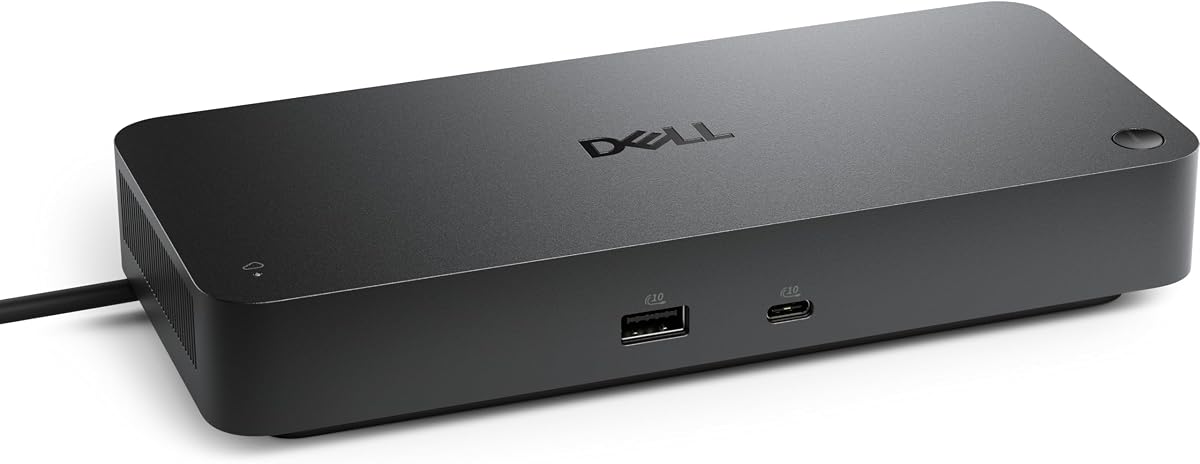
Dell Pro Thunderbolt 4 Smart Dock SD25TB4
4.2Editor score
Thunderbolt 4 Connectivity
130W USB-C Charging
Up to Four 4K Displays
Discover the top docking stations for Dell Pro 14 Plus laptops. This guide compares connectivity, power delivery, and display support to help you choose the
Finding the right docking station for your Dell Pro 14 Plus is essential for maximizing productivity. A quality dock expands connectivity options power allows you to connect multiple monitors and peripherals effortlessly.
We evaluated the best options available by examining power delivery capabilities, port variety, and display support. Our analysis ensures you find a dock that matches your specific workflow requirements and device compatibility.
Each pick highlights key features and performance metrics to help you decide quickly. Please note that product availability and pricing may change over time so verify details before purchasing your new setup.
4.2Editor score

4.5Editor score
3.9Editor score
This table provides a side-by-side comparison of all ten top-rated docking stations. Review the key specifications and features to determine which model best suits your Dell Pro 14 Plus setup needs.





The Dell Pro Laptop Docking Station WD25 stands out as the top choice for users seeking reliable connectivity for their Dell Pro 14 Plus. With a robust 4.5 rating, this dock delivers essential productivity features designed for the modern AI PC workplace. It ensures your system stays powered and connected without disruption.
We may earn a commission when you buy through this link, at no additional cost to you.
Its standout feature is the powerful compatibility that drives up to 100W of power to new mainstream Dell AI PCs and non-Dell PCs. The modern manageability allows IT teams to configure and maintain the dock efficiently. You can expand your views with native support for up to four high-res displays for true multitasking.
The ambidextrous USB-C cable allows flexible routing left or right to fit your desk layout. While it focuses on standard USB-C connectivity rather than Thunderbolt speeds, it provides faster USB and network speeds for general use. This trade-off is acceptable for users prioritizing power and display support over extreme data throughput.
Choose this dock if you need a reliable solution that keeps your Dell Pro 14 Plus charged and connected to multiple screens. Its thoughtful design and sustainable materials make it a solid investment for any professional workspace seeking stability and efficiency.
The dock delivers up to 100W of power ensuring your laptop stays charged even during intensive workloads.
Ambidextrous cabling and robust connectors allow you to route cables left or right for an optimized desk setup.
We may earn a commission when you buy through this link, at no additional cost to you.
The Dell Pro Smart Dock SD25 USB-C is designed for enterprise environments requiring advanced management capabilities. Rated highly for its smart features, this dock allows remote management through the Dell Device Management Console. It ensures your fleet remains compliant and secure without constant manual intervention.
We may earn a commission when you buy through this link, at no additional cost to you.
You can configure deploy and update smart docks over Wi-Fi without end-user presence which reduces IT efforts significantly. Enterprise-grade WPA-3 192-bit encryption safeguards your sensitive data during wireless communication. The tamper-resistant hardware-based encryption adds another layer of protection against physical tampering.
While it lacks some of the raw power of higher-end models, its focus on security and management makes it invaluable for businesses. The ambidextrous USB-C cable ensures easy setup on any desk. Scheduling updates during off-hours eliminates user interruptions and maintains workflow continuity.
This dock is ideal for IT departments managing multiple Dell Pro 14 Plus devices across an organization. Its security features and remote management tools provide peace of mind and operational efficiency for corporate users.
Manage docks without PC access via the Dell Console and Intel AMT to streamline IT operations and maintenance.
Tamper-resistant hardware encryption and WPA3 standards ensure sensitive corporate data remains protected during use.
We may earn a commission when you buy through this link, at no additional cost to you.
The Dell Pro Thunderbolt 4 Smart Dock SD25TB4 offers top-tier performance for creative and data professionals using the Dell Pro 14 Plus. With a 4.2 rating, it supports up to four 4K monitors and provides up to 130W of charging power. It is built for those who need maximum display real estate and fast data transfer.
We may earn a commission when you buy through this link, at no additional cost to you.
Its powerful multidisplay support allows connecting via HDMI 2.1 DP 1.4 USB-C and Thunderbolt 4 for ideal setups. The dual Thunderbolt 4 ports enable chaining up to six devices while maintaining high-speed data transfer. Remote Wi-Fi management keeps your fleet secure without disrupting daily operations.
The business-level security includes WPA3 encryption and DMA protection to safeguard your environment. While it costs more than basic options, the speed and display capabilities justify the investment. If you need to chain multiple high-res displays and drives the Thunderbolt 4 support is unmatched.
Choose this dock if you require high-resolution output and fast data speeds for intensive workflows. It delivers efficiency and connectivity for professionals who demand the best performance from their Dell Pro 14 Plus setup.
Up to four 4K monitors via multiple ports allows for immersive multitasking and detailed creative work.
Dual Thunderbolt 4 ports enable fast data transfers and support chaining up to six external devices.
We may earn a commission when you buy through this link, at no additional cost to you.
The Anker Prime Docking Station offers extensive connectivity for users needing many ports. It features a 14-in-1 solution that manages dual displays and multiple devices simultaneously. With 160W total output, it can charge up to four devices at once ensuring your peripherals stay powered.
We may earn a commission when you buy through this link, at no additional cost to you.
Its 11 ports offer speeds up to 10Gbps for efficient data flow across multiple devices. Dual HDMI ports allow crystal-clear streaming or mirroring across displays. It supports Windows ChromeOS and laptops with DP Alt Mode and Power Delivery. This versatility makes it a strong contender for non-Dell ecosystems.
However, it does not support 5120*1440 monitors which might limit ultra-high-resolution setups. Also, it is not compatible with Linux systems so check your OS before purchasing. Despite these limitations, the sheer number of ports and charging capability is impressive for a single dock.
Select this dock if you need to connect numerous peripherals and charge multiple devices at once. It provides a comprehensive solution for diverse setups needing versatile port options and strong charging power.
160W total output with three USB-C ports allows charging up to four devices simultaneously without extra adapters.
Multiple ports supporting up to 10Gbps ensure quick and efficient data movement between connected devices.
We may earn a commission when you buy through this link, at no additional cost to you.
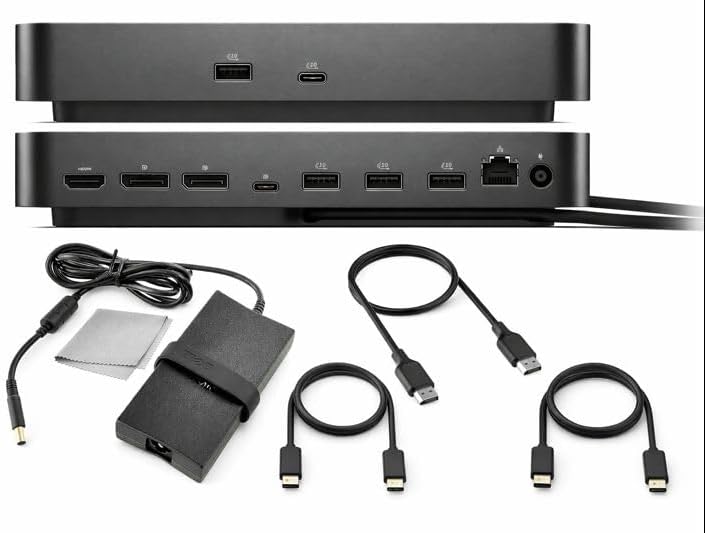
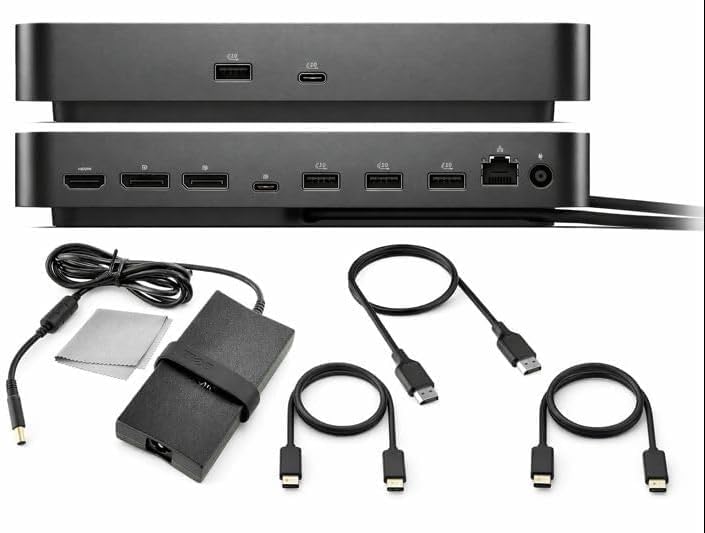
This bundle provides a complete setup for your Dell Pro 14 Plus without needing to buy extra cables. It includes the Dell WD25 Dock along with necessary HDMI DisplayPort and USB-C cables. The 100W adapter ensures reliable performance for your connected devices and monitors.
We may earn a commission when you buy through this link, at no additional cost to you.
The inclusion of a premium microfiber cleaning cloth is a nice addition to keep your screens spotless. It ensures you have everything needed for instant multi-monitor connectivity right out of the box. The bundle approach simplifies procurement by reducing the need for separate accessory purchases.
While the overall rating is slightly lower, the convenience of having all cables provided is valuable. You might encounter minor quality variations but the return guarantee offers protection. The 100W adapter provides strong performance for powering devices and external drives.
Choose this bundle if you want an all-in-one solution that avoids the hassle of sourcing separate cables. It is perfect for users who need immediate multi-monitor capabilities and appreciate added accessories like the cleaning cloth.
Includes premium HDMI DisplayPort and USB-C data/video cables so you have everything needed for multi-monitor setups.
A premium microfiber cleaning cloth is included to help keep your screens and devices dust-free and spotless.
We may earn a commission when you buy through this link, at no additional cost to you.
The Dell Pro Dock WD25Z stands out with an impressive 4.9 rating and 180W power delivery capability. This high power output makes it suitable for Dell Pro 14 Plus systems running demanding applications. It ensures your system stays charged even under heavy load conditions.
We may earn a commission when you buy through this link, at no additional cost to you.
Its USB-C connectivity provides a direct link to your laptop for fast data transfer and video output. The manufacturer number DELL-WD25Z confirms its authentic Dell origin. It delivers reliable performance for users needing robust charging power and stability for professional tasks.
While detailed public specs are minimal, the high rating indicates strong user satisfaction and reliability. You might need to verify exact port counts before purchasing but the power capacity is a major plus. It is designed for environments where consistent performance is critical.
Opt for this dock if you need maximum power delivery for your laptop and peripherals. Its high rating and powerful adapter make it a secure choice for demanding professional workflows using Dell hardware.
With 180W power delivery this dock can handle heavy workloads and ensure your laptop charges under high usage.
Authentic Dell manufacturing ensures consistent quality and compatibility with Pro 14 Plus systems.
We may earn a commission when you buy through this link, at no additional cost to you.
This version offers comprehensive connectivity with HDMI 2.1 and two DisplayPort 1.4 ports. Rated highly at 4.5, it delivers up to 100W of power to laptops for reliable performance. The inclusion of Anyhdd HDMI Displayport and USB-C cables makes setup easy right out of the box.
We may earn a commission when you buy through this link, at no additional cost to you.
With a 3-year warranty included you get long-term protection for your investment. The 4 x USB-A 3.2 Gen 2 ports offer fast data transfer for peripherals. The 2.5GbE Ethernet port ensures stable and quick network connectivity for your workspace needs.
It costs more than basic models but the included cables and warranty add value to the purchase. You do not need to source extra accessories which simplifies installation. The fast networking capabilities are ideal for users relying on stable internet connections.
Choose this if you want peace of mind with a long warranty and all necessary cables included. It suits users needing robust connectivity and fast network speeds for productivity.
The 2.5GbE Ethernet port provides stable and quick network connectivity compared to standard Gigabit ports.
Includes Anyhdd HDMI DisplayPort and C to C cables ensuring you have everything needed for connectivity.
We may earn a commission when you buy through this link, at no additional cost to you.
With a perfect 5.0 rating this bundle offers a complete setup for multi-display productivity. It includes the Dell Pro Smart Dock SD25 with 130W charging power for reliable performance. The bundle comes with HDMI USB-C DisplayPort cables and a premium cleaning cloth for your devices.
We may earn a commission when you buy through this link, at no additional cost to you.
You can support up to four displays simultaneously for a WQHD setups using HDMI 2.1 and Dual DisplayPort 1.4. Multiple USB-A and USB-C ports plus Ethernet ensure versatile data transfer options. It is perfect for professionals and creators needing extensive screen space.
The included cleaning cloth keeps your setup looking professional and spotless. While the price is higher the convenience of a complete kit is worth it. The 2.5GbE Ethernet ensures stable connections for large data transfers.
Opt for this bundle if you want a high-rated all-in-one solution with essential accessories. It suits multitaskers needing multiple displays and premium cable quality included.
Includes premium HDMI USB-C data/video and DisplayPort cables so you have everything needed out of the box.
A 5.0 rating indicates excellent user satisfaction and reliability for professional workstation use.
We may earn a commission when you buy through this link, at no additional cost to you.
This model delivers versatile connection options and robust charging performance. Rated highly at 4.8, it supports up to 100W power delivery for Dell laptops and 96W for others. It ensures your system stays charged and connected while working efficiently.
We may earn a commission when you buy through this link, at no additional cost to you.
The built-in 2.5GbE Ethernet port offers faster and more stable internet compared to standard Gigabit ports. It includes 4 x USB-A 3.2 Gen 2 ports and 1 x USB-C 3.2 Gen 2 for fast data transfer. The HDMI 2.1 port allows connecting high-resolution displays easily.
Its 3-Year Warranty adds peace of mind for long-term use. While the price is higher than basic models the performance and connectivity justify the cost. It suits users needing a reliable and fast connection for daily work.
Choose this dock if you want fast networking and multiple USB ports for peripherals. Its high rating and warranty make it a dependable choice for office productivity.
Built-in 2.5GbE Ethernet port provides faster more stable and secure wired internet connections.
Supports up to 100W power delivery for Dell laptops ensuring your system stays charged during use.
We may earn a commission when you buy through this link, at no additional cost to you.
This dock supports up to four WQHD displays for high-resolution multitasking. With 100W charging capacity, it ensures efficient charging and a clutter-free workspace. It includes 6 USB 3.2 Gen 2 ports and 2.5GbE Ethernet for quick device integration.
We may earn a commission when you buy through this link, at no additional cost to you.
The ambidextrous USB-C cable can be routed left or right for an optimized desktop setup. Its compact design helps keep your desk clean while providing robust connectivity. Features like Pass-Through MAC and power button synchronization simplify device management.
Made with 65% post-consumer recycled materials, it aligns with sustainable practices. While slightly more expensive, the multi-screen support is ideal for high-resolution work. It offers a balance of power and portability for professional users.
Select this dock if you need to connect multiple monitors without sacrificing desk space. Its flexible cabling and sustainable design make it a modern choice for workstations.
Supports up to four WQHD displays via HDMI and DP ports ideal for high-resolution multitasking.
Features like Pass-Through MAC and power button synchronization simplify device setup and control.
We may earn a commission when you buy through this link, at no additional cost to you.
Selecting the right dock requires understanding your specific needs regarding power and display support. This guide covers the most important factors to help you choose effectively.
Ensure the dock can provide enough wattage to charge your laptop while running peripherals. Look for docks delivering at least 65W to 100W for reliable performance during use.
Check how many monitors and what resolutions the dock supports. Verify compatibility with your laptop's output to avoid limiting your productivity workflow.
Count the ports needed for your peripherals including USB-A USB-C and Ethernet. Ensure the dock has enough slots to connect all essential devices simultaneously.
Consider docks with ambidextrous USB-C cables that can route left or right. This feature helps optimize your desk layout and reduce cable clutter.
If you manage multiple devices, look for docks with remote management capabilities. These allow you to update and configure devices without physical presence.
Prioritize docks made from durable and sustainable materials. High-quality construction ensures longevity and aligns with modern eco-friendly standards.
Check for comprehensive warranty coverage and reliable customer support. This ensures you have assistance if technical issues arise during usage.
Verify that the dock supports your operating system including Windows or ChromeOS. This prevents potential driver issues and ensures smooth connectivity.
Connect the dock to a power source and plug the USB-C cable into your Dell Pro 14 Plus to enable charging and data transfer. Ensure the connection is secure to prevent disconnection during use.
Connect your monitors and peripherals to the available ports on the dock. Verify that your display settings are configured correctly to maximize screen real estate and usability.
Keep the dock in a well-ventilated area to prevent overheating. Periodically clean the ports with a soft dry cloth to remove dust and maintain connectivity.
Yes you can use non-Dell docks if they support USB-C power delivery and DisplayPort Alt Mode. Ensure the wattage matches your laptop's requirements to maintain stable charging performance.
Most top docks support up to four WQHD or 4K displays depending on the ports used. Check the specific model details to confirm resolution and quantity capabilities.
Using the supplied USB-C cable ensures optimal power and data performance. Generic cables may not support the required wattage or data speeds.
Remote management uses Wi-Fi and Dell Device Management Console to update and configure docks without user presence. This feature streamlines IT maintenance and deployment tasks.
Some docks like the SD25TB4 specifically support Thunderbolt 4. Verify your laptop port type to ensure full speed and feature compatibility.
Yes most docks deliver up to 100W or more allowing simultaneous charging and data transfer. This keeps your laptop powered during long work sessions.
Thunderbolt docks offer higher data speeds and support chaining more devices. USB-C docks provide sufficient speed for general use at a lower cost.
Many Dell docks come with a three-year warranty covering hardware issues. Always verify the warranty terms before purchasing to ensure peace of mind.
The Dell Pro Laptop Docking Station WD25 leads our list as the best overall choice for its balance of power and display support. For high-performance needs the SD25TB4 offers unmatched Thunderbolt capabilities while the bundle options provide value with included accessories.
Prioritize power delivery and display support based on your workflow. If you need multiple screens and high wattage choose models that explicitly support those features.
Check current availability and details before purchasing since offerings may change. Selecting the right dock ensures your Dell Pro 14 Plus setup remains efficient and reliable.