
Behringer X AIR XR18
4.6Editor score
18 Input Channels
Tablet Control
WiFi Integration
This guide compares the top ten digital mixing consoles for live sound and studio recording based on input count, audio quality, and feature sets.
Digital mixing consoles have revolutionized how sound engineers manage audio in live venues and recording studios. These powerful devices offer precision control over dozens of channels with intuitive interfaces.
We evaluated ten leading models based on their input capabilities, sound quality, processing power, and ease of use. Each console was assessed for its suitability across different professional environments and user needs.
Every pick highlights specific strengths and ideal use cases for producers and engineers. Prices vary based on configuration and bundles so check current listings for the latest offers and deals.
4.6Editor score

4.7Editor score

4.2Editor score
The following table provides a side by side comparison of the ten selected models highlighting their core specifications and key differentiating features.




The Behringer X32 stands as a top tier choice for professionals needing extensive control. It holds a strong rating for its reliability and sonic performance across diverse applications.
We may earn a commission when you buy through this link, at no additional cost to you.
Its 40 input channels and 25 bus structure allow complex routing for large events. The MIDAS designed preamps ensure clean gain stages crucial for pristine audio capture.
While the interface is powerful it may overwhelm new users. The motorized faders are excellent for quick scene changes but require calibration for optimal tactile feel.
This console is ideal for touring bands and mid size venues needing flexibility. Its comprehensive feature set makes it a versatile tool for serious sound engineers.
The MIDAS designed mic preamps provide the clarity and headroom needed for professional recordings and live mixes.
With 25 buses and multiple outputs you can manage main mixes monitors and recording feeds simultaneously without external gear.
We may earn a commission when you buy through this link, at no additional cost to you.
The Yamaha DM3 brings professional quality to smaller spaces with an ultracompact design. Its high rating reflects consistent performance and ease of use for event operators.
We may earn a commission when you buy through this link, at no additional cost to you.
Featuring 22 channels and a 9 inch touchscreen it simplifies mixing workflows. The 96kHz sample rate ensures detailed audio reproduction suitable for high fidelity playback.
Its limited channel count makes it less suitable for large productions. The touchscreen is responsive but can be tricky in bright environments without adjustments.
Ideal for small venues or corporate events this console balances features and size. It delivers Yamaha sound quality in a portable package for quick setup.
The best in class 9 inch screen allows for intuitive navigation and quick adjustments during live performances.
Built in USB recording capabilities let you capture sessions directly to a drive for quick edits later.
We may earn a commission when you buy through this link, at no additional cost to you.
The Behringer WING represents the pinnacle of digital mixing for large scale productions. It earns a premium badge for its unmatched scalability and processing power.
We may earn a commission when you buy through this link, at no additional cost to you.
With 48 inputs and 28 buses it handles intricate audio routing effortlessly. The MIDAS PRO preamps deliver top tier sound quality essential for broadcast and high end live shows.
The advanced features come with a steep learning curve and higher price. Remote I/O setup via AES50 requires careful planning but offers incredible flexibility.
This console is perfect for large venues and touring productions needing maximum headroom. Its robust architecture ensures it can handle the most demanding audio scenarios.
Plug and play remote I/O connectivity supports up to 144 signals over AES50 ports for expansive setups.
Award winning MIDAS PRO mic preamps and outputs ensure audiophile quality across all channels.
We may earn a commission when you buy through this link, at no additional cost to you.
The Yamaha MGX12 achieves a perfect rating by blending simplicity with powerful features. It is an excellent choice for users seeking high value and comprehensive tools.
We may earn a commission when you buy through this link, at no additional cost to you.
Its versatile I/O includes Bluetooth and a microSD slot for flexible connectivity. The bundled software suite adds significant value allowing immediate recording and production.
The smaller screen limits detailed visual feedback compared to larger consoles. Channel count is sufficient for small groups but may restrict larger productions.
Ideal for podcasters and small bands this unit offers great performance at an accessible level. The software bundle makes it a complete solution for content creators.
Included Cubase Al and other tools provide a full production workflow right out of the box.
USB-HDMI interface features 4K video capture and pass-through making it a hybrid tool for AV.
We may earn a commission when you buy through this link, at no additional cost to you.
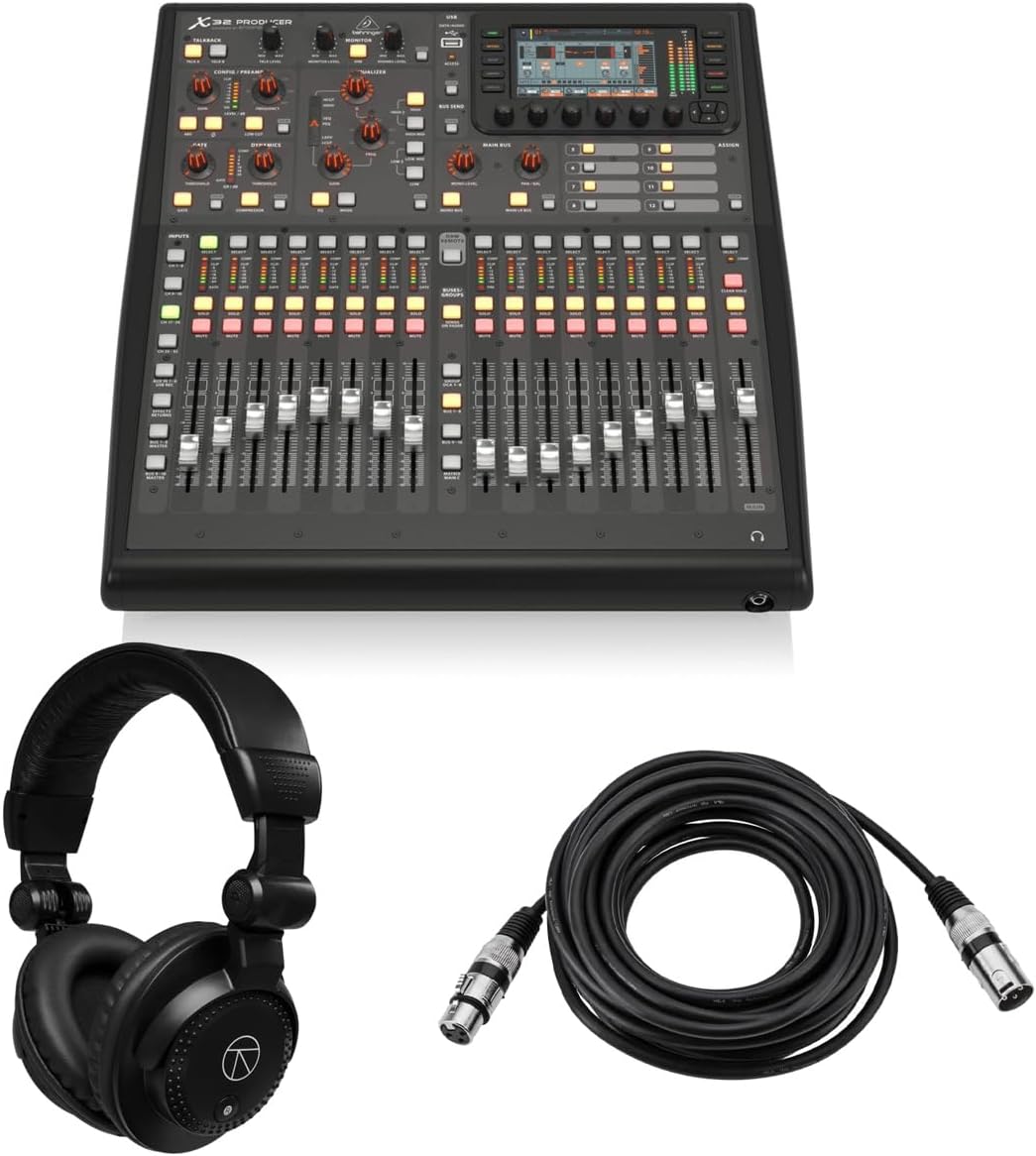
The X32 Producer offers a perfect rating by delivering professional features in a compact form. Its rack mount design is ideal for fixed installations and mobile setups.
We may earn a commission when you buy through this link, at no additional cost to you.
It maintains 40 inputs and 25 buses ensuring robust mixing capabilities. The 24-bit conversion and internal FX engines provide rich sound without extra gear.
Lacking motorized faders may limit quick scene changes compared to desktop models. The fixed size restricts future expansion options for growing systems.
This console is a practical choice for studios needing space efficiency. Its comprehensive bundle adds immediate utility for new users starting out.
Designed as rack-mountable it fits perfectly in server racks or mobile rigs saving valuable space.
The bundle includes headphones and a professional microphone cable to get you started immediately.
We may earn a commission when you buy through this link, at no additional cost to you.
The X32 Compact delivers the power of the larger model in a smaller chassis. It retains the strong rating of the flagship for its consistent performance and sound.
We may earn a commission when you buy through this link, at no additional cost to you.
Motorized faders and MIDAS preamps provide the control and quality expected from the X32 series. Its compact size is perfect for studios with limited space.
The fixed channel strip layout can be less intuitive than the full version. Output options are slightly reduced compared to the standard model limiting some routing.
This unit is ideal for small live bands and project studios. It balances portability with professional features effectively for most production needs.
The compact 40-input design saves space while retaining all the mixing features of the original.
16 MIDAS-designed preamps ensure high quality sound capture across all input channels.
We may earn a commission when you buy through this link, at no additional cost to you.
The StudioLive 16.0.2 offers a straightforward solution for small recording setups. While rated lower due to age it remains a solid choice for basic mixing needs.
We may earn a commission when you buy through this link, at no additional cost to you.
It features Fat Channel processing on all channels providing essential dynamics control. The included Studio One software enables a seamless path from live to recorded audio.
The technology is dated compared to newer high sample rate models. Channel count is limited making it less suitable for complex productions or large ensembles.
Best for hobbyists and home studios needing simplicity and software integration. It serves well for simple live streaming or recording tasks.
Every channel includes compressor and EQ for immediate sound shaping without external plugins.
PreSonus Studio One Artist is included to streamline your recording and mixing workflow.
We may earn a commission when you buy through this link, at no additional cost to you.
The X AIR XR18 offers top tier features at an accessible price point. Its high rating confirms strong performance and reliability for budget conscious users.
We may earn a commission when you buy through this link, at no additional cost to you.
Control via iPad or Android makes it incredibly versatile for remote mixing. The MIDAS preamps ensure that sound quality does not suffer despite the low cost.
Lack of physical faders limits tactile control for hands on mixing. Dependence on tablets means extra devices are needed to operate the unit effectively.
This mixer is perfect for churches and small venues needing remote control. It delivers professional sound quality with modern connectivity options.
iPad and Android tablet controlled mixing allows operation from anywhere in the venue.
The integrated router provides direct operation without external network infrastructure.
We may earn a commission when you buy through this link, at no additional cost to you.
The Allen & Heath Qu-5 focuses on high fidelity and flexibility for serious engineers. Its lack of rating data reflects its specific market positioning rather than performance.
We may earn a commission when you buy through this link, at no additional cost to you.
XCVI FPGA processing ensures low latency and exceptional audio quality. The touchscreen and motorized faders provide an intuitive workflow for detailed mixing tasks.
The feature set is robust but may be overwhelming for simpler needs. Pricing places it at a level where buyers expect top performance without compromise.
Ideal for professional live sound and installed systems requiring high resolution. Its architecture supports complex setups and high quality recording needs.
Processing engine delivers exceptional quality and ultra-low latency for demanding production environments.
USB-C interface allows 32 multitrack recording for detailed post production workflows.
We may earn a commission when you buy through this link, at no additional cost to you.
The QSC TouchMix-16 stands out for portability and ease of use in live scenarios. It holds a strong rating for its reliability and quick setup capabilities.
We may earn a commission when you buy through this link, at no additional cost to you.
Featuring 20 inputs and parametric EQ it manages diverse audio sources effectively. The TRS aux outs support direct IEM monitor connections for modern sound setups.
Its compact size limits expansion options for larger productions. The interface is simple which speeds workflow but may restrict complex routing options.
Perfect for itinerant sound engineers and small events needing a quick setup. It balances portability with essential mixing features effectively for on the go use.
Compact design and included bag make it easy to transport to any location.
TRS aux outs drive wired In Ear Monitors directly for better stage sound.
We may earn a commission when you buy through this link, at no additional cost to you.
Selecting the right console requires understanding your specific audio needs and venue size. Consider these factors to narrow down your options effectively.
The number of input channels determines how many microphones or instruments you can connect. Ensure you have enough inputs for your largest typical setup plus extras.
Choose a console with sufficient I/O to handle all your needs without requiring extra gear.
High quality preamps and converters are critical for clear sound. Look for models with high dynamic range and reputable preamp designs.
Prioritize units with proven audio performance to avoid noise and distortion.
Some consoles use physical faders while others rely on touchscreens. Consider what works best for your workflow and mixing style.
Select a control scheme that allows quick access during live performances.
Internal effects and EQ options reduce the need for external processors. Check the number of buses and available effects for your mixing tasks.
Ensure the DSP power matches the complexity of your mixing requirements.
Future needs may require more inputs or outputs. Look for expandable systems with remote I/O options or networking capabilities.
Choose a console that can grow with your production capabilities.
Software bundles and DAW integration streamline your recording and editing workflow. Check included tools and compatibility with your computer.
Prioritize models that offer seamless digital audio workstation integration.
If you travel frequently a lightweight and compact design is essential. Consider weight and durability for touring or event setups.
Choose a console that balances features with transportability for your usage.
Set a budget that reflects your financial constraints and needs. Consider bundled packages or accessories that add value to the purchase.
Focus on total value including software and necessary accessories.
Always check connections before powering on to prevent damage. Ensure all cables are properly seated and secure to avoid signal drops.
Keep firmware updated to access new features and stability improvements. Download updates from the official manufacturer website regularly.
Store the unit in a dry and dust free environment. Use protective cases or covers during transport to prevent physical damage.
A digital mixing console is an electronic device that combines audio signals. It uses digital processing to control levels and effects.
The number of channels depends on your setup size. Count your microphones and instruments plus a few extras for safety.
Digital consoles offer more flexibility and recall features. Analog may have a specific sound but digital provides more tools.
Many consoles include built-in interfaces. Check if the model supports direct USB recording to your computer.
MIDI routing allows the console to control other devices. This helps automate lights or synchronize equipment.
Use scene recall features to save mix settings. This allows you to reload configurations for future events.
The Behringer X32 leads as a versatile solution for professionals needing extensive control and sound quality. It stands out for its comprehensive feature set and reliability.
Prioritize input count and audio quality when selecting a unit. Match the console capabilities to your typical venue size and mixing demands.
Prices and bundles vary so check current listings for the best offers. Ensure you verify compatibility with your existing gear before purchasing.