
Amazon Basics Stereo 2.0 Speakers
4.4Editor score
USB powered design
In-line volume control
Compact desktop footprint
This guide compares the top ten cheap PC speakers for budget-conscious buyers seeking quality audio, clear sound, and reliable performance for desktop and
Finding affordable audio solutions for your computer setup can be challenging when you need clear sound without breaking the bank. Cheap PC speakers have evolved significantly over the years, offering surprising quality and features even at entry-level price points. Whether you are watching videos, gaming, or listening to music, having reliable external speakers makes a huge difference in your daily computing experience.
We have analyzed ten top-rated models available online to help you navigate the crowded market of budget audio hardware. Our evaluation focuses on sound quality, build durability, ease of connection, and overall value for money. Each product was selected based on user feedback, technical specifications, and real-world performance metrics to ensure you get the best experience possible.
Each pick in this list highlights specific strengths and potential limitations to help you make an informed decision. You will find detailed breakdowns of features, pros, cons, and practical usage tips for every model. Please note that pricing and availability can change frequently, so always check the current listings before making your final purchase decision.
4.4Editor score

4.6Editor score

4.2Editor score
The following table provides a side-by-side comparison of all ten selected models to help you quickly identify key differences in power, connectivity, and design features.




The Amazon Basics Stereo 2.0 Speakers stand out as a reliable entry-level option for anyone needing basic audio enhancement without spending much money. With a solid rating from users, these speakers deliver clear sound suitable for everyday tasks like browsing, video calls, and casual media consumption. They are designed to be unobtrusive yet effective on standard desktop workspaces.
We may earn a commission when you buy through this link, at no additional cost to you.
These speakers utilize USB power to simplify connection, requiring no external power adapter or complex driver installation. The in-line volume control allows for quick adjustments while listening, and the blue LED indicators provide a subtle visual cue when active. The bottom radiator helps improve low-frequency response, making music and movies sound more immersive than typical built-in laptop audio.
While the build quality is functional rather than premium, the scratch-free padded base protects your desk surface during use. The 3.5mm aux input ensures compatibility with devices that may not have USB audio support or need an alternative connection method. Users appreciate the straightforward design that avoids unnecessary features that could complicate the experience or add cost.
Anyone looking for a no-fuss upgrade from internal laptop speakers will find these meet their needs effectively. They are ideal for students, home office workers, or secondary computer setups where high-fidelity audio is not the primary concern. The combination of affordability, ease of use, and decent sound performance makes them a top recommendation for budget-conscious buyers.
USB power eliminates the need for extra outlets, keeping your desk clean and reducing cable clutter.
Clear mids and highs ensure speech is intelligible during meetings and videos without distortion.
We may earn a commission when you buy through this link, at no additional cost to you.
These compact desktop speakers deliver loud, crisp audio that defies their small physical dimensions. Designed for modern homes and offices, they feature a unique column shape that saves desk space while providing sufficient volume for movies and music. The matte metal panel adds a touch of style that blends well with contemporary computer setups.
We may earn a commission when you buy through this link, at no additional cost to you.
Setup is straightforward with plug-and-play functionality requiring no drivers or additional software configuration. The included USB cable powers the unit while the 3.5mm audio cable connects to your sound source. An in-line volume control makes it easy to adjust levels without reaching behind the computer or navigating system settings repeatedly.
The 31.5-inch cable length between the two speakers allows flexible placement options even on larger desks. Anti-slip foot pads keep the speakers stable during use, preventing unwanted movement or sliding across smooth surfaces. A thirty-day money-back guarantee and eighteen-month warranty offer peace of mind regarding product reliability and customer support.
Ideal for users with limited desk real estate, these speakers provide essential audio enhancement without overwhelming the workspace. They work well for general multimedia consumption and are particularly suited for shared workspaces where clear sound projection is valued. The combination of practical features and affordable pricing makes them a strong contender in the budget category.
Column shaped footprint minimizes desk usage while maintaining adequate separation for stereo imaging.
In-line control knob allows quick changes without interrupting your workflow or software navigation.
We may earn a commission when you buy through this link, at no additional cost to you.
The FUNLOGY Speaker offers exceptional performance for its price class, delivering 14W of stereo output in a palm-sized enclosure. Designed by a trusted Japanese brand, it features dual 48mm full-range drivers and passive radiators that produce punchy bass and clear highs. The 30-degree upward tilt optimizes sound delivery directly to ear level for a more immersive experience.
We may earn a commission when you buy through this link, at no additional cost to you.
Premium audio components including a gold-plated AUX input minimize signal noise and static during use. This ensures consistent sound quality even during computer startup or shutdown sequences when electrical interference might typically be audible. The matte finish provides a sleek look that complements modern monitors and laptops without drawing excessive attention.
Setup requires simply connecting the included USB and 3.5mm cables with no driver installation or Bluetooth pairing needed. This broad compatibility extends to desktop PCs, laptops, smartphones, and gaming consoles making it versatile for various setups. A one-year warranty further demonstrates the manufacturer confidence in product reliability and long-term performance.
Users seeking higher fidelity audio without breaking the budget will find this model an excellent upgrade path. The improved soundstage and reduced noise floor make it suitable for critical listening tasks and immersive gaming sessions. With its blend of technical sophistication and practical design, it stands out as a premium choice among affordable options.
Tilted drivers direct audio precisely to your ears improving clarity and reducing desk reflections.
Gold-plated connectors and premium components reduce hum and static for cleaner audio playback.
We may earn a commission when you buy through this link, at no additional cost to you.
These innovative speakers clamp directly onto your monitor freeing up valuable desk surface area while delivering loud sound and deep bass. The adaptive channel switching with G-sensor ensures left and right audio channels remain correctly oriented regardless of clamp position. Touch buttons on the front allow intuitive mute and volume adjustments without physical knobs.
We may earn a commission when you buy through this link, at no additional cost to you.
Included USB C to USB adapter extends compatibility to devices with only USB-C ports such as latest MacBooks and tablets. This future-proof connectivity ensures the speakers work with modern hardware trends without needing extra hubs or docks. The dual ultra-magnetic drivers and passive radiators create a rich stereo experience despite the slim form factor.
Setup is straightforward with the clamp fitting smoothly on monitor tops sides or bottoms for versatile placement options. Audio drivers must be up to date for optimal performance so checking computer audio settings is recommended before use. The design appeals particularly to minimalists who want clean cable management and a streamlined workstation look.
Ideal for users with limited desk space or those who prefer a centered audio source near their screen. The combination of innovative mounting and robust sound output makes these a standout option for modern office or home environments. Consider your monitor thickness and compatibility before purchasing to ensure a secure and stable fit.
G-sensor technology automatically corrects channel placement based on physical mount orientation.
USB C adapter support ensures compatibility with newer laptops and devices without legacy ports.
We may earn a commission when you buy through this link, at no additional cost to you.
These compact USB-powered speakers prioritize portability and simplicity making them ideal for users on the go or with very small workspaces. The front-mounted single control allows easy power and volume adjustment without reaching behind devices. A headphone jack enables direct connection for private listening without disrupting the main computer audio output.
We may earn a commission when you buy through this link, at no additional cost to you.
Plug-and-play functionality eliminates installation hassles while the 1.1 watts RMS power per speaker provides adequate volume for close listening. The frequency range of 103 Hz to 20 KHz ensures coverage of most audible tones for music and voice. Measuring just 2.76 by 3.55 by 5.3 inches they fit easily into bags or small shelves.
Users appreciate the straightforward design that focuses on essential functions without unnecessary complexity or clutter. The USB connection supplies power and audio signals simplifying cable management significantly. For students or travelers who need reliable audio without bulk these speakers offer a practical solution.
Best suited for secondary setups or mobile use where high fidelity is less critical than convenience. The included headphone jack adds versatility for shared computers where multiple users may need private listening options. Overall they represent a no-fuss choice for basic audio needs with minimal investment and setup time.
Small dimensions and lightweight construction make transport between locations effortless and safe.
Headphone pass-through allows personal listening without disconnecting the main speakers.
We may earn a commission when you buy through this link, at no additional cost to you.
These upgraded speakers combine dual 3W high-excursion drivers with a passive radiator to deliver louder sound and improved bass. The sound bar shape fits neatly under monitors while maintaining a clean and organized desk appearance. A single USB cable handles both power and audio reducing clutter and simplifying the setup process significantly.
We may earn a commission when you buy through this link, at no additional cost to you.
Compatibility spans Windows macOS ChromeOS and Linux ensuring they work with most modern computing environments. Users select the USB device in system settings to enable audio output without installing extra drivers. This universality makes them a reliable choice for mixed-device households or diverse office setups requiring broad support.
The enhanced dynamic range and lower distortion levels provide clearer audio during high-volume playback scenarios. While lacking physical volume knobs the system controls offer sufficient adjustment flexibility for most users. The anti-slip feet ensure the unit stays stable during use preventing sliding on smooth desk surfaces.
Ideal for users seeking a balance between performance and simplicity without compromising on sound quality. The combination of robust drivers and broad compatibility offers strong value for general multimedia use. They are particularly well suited for desktop workstations where a single cable solution reduces visual clutter.
Combining power and audio into one cable streamlines setup and reduces cable management needs.
Upgraded drivers and passive radiator deliver greater volume and deeper bass than standard models.
We may earn a commission when you buy through this link, at no additional cost to you.
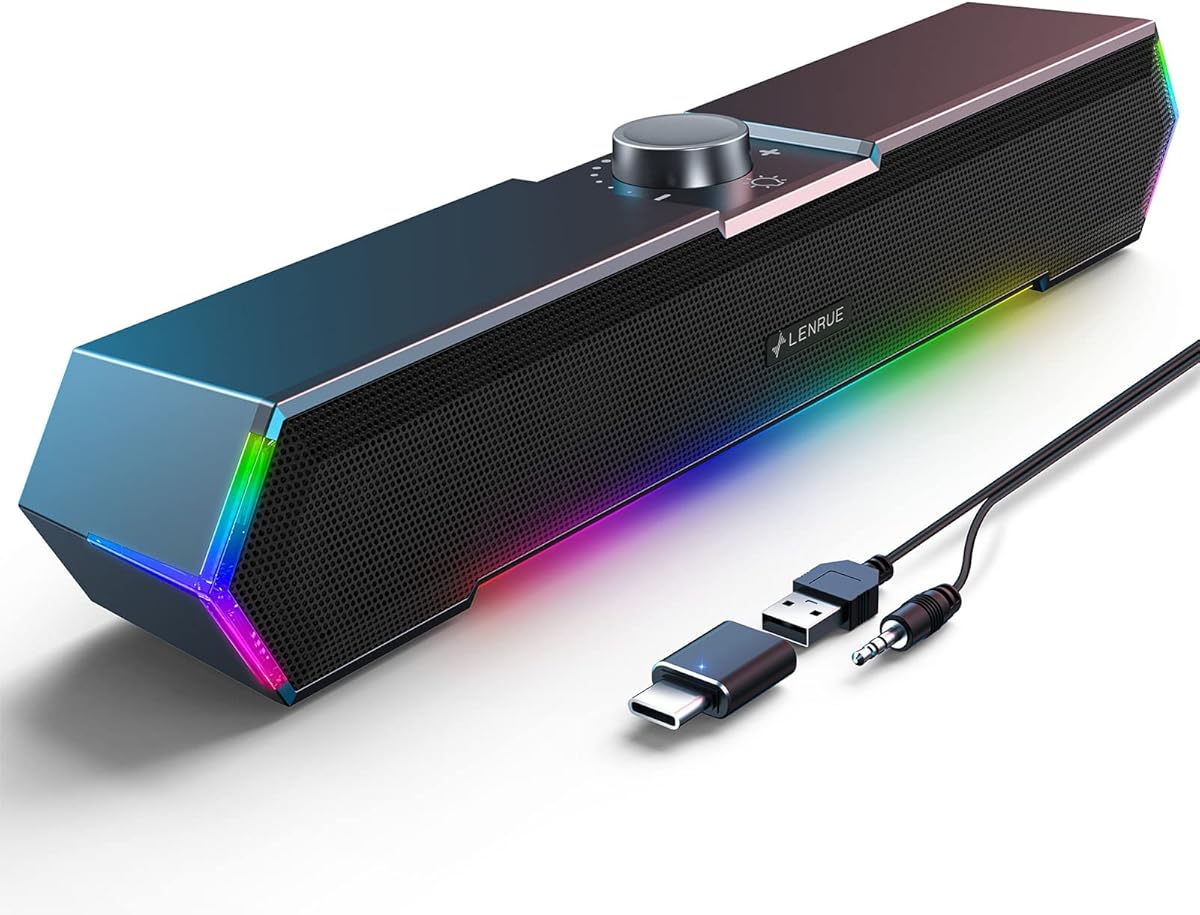
The LENRUE G11 features unique dynamic angular game lights that add visual flair to desktop setups with simple touch control. Four large amplifier IC horns deliver distortion-free noiseless sound creating an immersive cinema effect for movies and games. The design fits neatly under monitors avoiding extra desktop clutter while maintaining a compact footprint.
We may earn a commission when you buy through this link, at no additional cost to you.
Setup requires plugging in both USB and 3.5mm audio cables with no drivers needed for immediate use. A top volume knob allows easy adjustment without reaching behind the unit. The USB C adapter included ensures compatibility with modern devices that lack traditional USB ports expanding potential use cases.
Cables are glued together to reduce desk clutter and maintain a cleaner workspace appearance. This thoughtful detail helps prevent tangling and accidental disconnections during regular use. The surge clear sound technology ensures audio remains crisp even at higher volumes without unwanted artifacts.
Ideal for gamers or enthusiasts who appreciate visual lighting effects alongside solid audio performance. The lack of Bluetooth or headphone ports means these are wired-only dedicated desktop speakers. Users seeking ambiance and clear sound without complex setups will find these features particularly appealing for daily entertainment.
One-touch lighting adds customizable visual atmosphere without additional software or hardware.
Glued cables maintain organized desk appearance and reduce risk of accidental cable movement.
We may earn a commission when you buy through this link, at no additional cost to you.
These speakers enhance your workspace with vibrant 7-color LED backlighting that cycles through mesmerizing patterns automatically. Equipped with dual 3W high-fidelity drivers they deliver balanced sound with deep bass and zero distortion suitable for gaming and movies. The slim space-saving design fits seamlessly on any desk without overwhelming small setups.
We may earn a commission when you buy through this link, at no additional cost to you.
Connectivity is simple with USB power and 3.5mm aux input requiring no software installation or configuration. Inline rotary volume control allows precise adjustments without interrupting your activity. The plug and play compatibility extends to PCs laptops tablets and monitors for versatile use across devices.
Tips for low volume issues suggest setting system volume to maximum before adjusting speaker controls to avoid distortion. This ensures optimal performance and audio clarity without stressing the amplifier components. The RGB lighting adds aesthetic appeal while maintaining functional audio capabilities for daily tasks.
Perfect for users wanting visual flair alongside practical audio in compact form. The combination of colorful lighting and solid sound makes them appealing for gaming setups or personal desks. Consider your lighting preferences and audio needs when selecting to ensure they match your setup style and sound expectations.
RGB cycling offers dynamic visual customization without requiring software control or external hardware.
Slim design maintains adequate sound projection suitable for personal desk listening.
We may earn a commission when you buy through this link, at no additional cost to you.
The Uakinat Desktop Speaker uses upgraded 2x3W technology to deliver loud clear and distortion-free Hi-Fi sound in a small package. Designed to fit under monitors or on small desks it avoids taking up extra space while providing enhanced audio. The cables are glued together preventing tangles and keeping the area tidy and organized.
We may earn a commission when you buy through this link, at no additional cost to you.
Plug-and-play setup via USB and 3.5mm cables requires no driver installation making it ready to use instantly. Inline volume control makes adjustment convenient without accessing computer settings. Anti-slip foot pads keep the speaker stable during use preventing unwanted sliding across desks.
The 31.5-inch cable length provides flexibility for placing speakers beside PCs or under monitors easily. A 60-day money-back guarantee and 18-month warranty show commitment to product quality and customer satisfaction. Lifetime free user support is also available for troubleshooting assistance or questions.
Best for users needing a simple reliable upgrade to laptop audio without complexity. The combination of clear sound practical features and solid warranty support makes them a safe budget choice. Ideal for shared home offices or study areas where consistent performance and easy setup are valued.
Upgraded 2x3W tech ensures loud output without compromising audio clarity or fidelity.
Extended warranty and lifetime support provide peace of mind for long-term usage.
We may earn a commission when you buy through this link, at no additional cost to you.
The Creative Pebble 2.0 features far-field drivers and rear passive radiators custom-tuned for enhanced audio and deeper bass. The 45-degree elevated drivers project sound directly toward your ears creating a more immersive personal listening experience. A single USB cable powers and connects the speakers eliminating the need for a separate power adapter.
We may earn a commission when you buy through this link, at no additional cost to you.
Modern stylish aesthetics make these speakers look great in any home office or workspace without clashing with decor. Front-facing volume controls provide convenient access for instant adjustments during playback. The frequency response of 100 Hz to 17 kHz covers a wide range of audio tones for balanced performance.
Built by a well-known audio brand these speakers are trusted for consistent quality and durability. The compact footprint keeps desk space free while delivering sound that outperforms many competitors in the same class. Users appreciate the plug-and-play functionality that gets them listening quickly without technical hurdles.
Recommended for anyone seeking a blend of aesthetic appeal and quality audio in a compact form. The thoughtful driver elevation and passive radiators offer clear advantages for listening comfort and clarity. With solid build quality and brand support they stand as a reliable long-term solution for PC audio needs.
Angled drivers improve sound projection and reduce desk reflections for clearer listening.
Single USB cable simplifies desk management while delivering adequate power and audio signals.
We may earn a commission when you buy through this link, at no additional cost to you.
Selecting the right PC speakers involves considering several technical and practical factors to ensure satisfaction.
Power output measured in watts determines how loud your speakers can play without distortion. Higher wattage means better volume and clearer sound at high levels especially for music and movies. For desk use 3W to 14W total is typically sufficient for clear audio without overwhelming the room. Check total wattage including passive radiators to understand actual performance potential.
Aim for higher watts if you plan to use speakers in larger spaces or need louder volume.
Most budget speakers use USB power and 3.5mm audio inputs for simple plug-and-play setup. USB C compatibility is increasingly important for modern laptops and tablets with fewer ports. Ensure your computer has the necessary ports or adapters to avoid extra purchases after buying. Wired connections generally offer more reliable audio quality than Bluetooth in this price range.
Verify your device ports match the speaker connectors to ensure hassle-free installation and use.
Compact speakers save desk space while still delivering clear sound for everyday tasks. Consider dimensions and shape to fit your monitor or desk layout without obstruction. Some models feature mounts that clamp directly onto monitors for a clean cable-free appearance. Ensure the weight and base stability prevent accidental tipping during regular use.
Choose dimensions that fit your desk comfortably while allowing adequate separation for stereo imaging.
Look for features like passive radiators full-range drivers or angled tweeters for better audio clarity. Frequency response indicates the range of sound reproduced which affects bass and treble quality. Bass depth is often limited in compact speakers but passive radiators help improve low-end response. Read user reviews focusing on sound performance and distortion levels at high volumes.
Prioritize models with passive radiators if you want richer bass without subwoofers.
Physical volume knobs or inline controls allow quick adjustments without opening system settings. Touch controls offer modern aesthetics but may be less precise than dials. Mute buttons and standby switches add convenience for power management and privacy. Ensure controls are easily accessible from your seating position for daily use.
Physical controls are often more reliable and convenient than software-only volume management.
Metal or matte finishes resist scratches and look more premium than glossy plastic. Check base padding to protect your desk surface from scratches during movement or vibration. Stable anti-slip feet prevent speakers from sliding when adjusting volume or placement. Durable construction ensures the speakers withstand daily use without failing or degrading.
Invest in models with stable bases and scratch-resistant finishes for long-lasting desk protection.
Warranty periods range from 30 days to several years depending on brand reliability. Longer warranties indicate manufacturer confidence in product durability and performance quality. Customer support responsiveness matters if you encounter setup issues or defects after purchase. Check if technical support includes troubleshooting guides or direct contact options for help.
Select products with at least an 18-month warranty to ensure reliable long-term support.
Ensure speakers work with your operating system including Windows macOS ChromeOS and Linux. Most USB-powered speakers are universally compatible but some may require driver updates for full functionality. Check if additional adapters are needed for devices with only USB-C ports or unique audio outputs. Avoid models incompatible with TVs if you plan multi-device usage beyond computers.
Confirm compatibility with your current devices to avoid unexpected connection issues after purchase.
Start by connecting the USB power cable to your computer and the 3.5mm audio cable to your sound output port. Ensure both cables are firmly plugged in to avoid loose connections that cause sound dropouts or static. Adjust volume using the speaker controls before setting system volume to avoid sudden loud blasts.
Keep speakers clean by dusting the surfaces regularly with a soft dry cloth. Avoid using liquid cleaners that can damage internal components or leave residue on finish surfaces. Ensure ventilation openings remain unblocked to prevent overheating during extended use sessions.
Unplug the speakers when not in use to save energy and protect against power surges. Store cables neatly to prevent tangling and wear over time. If moving speakers relocate them carefully to avoid damaging sensitive internal audio components or wiring.
Most models in this roundup are USB-powered and do not require external power adapters. USB power simplifies setup and reduces cable clutter significantly. Check product specifications to confirm power source before purchasing for your specific setup.
Speakers with 3.5mm aux inputs can connect to any device with an audio jack. USB-C adapters extend compatibility for modern laptops without legacy ports. Verify your device ports match the speaker connectors before buying to ensure proper connection.
Many budget speakers provide clear audio suitable for casual gaming and voice chat. Look for models with passive radiators or higher wattage for deeper bass during games. Dedicated gaming headsets might offer better positional audio for competitive play.
Set your computer system volume and media player to 100% before adjusting speaker controls. Check that the speaker is selected as the default playback device in your OS. Ensure cables are fully seated and ports are clean for optimal signal transmission.
Most cheap PC speakers in this list are wired-only for reliable audio quality. Bluetooth versions are typically more expensive and may have latency issues. Wired models are preferred for stable and delay-free sound during daily tasks.
Check product compatibility notes since some speakers exclude TV compatibility due to power requirements. USB-powered speakers may not work with TVs lacking USB audio output. Using 3.5mm audio jacks or optical-to-aux converters might be required for TV connections.
Our top picks offer strong value for different needs with Creative Pebble leading in design and Amazon Basics in budget practicality. Each model has distinct strengths suited to various workspace sizes and audio preferences without compromising on core functionality. Consider your specific usage scenarios when choosing the best fit from this curated list of ten options.
Prioritize connectivity compatibility and sound quality over aesthetic features to ensure long-term satisfaction with your purchase. Investing a little more for better drivers or build materials can improve your daily audio experience significantly. Match your choice to your primary use case whether that is work music or casual entertainment at the desk.
Always verify current prices and availability before purchasing since discounts and stock levels change regularly online. Checking user reviews can also reveal real-world performance details beyond manufacturer specifications and claims. With the right choice your cheap PC speakers will enhance your workspace experience effectively and affordably.