10 Best DC Power Supply For Laptop Repairing in 2026
Compare the top 10 DC power supplies for laptop repairing including features ratings specs and safety protections to find the best bench supply for your repair
As an Amazon Associate we earn from qualifying purchases. We may earn a commission when you buy through links on this page, at no additional cost to you. Read our affiliate disclosure.As an Amazon Associate we earn from qualifying purchases.Purchases through our links may earn us a commission, at no extra cost to you. Read our affiliate disclosure.
Finding a reliable DC power supply for laptop repairing is essential for technicians who need stable and adjustable voltage to test components without damaging sensitive circuits during diagnosis or repair.
This guide compares ten highly rated models ranging from budget friendly bench units to advanced programmable supplies focusing on precision output safety features and usability for professional and hobbyist repair scenarios.
Each pick highlights key specifications real world performance and user feedback so you can choose the right tool for your needs while noting that availability and pricing may change over time.
Top 3 Picks for Best DC Power Supply for Laptop Repairing
Best Budget
DC Power Supply Variable 0 30V 0 10A 3 Digits LED Display Current and Voltage Adjustable 150W Fixed with Encoder DC Bench Power Supply 15V 10A 30V 5A Electroplating DIY etc PSU
DC Power Supply Variable 0 30V 0 10A Adjustable Switching Regulated Bench Power Supply with Encoder Coarse Fine Knob 3 6A USB Type C Quick Charge OCP Overcurrent Protection
X-Tronic PX-70 Linear Variable Bench DC Power Supply 30V 5A Range Output On Off Memory Recall Lock Unlock Func 5 Protection Modes USB Output Precise Rotary Encoder Dial 3 Sets of Leads
Top 10 Best DC Power Supply for Laptop Repairing in 2026 Compared
This side by side comparison evaluates all ten products based on output range precision protection features display quality and overall value to help you quickly identify the most suitable power supply for your laptop repair tasks.
This upgraded DC power supply ranks highest for laptop repairing due to its precise coding knobs and integrated fast charge ports. It delivers stable voltage from zero to thirty volts with up to ten amps output for most laptop tests.
Pros
Coarse and fine tuning knobs
3.6A USB Type C port
High definition four digit display
Automatic voltage detection technology
Short circuit alarm alert
Cons
Manual beep off needed
Bulky for travel use
We may earn a commission when you buy through this link, at no additional cost to you.
The coarse and fine coding knobs greatly improve efficiency by letting users set values before and after the decimal point. Its USB and Type C port allows quick charging of devices while they remain connected for testing.
Short circuit alarm and OCP protection ensure safety during repairs. The display is bright and clear, though disabling the key beep requires holding the voltage knob for seconds. Overall this is a robust tool for shops.
Ideal for technicians needing reliable adjustable power with safety alerts. Its automatic voltage detection simplifies setup. We recommend this unit for anyone who needs a bench supply that balances performance with user convenience features.
Precision Control for Diagnostics
The encoder knobs provide exact voltage settings essential for diagnosing delicate laptop circuits without risking damage from overshoot.
Integrated Device Charging
Type C and USB ports enable simultaneous device charging during testing saving outlets and streamlining the repair workflow.
This compact power supply offers excellent value for hobbyists and light repair work. Its ultra small size makes it portable while still providing up to 150 watts output in two flexible configurations.
Pros
Ultra small size under 1kg
Encoder button precise adjustment
Free switching between modes
Automatic fan cool start
Wide AC voltage input
Cons
Limited resolution 0.1V
Basic display features
We may earn a commission when you buy through this link, at no additional cost to you.
Encoder buttons replace traditional potentiometers for accurate setting. Users can select digits and rotate to set values between zero and nine which reduces adjustment time significantly.
The automatic fan starts when needed for cooling. Input voltage acceptance is global at 100 to 240 volts. However resolution is only 0.1 volts which may limit precise laptop testing needs.
Best for budget conscious buyers needing a lightweight bench unit. It covers basic repair tasks well. We suggest this for beginners or mobile technicians where size and cost matter most.
Portability for On Site Repairs
Weighing less than one kilogram this unit fits easily in tool bags enabling technicians to bring power supplies to client sites.
Flexible Output Modes
Switching freely between 15V 10A and 30V 5A configurations adapts to different laptop voltage and current requirements efficiently.
X-Tronic PX-70 Linear Variable Bench DC Power Supply
150 watts output power
3 memory recall presets
Precise rotary encoder dial
Complete kit with leads
The X-Tronic PX-70 stands out for professionals wanting a full kit with leads and safety features. It delivers stable linear power with precise encoder dial settings for accurate voltage and current control.
Pros
Complete kit with leads and mat
Three memory recall presets
Precise rotary encoder dial
Lifetime support and warranty
Five protection modes included
Cons
Higher price point
No universal voltage input
We may earn a commission when you buy through this link, at no additional cost to you.
Three memory recall presets allow fast set up for common laptop repair configurations. Lock unlock functions protect settings during long term tests. The included magnetic work mat adds value to the package.
Lifetime warranty and US based support provide peace of mind. Output on off allows adjustments without current running through leads which is safer. However this model runs on 110 120V only.
Best for repair labs needing reliability and support. Its robust build quality exceeds expectations. We recommend it for shops prioritizing long term service over initial cost savings.
Memory Presets for Efficiency
Storing common voltage and current settings in memory eliminates repeated manual entry for frequent laptop models tested.
Safety Focused Design
Output on off switch and lock unlock features prevent accidental changes that could damage sensitive components during testing.
This supply is ideal for automated testing and labs needing computer control. The USB C port plugs into laptops for parameter adjustment and data logging without legacy adapters or cables.
Pros
USB C PC control enabled
Dual display shows real time
18W Type C charge
One-key OCP protection
Lock function for tests
Cons
Software setup required
Limited manual features
We may earn a commission when you buy through this link, at no additional cost to you.
Dual display shows set value and real output side by side so you always know exactly what your circuit gets during repair. One key OCP lets you set overcurrent thresholds instantly.
Lock function fixes parameters during long aging tests to ensure stability. The 18W Type C fast charge powers devices while working. However PC software may be needed for full functionality.
Best for R&D or engineering shops. Its modern connectivity stands out. We suggest this for users comfortable with PC integration who want repeatable test sequences.
Real Time Output Visibility
Side by side display eliminates second guessing by showing both set points and actual outputs in real time.
Automated Test Integration
USB C control enables automated sequences for batch testing laptop boards in production environments.
DC Power Supply Variable with Encoder Adjustment Knob
30V 10A output range
Output enable disable button
4 digit LED display
Short circuit alarm
This model emphasizes safety with its output enable disable button which prevents forgetting to turn off output during repairs. It includes high precision encoder knobs for accurate settings.
Pros
Output enable disable button
Short circuit alarm alert
High precision encoder knob
4 digit LED display
18W USB fast charge
Cons
Basic user interface
No voltage memory
We may earn a commission when you buy through this link, at no additional cost to you.
The 4 digit LED display is accurate to 0.01 volts and 0.001 amps. Short circuit protection stops output and alerts with buzzer to protect both supply and load from damage.
18W fast charge port allows device charging on the bench. The encoder knob lets you switch digits and turn to customize values precisely. However it lacks memory presets for common settings.
Best for repair techs prioritizing safety. The output button is a key plus. We recommend this for users who need quick access and clear alerts during delicate work.
Preventing Accidental Power-On
Dedicated output button gives clear control over current flow reducing risk of shock or component damage.
Precise Adjustment
Encoder knob ensures stable settings without drift during long repair sessions.
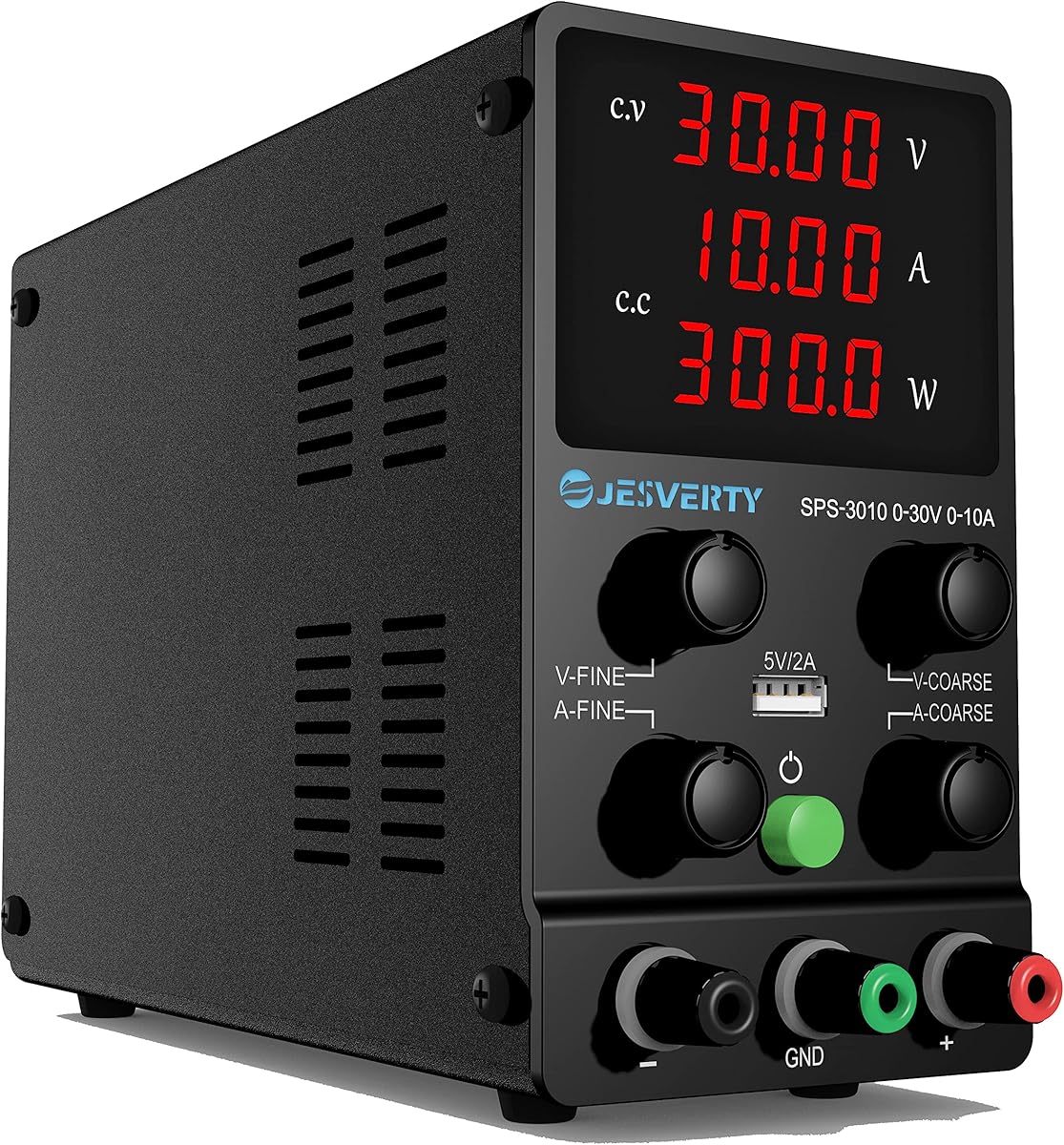
The Jesverty SPS-3010 is compact and light weighing only 2.5 lbs which makes it easy to move around your workspace. Its LED display shows voltage current and power real time.
Pros
Compact lightweight body design
Auto C.V and C.C mode
4 digit LED display
Short circuit protection
5V 2A USB port
Cons
Test leads are basic
AC input varies by region
We may earn a commission when you buy through this link, at no additional cost to you.
Auto switching between C.V and C.C modes adapts to load changes automatically. Coarse and fine adjustments provide accurate setting. 5V 2A USB port powers small devices during repairs.
Short circuit protection and thermal regulated fan ensure safety. Test leads included are basic so upgrading is wise for high current use. AC input may vary by factory.
Best for users needing a space-saving supply. Its weight is a standout. We suggest this for benches with limited space or for mobile repair setups.
Efficient Space Usage
Lightweight design saves valuable bench real estate while maintaining full 30V 10A capability.
Real Time Power Readouts
Display provides V A and W readings for complete insight into load behavior.
This supply features a 2.8 inch IPS color screen that flips 90 degrees for multi angle viewing. It supports PC programmable output with six preset groups for quick voltage adjustments.
Pros
IPS flip display included
PC programmable output
8 security protections
6 preset parameters
Low ripple output
Cons
Requires diode for battery charging
PC software learning curve
We may earn a commission when you buy through this link, at no additional cost to you.
Multiple connection options like banana heads and fine copper wires meet diverse needs. Eight safety mechanisms including overvoltage and overheating protect equipment. Output ripple is under 20mV.
PC control allows storing parameters but adds complexity. Diode needed for battery charging to prevent reverse current. Otherwise it is robust with clear UI options.
Best for labs with PC integration needs. The display is unique. We recommend it for users wanting visual clarity and preset flexibility.
Flexible Viewing Angles
Flip screen accommodates different bench positions improving visibility during repairs.
Preset Memory Groups
Six output presets reduce setup time for repeated tests.
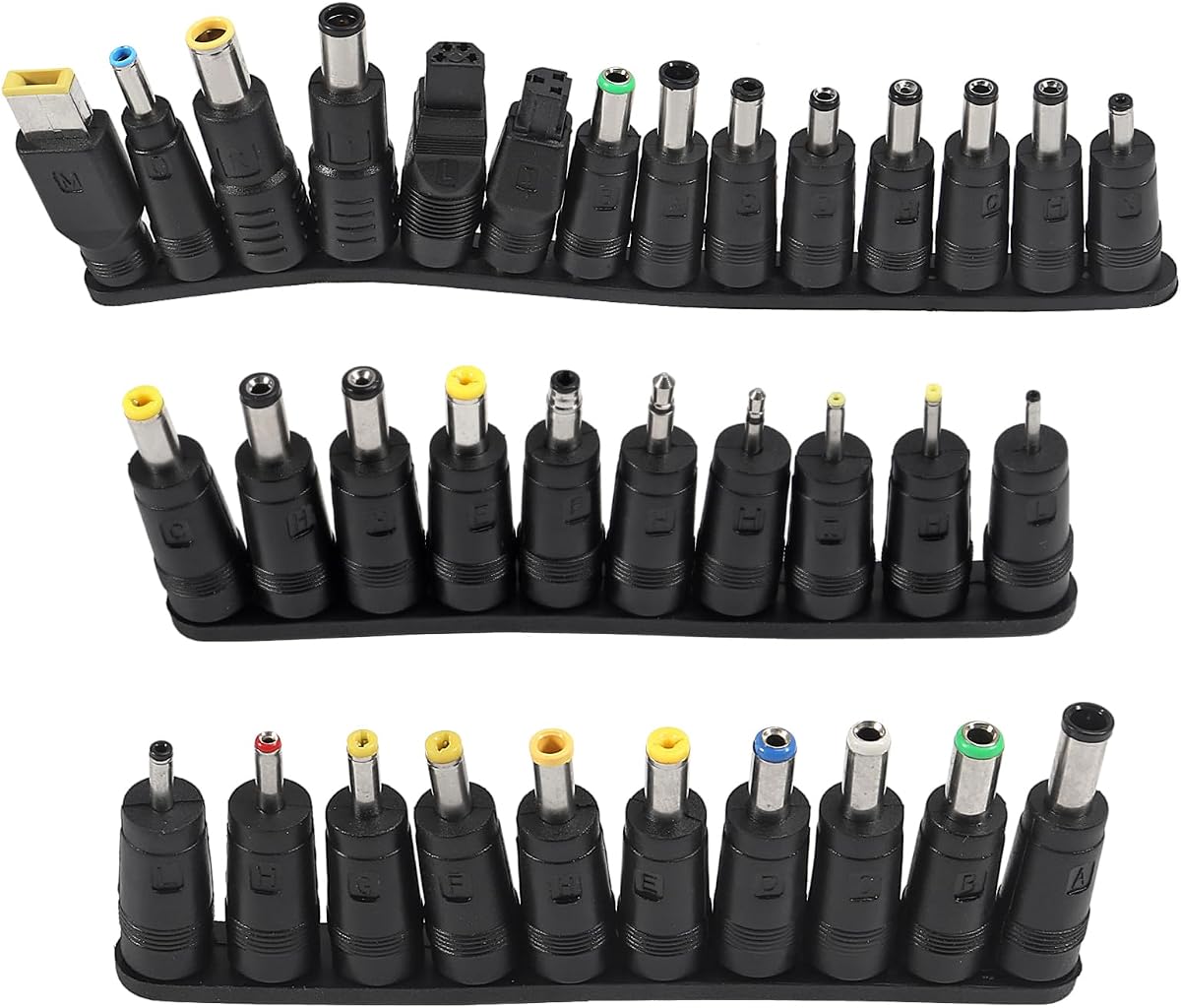
This comprehensive kit provides 34 adapter tips to match many laptop charging jacks. It includes Lenovo square tips and tuning fork variants for brands like Dell Toshiba HP and Asus.
Pros
34 connector pieces total
Lenovo square tip included
Multiple laptop compatibilities
Compatible with various brands
Includes tuning fork types
Cons
Not Mac compatible
No power source included
We may earn a commission when you buy through this link, at no additional cost to you.
Using these connectors allows you to adapt bench supplies to different devices. The variety covers most common sizes found in consumer electronics. However it does not include a power source.
Tips come color coded for easier identification. The magnetic mat from other units pairs well with these tips. Be aware Mac and some specific models are excluded from compatibility.
Best for shops with many laptop models. Having all tips on hand reduces downtime. We recommend stocking this kit alongside any bench power supply for versatility.
Wide Brand Compatibility
Covers major manufacturers from Dell and Lenovo to HP and Toshiba.
Color Coded Organization
Colors help techs quickly identify matching tips reducing setup time.
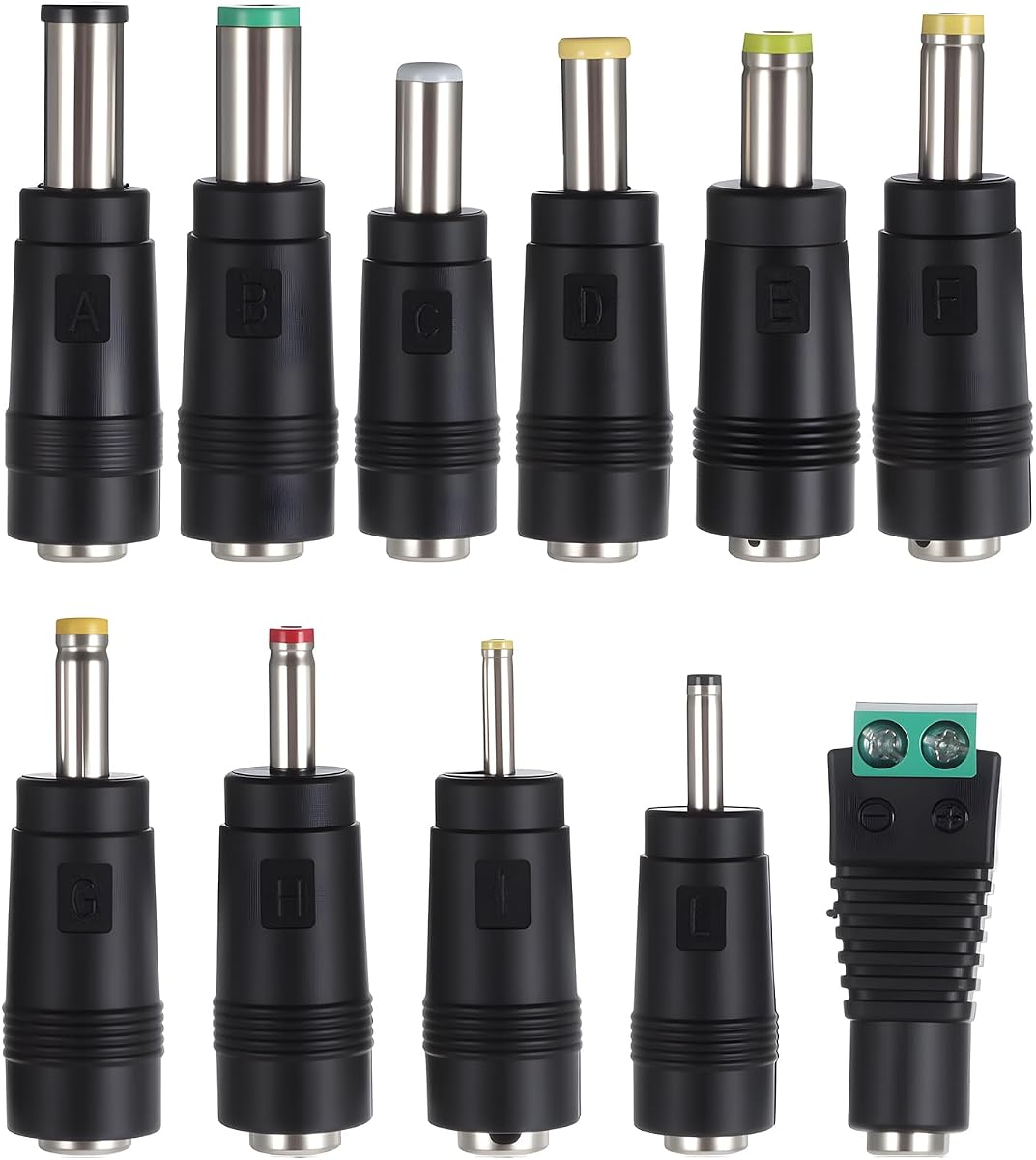
This kit offers 11 power converter tips to match round DC jacks on many devices. Each header inserts into a 5.5 x 2.1mm male base making connections straightforward.
Pros
11pcs connector kit included
5.5mm x 2.1mm base
Portable and compact design
Wide compatibility for devices
Easy to convert
Cons
Fewer tips than larger set
Limited to common sizes
We may earn a commission when you buy through this link, at no additional cost to you.
Portable design makes it ideal for on the go repairs. It supports adapters for routers cameras and laptops. However it has fewer tips than larger sets so niche sizes may be missing.
Converters adapt to chargers and power banks easily. Confirm device interface type before purchasing to ensure fit. This is a lightweight complement to your repair tools.
Best for small kits or travel use. It covers most common sizes. We suggest this for quick compatibility checks in the field.
On the Go Utility
Compact size fits in tool pouches for mobile techs.
Versatile Base
Universal 2.1mm base accepts various tips for different needs.
We may earn a commission when you buy through this link, at no additional cost to you.
Buying Guide – How to Choose the Best DC Power Supply for Laptop Repairing
Selecting the right DC power supply for laptop repairing requires attention to output range precision safety features and usability factors that impact repair accuracy and component protection.
Output Voltage and Current Range
Laptop repair often needs supplies covering 0 to 30 volts with 5 to 10 amps to handle different motherboard requirements and power circuits. Ensure the unit matches your highest expected load.
Look for a range that supports 30V and at least 5A to cover most laptops while leaving headroom for testing larger adapters or battery systems.
Adjustment Precision and Display
Adjustment precision impacts your ability to set exact test points without overshooting sensitive circuits. High resolution displays in 0.01V or finer help verify real output values during repairs.
Choose a supply with a clear display and fine tuning controls such as encoder knobs or coarse and fine adjustments for reliable voltage setting.
Safety Protection Features
Protection features like OCP OVP short circuit and overheating safeguards prevent damage to both the supply and the laptop being repaired. These mechanisms automatically limit or cut output if limits are exceeded.
Prioritize units with multiple protection modes and alarm alerts to reduce risk of accidental component damage during testing.
Portability and Form Factor
On site repair demands portable units that fit in tool bags without sacrificing performance. Lightweight compact designs enable technicians to carry supplies to client locations easily.
Consider weight and dimensions along with durability when selecting for mobile work.
Additional Connectivity and Ports
USB or Type C ports let you charge devices or power accessories from the bench supply. PC programmable interfaces support automated test sequences for labs and R&D.
Decide if you need digital control or fast charge ports based on your workflow requirements.
Memory and Control Features
Memory presets and lock functions streamline repeated tests and protect settings from accidental changes during long runs. Output enable disable buttons provide clear control over when power flows to the load.
Units with these features reduce setup time and improve safety during extended testing.
Power Input Compatibility
Global AC voltage support from 100 to 240V avoids the need for transformers when traveling. Auto voltage detection simplifies setup and reduces human error when plugging in.
Select a model with broad input range if you work across different regions.
Warranty and Support
Long warranties and responsive technical support ensure help if problems arise. Manufacturer support is valuable for specialized repair shops that need fast solutions to minimize downtime.
Check warranty terms and available channels before purchase to secure peace of mind.
How to Use and Care for Your DC Power Supply for Laptop Repairing
Begin by connecting the supply to the power outlet and verifying the input voltage range matches your mains before turning it on to ensure safe operation and prevent internal damage.
Set voltage and current limits using coarse and fine knobs or encoder controls so your load cannot draw more power than intended which protects both device and power source during tests.
Regularly check connections and clean dust from vents to maintain cooling and reliability then store the unit in a dry place when not in use to extend its service life.
Frequently Asked Questions
What voltage and current do laptops usually need for testing?
Most laptops require 5 to 20 volts and up to 5 amps but bench supplies should cover 0 to 30 volts and at least 5 amps to support most models safely. Using precise limits prevents accidental damage.
Why is a short circuit alarm useful during laptop repair?
A short circuit alarm warns you immediately when current spikes or a fault occurs so you can stop output before damage happens. This protects both the supply and the laptop components during testing.
Can I use a USB port on a power supply to charge a laptop?
USB ports on bench supplies typically deliver up to 18W which may charge small devices but not most laptops. Use the main output terminals for reliable laptop charging or testing.
How do memory presets help repair technicians?
Memory presets save common voltage and current settings so you do not need to re enter them each time. This speeds up workflow and reduces setup errors during batch testing.
What safety features should I prioritize for laptop repairing?
Prioritize OCP OVP short circuit protection and overheat protection to avoid damaging components. Also look for output enable disable buttons that allow safe control over power delivery during tests.
Are portable DC power supplies as accurate as bench units?
Compact units can be accurate if they include encoder controls or fine tuning knobs and quality regulators. Ensure the model provides sufficient resolution and protection for your repair tasks.
Do I need extra adapters for laptop charging jacks?
Yes because laptops have different DC jack sizes and polarities. Universal connector kits with multiple tips help match your supply output to the device safely without needing many separate adapters.
How can I extend the life of my bench power supply?
Keep vents clean and allow adequate airflow so the cooling fan works efficiently. Avoid setting outputs near maximum for long periods and store the unit in a dry place when not in use.
Final Thoughts on Choosing the Best DC Power Supply for Laptop Repairing
The top picks cover a range of needs from budget friendly portable units to advanced programmable supplies with safety features. Each model offers distinct strengths that suit different repair workflows and shop sizes.
Prioritize precise control and safety mechanisms if you work with sensitive laptop circuits often. Portable technicians may prefer lightweight units with universal input for quick deployment across sites.
Remember to verify current availability and pricing as offerings change. Selecting the right DC power supply for laptop repairing ensures reliable testing and efficient repairs that keep your work consistent.
Explore our expert guide comparing the top cordless desk lamp options for 2026, featuring portable rechargeable designs with versatile lighting features for