
Plug & Play USB Computer Microphone
4.6Editor score
Crystal clear 360-degree pickup
Touch-sensitive mute button with LED
Flexible metal gooseneck design
Finding a reliable and affordable microphone for your desk is essential for clear communication and quality recordings. Whether you are streaming, podcasting, or attending online meetings, the right device makes a significant difference in your audio output and overall professional presence.
We evaluated ten top-rated options based on audio clarity, build quality, ease of use, and specific features like noise cancellation and mute buttons. Our comparison focuses on delivering the best value without compromising on performance for everyday desktop setups.
Each selection below highlights key strengths and potential trade-offs to help you find the perfect fit for your needs. Please note that prices and availability can change frequently, so we recommend verifying current details before making your final purchase decision.
4.6Editor score

4.4Editor score

4.5Editor score
As an Amazon Associate we earn from qualifying purchases.
The following table provides a side-by-side overview of all ten products we reviewed to help you quickly identify the key specifications and differences between each model.
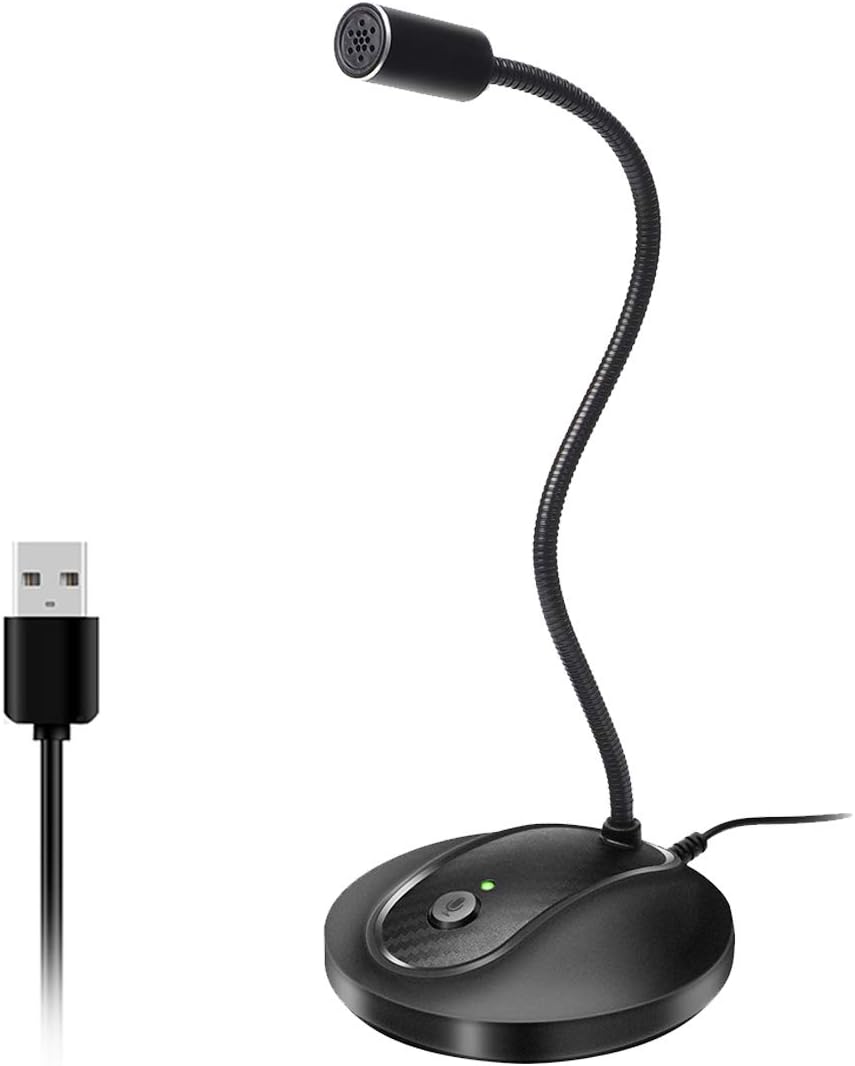



The CMTECK G009 stands out as a top contender for budget-conscious users seeking reliable audio capture. With a strong rating of 4.5 stars, it offers clear voice pickup and active noise cancellation that impresses for its price point.
We may earn a commission when you buy through this link, at no additional cost to you.
Its CCS2.0 smart chip actively filters out background noise, ensuring your voice remains the focus during calls or recordings. The built-in pop filter further prevents plosives from overloading the mic, while the gooseneck allows precise positioning.
While it lacks physical volume controls, the straightforward plug-and-play design makes it ideal for users who prefer simplicity. The LED indicator ensures you never forget to unmute, a common source of frustration in remote meetings.
Buyers looking for a dependable microphone for Zoom meetings, gaming, or basic podcasting will find this model delivers professional results without breaking the bank. It is a solid starting point for anyone new to desk microphones.
The CCS2.0 chip effectively blocks background noise so your voice is heard clearly without external software processing.
A clear LED light shows green when connected and red when muted to prevent accidental audio leaks during calls.
We may earn a commission when you buy through this link, at no additional cost to you.
This USB microphone earns the Editor's Choice title due to its robust build and flexible design that adapts to various desk layouts. Its 360-degree adjustable gooseneck allows you to position the mic exactly where you need it for optimal sound capture.
We may earn a commission when you buy through this link, at no additional cost to you.
The intelligent noise-canceling technology picks up your voice while reducing background noise and echo, making it suitable for less-than-ideal recording environments. The solid metal pipe and heavy-duty ABS stand ensure the unit stays stable even during animated conversations.
While the weight provides stability, it may not fit perfectly on smaller or very lightweight surfaces. The cable length is standard at 1.8 meters which works well for most setups but might require an extension for far-reaching desk configurations.
If you prioritize durability and precise positioning without spending a premium, this model offers a balanced mix of features. It is particularly well-suited for streaming or gaming where the mic needs to be close to your mouth without obstructing view.
Adjust the mic from 360 degrees to find the sweet spot for voice pickup without moving your chair or desk.
Advanced technology filters out ambient sounds and echo to maintain clear audio during online meetings and recordings.
We may earn a commission when you buy through this link, at no additional cost to you.
Rated highly at 4.6 stars, this microphone offers professional-level clarity and features that justify its premium placement. Its 360-degree omni-directional audio pickup captures your voice naturally, and the included windproof fluffy caps help reduce breaking noise from wind or spray.
We may earn a commission when you buy through this link, at no additional cost to you.
The touch-sensitive mute button allows you to instantly mute or unmute during chats or recordings which prevents audio mishaps. The LED indicator shows real-time status ensuring you are always aware of your microphone state without guessing.
While the touch controls are convenient they can sometimes be overly sensitive leading to accidental muting during intense sessions. The windproof caps are effective but may require careful positioning to maintain comfort while speaking directly into the mic.
This model is an excellent choice for content creators who need reliable audio quality without investing in high-end studio gear. Its compact design also makes it easy to transport between office and home setups without taking up much space.
Included fluffy caps reduce breaking noise from wind or spray to maintain clean audio during streaming or calls.
A built-in LED light changes color to show if you are connected or muted so you never miss your cue.
We may earn a commission when you buy through this link, at no additional cost to you.
The Amazon Basics Condenser Microphone delivers high sensitivity and low distortion thanks to its large 14mm diaphragm. The cardioid pickup pattern effectively isolates background noise ensuring clear and clean sound for recording and broadcasting tasks.
We may earn a commission when you buy through this link, at no additional cost to you.
One standout feature is its detachable design which allows connection to tripods boom arms or standard microphone stands. This flexibility makes it versatile for setups where a fixed desk position is not ideal or when mobility is required.
While the built-in shock absorber helps stability the base may not be as robust as models with weighted shockproof designs. Linux compatibility is not explicitly mentioned in the specs so Windows and Mac users get the best experience.
If you need a basic yet effective mic for streaming or podcasting that can grow with your setup this is a strong option. It balances ease of use with professional features without requiring complex software configuration.
The cardioid pattern focuses on your voice while rejecting background noise for clearer audio in noisy environments.
Use the standard 5/8 inch thread to attach the mic to tripods or boom arms for flexible positioning options.
We may earn a commission when you buy through this link, at no additional cost to you.
This microphone stands out for its advanced control options including physical knobs for gain volume and echo adjustment. The included USB-C and Lightning adapters ensure seamless compatibility with modern phones and tablets making it ideal for cross-platform creators.
We may earn a commission when you buy through this link, at no additional cost to you.
Real-time zero-latency monitoring via a 3.5mm headphone jack lets you hear exactly what is being recorded without delay. This feature helps identify distortion or background noise instantly improving your overall audio quality during sessions.
While the extra knobs provide flexibility they do require some desk real and may be unnecessary for simple users. The price is higher than basic models but the added features justify the cost for serious podcasters or streamers.
Creators who need hands-on control over their audio levels and effects will appreciate the tactile feedback these knobs provide. It offers professional versatility at a price point that remains accessible for most content creators.
Listen to your voice in real time without delay so you can catch audio issues as they happen.
Adjust mic gain monitoring volume and echo on the fly without needing software or external mixers.
We may earn a commission when you buy through this link, at no additional cost to you.
Designed specifically for small to medium conference meetings this microphone captures voices from a 11.5-foot range. Its omnidirectional pattern ensures everyone at the table can be heard without needing to raise their voices or lean forward.
We may earn a commission when you buy through this link, at no additional cost to you.
The nylon shielded cable effectively eliminates signal interference which is crucial for maintaining clear audio during online calls. An anti-slip mat keeps the unit stable on the desk even when someone taps it during a lively discussion.
Since it is optimized for room capture it may not perform as well as a close-talk mic for solo streaming or recording. The standard mute button works well though it lacks extra LED status indicators found on other models.
Teams using Zoom or Skype for regular small group meetings will find this mic a cost-effective solution for clear communication. It bridges the gap between basic home office gear and dedicated conference room equipment.
Capture sound from 11.5 feet away so everyone in a small meeting can be heard clearly without shouting.
A nylon shielded wire blocks signal noise to keep audio clean and free from static during calls.
We may earn a commission when you buy through this link, at no additional cost to you.
This model adds visual appeal with customizable breathing lights that enhance your gaming setup aesthetic without compromising function. The high-grade metal gooseneck and shock-resistant ABS base ensure the mic stays anchored even during enthusiastic live streaming sessions.
We may earn a commission when you buy through this link, at no additional cost to you.
Its intelligent noise reduction filters out keyboard clicks and fan humming delivering crystal-clear sound free from distortion. The lightweight design makes it easy to transport and stow in a bag for use in offices or meeting rooms.
While the lights can be turned off via switch they cannot be physically removed which some minimalists might find distracting. The microphone focus on audio quality means it lacks extra controls like volume or echo knobs.
Users who value both style and performance will enjoy the sleek tech aesthetics this mic brings to their workstation. It is a solid choice for streamers and gamers who want a professional look without a complex setup.
Customizable breathing lights add a premium look to your desk setup and can be toggled on or off easily.
Filters out common distractions like fan noise and keyboard clicks to ensure your voice is heard clearly.
We may earn a commission when you buy through this link, at no additional cost to you.
The LIANGSTAR microphone combines an omnidirectional condenser with a CCS3.0 smart chip to deliver clear smooth and loud voice capture. A dedicated volume control knob allows you to adjust levels instantly without digging into software settings during calls.
We may earn a commission when you buy through this link, at no additional cost to you.
Its built-in sound card means no drivers are needed to get started making setup a breeze for users of all technical levels. The compact design does not occupy much desk space which is helpful for those working with limited room.
While the plastic construction is functional it may not feel as premium as metal alternatives. There is no dedicated monitoring jack which limits real-time feedback capabilities compared to more advanced models.
This mic is a great option for casual users who need basic volume control and reliable audio without a complex interface. It works well for YouTube recording gaming and Skype chats where simplicity is key.
A physical knob lets you adjust mic volume instantly without needing to open software settings during calls.
The smart chip automatically reduces background noise to keep your voice clear and natural during recordings.
We may earn a commission when you buy through this link, at no additional cost to you.
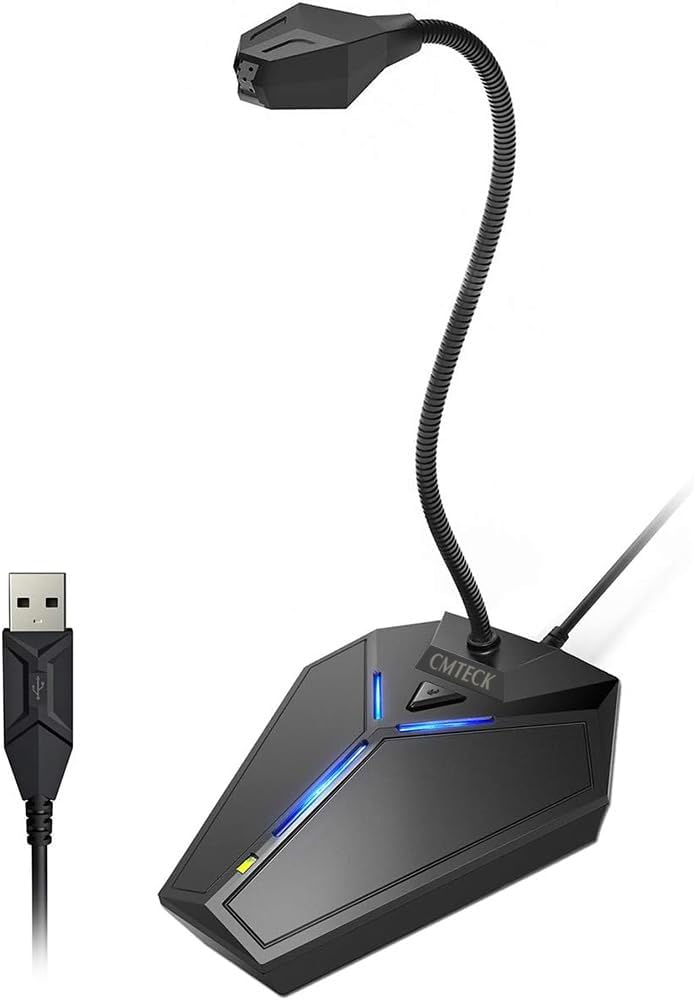
This CMTECK model features a high-performance SMART CHIP that effectively suppresses background noise ensuring your voice comes through crisp and clear. The unique blue LED light adds a sleek visual effect to your workspace and can be toggled on or off.
We may earn a commission when you buy through this link, at no additional cost to you.
The metal gooseneck tube allows precise positioning while the 6ft cable provides flexibility for reaching ports on towers or laptops at a distance. A mute button with an LED indicator helps you stay aware of your recording status at all times.
The blue LED is decorative but cannot be removed physically which might distract those who prefer a minimalist setup. The stand is functional but basic compared to models with weighted bases or adjustable shock mounts.
If you want a straightforward microphone with enough cable length to avoid tangles this is a strong budget-friendly pick. It delivers studio-quality results for calls and voice dictation without requiring extra configuration.
A 6-foot USB cable ensures you can reach your computer even if the ports are on the back of a tower.
The smart chip filters out ambient sounds to keep your voice clear during online classes and meetings.
We may earn a commission when you buy through this link, at no additional cost to you.
The KLIM Talk offers a patented audio filter that records your voice with perfect clarity for teammates and colleagues. Its aerodynamic design complements any desktop nicely and the five-year assurance reflects strong confidence in the product's build quality and longevity.
We may earn a commission when you buy through this link, at no additional cost to you.
It is compatible with Linux as well as Windows and Mac making it a versatile option for developers and tech workers who use open-source systems. The full flexible neck allows you to position the mic exactly where you need it.
While the warranty is impressive there is no LED indicator to show mute status which can lead to accidental audio sharing. The mute button is simple and functional but lacks additional visual cues found in other models.
This microphone is ideal for users who prioritize reliability and broad OS support for their daily work. The long-term warranty provides peace of mind that this is a sound investment for professional home use.
A patented filter ensures your voice is recorded with perfect clarity while rejecting background noise.
A five-year assurance backs the product so you can rely on its durability for long-term use.
We may earn a commission when you buy through this link, at no additional cost to you.
Choosing the right microphone involves understanding several key factors that affect performance and usability in your specific environment.
The pickup pattern defines how the mic captures sound from its surroundings. Omnidirectional mics pick up sound from all sides and are great for group meetings. Cardioid mics focus on the front which isolates your voice and reduces background noise better.
Choose cardioid for solo streaming and podcasting. Pick omnidirectional if you need to capture multiple voices in a small conference setup.
Noise cancellation helps filter out fans keyboards and other ambient sounds. Look for microphones with smart chips or built-in digital signal processing to keep your voice clear without software.
Active noise cancellation is a top priority if you work in a noisy home or office environment.
Metal goosenecks and weighted bases provide stability and longevity. Plastic models may be lighter but can feel cheap and wobble easily on your desk.
A sturdy base and metal neck ensure the mic stays in place during long recording sessions.
USB microphones are plug and play and need no extra drivers. Check cable length to ensure you can reach your PC ports without tangles.
A cable of at least six feet is usually sufficient for most desktop setups.
Physical mute buttons are essential for quick silencing. Volume knobs and monitoring jacks add versatility but increase price and complexity.
Prioritize a mute button if you join frequent video calls to prevent accidental speaking.
Most mics work with Windows and Mac. If you use Linux or consoles check the product specs to confirm support before buying.
Ensure the mic lists your operating system to avoid connection issues.
Compact designs with small bases are better if you move your workstation often. Heavy stands are stable but harder to pack into a laptop bag.
Consider portability if you work from home and office.
A warranty offers protection against defects. Support responsiveness matters if you encounter setup issues after purchase.
Check the warranty length and review support reputation for peace of mind.
Position the microphone about six inches from your mouth for the best balance of clarity and comfort. Use the flexible gooseneck to adjust the angle so it points directly at your mouth without getting in the way of your keyboard or view.
Test your audio levels before starting a call or recording. Speak at your normal volume and check that your voice is not clipping or distorting in the recording software. Adjust the distance slightly if you need more volume.
Keep the mic clean by wiping it gently with a dry cloth. Avoid placing it near liquids or using harsh chemicals that could damage the mesh or internal components. If it has a wind cap remove it for washing and let it air dry completely before reusing.
Cheap microphones often use simpler condenser capsules and plastic parts to keep costs low. However they still offer clear audio because manufacturers use smart chips and basic noise reduction to focus on your voice. You can find reliable options without needing expensive studio gear.
No most USB microphones are plug and play and work immediately on Windows and Mac. Just connect the cable and select the mic in your sound settings. Drivers are rarely needed for standard consumer models unless you use special editing software.
Yes many of these models are designed specifically for streaming and gaming. They offer clear voice pickup and mute buttons that are essential for live broadcasts. Just ensure the mic is positioned correctly to avoid picking up game noise.
Most desk microphones have a dedicated mute button on the base. Pressing it will light an LED to show you are muted. If not you can also mute through your video conferencing app like Zoom or Microsoft Teams.
It depends on your use case. Omnidirectional mics capture sound from all sides and are good for group conversations. Cardioid mics focus on the front and reduce background noise better for solo voice work.
Ideally the mic should be about six inches away from your mouth. This distance captures clear voice without picking up too much breath or plosive sounds. Adjust it closer or further based on your comfort and recording environment.
Some models come with USB-C or Lightning adapters to work with smartphones. Without adapters you may need a separate OTG adapter. Always check the product compatibility list before purchasing for mobile use.
Position the mic away from noisy fans and use the mute button when not speaking. Enable noise cancellation features if available and ensure you are in a quiet space. Software tools can also help reduce background noise during post-processing.
We reviewed ten top-rated options ranging from basic plug-and-play units to feature-rich models with noise cancellation. The ZealSound Podcast Microphone offers advanced controls while the CMTECK G009 provides strong value for budget buyers.
Prioritize features like a mute button and good noise cancellation if you work in a busy environment. Build quality and cable length also impact long-term satisfaction so choose a model that fits your desk setup.
Remember that prices can change so verify the current cost before clicking buy. With the right choice you can enjoy clear professional audio without overspending on a desk microphone.