
Thermalright Assassin X120 Refined SE
4.7Editor score
AGHP technology for gravity resistance
Low noise operation under 26dB
Wide socket compatibility support
This guide compares the top CPU Air Cooler Fan Heatsink models for performance and silence to help you find the perfect cooling solution for your build.
Choosing the right CPU Air Cooler Fan Heatsink is essential for maintaining optimal system performance and longevity. A high-quality cooler ensures your processor stays within safe temperature ranges even under heavy workloads or intense gaming sessions. This comprehensive guide explores the best options available to help you make an informed decision.
We evaluated each product based on cooling efficiency noise levels compatibility with modern sockets and overall build quality. Our analysis focuses on real-world performance metrics and user feedback to provide reliable recommendations. Whether you prioritize quiet operation or maximum thermal dissipation this list covers diverse needs for various system configurations.
Each pick highlights key features pros and cons to give you a clear understanding of what to expect. Please note that prices and availability may change over time so verify details before purchasing. Use this guide as a starting point to find the ideal thermal solution for your specific hardware setup and budget constraints.
4.7Editor score

4.8Editor score

4.8Editor score
This section presents a detailed side-by-side comparison of all ten selected coolers highlighting their key specifications and unique selling points. By examining dimensions heat pipe counts and fan features you can quickly identify which model aligns with your case constraints and cooling requirements.
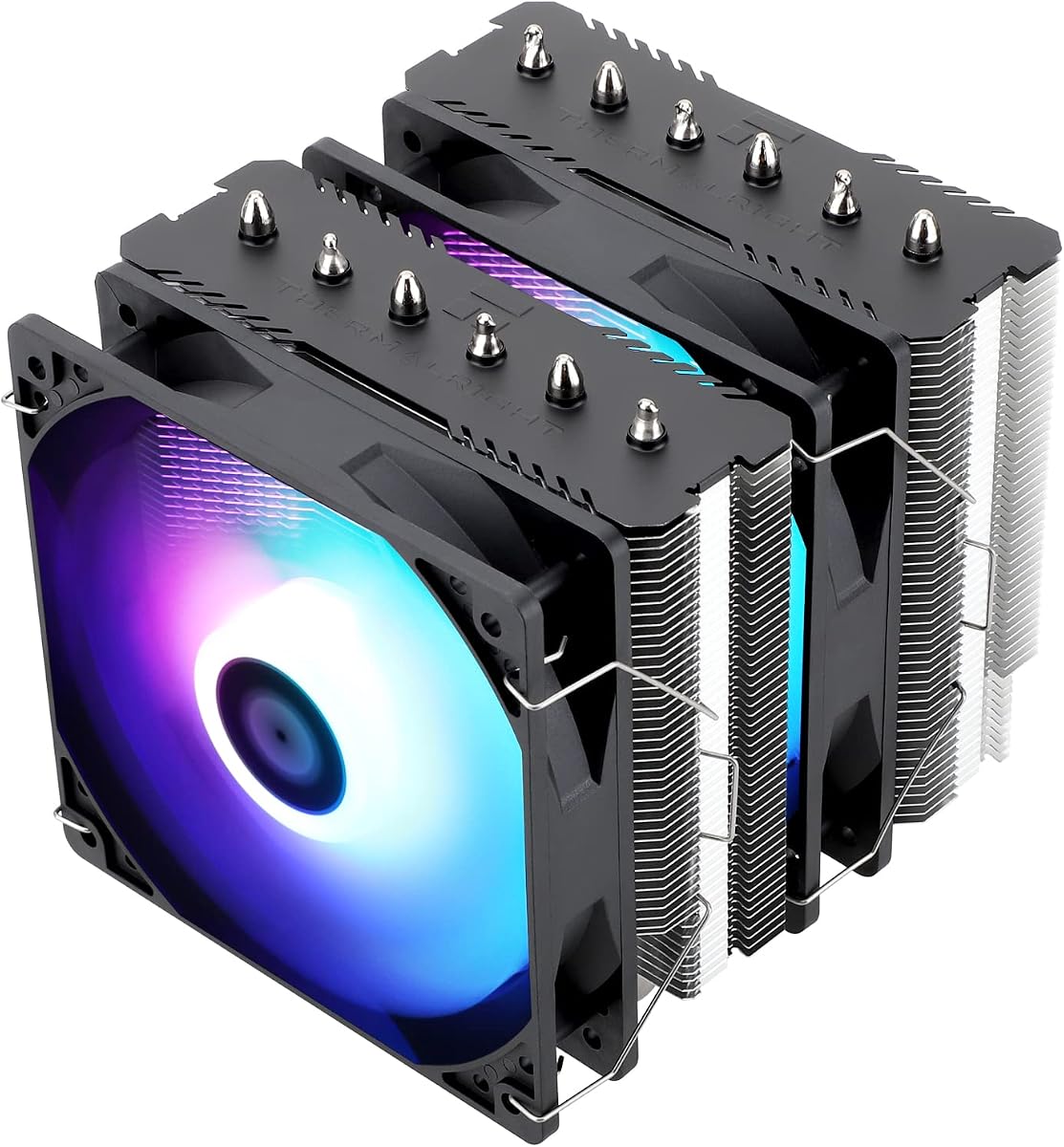


The Thermalright Assassin X120 Refined SE stands out as an exceptional value proposition for budget-conscious builders seeking reliable thermal performance. With a high rating of 4.7 stars it delivers consistent cooling without breaking the bank. Its AGHP technology ensures heat transfer remains efficient regardless of installation orientation.
We may earn a commission when you buy through this link, at no additional cost to you.
This cooler features four heat pipes and a TL-C12C PWM fan that maintains low noise levels under load. The aluminum heatsink cover provides durability while keeping the unit lightweight at 1.42 pounds. Installation is straightforward thanks to metal fasteners provided for both Intel and AMD platforms.
While it lacks flashy RGB lighting the focus on functional cooling makes it a practical choice for standard gaming or office setups. The compact height fits most mid-tower cases without obstructing other components. Some users might prefer additional aesthetic features but performance remains the priority here.
Ideal for first-time builders or those upgrading older systems this model offers a balance of cost and capability. Its support for modern sockets ensures longevity as hardware evolves. We recommend this unit for anyone needing effective cooling without premium pricing.
AGHP technology solves inverse gravity effects ensuring consistent cooling in vertical or horizontal case orientations.
The TL-C12C fan operates quietly with noise levels below 26dB for a peaceful computing environment.
We may earn a commission when you buy through this link, at no additional cost to you.
The Thermalright Peerless Assassin 120 SE ARGB brings robust dual tower cooling to mid-range enthusiasts with aesthetic flair. Featuring six heat pipes and dual PWM fans it manages high TDP loads efficiently. The ARGB lighting adds visual appeal without compromising thermal dissipation capabilities significantly.
We may earn a commission when you buy through this link, at no additional cost to you.
Its dimensions of 125x135x155mm provide ample surface area for airflow distribution. The pure copper sintered heat pipes and reflow welding process enhance heat transfer rates. Metal fasteners ensure secure installation across various Intel and AMD platforms including the latest socket generations.
Users seeking a balance between performance and style will appreciate the color light effects synchronized via motherboard headers. The fan cutouts allow room for tall memory modules preventing clearance issues. While it occupies more space than single tower models the cooling gain justifies the footprint.
This cooler is well-suited for gaming rigs where aesthetics and thermals matter equally. The AGHP tech ensures stability in any case orientation. Choose this if you want top-tier cooling without the price tag of premium brands.
With a TDP range of 120 to 245W this unit handles demanding workloads with ease.
Pure copper heat pipes and aluminum fins offer durability and efficient heat dissipation.
We may earn a commission when you buy through this link, at no additional cost to you.
The Noctua NH-D15 chromax.Black continues to set the benchmark for air cooling performance and silence. With over 300 awards it is proven reliable for overclockers and silent enthusiasts alike. The all-black design blends seamlessly with modern black-themed PC builds.
We may earn a commission when you buy through this link, at no additional cost to you.
Two NF-A15 140mm fans with Low-Noise Adaptors provide exceptional airflow while remaining quiet at idle. The SecuFirm2 mounting system simplifies installation on latest Intel and AMD sockets. Included NT-H1 thermal paste ensures optimal contact without extra purchases.
Its dual-tower design with six heatpipes delivers cooling on par with many AIO watercoolers. The offset mounting option allows for better RAM compatibility. While the height is significant it fits most tower cases without obstruction.
This cooler is ideal for users prioritizing longevity and performance above cost. The six-year warranty reflects Noctua confidence in product durability. For those seeking the best air cooling experience this model is the top recommendation.
Fans maintain full cooling power under load yet stay whisper quiet when idle.
High-end materials and design ensure years of reliable thermal management.
We may earn a commission when you buy through this link, at no additional cost to you.
The Noctua NH-U12A chromax.Black offers top-tier performance in a 120mm size that prioritizes compatibility. It is perfect for builds where RAM or PCIe clearance is critical. The all-black aesthetic matches contemporary hardware trends perfectly.
We may earn a commission when you buy through this link, at no additional cost to you.
Dual NF-A12x25 fans provide significant airflow for a single tower design. The mounting system supports latest Intel and AMD sockets effortlessly. Included NT-H1 paste ensures professional-grade thermal transfer upon setup.
Its height of 158mm fits most standard tower cases without issue. The design avoids overhanging RAM slots allowing for flexible memory upgrades. This makes it superior to bulkier coolers in constrained environments.
For those needing premium reliability with smaller footprints this is an ideal choice. The six-year warranty and Noctua quality guarantee peace of mind. Choose this for silent efficient cooling in compact builds.
Fits most tower cases without overhanging RAM or blocking PCIe slots.
Top-tier thermal performance in a compact size ideal for smaller cases.
We may earn a commission when you buy through this link, at no additional cost to you.
The Thermalright Assassin X 120R Digital ARGB introduces a digital screen top cover that displays vital system metrics. This unique feature lets users monitor CPU temperature and usage at a glance. It combines practicality with striking aesthetics for modern PC builds.
We may earn a commission when you buy through this link, at no additional cost to you.
With a 2000 RPM fan and four heat pipes it delivers solid cooling for its class. The 151mm height ensures compatibility with most mid-tower cases. ARGB fans synchronize with motherboard 5V 3pin headers for custom lighting effects.
While the digital display requires TRCC software it provides valuable real-time data. The aluminum fins symmetrical design maximize surface area for heat dissipation. Installation is straightforward with provided accessories for Intel and AMD platforms.
This model is perfect for enthusiasts who want visual feedback on thermal performance. It bridges the gap between utility and style. Choose this if you want a standout look with dependable cooling capabilities.
Display shows CPU temperature usage and GPU temp for immediate system insights.
Digital cover and ARGB lighting create a unique look for gaming setups.
We may earn a commission when you buy through this link, at no additional cost to you.
The original Noctua NH-D15 remains a state-of-the-art choice for high-performance cooling needs. Its dual-tower design with six heatpipes offers class-leading thermal management. Ideal for overclockers it handles extreme heat loads with minimal fan noise.
We may earn a commission when you buy through this link, at no additional cost to you.
Two NF-A15 fans ensure consistent airflow across the heatsink. The SecuFirm2 system simplifies installation on modern motherboards. Included NT-H1 paste guarantees optimal thermal conductivity out of the box.
While larger than some competitors its performance justifies the size. Offset mounting options allow better RAM clearance. The six-year warranty reflects exceptional build quality and durability.
This cooler is for users demanding the best thermal results without water cooling. It suits both gaming and professional workstation environments. Choose it for reliable long-term performance.
Designed to handle extreme heat loads without excessive noise.
Includes thermal paste and all mounting hardware needed.
We may earn a commission when you buy through this link, at no additional cost to you.
The Noctua NH-D15S chromax.Black offers dual-tower performance in a design optimized for RAM compatibility. Its asymmetrical layout ensures a 65mm clearance for memory modules. This makes it suitable for dense builds without sacrificing cooling power.
We may earn a commission when you buy through this link, at no additional cost to you.
An NF-A15 140mm fan provides robust airflow while remaining whisper quiet. The all-black design fits modern aesthetic preferences seamlessly. SecuFirm2 mounting simplifies setup on latest Intel and AMD platforms.
At 160mm height it fits most tower cases but may not suit low-profile systems. The offset mounting option helps further with clearance. It is a versatile choice for high-end desktops.
Ideal for users needing high performance with RAM compatibility. The premium build and warranty justify the cost. Choose this for a balanced approach to cooling.
Asymmetrical design allows high profile memory without obstruction.
Delivers dual-tower performance in a refined single fan package.
We may earn a commission when you buy through this link, at no additional cost to you.
The Noctua NH-D9L combines strong cooling performance with exceptional case compatibility. Its 110mm height makes it perfect for HTPCs and small form factor builds. It does not overhang RAM or PCIe slots on most motherboards.
We may earn a commission when you buy through this link, at no additional cost to you.
A highly optimized NF-A9 92mm fan ensures ultra-quiet operation. The SecuFirm2 system includes NT-H1 paste for seamless installation. The dual-tower design maximizes efficiency despite the compact footprint.
While the fan is smaller it delivers reliable cooling for moderate TDP CPUs. The offset mounting option improves airflow efficiency. This is a premium solution for constrained spaces.
Recommended for users needing reliable cooling in limited volume. It balances size and performance well. Choose this for silent efficient operation in small systems.
Ideal for HTPCs ITX or 3U builds with tight constraints.
92mm fan runs quietly without compromising cooling power.
We may earn a commission when you buy through this link, at no additional cost to you.
The Noctua NH-U12S offers outstanding cooling performance in a slim 120mm design. Its single tower structure ensures excellent compatibility with RAM and PCIe slots. It is a classic choice for builders seeking reliability.
We may earn a commission when you buy through this link, at no additional cost to you.
An NF-F12 fan provides focused airflow for efficient heat dissipation. SecuFirm2 mounting simplifies installation on various platforms. The NT-H1 paste included ensures premium thermal contact.
Its low profile allows flexible motherboard mounting. This cooler handles standard TDP loads effortlessly. The six-year warranty ensures long-term peace of mind.
Perfect for those needing simple effective cooling without bulk. The reliability and performance make it a safe investment. Choose this for straightforward efficient thermal management.
Slim profile allows for easy installation in most cases.
NF-F12 fan directs air precisely for optimal cooling.
We may earn a commission when you buy through this link, at no additional cost to you.
The Thermalright Peerless Assassin 120 SE delivers reliable dual fan cooling at a great value. Its six heat pipes and AGHP technology ensure effective thermal transfer. The nickel-plated pipes add durability and a refined look.
We may earn a commission when you buy through this link, at no additional cost to you.
Dual TL-C12C PWM fans maintain consistent airflow under load. The offset asymmetric layout supports better GPU compatibility. Note that AMD platforms require the original motherboard backplate for installation.
This cooler offers stable performance with a standard height fitting most cases. It supports modern Intel and AMD sockets seamlessly. The price point makes it attractive for value seekers.
Ideal for budget builds needing high performance. The dual fan design provides ample cooling. Choose this for solid thermal results without premium costs.
Nickel-plated heat pipes ensure long-term durability.
Dual fans provide consistent cooling under load.
We may earn a commission when you buy through this link, at no additional cost to you.
Selecting the right cooler involves evaluating several critical factors to ensure compatibility with your case and performance needs. This guide breaks down essential elements to consider before making a purchase.
Thermal Design Power (TDP) indicates the maximum heat your CPU generates. Ensure the cooler's TDP rating matches or exceeds your processor's requirements for optimal performance. Overclocking demands higher TDP capacity for stability.
Always verify that the cooler supports your CPU's TDP to avoid overheating.
Compatibility with your motherboard socket is non-negotiable. Modern Intel LGA1700 or AMD AM5 sockets require coolers specifically designed to mount correctly. Check the manufacturer's compatibility list before buying.
Verify socket support to prevent installation issues and ensure stability.
Height is critical to ensure your cooler fits inside your chassis. Measure your case's max height and compare it with the cooler's dimensions. Also consider RAM height to prevent interference.
Check case and RAM clearance to avoid physical installation conflicts.
For quiet computing, look for fans with high static pressure and low dB(A) ratings. PWM fans allow automatic speed adjustment to reduce noise during idle periods. Silent systems often require larger 140mm fans.
Prioritize low noise specs for a peaceful computing environment.
Durability depends on materials like copper heat pipes and aluminum fins. Soldered contacts and nickel plating improve thermal transfer and resistance to corrosion. A good warranty reflects confidence in build longevity.
Choose high-quality materials to ensure long-term reliable performance.
Balancing cost with performance is key. Entry-level coolers work for stock CPUs while premium models suit enthusiasts. Consider value over price alone by evaluating features included in the package.
Set a realistic budget that aligns with your performance goals.
A good mounting system like SecuFirm2 simplifies the process. Check if backplates are included or require existing motherboard components. Detailed manuals and videos can help first-time builders.
Select a model with user-friendly installation to save time and effort.
Visual appeal matters for gaming rigs. RGB lighting or all-black designs can complement your build theme. However, ensure aesthetic features do not compromise cooling capabilities significantly.
Pick a design that matches your visual preferences without sacrificing function.
Proper installation begins with cleaning the CPU surface of old thermal paste using isopropyl alcohol. Apply a small pea-sized amount of fresh paste centrally on the CPU before mounting the cooler. This ensures optimal thermal conductivity between the processor and the base.
Secure the cooler firmly using the mounting screws provided but avoid overtightening which can damage the motherboard. Ensure the fan connects to the CPU_FAN header for proper PWM control. Double-check all fasteners are tight after the first power cycle.
Maintain your cooler by periodically dusting the fins and blades using compressed air. Check thermal paste every two to three years and reapply if it dries out. Keeping airflow paths clear ensures consistent cooling efficiency over time.
A good cooler balances effective heat dissipation with low noise levels. Look for models with multiple heatpipes large fins and quality fans. Compatibility with your CPU socket and case dimensions is also essential for reliable operation.
Stock coolers often struggle with high TDP or overclocking. An aftermarket cooler improves thermal performance and reduces noise significantly. For longevity and better gaming experiences upgrading is highly recommended.
Air coolers are generally more reliable and easier to maintain. Liquid cooling can offer slightly better thermals for extreme overclocking but adds complexity. For most users air cooling provides the best balance of cost and performance.
Ensure the cooler height fits within your case limits typically around 160mm. Check motherboard RAM clearance too. Measuring your case before buying prevents physical installation issues.
Most quality coolers include thermal paste. However, if not included you will need a separate tube. High-quality paste ensures efficient heat transfer between CPU and cooler base.
Thermal paste dries over time so replacing it every two to three years is ideal. This maintains efficient heat transfer and prevents temperature spikes. Use quality paste for best results.
Small cases need compact coolers with low height or slim designs. Models around 120mm or lower are ideal. Always verify clearance limits before purchasing.
In conclusion the top picks offer diverse options from budget-friendly to premium performance. The Noctua NH-D15 and Peerless Assassin lead in cooling while the X120 offers excellent value.
Prioritize compatibility and noise levels alongside performance. Ensure your chosen model fits both your CPU socket and case constraints. A balance of these factors guarantees satisfaction.
Remember to verify current prices and stock availability before purchasing. Technology and market conditions change so always check the latest product details for the best deals.