
Ostrich Charger Compatible with Dell
4.5Editor score
65W and 45W output
Round tip power adapter
Safety certified design
This guide compares the top 10 battery backup solutions for Dell laptops, covering UPS systems, portable power banks, and compatible chargers to ensure
Keeping your Dell laptop powered during outages is essential for productivity. A reliable battery backup ensures you stay connected without losing unsaved work. This guide explores various options designed to meet different power needs and budgets.
We evaluated products based on compatibility, capacity, and safety features. Our selection includes uninterruptible power supplies, high-capacity portable chargers, and specialized adapters. Each item was chosen to provide stable power for your specific Dell model.
Every pick highlights key specifications and real-world performance benefits. Note that availability and pricing can change frequently. Always verify current details before purchasing to ensure you get the right solution for your setup.
4.5Editor score

4.4Editor score

4.3Editor score
This table provides a side-by-side comparison of all ten selected products. Review the specifications and features to find the most suitable power backup solution for your Dell laptop model.




The CyberPower EC850LCD Ecologic UPS stands out as a robust solution for protecting your Dell laptop and peripherals during power fluctuations. It offers a reliable battery backup system with surge protection capabilities. This product is highly rated for its comprehensive feature set and user-friendly interface.
We may earn a commission when you buy through this link, at no additional cost to you.
Its multifunction LCD panel displays immediate and detailed information on battery and power conditions. This ensures you are always aware of the system status. The ECO mode feature automatically turns off power to peripherals when your computer is off or in sleep mode. This reduces energy costs and extends battery life.
While this unit is excellent for desktop setups or home offices, it is not designed for portability. The size and weight make it unsuitable for carrying in a backpack. However, for stationary use, its protection capabilities are superior to portable alternatives.
This UPS is ideal for users who need consistent power protection for a fixed workstation. It is particularly useful for those with Dell laptops connected to external monitors or other accessories. The included software adds value for managing power settings remotely.
The ECO mode intelligently manages power usage by disconnecting non-essential peripherals when the main computer is inactive.
A robust equipment guarantee provides peace of mind against potential damage caused by power surges.
We may earn a commission when you buy through this link, at no additional cost to you.
The Ostrich Charger offers an affordable and reliable power solution for Dell laptops requiring a 65W or 45W round tip adapter. While it is not a battery backup itself, it is essential for maintaining charge during use. Its safety certifications ensure it protects your device from electrical hazards.
We may earn a commission when you buy through this link, at no additional cost to you.
This adapter supports a wide input range and includes a converter cable for different connector sizes. The safety mechanisms protect against short circuits and overheating. It is a practical choice for those who need a replacement charger without breaking the bank.
The primary limitation is that it does not provide power during an outage. You will need a separate backup source for unplanned power interruptions. However, for daily charging needs, it is a cost-effective and safe option.
Consider this charger if you need a reliable power source for your Dell Inspiron or XPS model. It pairs well with portable battery packs for a complete power strategy. The lifetime exchange policy adds significant value to the purchase.
Listed by a leading testing laboratory, this charger meets high standards for electrical safety in the United States.
Compatible with all 65W and 45W Dell laptops with round power connectors including Inspiron and Vostro series.
We may earn a commission when you buy through this link, at no additional cost to you.
The UGREEN Power Bank 25,000mAh is a premium portable charging solution capable of powering high-demand laptops like the Dell XPS. Its 145W output ensures rapid charging speeds. The massive capacity allows for multiple full recharges of a laptop on the go.
We may earn a commission when you buy through this link, at no additional cost to you.
Features like the digital display and two-way fast recharge make it user-friendly. You can recharge the bank itself quickly using a 65W PD charger. This ensures minimal downtime between uses. The compact design is surprisingly portable for its power.
The main consideration is the need for a powerful adapter to achieve fast recharge times. If you only have a low-wattage charger, it will take significantly longer to fill. Despite this, it offers top-tier performance for travelers.
This power bank is perfect for professionals who need extended battery life while traveling. It supports a wide range of devices including laptops and smartphones. The 145W capability makes it a versatile choice for modern tech.
With PD3.1 and QC3.0, it delivers 145W total output to power demanding laptops efficiently.
The 25,000mAh battery can fully recharge laptops up to 1.3 times for extended usage.
We may earn a commission when you buy through this link, at no additional cost to you.
The Omni 20C+ is a professional premium power bank designed for diverse charging needs. It features two high-powered USB-C ports suitable for most laptops. The capacity is sufficient for on-the-go charging sessions.
We may earn a commission when you buy through this link, at no additional cost to you.
A unique USB Hub Mode allows file transfer while charging. Wireless charging capabilities add convenience for smartphones. The device includes overcharge protection for safety during extended use.
One drawback is that the wall charger is not included in the package. You will need to source a compatible adapter separately. This adds to the cost but allows flexibility in choosing your charger.
This power bank is well-suited for users who need a multifunctional power solution. The wireless charging and hub features provide extra utility. It is a solid choice for those prioritizing convenience and versatility.
The device keeps all your devices charged up including high powered USB-C laptops and smartphones.
You can transfer files and connect USB devices through the USB Hub Mode simultaneously.
We may earn a commission when you buy through this link, at no additional cost to you.
This genuine Dell AC adapter is designed specifically for Dell Latitude and XPS models requiring a USB Type C tip. It provides stable power output across various wattages. It ensures optimal performance for your specific device.
We may earn a commission when you buy through this link, at no additional cost to you.
The adapter includes a power cord and is packaged as new genuine original. Its compatibility with models like Latitude 3340 and 5440 makes it a precise replacement. It supports multiple power configurations for flexible use.
As a direct wall charger, it does not offer backup capabilities. You must rely on the built-in battery during outages. However, it ensures your battery stays fully charged for travel or emergency use.
Choose this charger if you need an official replacement for your Dell Latitude. It offers reliability and correct voltage specifications. It is a dependable option for daily charging requirements.
This adapter is designed to work seamlessly with Dell Latitude and XPS models with Type C ports.
It supports outputs ranging from 15W to 65W to accommodate different device power needs.
We may earn a commission when you buy through this link, at no additional cost to you.
The Dell External USB Slim DVD RW Drive is a useful tool for optical media tasks. It is powered directly by your laptop's USB port, eliminating the need for extra power cords. This makes it portable and easy to use.
We may earn a commission when you buy through this link, at no additional cost to you.
Its lightweight design allows you to carry it in your bag. The pre-loaded CyberLink Media Suite helps with disc playback and burning. It simplifies the installation of disc-based programs.
While not a backup power source, it is essential for systems that still rely on optical media. It adds functionality to ultrabooks that lack internal drives. Its simple design complements contemporary notebooks well.
Use this drive if you need to burn CDs or install legacy software. It pairs well with a dedicated backup battery for on-the-go use. The limited hardware warranty offers additional confidence.
Powered by your Ultrabook's USB port, this drive requires no external batteries or power cords.
The CyberLink Media Suite helps you play and burn DVDs or install disc-based programs.
We may earn a commission when you buy through this link, at no additional cost to you.
This charger offers versatile power for a wide range of Dell Inspiron models. It features a plug design compatible with both 4.5×3.0mm and 7.4×5.0mm sockets. Safety certifications ensure reliable performance.
We may earn a commission when you buy through this link, at no additional cost to you.
The output specifications match the needs of many 65W laptops. It includes a cord length that provides flexibility in positioning. It is an economical choice for those needing a replacement.
As with most chargers, it requires a wall outlet to function. It does not provide power during outages. However, it ensures your battery remains topped up for when you are on the move.
Select this charger for your Inspiron 3000 or 7000 series laptop. Its wide compatibility and safety features make it a practical choice. It is effective for daily charging needs.
This versatile charger plugs into Inspiron computers with 4.5×3.0mm or 7.4×5.0mm sockets easily.
The adapter holds CE and FCC safety certificates ensuring it meets industry safety standards.
We may earn a commission when you buy through this link, at no additional cost to you.
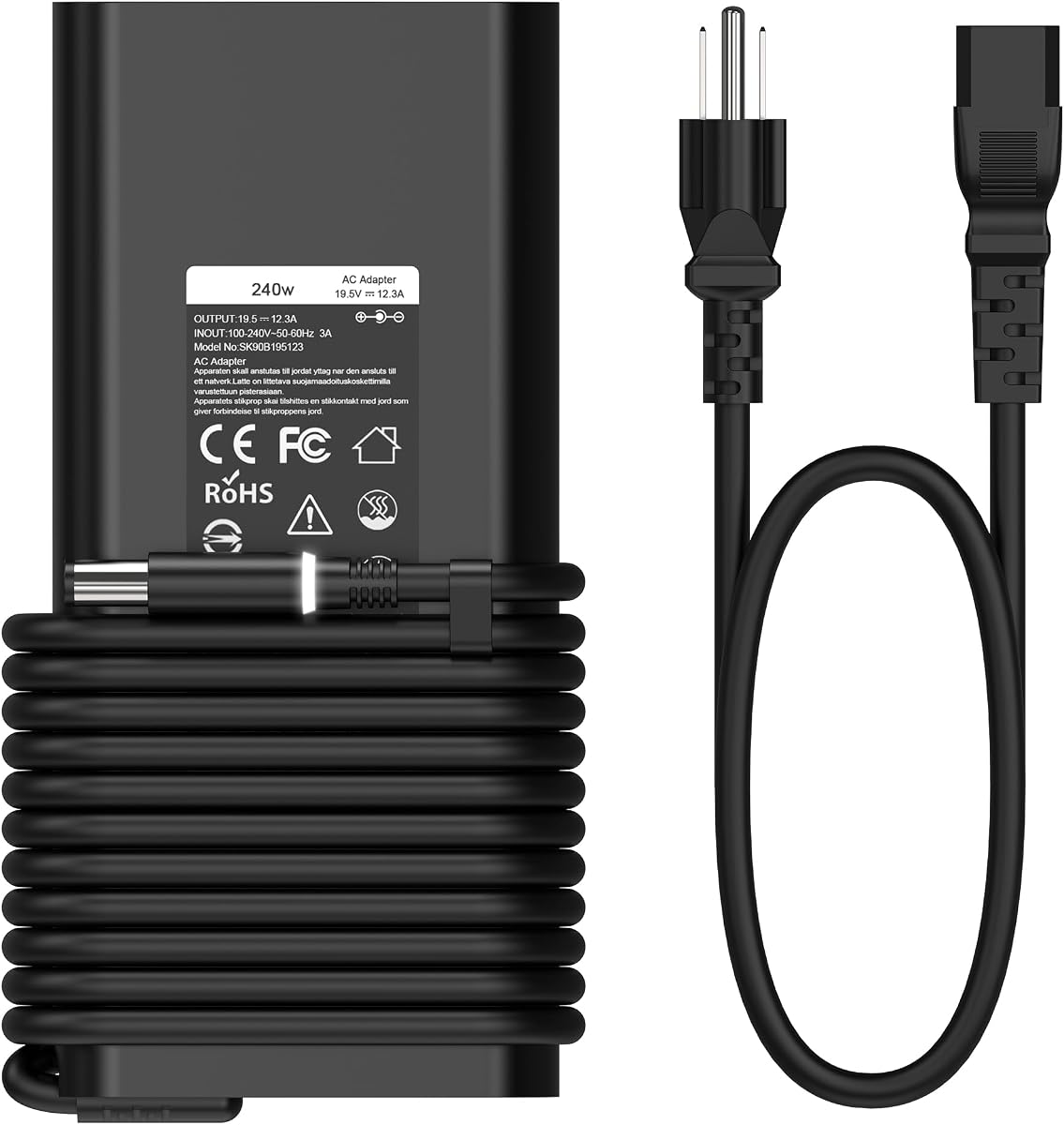
This charger delivers high power suitable for demanding Dell Alienware and Precision laptops. Its slim design is convenient for travel. It supports multiple wattage requirements across different series.
We may earn a commission when you buy through this link, at no additional cost to you.
It is compatible with Alienware, Precision, and G Series models. The high wattage ensures that performance-intensive devices run without throttling. This is critical for gaming or heavy workloads.
The adapter is large due to the power requirements. It may not fit easily in smaller bags. However, for high-performance laptops, this size is often unavoidable.
Use this charger for your Alienware or Precision workstation. It provides the necessary power for intensive tasks. It is a reliable replacement for original high-wattage adapters.
Delivering 240W output, this charger supports demanding systems without performance throttling.
It works with Alienware, Precision, and G Series models ensuring broad utility.
We may earn a commission when you buy through this link, at no additional cost to you.
This charger provides maximum power for high-end Alienware laptops. The 330W output ensures full performance during gaming or rendering. It prevents throttling by maintaining stable power delivery.
We may earn a commission when you buy through this link, at no additional cost to you.
It is backward compatible with lower wattage devices. This flexibility allows one charger to serve multiple needs. The tip size matches the 7.4mm standard for Alienware.
The physical size is substantial due to the power handling. It is best for stationary use rather than frequent travel. However, it is a reliable power source for intensive tasks.
Choose this for your M16 or X17 Alienware laptop. It ensures consistent power for demanding applications. It is a top-tier option for power users.
The 330W output delivers stable power to prevent CPU and GPU thermal throttling.
It eliminates frame drops and stuttering during intensive gaming sessions.
We may earn a commission when you buy through this link, at no additional cost to you.
This kit converts USB-C PD power to various DC connector types. It includes 15 different tips to cover most laptop models. This universality makes it a flexible solution for diverse setups.
We may earn a commission when you buy through this link, at no additional cost to you.
The smart charging chip adjusts current automatically for safety. It supports up to 100W for fast charging capabilities. It is useful for connecting various devices to a single power source.
You must provide your own 20V PD power source. This adds a layer of dependency on an external adapter. However, it allows for portable charging solutions using power banks.
This kit is ideal for travelers with multiple devices. It simplifies carrying multiple chargers. It is a clever solution for consolidating power needs.
Includes 15 male jack plugs to match most laptop DC power ports.
Built-in intelligence chip adjusts current automatically for efficient and safe charging.
We may earn a commission when you buy through this link, at no additional cost to you.
Selecting the right battery backup involves understanding your specific power needs. This guide outlines key factors to consider before purchasing.
Ensure the backup solution matches your Dell laptop's power port. Many older models use round tips while newer ones use USB-C. Mismatched connectors can prevent charging or damage the device.
Verify the specific model number and connector size before buying to avoid return hassles.
For portable batteries, look for capacity measured in Wh or mAh. Higher values mean longer run times. Ensure the output wattage meets your laptop's minimum charging requirements.
Choose a unit that delivers at least the same wattage as your original charger for efficient power delivery.
Consider how long you need to work without wall power. Portable batteries usually offer 1-3 hours while UPS systems provide seconds to minutes. Match the duration to your usage scenarios.
If you need hours of runtime, invest in a high-capacity portable power bank.
UPS units are generally heavy and designed for stationary use. Portable banks are lightweight and fit in bags. Decide if you need a travel-friendly solution or a desktop protector.
For commuters, a compact portable charger is far more practical than a full UPS.
Fast charging features allow your laptop and the battery itself to recharge quickly. Look for Power Delivery (PD) support for modern Dell models. Recharge time for the backup unit itself is also critical.
Prioritize models with two-way fast charging to minimize downtime between uses.
Electrical safety is paramount when dealing with power backups. Look for certifications like UL or CE. Ensure the unit includes protection against overvoltage and overheating.
Always choose products from reputable brands that explicitly state safety compliance.
Check the warranty terms provided by the manufacturer. A longer warranty period usually indicates better product quality. Read customer reviews to gauge long-term reliability.
Opt for products offering at least a one-year limited hardware warranty.
Some units include USB hubs or pass-through charging. Others have digital displays for battery status. Determine which extra features add value to your workflow.
Features like ECO mode or pass-through charging can improve overall energy efficiency.
When using a portable battery, connect the cable to your laptop before powering on the unit. This ensures a stable handshaking process for charging. Avoid connecting and disconnecting repeatedly while the laptop is running.
For UPS units, ensure they are plugged into a grounded wall outlet. Connect your laptop and monitor to the battery-backed outlets specifically. This protects your device during sudden power loss.
Store your portable battery at room temperature and charge it fully before long periods of non-use. Extreme cold or heat can degrade the battery life over time. Periodically check your UPS to ensure it remains operational.
Yes, you can use a power bank if it supports the correct output voltage and connector type. USB-C PD power banks work well with newer models. Older laptops may require specific adapters or higher wattage outputs.
A UPS typically provides enough runtime to save your work and shut down safely. This usually ranges from a few minutes to ten minutes depending on load. It is not designed for long-duration usage.
A UPS is designed for stationary desktop use with multiple outlets. Portable batteries are compact and designed for laptops on the go. UPS systems offer surge protection while banks offer mobility.
Dell XPS models with USB-C ports often use standard PD chargers. However, older models may require specific barrel connectors. Always check your model specifications to ensure compatibility before buying.
Third-party chargers are safe if they meet safety standards and match your laptop's voltage. Look for certified products like UL or CE listed chargers. Avoid cheap generic adapters that lack safety mechanisms.
Test your backup by unplugging the wall power and verifying that your laptop stays on. Check the device's LED indicators or display for power status. Regular testing ensures it will function when needed.
We have reviewed a wide range of options from robust UPS units to portable power banks. Each product offers unique benefits for different user needs and environments. The CyberPower EC850LCD and UGREEN Power Bank top our list.
Consider your specific requirements regarding mobility and power capacity. If you work in a fixed location, a UPS provides the best protection. For travelers, a high-capacity portable battery is essential.
Always verify the current availability and specifications before making your purchase. Prices and stock levels can change frequently. Choose the solution that best fits your daily workflow and usage habits.