
Dell Desktop Computer Package
3.8Editor score
8GB RAM memory
500GB HDD storage
19-inch LCD display
This guide compares the top desktop computers for kids focusing on performance, durability, and value to help parents choose the right system for home learning
Finding the right desktop computer for kids is essential for supporting their education and creative play. A good machine should balance performance with ease of use, ensuring smooth operation for school tasks and entertainment.
We compared ten real products based on processor power, memory capacity, storage options, and overall build quality. Our review highlights systems that offer reliable performance for students and families seeking value.
Each pick shows key features and ratings to help you decide quickly. Prices change often so check current listings before buying. These systems support learning, creativity, and family connectivity at home.
3.8Editor score

3.5Editor score

4.5Editor score
This table compares all ten systems side by side. Review processor cores, memory size, storage type, and display quality to find the best fit for your child needs and home setup requirements.




This HP Elite desktop delivers solid performance with a Core i5 and 16GB RAM making it strong for school tasks and media. It has a 22 inch LED monitor and Windows 11 Pro for a modern experience.
We may earn a commission when you buy through this link, at no additional cost to you.
The 16GB RAM allows smooth multitasking across browser tabs and apps while the 1TB HDD offers ample room for projects and files. RGB keyboard and mouse add style for young users.
As a renewed unit it may show minor wear and uses an HDD instead of SSD so speeds are moderate. These trade-offs are acceptable given the value and feature set for home learning.
Buyers seeking a balanced PC with good memory and screen size will find this a practical choice for kids needing reliable performance for school and play.
The 16GB RAM ensures multiple apps run smoothly without lag during homework and media streaming.
The 22 inch monitor provides a clear view for reading and creative projects at home.
We may earn a commission when you buy through this link, at no additional cost to you.
This HP All-in-One offers a clean setup with a 21.5 inch FHD display and Intel N100 processor for basic school and media tasks. It comes with keyboard mouse and docking hub for convenience.
We may earn a commission when you buy through this link, at no additional cost to you.
The screen provides clear text and images ideal for reading and videos while Windows 11 supports modern apps. The docking hub adds extra connectivity for peripherals and storage cards.
Eight gigabytes of RAM may limit heavy multitasking and storage is modest for large libraries. These limits are acceptable for everyday learning and light home use at a good price.
Families wanting a tidy desk solution with reliable performance for kids will appreciate this all-in-one design and included accessories.
The combined design reduces cable clutter and saves space on crowded desks at home.
Included hub expands ports and storage options for easy connection of devices and cards.
We may earn a commission when you buy through this link, at no additional cost to you.
This HP Elite desktop brings premium features with 16GB RAM and 1TB storage alongside a 22 inch LED monitor and Windows 11 Pro. It is designed for users needing power and extra space.
We may earn a commission when you buy through this link, at no additional cost to you.
The high memory supports smooth multitasking and the large drive holds many files. RGB accessories add a stylish touch appealing to younger users while the OS offers strong security.
As a renewed unit it may have minor cosmetic wear and relies on HDD for storage which is slower than SSD. These trade-offs are acceptable given the robust memory and storage capacity.
Buyers looking for a feature-rich system with extra RAM and storage will find this a solid choice for kids needing reliable performance and space.
The 1TB HDD provides room for school projects media and apps without frequent cleanup.
Windows 11 Pro offers latest security features and tools for safer home computing.
We may earn a commission when you buy through this link, at no additional cost to you.
This HP all-in-one combines a 21.5 inch FHD screen and Intel N100 in a compact unit ideal for home learning and browsing. It includes keyboard mouse and docking hub for full setup.
We may earn a commission when you buy through this link, at no additional cost to you.
The display shows clear visuals for reading and videos while the hub expands connectivity for peripherals. Windows 11 provides a familiar interface for kids and parents alike.
Eight gigabytes of RAM and basic processor may limit heavy tasks but suffice for school work and media. These limits are acceptable for typical home use and browsing needs.
Families seeking a tidy desk solution with reliable performance for kids will find this system practical and easy to use daily.
The integrated monitor reduces clutter and frees up space for other items.
Keyboard mouse and hub ship ready for quick setup without extra buys.
We may earn a commission when you buy through this link, at no additional cost to you.
This Dell OptiPlex offers a huge 2TB HDD and 16GB RAM with a Core i5 processor and 22 inch monitor for solid multitasking and media storage. It includes RGB keyboard and mouse for style.
We may earn a commission when you buy through this link, at no additional cost to you.
The large drive fits many files and apps while RAM supports smooth operation across tasks. WiFi and Windows 11 Pro add connectivity and modern features for home use.
As a renewed unit it may show wear and the older CPU is less efficient than new chips. These trade-offs are acceptable given the storage and memory value for families.
Buyers needing extra space for files and good multitasking will find this system a practical choice for kids and home office tasks.
Two terabytes hold extensive media projects and documents without running out.
Sixteen gigabytes of RAM enable smooth switching between apps and browsers.
We may earn a commission when you buy through this link, at no additional cost to you.
This HP desktop delivers fast performance with an SSD and 16GB RAM and Intel i5 processor for smooth multitasking and quick launches. It includes 24 LCD and WiFi 6 for modern connectivity.
We may earn a commission when you buy through this link, at no additional cost to you.
The SSD ensures quick boot and app start while RAM supports heavy browsing and apps. RGB keyboard and mouse add style and built-in webcam aids video calls.
As a renewed unit it may have minor wear and the small case limits expansion. These trade-offs are acceptable given the speed and memory for daily home use.
Families seeking fast performance and reliable storage for kids will find this system a solid choice for learning and play.
The SSD enables quick startup and faster app loads than traditional drives.
WiFi 6 ensures stable and fast connections for streaming and downloads.
We may earn a commission when you buy through this link, at no additional cost to you.
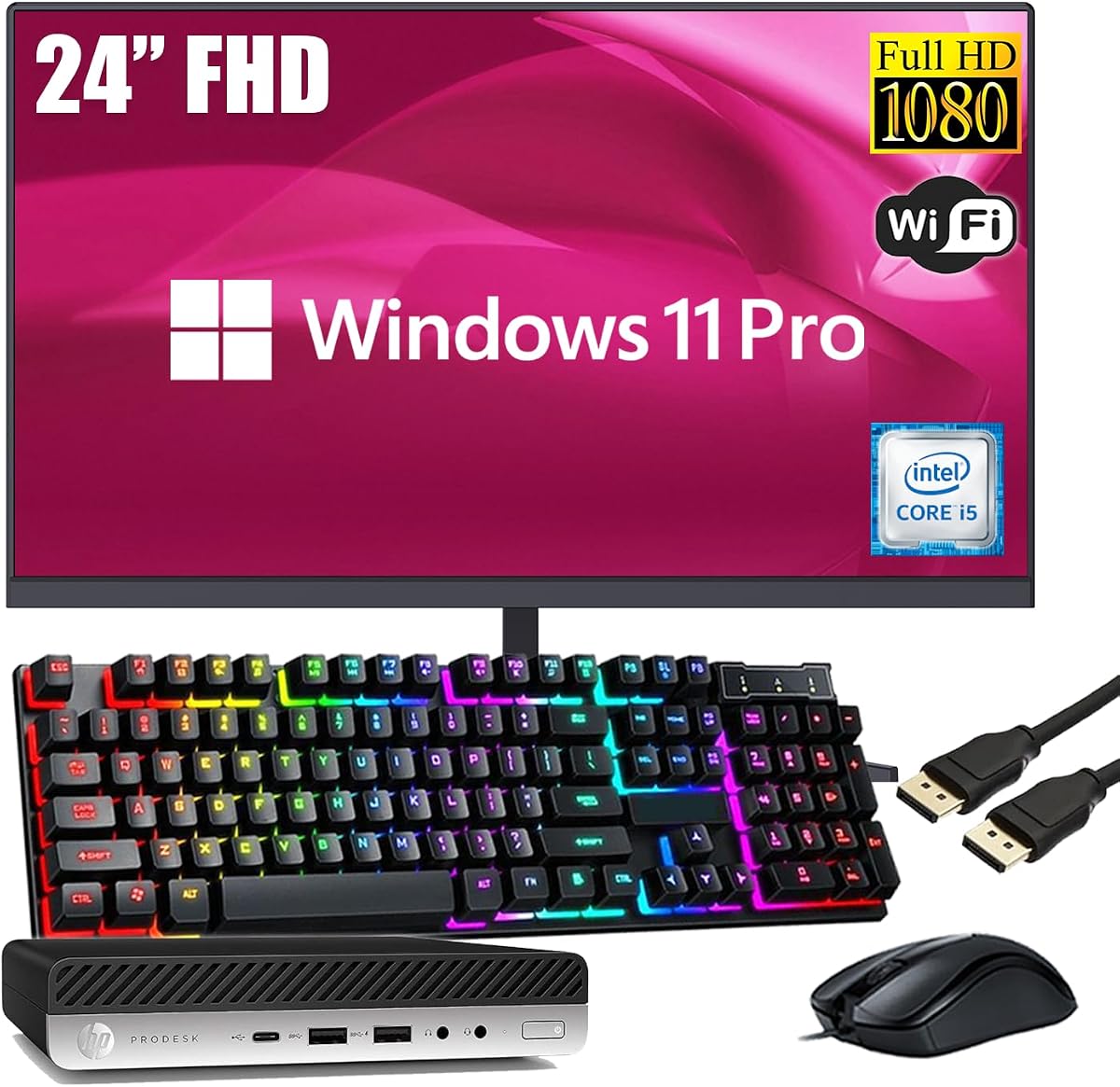
This HP ProDesk mini offers a compact design with an SSD and 8GB RAM for reliable school and home tasks. It includes 24 LCD and USB-C for modern connectivity and setup.
We may earn a commission when you buy through this link, at no additional cost to you.
The SSD enables quick boot and apps while the small case saves desk space. Windows 11 Pro adds security and tools for parents managing devices.
Eight gigabytes of RAM and 256GB SSD may limit heavy use but suit typical schoolwork and browsing. These limits are acceptable for kids and basic home computing needs.
Buyers wanting a tidy fast desktop for kids will find this system practical and easy to manage in any room.
The mini design reduces clutter and frees space for other items.
USB-C port supports modern peripherals and charging options for accessories.
We may earn a commission when you buy through this link, at no additional cost to you.
This Lenovo All-in-One delivers a clean setup with 16GB RAM and 256GB SSD for smooth multitasking and quick app loads. It includes 24 FHD IPS and WiFi 6 for strong connectivity.
We may earn a commission when you buy through this link, at no additional cost to you.
The IPS screen shows clear visuals for work and media while RAM supports many browser tabs. Wireless keyboard and mouse plus Bluetooth simplify desk setup for users.
The basic CPU and non-touch screen limit some tasks but suit daily school and office needs. These limits are acceptable given the memory and wireless ease of use.
Families wanting a tidy system with good memory and connectivity will find this a practical choice for kids and home work.
The IPS display provides consistent color and view angles for all users.
Included wireless keyboard and mouse reduce cable clutter and simplify setup.
We may earn a commission when you buy through this link, at no additional cost to you.
This Lenovo all-in-one offers a sleek borderless display with 16GB RAM and 512GB SSD for smooth multitasking and quick loads. It includes HD webcam and modern ports for connectivity.
We may earn a commission when you buy through this link, at no additional cost to you.
The large SSD stores plenty of files and RAM supports many apps at once. Borderless design provides immersive viewing for media and work at home.
The basic CPU limits heavy tasks and lack of optical drive may affect legacy media. These limits are acceptable for typical school and media needs.
Families wanting a tidy system with good memory and visuals will find this a practical choice for kids and home office use.
The borderless design offers an immersive viewing experience for media and work.
512GB SSD holds ample files and apps for students and home users.
We may earn a commission when you buy through this link, at no additional cost to you.
This Dell package includes a reliable tower with HDD and 8GB RAM for basic school and browsing tasks. It comes with keyboard mouse and DVD drive for legacy media and setup.
We may earn a commission when you buy through this link, at no additional cost to you.
The system supports Windows 11 Pro and offers WiFi for connectivity while including common accessories for quick setup. DVD drive helps with older discs and software installation.
Older display and HDD speed limit performance but suffice for essential tasks and learning. These limits are acceptable for families seeking basic reliable computing at home.
Buyers needing a classic setup with DVD and WiFi will find this system a practical choice for kids and home use.
Built-in DVD drive allows reading legacy media and software discs at home.
Keyboard and mouse included allow quick plug and play without extra buys.
We may earn a commission when you buy through this link, at no additional cost to you.
Selecting the right desktop for kids means balancing performance with ease of use. Consider memory storage display and form factor to match learning needs and home space.
Choose at least an Intel i5 or N100 for smooth browsing and apps. Avoid older cores that may lag with many tabs.
Look for quad cores or better for reliable daily performance.
Eight gigabytes is the minimum for school work and eight tabs. Sixteen gigabytes supports heavier multitasking and growth.
Opt for 16GB if your child uses many apps at once.
SSDs deliver faster boot and app loads than HDDs. Aim for at least 256GB SSD for speed and reliability.
If using HDD choose larger capacity for media storage.
Pick a Full HD screen with IPS panel for clear text and wide angles. Size between 21 and 24 inches suits most desks.
Ensure anti-glare and good brightness for comfort.
All-in-ones save space and reduce cable clutter while towers allow upgrades. Choose based on desk size and future needs.
Mini PCs work well for compact home offices.
Wi-Fi 6 and Bluetooth support modern peripherals and fast internet. Ensure enough USB ports for devices and charging.
Include Ethernet if stable wired internet is needed.
Windows 11 offers latest features and security for home use. Ensure it is activated and updated out of the box.
Avoid bloatware that can slow the system.
Look for included keyboard and mouse to simplify setup. Some bundles add speakers or webcams for calls.
Check accessory quality to avoid extra purchases.
Place the desktop on a stable surface with room for airflow to avoid overheating. Keep vents clear of dust and objects for safe operation.
Connect peripherals securely and update drivers regularly for best performance. Use power management settings to save energy when idle.
Teach kids safe browsing and software practices to maintain system health. Clean the screen with a soft cloth to protect the display.
Aim for at least 8GB RAM and a Full HD display with SSD storage for speed. An Intel i5 or N100 processor ensures smooth browsing and school apps.
All-in-ones reduce clutter and simplify setup by combining monitor and PC. They suit home desks where space and ease of use are priorities.
Renewed units offer strong value with tested components and warranty. New systems guarantee zero wear but cost more for similar specs.
At least 256GB SSD helps store files and apps without slowdown. Larger 512GB or 1TB drives support growing media and project needs.
Mini and all-in-one models limit upgrades while some towers allow RAM and storage expansion. Check specs for future-proofing before purchase.
Windows 11 includes parental controls and security tools for safe browsing. Keep it updated and configure settings to limit access.
Most include webcams and microphones with speakers for calls. Ensure good lighting and quiet space for clear online meetings.
These ten desktops offer reliable choices for kids with balanced memory storage and display options. Our top picks highlight systems with strong multitasking and clear screens.
Prioritize SSD storage and at least 16GB RAM for smooth performance. Choose all-in-one or mini designs to fit your home desk and workflow.
Prices and availability change so check current listings before buying. Use this guide to match specs to your child needs for success.