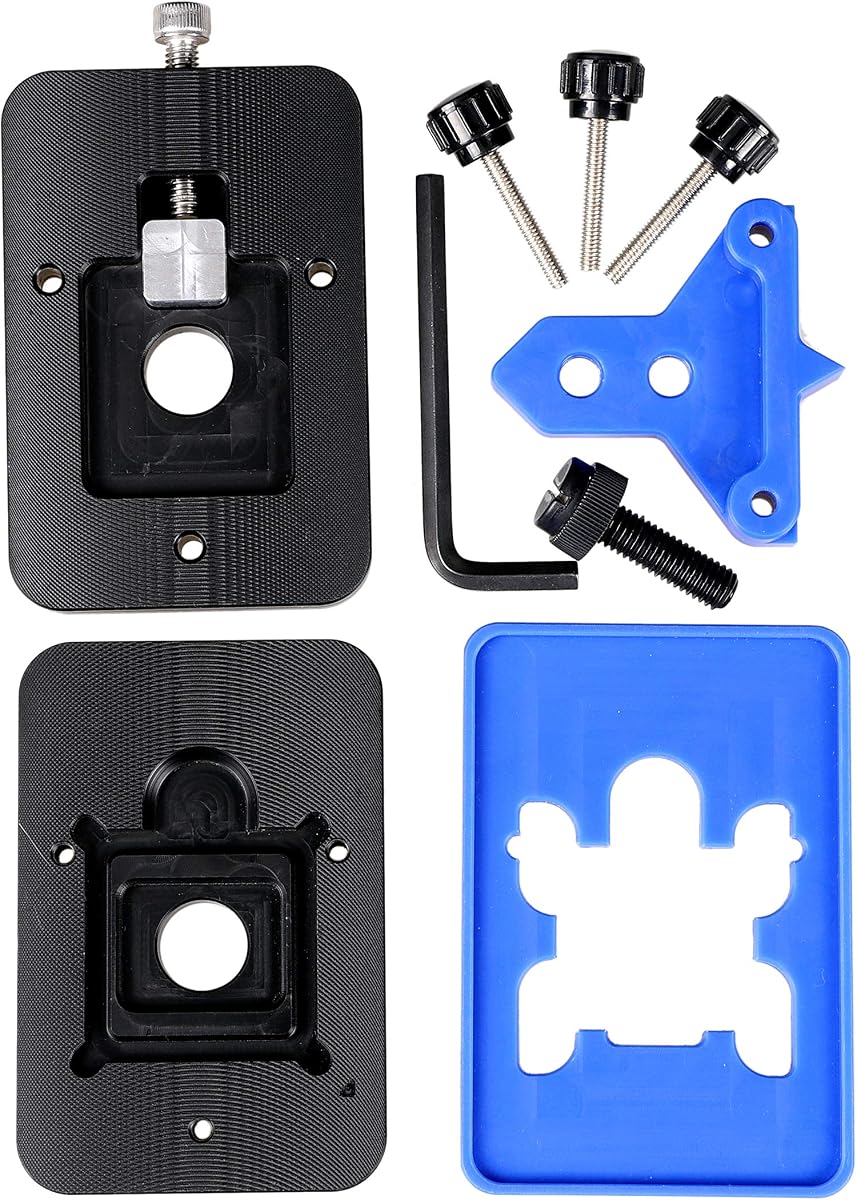
EG Starts Kaby Intel CPU Delid Tool
4.6Editor score
Compatible with Kaby and Coffee Lake
Includes relid tool for LGA 1150
Safe and easy delidding method
This guide compares the top 10 delidding kits for CPUs and GPUs, evaluating tools for precision, safety, and compatibility across various processor generations
Delidding kits are essential tools for enthusiasts seeking to improve thermal performance by removing the integrated heat spreader from processors. These kits provide specialized blades and guides to safely separate the silicon die from the metal cover without causing damage.
We evaluated each kit based on blade precision, material durability, compatibility with specific sockets or consoles, and user safety features. Our analysis includes tools designed for CPUs, GPUs, and specific gaming consoles to ensure broad applicability.
Each review highlights key features, pros, cons, and ideal use cases to help you choose the right tool for your repair needs. Please note that product availability and prices may vary over time, so verify details before purchasing.
4.6Editor score

4.5Editor score

4.1Editor score
The following comparison table outlines key specifications and compatibility details for each kit to help you quickly identify the right tool for your specific hardware needs.


The Thermal Grizzly Delid-Die-Mate stands out as a premium option for Intel enthusiasts. Rated 4.5 stars, it combines safety with performance to help users achieve direct die cooling safely.
We may earn a commission when you buy through this link, at no additional cost to you.
This tool was developed by Roman der8auer Hartung, a known figure in the thermal community. Its anodized aluminum construction ensures durability while providing a stable platform for removing the integrated heat spreader.
While it excels in compatibility with modern Intel CPUs, it may not suit those working with older sockets. The precision design minimizes risk but requires a steady hand and some technical confidence.
If you own a 12th or 13th Gen Intel processor and want to maximize cooling potential, this kit offers the reliability and safety features needed for successful delidding.
The design ensures that the blade engages the heat spreader correctly without risking damage to the silicon die underneath.
Anodized aluminum protects the tool from wear and tear, ensuring it lasts through multiple delidding projects.
We may earn a commission when you buy through this link, at no additional cost to you.
The EG Starts Kaby Intel CPU delid tool offers an accessible entry point for users looking to try delidding without breaking the bank. With a high rating of 4.6, it is praised for its ease of use and safety features.
We may earn a commission when you buy through this link, at no additional cost to you.
It covers a broad range of sockets including LGA 775, 1150, and 1151, making it ideal for owners of older Intel systems. The included relid tool ensures you can safely reassemble your CPU after thermal paste replacement.
The design prioritizes safety by using a block that prevents the blade from digging into the PCB. However, the plastic elements may not offer the same long-term durability as all-metal tools found in higher-end kits.
For budget-conscious users with compatible hardware, this kit provides a reliable way to improve cooling performance while minimizing risk during the delidding process.
The square aluminum block ensures the blade aligns correctly, preventing accidental damage to the CPU board.
Users report consistent results when removing the IHS, making it a solid choice for first-time delidders.
We may earn a commission when you buy through this link, at no additional cost to you.
Designed for Intel Skylake-X and Kaby Lake-X processors, the der8auer Delid-Die-Mate X caters to users working with high-end desktop platforms. Its 4.1 rating reflects a balance of quality and specificity for niche hardware.
We may earn a commission when you buy through this link, at no additional cost to you.
The tool features a stainless steel blade and anodized aluminum body, providing robustness for the difficult task of removing IHS from larger, more fragile CPUs. It ensures a consistent mounting height for coolers post-delidding.
While it is highly effective for its intended use, the high cost and limited socket range mean it is not a general-purpose purchase. It is best suited for those who specifically need it for Socket 2066 CPUs.
If you are tackling a high-performance workstation CPU and want a tool trusted by the professional community, this kit delivers the precision and durability required for such demanding tasks.
This tool is engineered specifically for the unique dimensions of Skylake-X and Kaby Lake-X processors.
The combination of stainless steel and aluminum ensures the tool remains stable and effective over time.
We may earn a commission when you buy through this link, at no additional cost to you.
This tool is designed specifically for the RSX GPU found in PlayStation 3 Fat and Slim models. It allows users to safely remove the integrated heat spreader to replace aged thermal paste, addressing common overheating issues.
We may earn a commission when you buy through this link, at no additional cost to you.
Unlike general CPU tools, this kit considers the unique layout of the PS3 board. It helps keep the working edge away from the mainboard, reducing the risk of accidental damage during the delicate removal process.
While effective for its specific purpose, it is not suitable for the CELL CPU or Super Slim models. The utility is limited to those with the exact console version requiring GPU maintenance.
If you are looking to restore a PS3 that suffers from thermal throttling, this tool provides the necessary access to the RSX chip for effective thermal maintenance.
The tool is tailored for the geometry of the RSX chip, ensuring better fit than generic alternatives.
Access to the thermal paste layer allows for a significant reduction in operating temperatures.
We may earn a commission when you buy through this link, at no additional cost to you.
Rated 4.6 stars, this tool is purpose-built for delidding gaming consoles to address overheating and performance issues. It offers a safer alternative to improvised solutions that often lead to costly damage.
We may earn a commission when you buy through this link, at no additional cost to you.
Version 3 of the tool features a sharper, more flexible blade for improved durability. The inclusion of three blades ensures you have backups, maintaining long-term usability without needing extra purchases.
The design reduces risks compared to using knives or screwdrivers, providing a guided approach to IHS removal. However, it remains limited to the PS3, so it is not a versatile option for PCs.
For PS3 owners looking to improve thermal performance safely, this kit provides the precision and convenience needed for successful maintenance without specialized experience.
The improved blade in Version 3 offers better flexibility, reducing the risk of snapping during removal.
Having multiple blades ensures that you can complete the job even if one blade becomes dull or damaged.
We may earn a commission when you buy through this link, at no additional cost to you.
This 12-in-1 handle metal craft knife set is engineered for a wide range of repair tasks. While not a dedicated delid tool, it offers the precision needed for adhesive removal and chip lifting on various boards.
We may earn a commission when you buy through this link, at no additional cost to you.
The ultra-thin, razor-sharp blades allow users to slide under components safely. With a non-slip metal handle, it provides the stability required for intricate work on sensitive electronics like CPUs and GPUs.
Since it lacks a specific guide for CPU IHS removal, it is best suited for experienced users who can manage the freehand precision required. It serves well as part of a broader toolkit.
If you perform complex repairs on smartphones or motherboards, this set offers a comprehensive range of tools that can adapt to various delicate tasks including thermal pad scraping.
The variety of blades allows this kit to be used for many repair scenarios beyond just CPU delidding.
Surgical precision blades enable safe interaction with components without causing scratches or short circuits.
We may earn a commission when you buy through this link, at no additional cost to you.
This kit is specifically designed for removing power supply units and dismantling chips with surgical precision. Its ultra-thin blades are smaller than solder points, allowing seamless movement between components.
We may earn a commission when you buy through this link, at no additional cost to you.
Made from SK5 steel, the blades offer high heat tolerance and oxidation resistance. The ergonomic handle ensures safe operation, while the non-slip design helps maintain control during detailed repair sessions.
While the rating is modest, the features suggest a solid build for specialized tasks. It requires care to avoid damaging PCB components, making it best for those with steady hands and board experience.
If your primary goal is BGA chip restoration or motherboard maintenance, this kit provides the thin, durable blades needed to navigate tight spaces without causing harm.
SK5 steel ensures the blades stay sharp and resist bending during demanding repair operations.
The ultra-thin profile allows for precise scraping between components where standard tools cannot fit.
We may earn a commission when you buy through this link, at no additional cost to you.
This acrylic scraper is ideal for cleaning off adhesive and solder residue after delidding. Its non-metallic construction ensures that it does not scratch or damage the CPU die or PCB during cleanup.
We may earn a commission when you buy through this link, at no additional cost to you.
Rated 4.8 stars, it is trusted by users who prioritize safety on sensitive surfaces. The narrow tip is designed to access tight spots, making it easy to remove leftover glue without risking shorts.
As it is not designed for the actual removal of the heat spreader, it is best paired with a dedicated delidding tool. However, for the post-delidding cleanup phase, it is highly effective.
For anyone performing delidding, having a safe tool to remove residue is crucial. This scraper ensures that your CPU is perfectly prepped for new thermal paste without damage.
Acrylic material prevents scratching the silicon die, ensuring the CPU remains intact for future use.
The ergonomic design allows for precise control, speeding up the cleanup process after heat spreader removal.
We may earn a commission when you buy through this link, at no additional cost to you.
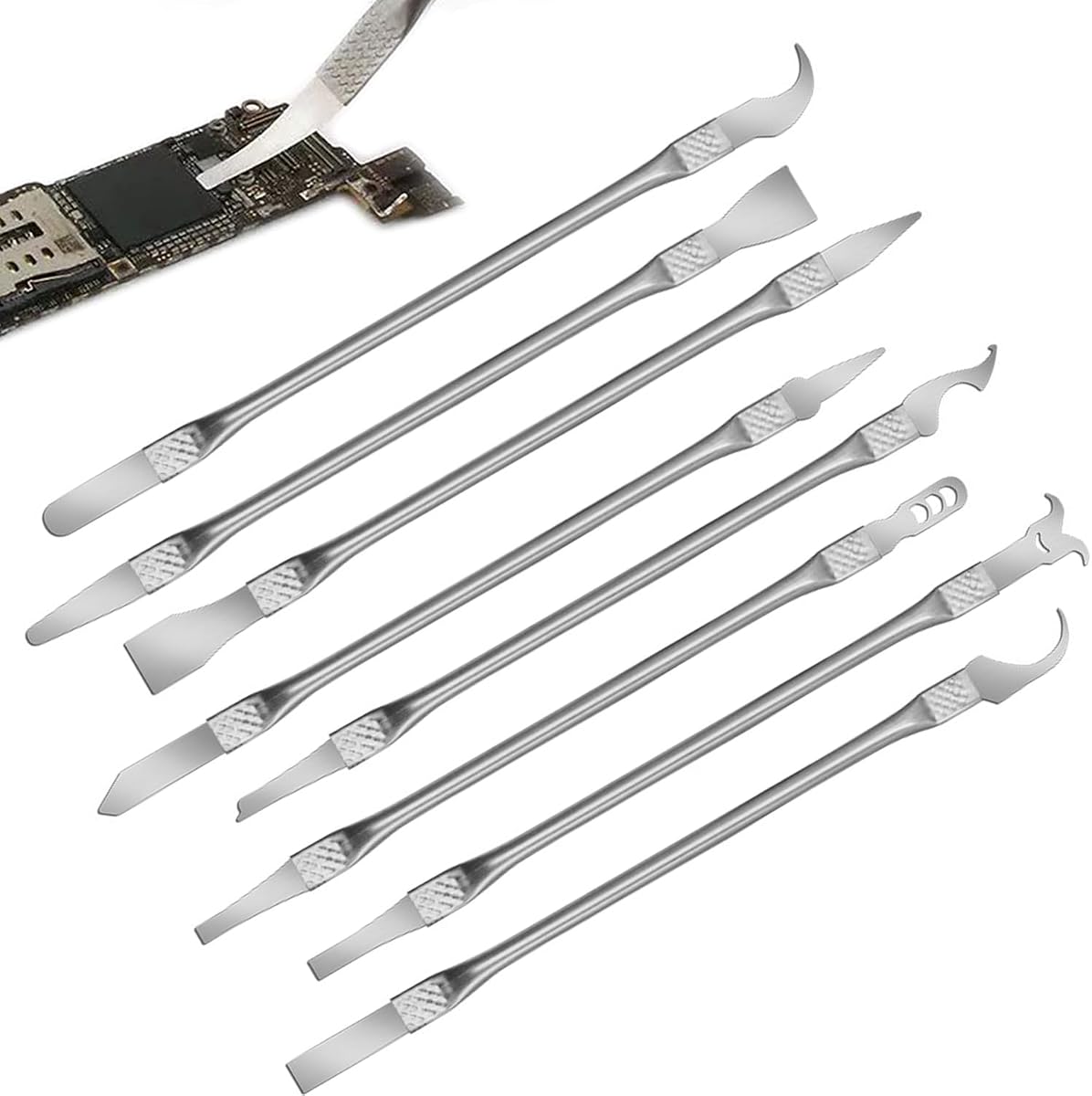
This 8-piece set offers versatile tools for safely removing BGA chips and CPUs from smartphones and motherboards. The tools are made from high-quality alloy, resistant to corrosion and bending for longevity.
We may earn a commission when you buy through this link, at no additional cost to you.
Rated 4.0 stars, it provides a time-saving solution with integrated blade and handle designs. The ergonomic shape ensures a comfortable grip, reducing hand fatigue during extended repair sessions on small components.
While it covers general repair needs well, it may lack the specific guidance of a dedicated CPU delid tool. It is best suited for users who need a broad set of tools for various electronics projects.
If you value cost-effectiveness and versatility in your repair toolkit, this set provides reliable tools for a range of tasks beyond just CPU maintenance.
With multiple pieces, this set can handle various removal tasks across different devices and components.
High-quality alloy ensures the tools withstand repeated use without degrading or rusting over time.
We may earn a commission when you buy through this link, at no additional cost to you.
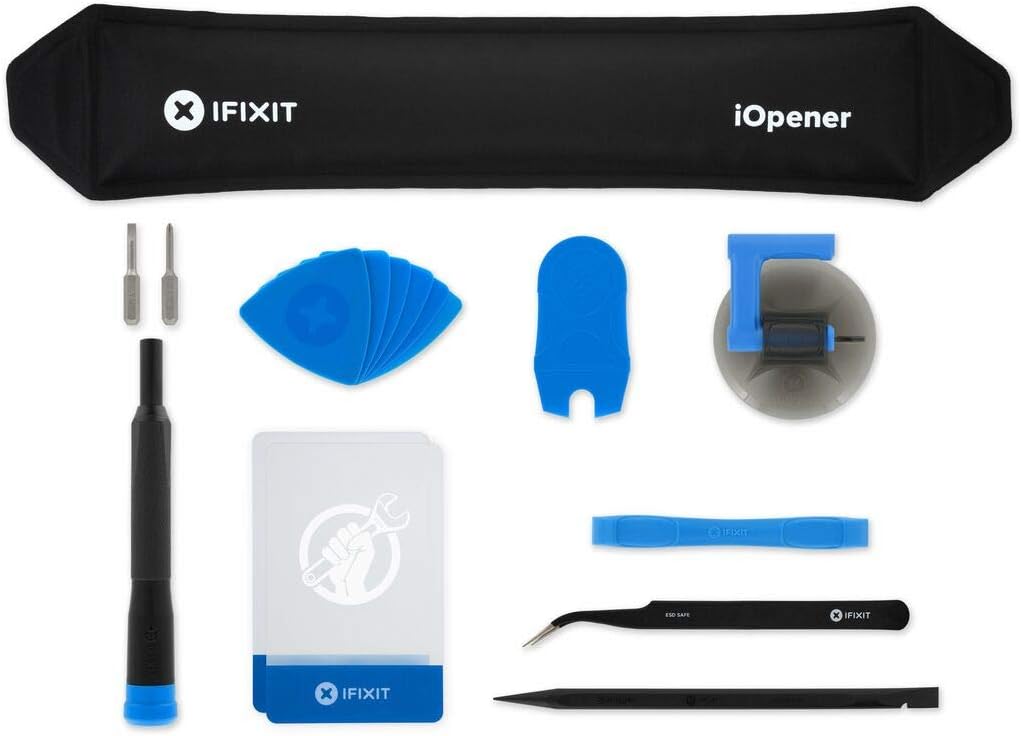
While not a blade-based delid tool, this heat pad is essential for loosening adhesive on screens and devices. It applies heat evenly, helping to separate components without forceful prying that could cause cracks.
We may earn a commission when you buy through this link, at no additional cost to you.
Rated 4.5 stars, it is designed for universal use on tablets, phones, and laptops. The material is non-toxic and food-safe, ensuring safety during DIY repair tasks that involve heat application.
For CPU delidding, heat can sometimes help soften adhesives holding the IHS, but this tool is not a substitute for a precision blade. It works best alongside other tools for comprehensive repairs.
If you frequently repair consumer electronics and need a reliable way to soften adhesives safely, this heat tool offers a safe and effective solution for your toolkit.
Works across a wide range of devices, making it a versatile addition for any home repair setup.
Non-toxic materials ensure that the tool is safe to handle and use even for beginners in DIY repair.
We may earn a commission when you buy through this link, at no additional cost to you.
Selecting the right delidding kit requires considering compatibility, safety features, and material quality to ensure successful thermal improvements.
Ensure the tool supports your specific CPU socket or console model. Some kits are designed for Intel sockets like LGA 1150, while others target consoles like the PS3.
Always verify the kit works with your hardware before purchasing to avoid wasted time and money.
High-quality blades made from stainless steel or SK5 offer better durability and sharpness. This ensures precise cuts without snapping under pressure.
Durable materials also reduce the risk of accidental slips that could harm your expensive components.
Look for kits that include guides or blocks to prevent the blade from digging into the PCB. These features minimize the risk of shorts or physical damage.
Safety should be a top priority, as improper tools can permanently damage your processor or motherboard.
An ergonomic handle provides better control and reduces hand fatigue during the precise movements required for delidding.
Tools with non-slip grips are generally easier to use for beginners and professionals alike.
Multi-function kits may offer blades for different tasks, such as cutting or scraping, which adds value if you perform varied repairs.
Consider whether you need a specialized tool or a set that can handle other electronics maintenance.
Kits that include extra blades or relid tools offer convenience and ensure you can complete the process from start to finish.
Additional accessories can save you from needing to buy separate items for cleaning or reassembly.
Robust materials like anodized aluminum provide stability and longevity for the tool itself, ensuring it remains reliable over multiple uses.
A well-constructed tool reduces wobble and improves precision during the removal process.
Balance the price of the kit against its features and durability. Budget options may be sufficient for occasional use, while premium tools offer better precision.
Invest in a kit that meets your needs without overspending on features you may not use.
Always prepare a clean, static-free workspace before starting your delidding project. Ensure you have the right thermal paste and tools ready to minimize exposure time.
When using a delid tool, align the blade carefully with the heat spreader edge and apply gentle, steady pressure. Avoid forcing the tool, as this can crack the die or damage the PCB.
After delidding, clean any adhesive residue carefully with appropriate solvents or tools like an acrylic scraper. Store your tools in a dry place to prevent rust and preserve blade sharpness.
A delidding kit is a set of tools designed to help you remove the integrated heat spreader (IHS) from a CPU or GPU. This process exposes the silicon die directly, allowing for better thermal paste application and improved cooling performance.
Yes, delidding can void your warranty and poses a risk of damaging the CPU if done incorrectly. Proper tools and careful handling are essential to avoid cracking the silicon die or damaging the motherboard.
A relid tool helps you reinstall the IHS after thermal paste replacement. It ensures the heat spreader sits flat and secure, which is important for maintaining cooling efficiency and protecting the die.
Stainless steel and SK5 steel are preferred for their sharpness and durability. These materials resist wear and provide the precision needed to safely separate the IHS from the die.
No, most kits are specific to certain sockets or console models. Always check the product description to ensure compatibility with your CPU generation or gaming console.
Proper delidding can lower CPU temperatures by 10 to 20 degrees Celsius depending on the model. This can lead to better thermal throttling performance and more stable overclocking.
Choosing the right delidding kit depends on your specific hardware and comfort level with repair tasks. From budget options to premium precision tools, there are solutions for every user.
Prioritize safety features and compatibility to ensure your efforts result in better cooling without risking hardware damage. Consider investing in a kit that includes extra blades or accessories for convenience.
Always check the latest product details and prices before buying, as availability can change quickly. With the right tool, you can unlock the full thermal potential of your system.