
HiFi DAC Pro Hat with ES9038Q2M Chip
4.5Editor score
ESS ES9038Q2M Flagship Chip
Supports DSD512 Audio
Balanced Output Options
This guide compares the top DAC for Raspberry Pi models to help you choose the best audio upgrade for your media center or music streaming project.
Adding a dedicated DAC for Raspberry Pi transforms your project into a high-fidelity music system. These boards bypass the weak internal audio to deliver clear, detailed sound for headphones or speakers.
We evaluated ten top models based on chip quality, software support, and build features. Each product offers unique strengths for different budgets and use cases in the DIY audio world.
Every pick shows key specs and real-world performance notes to guide your decision. Prices change often so check the links for the latest deals before you buy your new gear.
4.5Editor score
4.5Editor score

4.8Editor score
This side-by-side comparison highlights the key specifications and features of the top ten DAC for Raspberry Pi options available today.


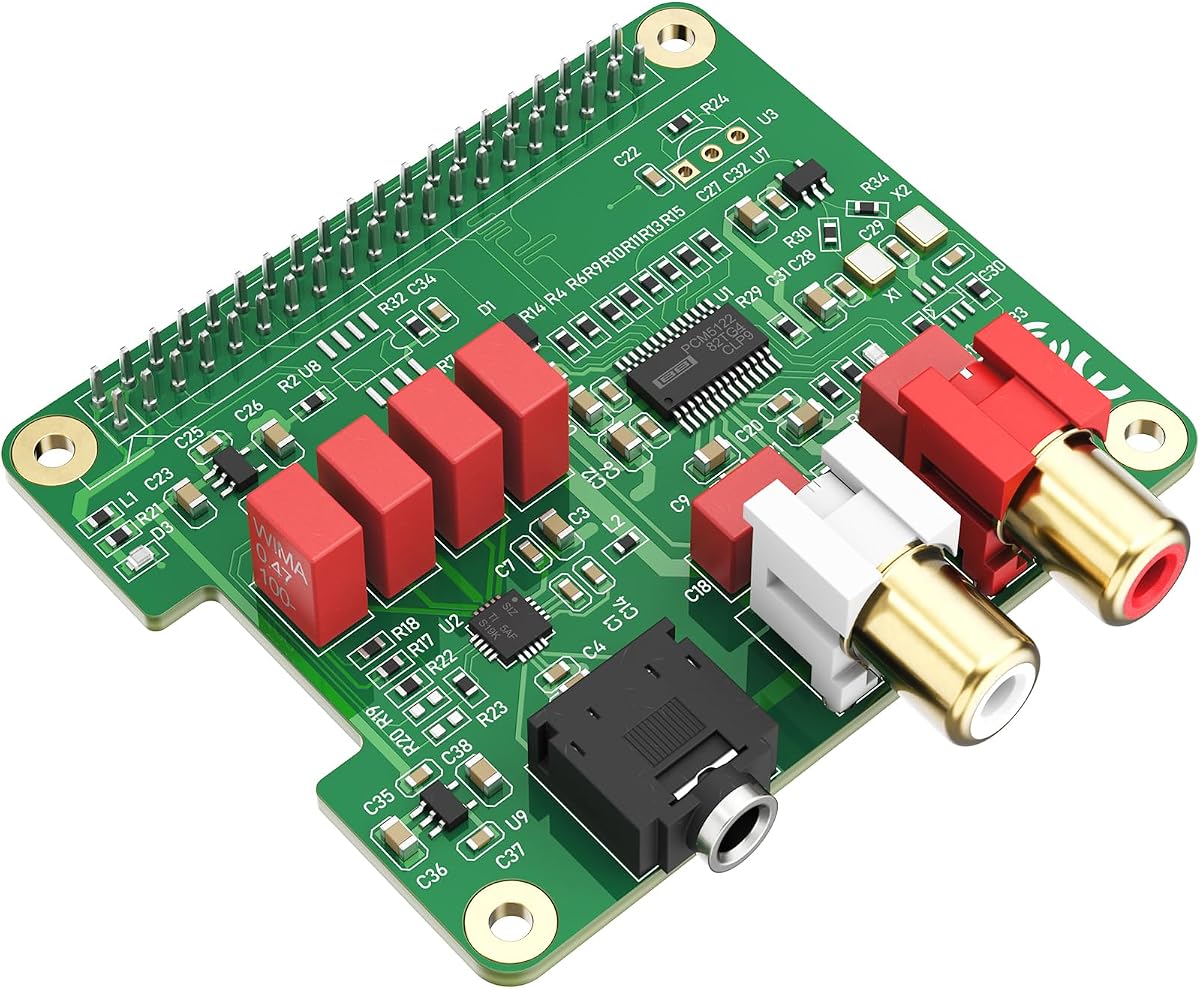
The HiFi DAC HAT stands out as the top choice for enthusiasts seeking studio-grade audio on a budget. It delivers a rich, detailed soundstage that dwarfs the onboard audio. With a 4.5 star rating this board is beloved for its balance of price and performance.
We may earn a commission when you buy through this link, at no additional cost to you.
Its core strength lies in the TI PCM5122 DAC coupled with dual ultra-low jitter oscillators. This setup ensures timing accuracy critical for high-resolution streaming. The onboard EEPROM allows seamless integration with popular OS choices like Volumio and Moode without manual config.
While the design is robust you may need to ensure your case has clearance for the GPIO header. Some users report needing extra standoffs to secure the board tightly. These are minor physical tweaks that do not impact the exceptional audio signal path.
Buy this if you want a reliable upgrade for a dedicated music server or media box. It supports both RCA line-level and headphone out cleanly. For most users this HAT provides the best overall value in the current market.
Using external clocks eliminates the Raspberry Pi internal jitter which improves clarity especially in quiet passages.
Pre-tested with major audio distros means you can start listening within minutes of booting up your system.
We may earn a commission when you buy through this link, at no additional cost to you.
This board is specifically designed to fit the Raspberry Pi Zero family without overhanging edges. It maintains full compatibility with larger models while saving space. The 4.2 star rating reflects its solid performance for tight enclosures.
We may earn a commission when you buy through this link, at no additional cost to you.
It pairs the PCM5122 DAC with a TPA6133 amplifier capable of 2.1Vrms output. This drives demanding headphones better than many competitors. The dual gold-plated outputs ensure secure connections for both speakers and personal listening.
The main trade-off is the lack of external oscillators which limits jitter reduction compared to pricier boards. However for casual listening the difference is often negligible. The value proposition remains strong for DIYers with small form factor needs.
Choose this if you are building a portable or wall-mounted Pi Zero player. It works seamlessly with Debian Ubuntu and standard distros. Its small footprint makes it ideal for projects where every millimeter counts.
The board is cut to match the Zero dimensions perfectly avoiding the need for bulky cases.
The integrated amplifier provides enough voltage to drive high-impedance headphones cleanly without extra gear.
We may earn a commission when you buy through this link, at no additional cost to you.
For those seeking ultimate fidelity this Pro Hat uses the flagship ESS ES9038Q2M chip. It delivers unmatched dynamic range and precision for critical listening. The 4.5 rating confirms it meets audiophile standards in a HAT form.
We may earn a commission when you buy through this link, at no additional cost to you.
It supports DSD512 playback and features three Texas Instruments op-amps for robust output. The balanced XLR outputs reduce noise when driving long cables or pro gear. Dual clocks ensure timing integrity across high sample rates.
The premium price and larger footprint mean it may not fit standard Zero enclosures. You will need to plan for a bigger case to house this board comfortably. These requirements are necessary to support its advanced circuitry and shielding.
Invest in this if you want a high-end DAC that rivals standalone units. It is perfect for a dedicated Hi-Fi streamer where sound quality is paramount. The extra cost buys real engineering upgrades that serious listeners will appreciate.
Direct DSD512 support allows native playback of high-res files without conversion artifacts.
Balanced XLR connections minimize interference for cleaner audio when using long interconnect cables.
We may earn a commission when you buy through this link, at no additional cost to you.
This Hat focuses purely on digital transmission to eliminate ground noise from the Pi. It uses galvanic isolation to protect downstream equipment from interference. The 4.8 star rating highlights its success in delivering clean digital signals.
We may earn a commission when you buy through this link, at no additional cost to you.
It offers both optical TOSLINK and coaxial RCA outputs for maximum flexibility. The dual low jitter oscillators ensure accurate clocking even across varied frequency ranges. This design is ideal for connecting to high-quality external DACs or amplifiers.
The lack of analog outputs means you cannot plug speakers directly into this board. You must have a separate DAC or amplifier with digital inputs to use it effectively. This limitation is intentional to prioritize signal purity above all else.
Select this if you already own a good DAC and need a clean source. It works with almost every Pi audio software including OSMC and Volumio. The isolation ensures your music signal remains pure regardless of Pi power noise.
Isolating power and signals blocks ground loops that cause hum in analog audio chains.
Bit perfect output ensures your external DAC receives exact data without any Pi modification.
We may earn a commission when you buy through this link, at no additional cost to you.
This module offers exceptional value by stripping back features to focus on core audio. It uses the trusted PCM5122 chip for rich sound at a minimal cost. The 4.8 rating proves users appreciate its high performance relative to price.
We may earn a commission when you buy through this link, at no additional cost to you.
It supports 120dB SNR and 384kHz sampling rates which are impressive for the cost. The LED indicators provide immediate visual feedback on power and decode status. This helps users quickly diagnose connection issues during setup.
Unlike HAT boards this module requires manual wiring to the GPIO header. There is no plug-and-play connector which can be challenging for beginners. You must follow pinout diagrams carefully to avoid damaging the Raspberry Pi board.
Pick this for simple projects where budget is the main constraint. It is compatible with older Pi models like 2 and B+. With careful wiring you get audiophile sound without spending a fortune on complex boards.
Direct I2S wiring keeps the signal path short and clean for better audio quality.
LED lights confirm the DAC is active and decoding audio without needing software checks.
We may earn a commission when you buy through this link, at no additional cost to you.
This Hat shines for its ease of use with the new EEPROM chip allowing instant recognition. It works across Pi 5 Zero and older versions without software fuss. The 4.2 rating indicates consistent performance for casual music listeners.
We may earn a commission when you buy through this link, at no additional cost to you.
It delivers a clean 32-bit 384kHz stream with a 112dB signal to noise ratio. The colorful PCB adds a nice aesthetic touch to visible builds. Users report it sounds significantly better than USB adapters in direct comparisons.
While the EEPROM helps it still needs a case that clears the GPIO pins. Some users note the build materials feel standard compared to premium boards. The audio quality remains excellent but the physical construction is simple.
Choose this for a simple upgrade that requires no terminal commands or drivers. It fits well in standard projects and offers reliable playback. The plug and play nature makes it great for quick media center builds.
The EEPROM chip handles identification so the Pi recognizes the board immediately on boot.
Works across all major Pi models from Zero to Pi 5 without needing version specific tweaks.
We may earn a commission when you buy through this link, at no additional cost to you.
Designed specifically for the Pi 5 this board addresses common noise issues with a built-in isolator. It earns a perfect 5.0 rating for its ability to remove unwanted hum. Users praise its ease of setup for quick projects.
We may earn a commission when you buy through this link, at no additional cost to you.
The PCM5122 codec ensures high fidelity sound while the isolator blocks electrical noise from the power supply. This combination results in a clean signal that improves headphone listening. It is tailored for modern Pi 5 power requirements.
The output is limited to a 3.5mm jack with no RCA options for line-out. You will need a splitter or adapter to connect to external speakers. This constraint keeps the board compact but limits flexibility for larger systems.
Select this if you want a silent, hum-free experience on a Pi 5. The isolator solves ground loops that often plague other cheap DACs. For simple headphone listening it offers a polished and effective solution.
Ground loop isolation removes hum caused by shared power grounds between Pi and audio gear.
Tailored to fit Pi 5 GPIO spacing perfectly without extra modifications needed.
We may earn a commission when you buy through this link, at no additional cost to you.
This advanced board adds a dedicated DSP chip to handle audio processing tasks efficiently. It supports room equalization and sample rate conversion directly on the hardware. The 4.1 rating reflects its specialized utility for technical users.
We may earn a commission when you buy through this link, at no additional cost to you.
It can run thousands of instructions per sample to adjust sound for room acoustics. The onboard EEPROM allows it to boot without a Pi for standalone DAC use. DSP parameters can be changed dynamically via software commands.
It is quite expensive compared to standard HATs and requires a specific case type for fit. This adds to the total project cost and limits enclosure choices. Users must invest time in setting up the DSP for best results.
Use this if you need room correction or complex audio routing without CPU load. It is ideal for dedicated Hi-Fi setups requiring precise tuning. The standalone boot capability adds versatility for embedded audio systems.
DSP filters allow you to adjust frequencies to compensate for room reflections and speaker placement.
Built-in converter handles mixed sources automatically ensuring consistent audio clocking.
We may earn a commission when you buy through this link, at no additional cost to you.
HiFiBerry is a trusted name in Pi audio offering a reliable digital output card. It supports up to 192kHz/24bit resolution for high-fidelity transmission. The 4.6 rating confirms its dependability for years of service.
We may earn a commission when you buy through this link, at no additional cost to you.
Both optical and coaxial outputs provide maximum compatibility with external gear. It guarantees bit-perfect streaming which is vital for serious audio setups. The chip is optimized for clean data transmission with minimal jitter.
It is limited to older Pi models like Pi 2 B+ and A+. This restricts use in modern projects using newer hardware like Pi 4 or 5. You must ensure your board version matches before purchasing this digital card.
Buy this for stable digital outputs on legacy Pi builds. It works seamlessly with standard software and delivers consistent results. For older systems needing a reliable digital stream this card remains a solid choice.
Having both coax and optical allows flexible connection to various external DACs and receivers.
Data streams are not modified ensuring the original audio is transmitted exactly to the output.
We may earn a commission when you buy through this link, at no additional cost to you.
This module is the most affordable way to add lossless audio to your Pi. It uses the PCM5102A chip for clear sound better than onboard options. The 4.2 rating reflects its value as a basic audio upgrade.
We may earn a commission when you buy through this link, at no additional cost to you.
The stereo jack comes pre-soldered which saves time on assembly. It connects via the I2S interface for direct digital communication. This simplicity makes it easy to integrate into small custom electronics projects.
Manual wiring is required so you must know GPIO pin locations. The board is bare without mounting holes or a case which requires planning. It lacks advanced features like clocks or EEPROM but serves basic needs well.
Choose this for budget projects needing simple audio output. It delivers lossless sound for voice or music without expensive hardware. For hobbyists learning about DACs this module offers a great starting point.
Pre-soldered 3.5mm jack reduces build time and ensures secure connection to headphones.
I2S allows direct digital audio transfer from Pi to DAC without extra converters.
We may earn a commission when you buy through this link, at no additional cost to you.
Choosing the right DAC for Raspberry Pi involves balancing audio specs with your project needs.
The DAC chip determines the core sound quality and resolution. Look for PCM5122 or ES9038Q2M chips for best results. Higher chip ratings usually mean better noise performance.
Prioritize well-known chips for reliable performance and support.
External oscillators eliminate timing jitter caused by the Pi's internal clock. Dual clocks ensure accurate sample rates for high-res audio. This factor is critical for audiophile setups.
Choose boards with external clocks for better clarity.
Decide if you need analog RCA/3.5mm outputs or digital S/PDIF. Analog boards drive speakers directly while digital boards need external amps. Match the output to your existing gear.
Ensure your chosen board fits your speaker setup.
Verify compatibility with your preferred OS like Volumio or Moode. Plug-and-play EEPROMs simplify setup compared to manual drivers. Broad support ensures easier configuration.
Check the manufacturer's wiki for your OS first.
Measure your case to ensure the HAT fits without blocking ports. Some boards overhang or require spacers for clearance. Plan your enclosure early to avoid issues.
Always verify dimensions before finalizing your case.
Prices vary widely based on features like balanced outputs or DSP. Higher cost brings better sound but entry-level options are sufficient for most. Set a budget that meets your needs.
Balance features with what you actually need.
Galvanic isolation protects your signal from power noise and ground loops. This is essential for clean audio in electrically noisy environments. Look for isolators if hum is a concern.
Isolation improves signal integrity significantly.
Check the amplifier specs if you use high-impedance headphones. Higher voltage output drives demanding headphones better. Some boards include dedicated amp circuits for this purpose.
Verify amp specs match your headphone needs.
Install the HAT by aligning the GPIO pins carefully to avoid bending them. Secure the board with spacers to prevent movement during use. Ensure your case has proper clearance for the added height.
Connect audio cables to the RCA or 3.5mm jacks ensuring firm contact. For digital boards route coaxial or optical cables to your external DAC. Check that cables are not pinched inside the case.
Keep the device dry and ventilated to prevent overheating. Dust can affect connections so clean ports occasionally with a dry brush. Proper care ensures stable audio performance over time.
Yes most HATs increase the height so you need a case with enough clearance. Without proper spacing the board may touch metal parts and cause short circuits. Plan your case dimensions carefully before starting.
Yes the PCM5122 is a respected chip offering high dynamic range and low noise. It delivers clean sound suitable for critical listening. Many users prefer it over cheaper alternatives.
Most modern HATs support Volumio out of the box via EEPROM. Manual drivers may be needed for older boards. Check the software compatibility list before buying.
Analog HATs have RCA or headphone jacks for direct connection. Digital HATs output S/PDIF signals for external DACs. Choose analog for simplicity and digital for high-end isolation.
External clocks reduce jitter for cleaner high-resolution playback. They are beneficial for critical listening. Entry-level boards work well without them though.
Check the product specs for supported models like Pi 5 4 or Zero. Most HATs fit 40-pin headers. Verify compatibility with your specific board type.
Hum often comes from ground loops or power issues. Try using an isolated power supply or a board with galvanic isolation. Check cables and case grounding.
Most fit standard 40-pin models but some are optimized for specific versions. Always review the compatibility list for your Pi model. Old models may need adapters.
We reviewed ten options from budget modules to premium HATs for every need. The HiFi DAC HAT stands out for its balance of price and performance.
Prioritize clocking and compatibility to ensure smooth setup. Your budget and audio gear will guide the final choice.
Check current prices and availability before buying as deals change. This guide helps you pick the right DAC for your next project.