
Pens Adapters Compatible with Maker
4.7Editor score
30 adapters included
Works with 40+ pens
Dual-coding manual provided
Choosing the right Cricut Pen Adapter can transform your cutting machine into a versatile drawing tool. A good adapter ensures precise alignment and allows you to use your favorite pens without buying expensive proprietary ones.
We compared ten top-rated adapters based on compatibility, ease of use, and build quality. Our analysis covers models for Maker, Explore, and Venture machines to help you find the best fit for your workflow.
Each pick shows key specs, pros, and cons to guide your decision. Prices fluctuate on Amazon, so check the linked pages for current deals before you order your next crafting accessory today.
4.7Editor score

4.5Editor score

4.2Editor score
As an Amazon Associate we earn from qualifying purchases.
Explore the side-by-side comparison of all ten products to see how they stack up on specs, compatibility, and user ratings for your next crafting project.


This CRAVERLAND universal adapter set stands out for its broad compatibility and included calibration tools. It earns top marks for allowing you to swap pens easily without losing alignment accuracy during projects.
We may earn a commission when you buy through this link, at no additional cost to you.
The kit includes two adapters and two calibration units designed to help you dial in the perfect depth. It fits pens under 0.5 inches and works with Sharpie, Bic, Sakura, and more for versatile drawing.
While it works well, the notes mention possible slight center deviation which can be fixed with a test run. It also does not work with Explore 5, so check your machine model before purchasing today.
If you want a reliable adapter that lets you use almost any pen, this is the best choice for most users. The included gift box makes it great for organizing your crafting supplies neatly.
The package includes calibration units to help you set the perfect depth for drawing.
It accepts pens under 0.5 inches from brands like Sharpie, Sakura, and Pilot.
We may earn a commission when you buy through this link, at no additional cost to you.
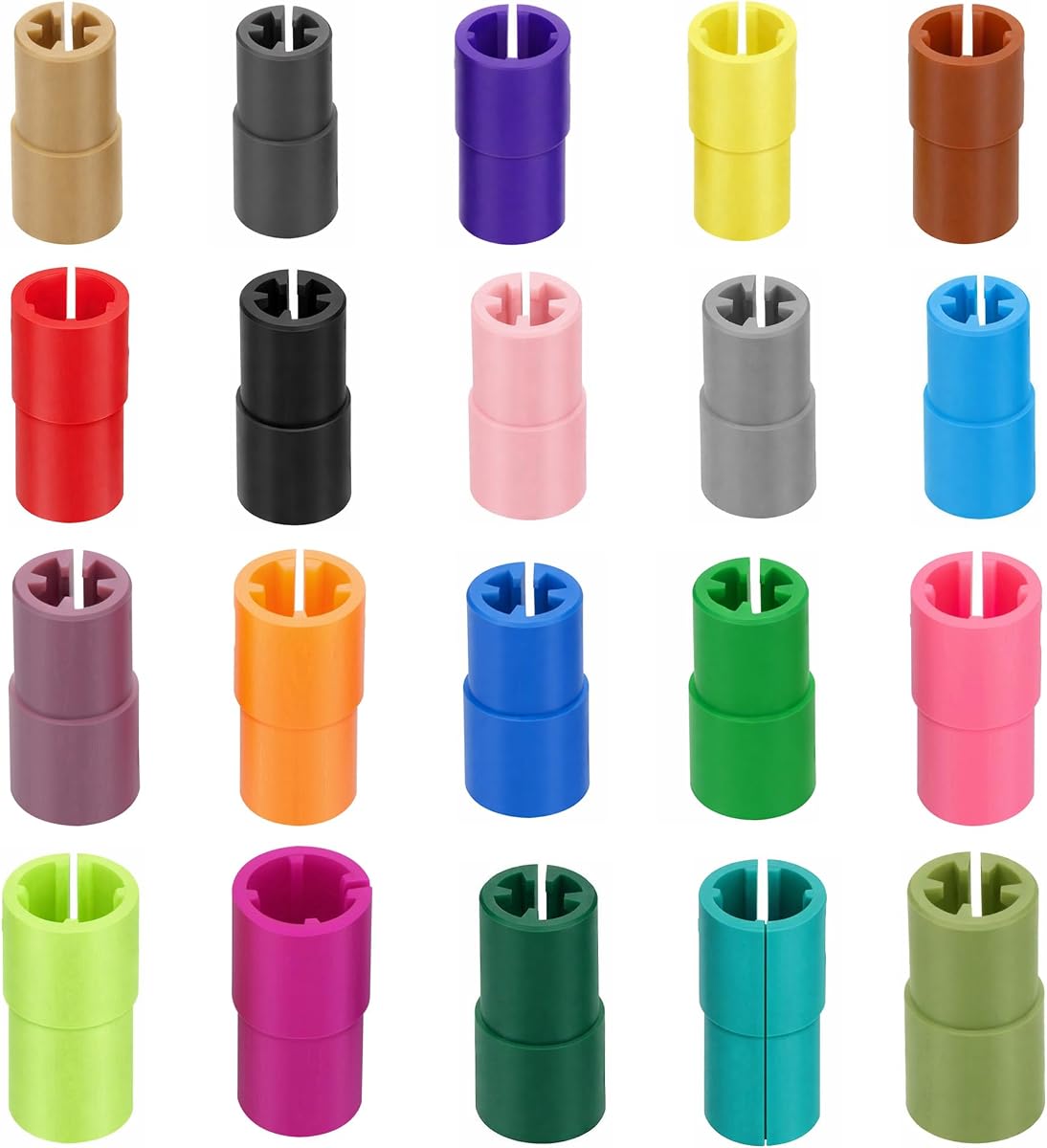
This set offers twenty different adapters to handle a wide range of marker types for your Cricut machine. The engraved abbreviations make it easy to identify the right adapter for each pen quickly.
We may earn a commission when you buy through this link, at no additional cost to you.
Each adapter holds the pen exactly in the center to ensure your draws and cuts line up perfectly. It works with Explore Air 2, 3, 4, and Maker 3 4 without needing any depth calibration at all.
While it provides great variety, it does not work with Explore One or Joy machines, so ensure you have a compatible model. The ABS plastic is durable but you may need to store them carefully.
For crafters who use many pen types, this variety pack saves time and ensures you have the right tool ready. It is a solid choice for expanding your creative options on Explore and Maker.
Engraved abbreviations let you quickly identify the right adapter for each pen.
The design ensures perfect alignment so you do not need to calibrate depths.
We may earn a commission when you buy through this link, at no additional cost to you.
This CRAVERLAND adapter is designed to fit all pens under 0.5 inches with a simple drop-in design. It comes in a convenient gift box that makes organizing or gifting your adapter set easy today.
We may earn a commission when you buy through this link, at no additional cost to you.
It has been tested with over 100 pens to ensure smooth drawing and sketching performance. The adapter slides smoothly into the pen clamp on Maker 4, 3, and Explore Air 2 without wobbling.
While it is stable and versatile, it does not support the Explore 5 or Joy Xtra models due to different clamps. You should check compatibility carefully if you own one of these machines.
For anyone looking for a reliable gift for a crafter, this set is perfect. The organization box helps keep everything tidy while you work on detailed projects.
The bundle comes in an original-designed box for easy organization and gifting.
It works with over 20 brands like Sharpie, Sakura, and Tombow.
We may earn a commission when you buy through this link, at no additional cost to you.
This adapter focuses on engineered alignment to ensure smooth writing and clean drawing lines. It is made from high-quality ABS material that is durable enough for long-term repeated crafting projects today.
We may earn a commission when you buy through this link, at no additional cost to you.
You can insert the adapter and pen and start creating immediately without needing extra tools. The lightweight yet sturdy design holds the pen firmly so you get consistent ink flow and no wobbling.
While it is designed for Maker and Explore Air, it will not work with the Explore 5 or Joy machines. Make sure to verify your machine model before ordering to avoid compatibility issues.
For precision-focused crafters, this adapter delivers reliable results with its accurate alignment design. It is a great choice for those who want clean lines without buying expensive proprietary pens.
The adapter is designed to ensure smooth writing and clean drawing lines.
Made from high-quality ABS plastic for durability and long-term use.
We may earn a commission when you buy through this link, at no additional cost to you.
This adapter features a dual-thread design that secures the pen more firmly to eliminate wobbling. It is ideal for creative projects like cards, invitations, and planners where precise lines are essential.
We may earn a commission when you buy through this link, at no additional cost to you.
You can simply drop the adapter into the clamp and start drawing without any tools. The design reduces side-to-side movement so you achieve smooth and consistent results every time you craft.
While it is great for many pens, it does not work with the Explore 5 model, so check your machine before buying. The simplicity of the design makes it very user-friendly for beginners.
If stability is your priority for detailed writing and drawing, this adapter is a solid option. It helps ensure your designs look clean and professional without extra calibration steps.
The dual-thread design secures the pen firmly to eliminate wobbling.
Insert the adapter and pen easily without any tools required.
We may earn a commission when you buy through this link, at no additional cost to you.
This set includes fifteen times two holders to work with over forty different pens and brands for your machine. It is designed to broaden your options so you can use pens you already have on Venture and Explore.
We may earn a commission when you buy through this link, at no additional cost to you.
It comes with a dual-coding manual to make identification and use easy. The kit also includes a special adapter to replace the original if it is broken or missing for your current setup.
While it offers great value for bulk use, the price is higher than single adapters. It does not work with the Explore One model so verify your machine compatibility before you purchase today.
For crafters who own many pens and want to use them all, this bulk set is excellent. It saves you from buying specific Cricut pens and keeps your workflow efficient and smooth.
The kit includes adapters to fit over forty different pens and brands.
A special adapter is included to replace your original if it is broken.
We may earn a commission when you buy through this link, at no additional cost to you.
This three-pack adapter set is specifically designed for Sharpie Fine Point, Ultra Fine Point, and Art Pens on Cricut Explore and Maker machines. It lets you use your favorite Sharpies without buying expensive branded Cricut pens.
We may earn a commission when you buy through this link, at no additional cost to you.
Each adapter is inscribed with abbreviations like SFP and SAP to help you identify the right one quickly. This means you do not rely on color codes that can fade or confuse you during busy crafting sessions.
While it is perfect for Sharpie fans, it does not work with other brands like Pilot or Bic, so it has limited versatility. It also does not support the Joy or One machines which use different clamps.
If you love using Sharpie markers for your projects, this set is a cost-effective choice. The USA-based business support gives extra peace of mind if you have questions about fit or usage.
Designed specifically for Sharpie Fine Point and Ultra Fine Point markers.
Each adapter has an inscribed code so you do not rely on colors.
We may earn a commission when you buy through this link, at no additional cost to you.
This accessory adapter enables drawing, writing, and scoring on your Cricut Explore and Maker machines easily. It installs into the A clamp and expands your creative options without needing complex tools or steps.
We may earn a commission when you buy through this link, at no additional cost to you.
It is designed as a replacement to restore functionality if your original adapter is missing or broken. The straightforward design ensures it fits right into the machine so you can start creating immediately.
While it is great for basic use, it may not offer the same pen variety as universal adapters. Also, it does not work with the Explore One model so make sure you have a compatible machine.
If you need a direct replacement for a broken adapter, this is a reliable choice. It helps get your machine back to working condition for all standard scoring and drawing tasks.
This adapter expands your creative options for drawing and scoring.
It installs easily into the machine's A clamp without any extra tools.
We may earn a commission when you buy through this link, at no additional cost to you.
This adapter set is specifically designed for the Joy, Joy 2, and Joy Xtra machines to let you use more pens. It supports brands like Sharpie, Pilot, and Bic so you can reuse your existing favorite pens.
We may earn a commission when you buy through this link, at no additional cost to you.
Each adapter is carved with an abbreviation to help identify which pen it fits quickly. It comes with a manual printed with compatible model names so you know exactly which pen to use for each adapter.
While it is great for Joy owners, it does not work with Explore or Maker machines which use different clamps. Also note that it is not for felt tip pens so check your pen type carefully.
If you own a Joy machine and want to expand your pen options, this set is ideal. It saves money by letting you use previous Explore pens that fit your Joy with these adapters.
These adapters are made specifically for Joy, Joy 2, and Joy Xtra machines.
Each adapter has an abbreviation so you can identify the pen type easily.
We may earn a commission when you buy through this link, at no additional cost to you.
This six-pack set offers an affordable way to use Sharpie pens on your Maker and Explore machines without expensive proprietary pens. The color-coded adapters make it easy to choose the right one for your pen type.
We may earn a commission when you buy through this link, at no additional cost to you.
You can install and remove them easily without any tools and they align precisely for accurate drawings. This means your writings and drawings are as precise as using the original Cricut holders every time.
While it is a great budget option, it is only compatible with Sharpies so it lacks the flexibility of universal adapters. Also it does not work with the Explore One model so check compatibility first.
If you love using Sharpies and want a simple, affordable set, this is a great choice. It saves money and lets you focus on creating more designs with the pens you already own.
This affordable six-pack set offers a great way to use Sharpie pens.
Color-coded adapters make it easy to choose the right pen type.
We may earn a commission when you buy through this link, at no additional cost to you.
Selecting the right adapter depends on your machine model, pen preference, and budget. Here are the key factors to consider before you buy.
The first step is to verify which Cricut machine you own. Some adapters are made for Maker 3 and 4 while others are designed for Explore or Joy. Always check the product description to ensure it lists your model.
Choose an adapter that explicitly states support for your machine to avoid fit issues.
Most universal adapters work with pens under 0.5 inches in diameter. This covers most Sharpies, gel pens, and fine liners. If you use larger markers, ensure the adapter can handle them before buying.
Verify the diameter limit matches your most used pens for smooth operation.
Some adapters include calibration tools while others are plug-and-play. If you plan to use many pen types, having calibration units can help adjust for different heights. If you use one pen type, simple adapters work fine.
Decide if you need calibration tools based on how varied your pen collection is.
Look for adapters made from high-quality ABS plastic that feel sturdy. Cheap plastic might crack over time or wobble during cutting. Reading reviews can help you gauge long-term durability.
Select models with durable materials to ensure long-term use and reliability.
Universal adapters let you use Sharpie, Pilot, Sakura, and more. Specific adapters might only work with Sharpie or one brand. Choose based on whether you want to use a wide variety of pens.
Pick a universal adapter if you want to experiment with many different pen types.
Some kits come with two adapters while others have twenty. A larger set lets you swap pens easily without cleaning. If you just want to use one pen, a smaller pack is more budget-friendly.
Choose a pack size that matches how often you plan to change pens.
Most adapters are designed for drop-in use without tools. This saves time and prevents damage to your machine. Avoid models that require complex setup or screws to fit.
Select adapters with a simple plug-and-play design for the best experience.
Reading reviews helps you see if the adapter causes drawing issues or fits well. Look for feedback on stability and if it matches the description. Good reviews often signal a product that works reliably.
Check ratings to confirm the adapter works as described for your setup.
Insert the adapter into the pen clamp on your machine before adding any pen. Make sure it fits snugly so the pen does not wobble during drawing or cutting tasks.
If using calibration tools, adjust the depth with a test sheet to ensure the pen touches the surface correctly. Then run a small project to confirm alignment before starting big designs.
Store the adapters in a dry place to keep dust out of the clamp. Wipe them clean after each use to prevent ink buildup that could affect performance or stick to the pen.
No most of these adapters are not compatible with Explore 5 due to different clamp designs. Check the product details to verify if your machine is supported before purchasing.
Many of these adapters are designed for plug-and-play use without depth calibration. However some kits include calibration units if you want to adjust for different pen sizes.
Universal adapters work with many brands like Sharpie, Pilot, and Sakura. But specific sets may only support Sharpies so check the compatibility list before buying.
Most adapters work with pens under 0.5 inches in diameter. Make sure your favorite pens fit this limit to avoid issues with fit or stability.
Most are made from high-quality ABS plastic designed for durability. Reading reviews can help you confirm how well they hold up over time with frequent use.
Some adapters are made for Joy models while others are not. Check the product description to see if it lists Joy compatibility before ordering.
If you see issues check if the adapter is centered and the depth is set correctly. A test run on scrap paper can help you find and fix any alignment problems.
Sets vary from two to twenty adapters depending on the product. Choose a size that matches how many pen types you plan to use regularly.
The top picks include a versatile universal set, a bulk variety pack, and a stable option for precise work. Each offers a different balance of pen compatibility and value for your crafting needs.
Prioritize compatibility with your machine model and the pen brands you use most. Look for adapters that reduce wobble and do not need complex setup for a smooth experience.
Check current prices on Amazon before you buy since deals change often. With the right adapter you can turn your machine into a versatile drawing tool.