
HUO JI E-Yooso
4.6Editor score
Hot-swappable switches
Gasket structure design
96% compact layout
RGB backlight effects
Explore our expert comparison of the top creamy keyboards for 2026. We evaluate sound, build, and features to help you find the perfect typing experience.
Creamy keyboards have become a favorite among typists and gamers who value a smooth, thocky sound profile. These mechanical boards use specialized switches and dampening to deliver a satisfying auditory and tactile experience. Finding the right one requires careful consideration of layout, connectivity, and customization options.
We compared ten distinct models based on their acoustic performance, build quality, and feature sets. Each product offers a unique take on the creamy sound trend, ranging from budget-friendly membrane options to premium wireless mechanical boards. Our analysis focuses on real-world usability and long-term value.
This guide provides detailed reviews of every keyboard, highlighting key strengths and potential drawbacks. You will learn which models offer the best value for specific needs like gaming or office work. Please note that prices and availability may change over time as products evolve.
4.6Editor score

4.8Editor score

4.8Editor score
This side-by-side comparison highlights the key specifications and features of all ten keyboards reviewed. Use this table to quickly identify which model fits your preferred layout, connection type, and sound profile needs.





The YUNZII B98 PRO stands out as a top contender in the creamy keyboard space. With a 4.8 rating, it delivers a rich sound profile and solid build quality. Its 96% layout balances functionality with desk space efficiently.
We may earn a commission when you buy through this link, at no additional cost to you.
This keyboard features a gasket mount and five-layer filling structure that creates a unique typing feel. The pre-lubed switches and tuned stabilizers ensure every keystroke is smooth and consistent. The 8000mAh battery supports long sessions without frequent charging.
While the QMK/VIA support offers deep customization, it may require some initial setup effort. The dual knob design adds versatility but increases complexity for users who prefer simplicity. However, these features justify the investment for enthusiasts.
If you value a premium typing experience and customization, this is the ideal choice. It suits both gamers and professionals seeking a reliable wireless mechanical board. We recommend it for those willing to explore advanced settings.
The internal foam and gasket mount work together to eliminate hollow sounds. This results in a deep, thocky profile that users love for typing and gaming.
Connect via Bluetooth 5.0, 2.4GHz, or USB-C for seamless switching. The battery life ensures you stay connected for days without interruption.
We may earn a commission when you buy through this link, at no additional cost to you.
The HUO JI E-Yooso offers an accessible entry into creamy keyboards. It delivers a satisfying sound and tactile experience without breaking the bank. The 96% layout retains essential keys while saving desk space effectively.
We may earn a commission when you buy through this link, at no additional cost to you.
Equipped with five layers of sound-absorbing foams, this board reduces noise significantly. The hot-swap PCB allows you to customize switches easily. This flexibility makes it great for hobbyists looking to experiment.
The lack of wireless connectivity might limit mobile users. RGB effects are functional but lack advanced animation options. However, for the price, the core typing experience is robust and reliable.
This keyboard is perfect for budget-conscious users wanting a custom feel. It suits office workers or gamers who prioritize performance over connectivity. We highly recommend it as a starting point.
The foam layers remove hollow sounds and provide a clean click. This enhances focus during long work or gaming sessions significantly.
Despite being smaller, it keeps all necessary keys like arrows and numpad. This balance is ideal for limited desk space environments.
We may earn a commission when you buy through this link, at no additional cost to you.
The Redragon K768 PRO brings premium features to a competitive market. With a 4.8 rating, it excels in sound and typing comfort. The gasket mount ensures a cushioned and enjoyable experience.
We may earn a commission when you buy through this link, at no additional cost to you.
Its one-knob simplicity makes adjusting backlight and media intuitive. PBT keycaps remain textured for years. The massive battery supports continuous use. This combination of features is rare in this price range.
Using the software for advanced macros adds a minor step. The size may not fit smaller desks comfortably. However, the overall build quality and feel justify these considerations.
This board is excellent for those seeking reliability and style. It suits power users who value convenience and premium materials. We recommend it for anyone wanting a top-tier wireless mechanical keyboard.
The knob handles both volume and brightness with ease. This design saves time and simplifies daily workflow significantly.
PBT keycaps resist shine and grease buildup. This ensures the keyboard looks and feels new for years of use.
We may earn a commission when you buy through this link, at no additional cost to you.
The Redragon K745 PRO delivers a full-size experience with creamy sound. It combines traditional layout benefits with modern wireless features. The gasket mount ensures a soft, cushioned typing feel.
We may earn a commission when you buy through this link, at no additional cost to you.
Four dedicated hotkeys provide quick access to common tasks. The transparent PBT keycaps enhance RGB aesthetics. Connectivity options allow seamless switching between devices. This makes it ideal for multitasking users.
Its size might be too large for compact setups. RGB customization is limited compared to other models. Despite this, it offers reliable performance and strong sound dampening.
This keyboard suits users needing a full numpad and comfort. It is great for office work or data entry tasks. We recommend it for those prioritizing functionality and feel.
Dedicated hotkeys streamline workflow with single touches. This improves efficiency during complex work routines.
Translucent keycaps allow RGB to shine through evenly. This adds a visually appealing element to the setup.
We may earn a commission when you buy through this link, at no additional cost to you.
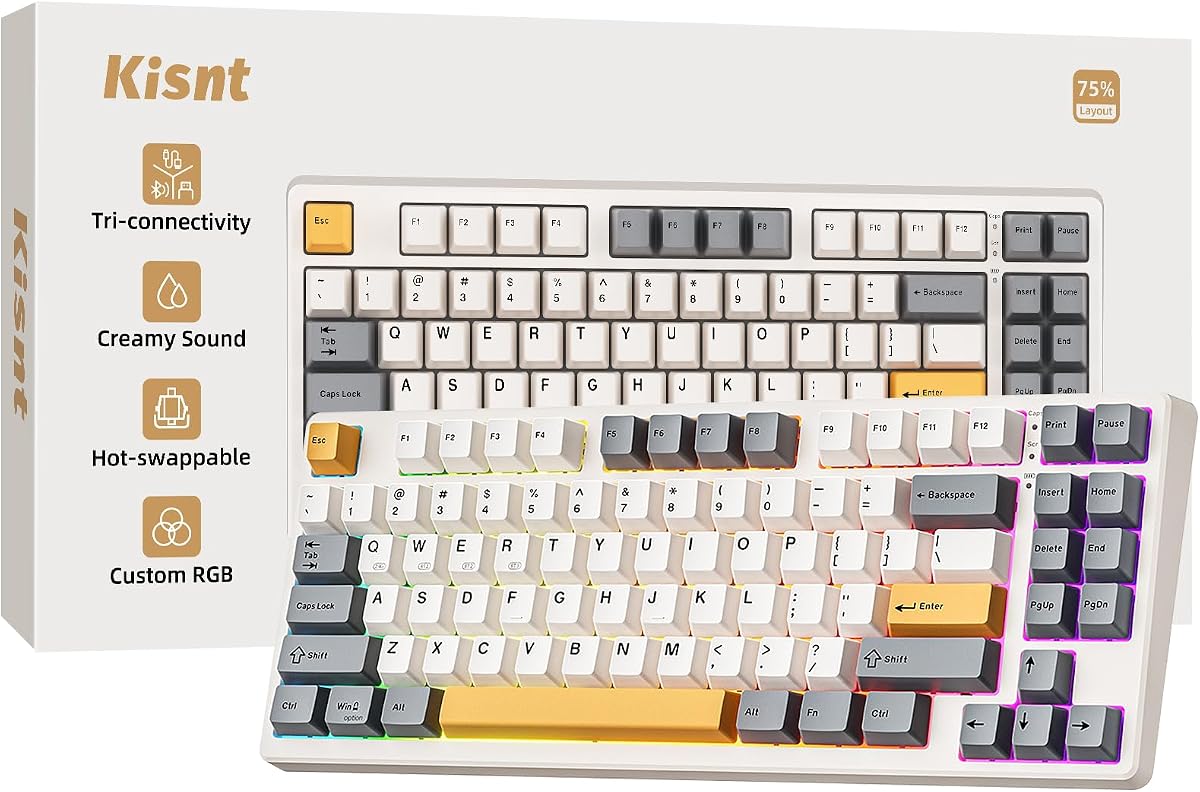
The Kisnt KN85 Wireless offers a compact solution for creamy typing. It balances space-saving and functionality effectively. The gasket mount provides a satisfyingly soft thocky feel.
We may earn a commission when you buy through this link, at no additional cost to you.
Pre-lubed switches ensure smooth keystrokes out of the box. Low latency modes make it suitable for competitive gaming. The battery life supports wireless use without frequent charging. This reliability is key for travelers.
The absence of a numpad may limit some users. Driver support is restricted to wired modes, which might inconvenience some. However, the overall experience is strong and consistent.
This board is ideal for minimalists who still value quality. It fits well in modern workspaces and portable setups. We recommend it for those prioritizing portability and sound.
The compact size and battery support effortless mobility. It fits easily into bags and smaller desks.
Gasket mount and foams reduce vibration effectively. This makes long typing sessions comfortable and focused.
We may earn a commission when you buy through this link, at no additional cost to you.
The SOLAKAKA A99 Pro introduces unique visual features to keyboards. The LCD screen displays time and connection info. This innovation adds a modern touch to the workspace.
We may earn a commission when you buy through this link, at no additional cost to you.
Sound dampening layers provide a premium creamy feel. The metal knob offers precise control over volume and brightness. Web driver support allows customization without local software. This is convenient for various systems.
Some users might find the LCD distracting. The web driver requires a wired connection to access. These limitations are minor but worth noting for specific use cases.
This keyboard is great for those who love visual feedback. It suits gamers and tech enthusiasts seeking novelty. We recommend it for users wanting a standout design.
The screen shows system status instantly. This helps monitor battery and connection modes efficiently.
Web driver simplifies updates and key mapping. It ensures compatibility across different operating systems.
We may earn a commission when you buy through this link, at no additional cost to you.
The AULA F75 Wireless is a solid choice for 75% layouts. It delivers creamy sound and a comfortable typing experience. The tri-mode connectivity supports seamless device switching.
We may earn a commission when you buy through this link, at no additional cost to you.
Pre-lubed switches and stabilizers reduce effort and noise. The gasket mount adds to the premium feel. Custom macros improve workflow efficiency. This makes it versatile for both work and play.
Setup of the driver might require some patience. Color options are limited to specific combos. Despite this, the core experience is consistent and reliable.
This keyboard is perfect for users seeking reliability. It suits generalists needing a mix of features. We recommend it for those wanting a stable wireless board.
Switches arrive smooth and ready to use. This saves time on customization and breaks-in.
Switch between Bluetooth and wired modes instantly. This flexibility supports complex multi-device setups.
We may earn a commission when you buy through this link, at no additional cost to you.
The AULA F75 Reaper stands out for its unique switch choice. It offers a distinct sound profile tailored for gamers. The gasket structure supports a creamy, consistent typing feel.
We may earn a commission when you buy through this link, at no additional cost to you.
PCB single key slotting improves stability. The multi-function knob allows easy media control. Wireless connectivity enables freedom of movement. This makes it a strong all-rounder.
The specific switches might be harder to replace. RGB brightness depends on the settings. These are minor factors for a quality product.
This keyboard suits those who want specialized performance. It is ideal for gamers looking for responsiveness. We recommend it for enthusiasts seeking a unique sound.
PCB slotting reduces flex and noise. This improves the overall feel of the board.
RGB effects add immersion to gaming setups. The lighting enhances the visual appeal.
We may earn a commission when you buy through this link, at no additional cost to you.
The AULA S99 Gaming offers a budget-friendly alternative. It delivers wireless convenience with creamy feel. The 96% layout fits various workspace needs.
We may earn a commission when you buy through this link, at no additional cost to you.
Multi-device connectivity supports seamless switching. Macro customization improves productivity. The ergonomic stand supports comfortable typing angles. These features make it accessible for casual users.
Membrane switches lack tactile feedback. Customization options are limited to software. Despite this, it provides reliable daily use.
This keyboard is good for casual users and gamers. It suits those new to mechanical keyboards. We recommend it for budget-conscious buyers.
The keyboard avoids complex setup steps. This makes it easy for beginners to adopt.
Adjustable stands reduce wrist strain. This improves long-term usage comfort.
We may earn a commission when you buy through this link, at no additional cost to you.
The AULA S99 Pink combines style with basic functionality. Its aesthetic adds personality to any desk. Wireless freedom allows flexible placement options.
We may earn a commission when you buy through this link, at no additional cost to you.
Multimedia controls simplify daily tasks. RGB lighting enhances the visual appeal. Macros provide basic customization. It is a practical choice for casual use.
Durability may be less than mechanical boards. Tactile feedback is minimal. These trade-offs suit casual users well.
This keyboard suits those prioritizing style. It is ideal for light typing and gaming. We recommend it for aesthetic-focused buyers.
The pink color adds a unique touch. This helps match specific decor themes.
Volume and lighting adjustments are straightforward. This ensures ease of daily operation.
We may earn a commission when you buy through this link, at no additional cost to you.
Selecting the right keyboard requires understanding key factors that affect sound and feel.
Switches determine the core sound and tactile feedback. Creamy keyboards often use linear switches pre-lubed for smoothness.
Look for linear switches for the quietest experience.
Foams and gaskets eliminate hollow sounds. Multiple layers enhance the creamy profile significantly.
Check for descriptions of internal foam or silicone pads.
Hot-swappable PCBs allow easy switch changes without soldering. This enables long-term customization.
Prioritize boards supporting 5-pin and 3-pin switches.
Tri-mode connectivity offers Bluetooth and wireless options. This adds flexibility for multi-device setups.
Ensure battery life meets your daily usage needs.
Plastic or metal cases affect stability and weight. Higher-end models use durable materials.
Check keycap material like PBT for longevity.
Software like QMK/VIA allows deep key mapping. This suits power users seeking efficiency.
Verify driver availability for your operating system.
75%, 96%, or full-size layouts impact desk space. Choose based on available space.
Balance functionality with footprint for your needs.
RGB lighting enhances setup visuals. Ensure effects are customizable.
Match lighting to your personal style preferences.
Start by charging the keyboard fully before first use. Ensure drivers are installed for maximum customization.
Keep the keyboard clean by gently dusting keys. Avoid spills by using a desk mat.
Store wireless keyboards in a dry place. Replace batteries or charge regularly to extend life.
A creamy sound comes from linear switches combined with internal dampening. Foams and gaskets reduce vibrations for a deep, smooth profile.
Yes, specifically mechanical ones with linear switches. Dampening features further reduce noise compared to traditional boards.
Use compressed air to remove debris. Wipe keycaps with a damp cloth for general maintenance.
Many models support hot-swap. Check if the board accepts 3 or 5 pin switches.
75% or 65% layouts save space for mouse movement. Ensure essential keys like arrows remain.
Wireless boards last from days to weeks. Turn off RGB to extend runtime significantly.
It helps for macros and lighting. Some boards work without software but offer fewer features.
Most are built for daily use. PBT keycaps resist wear better than ABS ones.
The top picks deliver exceptional sound and typing feel. The YUNZII B98 PRO leads in customization while the HUO JI E-Yooso offers value.
Prioritize switch type and connectivity based on your needs. Consider layout size and battery life for daily use.
Prices and availability fluctuate regularly. Check current offers before making a final decision.