
Memory Card Reader, BENFEI 4in1 USB 3.0 and USB-C to SD Micro SD MS CF Card Reader Adapter
4.5Editor score
4 cards simultaneously read
USB-C and USB 3.0
18 month warranty included
Compare the top Compact Flash Card Reader options for 2026. We review speed, compatibility, durability, and value to help you choose the right adapter for your
Finding the right Compact Flash Card Reader is essential for photographers and videographers who need reliable data access. A good reader offers fast transfer speeds, broad card compatibility, and a durable build to withstand daily use in various environments.
We compared ten leading models based on their connection types, supported card formats, and real-world performance metrics. Each entry was evaluated for ease of use, build quality, and how well it handles simultaneous card reading without errors or delays.
This guide details the strengths and weaknesses of every pick so you can make an informed decision. Note that availability and pricing may fluctuate over time, so check current listings before purchasing to ensure you get the best deal available.
4.5Editor score

4.7Editor score

4.3Editor score
The following table provides a side-by-side overview of the ten best Compact Flash Card Reader models available in 2026. Compare their key specifications to find the model that fits your specific camera and computer setup.



The Lexar Multi-Card 3-in-1 stands out as the top choice for professionals needing speed and reliability. With a rating of 4.7 stars, it consistently delivers high performance for SD, microSD, and CF cards.
We may earn a commission when you buy through this link, at no additional cost to you.
Its standout quality is the transfer speed reaching up to 312MB/s for SD and microSD cards. This allows photographers to offload large RAW files quickly, saving valuable time during busy shoots.
While it does not support simultaneous reading of multiple cards like some competitors, the speed and stability compensate for this limitation. It is best for users who prioritize fast single-card transfers.
We recommend this reader for professionals who need a dependable tool for daily workflows. Its USB 3.1 interface ensures future compatibility while maintaining speed for current devices.
The 312MB/s speed ensures minimal waiting time when moving large video or photo files to your computer for editing.
Backward compatibility with USB 2.0 means you can use it with older computers without losing essential functionality or speed.
We may earn a commission when you buy through this link, at no additional cost to you.
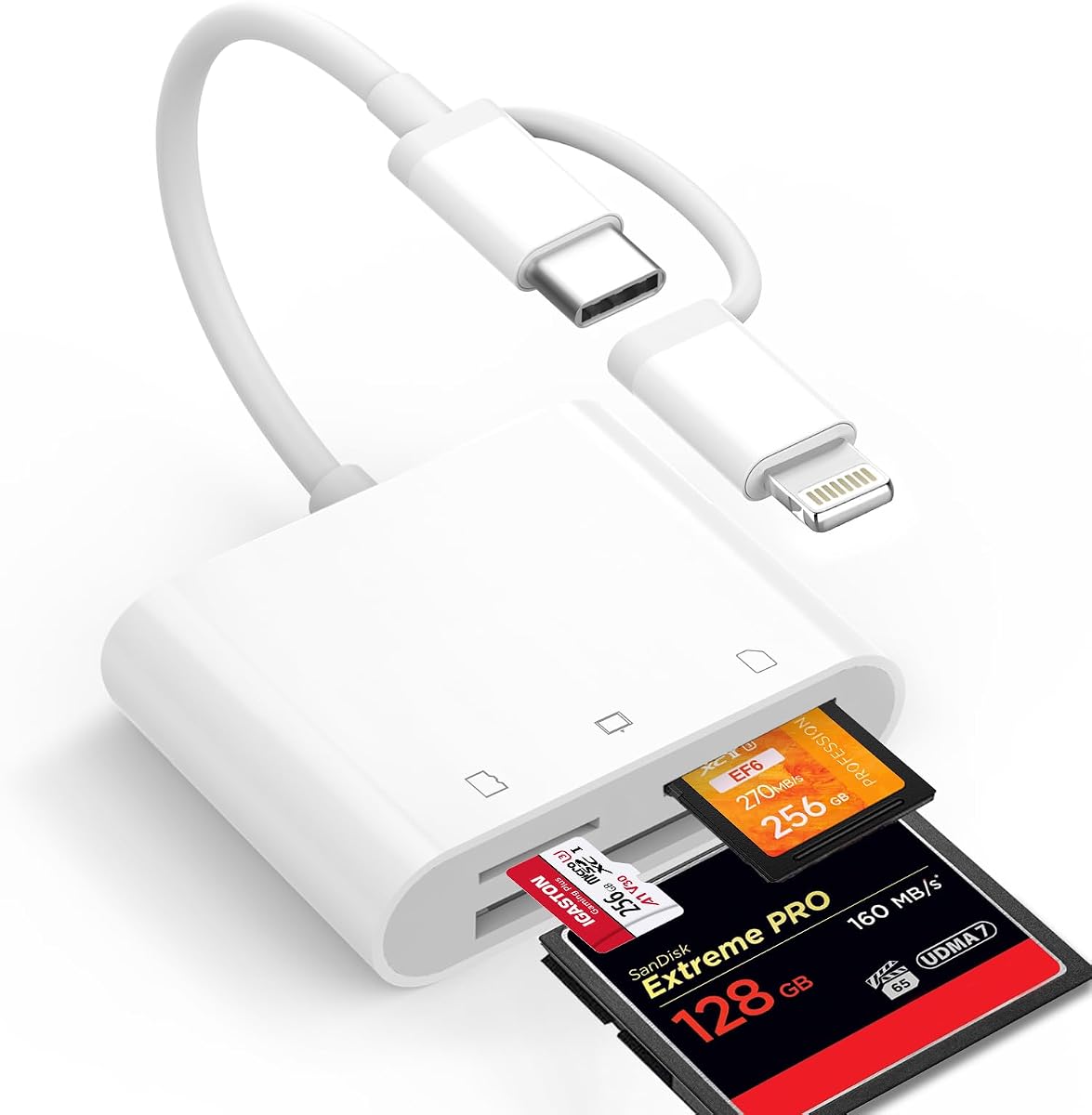
The BENFEI 4in1 card reader offers exceptional value for money without compromising on essential features. It supports simultaneous reading of four cards, which is rare in this price range.
We may earn a commission when you buy through this link, at no additional cost to you.
Its dual USB-C and USB 3.0 design makes it versatile for both modern laptops and older systems. This flexibility ensures you can connect to almost any device without needing extra adapters.
While the transfer speed is slightly lower than premium models, it remains efficient for most everyday tasks. The 18-month warranty adds significant peace of mind for budget-conscious buyers.
This model is perfect for students or hobbyists who need a reliable card reader for occasional use. It balances cost and functionality better than many competitors in the market.
Read up to four cards at once, streamlining the process of organizing data from multiple shoots without swapping cards constantly.
Works seamlessly with the latest USB-C devices and older USB 3.0 ports, making it a future-proof investment for any setup.
We may earn a commission when you buy through this link, at no additional cost to you.
This 6-in-1 reader is designed for professionals who work with a wide variety of legacy and modern memory cards. Its aluminum alloy build ensures durability during travel and daily use.
We may earn a commission when you buy through this link, at no additional cost to you.
The inclusion of a dedicated CFast 2.0 slot sets it apart from standard readers. It supports simultaneous reading of six different card types, making it a comprehensive solution for complex workflows.
Although it is heavier than some plastic competitors, the aluminum chassis helps dissipate heat during long data transfers. This prevents throttling and maintains consistent speeds over time.
We recommend this model for cinematographers and photographers who need to archive data from various camera systems quickly. It is a premium tool that justifies its price with versatility.
Includes slots for XD-Picture Cards and CFast, ensuring your old camera cards remain accessible and useful for future projects.
The metal body acts as a heatsink, keeping the device cool during prolonged use even when transferring large 4K video files.
We may earn a commission when you buy through this link, at no additional cost to you.
UGREEN is known for quality accessories, and this SD card reader is no exception. It offers robust support for various card types including CF, SD, and Micro SD simultaneously.
We may earn a commission when you buy through this link, at no additional cost to you.
The 5Gbps transfer speed allows for quick data handling. Users appreciate the compact design that fits easily into a camera bag without adding bulk to their gear.
It supports cards up to 2TB, making it future-proof for high-capacity storage needs. The lack of a USB-C port limits compatibility with newer devices like the iPhone 15.
This reader is ideal for photographers who need to manage multiple cards from different sessions efficiently. It provides reliable performance at a reasonable price point.
No drivers are needed for Windows or Mac, allowing you to start transferring files immediately after plugging into your computer.
Support for 2TB cards ensures compatibility with future storage technologies without needing to buy a new reader later.
We may earn a commission when you buy through this link, at no additional cost to you.
This reader stands out for its inclusion of the Sony M2 card slot which is rare in modern readers. It allows users to access data from older Sony cameras without extra adapters.
We may earn a commission when you buy through this link, at no additional cost to you.
The aluminum cover adds a touch of durability and helps with heat dissipation during transfers. It features protection against over-current and short circuits to safeguard your hardware.
While it offers five card slots, the layout is compact which might feel crowded when multiple cards are inserted. This makes it suitable for users with diverse camera gear.
We recommend this to Sony owners or those with mixed legacy card types. Its protection features add value by reducing the risk of hardware damage during use.
Unique support for Sony Memory Stick Micro (M2) ensures you can retrieve data from older Sony Cyber-shot cameras seamlessly.
Built-in safety features protect your computer and memory cards from electrical surges during data transfer operations.
We may earn a commission when you buy through this link, at no additional cost to you.
Designed specifically for USB-C devices, this reader is perfect for modern smartphones and tablets. It allows direct file access without needing extra cables or adapters.
We may earn a commission when you buy through this link, at no additional cost to you.
The ability to read four cards simultaneously makes it efficient for transferring images from trail or deer cameras directly to your phone. It saves significant time in the field.
Its compact size ensures it fits easily into pockets or small bags. The USB-C interface provides fast data transfer speeds necessary for high-resolution images.
Ideal for photographers using Android or iOS devices, it bridges the gap between camera and mobile editing. It ensures your workflow remains uninterrupted by hardware limitations.
Transfer photos directly to your phone for instant editing and sharing without needing a computer as an intermediate step.
Works with any device featuring a USB-C port including most laptops, tablets, and modern smartphones for broad utility.
We may earn a commission when you buy through this link, at no additional cost to you.
The SmartQ C368 offers a simple and effective solution for transferring data from CF and SD cards. Its blue LED indicator light provides immediate visual feedback when the device is active.
We may earn a commission when you buy through this link, at no additional cost to you.
This feature is particularly useful in low-light conditions where you need to know if your reader is connected properly. It prevents accidental disconnections during critical file transfers.
It includes a cable organizer in the box which keeps your workspace tidy. The plug and play nature means no software installation is required on any supported system.
Recommended for users who prefer simplicity and visual confirmation of device status. It delivers reliable performance for everyday data transfer needs without unnecessary complexity.
The blue LED lights up when powered on, ensuring you never have to guess if the reader is connected correctly.
Comes with a cable organizer to keep your setup tidy and prevent tangling during travel or storage.
We may earn a commission when you buy through this link, at no additional cost to you.
This reader is specifically engineered for professional videographers using cameras that support CFast cards. It ensures high-speed data transfer crucial for 4K and 8K footage management.
We may earn a commission when you buy through this link, at no additional cost to you.
The dual USB-C and USB-A connectors mean you can use it with both desktops and laptops regardless of their ports. This flexibility is key for professionals working in varied environments.
It supports reading five cards simultaneously which speeds up the ingestion process for large productions. The aluminum housing helps maintain performance during long offloading sessions.
Best for cinematographers needing a reliable tool for high-speed workflows. It simplifies the data management process and supports a wide range of legacy formats.
Handles high-resolution footage quickly, ensuring your editing timeline stays synchronized with your raw source files.
Includes both USB-C and USB-A connectors to match any computer configuration without needing extra adapters.
We may earn a commission when you buy through this link, at no additional cost to you.
This reader is designed for Apple users who own both older Lightning devices and newer USB-C models. It allows direct viewing and editing of photos on your iPhone or iPad.
We may earn a commission when you buy through this link, at no additional cost to you.
Being Apple MFi certified ensures stable connection speeds and prevents software warnings on iOS devices. It supports bi-directional transfer to save space on your device storage.
The fixed dual connector design eliminates the need to carry separate adapters for different iPhones. However, you cannot use both connectors at the same time due to physical design.
Recommended for iPhone photographers who want to manage memory cards directly on their mobile device. It simplifies sharing moments instantly without needing a laptop.
Official Apple certification ensures the reader works safely and reliably with iOS devices without compatibility issues.
Transfer photos from phone to card to free up storage space on your device for more captures.
We may earn a commission when you buy through this link, at no additional cost to you.
The ChiaoPio reader features a built-in USB-C cord that avoids blocking other ports on your laptop or tablet. This design choice enhances convenience during use.
We may earn a commission when you buy through this link, at no additional cost to you.
It supports Compact Flash, SD, and MicroSD cards making it versatile enough for various camera types. The lightweight design ensures it does not add bulk to your carrying case.
Since it has a fixed cord it is less flexible than models with detachable cables. However, this reduces the risk of losing connectors while traveling on assignments.
Ideal for iPad Pro users looking for a simple solution to access camera cards. Its plug-and-play nature ensures hassle-free data transfers every time.
The integrated cable prevents you from losing connectors and keeps your desk setup clean and organized.
Works perfectly with the latest iPad Pro models allowing seamless integration into your mobile editing workflow.
We may earn a commission when you buy through this link, at no additional cost to you.
Selecting the right reader requires evaluating connection types, supported card formats, and transfer speeds. This guide outlines the key factors to consider before making a purchase.
Modern computers often use USB-C while older systems use USB-A. Choose a reader that matches your device ports or supports both for flexibility. Dual connector models allow use with multiple device types.
Prioritize USB-C for future-proofing as it is the standard for new laptops and phones. Older USB 3.0 readers still work but may be slower than newer USB 3.1 or 3.2 models.
Ensure the reader supports CF, SD, and Micro SD formats used by your cameras. Some readers also support legacy formats like XD or CFast which are useful for niche professional gear.
Check for simultaneous multi-card slots if you work with multiple cards. This reduces the need to swap cards manually during large data transfer sessions.
Transfer speed impacts how quickly you can offload large files like RAW photos or 4K video. Look for readers with USB 3.0 or 3.1 support to achieve speeds up to 5Gbps.
Faster readers save time during busy workdays. Ensure your computer port supports high speeds to avoid bottlenecks that negate the reader's potential.
Durability matters for travel and daily use. Aluminum alloy bodies resist physical damage and help dissipate heat better than plastic alternatives during prolonged transfers.
A sturdy casing ensures the reader lasts longer even with frequent plugging and unplugging. This is crucial for professionals working in varied environments.
A reliable warranty indicates manufacturer confidence. Look for models offering at least 18 months to 2 years of coverage to protect your investment against defects.
Good customer service ensures any issues with the product are resolved quickly. This minimizes downtime for professionals relying on the reader for work.
Drivers should not be required for basic functionality. Plug and play ensures you can start transferring files immediately after connection without installing extra software.
Compatibility with Mac, Windows, and Linux increases utility. This ensures you can use the reader across different workstations or OS environments.
Consider the size and weight of the reader if you travel often. Compact designs fit easily into camera bags without adding unnecessary bulk to your gear.
Integrated cable designs can prevent loss but fixed cables might limit flexibility. Weigh portability against convenience when selecting the right form factor.
Budget models offer essential features while premium ones provide speed and durability. Balance your needs with your budget to get the best value without overspending.
Higher price does not always guarantee better results. Read reviews to verify performance claims before investing in expensive models for critical tasks.
To use your reader, insert the memory card into the correct slot ensuring the notch aligns properly with the internal contacts. Plug the USB connector into your computer's available port.
Wait for the system to recognize the device which usually takes only a few seconds. Once detected, open the file explorer to access and transfer your photos or videos to your hard drive.
After finishing data transfer, safely eject the reader through the operating system menu before unplugging. This prevents file corruption. Store the device in a protective pouch when not in use.
Most modern readers are plug-and-play and do not require manual driver installation. They work directly with Windows, Mac OS, and Linux. If your system does not recognize the reader, ensure it is securely connected or restart your computer.
Only readers with a USB-C connector work with iPhone 15. Ensure the model supports USB-C connectivity. Some models include adapters for Lightning devices which are incompatible with newer iPhone 15 models.
Most USB 3.0 readers support cards up to 2TB. Check the product specifications for exact capacity limits. Larger capacities may require formatted cards such as exFAT for full compatibility.
Many modern readers allow reading multiple cards at once. This feature saves time when offloading from multiple sessions. Look for 4-in-1 or 6-in-1 models to maximize efficiency.
Speeds vary by model ranging from 100MB/s to 300MB/s. USB 3.0 and 3.1 ports enable faster speeds compared to older standards. Real-world speeds depend on your computer's ports.
Only specialized readers support CFast cards. Standard readers usually handle Compact Flash but not CFast. Verify compatibility in the product specs if you use pro cinema cameras.
Ensure the card is properly inserted and the port is functional. Try different ports or restart your Mac. Some macOS versions may require permissions to access external drives.
Yes, most readers allow both read and write operations. This enables you to transfer files back to the card or reformat it directly. Ensure the card is not write-protected.
We identified the Lexar Multi-Card 3-in-1 as the top choice for professionals due to its speed and reliability. Budget buyers may prefer the BENFEI 4in1 for its affordability and simultaneous reading capability.
When choosing a model prioritize connection compatibility and build quality to ensure it meets your specific workflow needs. Consider future-proofing with USB-C options as older USB-A ports become less common on devices.
Prices and availability change frequently so verify current offers before purchasing. We hope this guide helps you select the right Compact Flash Card Reader to streamline your photography workflow.