
Cooler Master Q300L V1 Micro-ATX PC Case, High Airflow, Transparent Panel
4.5Editor score
Modular I/O placement
Transparent side panel
Affordable price point
This guide compares the top ten compact E ATX cases for powerful builds in a small footprint with airflow support and modern features.
Finding the right compact E ATX case is essential for builders who want high performance without sacrificing desk space. These cases must balance size with cooling and component support.
We compared ten top models based on airflow design motherboard support and build quality to help you find the best fit for your needs and budget today.
Each pick shows key specs and real user feedback so you can decide confidently. Keep in mind that prices and availability change often across online stores.
4.5Editor score

4.4Editor score

3.9Editor score
Here is a side by side comparison of all ten cases to help you quickly identify which model best matches your component needs and design goals.



The Cooler Master QUBE 540 is a standout choice for builders who need a compact E ATX case without losing performance. With a strong rating from users, it stands out for its flexible orientation design that lets you place the case horizontally or vertically. The reversible I/O panel and movable handles make it easy to customize your layout for better access.
We may earn a commission when you buy through this link, at no additional cost to you.
One of its key strengths is compatibility. It supports large motherboards up to 11 inches wide, which is rare for a compact frame. The front mesh panel ensures maximum ventilation so your components stay cool even under heavy loads. This makes it ideal for high-end gaming builds that still fit on a small desk.
There are some trade-offs. The case does not come with fans pre-installed so you will need to buy them separately. This can raise the total cost and add to the build time. However, the superior airflow design means the investment in fans pays off in quieter and cooler operation.
If you want a case that balances size and power with smart ergonomics, the QUBE 540 is the best pick. It suits users who value flexibility and cooling over a minimal price. For most builders seeking a versatile E ATX fit, this model delivers the most complete package.
The case works in horizontal and vertical positions so you can fit it into tight corners or standard desks with ease.
It accepts large GPUs and E ATX boards which means you can use flagship parts without needing a huge tower.
We may earn a commission when you buy through this link, at no additional cost to you.
The Lian Li O11D Mini V2 earns high marks for its sleek design and optimized airflow. Users praise the 10 degree slanted bottom which boosts cold air intake directly to the GPU. This feature helps keep temperatures low during gaming sessions. The compact size fits well in home offices where space is tight.
We may earn a commission when you buy through this link, at no additional cost to you.
Its mesh side panel and pillar-less glass offer a clear view of your components. This makes it perfect for builders who want to showcase custom loops or RGB lighting. The case also includes horizontal and vertical GPU brackets which reduce strain on the motherboard and keep heavy cards stable.
While the look is great, you should know that no fans come included. You will need to source your own cooling which adds to cost and setup time. Also, routing cables can be less intuitive due to the open layout. These factors may slow down first-time builders.
Choose this case if you value looks and thermal efficiency in a small frame. It works well for advanced users who can plan their airflow and cable routes. For those who want a stylish compact E ATX build with strong cooling potential, the O11D Mini V2 is a top choice.
The slanted bottom design pushes cool air straight to the GPU which improves cooling performance during heavy use.
Pillar-less glass panels give an unobstructed view of your hardware which is great for aesthetic builds and RGB fans.
We may earn a commission when you buy through this link, at no additional cost to you.
The Mechanic Master C34Pro stands out as a premium option with its aluminum shell and portable features. This case is built for users who need to move their PC to LAN events or between rooms. The integrated carry handle makes transport much easier than standard towers. It holds E ATX boards and large GPUs without issue.
We may earn a commission when you buy through this link, at no additional cost to you.
Thermal performance is strong with multi-zone fan mounts and dust filters. You can fit a 360mm radiator which is rare for a compact case. The aluminum alloy exterior adds durability while keeping the weight manageable for a portable unit. The design supports full-size PSUs as well.
Some users note that the case can feel heavier than expected due to the metal build. There are also fewer long-term reviews so you may rely on specs more than community feedback. These factors should be weighed against the portability and support it offers.
This model is best for those who want a rugged portable E ATX case for high-end parts. If moving your PC is a priority and you need strong cooling, this is a smart buy. For standard desktop use it may be more than needed but it still delivers value.
An integrated handle and compact size make it easy to carry your powerful build to events or different rooms.
The 2mm aluminum shell gives a durable feel that resists dents and adds a premium look to your setup.
We may earn a commission when you buy through this link, at no additional cost to you.
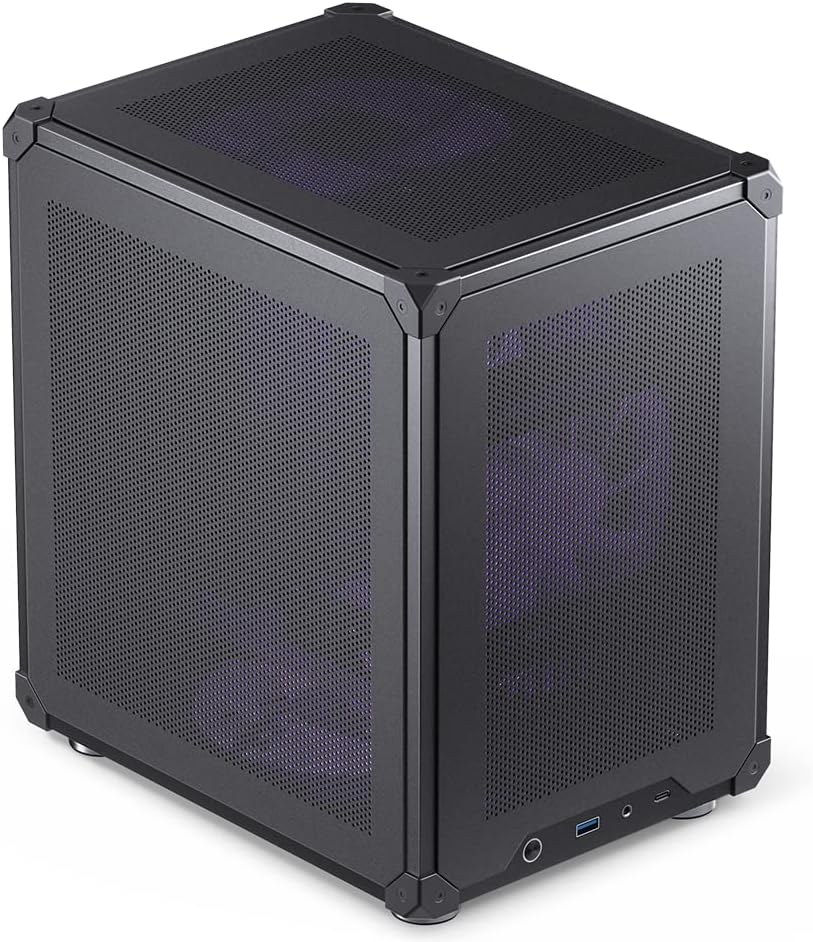
The Cooler Master Q300L V1 is an excellent budget choice for those who want airflow without a high cost. It supports Micro ATX and Mini ITX boards which keeps the footprint small. Users report that the open design makes it easy to install parts. The transparent side lets you show off your build.
We may earn a commission when you buy through this link, at no additional cost to you.
One key feature is the modular I/O panel that you can move to the front, top, or bottom. This flexibility helps you route cables better and match your setup layout. The perforated sides promote airflow which keeps components cool even with limited fans. It is great for entry-level gaming PCs.
On the downside, it does not support larger E ATX boards which limits future upgrades. The design is also very simple and may not appeal to those who want a high-end look. These trade-offs are acceptable given the low price point and functional design.
Choose this if you need a cheap compact case for a small build. It is perfect for students or casual gamers on a tight budget. While not for E ATX users it offers the best value for Micro ATX systems with good airflow.
This case offers high airflow and decent features at a price that fits most entry-level build budgets easily.
You can move the I/O panel to different spots for better cable management and access depending on your desk.
We may earn a commission when you buy through this link, at no additional cost to you.
The Mechanic Master C34 Ultra saves space without losing performance. It supports standard ATX boards and full-size PSUs. The built-in carry handle makes it easy to move between workstations or for LAN parties. Users rate it highly for its balance of size and power.
We may earn a commission when you buy through this link, at no additional cost to you.
It fits a 240mm liquid cooler and up to 162mm tall CPU coolers which is great for high-end builds. The internal layout is designed for easier building and clean cable management. The front I/O includes modern ports like USB Type-C for fast device connections.
One limitation is that it does not support E ATX boards. Also the price is higher than basic cases. However, the portability and build quality justify the cost for many. It is a solid pick for those who want a compact ATX case with travel features.
If you need a small case that can handle a powerful build and be moved often this is a top choice. It suits users who value convenience and cooling. For pure E ATX needs look elsewhere but for ATX this is well worth the price.
The integrated handle allows easy transport of your desktop PC to LAN events or between rooms without hassle.
It accepts 240mm radiators and tall air coolers so you can keep high-end parts cool in a small box.
We may earn a commission when you buy through this link, at no additional cost to you.
The ASUS Prime AP201 is known for its exceptional airflow and spatial efficiency. The mesh panels with over 57000 holes push air through easily. It fits 360mm radiators which is rare in a 33L case. Tool-free side panels make access and upgrades a breeze for all users.
We may earn a commission when you buy through this link, at no additional cost to you.
Despite its small size it supports long ATX PSUs and GPUs up to 338mm. The cable management space is generous which keeps the build neat. Users report stable temperatures under load thanks to the design. It is a top choice for compact builds that need strong cooling.
The main trade-off is that it only supports Micro ATX boards. This limits motherboard options for some users. Also, GPU length is capped which may exclude the largest cards. These limits are acceptable for those who prioritize cooling and size over maximum board support.
Choose this if you need a compact case with top-tier airflow and easy access. It suits users who want to keep temps low without buying extra fans. For Micro ATX systems that need to stay cool this case is a strong contender.
Over 57k precision holes in the mesh panels ensure maximum air moves through to keep components cool under load.
Simple clip mechanisms let you remove side panels without tools for faster access to your internal components.
We may earn a commission when you buy through this link, at no additional cost to you.
The Cooler Master Q300L V3 is a refined version of the popular budget case. It supports GPUs up to 366mm which is great for high-end cards in a small frame. The tempered glass side panel showcases your build. Users praise its builder-friendly design and high airflow features.
We may earn a commission when you buy through this link, at no additional cost to you.
The movable I/O panel lets you place the ports where they suit your setup. This improves cable routing and access. It can fit 6x 120mm fans or 240mm radiators which offers solid cooling options. The magnetic dust filters are easy to remove and clean.
This case does not include fans which means you must buy them to get full airflow. Also it does not support E ATX boards. These factors may not fit every builder. However the flexibility and build quality make it a strong choice for ATX Micro ATX systems.
Pick this if you need a compact case with a glass view and great GPU support. It suits users who want to display parts and keep things cool. For most Micro ATX builds with a need for long GPUs this model delivers.
You can move the I/O panel to fit your desk setup which helps with cable routing and device access.
Supports up to 366mm GPUs so you can use high-end graphics cards without needing a large tower.
We may earn a commission when you buy through this link, at no additional cost to you.
The Zalman CUBIX M-ATX is one of the smallest compact cases available. It fits ATX PSUs and has a sturdy steel frame. The case includes a pre-installed 80mm fan which helps with airflow out of the box. Users appreciate the low cost and durable build.
We may earn a commission when you buy through this link, at no additional cost to you.
Its perforated front panel allows air to enter easily. It supports GPUs up to 260mm and CPU coolers up to 137mm which covers most standard parts. The total volume is only 17 liters so it takes up very little space. This is ideal for dorm rooms or small desks.
The limited size means you cannot use large GPUs or tall coolers. Also the design is basic with few modern features. These limits make it less suitable for high-end builds. However for basic systems it offers great value and reliability.
Choose this if you need the smallest possible case with decent support and a fan included. It suits budget builds or media centers. For high-end parts look elsewhere but for compact utility this case is a solid choice.
At just 17 liters this case takes up minimal space so it fits easily on small desks and in tight spots.
A built-in 80mm fan ensures basic airflow from the start which helps keep temps stable without extra cost.
We may earn a commission when you buy through this link, at no additional cost to you.
The JONSBO C6 Black is praised for its easy assembly design. The upper cover and side panels open without tools which speeds up building. It features a mesh chassis that allows air to move freely. Users report that it is simple to work with and great for beginners.
We may earn a commission when you buy through this link, at no additional cost to you.
It supports ITX and M-ATX boards and GPUs up to 255mm. The all-sides mesh design ensures good thermal performance. The case is compact and sits neatly on a desk. The price is reasonable for the features and build quality offered.
One limitation is the 75mm CPU cooler max which restricts taller coolers. Also the GPU length is capped. These factors may not suit all builds. But for simple systems the design and ease of use are strong benefits.
Choose this if you want a case that is easy to build in and offers solid airflow. It suits first-time builders or those who need quick access. For standard compact builds this case delivers value and simplicity.
Upper cover and side panels open without tools so you can work on your build faster without fiddling with screws.
All sides have mesh which allows heat to escape easily so your components stay cool during use.
We may earn a commission when you buy through this link, at no additional cost to you.
The NZXT H5 Flow is designed to deliver great cooling right out of the box. It comes with two 120mm fans so you can start building immediately. The PSU shroud is perforated on the sides and bottom which boosts airflow. Users like its clean look and ease of use.
We may earn a commission when you buy through this link, at no additional cost to you.
It supports up to a 360mm radiator in the front and a 240mm radiator on top. The ultra-fine mesh on all panels filters dust while allowing air through. Cable management is simple with wide channels and hooks to keep the build tidy.
The case is slightly higher priced than budget options and has fewer customization features. However the pre-installed fans and solid build make up for this. It is ideal for those who want a reliable compact case with minimal hassle.
Choose this if you want a case that works well without extra parts. It suits users who value convenience and airflow. For standard ATX builds that need strong cooling this model is a strong option.
Pre-installed airflow fans mean you do not need to buy extra fans to get great cooling right away.
The shroud has holes that let air flow from the PSU fans to the GPU which improves overall cooling.
We may earn a commission when you buy through this link, at no additional cost to you.
Selecting the right compact E ATX case requires careful thought about how your components fit and how the case cools them.
Ensure the case supports your board size. E ATX boards are wide so look for cases that allow up to 11 inches in width. Some cases only support Micro ATX which limits your options.
Always check the exact specs before buying to avoid fit issues.
Graphics cards can be long and thick. A good case should support at least 300mm of GPU length for most modern cards. Some models support more which gives room for upgrades.
Measure your GPU and compare it to the case specs to ensure it fits.
Tall air coolers need vertical space. Look for cases that list a max cooler height of 160mm or more. Liquid cooling support is a plus for high-end builds.
Check if your cooler fits before you buy to avoid returns.
Most compact cases support standard ATX PSUs but some require SFX. Confirm the PSU size your case can take to ensure compatibility with your power unit.
Choose a PSU that fits and provides enough wattage for your parts.
A compact case needs good airflow to prevent heat buildup. Look for mesh panels front intakes and dust filters. Cases with pre-installed fans save time and money.
Prioritize cases with open front and bottom panels for best cooling.
If you plan to move your PC often look for cases with integrated handles or rugged builds. Portable cases often weigh less and have reinforced frames.
Decide if you need transport features based on your setup needs.
Good cable management keeps your build clean and improves airflow. Look for cases with wide channels tie points and removable panels.
A well-laid-out case makes building easier and keeps things tidy.
Price varies with build materials. Metal cases last longer and look better than plastic ones. Balance the cost with the features you need most.
Choose a case that fits your budget without cutting key cooling or support features.
Install your components in the order recommended by the case manual to avoid crowding. Start with the motherboard and PSU then add the GPU and drives.
Route cables through the channels provided to keep airflow clear. Use ties to secure loose wires and maintain a clean look.
Clean dust filters and vents regularly using a soft brush or compressed air. This ensures airflow stays strong and temperatures stay low over time.
A compact E ATX case is a PC chassis that supports E ATX motherboards while keeping the footprint smaller than standard towers. It allows large parts in a tighter space.
Not always. Many support standard ATX PSUs but some require SFX. Check the case specs for PSU limits to ensure your power unit fits.
Yes. Most compact E ATX cases support 240mm or 360mm radiators which are suitable for liquid cooling. Check the support details before buying.
Yes. With good airflow and support for large GPUs they handle gaming loads well. Choose a model with strong cooling for best results.
Check the case's max GPU length and compare it to your card. Add a small margin for extra safety in case of fit issues.
Yes. Most cases are designed for one-person builds with clear layouts. Use the included guides or online tutorials for help during assembly.
The top picks show a range of options from budget friendly to premium portable builds. Each case offers different strengths in cooling and component support.
Prioritize airflow and motherboard fit when choosing. A case that cools well and fits your parts will keep your build happy for years.
Check current prices before you buy since deals change often. The right case at a good price makes building a small E ATX PC easier.