
Wireless Keyboard and Mouse Combo
4.4Editor score
2.4GHz wireless connection
Retro round keycaps
Auto power-saving function
This guide compares ten top colorful keyboards for style and function, highlighting wireless options, retro designs, and mechanical features for every
Finding a keyboard that stands out can transform your daily workflow. Colorful keyboards offer more than just aesthetics; they bring personality and joy to typing. Whether you prefer retro typewriter styles or modern LED lighting, there is a perfect match for your desk setup.
We evaluated ten distinct models based on connectivity, design quality, and typing comfort. Each option provides unique features like wireless freedom, mechanical switches, or vintage keycaps. Our analysis helps you navigate the wide variety of colorful choices available in the current market.
Each pick below showcases specific strengths tailored to different needs and preferences. You will see detailed specs, pros, and cons to help you decide. Please note that product availability and details may change over time so verify before buying.
4.4Editor score

4.7Editor score
4.6Editor score
This side-by-side comparison highlights the key specifications and design elements of each colorful keyboard option to help you choose the right fit for your specific needs.


This mechanical keyboard stands out with a vibrant color multimedia screen that displays gifs and system status. It holds a strong rating for users who want both function and visual flair in their setup.
We may earn a commission when you buy through this link, at no additional cost to you.
The hot-swappable sockets allow you to change switches without soldering which offers great customization. The gasket mount design reduces noise and increases stability for a premium typing experience.
While the software for deep customization works best on Windows the hardware itself is versatile. The screen angle is designed to match your natural view making it easy to check status updates.
If you want a keyboard that acts as a centerpiece for your desk this model delivers. It is perfect for enthusiasts who value personalization and a high-quality typing feel.
The built-in screen lets you show off GIFs and system data adding a dynamic element to your workspace.
The gasket mount and ergonomic tilt reduce hand fatigue allowing for longer sessions without discomfort.
We may earn a commission when you buy through this link, at no additional cost to you.
This combo offers a retro typewriter look at a very accessible price point. It maintains a solid rating for users needing a reliable wireless setup without breaking the bank.
We may earn a commission when you buy through this link, at no additional cost to you.
The 2.4GHz connection ensures stable performance up to thirty meters away. Noise reduction keys make it suitable for quiet offices where loud clicks might disturb others.
Battery life is impressive with sleep mode activating after five minutes of inactivity. While you need to buy batteries separately the long usage time makes up for it.
Choose this if you want a colorful aesthetic with solid wireless basics. It is a practical choice for students or home offices looking for value.
The shared receiver keeps your desk clean and provides a strong signal without lag or dropouts.
The square mechanism under each key dampens sound so you can type quietly during meetings.
We may earn a commission when you buy through this link, at no additional cost to you.
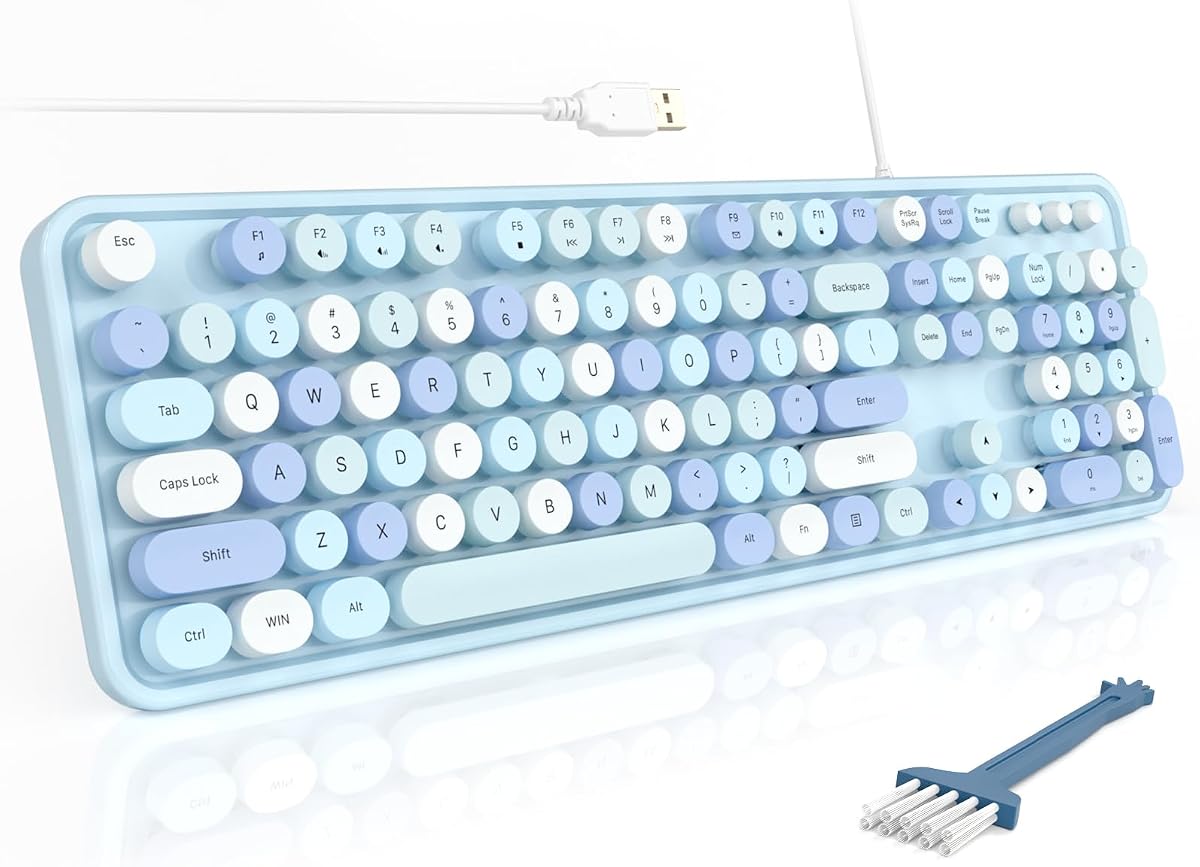
This wired keyboard combines a nostalgic typewriter style with modern reliability. It scores high for users who prefer a wired connection to avoid battery issues.
We may earn a commission when you buy through this link, at no additional cost to you.
The foldable stand helps position the keyboard at a comfortable angle for long typing sessions. The round keycaps provide a unique feel that stands out from standard flat keys.
With no need to charge or replace batteries it is always ready to work. The simple plug and play setup means you can start using it immediately after unboxing.
If you prefer a clean desk without wireless signals this option is ideal. It is great for home setups where you want style and simplicity.
The built-in stand lifts the keyboard slightly to improve wrist angle and reduce strain.
The wired design eliminates pairing steps so you can focus on work right away.
We may earn a commission when you buy through this link, at no additional cost to you.
This wireless set features a popular MilkTea color that adds warmth to any desk. It is rated well for users seeking a cheerful and colorful workspace solution.
We may earn a commission when you buy through this link, at no additional cost to you.
The detachable keycaps allow you to wash them if they get dirty which is rare for wireless models. The floating button design provides a soft typing feel reminiscent of old typewriters.
Auto power saving helps extend battery life by putting the keyboard to sleep when not in use. However the wake up time might feel slow if you prefer instant response.
Choose this if you want a specific color theme and easy maintenance. It suits users who like to keep their setup looking fresh and tidy.
The caps can be removed for cleaning with water which helps keep the keyboard looking new.
The 2.4GHz connection works smoothly up to thirty-five feet away from your computer.
We may earn a commission when you buy through this link, at no additional cost to you.
This combo uses upgraded materials to keep its rainbow colors vibrant over time. It receives good feedback for those who want a colorful keyboard that lasts.
We may earn a commission when you buy through this link, at no additional cost to you.
The keycaps provide a tactile clicky feel that many typists enjoy for feedback. Independent power switches mean you can turn on just the keyboard or mouse as needed.
The wireless range is solid allowing you to move around comfortably. Just note that if you have a modern Mac you might need a separate USB adapter.
Select this if you want a durable colorful keyboard that stands up to daily use. It is a strong choice for users who prioritize color retention.
The fade-resistant coating keeps the rainbow look bright even after months of daily use.
Independent switches let you save power by turning off devices when not in use.
We may earn a commission when you buy through this link, at no additional cost to you.
This green wireless combo is designed for productivity with a full number pad. It has a steady rating for those needing a complete layout for data entry.
We may earn a commission when you buy through this link, at no additional cost to you.
The ergonomic foldable holder ensures your keyboard sits at a comfortable angle. This design helps prevent wrist strain during long work sessions or shifts.
The wireless connection is reliable up to ten meters away with little delay. Removable keycaps make it easy to clean out dust or crumbs easily.
If you need a full layout with style this set covers your needs. It is great for office workers who want a reliable colorful setup.
The full number pad speeds up data entry tasks significantly for office workflows.
The holder keeps the keyboard tilted correctly to support better wrist posture.
We may earn a commission when you buy through this link, at no additional cost to you.
This blue set includes a silent mouse and keyboard designed for shared office spaces. It is rated well for users who need a quiet and reliable tool.
We may earn a commission when you buy through this link, at no additional cost to you.
The waterproof film allows liquid to drain away preventing damage from spills. Silent micro-motion technology ensures clicks are quiet so you do not disturb colleagues.
The laser-engraved characters stay clear over time and the base prevents sliding. It is a practical choice for busy environments where noise and accidents happen.
Choose this if you want a sturdy colorful keyboard for daily office tasks. It balances functionality with a clean and quiet operation.
The internal film directs liquid out of the keyboard to save the electronics from damage.
Silent mouse buttons reduce noise for a more peaceful work environment.
We may earn a commission when you buy through this link, at no additional cost to you.
This purple wired keyboard is perfect for users who prefer a simple reliable connection. It earns a high rating for consistency and lack of technical issues.
We may earn a commission when you buy through this link, at no additional cost to you.
Since it is wired there is no need to worry about charging or replacing batteries. The detachable keycaps allow you to clean it thoroughly whenever you need to.
It connects instantly via USB and works with a wide range of operating systems. The large number pad makes it suitable for tasks that require frequent number entry.
If you value a straightforward typing experience this keyboard delivers. It is an excellent choice for users who want to avoid wireless complexity.
The wired connection ensures your typing is always transmitted without signal loss.
Compatible with many OS versions it fits easily into various computer setups.
We may earn a commission when you buy through this link, at no additional cost to you.
This combo features a unique mirror finish that adds a premium look to any desk. It is rated well for users who prioritize a distinct and stylish appearance.
We may earn a commission when you buy through this link, at no additional cost to you.
The multicolor keys are coated to resist fading over time ensuring long-term vibrancy. The rounded typewriter style keys provide a smooth and comfortable typing experience.
The mirror surface panel reflects light creating an elegant desktop aesthetic. Just be aware that this surface might show fingerprints more easily than matte finishes.
Choose this if you want a keyboard that acts as a visual statement. It is ideal for users who value beauty and design in their tools.
The mirror finish combined with multicolor keys creates a modern and unique look.
Retro round keycaps match finger shape for a smooth and comfortable typing feel.
We may earn a commission when you buy through this link, at no additional cost to you.
This wired gaming keyboard features a rainbow LED backlight that lights up your keys. It is rated well for gamers who want colorful lighting at an affordable price.
We may earn a commission when you buy through this link, at no additional cost to you.
The double shot keycaps ensure legends never fade even with heavy use. The water-resistant design protects the internal components from accidental spills.
You can adjust the brightness of the backlight to suit your environment. The anti-sweat surface helps keep keys comfortable during long gaming sessions.
Select this if you want a colorful keyboard for gaming without spending too much. It offers solid performance with a vibrant visual style.
The adjustable backlight lets you set the mood for night gaming sessions easily.
Double shot injection keeps the letters visible and durable over long periods.
We may earn a commission when you buy through this link, at no additional cost to you.
Choosing the right colorful keyboard involves looking at several factors beyond just the design.
Decide between wired and wireless models based on your desk setup. Wired options offer stable connections and no batteries while wireless provide freedom from cables.
Choose wireless for a clean desk or wired for maximum reliability without maintenance.
Round typewriter style keycaps offer a retro look and unique tactile feel. Standard flat caps are more common but may not stand out visually.
Select round caps for nostalgia or flat caps for familiarity and ergonomics.
Look for fade-resistant coatings to keep colors vibrant over time. Cheaper plastic may discolor or wear down with heavy use.
Check reviews for color retention to ensure your keyboard stays colorful.
RGB or rainbow backlighting adds more color especially in low light. Ensure brightness is adjustable to avoid eye strain.
Prioritize models with adjustable light settings for comfort.
Mechanical switches offer a tactile clicky feel while membrane keys are quieter. Choose based on your noise tolerance and typing preference.
Select quiet options for shared spaces and tactile ones for feedback.
Foldable stands or adjustable tilt help reduce wrist strain. Comfortable typing reduces fatigue during long sessions.
Look for ergonomic stands to keep your hands in a natural position.
Ensure the keyboard works with your operating system. Some features may not work on Mac or require drivers.
Verify system support before purchasing to avoid connectivity issues.
Water resistance and solid construction protect against accidents. A sturdy base prevents sliding and extends lifespan.
Choose water-resistant models for protection in casual environments.
Plug the USB receiver into a free port and wait for your system to recognize it. If wired simply connect the USB cable to your computer to begin typing.
Clean the keycaps regularly with a brush or damp cloth to remove dust. Avoid harsh chemicals that might fade the colorful coating on the plastic.
Store the keyboard in a cool dry place away from direct sunlight. This helps preserve the colors and prevents the electronics from overheating.
Most colorful keyboards work with Mac via standard USB connection. However some specialized function keys might not function on macOS systems.
Quality models use fade-resistant coatings that maintain color for years. Cheaper options may show wear after extensive use.
Yes most combos allow you to use the keyboard independently. Just ensure the USB receiver is connected to your device.
Some models like the Womier feature mechanical switches for tactile feedback. Others use membrane switches for a quieter experience.
Many RGB models let you adjust brightness or colors through keys. Check specific product details for customization options.
Wireless models typically require AAA or AA batteries. Wired models do not need batteries and draw power from your computer.
Some keyboards are optimized for gaming with anti-ghosting and quick response. Others are designed for typing and general office work.
You can remove keycaps on some models to wash them gently. Use a soft brush or cloth to clean dust from the surface.
We explored ten unique colorful keyboards ranging from retro designs to modern mechanical options. The Womier SK80 stands out for its multimedia screen while the budget combo offers great value for casual users.
Prioritize your needs such as wireless freedom or quiet typing before deciding. The ergonomic features and color durability play a major role in long-term satisfaction.
Always check the latest availability and details before making a purchase. These keyboards add a personal touch to your workspace while improving your daily workflow.