
LeFix 2 Pins 2 Wires
4.6Editor score
Includes wire connector leads
Standard polarity design
Affordable replacement option
This guide compares the top CMOS batteries for motherboards to help you choose reliable power for BIOS settings and system stability.
Your motherboard needs a reliable power source to keep critical settings alive even when the system is off. Choosing the right CMOS battery ensures your BIOS configurations remain safe and accurate over time.
We evaluated ten top products based on voltage stability, lifespan, connector types, and brand reputation. Each option offers unique benefits for different motherboard models and usage scenarios you might encounter.
Each pick highlights key features and suitability for various systems. Prices fluctuate frequently so verify current listings before purchasing to ensure you get the best value available today.
4.6Editor score

4.8Editor score

4.7Editor score
This comparison table lists each product with key specs and ratings to help you quickly identify the best option for your specific motherboard needs and budget constraints.


This Duracell option stands out as the top pick for CMOS replacement due to its proven reliability and safety features. With a 4.8 rating, users appreciate the consistent 3V output that keeps your motherboard settings stable over time.
We may earn a commission when you buy through this link, at no additional cost to you.
The battery offers superior longevity compared to competitors, ensuring your BIOS data remains intact for years. The bitter taste coating on both sides provides extra safety for households with young children, reducing accidental ingestion risks significantly.
While the cost per unit may be slightly higher than generic brands, the quality assurance and medical-grade trustworthiness justify the investment. The packaging also ensures the cells remain sealed and protected until you are ready to install them.
Choose this option if you prioritize brand trust and safety for your home setup. Its wide compatibility with various devices means you can keep extra batteries on hand for other electronics too.
Duracell cells last longer than standard Energizer options based on ANSI testing, providing extended runtime for your motherboard BIOS settings without frequent replacements.
The bitter taste coating and child-safe packaging add critical layers of protection for households with curious kids, preventing accidental ingestion of small coin cells.
We may earn a commission when you buy through this link, at no additional cost to you.
This LeFix battery is designed for laptops and systems requiring a wire connector rather than a standard coin slot. It offers an affordable solution for users who need a direct replacement with existing wiring harnesses.
We may earn a commission when you buy through this link, at no additional cost to you.
Manufactured by a Japanese battery giant, the cell ensures reliable performance despite the lower price. The 2-pin Molex connector makes it easy to plug into the motherboard without soldering or complex modifications.
Each item undergoes testing before shipping to ensure functionality. The anti-static packaging protects the cell from damage during transit, which is crucial for electronic components sensitive to static discharge.
Ideal for budget-conscious users with specific laptop models like Dell or HP. The clear red and black wire markings simplify installation, reducing the risk of incorrect polarity connection.
The standard Molex 51021 connector matches many OEM designs, allowing for a straightforward plug-and-play replacement without needing to solder wires to the cell.
Production by a recognized Japanese manufacturer ensures consistent quality and capacity, giving users confidence in the battery's lifespan and performance under load.
We may earn a commission when you buy through this link, at no additional cost to you.
Panasonic is renowned for quality, and this 10-pack delivers exceptional reliability for critical motherboard applications. The cells maintain power for up to eight years when stored properly, making them ideal for infrequent replacements.
We may earn a commission when you buy through this link, at no additional cost to you.
Engineered to work in extreme temperatures from 14F to 140F, these batteries ensure stability even in harsh operating environments. The child-resistant packaging meets rigorous safety standards like IEC and ANSI requirements.
The bulk pack offers value for those stocking up for multiple systems or long-term needs. Each cell is tested for quality, ensuring consistent voltage delivery that keeps BIOS settings accurate and system boot times stable.
Choose this if you need dependable power for mission-critical systems. The premium price reflects the extended shelf life and safety certifications that generic batteries often lack.
These cells function reliably across a wide temperature range, ensuring that your motherboard retains settings even in garages or server rooms with fluctuating heat levels.
Packaging meets strict international safety standards including CFR regulations, offering legal and physical safety compliance for households and businesses handling lithium coin cells.
We may earn a commission when you buy through this link, at no additional cost to you.
This 5-pack provides wire leads specifically designed for laptops needing a connectorized battery solution. The high capacity ensures your system retains CMOS settings longer than standard low-capacity replacements.
We may earn a commission when you buy through this link, at no additional cost to you.
The Molex connector matches many OEM designs like Dell Latitude and Inspiron series. Users appreciate the no-leak promise, which prevents corrosion damage to the motherboard if the cell is removed improperly.
While not a direct coin cell fit, it solves hard-to-find OEM issues effectively. The 240mAh capacity helps maintain settings even during power outages or transport where battery power is cut temporarily.
Best for users repairing specific laptop models with integrated CMOS sockets. The bulk pack ensures you have spares for future repairs or similar models without frequent reordering.
With 240mAh capacity, these cells hold more charge than standard 220mAh coins, extending the time your BIOS settings remain safe during power removal.
The connector matches widely used Dell chassis designs, making it a direct replacement for older laptops where the OEM battery has failed or degraded.
We may earn a commission when you buy through this link, at no additional cost to you.
This 4-count pack offers the perfect balance for home use, providing enough spares for your main motherboard and other electronics. Duracell's consistent quality ensures that BIOS settings remain accurate without intermittent power loss.
We may earn a commission when you buy through this link, at no additional cost to you.
The bitter taste coating is a vital safety feature for families, deterring accidental ingestion by children. The packaging is designed to be child-safe, adding peace of mind during storage at home.
While the price per unit is higher than generic alternatives, the reliability and warranty protection make it a worthwhile choice for critical systems. Medical device trustworthiness indicates strict quality control standards.
Ideal for general home PC builds where safety and brand reputation matter. Keep extra cells on hand to ensure uninterrupted system startup and accurate timekeeping.
Duracell batteries are trusted in medical devices, meaning they meet higher quality and performance standards than typical consumer electronics replacements.
The cells maintain a steady 3V output throughout their lifespan, preventing the voltage drops that can cause BIOS data corruption or reset errors.
We may earn a commission when you buy through this link, at no additional cost to you.
Amazon Basics offers a budget-friendly option without sacrificing basic reliability. These cells work well for standard motherboards and provide consistent voltage to maintain BIOS configurations over normal usage periods.
We may earn a commission when you buy through this link, at no additional cost to you.
The engraved model number makes it easy to identify the battery type quickly during replacement. The packaging is child-proof, adding an extra layer of safety for storage in accessible areas.
While the non-coated surface means less protection against accidental ingestion compared to coated options, the overall performance remains strong. The 4-pack ensures you have a spare without a large investment.
Perfect for DIY enthusiasts building multiple PCs or needing simple replacements. The price and performance balance make it a go-to for standard consumer motherboard requirements.
Engraved markings on the cell allow for quick identification of the battery model, preventing confusion during replacement in tight motherboard slots.
Amazon Basics delivers solid performance at a lower price point, ideal for users who need reliable power without the premium cost of top-tier brands.
We may earn a commission when you buy through this link, at no additional cost to you.
This 2-count pack is perfect for users who need just enough replacements for a single motherboard or immediate project. Duracell ensures reliable power output to keep BIOS settings secure and accurate.
We may earn a commission when you buy through this link, at no additional cost to you.
The bitter taste coating adds safety for households with children, while the trusted brand reputation guarantees consistent performance. The packaging is secure and child-safe, reducing risks of accidental access.
While the pack size is smaller, the quality ensures each cell performs reliably without failure. The cost is higher per unit than bulk packs but convenient for small purchases.
Best for quick replacements where you already have spares elsewhere. The convenience of a reliable brand makes it a good choice for one-off motherboard battery changes.
The 2-count pack fits easily into any storage drawer, providing a quick solution without cluttering space when you only need a single spare.
Engineered for superior longevity, these cells ensure your motherboard retains settings for years, reducing the frequency of replacement cycles significantly.
We may earn a commission when you buy through this link, at no additional cost to you.
This DL2032B2 variant serves as a reliable standard replacement for most modern motherboards. Duracell ensures that voltage levels stay consistent, preventing unexpected BIOS resets during power interruptions.
We may earn a commission when you buy through this link, at no additional cost to you.
The 2-pack provides a spare cell if the first one fails or you need to replace multiple units. The packaging is secure, and the battery's high quality ensures stable operation over time.
While the pack is small compared to bulk options, it offers convenience and brand assurance. Duracell is a trusted name in consumer electronics, ensuring quality control in every cell.
Ideal for users needing quick replacements without hunting for larger packs. The standard design fits most CMOS sockets easily, simplifying the upgrade process for any system.
These cells follow standard CR2032 dimensions ensuring compatibility with most motherboard CMOS sockets without requiring adapters or modifications for a secure fit.
Lithium technology ensures steady 3V output throughout the battery lifespan, avoiding the voltage drops that often cause BIOS data corruption issues.
We may earn a commission when you buy through this link, at no additional cost to you.
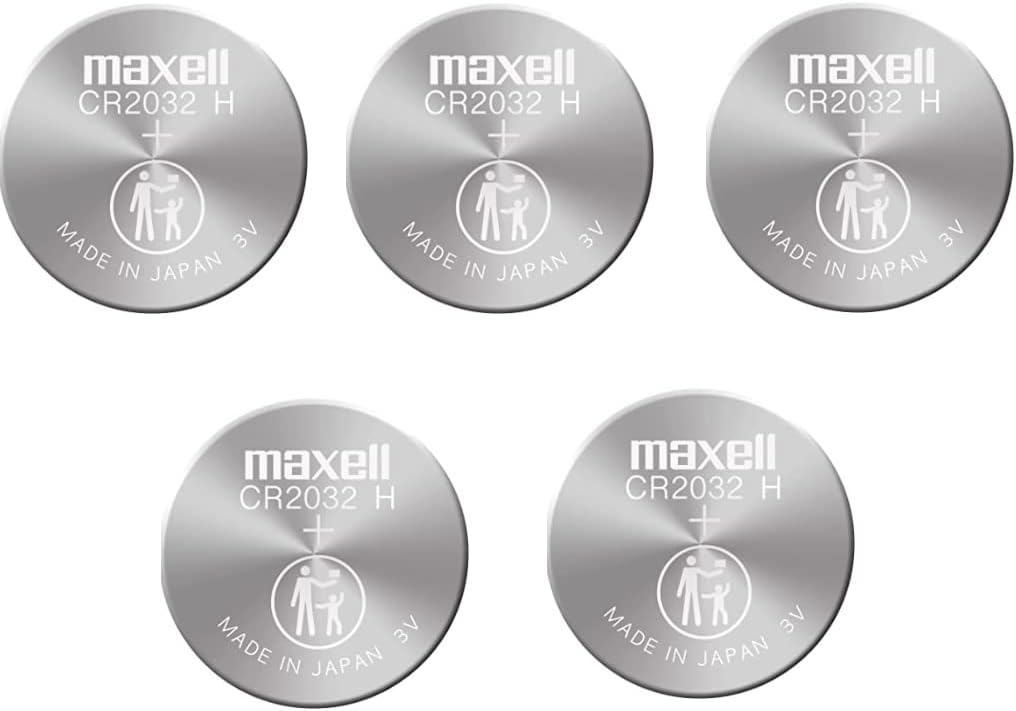
Maxell delivers a 5-pack with a capacity of 235mAh, slightly higher than standard cells. This extra capacity helps retain BIOS settings longer during power disruptions or transport periods.
We may earn a commission when you buy through this link, at no additional cost to you.
The repair or replace guarantee adds confidence to the purchase, ensuring that any defective units are handled properly. The pack is affordable, making it great for users with multiple systems.
The lithium ion technology ensures consistent power delivery and reduced self-discharge rates compared to older alkaline options. This makes it a solid long-term solution for system builders.
Perfect for workshops or families with many devices needing batteries. The higher capacity ensures fewer replacements over time compared to lower mAh alternatives in the market.
With 235mAh, these cells store more charge than standard 220mAh coins, ensuring your motherboard retains time and settings for longer periods during power loss.
The repair or replace guarantee means you have assurance against defects, ensuring that your purchase is protected and you get functional batteries every time.
We may earn a commission when you buy through this link, at no additional cost to you.
Made in Japan, these Maxell cells offer the quality control associated with Japanese manufacturing standards. The 5-pack provides excellent value for those needing multiple replacements or spare cells.
We may earn a commission when you buy through this link, at no additional cost to you.
The expiration date on the batch is clear, helping users track freshness. Lithium technology ensures low self-discharge, meaning stored cells remain viable longer than standard alternatives.
While the specific batch expiry might be older, the cells remain functional for standard motherboard use. The affordable price makes it a practical choice for bulk replacements in IT environments.
Best for tech enthusiasts stocking up for multiple builds. The consistent quality and Japanese manufacturing ensure reliable performance without the high cost of premium brands.
Manufacturing in Japan ensures strict quality control and precise specifications, resulting in consistent performance across the entire 5-pack of cells.
The 5-count format offers the best price per unit among the options, making it ideal for users who need multiple batteries for various devices.
We may earn a commission when you buy through this link, at no additional cost to you.
Selecting the right CMOS battery involves more than just matching voltage; you must consider connector types, capacity, and safety features.
Motherboards use either a direct coin slot or a wire harness with a connector. Laptops often use connectors, so verify if you need wire leads or a standard coin cell.
Standard CMOS batteries provide 3V. Ensure the replacement matches this exactly to avoid damaging motherboard circuits or causing unstable BIOS settings.
Higher capacity in mAh ensures longer life for settings retention. Look for 220mAh or higher to guarantee stability during power outages or transport.
For households with children, choose batteries with bitter taste coatings and child-resistant packaging to prevent accidental ingestion risks.
Trusted brands like Panasonic and Duracell ensure quality and longevity. Medical-grade trust can indicate stricter manufacturing standards for reliability.
Buying a bulk pack ensures you have spares for future needs. Consider if you need 2, 4, or 10 cells based on your household needs.
Some batteries claim up to 8 years of shelf life. Check expiry dates and storage conditions to ensure the battery is fresh upon installation.
First, ensure the computer is powered off and unplugged to avoid electrical shock. Ground yourself to prevent static discharge that might damage components.
Locate the CMOS battery on the motherboard; it is usually a silver coin-shaped cell. If it has wires, check the polarity before removing the old battery.
Install the new battery ensuring the positive side faces up. For wire models, connect the red and black leads to the correct terminals to prevent damage.
Check your motherboard or laptop model number and consult the service manual. Desktops usually use coin cells, while laptops often use wire connectors.
Installing a battery backwards can cause a short circuit, potentially damaging the motherboard or causing the battery to leak or overheat unexpectedly.
They are constantly draining to keep the BIOS active. Over time, the internal chemicals degrade, especially in high heat or if left unused for years.
No, these are primary lithium cells. Attempting to charge them is dangerous and can lead to leakage or fire, so always replace them with new units.
Brand matters for longevity and safety. Trusted brands offer better quality control, ensuring stable voltage and preventing leakage that damages your motherboard.
Clear the CMOS by shorting the jumper or removing the battery for a few minutes before reinstalling. This forces the BIOS to re-read and save settings correctly.
Top picks like Duracell and Panasonic offer reliability for standard setups. Wire options like LeFix serve specific laptop needs with budget friendly pricing.
Prioritize safety and capacity based on your environment. Homes with kids need coated options, while IT setups benefit from bulk packs.
Prices change frequently so verify current listings before purchasing to ensure you get the best value available today for your specific motherboard model.