
15.6 Laptop Computer
5.0Editor score
12GB RAM for multitasking
128GB SSD storage
Full HD IPS display
Discover the top affordable laptops for music production and recording. This guide compares performance, storage, and ports to help you choose the best cheap
Finding a cheap laptop for recording music requires balancing performance with budget constraints. You need enough processing power to handle digital audio workstations without breaking the bank. This guide explores ten affordable options that deliver reliable audio recording capabilities for beginners and hobbyists alike.
We evaluated each model based on processor speed, memory capacity, and storage options essential for music production. Port availability matters significantly when connecting audio interfaces and external monitors. Our comparison highlights devices that offer the best value for creators seeking professional results at an accessible price point.
Each pick showcases specific strengths like quiet operation, fast storage, or robust connectivity for studio setups. Please note that pricing fluctuates frequently due to market demand and promotions. Always verify current costs before purchasing to ensure you get the best deal available for your recording needs.
5.0Editor score
4.3Editor score

4.4Editor score
This side-by-side comparison examines ten affordable laptops suitable for music recording tasks. We analyze processor types, RAM amounts, storage solutions, and connectivity options to help you identify the most capable device for your studio setup.


This 15.6 inch laptop offers an exceptional entry point for musicians on a tight budget. With a perfect five star rating from users, it delivers reliable performance for everyday tasks including light audio editing. Its 12GB RAM ensures smooth multitasking when running recording software alongside other applications.
We may earn a commission when you buy through this link, at no additional cost to you.
The standout quality lies in its responsive 128GB SSD storage which provides fast startup times for your digital audio workstation. Although the internal storage is limited, the M.2 slot supports upgrades up to 1TB allowing you to expand as your music library grows. This flexibility makes it a practical long term solution for aspiring producers.
Honest trade-offs include the Pentium Gold processor which may struggle with complex multi track sessions involving heavy effects. However, for basic recording and mixing tasks, it performs adequately without breaking the bank. The inclusion of various ports like USB C and HDMI ensures you can connect essential audio interfaces and monitors easily.
You should buy this if you need a budget friendly device for learning music production basics. It is ideal for students or hobbyists who prioritize affordability and portability over high end processing power. Its lightweight design makes it easy to transport between home and studio environments.
The M.2 SSD slot allows users to expand storage up to 1TB for more project files.
Multiple USB and HDMI ports facilitate connections to external audio interfaces and displays.
We may earn a commission when you buy through this link, at no additional cost to you.
The HP Chromebook 14 is designed for users who prioritize portability and battery endurance during recording sessions. Its integrated dual array digital microphones capture clear audio for voiceovers and field recordings without external gear. The lightweight chassis makes it easy to carry to various locations for on the go music creation.
We may earn a commission when you buy through this link, at no additional cost to you.
With up to 13 hours and 30 minutes of wireless streaming battery life you can work through long creative blocks without hunting for outlets. The Chrome operating system offers a secure environment that protects your work from malware and viruses. This reliability is crucial for maintaining focus on your music production tasks.
Trade-offs involve the limited 32GB eMMC storage and Chrome OS which restricts traditional desktop software installations. You may need cloud storage or external drives to manage large audio files. Despite these limitations, it remains a solid choice for note taking, lyric writing, and basic editing tasks.
Consider this laptop if you value mobility and battery life over raw processing power. It suits songwriters who need a reliable tool for capturing ideas anywhere. The secure hardware and long battery life ensure your creative process remains uninterrupted.
Enjoy up to 13.5 hours of use to keep working through long creative sessions.
Integrated dual array mics allow clear voice capture for demos without extra hardware.
We may earn a commission when you buy through this link, at no additional cost to you.
This 15.6 inch laptop provides excellent value for students needing a capable machine for recording music. The 12GB RAM allows for smoother multitasking compared to standard 8GB models which is vital when running audio software. Its anti-glare IPS screen reduces eye strain during long editing sessions in various lighting conditions.
We may earn a commission when you buy through this link, at no additional cost to you.
The physical camera privacy slider adds a layer of security and peace of mind for remote workers and students. With rich connectivity options including USB C and HDMI you can connect to monitors and storage devices without extra adapters. This flexibility supports a versatile workspace setup for music production.
Honest trade-offs include the Pentium Gold processor which may not handle intensive rendering tasks efficiently. However, for learning recording techniques and basic mixing it offers sufficient performance. The lightweight design ensures you can easily carry it between classes or home studios.
Buy this if you are a student seeking a balanced mix of performance and affordability. It supports daily tasks and light creative work without costing a fortune. The privacy features and connectivity make it a practical tool for modern learning.
Anti-glare coating on the screen reduces strain during extended viewing periods.
Physical camera slider lets you cover the lens for better privacy during calls.
We may earn a commission when you buy through this link, at no additional cost to you.
BLUEING 2026 Laptop delivers vibrant visuals with a 100% sRGB color gamut beneficial for creators who also edit album art. The 8GB RAM supports daily applications and light multitasking effectively. USB-C charging adds modern convenience allowing you to use a single cable for power and data transfer.
We may earn a commission when you buy through this link, at no additional cost to you.
Its manual privacy slider ensures security when not in use protecting your personal information. The Bluetooth 5.2 connectivity supports fast downloads and stable wireless streaming for your workspace. Despite its thin profile it includes ample ports for peripherals like mice and external drives.
Trade-offs include limited battery life compared to some competitors and only 8GB RAM which may bottleneck heavy workflows. However, the visual quality and port selection make it a strong contender for basic production needs. It is a reliable choice for those who value screen clarity.
You should buy this if visual accuracy is a priority for your creative work. It suits musicians who also handle graphic design tasks. The privacy features and modern charging options enhance daily usability.
100% sRGB color gamut ensures vibrant and accurate colors on the display.
USB-C charging capability allows for versatile and convenient power connections.
We may earn a commission when you buy through this link, at no additional cost to you.
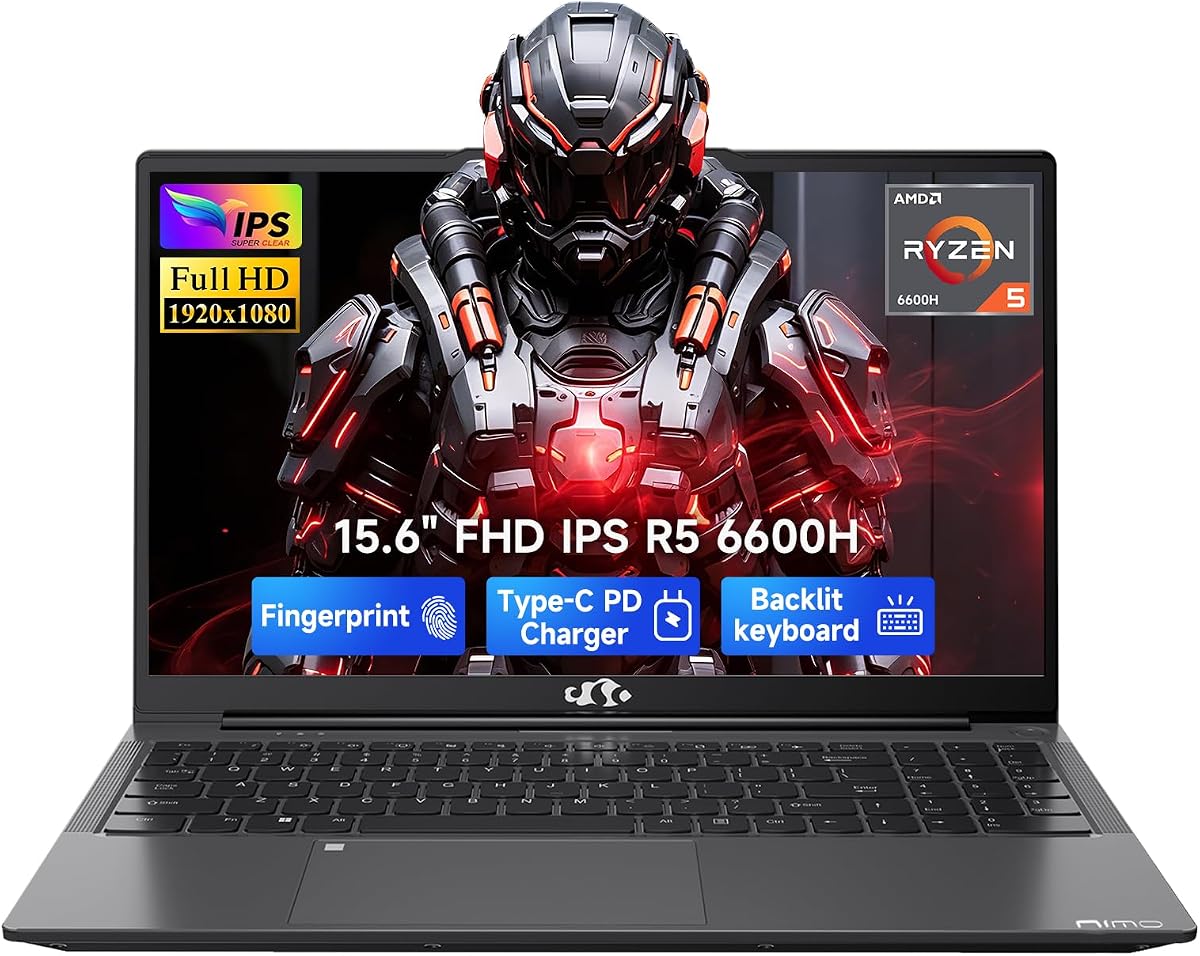
The NIMO 15.6 AI Creator stands out with its AMD Ryzen 5 6600H processor and 16GB DDR5 RAM providing superior speed for audio work. This configuration handles demanding daily performance and content creation tasks smoothly. The 512GB SSD offers ample space for large project files and media libraries.
We may earn a commission when you buy through this link, at no additional cost to you.
Its Radeon 660M integrated graphics support smooth media playback and light photo editing which complements music production workflows. The fingerprint reader built into the touchpad ensures quick and secure login without typing passwords. Multi port convenience with two full function USB-C ports allows seamless connectivity for external monitors and drives.
Trade-offs include a higher price point compared to budget options and a heavier chassis which affects portability. However, the performance headroom is significant for users planning to grow their recording setups. The 2-year warranty adds confidence for long-term investment.
Buy this if you need robust performance for complex multi-track recordings. It is ideal for serious hobbyists who want future-proof hardware. The balance of power and storage makes it a top choice.
6-core Ryzen 5 6600H delivers strong speed for multitasking and recording.
Fingerprint reader integrated into the touchpad for quick and secure access.
We may earn a commission when you buy through this link, at no additional cost to you.
BLUEING 2026 Laptop offers a generous 12GB RAM and 256GB SSD which provides a solid balance for everyday tasks. The spacious touchpad and ergonomic keyboard enhance typing comfort during long writing or coding sessions. It is designed for business and student use cases requiring reliability.
We may earn a commission when you buy through this link, at no additional cost to you.
With support for storage expansion up to 4TB via NVMe you can accommodate growing music libraries easily. The wide selection of ports including USB-C and HDMI ensures you can connect all necessary peripherals. This connectivity supports a flexible workstation setup for recording and production.
Honest trade-offs include the Pentium Gold processor which may not handle heavy rendering tasks efficiently. However, the storage and RAM combo offers good value for those needing space and memory. It is a practical choice for those with growing storage needs.
Consider this laptop if you need significant storage capacity and memory. It fits users who manage large file sets and need room to grow. The keyboard design adds to the overall comfort.
Support for up to 4TB NVMe SSD upgrades for massive storage needs.
Full-size ergonomic keyboard and spacious touchpad for better navigation.
We may earn a commission when you buy through this link, at no additional cost to you.
This 15.6 inch laptop features a 170-degree hinge design for flexible viewing angles in various environments. The quiet operation ensures it does not distract during online learning or music recording sessions. Dual Type-C ports provide modern connectivity options for peripherals.
We may earn a commission when you buy through this link, at no additional cost to you.
It comes with 12GB RAM and 256GB SSD for smooth multitasking and fast file access. The lightweight design makes it easy to carry for students and professionals on the go. Privacy protection is included with a built-in webcam cover.
Trade-offs include up to 6 hours of battery life which may require frequent charging. However, the performance and screen flexibility make it suitable for daily use. It is a reliable option for those prioritizing screen angle and privacy.
Buy this if you need a versatile screen and quiet operation. It suits students and remote workers who value comfort and privacy. The modern connectivity supports various devices.
170-degree hinge design allows comfortable viewing from multiple angles.
Quiet performance ensures minimal noise distraction during work or study.
We may earn a commission when you buy through this link, at no additional cost to you.
BLUEING 15.6 Laptop provides a vibrant visual experience with a 100% sRGB color gamut for accurate colors. The 256GB SSD ensures ample space for files and fast startup times. Wireless connectivity is powered by Bluetooth 5.0 for fast downloads.
We may earn a commission when you buy through this link, at no additional cost to you.
Its 16:9 widescreen display offers more workspace for browsing and editing. The ergonomic keyboard and touchpad enhance navigation and typing comfort. Storage expansion up to 512GB via TF card allows room for growth.
Trade-offs include a lower overall rating compared to top contenders and basic specs. However, the visual quality remains a strong point for creative work. It is a decent option for those prioritizing screen color.
Consider this laptop if visual fidelity is a primary concern. It suits media consumption and light editing. The connectivity and storage options add practical value.
100% sRGB color gamut provides vivid and accurate visuals.
Bluetooth 5.0 enables fast downloads and streaming capabilities.
We may earn a commission when you buy through this link, at no additional cost to you.
Amzboy 15.6 Laptop is built with a fanless solid-state design ensuring absolute silent operation for noise-sensitive recording. Its 15.6-inch anti-glare display offers a wide viewing experience for all tasks. Windows 11 is pre-installed for a seamless experience out of the box.
We may earn a commission when you buy through this link, at no additional cost to you.
Type-C PD fast charging lets you power up quickly with a compact adapter. Storage expansion up to 1TB via TF card offers flexibility for media files. It is lightweight and easy to carry for daily travel.
Trade-offs include limited 4GB RAM and CPU speed which restrict multitasking capabilities. However, the silent operation is a unique benefit for home studios. It is ideal for simple tasks and portability.
Buy this if you need a quiet device for recording environments. It suits light users who value silence over raw power. The charging options add modern convenience.
Fanless solid-state design ensures no noise distraction during work.
45W Type-C PD fast charging keeps you productive on the go.
We may earn a commission when you buy through this link, at no additional cost to you.
This 15.6 inch FHD laptop is surprisingly light at only 1.63kg making it easy to carry anywhere. The Comet Lake 5205U processor delivers daily workloads performance with integrated UHD Graphics. Pre-loaded with Win11 it starts working immediately without setup.
We may earn a commission when you buy through this link, at no additional cost to you.
Storage expansion up to 512GB via TF card allows room for archiving projects. The Kensington lock slot provides added security in shared spaces like libraries. Connectivity includes three USB 3.0 ports and Type-C for versatile peripheral use.
Trade-offs include 6GB RAM which may limit heavy multitasking and a 38Wh battery that requires charging. However, the lightweight design and security features make it practical for travelers. It is a reliable tool for those on the move.
Buy this if portability is your top priority. It suits students and travelers who need a secure lightweight device. The connectivity and OS ensure immediate productivity.
Integrated Kensington lock slot helps secure the laptop in public spaces.
Lightweight chassis at 1.63kg makes it easy to carry daily.
We may earn a commission when you buy through this link, at no additional cost to you.
Selecting the right laptop for music recording requires evaluating specific hardware components that impact audio performance. Understanding these factors ensures you invest in a device capable of handling your production needs.
Processor speed determines how efficiently your digital audio workstation runs complex tasks. For music recording look for multi-core CPUs that handle real-time effects processing without lag. Even budget processors like Pentium Gold can work for basic recording if paired with sufficient RAM.
Prioritize CPUs with higher core counts if you plan to expand your production capabilities.
RAM is critical for running audio software and multiple applications simultaneously. Aim for at least 8GB of memory to ensure smooth playback of multi-track sessions. 12GB or 16GB options provide extra headroom for future growth and larger projects.
More RAM reduces the likelihood of audio dropouts during recording or playback.
Solid State Drives offer faster data access speeds essential for loading large sample libraries quickly. An SSD ensures your operating system and music software boot up in seconds. Avoid older hard drives as they may introduce latency during audio recording.
Choose a model with an SSD to minimize lag and maximize workflow efficiency.
Connectivity ports allow you to link external audio interfaces and MIDI controllers. Look for laptops with USB-C or USB 3.0 ports for fast data transfer. HDMI outputs enable you to use external monitors for a larger workspace.
Ensure the laptop has enough ports to connect all your necessary studio gear.
Battery life impacts how long you can work away from a power source. Longer battery life is beneficial for mobile recording or traveling to different locations. Aim for at least 6 hours of use to avoid interruptions during sessions.
A strong battery ensures uninterrupted creativity when outlets are not available.
Operating system compatibility dictates which digital audio workstations you can install. Windows and macOS generally offer broader software support for professional tools. Chromebooks may be limited to browser-based audio apps which restricts production options.
Verify the OS supports your preferred recording software before purchasing.
Screen quality affects your ability to view waveforms and edit tracks clearly. An IPS display with anti-glare coating reduces eye strain during long editing sessions. Larger screens provide more workspace for complex projects and interface elements.
Invest in a display that offers clear visuals for comfortable long-term use.
Upgrade potential ensures your device remains useful as your needs grow. Check if RAM and storage slots allow for future expansion without replacing the entire device. Upgradable components save money in the long run by extending the laptop's lifespan.
Choose a model with accessible slots to increase RAM or storage later.
Start by installing a reliable digital audio workstation software compatible with your operating system. Configure your audio settings to use the external interface if connected for better sound quality. Keep your system updates current to maintain stability and security.
Organize your project files into dedicated folders to avoid losing recordings during edits. Back up your music library regularly to an external drive or cloud service. Proper file management ensures you can retrieve your work efficiently whenever needed.
Protect your laptop from dust and heat by keeping it on a flat surface during use. Use a cooling pad if the device gets warm during intensive rendering tasks. Clean the keyboard and screen periodically with a soft cloth to maintain performance and appearance.
Yes you can record music on a Chromebook using web-based digital audio workstations. These browser tools work well for basic recording and editing. However advanced features may be limited compared to desktop software on Windows.
Ideally you need at least 8GB of RAM for smooth music production. More RAM such as 16GB helps when handling large multi-track sessions. Budget models with 12GB offer a good balance for beginners.
An external audio interface improves sound quality and reduces latency during recording. It allows you to connect professional microphones and instruments. Built-in laptop ports may work for casual demos but lack professional fidelity.
Windows and macOS are the industry standards for music production software. They offer the widest compatibility with digital audio workstations and plugins. Chrome OS is limited to web apps which restricts professional workflows.
Reduce latency by using an external audio interface with dedicated drivers. Adjust your audio buffer size in the software settings. Using a laptop with an SSD storage helps load data faster to minimize delays.
Many models support storage upgrades via M.2 slots or external ports. Check the specifications for expansion options before purchasing. Adding an external drive is often an easy way to increase space for recordings.
These top ten options provide a range of choices for musicians seeking affordability and performance. The NIMO 15.6 AI Creator leads in power while the 15.6 Laptop Computer offers a solid budget entry point. Each device brings unique strengths suitable for different recording needs and preferences.
When choosing prioritize RAM capacity and connectivity to ensure your laptop handles your software smoothly. A laptop with upgrade potential offers better longevity as your projects grow. Consider how portable you need the device to be for your workflow.
Remember that prices fluctuate often so always check current deals before purchasing. Investing in the right hardware sets the foundation for successful music production. Use this guide to find a reliable partner for your creative journey.