
Zobirez 420W 10-Port Fast USB Charging Station
4.5Editor score
Delivers up to 420W total output
Includes ten short mixed charging cables
Features sturdy one piece ABS slots
This guide compares the best charging stations for Chromebooks to help schools and offices organize devices with safe, fast, and efficient power solutions.
Finding the right charging solution for Chromebooks is essential for schools and offices managing multiple devices daily. A good station keeps laptops organized prevents cable clutter and ensures safety during overnight storage.
We evaluated ten top models based on capacity design durability and safety features. Each option offers unique benefits for classrooms workspaces and shared environments needing reliable multi-device power management.
Every pick highlights key strengths ideal users and potential trade-offs to help you decide. Note that availability and pricing may change so verify details before purchasing your next charging station.
4.5Editor score

4.7Editor score
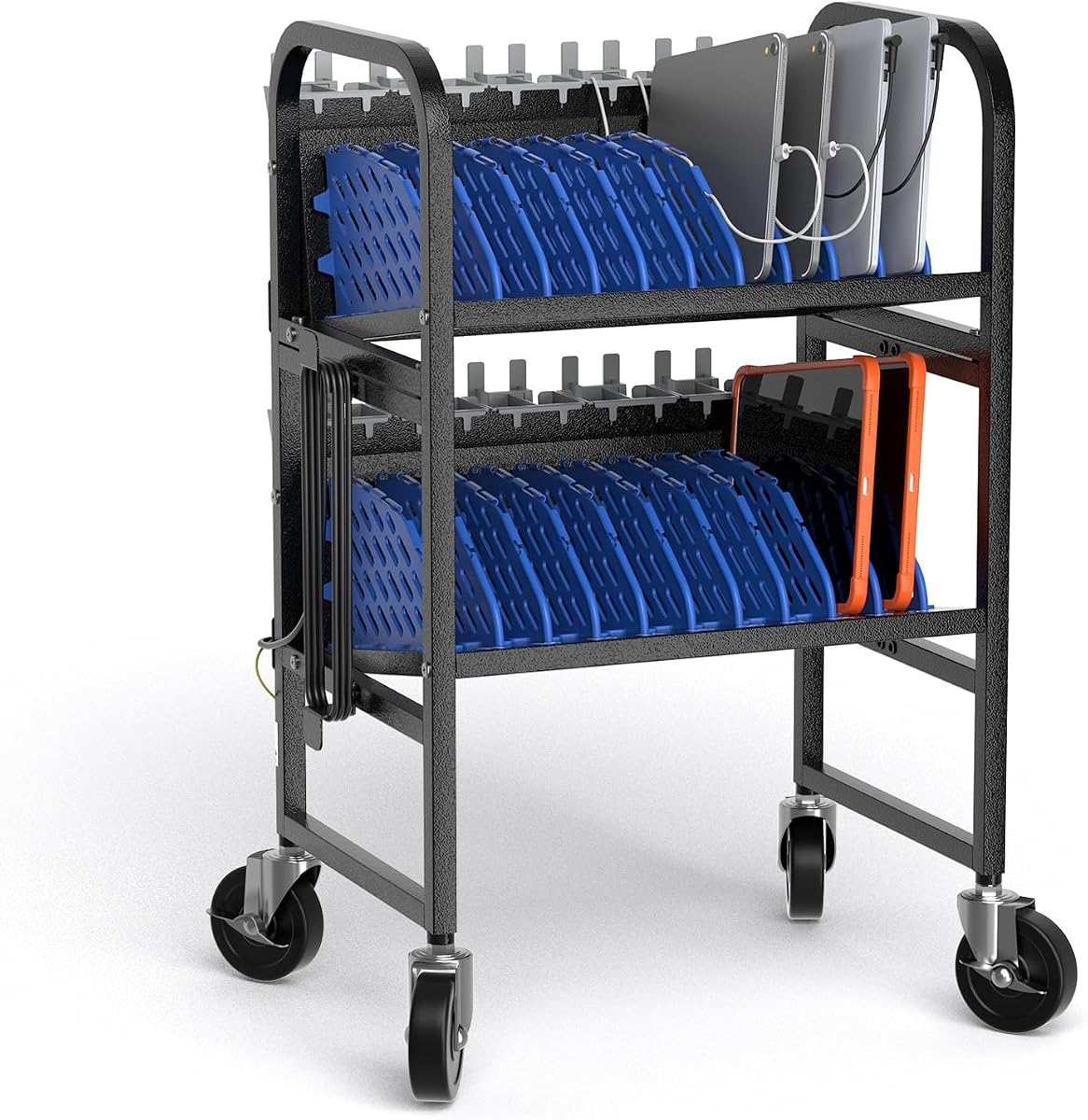
The following table provides a side by side overview of all ten reviewed stations including key specifications and direct links to product details.


The POCHAR 8-Device Universal AC Laptop Charging Station stands out as the top pick for general use. It holds a4.7 rating and offers versatile support for Chromebooks tablets and other laptops up to 14 inches.
We may earn a commission when you buy through this link, at no additional cost to you.
This station excels in organization and safety with its surge protected power strip included. The wide angle slots fit various devices securely while the compact design keeps workspaces tidy without taking up too much room.
While it supports eight devices which suits small to medium setups it may not fit exceptionally thick protective cases. However for most standard Chromebooks and laptops the dimensions are generous enough to avoid fit issues.
Schools and offices needing a reliable no-fuss solution should consider this model. It combines ease of use with robust construction making it a practical choice for daily charging and storage needs.
Wide angle slots accommodate Chromebooks iPads tablets and most laptops up to 14 inches and 1.4 inches thick.
Built in surge protection prevents voltage spikes keeping devices safe during long charging sessions without extra hardware.
We may earn a commission when you buy through this link, at no additional cost to you.
The 10-Device Laptop and Tablet Charging Station provides flexibility with six AC outlets and four USB ports. It rates at 4.4 stars and suits environments needing mixed power types for various devices.
We may earn a commission when you buy through this link, at no additional cost to you.
Its cable management system helps reduce clutter while the open rack design allows easy insertion and removal of Chromebooks or tablets. The surge protected strip adds safety for shared spaces like classrooms.
Users may need to route cords carefully to maximize the compact footprint. Though pricier than simple racks the added port variety justifies the cost for dynamic device needs.
Ideal for offices or libraries where phones tablets and laptops share charging spots. This station balances capacity with accessibility supporting efficient workflows.
Six AC and four USB ports allow simultaneous charging of laptops phones and accessories without needing extra adapters.
Vertical slots minimize desk usage while providing quick access for students or staff retrieving devices quickly.
We may earn a commission when you buy through this link, at no additional cost to you.
The 14-Slot Open Charging and Storage Rack offers maximum capacity with fourteen slots rated 5 stars. Its steel build ensures durability for high intensity use in schools or offices.
We may earn a commission when you buy through this link, at no additional cost to you.
Open design allows airflow to prevent overheating while adjustable feet keep devices balanced on uneven floors. It keeps cables tidy and supports many Chromebooks without bulky enclosures.
Note the power strip must be purchased separately which adds to setup effort. Assembly is also required but the sturdy frame withstands daily heavy use well.
Best for spaces needing dense device storage without doors or complex access. This rack prioritizes ventilation and stability for safe long term charging.
Fourteen independent slots support simultaneous storage and charging for high density needs in classrooms or labs.
Open frame design enables natural ventilation reducing heat buildup during extended overnight charging sessions.
We may earn a commission when you buy through this link, at no additional cost to you.
The Workington 8-Device Open Desktop School Charging Cart focuses on safety and accessibility. It includes an UL approved power strip and padded shelves to prevent scratches during storage.
We may earn a commission when you buy through this link, at no additional cost to you.
Open cart layout lets students or staff retrieve devices quickly. Removable dividers adapt to larger laptops or tablets while cord clips keep cables organized at the back.
Assembly is needed which may delay initial use but ensures secure setup. With only eight slots it suits smaller classrooms or workspaces needing reliable protection.
A good choice for schools prioritizing device safety and easy retrieval. The open style supports frequent access without compromising power reliability.
Soft shelf pads and plastic dividers prevent accidental scratches protecting Chromebooks and tablets during storage.
Open design allows instant device retrieval ideal for students switching between tasks throughout the day.
We may earn a commission when you buy through this link, at no additional cost to you.
The Moezuti 20-Port 600W Charging Station delivers exceptional power at a budget-friendly rate rated 4.8 stars. It supports laptops via high-speed USB-C ports and includes ten cables for convenience.
We may earn a commission when you buy through this link, at no additional cost to you.
GaN technology monitors temperature to prevent overheating while the one-piece slots hold devices securely without breakable dividers. This design ensures long term reliability for classrooms.
Limited to USB ports it may not fit devices needing traditional AC adapters. Also cables are short which might require careful placement near outlets.
Best for offices or families with many USB-C capable Chromebooks or gadgets. It combines safety features with high capacity at a compelling price.
Two high-speed 65W USB-C ports enable fast charging for laptops and other high demand devices.
Ten short cables reduce the need for additional purchases and keep surfaces tidy after setup.
We may earn a commission when you buy through this link, at no additional cost to you.
The POCHAR 20-Device Laptop Charging Cart is designed for high traffic environments requiring mobility. It holds twenty devices and features locking casters to move securely between rooms.
We may earn a commission when you buy through this link, at no additional cost to you.
Ventilated open frame reduces heat while adjustable dividers fit Chromebooks up to 15.6 inches. Built for industrial use it stands up to daily wear in schools or hospitals.
The size demands more floor space and the price is higher than fixed units. But for large institutions needing transportable storage the investment pays off in efficiency.
Ideal for universities or training centers moving Chromebooks regularly. This cart merges robust safety with transport convenience.
Swivel casters with locks allow quiet transport between classrooms or offices while keeping the unit stable.
Twenty slots accommodate varied devices with dividers adjusting to fit laptops or tablets with cases.
We may earn a commission when you buy through this link, at no additional cost to you.
The POCHAR 10-Device Open Charging Station balances durability and organization with its steel frame rated 4.7 stars. It holds ten devices and includes a lower tray for chargers or supplies.
We may earn a commission when you buy through this link, at no additional cost to you.
Cable clips and open design reduce clutter while promoting airflow to avoid overheating. Its build withstands daily high traffic in offices hospitals or libraries.
Fixed dividers limit adaptability for very thick devices and mobility is not a focus. But its sturdiness ensures long term reliability.
Perfect for fixed workspaces needing reliable storage and charge. The lower tray adds practical value for accessories.
Heavy duty steel construction resists deformation and ensures stability for daily high frequency use.
Lower storage tray provides space for chargers cables or accessories keeping everything centralized.
We may earn a commission when you buy through this link, at no additional cost to you.
The Belkin 10-Device Charging Station comes from a trusted name in power protection rated 4.3 stars. It includes ten surge protected outlets and wide-angle slots for most Chromebooks up to 13 inches.
We may earn a commission when you buy through this link, at no additional cost to you.
Design allows mounting on carts or desks while labeling space helps personalize device assignments. Safety is highlighted with equipment warranty coverage.
Devices larger than 13 inches or thick cases may not fit. The cost is higher than generic brands but reliability justifies it.
Ideal for schools prioritizing safety and brand reputation. Its mountable design adds versatility for fixed setups.
Built-in surge protection and equipment warranty guard devices against voltage spikes during charging.
Fits on standard carts or mounts to desks for secure placement in various environments.
We may earn a commission when you buy through this link, at no additional cost to you.
The Zobirez 420W 10-Port Fast Charging Station offers fast PD ports for laptops rated 4.5 stars. It includes mixed cables and one-piece slots to prevent breakage.
We may earn a commission when you buy through this link, at no additional cost to you.
Non-slip pads keep the unit secure while the sturdy ABS material ensures longevity. It suits desks or nightstands needing organized charging for mixed devices.
Without AC outlets it relies entirely on USB connections which may limit older Chromebooks. Short cables also restrict flexibility.
Best for modern USB-C devices needing quick charging and tidy cables. It is a practical compact solution.
Dual 65W PD ports support fast charging for laptops and high demand mobile devices.
Mixed cable pack covers various connectors reducing the need for extra purchases.
We may earn a commission when you buy through this link, at no additional cost to you.
The 10-Device Mobile Charging Station combines mobility with sturdy construction rated 5 stars. Rolling casters and open access make it easy to move Chromebooks between rooms.
We may earn a commission when you buy through this link, at no additional cost to you.
Tool-free assembly simplifies setup while the steel build ensures durability. A lower shelf stores adapters or supplies keeping the cart organized.
Though limited to ten slots it suits small to mid sized groups needing portability. The build quality supports daily classroom use well.
Perfect for schools needing flexible device management. This cart balances ease of use with reliable storage.
Tool-free assembly gets the cart ready quickly minimizing setup time for busy environments.
Rolling casters allow easy transport between classrooms or workspaces with secure locking options.
We may earn a commission when you buy through this link, at no additional cost to you.
Selecting a charging station involves evaluating capacity design safety and portability to fit your environment.
Consider how many Chromebooks or tablets you need to charge simultaneously. Options range from eight to twenty slots depending on your group size.
Choose a model that matches your maximum device count with some room for growth.
Check if the station includes AC outlets USB ports or both. Some support laptops via USB-C while others need traditional adapters.
Ensure the wattage and port types match your Chromebook chargers for reliable charging.
Look for built-in surge protection UL certification and overheat prevention. These protect devices from damage during long charging sessions.
Prioritize units with robust safety systems for shared public spaces.
Stations made from steel or flame-retardant ABS last longer in high traffic areas. Check frame construction and divider quality.
Durable materials prevent wear and ensure stability for heavy use.
Decide if you need wheels for moving between rooms or a fixed desk unit. Open designs aid ventilation while enclosed options may save space.
Select mobility features based on how often devices are relocated.
Integrated clips or routing systems keep cords tidy and prevent tangling. This improves safety and appearance.
Look for models with built-in solutions to minimize clutter.
Some stations need tools or time to assemble while others are ready out of box. Factor this into setup plans.
Choose no-assembly options if quick deployment is needed.
Open-frame racks allow airflow which reduces overheating risks during charging. Enclosed units may trap heat.
Ensure adequate ventilation for safe operation in warm environments.
Place the station on a stable flat surface away from water or heavy traffic areas. Plug the power cord into a grounded outlet and connect all device chargers securely.
Slide each Chromebook or tablet into a slot ensuring it fits snugly without forcing. If your model has adjustable dividers set them to fit your device sizes.
Periodically dust the slots and wipe down surfaces to prevent buildup. Check cables for wear and replace damaged ones promptly to maintain safety.
Many models support any laptop or tablet with compatible dimensions. Check width and thickness limits to ensure fit for your devices.
Most units come with built-in surge protected power strips to protect devices from voltage spikes. Verify specifications before purchasing.
No they are designed for indoor environments. Exposure to moisture or extreme temperatures can damage electronics and void warranties.
Use a soft dry cloth to wipe dust and debris. Avoid liquids directly on the unit to prevent electrical hazards.
Yes most stations accommodate cases up to a specified thickness. Check the product specs for exact limits before purchasing.
Warranty terms vary by manufacturer. Some offer extended coverage for connected equipment while others provide basic guarantees.
The POCHAR 8-Device Universal AC Moezuti 20-Port and POCHAR 20-Device Laptop Cart offer top solutions for varied needs. Each brings unique strengths in power safety or mobility.
Prioritize capacity portability and protection features that match your space and usage. Balancing these ensures efficient and secure device management.
Remember to check current availability and details before ordering. Verify specs and customer reviews for the best results.