
Charging Station for Multiple Devices 50W
4.4Editor score
Compact 6 port design
Includes apple watch holder
Affordable price point
This guide compares the top charging dock for multiple smartwatches to help you organize and power your devices efficiently without clutter.
Finding the right charging dock for multiple smartwatches can transform your daily routine by keeping your devices organized and fully powered. With so many options available, selecting one that fits your specific needs requires careful consideration of features, compatibility, and design.
We have thoroughly evaluated a wide range of products to bring you this comprehensive list. Each item was assessed based on its ability to handle multiple devices, charging speed, build quality, and overall user experience to ensure you make an informed decision.
Each pick in this guide highlights specific strengths and potential trade-offs to help you choose the best solution for your setup. Please note that prices and availability can change frequently, so always check the current listings before making your final purchase.
4.4Editor score

4.6Editor score

4.3Editor score
This side-by-side comparison highlights the key specifications and features of the top ten charging solutions to help you quickly identify the best fit for your smartwatch and device collection.


This 100W charging station stands out as a comprehensive solution for households with multiple devices. Its high rating reflects user satisfaction with its ability to power ten devices simultaneously while maintaining a clean and organized look on any desk.
We may earn a commission when you buy through this link, at no additional cost to you.
The inclusion of adjustable dividers makes it easy to accommodate tablets with thick cases, ensuring no device is left stranded. The advanced cooling system with smart fans keeps temperatures down during extended charging sessions, protecting your valuable electronics from heat damage.
While the unit is somewhat larger than compact models, this size allows for better heat dissipation and stability. The included cables are convenient but may need to be managed carefully to avoid clutter over time.
Anyone with a mix of phones, tablets, and smartwatches will find this dock highly functional. It is an excellent choice for families or office environments where reliable and fast charging for multiple gadgets is essential.
The station offers a mix of USB-C and USB-A ports to suit almost any modern device.
Built-in chips detect devices to prevent overcharging and ensure safe operation.
We may earn a commission when you buy through this link, at no additional cost to you.
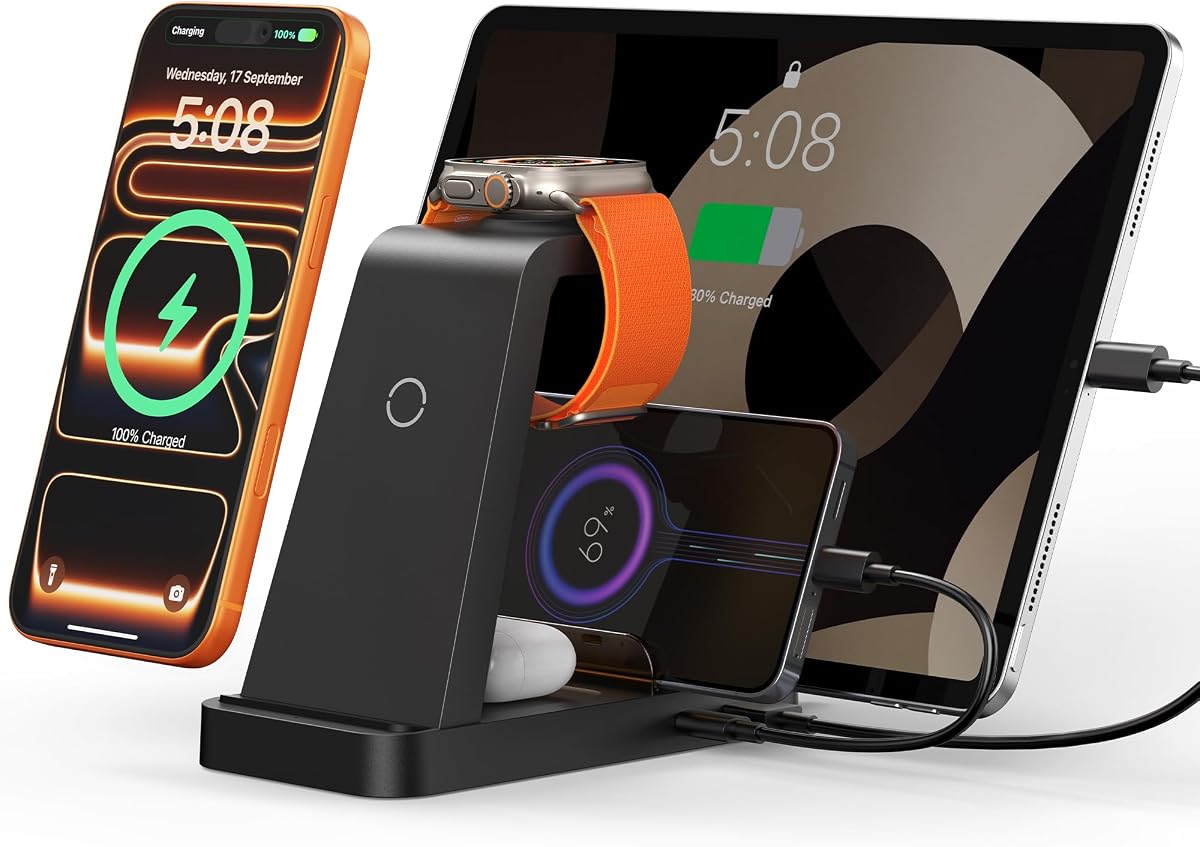
For those seeking an efficient and affordable option, this 50W charging station delivers solid performance. It is designed to keep your desk tidy while powering up to six devices at once, making it ideal for smaller setups.
We may earn a commission when you buy through this link, at no additional cost to you.
The inclusion of an Apple Watch charger holder is a thoughtful touch that sets it apart from many competitors in this price range. Silicone pads on the slots protect your devices from scratches and keep them secure during charging.
While it lacks the high wattage of larger models, it provides sufficient power for standard charging needs. Its compact size makes it easy to move between rooms or take on trips without taking up too much space.
This station is perfect for users who want basic organization without spending a lot of money. It balances cost and functionality well, making it a great entry-level choice for managing multiple smartwatches and phones.
Its small footprint ensures it fits comfortably on nightstands and small desks.
Protection against overheat and short circuits keeps your devices safe.
We may earn a commission when you buy through this link, at no additional cost to you.
This ANJANK station combines charging with practical bedside features like an alarm clock and night light. Its premium design appeals to users who want more than just a power source, offering a streamlined nightstand experience.
We may earn a commission when you buy through this link, at no additional cost to you.
The magnetic wireless charging ensures your iPhone aligns perfectly every time, reducing the need for manual adjustment. The night light offers seven colors and adjustable brightness, providing a soothing ambiance for reading or sleeping.
Users should note that this device is optimized for Apple products and may not support Samsung or Android smartwatches directly. This limitation is acceptable if you are fully invested in the Apple ecosystem and want a unified solution.
If you value aesthetics and functionality, this dock is a strong contender. It replaces multiple gadgets on your nightstand and charges your key devices wirelessly, making mornings and evenings easier and more organized.
Combines a clock, light, and charger into a single sleek device.
Magnets snap your phone into place for reliable wireless charging.
We may earn a commission when you buy through this link, at no additional cost to you.
This powerhouse unit offers an incredible 320W of total power, allowing you to charge laptops and phones simultaneously. It is designed for households where everyone needs to power up their devices at the same time without fighting for outlets.
We may earn a commission when you buy through this link, at no additional cost to you.
The station includes eight complimentary charging cables, which is a significant value add. The anti-slip design ensures devices stay put on the desk, while the flame-retardant material adds a layer of safety to the robust construction.
The main consideration is the size and the number of cables involved. You will need a dedicated space to set this up, and cable management might be required to keep things tidy around the desk.
For power users or large families, this station is unbeatable. It handles the load of multiple high-power devices with ease, ensuring that everyone stays connected without compromising on speed or safety.
With 320W, you can charge laptops and phones at full speed.
Eight cables mean you do not need to buy extras immediately.
We may earn a commission when you buy through this link, at no additional cost to you.
This charging station brings a warm and elegant touch to any desk with its natural bamboo finish. It is perfect for those who want their tech accessories to blend seamlessly with home decor rather than standing out as plastic gadgets.
We may earn a commission when you buy through this link, at no additional cost to you.
The design includes a hidden compartment to store cables, keeping your workspace looking clean and clutter-free. An extra hanging stand for smartwatches ensures your device is always within easy reach without taking up table space.
While the bamboo is durable, it is not as resilient as hard plastic or metal, so care should be taken to avoid scratches. The power adapter is not included, which is a common consideration for buyers choosing this aesthetic.
If style is a priority for your workspace, this dock is an excellent choice. It organizes your devices effectively while adding a touch of sophistication to your home or office environment.
The base compartment hides cables to reduce visual clutter on your desk.
A dedicated stand keeps your smartwatch upright and ready to charge.
We may earn a commission when you buy through this link, at no additional cost to you.
This minimalist organizer uses natural bamboo to keep up to eight devices tidy and easily accessible. It is a great option for users who prefer a simple, clean look over complex technical features and high speed charging.
We may earn a commission when you buy through this link, at no additional cost to you.
The included cables are short to maintain a neat appearance, and the magnetic base allows for easy assembly. The design focuses on organization and aesthetics, making it a great addition to a conference room or living space.
The lower rating suggests some users may find it lacks the robustness of other models. Without a power adapter, you will need to use your own, which adds a small step to the setup process.
Ideal for those who prioritize style over raw power, this station keeps your desk looking professional. It is perfect for light users who mainly need a place to park their devices safely during the day.
The natural wood finish blends well with wooden furniture and decor.
Space for eight devices means even large families can use it.
We may earn a commission when you buy through this link, at no additional cost to you.
This portable unit is designed for travelers who need a reliable way to charge their devices on the go. Its folding design and lightweight build make it easy to pack in a bag without adding much weight or bulk to your luggage.
We may earn a commission when you buy through this link, at no additional cost to you.
The wireless charging feature allows you to place your phone down without fumbling for cables, while the indicator light shows charging status clearly. It also includes overheat and foreign object detection to ensure safety anywhere you plug in.
Keep in mind that phone cases thicker than 2mm may interfere with wireless charging, so you might need to remove the case temporarily. It is best suited for smaller devices like phones and watches rather than large tablets.
If you travel often and want a charging solution that fits in your pocket, this is a great choice. It simplifies your travel tech setup and keeps your essential devices powered throughout your trips.
Folds flat for easy storage in bags, pockets, or small spaces.
Built-in protections guard against overheating and foreign objects.
We may earn a commission when you buy through this link, at no additional cost to you.
This unit stands out for the number of cables included, covering a wide range of device types right out of the box. It simplifies the setup process significantly so you can start charging immediately without searching for extra wires.
We may earn a commission when you buy through this link, at no additional cost to you.
The removable dividers allow you to adjust the slots to fit larger tablets, while the power switch gives a clear visual cue that the device is active. It supports universal compatibility for various phones and tablets on the market.
The use of USB-A ports may be limiting for newer devices that require USB-C for fast charging. However, for standard charging needs, it provides a reliable and organized solution for keeping your desk clutter-free.
If you want a plug-and-play experience with minimal setup, this station is a strong candidate. It works well for users with older devices or those who do not need the latest charging speeds.
With seven cables included, you can charge multiple devices immediately.
Removable dividers adapt the dock to different device sizes.
We may earn a commission when you buy through this link, at no additional cost to you.
This wireless dock is tailored for Apple users who want a streamlined charging experience for their iPhone, Watch, and AirPods. The 36W adapter ensures that devices charge quickly without staying plugged in for hours.
We may earn a commission when you buy through this link, at no additional cost to you.
Safety features like overcurrent and overvoltage protection provide peace of mind, while the air vents help dissipate heat efficiently. The design is compact enough for a nightstand yet robust enough for daily heavy use.
You must remove your phone case for wireless charging, which may be a minor inconvenience for some users. Additionally, it is optimized for Apple devices so Android watch users might need separate accessories.
For the dedicated Apple user, this station simplifies charging by bringing all devices together in one spot. It reduces cable clutter and keeps your devices ready to go whenever you need them.
A 36W adapter ensures your devices charge efficiently and quickly.
A replacement service for cables reduces waste and supports longevity.
We may earn a commission when you buy through this link, at no additional cost to you.
This station serves as a comprehensive nightstand assistant by combining a charger with an alarm clock and night light. It replaces the need for separate devices, saving space and creating a unified look on your bedside table.
We may earn a commission when you buy through this link, at no additional cost to you.
The magnetic charging ensures your iPhone aligns correctly for wireless charging every time. The night light offers seven colors and adjustable brightness, making it perfect for reading or creating a calming atmosphere.
Compatibility is limited mostly to Apple products, so users with Android watches should be aware. The setup is straightforward, but ensuring the watch connects properly requires attention to the specific magnetic mount.
If you want a device that supports your morning and evening routine while keeping your phone charged, this dock is ideal. It adds functionality to your nightstand while keeping your devices organized and safe.
The alarm clock and light eliminate the need for separate gadgets.
Magnetic alignment ensures a secure connection for reliable charging.
We may earn a commission when you buy through this link, at no additional cost to you.
Selecting the right charging dock involves considering compatibility, power, and design to meet your specific needs.
Ensure the dock supports your specific watch model and phone type. Some docks are optimized for Apple devices while others work with Android and universal smartwatches.
Check the ports and connectors to confirm they match your existing cables and device requirements.
Look for docks that support fast charging standards to reduce wait times. USB-C Power Delivery often provides faster charging than standard USB-A ports.
Verify the total wattage to ensure it can power multiple devices simultaneously without slowing down.
Choose durable materials like metal or high-grade plastic that can withstand daily use. Flame retardant materials add an extra layer of safety during charging.
Inspect the base for stability to prevent the dock from sliding or tipping over when devices are placed on it.
Consider the size of the dock relative to your desk or nightstand. Compact models save space while larger ones may offer more ports.
If you travel frequently, look for foldable or lightweight designs that are easy to pack and carry.
Docks that include cables and adapters can save you money and simplify setup. Check the types and lengths of included cables to see if they meet your needs.
Ensure any included stands or holders are adjustable to fit your specific device sizes comfortably.
Safety is paramount when charging multiple devices. Look for overheat protection, foreign object detection, and surge protection features.
Certifications like FCC or UL indicate that the product has been tested for safety standards.
Aesthetics matter if the dock will be visible in your living space. Bamboo or minimalist designs blend better with home decor than plain plastic units.
Consider color options and the overall style to ensure it complements your existing setup.
Read customer reviews to understand real-world performance and common issues. High ratings often reflect reliable performance and good customer support.
Pay attention to feedback on cable quality and long-term durability to avoid products that fail quickly.
Place the charging dock on a flat stable surface away from direct sunlight or heat sources. Ensure the power adapter is securely connected to the dock and a working outlet to avoid intermittent charging issues.
Organize your devices according to the slot layout and adjust dividers if available to fit your tablets or phones. Remove any thick cases if wireless charging is required to maintain efficient power transfer.
Clean the dock regularly with a soft dry cloth to remove dust and debris. Check cables for signs of wear and replace them if necessary to maintain safety and performance.
Yes many docks support universal USB-A and USB-C ports which can charge various watch models. Just ensure you have the right cable for each specific watch type to maintain compatibility.
Most docks distribute power efficiently but charging may be slightly slower than a direct wall charger. Using a high wattage dock ensures each device receives enough power for a steady charge.
Modern docks include safety features that stop charging once the battery is full preventing overcharging. It is generally safe to leave devices on the dock overnight but always follow manufacturer guidelines.
Wireless chargers usually require thin cases while wired docks can accommodate most cases easily. Thick or metal cases may interfere with charging so removing them ensures better connection.
Consider choosing a dock with extra available ports or a higher wattage rating to support future devices. This allows you to expand your charging needs without buying a new dock.
Use a damp cloth to wipe the surface and dry it immediately to protect the finish. Avoid harsh chemicals that could damage the wood or the internal electronics inside.
Choosing the right charging dock depends on your specific needs and device collection. The top picks highlight a range of options from powerful all-in-one units to compact portable solutions that fit any space.
Prioritize features like safety, compatibility, and ease of use to ensure a smooth daily routine. A good dock keeps your devices organized and ready to go whenever you need them.
Remember to check the latest prices and availability before buying to get the best deal. Technology evolves quickly so always look for current models that meet your requirements.