
Gigabyte Z370 AORUS Gaming 7
4.4Editor score
Three M.2 thermal guards
ESS Sabre audio DAC
RGB FUSION lighting zones
Compare the top brands for Z370 motherboards to find the perfect match for your Intel Core build with expert insights on features and reliability.
Finding the right motherboard for your Intel Core processor is crucial for system stability and performance. The Z370 chipset offers excellent support for 8th and 9th Gen chips with robust power delivery and connectivity options.
We have evaluated ten leading models based on build quality, feature sets, and user feedback to help you make an informed decision. Each board brings unique strengths whether you need gaming features, mining support, or pure reliability.
This guide details specific capabilities and strengths for each option so you can match the board to your needs. Please note that availability and pricing fluctuate frequently so verify current details before purchasing your component.
4.4Editor score
4.6Editor score

4.4Editor score
This table provides a side by side overview of key specifications and features across all ten selected boards to streamline your comparison process.


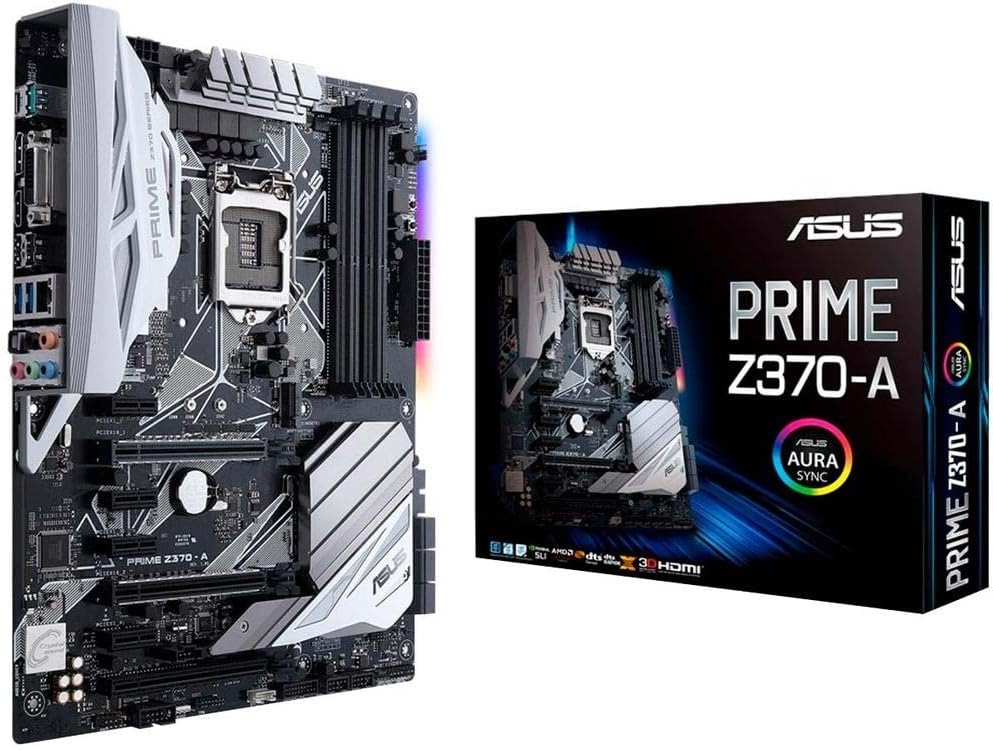
The ASUS Prime Z370-A stands out as a top choice for users seeking a balance of features and reliability. With a high user rating and support for the latest Intel Core processors, it delivers robust performance for both gaming and productivity tasks.
We may earn a commission when you buy through this link, at no additional cost to you.
Its design emphasizes connectivity and customization with dual M.2 slots and support for Thunderbolt 3 expansion. The patented Safe Slot Core technology ensures your graphics cards are securely seated while the AURA Sync system allows for deep RGB customization across your build.
While the price is higher than some budget options the build quality justifies the investment. The use of Japanese capacitors in the audio section provides a warmer sound profile that is often lacking in standard boards.
We recommend this board for enthusiasts who want a reliable foundation for a high performance system. It is an excellent fit for those who prioritize storage speed and visual customization without compromising on core performance.
Dual M.2 slots allow for dual fast NVMe drives which significantly improves system responsiveness and game load times.
The AURA Sync RGB lighting system integrates seamlessly with other compatible components to create a unified and dynamic visual experience.
We may earn a commission when you buy through this link, at no additional cost to you.
The Gigabyte Z370 AORUS Gaming 7 is engineered for users who demand top tier audio and storage performance. It combines a sleek design with advanced networking and audio technologies to deliver a premium experience.
We may earn a commission when you buy through this link, at no additional cost to you.
Its standout features include three M.2 slots equipped with thermal guards to prevent throttling during heavy use. The ESS Sabre DAC ensures that gaming audio is crisp and detailed while the RGB FUSION system offers extensive customization for lighting effects.
The inclusion of a front USB 3.1 Gen 2 Type-C header provides future proof connectivity for modern cases. While the software suite required to manage all the RGB zones can be complex it offers granular control for enthusiasts.
This board is ideal for gamers who want high end features out of the box. It is particularly suited for those who value superior audio quality and extensive storage options in their Z370 build.
The dedicated ESS Sabre DAC provides high definition audio output that enhances gaming and multimedia experiences significantly.
Thermal guards on all M.2 slots prevent overheating ensuring consistent high speed storage performance under load.
We may earn a commission when you buy through this link, at no additional cost to you.
The GIGABYTE Z390 UD offers exceptional value for users who need robust expansion capabilities without breaking the bank. It is designed to support high power processors and multiple add in cards efficiently.
We may earn a commission when you buy through this link, at no additional cost to you.
Its 10+2 phase digital PWM design ensures stable power delivery for overclocking tasks. The board features six PCIe slots making it a versatile choice for users who need to install multiple GPUs or specialized cards.
Smart Fan 5 technology allows for precise control over cooling based on multiple temperature sensors. While it lacks the flashy RGB features of other boards it focuses on reliability and performance.
This board is highly recommended for budget conscious builders who need maximum flexibility. It is a solid choice for workstations or multi GPU setups where price and reliability are the primary concerns.
Six PCIe slots allow for extensive customization and the ability to install multiple graphics or expansion cards.
The digital PWM design provides clean power to the CPU which is essential for stable overclocking and system longevity.
We may earn a commission when you buy through this link, at no additional cost to you.
The ASUS Prime Z390-P is designed for users who prioritize stability and connectivity in their system build. It offers a range of protections and connectivity features that make it suitable for various workloads.
We may earn a commission when you buy through this link, at no additional cost to you.
Its Safe Slot Core technology reinforces the PCIe slots to prevent damage from heavy GPUs. The board also includes Languard which provides advanced network protection against voltage surges and interference.
With USB 3.1 Gen2 support users can enjoy fast data transfer speeds for external devices. The six PCIe slots make it a versatile option for users who need to expand their system capabilities.
This board is a strong choice for users looking for a reliable platform with minimal fuss. It is particularly well suited for multi GPU setups or general purpose builds where durability is key.
LANGuard technology protects your network connection from voltage surges and electromagnetic interference ensuring stable connectivity.
Safe Slot Core provides reinforced PCIe slots that can withstand the weight of heavy modern graphics cards.
We may earn a commission when you buy through this link, at no additional cost to you.
The ASUS TUF Z370 Plus Gaming is built to withstand rigorous use with military grade components that ensure long term reliability. It is an excellent choice for users who prioritize durability and stability.
We may earn a commission when you buy through this link, at no additional cost to you.
Its design includes dual M.2 slots for fast storage and Gigabit LAN for reliable networking. The TUF LANGuard provides additional protection for your network connection ensuring consistent performance over time.
FanXpert 4 offers comprehensive cooling control to keep your system temperatures in check. The board is optimized for 8th Gen Intel processors delivering consistent performance for gaming and daily tasks.
We recommend this board for users who want a robust platform without unnecessary flash. It is a great fit for those who value reliability and warranty support in their component choices.
Components like TUF Chokes and Capacitors are tested to military standards for enhanced durability and performance.
FanXpert 4 ensures that your system stays cool by automatically adjusting fan speeds based on temperature sensors.
We may earn a commission when you buy through this link, at no additional cost to you.
The ASUS PRIME Z370-P offers a balanced set of features suitable for mainstream builds. It provides essential connectivity and protection features that ensure a stable computing experience.
We may earn a commission when you buy through this link, at no additional cost to you.
Its dual M.2 slots allow for fast storage options which is crucial for modern operating systems and applications. The Safe Slot Core technology adds durability to the PCIe slots ensuring they can handle heavy components.
The board includes USB 3.1 Gen2 support for high speed data transfers. FanXpert 4 Core helps manage system cooling effectively to maintain performance during intensive tasks.
This board is recommended for users who need a reliable platform without extra frills. It is a solid choice for general gaming and productivity tasks where stability is the priority.
5X Protection III ensures your motherboard is safeguarded against dust heat and electrical surges for long term reliability.
USB 3.1 Gen2 support allows for data transfer speeds up to 10Gbps which is ideal for fast external drives.
We may earn a commission when you buy through this link, at no additional cost to you.
The MSI Z370-A PRO is designed to deliver reliable performance for VR and gaming applications. It supports high capacity memory and dual GPU setups making it versatile for various user needs.
We may earn a commission when you buy through this link, at no additional cost to you.
Its VR Ready certification ensures that the board is capable of handling the demands of modern virtual reality headsets. The support for up to 64GB of DDR4 RAM makes it future proof for memory intensive tasks.
The board includes AMD CrossFireX support allowing for dual GPU configurations. This makes it a flexible choice for users who want to upgrade their graphics capabilities later.
We recommend this board for users looking for a no fuss reliable platform. It is particularly suited for gamers and VR enthusiasts who need a stable base without unnecessary complexity.
VR Ready certification ensures the system can handle the graphics demands of modern virtual reality experiences.
Support for 64GB of DDR4 RAM provides ample headroom for demanding applications and multitasking workloads.
We may earn a commission when you buy through this link, at no additional cost to you.
The Gigabyte Z370 HD3 is an entry level board that provides essential features for a stable build. It is a good option for users who need basic functionality without extra costs.
We may earn a commission when you buy through this link, at no additional cost to you.
It includes an M.2 slot for fast storage connectivity which is a valuable feature at this price point. The Intel Gigabit LAN ensures reliable network performance for online gaming and browsing.
The board supports AMD Crossfire allowing for dual GPU setups if needed. It also provides both HDMI and DVI outputs ensuring compatibility with a wide range of monitors.
We recommend this board for budget builds where core features are the priority. It is a solid choice for users who want a simple reliable platform for general use.
The included M.2 slot supports high speed storage which improves boot times and application load speeds significantly.
Intel Gigabit LAN provides a reliable and consistent network connection essential for online gaming and downloads.
We may earn a commission when you buy through this link, at no additional cost to you.
The ASRock Z370 EXTREME4 brings a variety of connectivity options to the table. It focuses on providing modern USB standards and essential features for a versatile build.
We may earn a commission when you buy through this link, at no additional cost to you.
Its USB 3.1 Gen2 Type-C and Type-A ports ensure high speed data transfers for external drives. The board supports up to four DDR4 DIMM slots allowing for flexible memory configurations.
The board includes HDMI support making it easy to connect to modern displays. It is a solid choice for users who need a balance of features at a reasonable price.
We recommend this board for users who need modern connectivity features. It is particularly suited for those who want high speed USB ports without paying a premium for RGB lighting.
USB 3.1 Gen2 ports provide fast transfer speeds for external drives and accessories.
Four DIMM slots allow for flexible memory configurations to suit your performance needs.
We may earn a commission when you buy through this link, at no additional cost to you.
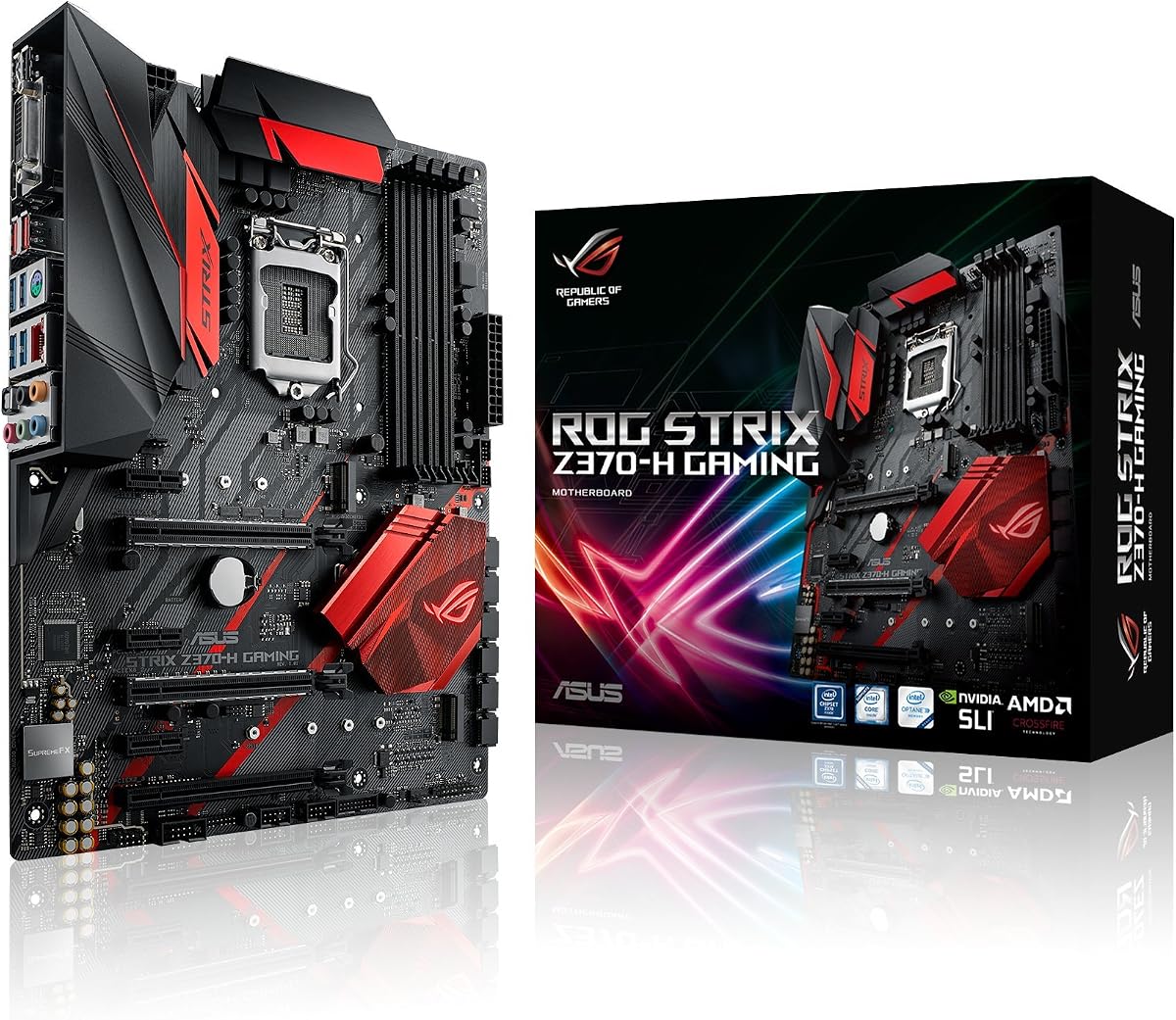
The ASUS ROG Strix Z370-H is designed with gamers in mind offering a feature rich experience. It provides a comprehensive set of ports and features to support high performance gaming.
We may earn a commission when you buy through this link, at no additional cost to you.
Its support for up to 64GB of DDR4 ensures ample headroom for demanding tasks. The board offers a vast array of USB ports ensuring you can connect all your peripherals.
The I/O panel is comprehensive including HDMI and DVI for display options. A three year manufacturer warranty provides peace of mind for your purchase.
We recommend this board for users who want a dedicated gaming platform. It is a solid choice for those who need connectivity and performance without compromising on style.
Multiple USB ports ensure you can connect all your gaming peripherals and accessories simultaneously.
ROG specific features enhance the gaming experience with optimized settings and support.
We may earn a commission when you buy through this link, at no additional cost to you.
Selecting the right motherboard involves understanding several key factors that impact your system performance and compatibility.
Ensure the motherboard supports your specific Intel Core processor generation. The Z370 chipset is compatible with 8th and 9th Gen processors so verify the exact model support.
Always check the manufacturer website for a list of supported CPUs to avoid compatibility issues.
Look for a motherboard with enough PCIe slots for your GPU and other expansion cards. If you plan to use multiple GPUs or specialized cards check the slot count and spacing.
Consider future expansion needs when selecting the number of available slots.
Modern systems benefit from M.2 slots which offer faster storage speeds than traditional SATA drives. Check the number of M.2 slots and their supported speeds.
Verify that the board supports NVMe Gen3 x4 for the best performance.
A robust VRM design ensures stable power delivery for your CPU especially during overclocking. Look for boards with digital PWM designs and adequate phase counts.
Higher phase counts generally lead to better thermal performance and stability.
Gigabit LAN is standard but some boards offer advanced networking features like Killer LAN. These can provide better bandwidth management for gaming.
Choose a board that matches your internet usage and network requirements.
Integrated audio codecs vary in quality and high end boards include dedicated DACs. If audio fidelity is important look for boards with premium audio components.
Check for noise reduction features and audio amplifiers for better sound.
If aesthetics matter look for boards with AURA Sync or similar RGB lighting systems. Ensure there are enough headers for additional RGB fans or strips.
Customization software should be user friendly and allow for sync with other components.
A solid warranty can save you money if the board fails. Most manufacturers offer a three year warranty but some may vary.
Check the manufacturer reputation for BIOS updates and customer support.
Install the motherboard on a non-conductive surface and use the correct standoffs to prevent short circuits. Secure the board firmly to the case to avoid movement that could damage components.
Update the BIOS immediately after installation to ensure compatibility with your processor. Manufacturers release updates that fix bugs and improve system stability.
Keep the motherboard free from dust by cleaning it regularly with compressed air. Proper airflow inside the case will help maintain optimal temperatures and extend the life of the board.
Yes most Z370 motherboards support 9th Gen Intel processors with a BIOS update. Always check the specific board's compatibility list before purchasing to ensure support for your exact CPU model.
Ideally look for at least two M.2 slots to allow for fast boot drives and storage expansion. More slots provide flexibility for users who need multiple high speed NVMe drives.
Safe Slot Core is a reinforced PCIe slot technology that prevents damage from heavy graphics cards. It provides better structural integrity and ensures your GPU remains secure.
Yes the Z370 chipset supports CPU overclocking. However the quality of the VRM will determine how stable and high your overclocking can be.
Higher end boards use codecs like S1220A or dedicated DACs like ESS Sabre for better sound quality. For general use standard codecs are sufficient but audiophiles may prefer dedicated audio solutions.
No the Z370 chipset requires DDR4 memory. It does not support older DDR3 modules so you must use DDR4 RAM for your build.
Thunderbolt 3 support is available on select Z370 boards but is not standard. You will need to verify specific board support if you need this feature.
Most manufacturers offer a standard three year warranty for motherboards. Some brands may offer extended warranties depending on the specific product line and region.
We reviewed ten top options that cater to different needs from budget builds to premium gaming setups. Each board offers unique strengths that can suit various user priorities and system requirements.
Prioritize features like M.2 slots and power delivery when selecting your board. Ensure the model you choose aligns with your long term goals for the build.
Check current pricing and availability as these fluctuate regularly. Making an informed choice now will ensure your system is ready for the future.