
CyberPower CP1500PFCLCD
4.5Editor score
1500VA/1000W PFC Sinewave
12 NEMA Outlets Included
Color LCD Display Panel
Compare the top battery backup for workstation PC options to find reliable power protection with surge suppression and smart features for your critical
Workstations demand consistent power to avoid data loss and hardware damage during outages. A reliable battery backup ensures your critical systems stay online or shut down safely when the grid fails unexpectedly.
We compared ten leading UPS models based on capacity, waveform quality, and management features. Our analysis focuses on reliability and ease of use for professional computing environments and home labs.
Each pick highlights key strengths and trade-offs to help you choose the right unit. Prices and availability change frequently so verify current details before purchasing your next power protection solution.
4.5Editor score

4.5Editor score

4.4Editor score
The following table provides a side-by-side view of all ten selected UPS models highlighting their core specifications and key protective features for your workstation setup.


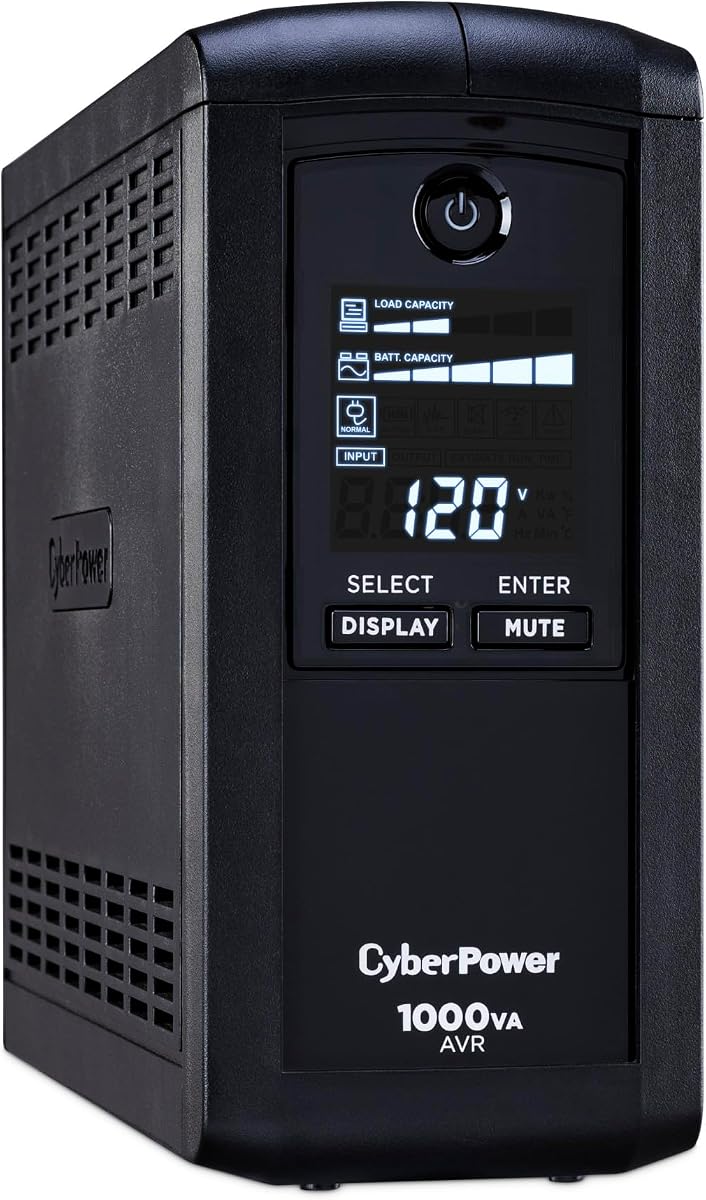


The CyberPower CP1500PFCLCD stands out as a robust solution for workstations requiring stable power. It offers 1000W of power with a pure sine wave output ensuring compatibility with active PFC power supplies.
We may earn a commission when you buy through this link, at no additional cost to you.
This model provides extensive protection with twelve outlets split between battery backup and surge only. The color LCD panel offers clear status updates and the AVR corrects minor fluctuations without draining the battery.
While the unit is larger and heavier than some alternatives it ensures reliable performance for high-demand systems. The included PowerPanel software allows for easy management and shutdown scheduling during outages.
Buy this unit if you need maximum compatibility and power for critical workstation tasks. It balances performance and features well for professional computing environments.
The PFC Sinewave technology ensures safe operation with modern computer power supplies that require pure sine wave input to function correctly.
The color LCD displays real-time data on load and battery status while the AVR maintains steady voltage to prolong battery life.
We may earn a commission when you buy through this link, at no additional cost to you.
The CyberPower CP1500AVRLCD3 offers a cost effective solution for protecting workstations and network gear. It delivers 1500VA of capacity with simulated sine wave technology for standard electronics.
We may earn a commission when you buy through this link, at no additional cost to you.
It features twelve outlets with automatic voltage regulation to stabilize power without switching to battery. The color LCD provides immediate feedback on battery status and potential issues before they cause downtime.
Users should note that simulated sine wave may not be ideal for all active PFC supplies. However it remains a strong choice for general computing and peripheral protection.
Choose this model for its balance of capacity and affordability. It is well suited for users who need reliable backup without the premium cost of pure sine wave units.
Automatic Voltage Regulation handles minor fluctuations to protect connected equipment without unnecessarily using up battery charge.
The unit includes USB charging ports to keep mobile devices powered during an outage while maintaining critical system backups.
We may earn a commission when you buy through this link, at no additional cost to you.
The GOLDENMATE 2000VA/1600W uses advanced Lithium Iron Phosphate batteries for long-term reliability and performance. It delivers pure sine wave output ideal for sensitive workstation components.
We may earn a commission when you buy through this link, at no additional cost to you.
This UPS supports high loads with over 1600W of continuous power and offers maintenance free operation for up to ten years. The communication port enables automatic PC shutdown during extended outages.
The weight is greater due to the robust internal components but this ensures stability and safety. It eliminates the need for frequent battery replacements common with lead acid models.
This unit is perfect for professional environments where uptime and long-term value are critical. Invest in this premium solution for peace of mind and reduced total cost of ownership.
The LiFePO4 battery lasts over 10 years reducing replacement costs and maintenance requirements significantly over time.
Pure Sine Wave technology ensures compatibility with all power supplies while the high wattage handles demanding workstation loads.
We may earn a commission when you buy through this link, at no additional cost to you.
The CyberPower CP1000PFCLCD offers a reliable 600W capacity with PFC Sinewave technology for standard workstations. It uses AVR to manage minor fluctuations and protect connected devices from power spikes.
We may earn a commission when you buy through this link, at no additional cost to you.
This model features a color LCD to display battery status and includes ten outlets for various peripherals. The tiltable screen allows for easy viewing and the USB ports keep phones charged.
While less powerful than higher VA models it suffices for single system setups. The trade-off is fewer outlets and lower total wattage which may not fit expanding setups.
Select this unit for smaller offices or single workstations needing quality protection. It balances essential features at a mid-range price point for typical users.
PFC Sinewave output ensures safe operation with modern power supplies designed to require a clean sine wave signal.
Automatic Voltage Regulation stabilizes power without battery use extending overall lifespan and reliability for critical equipment.
We may earn a commission when you buy through this link, at no additional cost to you.
The CyberPower AVRG900LCD provides solid protection for workstations with 480W capacity. It features data line protection to safeguard against surges traveling through telephone lines and uses AVR for stability.
We may earn a commission when you buy through this link, at no additional cost to you.
Users appreciate the intelligent LCD for monitoring status and the high rating reflects reliable performance. It offers twelve outlets allowing for extensive peripheral connections without additional hardware.
Note that it lacks USB charging ports and has lower wattage than higher VA models. This makes it best for systems with moderate power demands and existing charging solutions.
Choose this model for its reliability and outlet density. It is a practical choice for users needing to protect multiple devices in a standard office setup.
Data line protection prevents damage from electrical surges traveling through network or phone cables connected to the unit.
The strong user rating highlights consistent reliability and performance for daily computing and networking tasks.
We may earn a commission when you buy through this link, at no additional cost to you.
The CyberPower CP1000AVRLCD delivers 600W of power with a focus on efficient voltage management. Its intelligent LCD shows load and battery capacity to help users track status clearly.
We may earn a commission when you buy through this link, at no additional cost to you.
This model handles minor power issues with AVR to preserve battery life. It includes nine outlets and connects to software for shutdown control during outages ensuring data safety.
The simulated sine wave works for most computers but may not suit sensitive PFC equipment. Fewer outlets than some rivals might require extra power strips for large setups.
Opt for this unit for its detailed monitoring and voltage stability. It fits well in home office or small workstation environments requiring consistent power quality.
The LCD panel displays battery capacity and load estimates to help users manage power usage during an outage.
Automatic Voltage Regulation corrects voltage fluctuations without battery use extending the overall life of the battery.
We may earn a commission when you buy through this link, at no additional cost to you.
The CyberPower ST900U offers a slim profile design ideal for space constrained workstations. It provides 500W capacity with high efficiency components to reduce power consumption.
We may earn a commission when you buy through this link, at no additional cost to you.
This model features twelve outlets with wide spacing to accommodate bulky plugs. The standby mode ensures quick switchover and the software supports automated shutdown procedures.
While it lacks advanced waveform technology it meets basic needs for consumer gear and standard computers. The design prioritizes space efficiency over maximum power output.
Select this unit for compact home office setups. It balances essential protection with a small footprint to fit neatly on a desk or shelf.
The slim profile saves valuable desk space while still providing ample outlet availability for multiple devices.
High efficiency components reduce power consumption during normal operation keeping energy costs low.
We may earn a commission when you buy through this link, at no additional cost to you.
The CyberPower CP850AVRLCD provides entry level protection for workstations needing basic backup. It features an intelligent LCD to monitor battery capacity and load status clearly.
We may earn a commission when you buy through this link, at no additional cost to you.
AVR helps maintain stable voltage to protect devices without constant battery use. It includes nine outlets and comes with software for safe shutdown of connected systems.
Users should consider the lower wattage limits for heavy duty equipment. Simulated sine wave may not support advanced power supplies requiring pure waveform output.
Choose this model for budget conscious buyers with standard desktop setups. It offers essential safety features without unnecessary complexity or cost.
The intelligent LCD shows runtime and battery capacity to help users gauge available power during outages.
This unit delivers essential surge and battery backup at an accessible price for entry level users.
We may earn a commission when you buy through this link, at no additional cost to you.
The CyberPower EC850LCD focuses on energy efficiency with its ECO Mode that cuts power to peripherals when the PC is off. It provides 510W backup capacity for critical workstation components.
We may earn a commission when you buy through this link, at no additional cost to you.
It features a multifunction LCD to display status and offers twelve outlets for versatile connection. This model reduces energy waste while maintaining standard surge and battery backup.
Lacking communication ports it does not support automatic shutdown. This suits users comfortable with manual shutdown or those using independent network tools.
Select this unit for those prioritizing energy savings. It combines solid protection with green features ideal for eco conscious computing environments.
ECO Mode automatically shuts off connected peripherals when the computer sleeps to reduce unnecessary energy consumption.
Twelve outlets provide ample space to connect multiple devices without needing extra power strips.
We may earn a commission when you buy through this link, at no additional cost to you.
The CyberPower BRG1500AVRLCD2 offers high capacity power with 900W output suitable for demanding workstations. It includes a five year warranty and supports remote management cards for advanced control.
We may earn a commission when you buy through this link, at no additional cost to you.
Users get a color LCD and USB ports for device charging. The AVR stabilizes voltage to protect equipment and the outlet layout supports a full workstation setup.
Remote management requires buying an optional card which adds to the total cost. The higher wattage and warranty make it a premium choice for reliability.
Invest in this unit for high performance needs. It delivers extended protection and control features valuable for critical business or professional environments.
A five year warranty provides long term assurance covering the battery and equipment against defects.
Optional remote management cards enable advanced monitoring and control for professional deployment needs.
We may earn a commission when you buy through this link, at no additional cost to you.
Selecting the right UPS involves understanding your power needs and compatibility requirements for your workstation components.
Ensure the UPS can handle the total wattage of your PC and peripherals. Higher capacity provides longer runtimes during outages to save your work safely.
Check the VA and watt ratings to match your system requirements. Always leave a safety margin for future upgrades.
Pure sine wave outputs are best for active PFC power supplies found in modern workstations. Simulated sine wave suits standard units but may cause issues with sensitive hardware.
Choose pure sine wave for critical systems to guarantee compatibility and stability across all devices.
AVR corrects minor power fluctuations without draining the battery. This extends battery life and ensures consistent power quality for connected equipment.
Look for models with AVR to protect your hardware and reduce unnecessary battery cycles during brownouts.
Count your devices to ensure enough outlets are available for both battery backup and surge protection. Some units offer USB ports for charging mobile devices.
Select a unit with enough outlets to avoid extra power strips and ensure critical devices remain protected.
Management software allows automatic shutdown during outages to prevent data loss. Communication ports enable monitoring from remote locations or server rooms.
Prioritize models with compatible software to keep your workstation safe even when you are away.
A solid warranty covering the battery and equipment guarantees long term protection. Longer terms indicate manufacturer confidence in product reliability.
Check warranty details to ensure adequate coverage for your investment.
Consider the unit size and weight for your available space. Larger capacity units tend to be heavier and may require floor placement.
Ensure the UPS fits comfortably near your workstation without obstructing airflow.
Place the UPS in a cool dry location away from direct sunlight to maintain battery health. Ensure adequate airflow around the unit to prevent overheating during operation.
Connect critical devices directly to battery backed outlets while surge protectors can go on surge only ports. Plug everything into the UPS before turning it on to ensure stable startup.
Perform a battery test every six months by disconnecting power to verify operation. Replace the battery when runtime drops significantly or the unit alerts you to failure.
Runtime depends on load and battery capacity. A typical unit can support a workstation for 5 to 15 minutes allowing safe shutdown. Higher capacity models extend this time for longer interruptions.
Yes if your power supply has active PFC. Pure sine wave ensures safe operation. Simulated sine wave works for standard power supplies but may cause instability with modern units.
Yes but ensure the UPS wattage meets your PC requirements. Gaming PCs consume significant power so check capacity ratings carefully to avoid overloading the battery.
Batteries typically last 3 to 5 years. Replace them when runtime declines or the unit warns of low battery. Regular testing helps identify when replacement is due.
Automatic Voltage Regulation stabilizes incoming power without using battery. It corrects minor fluctuations and prolongs battery life by reducing unnecessary discharges during minor issues.
UPS units offer surge protection against voltage spikes but are not lightning arrestors. Direct strikes can still damage electronics so additional protection or grounding is recommended.
The top picks provide reliable protection across various needs and budgets. Pure sine wave models offer premium compatibility while budget units deliver essential safety for standard setups.
Prioritize capacity and waveform compatibility to ensure your hardware stays safe. Features like AVR and management software add valuable control and longevity to your investment.
Prices and stock vary so check current listings before purchasing. Choose the unit that best matches your performance and reliability goals.