
Eaton Tripp Lite BC350R 350VA Small UPS 210W Battery Backup Surge Protector
4.5Editor score
350VA/210W Capacity
Wall Mount Compatible Design
Easy Battery Replacement
Discover the top battery backup for small office setups. This guide compares UPS systems for reliability, surge protection, and runtime to keep your business
A reliable battery backup for small office ensures your critical equipment stays online during unexpected power outages. Protecting computers, routers, and NAS devices from sudden shutdowns prevents data loss and hardware damage effectively.
We evaluated leading UPS models based on runtime, outlet capacity, surge protection, and ease of use. Our analysis highlights systems that balance performance with value for modern small business environments efficiently.
Each pick below showcases key strengths and specific use cases to help you decide. Please note that product availability and pricing can change frequently, so check current listings before purchasing today.
4.5Editor score

4.5Editor score
4.9Editor score
This table provides a side-by-side look at all ten reviewed units. Compare their output capacity, outlet counts, and key protection features to find the right fit for your office needs.


This UPS ranks as the top choice for small offices needing robust protection. With a 4.5 rating, it combines high capacity with intelligent power management features effectively.
We may earn a commission when you buy through this link, at no additional cost to you.
It delivers 1500VA/1000W using PFC Sinewave technology which is ideal for active power supplies in modern computers. The 12 outlets allow you to plug in workstations, printers, and network gear without needing extra strips.
The color LCD panel provides real-time status updates on voltage and battery levels. While the unit is physically larger than some competitors, the extra capacity justifies the size for busy workspaces.
It is best for offices running multiple devices that need uninterrupted power. The included software helps manage shutdowns gracefully during extended outages.
The pure sine wave output ensures sensitive equipment like medical devices or high-end PCs receive stable power without risk of damage or noise.
With 12 outlets split between battery backup and surge-only, you can prioritize critical gear while still protecting peripherals from voltage spikes.
We may earn a commission when you buy through this link, at no additional cost to you.
This model offers similar capacity to the top pick but uses simulated sine wave technology. It is rated 4.5 stars and serves well for general office computing tasks.
We may earn a commission when you buy through this link, at no additional cost to you.
The Intelligent LCD panel helps you track battery health easily. With 12 outlets, you have plenty of ports for servers, routers, and desktop computers simultaneously.
While it lacks pure sine wave, it includes Automatic Voltage Regulation to stabilize power without draining the battery. This makes it efficient for areas with unstable grid power.
Choose this if you need many outlets and high capacity but do not run sensitive audio or medical equipment. It balances cost and performance well for most small businesses.
AVR corrects minor power fluctuations before switching to battery. This extends battery life and provides continuous power without unnecessary interruptions.
Two USB charge ports allow you to keep mobile devices powered during outages without using AC outlets. This adds convenience for staff on the go.
We may earn a commission when you buy through this link, at no additional cost to you.
This UPS focuses on energy efficiency with ECO mode to cut costs. Rated 4.4 stars, it is a strong option for offices looking to reduce power consumption.
We may earn a commission when you buy through this link, at no additional cost to you.
When a computer goes to sleep, the ECO outlets turn off connected peripherals. This saves energy and extends the battery life during an actual outage.
It features 12 outlets split between UPS and surge protection. The LCD panel keeps you informed on battery status without needing to open software on your PC.
Ideal for small setups with fewer high-wattage devices. If you prioritize energy savings and have moderate power needs, this unit is a smart investment.
ECO outlets automatically shut off power to peripherals when your computer sleeps. This reduces standby power usage and lowers your overall electricity bill.
Beyond battery backup, it shields devices from voltage spikes. This dual protection ensures your gear stays safe from both outages and electrical noise.
We may earn a commission when you buy through this link, at no additional cost to you.
This unit is designed to save space while offering solid protection. With a 4.5 rating, it is a favorite for offices with limited desk or floor space.
We may earn a commission when you buy through this link, at no additional cost to you.
Its slim profile allows it to fit under desks or in tight corners. The 12 outlets ensure you can connect all necessary office equipment without clutter.
GreenPower efficiency reduces power consumption during normal operation. This means lower running costs even when the battery is not being used.
Perfect for home offices or small workspaces where space is at a premium. It provides adequate backup for standard PCs and routers.
The slim profile takes up less physical space than bulky tower units. This makes installation easier in crowded workstations or under desks.
GreenPower technology minimizes energy use while the UPS is plugged in. This helps keep electricity costs down over the long term.
We may earn a commission when you buy through this link, at no additional cost to you.
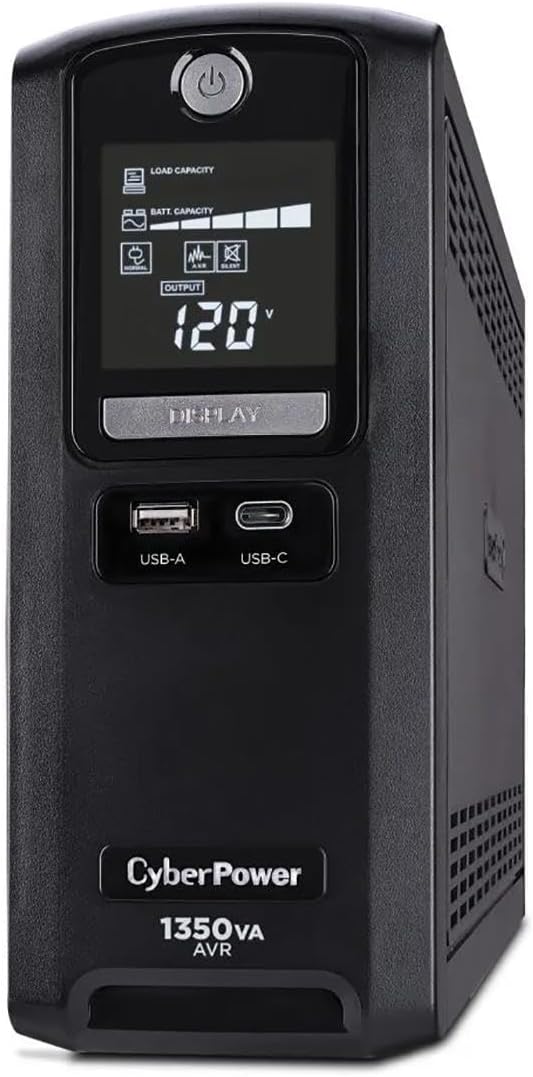
This unit stands out with a rare 4.9 rating due to its comprehensive protection features. It is ideal for offices that rely heavily on network connectivity.
We may earn a commission when you buy through this link, at no additional cost to you.
It includes network and coax protection to guard against surges traveling through phone or cable lines. This is critical for modem and router survival.
With 1350VA capacity, it supports demanding workloads. The dual USB ports allow you to charge phones during outages without using up AC outlets.
Best for network-heavy environments where keeping internet access is as important as powering PCs. Its high reliability makes it a top-tier choice.
Network and coax ports protect your modem from surges. This ensures your internet remains online even when power is out.
The 4.9 rating reflects strong customer trust and performance. It combines robust features with ease of use effectively.
We may earn a commission when you buy through this link, at no additional cost to you.
This model balances features and capacity for everyday office use. It holds a 4.6 rating for consistent performance in various power environments.
We may earn a commission when you buy through this link, at no additional cost to you.
Data line protection prevents surges from telephone lines damaging electronics. The AVR ensures stable power without switching to battery unnecessarily.
It offers 12 outlets to support multiple devices. The LCD display gives you visibility on the system status at a glance.
Good for offices needing standard protection with extra safety for phone lines. It is a reliable workhorse for general computing needs.
Protects fax machines and modems from line surges. This adds a layer of security beyond standard electrical protection.
Automatic Voltage Regulation helps conserve battery. It corrects voltage issues instantly, keeping the battery fresh for outages.
We may earn a commission when you buy through this link, at no additional cost to you.
This is a great entry point for smaller setups. With a 4.2 rating, it offers basic protection for essential devices like routers and small monitors.
We may earn a commission when you buy through this link, at no additional cost to you.
Its compact size fits easily in small spaces. The wall mount tabs allow you to save desk space by mounting it vertically.
It features 8 outlets to cover your basics. The internal battery is replaceable, extending the life of the unit.
Best for very small offices or home desks where minimal power is needed. It provides a cost-effective safety net for critical electronics.
Wall mount tabs let you install the unit out of the way. This keeps your desk clean and frees up valuable work surface.
The battery is easily replaced when it loses capacity. This avoids buying a whole new unit when the battery ages.
We may earn a commission when you buy through this link, at no additional cost to you.
This unit tops our budget list with strong value for money. It has a 4.5 rating for reliability in basic power protection tasks.
We may earn a commission when you buy through this link, at no additional cost to you.
It offers simple setup for plug-and-play protection. The VESA mount slots allow secure wall mounting if needed.
While low wattage, it suffices for routers and small electronics. The battery can be replaced easily to keep the unit running longer.
Perfect for tight budgets needing basic protection. It is an excellent choice for protecting just one or two critical devices.
Just plug in and press the power button. No complicated configuration is needed to get started immediately.
VESA compatible slots allow secure mounting. This keeps the unit out of the way and protects it from physical damage.
We may earn a commission when you buy through this link, at no additional cost to you.
APC is a trusted name in power protection. This model holds a 4.5 rating for dependable performance in home office settings.
We may earn a commission when you buy through this link, at no additional cost to you.
It includes a USB port to charge phones during outages. The battery replacement is designed to be user-friendly for DIY maintenance.
With 7 outlets, it covers essentials efficiently. It protects computers and routers well from sudden power cuts.
Choose this if you prefer a reputable brand with simple functionality. It is reliable for standard office workloads.
The battery can be swapped in minutes without tools. This keeps maintenance simple and extends the unit's lifespan.
APC is known for quality and durability. Their units often provide years of reliable service in various environments.
We may earn a commission when you buy through this link, at no additional cost to you.
This is a straightforward unit for basic needs. It has a 4.4 rating and offers good value for small setups with limited power requirements.
We may earn a commission when you buy through this link, at no additional cost to you.
The LED status lights keep you informed at a glance. It is efficient and uses GreenPower technology to save energy.
With 8 outlets, it covers standard office tasks. It is ideal for protecting just a PC and a monitor effectively.
Best for those who need simple backup without complex features. It is a practical choice for essential protection.
GreenPower design reduces power consumption. This keeps operating costs low even when the unit is idle.
Provides reliable backup for small devices. It is designed for straightforward use cases without extra complexity.
We may earn a commission when you buy through this link, at no additional cost to you.
Selecting the right UPS depends on your specific equipment needs. We outline the critical factors to consider before making a purchase decision.
Output capacity measured in VA or watts determines how much equipment you can support. Ensure the UPS rating exceeds the total wattage of all connected devices to prevent overload and premature shutdown.
Always choose a unit with at least 20% more capacity than your actual load to ensure safe operation.
Simulated sine wave units are affordable and work for most standard electronics. However, computers with Active Power Factor Correction may require pure sine wave outputs to function correctly during an outage.
Match the waveform to your equipment requirements to avoid potential compatibility issues or shutdowns.
More outlets provide greater flexibility for connecting computers, printers, and routers simultaneously. Consider both the total number and how many are battery-backed versus surge-only.
Prioritize models with enough battery-backed outlets to protect your critical devices first.
Battery life depends on load and runtime requirements. Check the estimated runtime at specific loads to see if you have time to save work or shut down safely.
Longer runtimes are necessary for servers or mission-critical systems that cannot tolerate sudden power loss.
Surge protection protects your equipment from voltage spikes caused by lightning or grid fluctuations. Look for higher Joule ratings for better protection of expensive electronics.
Ensure the unit offers comprehensive protection across all outlets for maximum safety.
LCD panels provide real-time information on load, battery status, and potential issues. Some models include software for automatic system shutdowns during extended outages.
Visual monitoring helps you maintain your system and react quickly to power problems.
Smaller units save desk space but may have lower capacity. Larger tower units offer more power but require floor space. Consider your workspace layout carefully before buying.
Measure your available space to ensure the UPS fits comfortably in your office environment.
Look for warranties that include the battery, not just the electronics. Good support ensures you can get help if issues arise with the unit.
A solid warranty provides peace of mind and protects your investment over time.
Place the UPS in a cool, dry area away from direct sunlight or heat sources. Proper airflow ensures the unit operates efficiently and maintains battery health over time.
Plug your critical devices into the battery-backed outlets. Verify which outlets provide backup power to ensure your router and computer are properly protected during an outage.
Test the unit periodically by unplugging it to confirm the battery functions correctly. Check the LCD display for errors and replace the battery when performance drops.
Runtime depends on the load connected to the unit. A basic unit might last 10 to 15 minutes for a single PC, while larger models can provide extended runtimes for multiple devices. Always check the manufacturer specifications for expected runtime at your specific load.
Yes, most UPS units allow battery replacement to extend the device's life. Look for user-friendly designs with tool-free battery trays. Always purchase the correct replacement battery model specified by the manufacturer for safety.
Surge protection guards against voltage spikes but does not provide backup power. A UPS provides both surge protection and battery backup during outages. For small offices, a UPS is better as it ensures continuous operation during power interruptions.
Pure sine wave is necessary for equipment with active PFC power supplies like modern servers or high-end PCs. Simulated sine wave works for most standard electronics. Check your device requirements to ensure compatibility before purchase.
Testing once a month is recommended to ensure reliability. Unplug the unit briefly to confirm it switches to battery power without shutting down your devices. Regular tests help identify weak batteries before a real outage occurs.
Yes, if you plug your modem and router into battery-backed outlets. This ensures your internet stays active even when the power goes out, allowing you to work remotely or save data safely.
Heat, frequent discharges, and age affect battery lifespan. High temperatures reduce chemical efficiency leading to faster degradation. Keep the unit in a climate-controlled environment to maximize the life of the internal battery.
Choosing the right UPS involves balancing capacity, features, and your specific office needs. The top picks offer excellent protection for a wide range of workloads.
Prioritize runtime and outlet count to ensure all critical devices stay online during an outage. Don't forget to account for future growth when selecting your unit.
Prices and availability change frequently so check the latest listings before finalizing your purchase. With the right backup, your small office can handle power interruptions with confidence.