
NetumScan USB 1D Barcode Scanner
4.4Editor score
Plug and play USB
Durable shockproof design
Wide code support
This guide compares the top barcode scanners for library use, evaluating wireless range, battery life, and compatibility to help you choose the right tool for
Finding the right barcode scanner for library operations is crucial for maintaining accurate inventory and streamlining checkout processes. Librarians need devices that can handle worn spines, scan quickly, and integrate seamlessly with existing circulation systems without constant connectivity issues.
We evaluated ten top-rated models based on connection versatility, scanning accuracy, and battery durability. Each product was assessed for its ability to read damaged codes, support multiple devices, and operate quietly in noise-sensitive environments like reading rooms or study areas.
Each pick below highlights specific strengths for library workflows, from portable pocket scanners to robust handheld units with cradles. Please note that product availability and pricing change frequently, so verify current details before making your final purchase decision today.
4.4Editor score

4.4Editor score

4.3Editor score
The following table provides a side-by-side comparison of all ten selected barcode scanners, highlighting their connection types, battery capabilities, and specific design features relevant to library management tasks.




The NETUM Bluetooth Barcode Scanner stands out as a top choice for libraries needing reliable wireless performance. With a high rating of 4.4 stars, it offers robust scanning capabilities across various code types including ISBNs found on book spines. Its ability to switch between Bluetooth, 2.4G wireless, and wired modes ensures you stay connected regardless of the system infrastructure.
We may earn a commission when you buy through this link, at no additional cost to you.
Library staff will appreciate the massive 2600mAh battery that supports up to 200,000 scans per charge. This longevity means less downtime for charging during busy circulation hours. The built-in storage mode allows up to 100,000 codes to be saved offline if connectivity drops, syncing automatically when the signal returns.
While the configuration process can seem complex initially due to the many setting barcodes in the manual, the flexibility it provides is worth the effort. You can disable the buzzer for quiet zones or add custom prefixes to catalog numbers. The only notable limitation is the lack of 2D code scanning for newer QR-based library passes.
This scanner is ideal for libraries with mixed mobile and desktop systems requiring silent operation. It handles worn or damaged book labels effectively using its CCD sensor technology. For libraries prioritizing battery life and connection flexibility, this model delivers exceptional value and consistent performance throughout the work day.
Supports Bluetooth, 2.4G, and USB connections to adapt to any library workstation setup seamlessly.
Stores up to 100,000 barcodes locally when out of range, ensuring no lost circulation data during network issues.
We may earn a commission when you buy through this link, at no additional cost to you.
The NetumScan USB 1D Barcode Scanner offers an incredibly affordable entry point for libraries managing tight budgets. It maintains a solid 4.4 star rating by delivering consistent performance on essential 1D barcode tasks. The wired USB connection ensures stable data transmission without battery anxiety or wireless interference issues common in older library networks.
We may earn a commission when you buy through this link, at no additional cost to you.
Its CCD sensor technology is particularly effective for reading codes from screens and damaged paper labels common in older archives. The scanner handles a wide range of ISBN and ISSN formats without manual configuration. The sturdy ABS housing can withstand accidental drops from significant heights, making it suitable for high-traffic circulation desks.
The main trade-off is the lack of wireless mobility, restricting staff to fixed workstations. The two-meter cable limits movement between shelves unless extension cables are used. However, the auto-sensing mode allows quick scanning without holding a trigger, reducing hand fatigue during intensive inventory audits.
This device is perfect for dedicated checkout counters where mobility is not a primary concern. Libraries focusing on budget-friendly hardware that simply works without driver installation will find it reliable. It supports multiple operating systems and connects instantly to standard USB ports for immediate use.
Requires no driver installation or software configuration, allowing instant connection to any USB-enabled computer terminal.
Constructed with high-quality ABS plastic to withstand repeated drops and harsh handling in busy library environments.
We may earn a commission when you buy through this link, at no additional cost to you.
The Eyoyo Mini 1D Bluetooth Barcode Scanner is designed for staff who need extreme portability during floor walks. Weighing only 35 grams, it fits easily in a pocket or bag for scanning books directly on shelves. Its 4.3 star rating reflects its success as a lightweight tool for quick inventory checks and interlibrary transfers.
We may earn a commission when you buy through this link, at no additional cost to you.
The vibration mode feature is a standout benefit for libraries that require silence in reading areas. Staff can confirm a scan through tactile feedback rather than sound, maintaining a quiet environment. It supports 2.4G, Bluetooth, and USB connections, offering flexibility for different library software requirements.
Battery life is moderate compared to larger units, lasting about 8 hours of continuous use. The auto-off feature helps extend this to several days for intermittent usage. It cannot read QR codes or screen barcodes, limiting its use to traditional book barcodes printed on physical materials.
This scanner is best suited for mobile reference services or rapid stocktaking where weight matters most. It offers a friendly user experience with adjustable sound settings. Libraries prioritizing quiet operation and ease of carry will find it a helpful supplement to heavier desktop scanners.
Allows scanning confirmation through vibration instead of sound, ensuring quiet operation in study zones.
Ultra-light 35g design makes it easy to carry on patrols for shelf reading and quick verification tasks.
We may earn a commission when you buy through this link, at no additional cost to you.
The Tera Barcode Scanner with Battery Indicator provides exceptional reliability for daily circulation tasks. With a high 4.5 star rating, it features a unique battery indicator light that prevents unexpected shutdowns during busy periods. The wireless range extends up to 328 feet, allowing staff to scan items deep within stacks without tethering to a computer.
We may earn a commission when you buy through this link, at no additional cost to you.
Its IP54 protection and silicone cover make it resistant to dust and accidental drops from over six feet. This durability suits active environments where equipment might be exposed to wear and tear on the floor or desk. The curved handle and flat trigger ensure comfortable use during long shifts.
The lack of 2D support means it cannot scan modern QR codes often used for digital passes. It is focused purely on 1D barcodes standard for book identification. While the purple color is distinct, it may not appeal to all aesthetic preferences compared to neutral tones.
This scanner is ideal for libraries needing robust wireless performance with clear status indicators. The long standby time reduces charging frequency significantly. Libraries managing extensive collections with minimal IT infrastructure will appreciate the ease of setup and dependable scanning capability.
Visual alert system shows remaining power to prevent workflow interruptions caused by unexpected battery depletion.
IP54 technology shields internal components from dust particles often present in older or storage areas of libraries.
We may earn a commission when you buy through this link, at no additional cost to you.
The Tera Barcode Scanner with Screen represents a premium option for libraries needing advanced scanning capabilities. It stands out with a built-in display allowing users to adjust settings like volume and language directly on the device. This feature reduces dependency on external manuals and simplifies configuration for different departments or shift changes.
We may earn a commission when you buy through this link, at no additional cost to you.
Its 2D QR scanning ability covers modern needs like digital membership cards and resource tracking. The CMOS imaging technology handles various surface types including silver labels or reflective materials common in book covers. The dedicated charging cradle keeps the workspace organized and ensures the scanner is always ready for use.
The 2500mAh battery supports all-day operation without frequent interruptions. However, the added weight and cost might be more than required for basic checkout tasks. It is best suited for larger libraries where staff frequently need to scan diverse code types throughout their shifts.
Libraries looking for a versatile and high-tech solution will find this scanner valuable. The programmable features allow precise customization of output formats. Its broad system compatibility ensures it integrates well with existing library management software without complex setups.
Customizable display screen lets staff change settings directly without needing to scan multiple configuration barcodes.
Capable of reading QR codes and data matrix barcodes, expanding utility beyond standard ISBN and product labels.
We may earn a commission when you buy through this link, at no additional cost to you.
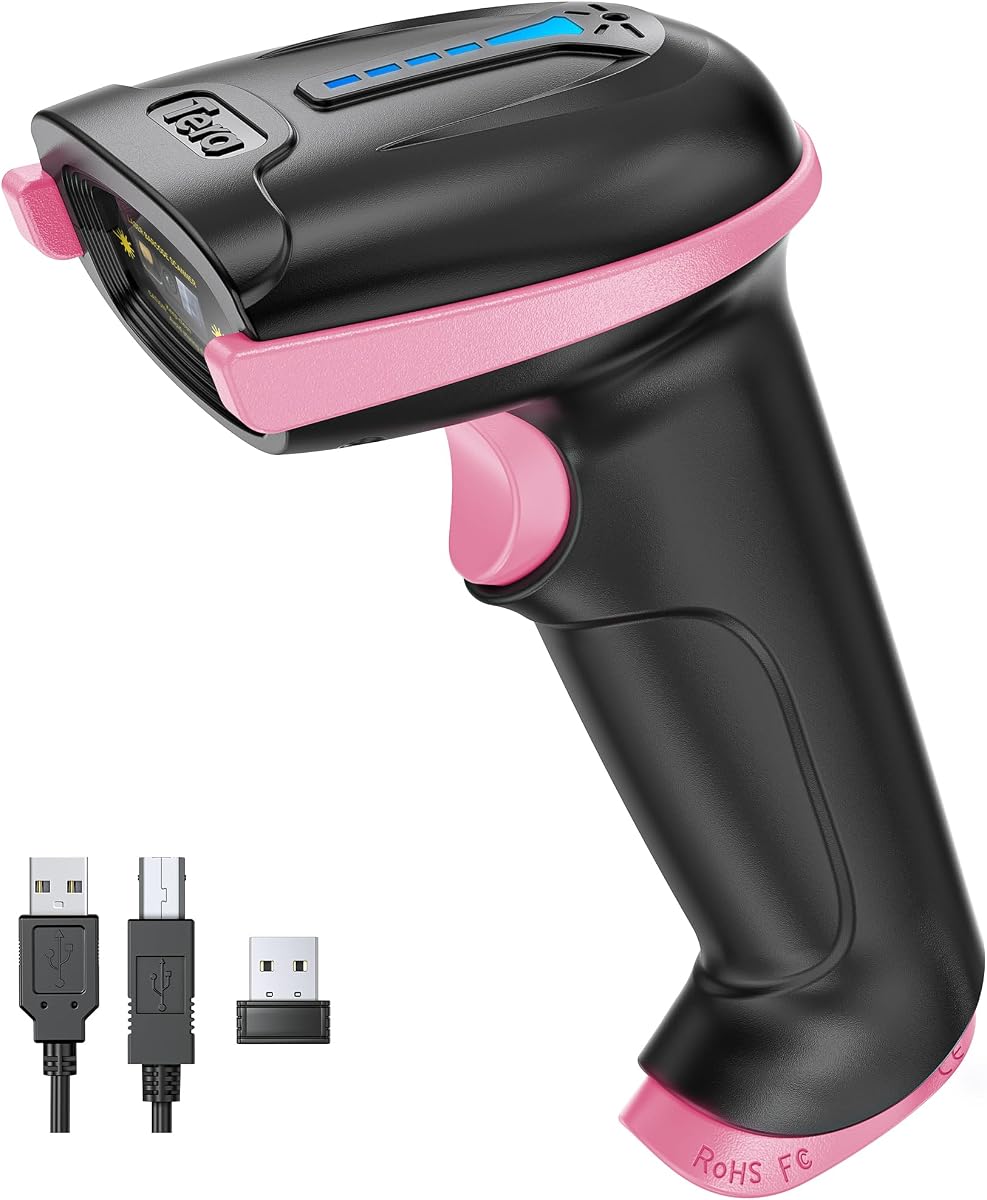
The Tera Barcode Scanner with Battery Indicator Pink offers the same robust performance as its purple counterpart with a distinctive aesthetic. It features a 4.5 star rating based on reliable connectivity and durability for daily library tasks. The pink finish makes it easy to identify in shared workspaces or for specific departments.
We may earn a commission when you buy through this link, at no additional cost to you.
It includes the same IP54 protection and extended handle design for comfort during long shifts. The large battery ensures consistent operation without frequent interruptions. The wireless range allows scanning across large floor plans or multiple rooms without losing connection to the main terminal.
While it lacks 2D scanning support, it excels at traditional book barcode tasks. The design and features mirror the more premium models but without the advanced screen configuration. Libraries can choose colors to match branding or simply for easier equipment management and identification.
This scanner is perfect for libraries needing reliable wireless tools with easy identification. The sturdy build protects against wear and tear effectively. It serves well for general circulation duties where standard 1D scanning is the primary requirement for inventory management.
Distinct color options simplify equipment tracking and prevent loss in large library facilities with multiple units.
Offers same reliability and battery life as standard models while providing a unique aesthetic for your team.
We may earn a commission when you buy through this link, at no additional cost to you.
The WoneNice USB Laser Barcode Scanner delivers high-speed performance with a 4.5 star rating for speed. Its laser technology allows 200 scans per second, making it efficient for rapid checkout lines. The wide scanning angles provide flexibility in positioning, reducing user effort when handling items of different sizes.
We may earn a commission when you buy through this link, at no additional cost to you.
It supports extensive configurable options for prefixes and suffixes to integrate well with cataloging systems. The simple plug and play installation means IT teams do not need to spend time on drivers. The visible laser beam ensures clear targeting even in varied lighting conditions common in reading rooms.
While it cannot read from screens, its focus on printed barcodes is solid for standard books. The fixed cable limits movement to the desk area which might not suit mobile staff. However, for high-volume transactions, its speed and reliability are unmatched in this price range.
Libraries with high traffic checkout areas will benefit most from this device. Its compatibility with Windows and Mac systems makes it versatile. It is a dependable choice for standardizing the scanning process at fixed service points.
Processes up to 200 scans per second ensuring minimal wait times for patrons during peak circulation hours.
Broad inclination and elevation angles allow reading codes from books held in almost any orientation.
We may earn a commission when you buy through this link, at no additional cost to you.
The Symcode Wireless Barcode Scanner is optimized for large spaces with a massive 400m outdoor range. It carries a 4.4 star rating for its ability to handle multi-user environments through network mode support. This feature allows multiple scanners to transmit to one receiver, ideal for large stacks or simultaneous inventory checks.
We may earn a commission when you buy through this link, at no additional cost to you.
Its 2000mAh battery supports over a week of continuous scanning or half a year of standby. The offline storage mode saves up to 100,000 codes when out of range, syncing later. This ensures no data is lost even if a librarian walks deep into a basement archive area.
The laser technology works well for printed labels but cannot read QR codes on screens. While the range is impressive, indoor reception varies by building structure. It is best suited for warehouses or very large library facilities where distance is a key factor in workflow efficiency.
Libraries needing to cover vast areas without constant network drops will find this valuable. The rechargeable battery and flexible connection modes add convenience. It provides a robust solution for extensive cataloging and asset tracking tasks across wide physical spaces.
Allows multiple scanners to connect to a single receiver, improving efficiency during large scale inventory audits.
Delivers up to 400m transmission in open air, covering large library complexes or outdoor storage areas effectively.
We may earn a commission when you buy through this link, at no additional cost to you.
The Eyoyo Portable Mini 1D Bluetooth Scanner in Pink offers a stylish and practical tool for modern libraries. It holds a 4.3 star rating for its user-friendly design and versatile connectivity options. The pink color adds a cheerful touch to the workspace and makes it easy to spot if left on a shelf.
We may earn a commission when you buy through this link, at no additional cost to you.
It shares the compact design of the standard Eyoyo mini with three connection modes for flexibility. The vibration mode allows quiet scanning in study areas without disturbing patrons. It supports a wide range of 1D codes including ISBN and UPC standards used for general collections.
The 650mAh battery provides enough power for moderate daily use but needs recharging every few days. Its lightweight construction makes it comfortable for staff with smaller hands or those needing prolonged handheld use. It is less rugged than industrial units but sufficient for daily circulation needs.
This scanner is perfect for smaller libraries or mobile staff needing a cheerful and functional device. It supports both Windows and Mac systems for easy integration. Libraries looking for a balance of style and utility will appreciate this thoughtful design choice.
Pink color adds visual appeal and makes the device easy to identify among other office equipment instantly.
Switches between wireless and wired modes easily to adapt to various workstation setups and user needs.
We may earn a commission when you buy through this link, at no additional cost to you.
The Barcode Scanner with Stand is a practical desktop solution designed to minimize manual effort during checkout. It includes an adjustable stand that allows hands-free scanning through auto-sensing technology. This feature is highly useful for processing large volumes of items like returns or donations efficiently without holding the device.
We may earn a commission when you buy through this link, at no additional cost to you.
It supports both 1D and 2D codes including QR and PDF417 for broader utility. The auto-sensing sensor detects when a code is present and triggers automatically. This reduces repetitive strain on the wrist during long shifts at the circulation desk. It works well for standard operating systems like Windows and Mac.
The wired connection ensures stable data transfer but limits mobility to the immediate desk area. The stand design is simple but functional for keeping the device ready. For libraries prioritizing hands-free efficiency at the desk, this offers a good balance of features and ease of use.
Libraries focusing on desktop circulation tasks will find this helpful for quick item processing. The 2D support adds value for modern digital resources. It is a straightforward option that streamlines the check-in and check-out experience significantly.
Adjustable stand allows placing items in front of the scanner for automatic detection without holding it manually.
Handles both traditional barcodes and QR codes for greater versatility in managing various library materials.
We may earn a commission when you buy through this link, at no additional cost to you.
Choosing the right barcode scanner involves assessing connectivity, durability, and specific library needs.
Connectivity determines how the scanner interacts with your library system. Wired USB is stable but limits movement. Wireless options like Bluetooth or 2.4G offer mobility across the stacks. Decide if your workflow requires a fixed station or roaming staff.
Choose wireless if staff need to scan on shelves, or wired for high-volume desk work where stability is key.
Most books use 1D barcodes like ISBN-13 or ISSN. However, modern libraries often use 2D QR codes for digital passes or event registration. Ensure the scanner supports the specific formats your collection and systems utilize.
Select a model with 2D capability if you plan to use QR codes for memberships or digital cataloging.
Battery life impacts how often staff must recharge. Wireless scanners need robust batteries to last a full shift. Look for capacity measured in scans per charge or hours of continuous use to match your operational hours.
Prioritize high capacity batteries for large libraries with long hours to minimize charging interruptions.
Library equipment often faces drops or dust in storage areas. Rubberized or shockproof designs protect against wear. A durable casing ensures the scanner lasts longer despite active handling on busy circulation desks.
Look for rugged housing and shock ratings if the device will be used frequently by different staff members.
Your scanner must work with your library management software and devices. Check compatibility with Windows, Mac, or Linux. Some devices work better with specific OS versions or browser requirements.
Verify that the scanner is supported on your current operating system before purchase to avoid software conflicts.
Scanning modes affect how the device is used. Manual trigger requires pressing a button, while auto-sensing scans when a barcode is detected. Continuous modes are useful for rapid batch processing without repeated button presses.
Choose auto-sensing for high volume check-in and manual trigger for precise individual item scanning.
Wireless scanners have varying transmission distances. Some work up to 300 feet while others require proximity. Consider the size of your library and whether staff need to move far from the server room.
Opt for long range models for multi floor libraries where distance from the computer is significant.
Cost varies significantly between basic wired units and advanced wireless ones. Determine how many units you need and if premium features like screens are necessary. Budget-friendly options often meet basic needs without extra cost.
Balance the upfront cost against expected lifespan and required features to find the best value for your facility.
Begin by connecting the scanner to your computer via the designated method, whether it is a USB cable, Bluetooth pairing, or wireless receiver. Follow the manual to install any necessary drivers if they are not plug-and-play compatible with your operating system.
Configure the scanner using barcode sheets found in the manual to customize settings like prefixes or quiet modes. This helps adapt the device to your library system without needing complex software interfaces on the computer.
Store the device in a safe, dry place when not in use to prevent dust accumulation or battery drain. Regularly charge wireless units to maintain battery health and keep it clean with a soft cloth to ensure consistent reading performance.
Not all models can read QR codes. Traditional 1D laser scanners focus on linear barcodes. To read QR codes, you need a 2D imaging or CMOS sensor model that supports matrix barcodes used for digital passes.
Most USB scanners do not require special software as they emulate keyboard input. However, some wireless models might need drivers or configuration tools. Always check system requirements for your specific operating system and library software.
Laser scanners use a red laser beam to read codes and are great for printed labels. CCD scanners use light sensors and can read codes from screens or damaged paper. CCD is often preferred for libraries needing to scan digital IDs.
Wireless scanners typically last from 8 hours to several days depending on usage. Look for models with 2000mAh or higher capacity for full shift support. Rechargeable batteries should be fully charged before daily use for best performance.
Yes, Bluetooth scanners often work with tablets if they support HID profiles. Ensure the library app on the tablet supports keyboard input or scanner data injection. Wireless connections provide the flexibility needed for mobile use.
The sound setting might be muted for quiet zones. Check the configuration barcodes in the manual to toggle the buzzer on or off. Some models allow adjusting volume to prevent disturbing patrons while still confirming successful scans.
Wireless scanners are reliable if the transmission range matches your building size. 2.4G models often offer ranges up to 300 feet. For very large facilities, check signal strength in remote areas to ensure consistent data transfer during circulation tasks.
Damaged barcodes often require a CCD or imaging scanner rather than a standard laser model. These sensors are better at interpreting smudged or faded lines. Try scanning from different angles to see if it improves accuracy.
Selecting the right barcode scanner depends heavily on your specific library workflow and infrastructure. Models like the NETUM Bluetooth offer versatile connectivity for mixed systems, while the Tera with Screen provides advanced features for diverse code types.
Prioritize battery life if staff move around the shelves frequently and choose wired options for fixed desk positions. The ability to scan quietly is also crucial for maintaining a calm atmosphere in study areas and reading rooms.
Always check current pricing and availability before purchasing as technology and deals change. By considering these factors carefully, you can ensure your library staff have the tools they need to keep inventory accurate and circulation efficient.