
ASUS RP-BE58
3.8Editor score
WiFi 7 Standard Support
Multi-link Operation Enabled
AiMesh System Compatible
This guide compares the top ten ASUS WiFi Extender models for October 2026, analyzing speed, coverage, and features to help you choose the right booster.
Finding the right network booster can transform your home connectivity. ASUS offers a wide range of extenders designed to eliminate dead zones and improve signal strength throughout your living space efficiently.
We have carefully evaluated ten distinct models based on their technical specifications and user feedback. Our analysis focuses on real-world performance, ease of setup, and compatibility with various router systems.
Each selection highlights specific strengths to match different household needs. Keep in mind that availability and offers may vary over time so checking current listings is always recommended before purchasing.
3.8Editor score

4.1Editor score

4.1Editor score
The following table provides a side-by-side overview of all ten models evaluated in this guide allowing you to quickly compare their key specifications and capabilities.

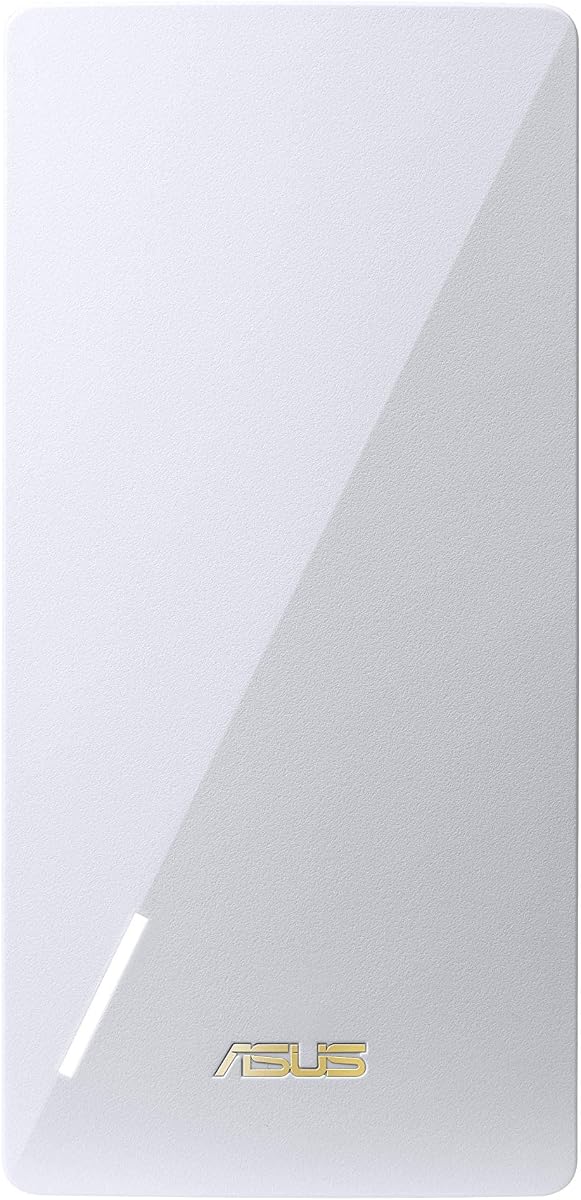


This model represents the cutting edge of home networking technology with its support for the latest WiFi 7 standard. It offers exceptional throughput capabilities that future-proof your network against increasing bandwidth demands.
We may earn a commission when you buy through this link, at no additional cost to you.
The inclusion of Multi-link Operation allows simultaneous connections across bands ensuring stable data transfers even when multiple devices are active. This is ideal for households with heavy streaming and gaming requirements.
While the performance is impressive the higher cost may not be justified for users with older routers that cannot leverage the full potential of WiFi 7 features. Compatibility with existing devices should be verified first.
Buy this if you need maximum speed and have a compatible router. It is the top choice for tech enthusiasts looking to invest in the future of wireless connectivity.
The WiFi 7 standard ensures your network can handle emerging high-bandwidth applications for years to come.
AiMesh support allows you to integrate this extender into a larger whole-home wireless system effortlessly.
We may earn a commission when you buy through this link, at no additional cost to you.
The RP-AX58 stands out as a balanced option offering high-speed connectivity without the premium price tag of next-gen models. Its WiFi 6 efficiency handles multiple devices well in typical home environments.
We may earn a commission when you buy through this link, at no additional cost to you.
Security is a major highlight with lifetime free AiProtection Pro powered by Trend Micro. This ensures your network remains protected against threats without requiring additional subscription fees.
The device does not support the very latest features found in higher tier models but it covers all essential needs for most users. It is a reliable workhorse for everyday connectivity.
Choose this if you want a mix of performance and security. It is the best pick for families needing robust protection and solid speeds.
Lifetime free AiProtection Pro provides enterprise-grade threat protection directly integrated into your extender.
WiFi 6 technology optimizes data transmission to reduce latency and improve responsiveness across connected devices.
We may earn a commission when you buy through this link, at no additional cost to you.
This renewed version of the BE58 offers access to high-end features at a reduced price point. It is an attractive option for budget-conscious buyers who still want next-generation speed.
We may earn a commission when you buy through this link, at no additional cost to you.
The coverage area extends significantly to cover large homes effectively. With dual-band operation you can maintain strong signals throughout various rooms without frequent dropouts.
However the lower user rating suggests some variability in performance or quality control. Buying refurbished always carries a slight risk compared to a new unit.
Opt for this if you are comfortable with refurbished products. It is a smart choice if you need advanced features without the full price.
You get high-end specs at a lower entry price allowing savings on other home networking needs.
Designed to push signals into hard-to-reach areas ensuring no room is left without connectivity.
We may earn a commission when you buy through this link, at no additional cost to you.
This model offers a compact and modern design that blends well with home decor. The white finish makes it less obtrusive in living spaces compared to bulkier black units.
We may earn a commission when you buy through this link, at no additional cost to you.
It utilizes WiFi 6 technology to provide efficient data handling for standard home tasks. The compact size is great for rooms where space is limited or aesthetics are a priority.
The very low rating indicates significant issues with this specific listing or product batch. Caution is advised when considering this particular refurbished option.
Consider this only if the design is critical. You may want to check other options for better reliability and customer satisfaction.
The sleek white finish and small footprint allow placement on shelves without cluttering your room.
Designed to match contemporary home styles ensuring your tech does not stand out negatively.
We may earn a commission when you buy through this link, at no additional cost to you.
The RP-AC1900 is built for large homes needing extensive coverage. Its three external antennas help direct signals effectively across wider spaces than smaller units.
We may earn a commission when you buy through this link, at no additional cost to you.
It supports multiple networking modes including Access Point and Media Bridge. This flexibility allows you to repurpose the device for different connection needs within your network.
While it uses an older WiFi standard it still delivers solid speeds for most general internet activities. The trade-off is slightly less efficiency compared to WiFi 6 models.
This is ideal for large properties where range is the primary concern. It delivers consistent signal strength over a broad area.
Up to 3000 square feet of coverage ensures your outdoor or large indoor spaces stay connected.
Use as an extender or access point to tailor the setup to your specific home layout.
We may earn a commission when you buy through this link, at no additional cost to you.
This unit offers reliable connectivity with a focus on stability and ease of use. It supports the latest WiFi 6 standard ensuring efficient data handling across connected devices.
We may earn a commission when you buy through this link, at no additional cost to you.
Setup is straightforward via the mobile app making it accessible for non-technical users. You can choose to keep one network name or separate them for different bands.
The coverage is adequate for medium-sized homes but might need supplementation in very large properties. It strikes a good balance between cost and capability.
Select this for reliable performance without unnecessary complexity. It is great for apartments or mid-sized houses.
The mobile app guides you through setup with just a few taps ensuring a quick start.
Decide whether to unify your network names or separate them based on your management preference.
We may earn a commission when you buy through this link, at no additional cost to you.
This renewed model provides a budget-friendly way to access WiFi 6 technology. It has been inspected to ensure it works and looks like new for the user.
We may earn a commission when you buy through this link, at no additional cost to you.
The coverage remains consistent at 2200 square feet offering sufficient reach for most standard living spaces. The AiMesh support adds value by allowing future network expansion.
Buying refurbished can carry risks regarding longevity or specific hardware quirks. Ensure you review the return policy before finalizing the purchase.
Consider this if you want to save money on a reliable brand. It is a practical choice for budget-conscious buyers.
Each unit is professionally inspected to meet quality standards before resale.
Get the benefits of modern networking standards without paying full retail price.
We may earn a commission when you buy through this link, at no additional cost to you.
This is not a standard extender but a full mesh system designed for expansive coverage. It utilizes the 6GHz band to reduce interference and provide ultra-fast speeds.
We may earn a commission when you buy through this link, at no additional cost to you.
With up to 7800 square feet of coverage it is perfect for large estates or multi-story homes. The three-pack ensures you can cover the entire property seamlessly.
The investment is significant compared to single extenders. However the performance and coverage it delivers are unmatched in the market.
Choose this if you need maximum range and speed. It is the best option for large properties.
Designed to cover up to 7800 square feet ensuring consistent signal throughout large estates.
Use the new 6GHz band for faster speeds and less congestion from older devices.
We may earn a commission when you buy through this link, at no additional cost to you.
This repeater offers a straightforward solution for extending your existing network. The high rating suggests users appreciate its reliability and ease of use.
We may earn a commission when you buy through this link, at no additional cost to you.
It operates with AX3000 speeds providing fast internet access for streaming and browsing. The dual-band capability ensures you can choose the best frequency for your location.
Specific technical details are minimal but the performance speaks for itself through user feedback. It serves well for general connectivity needs.
Buy this if you want a simple reliable booster. It is ideal for basic home network expansion.
User feedback highlights consistent performance making it a trusted choice for daily use.
Focuses on core tasks like extending signal without complicating setup with extra features.
We may earn a commission when you buy through this link, at no additional cost to you.
This model is versatile supporting multiple modes like Access Point and Media Bridge. It allows you to adapt the device to different networking requirements in your home.
We may earn a commission when you buy through this link, at no additional cost to you.
The AC1200 speed is sufficient for general browsing and streaming. It is a cost-effective way to expand coverage or convert wired connections to wireless.
Newer devices may find the speeds limiting but it serves older setups well. The compact design ensures it fits anywhere without obstruction.
Select this for flexibility and value. It is great for converting old wired devices to wireless.
Switch between Extender Access Point or Media Bridge to fit your specific home network needs.
A sleek white design that blends easily into entertainment areas and home offices.
We may earn a commission when you buy through this link, at no additional cost to you.
Selecting the right extender involves considering several key factors to ensure it meets your specific network needs effectively.
Ensure the extender matches or exceeds your router's standard for best performance. Newer standards like WiFi 7 or WiFi 6 offer better speed and efficiency.
Always check the generation of your current router before buying an extender to avoid mismatched capabilities.
Determine how many square feet you need to cover to eliminate dead zones. Look for models with range specs that match your home size.
Larger homes may require multiple units or a mesh system instead of a single extender.
Check the speed rating to ensure it supports your internet plan speeds. Higher ratings provide more headroom for multiple devices.
Choose a model with a speed class that fits your typical usage habits like streaming or gaming.
Verify that the device supports the modes you need such as Extender or Access Point. Flexible options add value if you change layouts.
Multi-mode support allows you to use the device in different parts of your home for different purposes.
Look for built-in security tools like WPA3 or antivirus integration. These protect your data and devices from external threats.
Lifetime security subscriptions can save money compared to buying third-party antivirus solutions separately.
Mobile apps and WPS buttons make setup easier for non-technical users. A simple installation process reduces frustration and time.
Choose a model with an intuitive interface if you prefer guided step-by-step instructions during setup.
If you plan to expand your network later choose a model that supports mesh systems. This allows seamless integration with other nodes.
AiMesh support ensures you can grow your network without buying entirely new hardware in the future.
Balance the cost against the features you actually need. Refurbished models can offer high value if you are comfortable with used electronics.
Consider your budget carefully and ensure the price aligns with the performance benefits you receive.
Place the extender halfway between your router and the dead zone. This location ensures it picks up a strong signal to retransmit effectively.
Update the firmware regularly through the mobile app to maintain security and performance. Manufacturers release patches to fix bugs and improve stability.
Keep the device in a well-ventilated area to prevent overheating. Dust buildup can block vents so clean it occasionally with a soft cloth.
Yes, most ASUS WiFi extenders work with any standard router on the market. They support universal protocols that allow them to connect to devices from other brands effectively.
Yes, it can reduce speed slightly because the extender uses bandwidth to communicate back to the router. However modern WiFi 6 models minimize this loss significantly.
Yes, you can use multiple units to cover larger areas. Just ensure they are set up correctly to avoid interference between them.
An extender usually connects wirelessly to a router to push signal further. A repeater takes an existing signal and rebroadcasts it. The terms are often used interchangeably.
No, your devices will reconnect automatically as long as the SSID is consistent. If not you may need to select the network manually on your devices.
You can update firmware easily using the ASUS Router or Extender mobile app. Open the app and check for updates to ensure you have the latest security.
We reviewed ten distinct models ranging from budget-friendly options to premium mesh systems. Each offers unique features that cater to different household needs and sizes.
Prioritize coverage and speed based on your home layout and internet usage habits. Security features should also be considered to protect your digital environment.
Remember to check current availability and offers before making a final decision. Prices and stock levels can change quickly so stay informed.