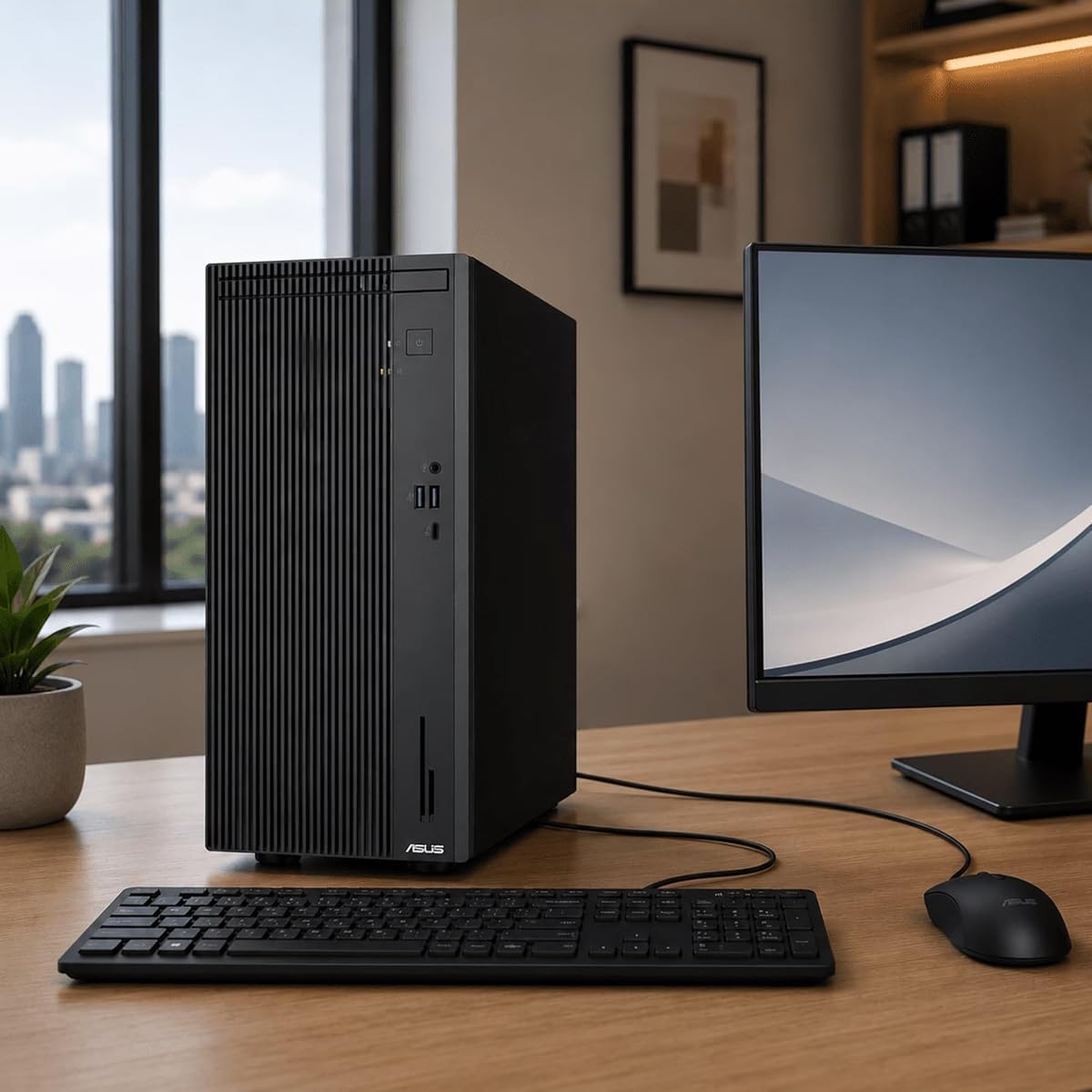
ASUS V500 Business Tower
5.0Editor score
Intel Core i7 13620H
16GB DDR5 RAM
1TB Mixed Storage
This expert guide compares the top 10 ASUS Desktop PC models for October 2026, analyzing performance, design, and features to help you choose the perfect
ASUS Desktop PC systems offer a wide range of powerful computing solutions for home, office, and gaming needs. Whether you need a compact tower for productivity or a high-performance rig for creative work, ASUS provides reliable hardware with cutting-edge technology and sleek designs.
We have evaluated ten distinct models from the ASUS lineup based on processor speed, memory capacity, storage options, and connectivity features. Our analysis focuses on real-world performance capabilities and value to ensure you find a machine that meets your specific daily computing demands without compromise.
Each pick in this list showcases a different strength, from budget-friendly business towers to premium gaming beasts equipped with latest-generation components. Keep in mind that product availability and pricing can change frequently, so verify current details before making your final purchasing decision online.
5.0Editor score

4.7Editor score

4.2Editor score
The following comparison table breaks down the key specifications of all ten models to help you quickly identify which system aligns with your performance requirements and budget constraints.


The ASUS V500 Business Tower is a powerhouse for professional environments needing fast processing speeds without breaking the bank. With its robust Intel Core i7-13620H processor and 16GB of DDR5 RAM, this system handles multitasking with ease and maintains steady performance across various business applications.
We may earn a commission when you buy through this link, at no additional cost to you.
Key strengths include its ability to support multiple displays via HDMI and DisplayPort and which significantly boosts productivity for analysts and designers. The inclusion of both an SSD and external storage provides immediate system responsiveness while offering expandable space for archives and large file transfers without needing external drives.
Trade-offs involve the lack of a dedicated graphics card, making it unsuitable for heavy 3D rendering or modern AAA gaming. However, integrated Intel UHD Graphics are sufficient for video playback and standard office tasks. The wired keyboard is functional but lacks mechanical precision preferred by heavy typists.
This desktop is ideal for small businesses or home offices requiring reliable computing power and connectivity. It balances performance and cost effectively, ensuring users get enterprise-grade processing capabilities in a compact form factor ready for deployment immediately upon arrival.
The 10-core processor ensures smooth switching between applications without slowdowns.
Multiple USB ports and video outputs allow seamless connection to diverse peripherals.
We may earn a commission when you buy through this link, at no additional cost to you.
The ASUS ROG G700 Gaming Desktop stands out as the top choice for enthusiasts seeking a blend of cutting-edge performance and aesthetic appeal. Powered by the latest Intel Core Ultra 7 265F and NVIDIA GeForce RTX 5060, this machine delivers high frame rates and realistic lighting effects in demanding titles.
We may earn a commission when you buy through this link, at no additional cost to you.
Its 32GB of DDR5 RAM ensures that users can stream, game, and run background applications simultaneously without experiencing lag. The included RGB keyboard and mouse enhance the immersive experience and provide immediate utility without needing extra purchases. The 600W Gold PSU offers reliable power delivery for sustained gaming sessions.
The main drawback is its size and premium pricing compared to standard office PCs, which may not fit every workspace. Additionally, the cooling system requires adequate airflow space to prevent overheating during extended use. Despite this, the included CPS protection provides peace of mind for long-term usage.
Gamers and content creators who demand top-tier performance and visual fidelity will find this system indispensable. It offers a robust platform for competitive gaming and creative workloads, ensuring longevity through high-quality components and forward-looking architectural designs.
RTX 5060 enables realistic shadows and lighting for stunning graphics.
Advanced cooling keeps the system cool under heavy load conditions.
We may earn a commission when you buy through this link, at no additional cost to you.
The ASUS ROG GM700 2025 represents the pinnacle of gaming performance available today with its AMD Ryzen 7 9800X3D processor and Radeon RX 9070 XT graphics. This configuration delivers unmatched speed for both gaming and heavy creative workloads like video editing and 3D rendering.
We may earn a commission when you buy through this link, at no additional cost to you.
With 32GB DDR5 RAM and a massive 2TB PCIe Gen 4 SSD, load times are nearly instantaneous and multitasking is seamless. The Prime OC version of the GPU ensures maximum potential out of the box without needing manual tweaking. This system is built for those who refuse to compromise on speed or visual quality.
The primary downside is the steep cost which places it out of reach for casual users. The chassis is also large and requires significant desk space. Furthermore, the specialized cooling solutions mean it is not designed for quiet office environments but rather dedicated gaming setups.
This desktop is perfect for competitive gamers and professional content creators who need the absolute fastest processing speeds. It offers a future-proof platform that will handle the most demanding software updates for years to come without requiring hardware upgrades.
Gen 4 SSD ensures instant access to games and large files.
Advanced GPU features deliver stunning visual realism and smooth creative workflows.
We may earn a commission when you buy through this link, at no additional cost to you.
The ASUS S501MER is an excellent mid-range option for users needing a modern desktop with fast connectivity and a compact form factor. Powered by the 14th Gen Intel Core i7-14700, it handles daily tasks and light creative work with impressive speed and efficiency.
We may earn a commission when you buy through this link, at no additional cost to you.
Wi-Fi 6E support ensures stable and fast wireless internet which is crucial for remote work and online meetings. The inclusion of USB Type-C and HDMI 2.1b ports allows for versatile peripheral connections and high-resolution display support. The chassis design is sleek and fits well in most home offices.
The lack of a dedicated graphics card limits gaming capabilities but works well for professional productivity tasks. While it supports expandable memory up to 64GB, the default 16GB is sufficient for most users but may require upgrading for heavy multitaskers.
This model is suitable for remote workers and students who need reliable performance without the bulk of a gaming tower. Its modern connectivity options and solid processor make it a smart choice for those upgrading from older desktop systems.
Wi-Fi 6E provides faster speeds and lower latency for online tasks.
Space-saving design fits easily on any desk or shelf.
We may earn a commission when you buy through this link, at no additional cost to you.
The ASUS V500 Home & Business variant delivers robust performance for professionals handling multiple large applications simultaneously. With 32GB of RAM and a fast PCIe SSD, this system ensures smooth multitasking and rapid file access even when running demanding business software.
We may earn a commission when you buy through this link, at no additional cost to you.
Support for two 4K monitors makes it an excellent choice for data analysts and designers who need expanded workspace. The inclusion of USB Type-C and DisplayPort ports ensures compatibility with modern high-resolution displays. It comes ready to use with a keyboard and mouse bundle.
While it lacks a dedicated GPU, its integrated Intel UHD Graphics are capable enough for standard office work and media consumption. The system focuses heavily on CPU performance and stability rather than graphical prowess. This makes it less ideal for gaming but perfect for productivity.
This desktop is recommended for home office users who need a reliable and fast machine for daily operations. Its generous memory and storage configuration ensure that it remains responsive and efficient for years without requiring immediate upgrades.
32GB RAM supports heavy multitasking without lag or slowdown.
Dual-monitor setup allows for greater productivity and organization.
We may earn a commission when you buy through this link, at no additional cost to you.
The ASUS ROG G700 2026 is designed for gamers who demand the latest hardware without sacrificing aesthetics. Featuring the new RTX 5070 and a massive 58L capacity, this chassis supports triple-slot GPUs and ensures excellent thermal performance for sustained gaming sessions.
We may earn a commission when you buy through this link, at no additional cost to you.
The dual-glass chassis showcases internal components while maintaining a sleek look with Aura Sync RGB lighting. Tool-less access makes upgrading components easy without the need for screwdrivers or technical expertise. The cooling system includes a 240mm liquid cooler and quad-fan setup for optimal heat dissipation.
While the 16GB RAM may be standard for some high-end users, the expandability ensures longevity. The 2.5Gbps Ethernet port ensures low-latency connections crucial for competitive online play. This system is built to last and supports high-end gaming for years to come.
This desktop is perfect for hardcore gamers who want a machine that looks as good as it performs. The combination of high-end specs and easy upgrade paths ensures it remains relevant for the next generation of games.
Dual-glass chassis showcases internal components with RGB lighting.
Tool-less access allows quick component swaps without tools.
We may earn a commission when you buy through this link, at no additional cost to you.
This V500 bundle is designed specifically for business environments requiring enhanced security and management features. The inclusion of Windows 11 Pro provides advanced tools for remote access and network management which are essential for enterprise deployments and professional offices.
We may earn a commission when you buy through this link, at no additional cost to you.
The added ADATA 64GB USB flash drive offers convenient data transfer capabilities right out of the box. With multi-display support via HDMI and DisplayPort, it facilitates efficient workspaces for analysts and traders. The reliable SSD ensures quick boot times and responsive performance.
While the user rating is lower compared to other models, the specific feature set targets business utility over consumer gaming. The included accessories are functional but not premium. The upgrade process may void warranties on specific parts but ensures immediate readiness for deployment.
This system is ideal for small to medium businesses needing a secure and functional workstation. The focus on Pro features makes it a reliable choice for professional environments where data security and network integration are priorities.
Windows 11 Pro offers advanced security and management tools for offices.
Includes USB flash drive for easy and fast data transfers.
We may earn a commission when you buy through this link, at no additional cost to you.
The ASUS ROG Strix G700 is a specialized workstation designed for extreme data processing and storage needs. With 128GB of DDR5 RAM and an Intel Core Ultra 9 processor, it handles intensive computational tasks like 3D rendering and scientific simulations with ease.
We may earn a commission when you buy through this link, at no additional cost to you.
The 11TB total storage capacity ensures that users never run out of space for large media libraries or project files. Triple band Wi-Fi 6E and multiple display ports support complex setups involving multiple monitors and high-speed networks. It is a true powerhouse for professionals.
The main drawback is the prohibitive cost which limits it to enterprise-level use. The system is large and requires significant physical space and cooling. It is not optimized for standard home gaming but rather for high-end productivity and rendering workloads.
This desktop is recommended for professional users who need massive memory and storage capacity. It serves as a reliable station for heavy data processing where time efficiency and file capacity are critical operational requirements.
128GB RAM supports extreme multitasking and virtualization tasks.
11TB total storage holds extensive libraries of media and files.
We may earn a commission when you buy through this link, at no additional cost to you.
The ASUS V500 Pro offers exceptional memory capacity designed for heavy business and creative workflows. With 64GB of RAM, this system is optimized for running multiple virtual machines or large datasets simultaneously without performance degradation. It ensures smooth operation for power users.
We may earn a commission when you buy through this link, at no additional cost to you.
Fast PCIe SSD storage combined with support for two 4K monitors makes it ideal for video editors and architects who need precise visual fidelity. The integrated graphics support 4K streaming efficiently. It balances professional performance with a clean and reliable design.
The lack of a dedicated GPU may limit gaming but does not hinder professional productivity. The high RAM count ensures it remains future-proof for memory-intensive applications. While expensive, it delivers value through its ability to handle demanding workloads without lag.
This desktop is perfect for professionals who need maximum memory without building a custom PC. Its reliable performance and high storage speed make it a trusted choice for business users who require consistency and speed in their daily work.
64GB RAM supports heavy data processing and virtualization.
Dual 4K monitor support enables detailed visual workspaces.
We may earn a commission when you buy through this link, at no additional cost to you.
The ASUS Business Desktop PC is a compact and efficient solution tailored for modern office environments. Its 13th Gen Core i7 processor ensures fast boot times and smooth multitasking for daily business applications. The Windows 11 Pro operating system adds essential security and management features.
We may earn a commission when you buy through this link, at no additional cost to you.
With 16GB DDR5 RAM and a 1TB SSD, the system handles file access and application launching with speed. Connectivity includes Wi-Fi 6 and Ethernet ensuring stable network performance. The compact chassis saves space on crowded desks while maintaining high thermal efficiency.
While the included accessories are basic, the focus is on reliable core performance and security. It offers expandability for future upgrades if needed. This desktop is a solid investment for offices seeking consistent performance without unnecessary gaming features.
This model is recommended for corporate and small business setups needing a dependable machine. Its balance of performance, security, and space efficiency makes it an ideal choice for professional daily tasks.
Windows 11 Pro ensures enhanced security and professional management tools.
Compact design balances performance with space efficiency in offices.
We may earn a commission when you buy through this link, at no additional cost to you.
Selecting the right ASUS desktop depends on your specific needs ranging from basic productivity to high-end gaming and creative workloads.
Processors drive the overall speed of your system. For general office use, an Intel Core i5 or i7 is sufficient. For gaming and video editing, prioritize the latest Core Ultra or Ryzen 9 series to ensure fast rendering and multitasking without bottlenecks.
Always choose a processor that matches your intended workload to balance speed and cost effectively.
RAM determines how many applications you can run simultaneously. 16GB is standard for most users, but professionals should consider 32GB or more for heavy multitasking. Ensure the system uses DDR5 for faster data transfer speeds.
Selecting sufficient RAM prevents system slowdowns when switching between multiple programs.
SSDs offer much faster boot and load times than traditional hard drives. Look for systems with at least 1TB of NVMe storage. If you store large media files, consider models with 2TB capacity or expansion slots for future upgrades.
Adequate storage ensures you have space for all your files without constant maintenance.
Integrated graphics are suitable for basic tasks but not for gaming or 3D work. If you plan to play modern games or edit videos, choose a desktop with a dedicated GPU like the RTX or Radeon series.
A dedicated GPU ensures smooth visuals and rendering performance for creative tasks.
Check the number and type of ports available. Look for USB Type-C, HDMI, and DisplayPort options to connect modern peripherals and monitors. Wi-Fi 6 or 6E support ensures fast wireless networking without cables.
Versatile connectivity allows seamless integration with all your external devices.
Windows 11 Pro offers better security and management tools for business users compared to Home. Ensure the OS matches your professional requirements for networking and remote access capabilities.
The right OS ensures your system is secure and ready for work needs.
Desktops come in various sizes from compact towers to large gaming rigs. Measure your workspace before purchasing to ensure the unit fits comfortably. Larger cases often offer better cooling for high-performance components.
Choose a size that fits your physical space while meeting performance needs.
Verify the warranty terms before buying. Premium models often come with extended protection plans or easier support channels. A reliable warranty protects your investment against hardware failures.
Ensure you have adequate support coverage for peace of mind.
Place your desktop in a well-ventilated area to prevent overheating. Ensure there is enough space around the air vents to allow proper airflow for the internal fans and cooling systems to function efficiently.
Regularly clean dust from the exterior vents using a soft brush or compressed air. Accumulated dust can block airflow and cause thermal throttling which reduces performance and component lifespan over time.
Keep your software updated through the manufacturer’s portal to ensure security patches are applied. Use disk cleanup tools to remove temporary files and maintain optimal system speed for daily operations.
Most ASUS desktops allow RAM upgrades. Check the manual for maximum capacity and slot availability. The V500 series often supports expansion up to 64GB easily.
No, only specific business models like the V500 Business variants come with Windows 11 Pro pre-installed. Other units may require an upgrade to access Pro features.
Yes, models with 32GB+ RAM and dedicated GPUs like the ROG series are excellent for editing. Ensure you have fast SSD storage for smooth project workflows.
Standard warranty is usually 1 year. Some bundles include extended protection plans or offer paid upgrades for longer coverage terms.
Most models do not include a monitor. You will need to purchase a display separately to connect to the HDMI or DisplayPort outputs.
High-end models like the ROG GM700 and G700 are capable of VR gaming with powerful GPUs. Budget models will struggle to meet VR minimum specs.
This guide highlights ten distinct options ranging from budget-friendly business towers to premium gaming rigs. Each model offers unique strengths tailored to different workloads and budgets ensuring there is a fit for every user.
Prioritize your core needs such as processing speed or memory capacity when making your selection. Investing in a system that matches your daily tasks ensures long-term satisfaction and performance stability.
Remember to verify current pricing and availability before purchasing as specs can change frequently. This ensures you get the most up-to-date performance and value for your investment.