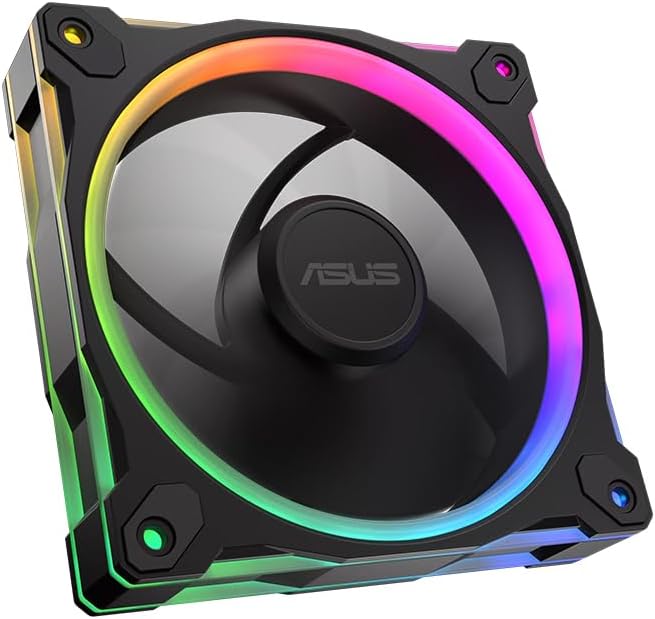
ASUS Prime MR120 ARGB Reverse Fan Black
4.6Editor score
Extra-thick 28mm fan frame
20 addressable RGB LEDs
Quiet operation up to 23dB
This guide compares ten top ASUS case fans for cooling and aesthetics, evaluating airflow, noise, and RGB features to help you build a silent efficient PC
Choosing the right cooling solution is vital for any modern computer build. High performance components generate significant heat which requires efficient airflow to maintain stability and longevity. ASUS case fans offer a blend of quiet operation and vibrant lighting to meet these demanding thermal requirements.
We have evaluated ten distinct models ranging from budget friendly options to premium engineering feats. Each product was assessed based on frame design, motor technology, and lighting capabilities. Our goal is to provide a clear comparison of how these fans perform in real world scenarios.
Each selection below highlights specific strengths such as static pressure or silent operation. You will find detailed specifications and honest assessments of trade offs for every model. Please note that pricing and availability can change frequently so verify details before purchasing.
4.6Editor score

4.7Editor score

5.0Editor score
The following table provides a side by side overview of all ten models. You can quickly compare key specifications such as frame thickness, RPM limits, and lighting configurations across the entire range of available options.


This triple pack represents the pinnacle of ASUS TUF cooling technology available today. It holds an Editor's Choice badge due to its balance of raw cooling power and aesthetic appeal. The fans are engineered to deliver high static pressure which is crucial for radiators or dense radi.
We may earn a commission when you buy through this link, at no additional cost to you.
The standout feature is the 3.3mm H2O static pressure rating which ensures air moves effectively through obstacles. The double layer LED matrix provides vibrant color saturation that looks superior to standard RGB strips. PWM control allows for precise speed adjustments to match thermal demands.
While the price is higher than standard models the performance justifies the cost for serious builders. The extra thick 28mm frame adds rigidity which reduces vibration over long periods. Some users might find the cabling slightly complex but the daisy chain options help mitigate this.
We recommend this pack for anyone prioritizing thermal performance and lighting quality equally. It is an ideal fit for mid tower or full tower cases where airflow is critical. The reliability of the TUF series ensures these fans will last through many upgrades.
The 3.3mm H2O rating allows these fans to push air through tight spaces and heatsinks efficiently.
The dual layer LED matrix offers more depth and brightness than typical single layer RGB fans.
We may earn a commission when you buy through this link, at no additional cost to you.
The Prime MR120 series focuses heavily on balancing performance with silence. It operates at up to 21 dB(A) which makes it nearly inaudible in most environments. This triple pack offers excellent value for users who need quiet cooling without sacrificing style.
We may earn a commission when you buy through this link, at no additional cost to you.
Its 28mm extra thick frame provides structural stability that enhances cooling efficiency. The dual-sided frame lighting ensures the glow is visible from multiple angles. PWM control allows speeds up to 1600 RPM for optimized cooling across various workloads.
The trade-off is that the maximum speed is lower than some performance oriented models. However for standard builds this is rarely an issue. The 2 year warranty adds peace of mind for long term reliability expectations.
Ideal for home offices or media PCs this set delivers whisper quiet operation. It handles standard CPU and GPU cooling needs effectively. The lighting adds a nice touch without being overly flashy.
The low noise profile makes it perfect for noise sensitive environments like bedrooms or offices.
A two year warranty provides significant assurance compared to shorter standard guarantees.
We may earn a commission when you buy through this link, at no additional cost to you.
This single fan is an excellent entry point for those seeking quality without overspending. It offers a reverse blade design which hides cabling for a cleaner look. At its price point it delivers surprisingly robust cooling and lighting features.
We may earn a commission when you buy through this link, at no additional cost to you.
The extra thick 28mm frame ensures rigidity and consistent performance over time. Double-sided lighting on the frame provides a crisp uninterrupted look from any angle. It operates quietly at up to 23 dB(A) making it suitable for most builds.
While it is sold individually it allows for flexible purchase strategies. The PWM control ensures optimal cooling for a variety of workloads without excessive noise. Some users may need to buy multiple packs for a full system setup.
We recommend this for budget builders or those replacing a single failed unit. It brings premium features to an accessible price tier. The reverse design helps maintain aesthetic integrity without extra cable management.
The reverse orientation hides power cables for a cleaner and more polished build appearance.
Delivers premium features like RGB and thick frame construction at a very competitive price.
We may earn a commission when you buy through this link, at no additional cost to you.
The ProArt line targets professionals who need reliable cooling for critical work. This model boasts a perfect 5.0 rating due to its exceptional build quality. It is designed for quiet operation and high efficiency in demanding environments.
We may earn a commission when you buy through this link, at no additional cost to you.
Its CNC milled brass bearing housing ensures manufacturing accuracy and strict tolerances. The 3-phase 6-pole motor delivers smooth robust performance with minimal noise. LCP blades provide stable high speed operation and natural vibration damping.
The price reflects the premium materials and engineering invested in this unit. It is ideal for workstations where downtime is costly. The chain connectors simplify installation in dense multi-fan setups.
We suggest this for users needing maximum reliability and minimal noise. It is a top choice for silent professional rigs. The precision components ensure it performs consistently over its lifespan.
Strict tolerances and CNC milled parts ensure consistent performance and long term durability.
LCP composite blades reduce vibration to keep noise levels exceptionally low.
We may earn a commission when you buy through this link, at no additional cost to you.
This set is the top choice for those seeking a clean white themed build. It mirrors the performance of the black TR120 version with similar pressure ratings. The white finish ensures a cohesive look with matching components.
We may earn a commission when you buy through this link, at no additional cost to you.
It delivers best in class static pressure at 3.3mm H2O with high airflow. The double layer LED matrix provides bright colorful illumination. PWM control allows for an extremely wide speed range for optimal cooling.
The flexible side pattern on the frame adds a unique personalized aesthetic. Some users might find the white plastic slightly less durable than black though quality remains high. The triple pack offers good value compared to buying singles.
We recommend this for gamers wanting a unified color scheme. It handles heavy cooling loads effectively. The lighting features integrate well with modern motherboards.
The white design matches perfectly with white cases and components for a unified look.
Delivers the same high static pressure as the black version for excellent thermal management.
We may earn a commission when you buy through this link, at no additional cost to you.
The PF120 offers an exceptional 3000 RPM maximum speed for intense cooling needs. It prioritizes performance over lighting with a clean professional design. The daisy-chain connectors allow for seamless installation of multiple units.
We may earn a commission when you buy through this link, at no additional cost to you.
Its 3-phase 6-pole motor reduces operating frequency for an enhanced sound profile. The 0.5mm gap between blade and frame reduces turbulence significantly. CNC-milled brass bearings ensure long-term reliability and consistent operation.
Users may find the lack of RGB limiting if aesthetics are a priority. At max RPM it produces more noise than standard fans but performance is outstanding. The LCP blades ensure stable performance even at high speeds.
This model is perfect for workstation builds requiring maximum airflow. It excels in dense radiator configurations. The ease of chaining makes large setups manageable.
The 3000 RPM capability provides immense cooling power for high-heat components.
A small 0.5mm gap minimizes air turbulence for smoother airflow.
We may earn a commission when you buy through this link, at no additional cost to you.
This single fan is a reliable choice for targeted cooling upgrades. It features reverse blade technology to maintain a clean visual front. The 76.3 CFM airflow is impressive for standard 120mm fans.
We may earn a commission when you buy through this link, at no additional cost to you.
Its best in class static pressure ensures air is pushed effectively through obstacles. The exclusive double layer LED matrix creates vibrant lighting effects. PWM control supports an extremely wide speed range for optimal cooling.
Since it is a single pack it is great for replacing a specific fan. The cost is higher per fan than a triple pack though. It remains a solid pick for focused builds.
We recommend it for builders needing to replace a failed fan with a high performance match. The reverse design hides cables effectively. The TUF brand ensures it withstands daily use.
The 76.3 CFM rating delivers strong air movement for better component cooling.
The reverse orientation ensures clean cable management for a neat system interior.
We may earn a commission when you buy through this link, at no additional cost to you.
This white edition offers a high rating of 4.8 for its quality. It focuses on clean aesthetics and quiet performance. The white frame and blades ensure a seamless look with white interiors.
We may earn a commission when you buy through this link, at no additional cost to you.
It provides 20 addressable RGB LEDs for vivid illumination. The double-sided lighting adds depth to the fan appearance. It operates quietly at up to 23 dBA for distraction free use.
The 1600 RPM limit prioritizes silence over raw speed. This makes it excellent for noise sensitive environments. The Aura Sync compatibility allows for easy system wide lighting control.
We recommend this for white builds needing reliable silent fans. It brings excellent lighting without loud operation. The high rating reflects user satisfaction with the build quality.
The pure white design ensures a flawless look in white PC cases.
Operates at 23 dBA making it nearly silent during normal usage.
We may earn a commission when you buy through this link, at no additional cost to you.
The TF120 stands out for its advanced dynamic plain bearing technology. It allows an operating time of up to 250000 hours. This makes it a very reliable choice for long term installations.
We may earn a commission when you buy through this link, at no additional cost to you.
Its double layer LED array produces high color saturation for vivid effects. Anti vibration pads reduce rattling to ensure a quiet experience. PWM control supports an extremely wide speed range for all workloads.
While it has fewer LED features than the TR120 it remains robust. The single pack limits bulk cooling upgrades but suits replacements. It balances quality and affordability well.
We recommend this for users prioritizing bearing lifespan and quietness. It is a dependable choice for any white build. The vibration dampening adds to the comfort factor.
The 250000 hour rating ensures the fan will last for many years of use.
Anti vibration pads minimize rattling to keep noise levels at a minimum.
We may earn a commission when you buy through this link, at no additional cost to you.
This option provides a compelling alternative for those preferring RS features. It offers streamlined fan connections through daisy-chain technology. The magnetic dome bearing ensures low noise operation and long life.
We may earn a commission when you buy through this link, at no additional cost to you.
It delivers up to 72.8 CFM airflow which supports cooling efficiency. CorsAir AirGuide Technology directs airflow precisely to hot components. The low-noise design is perfect for quiet builds.
It lacks Aura Sync which limits lighting control with ASUS boards. However its physical performance remains strong for the price. It is a versatile choice for mixed builds.
We recommend this for users needing reliable cooling without high cost. It fits well in systems prioritizing function over brand consistency. The triple pack provides great value for airflow needs.
Anti-vortex vanes direct airflow to the hottest parts for efficient cooling.
Daisy-chain cables simplify cabling by reducing the need for multiple connections.
We may earn a commission when you buy through this link, at no additional cost to you.
Selecting the right fan involves balancing several technical factors to suit your specific build needs.
Most models feature 28mm extra thick frames which increase durability and cooling volume. Ensure your case supports this depth before purchasing to avoid clearance issues.
High static pressure fans are better for radiators while high airflow fans suit general case ventilation. Evaluate where you plan to mount the fan for best results.
Dynamic plain bearings offer longevity while magnetic dome bearings reduce vibration. Look for specs indicating long operating times for reliability.
Noise is measured in decibels with lower numbers indicating quieter operation. Fans under 25dB(A) are generally considered silent for standard office use.
PWM allows your motherboard to adjust speed based on temperature. This saves energy and reduces noise during idle times.
Single or dual sided lighting changes the aesthetic appeal of your case. Ensure your motherboard supports ARGB protocols for syncing effects.
Reverse fans let you mount them without visible cables for a cleaner look. This is ideal for front intake fans.
Buying packs often reduces cost per fan compared to singles. Decide how many fans you need upfront to save money.
Clean dust periodically using compressed air to maintain performance. Check for any rattling noises that might indicate loose mounts.
ARGB stands for Addressable RGB which lets you control each LED individually. Standard RGB groups LEDs together for the same effect on the whole fan.
Reverse blade fans often run at slightly higher speeds to achieve similar airflow. However modern models manage noise very well.
You need a motherboard with a compatible 5V or 12V header for lighting control. Most modern boards support Aura Sync or similar protocols.
Use daisy-chain connectors where provided. This allows you to plug one fan into the next reducing cable clutter.
Yes you can mix models as long as they are same size. However mixing brands might limit unified lighting control.
High quality fans can last up to 250000 hours. Proper cleaning helps maintain their lifespan significantly.
For general use 1500 to 2000 RPM is ideal. It balances cooling performance with acceptable noise levels.
Thick frames occupy more space but provide better rigidity. They do not block airflow significantly if sized correctly.
Verify current prices and availability as these values fluctuate often on marketplaces.