
GeeekPi Starter Kit
4.6Editor score
Includes aluminum protective case
USB-C hub with Ethernet port
Full accessory package included
This guide compares the top Arduino Uno Q boards and kits, detailing their hybrid processing, AI capabilities, and ecosystem compatibility for 2026.
The Arduino Uno Q represents a significant leap in embedded development, blending traditional microcontroller ease with powerful computing capabilities. This hybrid board brings AI vision and Linux support to the familiar Uno form factor, empowering makers and professionals alike.
We evaluated ten top-rated products including the official board and expert kits to find the best options for your project needs. Our analysis focuses on performance, connectivity, included accessories, and value to ensure you choose the right hardware for your next build.
Each pick in this list highlights specific strengths from budget-friendly starter sets to premium AI-enabled bundles. Keep in mind that product availability and pricing can fluctuate, so verify the latest details before finalizing your purchase decision today.
4.6Editor score

4.4Editor score
3.7Editor score
The following comparison table provides a side-by-side overview of all ten products featured in this guide, highlighting their key specifications and unique offerings to help you make an informed decision.


The Arduino UNO Q 4GB stands out as the premier choice for developers needing high-performance edge computing within a familiar form factor. This hybrid board earns a strong 4.4 rating by combining a powerful Qualcomm processor with a traditional STM32 microcontroller, offering a unique blend of speed and reliability.
We may earn a commission when you buy through this link, at no additional cost to you.
Its standout quality is the dual-brain architecture that allows for sophisticated AI applications like object recognition and voice commands while maintaining real-time control for robotics. Running Linux Debian OS natively opens up Python scripting and complex processes that were previously impossible on standard microcontrollers.
While the performance is exceptional, users should note the requirement for a robust 45W USB-C power supply to handle heavy workloads effectively. The complexity of managing two different processor types might also present a steeper learning curve for absolute beginners compared to simpler boards.
Ultimately, this board is perfect for professionals and advanced hobbyists building scalable robotics or IoT systems that demand both AI capabilities and precise hardware control. If you need a unified platform that supports containerized models and high-level code alongside Arduino sketches, this is the top recommendation.
The dual-core design allows Linux applications to handle heavy tasks while the MCU manages critical real-time peripherals without interference.
With built-in Wi-Fi 5 and Bluetooth 5.1, connecting to cloud services and local IoT networks is straightforward and reliable.
We may earn a commission when you buy through this link, at no additional cost to you.
This bundle offers the full power of the Arduino UNO Q 4GB with the crucial addition of a dedicated 45W USB-C power supply. It is designed to ensure stable operation during heavy workloads which is essential for reliable robotics and industrial automation tasks.
We may earn a commission when you buy through this link, at no additional cost to you.
The inclusion of the power supply removes a potential bottleneck for performance, allowing the board to utilize its full potential immediately without needing to source external hardware. This makes it a convenient and practical choice for engineers building scalable systems quickly.
The main trade-off is a slightly higher price compared to the board alone, which might matter for strict budgets. Additionally, the power adapter adds some bulk to the setup which could be a consideration for space-constrained projects.
If you prioritize a hassle-free setup that guarantees consistent performance from day one, this complete package is an excellent investment. It removes the guesswork of power requirements and provides a robust foundation for advanced AI and robotics development.
The 45W supply ensures that high-demand applications run smoothly without voltage drops or instability issues.
Having the power adapter included saves time and ensures compatibility right out of the box.
We may earn a commission when you buy through this link, at no additional cost to you.
The GeeekPi Starter Kit is the best budget option for getting started with the UNO Q while ensuring you have all the necessary peripherals. It includes a sturdy aluminum case that protects the board from dust and static electricity while aiding heat dissipation.
We may earn a commission when you buy through this link, at no additional cost to you.
This kit stands out because it adds significant value through accessories like a USB-C hub with Ethernet and HDMI cables which are often missing when buying the board alone. It allows for immediate use as a standalone single-board computer with a monitor and keyboard.
The downside is that it comes with the 2GB RAM and 16GB storage version of the board which is less powerful than the 4GB model. For very heavy AI tasks this might limit performance, though it is sufficient for many embedded projects.
For hobbyists who need a complete physical kit ready to run on a desktop without hunting for extra cables this offers the best value. It simplifies the initial setup and provides protection for your investment right from the start.
By including the hub case and cables this kit removes the friction of finding compatible accessories for your new board.
The aluminum housing ensures durability for portable projects or environments where physical security is a concern.
We may earn a commission when you buy through this link, at no additional cost to you.
The Arduino Uno REV3 remains the gold standard for classic microcontroller projects and offers unmatched reliability for basic electronics. It is a perfect comparison point to the UNO Q for those who do not need AI capabilities or Linux OS support.
We may earn a commission when you buy through this link, at no additional cost to you.
With a rating of 4.8 it is trusted by educators and hobbyists worldwide for its simplicity and vast community support. It handles basic tasks like sensor reading and motor control with ease thanks to its ATmega328P microcontroller.
However it lacks the advanced features of the UNO Q such as Wi-Fi Bluetooth and AI processing. This limits its use to simpler tasks where complex logic or internet connectivity is not required for the application.
If your project does not require edge AI or heavy computing this classic board is a dependable and cost-effective choice. It serves as an excellent learning tool and remains relevant for many standard industrial and hobby applications.
Its widespread adoption means finding tutorials and solutions is incredibly easy for any beginner or student.
For projects needing basic I/O control the Uno REV3 provides all the necessary functionality without unnecessary complexity.
We may earn a commission when you buy through this link, at no additional cost to you.
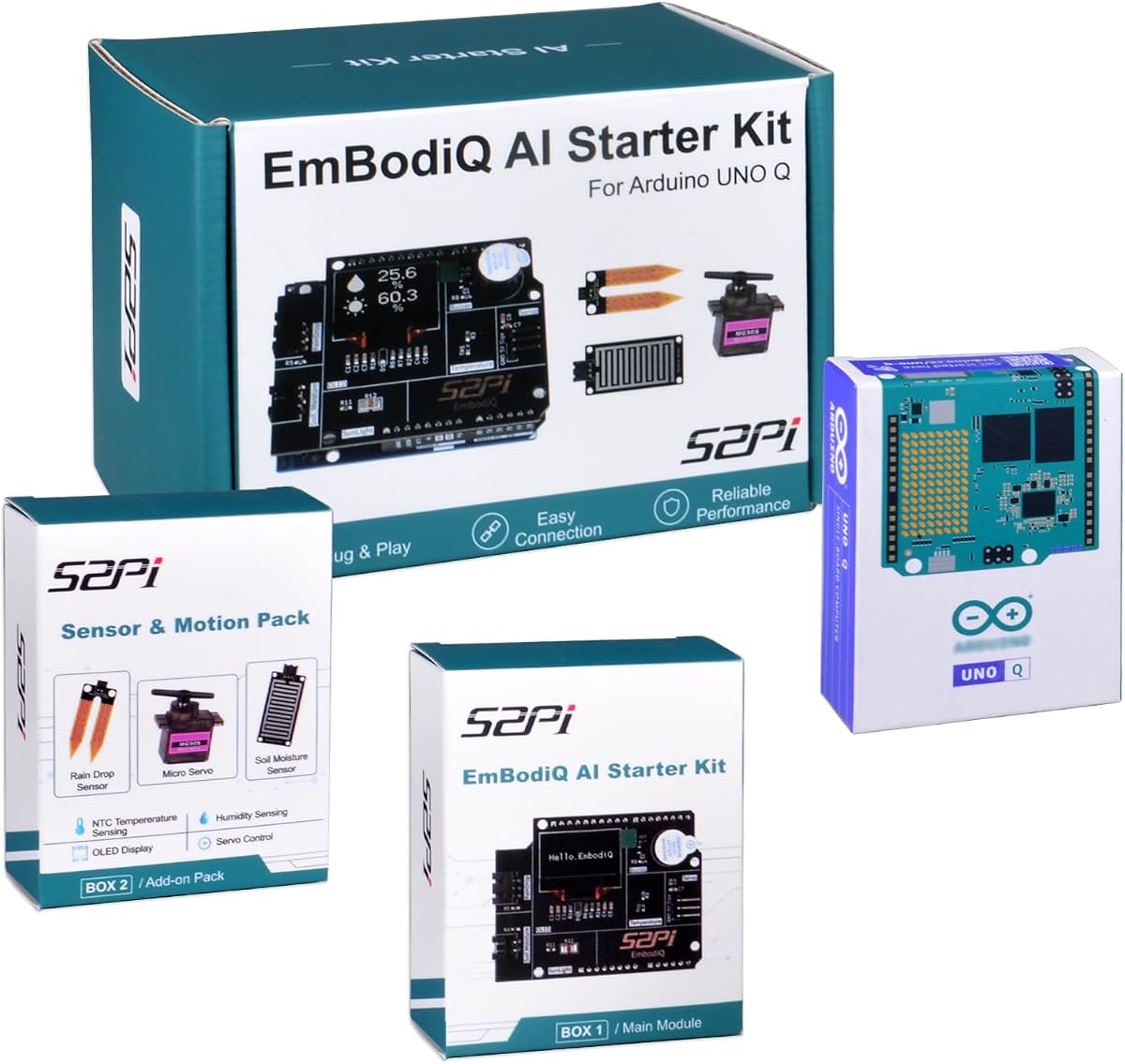
This kit pushes the boundaries of what a standard Uno can do by adding an AI Agent HAT that enables natural language control. You can talk to your hardware to control sensors and servos without writing complex code which is a unique premium feature.
We may earn a commission when you buy through this link, at no additional cost to you.
The bundle includes essential hardware like soil moisture sensors and a servo motor making it a ready-to-go solution for smart gardening or weather stations. It allows for multi-step task execution using conditional logic powered by the onboard AI model.
The rating is lower than other picks suggesting that the software experience or setup might be less polished than expected. Users may need to spend time configuring the AI provider or troubleshooting the HAT to get optimal performance.
For innovators who want to experiment with conversational AI on edge devices this kit offers a distinct premium advantage. It is best suited for those willing to tinker with advanced features to achieve unique interactive results.
Natural language control allows users to interact with hardware using voice commands or text inputs instead of code.
The included HAT adds a layer of intelligence that transforms the board into a smart reasoning engine.
We may earn a commission when you buy through this link, at no additional cost to you.
The UNO R4 WiFi is a compelling alternative for projects that need strong Wi-Fi and Bluetooth without the complexity of a Linux OS. It combines a powerful microcontroller with an ESP32-S3 for robust wireless communication essential for modern IoT.
We may earn a commission when you buy through this link, at no additional cost to you.
With a rating of 4.7 it is highly regarded for its stability and added features like the built-in LED matrix and CAN bus support. These features make it suitable for industrial and automotive projects where standard microcontrollers fall short.
It lacks the AI and OS capabilities of the UNO Q which limits its use to scenarios where Python or complex AI models are not needed. For simpler IoT needs it remains a fantastic choice.
If you need a reliable board that stays within the classic Arduino IDE workflow but offers modern connectivity options the R4 WiFi is an excellent pick. It bridges the gap between traditional hardware and wireless IoT seamlessly.
Dual wireless chip implementation ensures stable and fast connections for real-time data transmission.
The onboard LED matrix allows for immediate visual status displays without external displays.
We may earn a commission when you buy through this link, at no additional cost to you.
This kit is designed to turn code into real-world results with over twenty-two guided lessons that cover a wide range of electronics skills. It is an ideal entry point for beginners who want to learn logic and project structure systematically.
We may earn a commission when you buy through this link, at no additional cost to you.
The inclusion of a breadboard power module and LCD screens helps users focus on wiring and code rather than debugging power issues. This makes it a practical choice for classrooms or family weekend builds.
The kit is based on the older UNO R3 architecture which means it lacks the modern connectivity and AI of newer boards. It is focused purely on learning the fundamentals of microcontroller programming and hardware interfacing.
For educational purposes or for those just starting their journey in electronics this bundle offers the most comprehensive support. The PDF tutorials provide a structured path that ensures you learn the basics before moving on to complex projects.
The guided lessons ensure you do not get lost and build confidence step by step with clear instructions.
Having a large set of sensors and motors in one box allows for diverse project experimentation immediately.
We may earn a commission when you buy through this link, at no additional cost to you.
This board provides a practical controller for maker desks and robotics labs by offering a reliable core without unnecessary extras. It is a straightforward choice for those who need to prototype quickly or need a spare board.
We may earn a commission when you buy through this link, at no additional cost to you.
The ATmega328P core allows for everyday projects like sensors and motor control while the included USB cable ensures you can start coding immediately. It keeps the focus on the electronics rather than complex software environments.
The main limitation is the lack of modern features like Wi-Fi or Bluetooth which restricts its use to wired applications. It is best used where legacy compatibility is key or where external modules can add missing features.
If you need a simple and cost-effective board for a school project or a standard DIY build this option is highly reliable. It supports the ecosystem fully and makes it easy to expand with additional shields or modules as needed.
All essential components are present to begin basic prototyping without extra purchases.
Standard headers and USB support ensure compatibility with most existing projects and tools.
We may earn a commission when you buy through this link, at no additional cost to you.
This official board is a foundational choice for robotics and smart home technology requiring standard microcontroller capabilities. It offers a solid 16MHz performance with plenty of memory for basic code and data storage.
We may earn a commission when you buy through this link, at no additional cost to you.
Being an official product it guarantees full compatibility with the Arduino IDE and community libraries which simplifies development for users. It supports standard communication interfaces like UART and SPI for sensor integration.
However it does not include the modern wireless or AI features found in the newer UNO Q series. It remains a workhorse for traditional electronics but may feel dated for internet-connected projects without external hardware.
For those who value brand consistency and standard performance this board is a safe choice for reliable projects. It supports a wide range of shields and integrates well with Raspberry Pi for hybrid applications.
Purchasing the official board ensures you get genuine quality and full support from the community ecosystem.
The reliable speed and memory allow for consistent execution of standard microcontroller applications.
We may earn a commission when you buy through this link, at no additional cost to you.
This Arduino-compatible board unlocks creativity with a versatile development environment and extensive I/O pins for various sensors. It provides a feature-packed ATmega328P core that handles standard tasks with reliable performance and broad compatibility.
We may earn a commission when you buy through this link, at no additional cost to you.
The design allows for customization and easy expansion with shields or modules which is ideal for DIY projects. It integrates seamlessly with the ecosystem ensuring access to a vast library of code and resources.
While it is a capable board it lacks the high-end AI and OS features of the UNO Q making it less suitable for advanced smart tasks. It remains a strong contender for general purpose electronics and hobbyist use.
If you need a cost-effective solution that pairs well with Raspberry Pi or standard sensors this board is a great fit. It is a must-have for building innovative and interactive electronic systems without breaking the budget.
The open-source friendly layout allows for easy modifications and expansions to suit specific project needs.
It delivers reliable performance at a price point that makes it accessible for budget-conscious makers.
We may earn a commission when you buy through this link, at no additional cost to you.
Choosing the right board depends on your project goals and technical requirements. This guide outlines the key factors to consider to help you select the best hardware.
The UNO Q features a hybrid architecture with an MPU and MCU which allows for both high-level Linux processes and real-time control. If you plan to run AI models or multiple simultaneous processes ensure you choose a model with at least 4GB RAM and 32GB storage to handle the workload efficiently.
Look for sufficient RAM and storage to avoid bottlenecks during complex tasks and ensure your project has the necessary headroom.
Unlike standard microcontrollers the UNO Q supports Linux Debian which opens up Python scripting and advanced software capabilities. Verify that the board supports the OS you need for your application such as Linux or bare-metal programming depending on your workflow.
Confirm OS compatibility to ensure you can write and run the code required for your specific project needs.
Modern projects often require wireless communication so check if the board includes Wi-Fi and Bluetooth. The UNO Q includes Wi-Fi 5 and Bluetooth 5.1 which are essential for IoT and remote control applications to ensure seamless connectivity.
Ensure the board has the wireless protocols you need to connect to cloud services or local networks without extra hardware.
The hybrid processor requires more power than a standard Uno so verify the power supply requirements. A stable 45W USB-C power supply is often recommended to ensure reliable operation during heavy workloads and peripheral usage.
Always check the power supply requirements to prevent voltage drops or instability during operation.
Many kits come with essential accessories like cases hubs and cables which save time and money. A starter kit that includes a USB hub with Ethernet and a protective case can significantly simplify your initial setup and protect your investment.
Consider whether you need a standalone board or a complete kit with accessories to simplify your setup.
If your project involves vision voice or machine learning ensure the hardware supports these features. The UNO Q includes AI vision capabilities and optional AI Agent HATs which are crucial for smart robotics and automation applications.
Check for AI capabilities and HAT support to ensure the board meets your intelligent automation needs.
The classic UNO form factor allows compatibility with existing shields which is a major advantage for prototyping. Ensure the board has headers and connectors that allow you to expand with sensors motors or displays without custom wiring.
Look for standard headers and shield compatibility to simplify expanding your project with additional components.
A strong community and available libraries are vital for long-term development and troubleshooting. The UNO ecosystem offers extensive support including libraries and documentation which helps resolve issues quickly and provides ready-made code examples.
Choose a platform with strong community support to ensure access to help and resources when you need them.
To begin using the UNO Q connect it to a stable power source and attach necessary peripherals via the USB-C port. Use the Arduino IDE or a Python environment to upload sketches and configure the Linux OS for your project.
Ensure you use high-quality USB-C cables and power adapters to prevent instability during heavy processing tasks. For projects requiring constant operation consider using a dedicated power supply rather than a computer USB port.
Store the board in a dry and dust-free environment and use a protective case when transporting it. Avoid static discharge by grounding yourself before handling the board and keep the aluminum case clean for optimal cooling.
Yes the UNO Q runs Linux Debian OS which allows you to run Python scripts directly on the board. This enables complex logic and AI processing without needing a separate computer for execution.
Yes the UNO Q maintains the classic UNO form factor allowing it to work with most standard Arduino shields. This ensures backward compatibility with existing projects and hardware accessories.
The 4GB model has more RAM and storage allowing for more complex AI models and multitasking. The 2GB model is suitable for simpler embedded tasks but may struggle with heavy workloads.
No the UNO Q can operate locally for edge AI and control tasks without internet. However internet is needed for cloud connectivity and remote updates if those features are required.
The board should be powered using a USB-C power supply capable of delivering enough power for the processor. A dedicated 45W adapter is recommended to ensure stable operation under load.
Yes the dual processing power and real-time control make it ideal for robotics projects. The AI capabilities also support advanced tasks like object recognition and autonomous navigation.
The UNO Q runs Linux Debian which provides a full desktop-like environment. This allows for running standard Linux applications alongside Arduino sketches.
Using a case is recommended to protect the board from physical damage and static. An aluminum case also helps with heat dissipation during high-performance tasks.
The Arduino UNO Q series offers a powerful leap forward for makers who need AI and Linux capabilities in a compact form. The official 4GB board stands out as the top choice for performance while the GeeekPi kits offer excellent value with included accessories.
Prioritize your specific needs such as memory and processing power before selecting a kit or board. If you need natural language control or AI HATs look at specialized bundles like the EmbodiQ kit.
Remember that availability and prices can change so always verify current offers before making a purchase. Choosing the right hardware today ensures your project is ready for the demands of tomorrow.