
Qanba N3 Drone 2 Wired Joystick
4.5Editor score
Officially licensed Sony product
Full control panel design
Affordable pricing option
This guide compares the top arcade sticks for PS5 to help you find the best fightstick for your fighting games based on features and compatibility.
Finding the right arcade stick for PS5 can transform your fighting game experience. A quality controller offers precision and comfort during intense matches on your console.
We compared ten top models based on build quality, button types, and connectivity options. Our list covers various budgets and preferences for serious players and newcomers.
Each pick shows key features and ratings to help you decide. Prices and availability change so check the latest links before making your final purchase today.
4.5Editor score

4.6Editor score

4.6Editor score
This side-by-side comparison highlights the key specifications of each fightstick to help you choose the right model for your setup.




This high-end pro fight stick is designed for PlayStation 5, PlayStation 4, and PC. It holds a strong rating for its tournament-grade build and official Sony license.
We may earn a commission when you buy through this link, at no additional cost to you.
The stick features Hayabusa buttons and joystick which provide superior precision. It opens for easy customization and maintenance allowing users to replace parts quickly.
While it is priced higher than budget options the build quality justifies the cost. The official license ensures full compatibility with PS5 fighting games.
Serious players looking for reliability should consider this model. It offers the best balance of performance and support for the PS5 ecosystem.
The tournament grade construction ensures stability during intense matches without sliding around on your table surface.
You can easily swap the top-panel artwork and components to match your personal style and preferences over time.
We may earn a commission when you buy through this link, at no additional cost to you.
Developed with professional gamers this stick targets top fighting games like Street Fighter and Tekken. It holds a solid rating for its comfort and features.
We may earn a commission when you buy through this link, at no additional cost to you.
The Sanwa joystick and action buttons ensure premium quality and durability. You can configure all buttons using the Nacon software on PC or Mac.
The textured palm rest provides sturdy support for long sessions. While it has many features the software learning curve might be a downside for some.
Players who value customization and comfort will appreciate this model. It is a strong choice for those who want deep control over their input setup.
Create game profiles with intuitive software to save your preferred button layouts for different titles.
The textured palm rest supports your hands reducing fatigue during extended play sessions.
We may earn a commission when you buy through this link, at no additional cost to you.
This stick supports PS5 fighting games and multiple platforms like Switch and PC. It has a high rating for its versatility and connection options.
We may earn a commission when you buy through this link, at no additional cost to you.
You can connect via Bluetooth 2.4G receiver or wired USB. It supports Sanwa components for customization and includes turbo functions with speed settings.
While it covers many platforms it does not support Xbox Series consoles. Firmware updates allow compatibility with newer hardware like Switch 2.
Gamers who play across multiple consoles will find this very useful. It offers excellent connectivity at a competitive price point.
Compatible with Windows Apple Android and SEGA devices offering a unified experience for all your systems.
Choose between Bluetooth and wired connections to suit your preference for wireless or stable input.
We may earn a commission when you buy through this link, at no additional cost to you.
This officially licensed Sony peripheral is an affordable option for PS5 and PC. It has a high rating for its authentic Qanba components and value.
We may earn a commission when you buy through this link, at no additional cost to you.
It features a full control panel with Qanba 30mm buttons and OV7 OMRON switch joystick. The 3.5mm mic input allows for chat control.
The lower price makes it accessible to newcomers. It is wired which is stable but less flexible than wireless options for some users.
Budget conscious players should consider this stick. It provides a reliable official experience without breaking the bank.
The 3.5mm microphone input with mute button lets you manage voice chat directly from the stick.
Genuine Qanba buttons and lever ensure a tactile feel close to arcade machines.
We may earn a commission when you buy through this link, at no additional cost to you.
Using premium quality Sanwa components this stick offers high responsiveness and reliability. It shares compatibility with the F700 but enhances build quality.
We may earn a commission when you buy through this link, at no additional cost to you.
It supports Bluetooth 2.4G and wired connections. The full size anti-slip rubber mat holds the stick firmly in place on any surface.
This is a premium upgrade for those who demand performance. The Sanwa components ensure peak performance game after game.
If you want the best in performance choose this Elite version. It is ideal for serious fighting game enthusiasts.
Eight highly responsive buttons and a precision 4-way joystick provide the best input experience.
The anti-slip rubber mat prevents sliding during intense rapid inputs.
We may earn a commission when you buy through this link, at no additional cost to you.
This bundle includes Magic Boots for PS5 compatibility without needing a controller plugged in. It works with many consoles including Xbox and Switch.
We may earn a commission when you buy through this link, at no additional cost to you.
It supports X input and D input on PC. Headset output is supported on PS4 and Xbox One for background music and chat.
While it is a budget friendly bundle the build is simpler than high end sticks. It is great for casual players on multiple platforms.
Choose this if you play on Xbox and PlayStation. The Magic Boots make PS5 use straightforward and convenient.
Use the Magic Boots to use the stick on PS5 without additional controller hardware.
Compatible with Xbox Series and and PC making it a versatile choice for multi system households.
We may earn a commission when you buy through this link, at no additional cost to you.
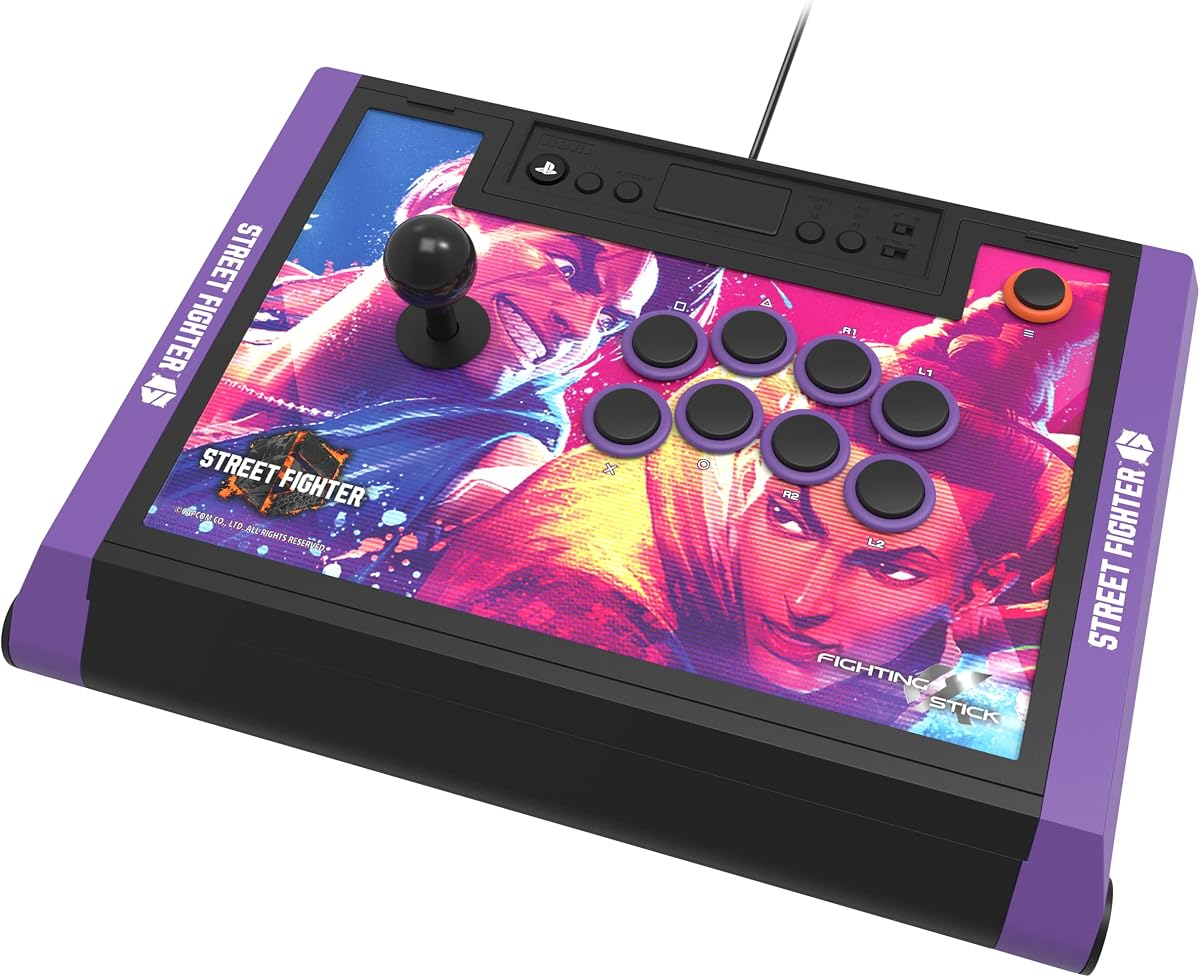
This high-end tournament ready fight stick features Street Fighter 6 artwork. It holds a solid rating for its build quality and official licenses.
We may earn a commission when you buy through this link, at no additional cost to you.
It opens for easy customization and maintenance. It includes a link to 18 downloadable hi-res images for top panel customization.
The SF6 theme appeals to fans of the game. It uses HORI's proprietary HAYABUSA buttons and joystick for performance.
Fans of Street Fighter 6 will love this design. It combines style with the reliability of the standard Alpha model.
Downloadable character images let you print your own artwork to personalize the stick.
Built for high level play with features that ensure stability and accuracy in matches.
We may earn a commission when you buy through this link, at no additional cost to you.
This officially licensed Sony peripheral features OBSF buttons and swappable Sanwa joystick tops. It holds a solid rating for its premium wired build.
We may earn a commission when you buy through this link, at no additional cost to you.
It has a switch to change between PS5 PS4 and PC modes. The full control panel includes a touch pad and mic input.
It is more expensive than basic wired sticks. It offers better quality and official support for those who prefer wired setups.
Players who want a premium wired experience will like this. It is reliable and offers official compatibility guarantees.
Use the switch to toggle between different console modes easily without reconfiguring settings.
The full control panel and touch pad provide all controls you need in one place.
We may earn a commission when you buy through this link, at no additional cost to you.
This tournament grade fight stick features TEKKEN 8 top panel artwork. It holds a high rating for its build quality and official licenses.
We may earn a commission when you buy through this link, at no additional cost to you.
It opens for easy customization and maintenance. It features HORI's proprietary HAYABUSA buttons and HAYABUSA joystick for performance.
The TEKKEN 8 theme appeals to fans of the series. It provides the same quality as the SF6 version.
Fans of Tekken will enjoy this specific edition. It offers style and performance in one package.
The top panel features TEKKEN 8 artwork and downloadable alternate artwork to print.
Uses the same high end buttons as the standard model for reliability in tournaments.
We may earn a commission when you buy through this link, at no additional cost to you.
This leverless controller features 18 keys and all button layout. It holds a solid rating for its low latency and customization options.
We may earn a commission when you buy through this link, at no additional cost to you.
It uses four direction buttons instead of a joystick to reduce input errors. RGB lighting and OLED screen enhance the setup visually.
It requires an additional converter for PS4 PS5. The unique layout might take time to get used to for traditional players.
Players interested in a future style controller will love this. It offers high customization and fast response.
Input latency is less than 1ms in all modes ensuring fast and accurate button actions.
Hot swap switches and keycaps allow you to change the controller without soldering tools.
We may earn a commission when you buy through this link, at no additional cost to you.
Choosing the right fightstick depends on several factors. This guide helps you prioritize what matters most for your gaming style.
Ensure the stick supports PS5 for fighting games. Check if it also works with PC or other consoles you own to avoid future limitations.
Always confirm the product page lists PS5 compatibility before buying to guarantee it will work with your setup.
Look for sticks with Sanwa or Hayabusa buttons as they offer better durability and feel. Standard buttons may wear out faster under heavy use.
Prioritize sticks with replaceable or high quality buttons for long term performance.
Wired sticks offer stability while wireless sticks provide convenience. Decide if you prefer Bluetooth or a cable for your play style.
Wireless options are great for reducing clutter but check latency ratings for competitive play.
A solid base prevents sliding during matches. Look for anti-slip rubber mats or heavy wooden cases for stability.
Investing in a durable build saves money on replacements in the long run.
Some sticks open for maintenance and part swapping. This lets you repair or upgrade the stick when components wear out.
Choose a model that allows easy access if you plan to modify the layout later.
Sticks range from affordable to premium. Set a budget based on how much you play and what features you need.
Higher priced models often offer better parts and licenses for official support.
Software mapping allows you to save profiles for different games. This is useful for managing complex button setups.
Look for software that is easy to use and supports your specific console.
Check for audio or microphone inputs. Some sticks let you plug in headsets directly for chat and game audio.
These ports add convenience if you play online frequently and want to avoid extra dongles.
Connect the stick to your PS5 via USB. If the stick uses a wireless connection pair it using the Bluetooth settings on your console.
Calibrate the stick if needed to ensure accurate inputs. Some sticks come with software tools to help you adjust settings.
Clean the buttons and joystick regularly to maintain smooth performance. Store the stick in a safe place when not in use to prevent damage.
No arcade sticks are designed for fighting games. They work with titles like Street Fighter 6 Tekken 8 and Mortal Kombat but not with all genres.
Wired is generally more stable with lower latency. Bluetooth is convenient but ensure it has low latency for competitive play.
Most PS5 sticks are compatible with PC. Always check the product details to confirm PC support before buying.
Many sticks open easily. You can replace buttons or the joystick using basic tools and official parts from the manufacturer.
Turbo allows you to press a button multiple times quickly. It is useful for performing repeated attacks without rapid tapping.
Licensed sticks are guaranteed to work with PS5 and official games. Unlicensed ones may have compatibility issues.
No licensed PS5 sticks do not need adapters. Some generic sticks may require an adapter to work with the console.
Use a soft cloth or compressed air to remove dust. Avoid liquids on the stick to prevent damage to electronics.
The top picks include the HORI Alpha for overall quality the Qanba N3 for budget and the MAYFLASH F700 Elite for premium features.
Prioritize compatibility and build quality when deciding. Choose a model that fits your budget and play style.
Check the latest prices and availability on Amazon before buying to ensure you get the best deal available today.