
MAYFLASH F300 Arcade Fight Stick
4.5Editor score
Compatible with Sanwa components
Wide platform compatibility list
Turbo functions with speed settings
Discover the top arcade fight stick for Switch 2 options ranked by performance, compatibility, and build quality to elevate your fighting game experience on
Finding the right arcade fight stick for Switch 2 is essential for serious players who demand precision and reliability during intense competitive sessions. Modern controllers offer a range of features tailored to enhance gameplay and reduce input lag effectively.
We compared ten leading models based on connectivity options, build durability, and compatibility with the latest Nintendo hardware to ensure you make an informed decision today. Each product was evaluated for its responsiveness and ease of customization across different gaming platforms.
Every selection highlights unique strengths such as wireless performance, modding potential, or premium materials that cater to specific player needs and preferences. Please note that product availability and pricing may change over time so check the latest details before purchasing.
4.5Editor score
4.7Editor score

4.6Editor score
This side-by-side comparison examines ten top-rated arcade fight sticks designed for Switch 2 and other platforms to help you identify the model that best fits your gaming style and budget requirements.




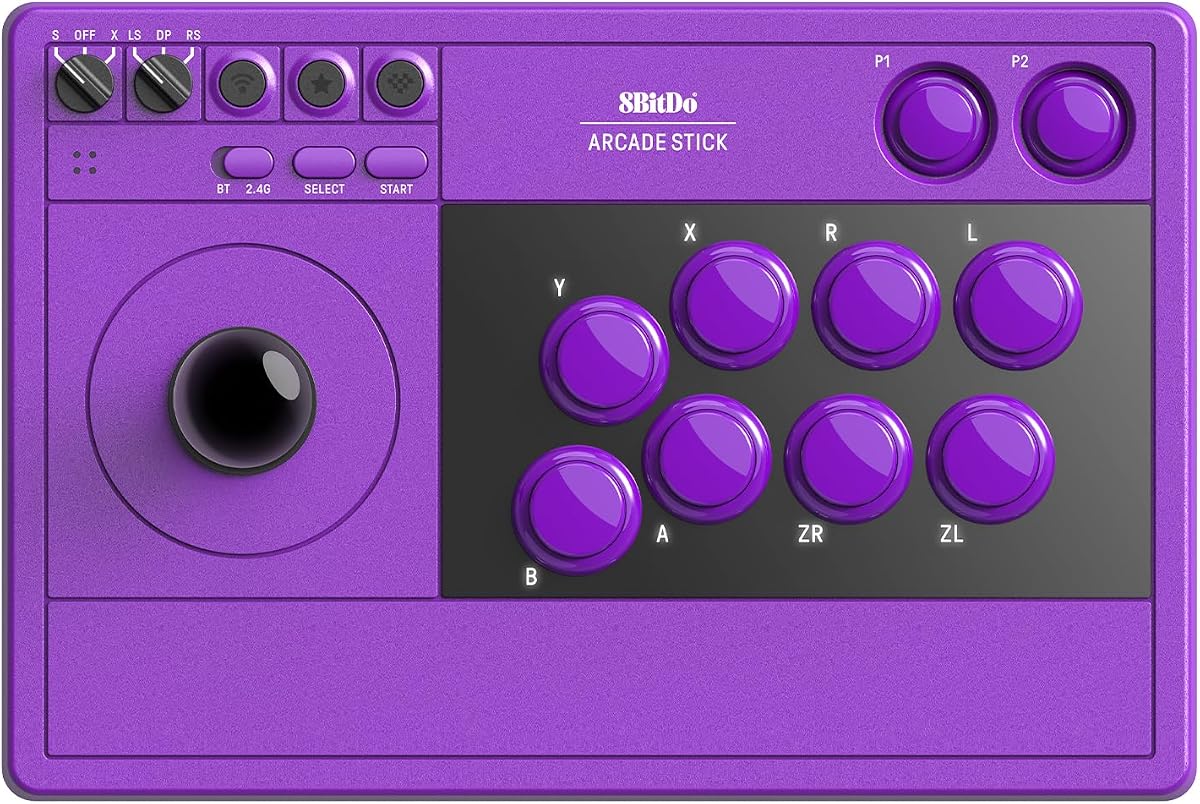
The 8Bitdo Arcade Stick for Switch 2 stands out with its dynamic button layout that instantly adjusts when switching between console and PC modes. This feature reduces confusion during multiplayer sessions and ensures intuitive control mapping regardless of the platform you are using.
We may earn a commission when you buy through this link, at no additional cost to you.
Its tempered glass faceplate adds a sleek premium look while providing a smooth surface for rapid inputs. The included Ultimate Software allows deep customization of button mappings and macros, giving competitive players the edge they need for complex combos.
While the price is higher than some budget alternatives, the build quality and thoughtful design features justify the investment. The hidden compartment for the 2.4G receiver keeps your setup tidy and prevents accidental loss of small accessories during travel.
Serious gamers who value both aesthetics and functionality will find this stick an excellent choice for their collection. It balances performance and style effectively making it the top recommendation for Switch 2 users seeking a versatile fighting controller.
Switching between platforms automatically updates on device labels so you never miss a button press during intense matches.
The tempered glass faceplate resists scratches and provides a tactile feel that enhances precision during long play sessions.
We may earn a commission when you buy through this link, at no additional cost to you.
The MAYFLASH F300 offers an accessible entry point into arcade fighting sticks without sacrificing essential performance features. It supports a vast array of consoles and PCs making it ideal for players who own multiple gaming systems and want one versatile controller.
We may earn a commission when you buy through this link, at no additional cost to you.
Its compatibility with Sanwa Denshi components means you can upgrade buttons or joysticks later to suit your personal preference. The turbo function with adjustable speeds helps automate repetitive inputs which is useful for games that require rapid button pressing.
While it lacks wireless connectivity and uses standard plastic housing the stick remains sturdy enough for regular use. The straightforward design makes it a great choice for newcomers who want to learn fight stick basics without a large upfront investment.
Budget conscious gamers or those who frequently swap consoles will appreciate the flexibility and value this model provides. It delivers solid performance for the price and serves as a reliable foundation for future upgrades or customization projects.
Swapping components allows you to tailor the stick to your exact preference over time as your skills and needs evolve.
Using one stick across different systems saves money and reduces clutter by eliminating the need for multiple controllers.
We may earn a commission when you buy through this link, at no additional cost to you.
The MAYFLASH F700 Elite delivers professional grade performance out of the box thanks to its inclusion of premium Sanwa buttons and joystick. These components are industry standards for competitive players and provide the precision and durability required for high level play.
We may earn a commission when you buy through this link, at no additional cost to you.
A full size anti-slip rubber mat ensures the stick stays firmly planted on any surface during intense matches. This stability is crucial for maintaining control when executing rapid directional inputs and complex combos without the stick shifting unintentionally.
While the price reflects its high end positioning the stick is designed for serious competitors who prioritize performance over cost. The support for wired headsets adds convenience for online play allowing you to hear chat without needing external hardware.
If you are ready to invest in a top tier controller this model offers the reliability and feel of a custom built stick. It represents the pinnacle of plug and play options for Switch 2 users who demand tournament level quality.
Industry standard parts ensure consistent response times and durability that holds up under rigorous competitive usage conditions.
The anti-slip mat prevents movement during rapid inputs which is essential for executing precise combos without distraction.
We may earn a commission when you buy through this link, at no additional cost to you.
The 8Bitdo Retro Wireless Arcade Fight Stick combines classic styling with modern wireless convenience for an enjoyable fighting experience. Its battery life extends up to forty hours on 2.4G connections allowing for extended play sessions without frequent recharging interruptions.
We may earn a commission when you buy through this link, at no additional cost to you.
Dynamic button layout technology ensures that your control scheme adapts visually when you switch between Switch and PC modes. This feature reduces cognitive load during gameplay so you can focus on your strategy rather than remembering which buttons map to what.
The ultra-moddable design invites players to swap out arcade buttons and joystick stems to tailor the feel to their preference. Firmware updates keep the stick current with the latest console requirements ensuring long term compatibility with future game releases.
Players who prioritize cord free operation and long battery life will find this stick an ideal match for their needs. It balances retro charm with practical features making it a strong contender for both casual and competitive fighters.
Long battery life means you can play all weekend on a single charge without worrying about running out of power.
Swappable components allow you to personalize your stick and keep it up to date with the latest arcade standards.
We may earn a commission when you buy through this link, at no additional cost to you.
The 8Bitdo Arcade Stick for Switch and Windows shines for players who want extensive control over their input configurations. The Ultimate Software allows you to map buttons to any combination and create macros for complex moves which is invaluable for competitive play.
We may earn a commission when you buy through this link, at no additional cost to you.
A universal mounting plate supports Sanwa arcade sticks making this one of the most modding friendly options on the market. This flexibility lets you upgrade the internal components to match your exact preference for tension and response time over the years.
Dynamic button layout changes both functionally and visually depending on the active mode which streamlines the user experience. The hidden compartment for the 2.4G receiver ensures that small accessories are stored safely and do not get lost during transport.
Customization enthusiasts will appreciate the open architecture and software support that this model provides out of the box. It strikes a great balance between ready to use performance and the potential for future hardware and software enhancements.
Create complex macros and save profiles for different games to simplify your workflow and execute moves quickly.
The universal plate allows you to swap in high end parts later ensuring the stick grows with your skills.
We may earn a commission when you buy through this link, at no additional cost to you.
The Saitake Wireless Arcade Fight Stick offers unique features like an onboard display screen and audio jack that are rare in this price segment. These elements allow you to adjust settings and volume directly on the device without needing to dive into console menus.
We may earn a commission when you buy through this link, at no additional cost to you.
A 1000mAh rechargeable battery provides extended usage time while the 3.5mm headphone jack supports direct audio output for immersive gameplay. The lighting effects and brightness adjustments add a personalized touch to your setup that enhances the visual appeal of your gaming station.
Macro recording functionality lets you capture up to eighteen keystrokes which is useful for simplifying complex sequences in certain games. This feature combined with the turbo modes gives you a range of tools to optimize your gameplay experience without extra accessories.
Players who value convenience and unique built-in features will find this stick an interesting alternative to more traditional models. It brings a level of interactivity and customization that is usually reserved for much more expensive or pro-tier controllers.
The screen lets you adjust volume and settings instantly which keeps your focus on the game rather than menus.
Headphone output directly from the stick simplifies your setup and removes the need for external audio adapters.
We may earn a commission when you buy through this link, at no additional cost to you.
The MAYFLASH F700 is specifically designed for fighting games making it a specialized tool for players focused on titles like Street Fighter or Tekken. It does not support other genres which ensures that resources are dedicated to performance features that matter most for competitive fighting.
We may earn a commission when you buy through this link, at no additional cost to you.
Firmware updates allow Bluetooth compatibility with Switch 2 which keeps the stick relevant as the console ecosystem evolves. The support for wired headsets means you can hear online chat or music directly without needing additional hardware which simplifies your desk setup.
Three connection methods provide flexibility for different scenarios whether you prefer wireless for convenience or wired for zero latency. The turbo function with adjustable speed settings helps automate rapid inputs for combo-heavy moves without manual repetition strain.
If your primary interest is fighting games this dedicated approach offers a focused experience that generalist sticks may not match. It is an excellent choice for enthusiasts who want a reliable controller built specifically for their genre of choice.
Designed exclusively for fighting titles ensures that every component supports the precision and speed needed for competitive play.
Direct audio output for chat and music streamlines your setup and enhances immersion during online matches.
We may earn a commission when you buy through this link, at no additional cost to you.
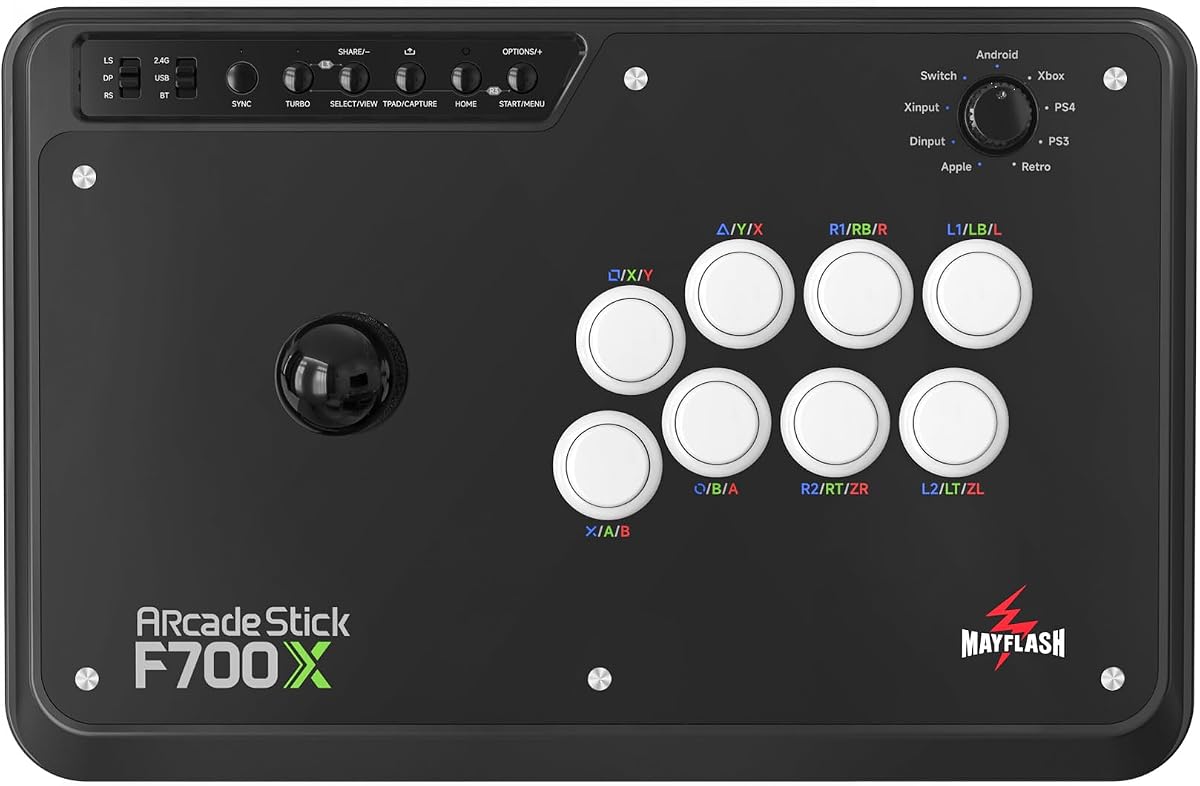
The MAYFLASH F700X is tailored for Xbox Series S and X users who need native wireless support without extra adapters. It also connects to Switch 2 after a firmware update ensuring that Xbox owners can play on multiple platforms with a single device.
We may earn a commission when you buy through this link, at no additional cost to you.
Sanwa Denshi compatibility allows you to swap components easily if you want to adjust the feel or replace parts after heavy use. The turbo functions and speed settings provide flexibility for automating inputs which is useful for games that rely on rapid button sequences.
While it does not work with PS5 wirelessly the stick remains a strong option for Xbox and PC players looking for versatility. The wired headset output feature lets you manage audio directly from the controller which enhances your online gaming experience.
Xbox players or those who switch between Xbox and PC will find this stick offers the most seamless integration in the market. It delivers reliable performance for fighting games on consoles that often lack dedicated third-party options.
Native support for Xbox Series eliminates the need for adapters and ensures stable wireless connections during play.
Firmware updates extend compatibility to Switch 2 making it a versatile choice for multi-console households.
We may earn a commission when you buy through this link, at no additional cost to you.
The POWER A Fusion Wireless Arcade Stick is an officially licensed product that ensures full compatibility with Nintendo Switch systems right out of the box. This official status often translates to reliable performance and peace of mind regarding support and warranty coverage.
We may earn a commission when you buy through this link, at no additional cost to you.
A metal base and rubber footing provide stability during intense gameplay which prevents unwanted movement that could disrupt your inputs. The customizable face-card template allows you to print your own design so you can personalize the look without replacing the whole unit.
Wireless connectivity via Bluetooth 5.0 or wired USB-C offers flexibility for different play styles and power management needs. A low battery warning LED helps you stay prepared for longer sessions so you are not caught off guard by a sudden power loss.
Switch owners who value official licensing and warranty protection will find this stick a safe and reliable choice for their setup. It balances functionality with Nintendo branding which can be appealing for fans of the console ecosystem.
Licensed products undergo specific testing for console compatibility which reduces the risk of connection or driver issues.
Print your own design to make the stick uniquely yours without buying a new unit every time you want a change.
We may earn a commission when you buy through this link, at no additional cost to you.
The 8Bitdo Arcade Stick V3 builds on previous versions with a high capacity 1000mAh battery that ensures long play sessions without interruption. Its tempered glass faceplate offers a scratch-resistant surface that maintains a sleek look even after heavy use during competitive matches.
We may earn a commission when you buy through this link, at no additional cost to you.
Two dedicated macro buttons give you instant access to complex combos which is ideal for fighters that require precise timing. The support for firmware updates keeps compatibility tight with new system releases so your stick remains relevant as your console updates.
While it is a newer model without extensive user reviews the features suggest a strong foundation for performance and reliability. Fast response support from the team means any setup or configuration questions can be resolved quickly to minimize downtime.
Players looking for the latest features in an 8Bitdo stick will find the V3 edition a compelling choice for modern fighting games. It combines proven design elements with new enhancements that cater to competitive needs and aesthetic preferences.
High capacity battery extends wireless play time significantly so you can focus on games rather than charging sessions.
Quick access to macros lets you execute complex combos instantly without relying on menu navigation during play.
We may earn a commission when you buy through this link, at no additional cost to you.
Selecting the right arcade fight stick for Switch 2 involves evaluating several key factors to ensure compatibility performance and durability meet your specific gaming needs effectively.
Ensure the stick supports Switch 2 natively or through firmware updates to avoid connection issues. Many sticks also support multiple consoles so check compatibility lists before purchasing.
Choose a stick that works across all your devices to maximize value and reduce the need for multiple controllers.
Wireless options like Bluetooth or 2.4G adapters offer convenience but wired USB-C connections provide zero latency. Select the mode that best fits your preference for mobility or competitive precision.
Look for sticks with multiple connection methods to adapt to different play scenarios without needing extra hardware.
Sturdy materials like metal bases and tempered glass faceplates improve durability and aesthetics. Check for anti-slip rubber mats to keep the stick stable during intense gameplay.
Prioritize robust construction to ensure the stick withstands frequent use over years without developing loose parts.
Sticks with modding support allow you to swap buttons and joysticks for a tailored feel. Software tools for macro creation and profile management add flexibility for different games.
Look for universal mounting plates and open software ecosystems to future proof your investment as preferences change.
Wireless sticks with high capacity batteries reduce interruptions during long play sessions. Check charging times and battery indicators to stay informed about power levels.
Select models with at least thirty hours of battery life to ensure uninterrupted gameplay during tournaments or marathons.
Sanwa Denshi components are industry standards for precision and reliability. Ensure the stick supports these parts if you plan to upgrade components later.
High quality internal parts deliver consistent response times and durability essential for competitive performance.
Officially licensed products often come with better warranty coverage and support. Check response times and availability of customer service for setup or repair issues.
A strong warranty policy provides peace of mind and protects your investment against manufacturing defects.
Set a budget range that balances features with affordability. High end models offer premium components while budget options provide solid entry level performance.
Invest in features you will use rather than paying for extras that may not benefit your specific play style.
Connect the stick via USB-C or wireless adapter and ensure it is recognized by your Switch 2 system settings. Update firmware if required to enable full compatibility and new features.
Calibrate button mappings using provided software to match your preferred layout. Save profiles for different games to switch between modes seamlessly without manual reconfiguration.
Store the 2.4G receiver in its hidden compartment when not in use and clean the faceplate regularly with a soft dry cloth to maintain performance and aesthetics.
Many top models support Switch 2 natively or via firmware updates to ensure compatibility. Check the product description or manufacturer website for confirmed support details before purchasing.
Yes many sticks feature universal mounting plates or standard sizes that allow easy upgrades. Swappable components let you customize the feel without replacing the entire unit.
Wired USB-C connections provide zero latency and stable performance ideal for tournaments. Wireless options are convenient for casual play but may introduce slight lag in competitive scenarios.
Use manufacturer software to record button sequences and assign them to dedicated macro buttons. This automates complex combos and simplifies execution during gameplay.
Most modern sticks support multiple platforms including PC PlayStation and Xbox. Check compatibility lists to ensure your specific devices are supported before buying.
Battery life varies but many models offer over thirty hours on a single charge. This ensures extended play sessions without frequent recharging interruptions.
The top picks like the 8Bitdo Arcade Stick for Switch 2 and MAYFLASH F700 Elite deliver exceptional performance tailored for competitive gaming needs on the latest console.
Prioritize features such as customization, battery life, and connection stability based on your personal preferences to ensure the stick fits your play style effectively.
Remember to verify the latest pricing and availability before purchasing to make the most informed decision for your gaming setup.