
GIGABYTE X470 AORUS Gaming 7 WIFI
4.3Editor score
10+2 Phase Digital PWM
Fins-Array Heatsink
ESS 9018 Audio
This guide compares the best Amd Ryzen Gen 2 X470 Motherboards for gaming and productivity, evaluating power delivery, connectivity, and thermal design.
Choosing the right motherboard is critical for any build focused on AMD Ryzen processors. The X470 chipset remains a popular choice for users seeking balanced performance and features without the latest chipset costs.
We compared ten top models based on power delivery, connectivity options, and thermal design. Each entry includes verified specifications and real user ratings to help you make an informed decision for your system.
Every pick highlights specific strengths like VRM quality or networking features. Please note that availability and pricing change frequently, so check the current listings before finalizing your purchase order.
4.3Editor score

4.6Editor score

4.6Editor score
This table provides a side-by-side view of key specifications for all ten models. Use this to quickly identify differences in power phases, slot types, and connectivity features across the lineup.


The Asus ROG Strix B550-F Gaming WiFi II stands out as a top choice for builders needing future proof performance. Its rating of 4.6 reflects consistent quality in power delivery and connectivity.
We may earn a commission when you buy through this link, at no additional cost to you.
Key strengths include 12+2 teamed power stages ensuring stable power for Ryzen 5000 series. PCIe 4.0 readiness and dual M.2 slots provide ample bandwidth for fast storage.
Trade-offs include a higher price point compared to standard boards. This is acceptable for users prioritizing WiFi 6E and robust audio capabilities.
Buyers seeking high performance gaming rigs should consider this board. It balances premium features with reliable design for demanding workloads.
The 12+2 power stages ensure stable voltage even under heavy multi-core loads.
WiFi 6E and 2.5Gb LAN offer superior networking speeds compared to older standards.
We may earn a commission when you buy through this link, at no additional cost to you.
The GIGABYTE X470 AORUS Gaming 7 WIFI offers premium audio and power solutions ideal for high fidelity builds. Its 4.3 rating indicates strong user satisfaction despite older chipset constraints.
We may earn a commission when you buy through this link, at no additional cost to you.
Strengths lie in the 10+2 Phase IR Digital PWM and ESS 9018 audio DAC. These components ensure clean power and studio grade sound quality for immersive gaming.
However, it lacks PCIe 4.0 support found in newer boards. This limitation is acceptable for users focused on audio quality rather than storage speed.
Audiophiles and gamers needing stable power should pick this model. It delivers exceptional build quality within the X470 ecosystem.
ESS 9018 DAC provides distinct audio clarity for headsets and speakers.
Fins-Array Heatsink efficiently dissipates heat from VRMs during operation.
We may earn a commission when you buy through this link, at no additional cost to you.
The ASUS Prime X470-Pro delivers exceptional value with a 4.6 rating for reliability. It suits builders seeking core X470 features without unnecessary extras.
We may earn a commission when you buy through this link, at no additional cost to you.
Key strengths include SafeSlot technology for GPU protection and 5-Way Optimization for easy tuning. Realtek S1220A codec ensures decent audio for the price.
It lacks advanced WiFi and high end RGB features. This trade-off is acceptable for users prioritizing stability and budget.
Budget conscious gamers should choose this board for stable performance. It offers essential features for Ryzen systems at a low cost.
SafeSlot uses injection molding to secure heavy GPUs firmly in place.
5-Way Optimization handles fan tuning and CPU adjustments automatically.
We may earn a commission when you buy through this link, at no additional cost to you.
The GIGABYTE X470 AORUS ULTRA GAMING offers robust features for builders needing modern ports. Its 4.4 rating reflects reliability in daily usage and gaming.
We may earn a commission when you buy through this link, at no additional cost to you.
Strengths include the USB 3.1 Gen 2 Front Type-C and 8+3 Phase Hybrid Digital PWM. These provide easy access and steady power for mid range CPUs.
It lacks integrated WiFi found in higher models. This limitation is acceptable for users who rely on wired Ethernet connections.
Users needing convenient I/O ports should buy this board. It balances durability with practical connectivity for ATX cases.
Front USB 3.1 Gen 2 Type-C speeds up data transfer to peripherals.
Dual Armor and Ultra Durable Design protect against physical stress and heat.
We may earn a commission when you buy through this link, at no additional cost to you.
The GIGABYTE B550M K is ideal for compact builds needing high speed slots. A 4.4 rating suggests it handles basic gaming and office tasks well.
We may earn a commission when you buy through this link, at no additional cost to you.
Strengths are its PCIe 4.0 x16 slot and Dual M.2 support in a Micro-ATX board. It enables fast GPUs and storage in smaller cases.
It lacks WiFi and advanced power phases for high TDP CPUs. This trade-off fits well for budget entry level systems.
Casual builders looking for compact setups should choose this. It offers essential modern features at a very low cost.
Micro-ATX design fits smaller cases while maintaining key PCIe 4.0 features.
Two M.2 slots allow for fast NVMe storage expansion without cables.
We may earn a commission when you buy through this link, at no additional cost to you.
The ASUS Prime B550-PLUS AC-HES offers balanced features for mainstream systems. A 4.5 rating confirms stable performance for typical workloads and gaming.
We may earn a commission when you buy through this link, at no additional cost to you.
Strengths include 8+1 DrMOS power stages and dual M.2 slots with PCIe 4.0. These ensure power stability and storage speed for 3rd Gen Ryzen CPUs.
It uses WIFI5 instead of newer WiFi 6 standards. This trade-off is acceptable for users prioritizing wired Ethernet and stability.
General users needing a reliable ATX board should pick this. It provides essential modern features without high cost.
8+1 DrMOS stages provide efficient and cool operation during usage.
Front USB 3.2 Gen 1 Type-C helps modern peripherals connect easily.
We may earn a commission when you buy through this link, at no additional cost to you.
The GIGABYTE B550 Gaming X V2 simplifies builds with strong power and tools. Its 4.5 rating indicates reliability across various system configurations.
We may earn a commission when you buy through this link, at no additional cost to you.
Strengths include 10+3 Power Phase and Q-Flash Plus for BIOS updates without a CPU. Integrated I/O Shield saves time and reduces assembly errors.
It lacks advanced WiFi but covers Ethernet needs. This trade-off is acceptable for those focused on local network stability.
DIY enthusiasts needing easy assembly features should buy this. It provides reliable power and practical convenience for Ryzen systems.
Update BIOS using a USB drive without installing CPU or RAM.
Advanced VRM heatsink keeps power delivery components cool during load.
We may earn a commission when you buy through this link, at no additional cost to you.
The ASUS Prime B550M-A WiFi II combines compact design with modern connectivity. A 4.5 rating reflects consistent performance in gaming and general use.
We may earn a commission when you buy through this link, at no additional cost to you.
Strengths include WiFi 6 and HDMI 2.1 for 4K at 60Hz. These features enable modern streaming and gaming without extra hardware.
It offers fewer SATA ports than full ATX boards. This trade-off fits for builders using SSDs and small cases.
Users needing wireless speed in small cases should pick this. It balances form factor with critical modern standards.
WiFi 6 offers improved latency and speed over older wireless standards.
HDMI 2.1 supports 4K video at 60Hz for connected displays.
We may earn a commission when you buy through this link, at no additional cost to you.
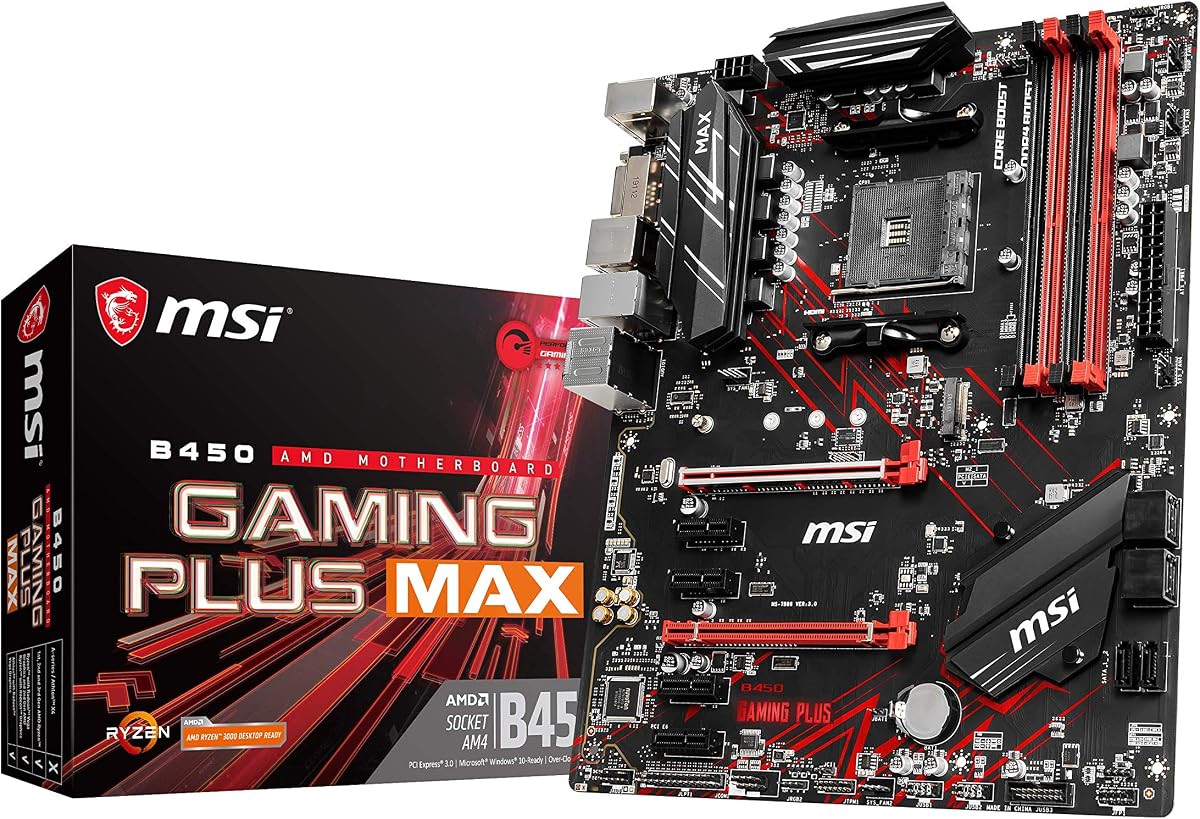
The MSI B450 Gaming Plus Max offers strong support for existing systems. Its 4.6 rating suggests high reliability for daily tasks and gaming.
We may earn a commission when you buy through this link, at no additional cost to you.
Strengths are DDR4 Boost for stable memory speeds and StoreMI for storage management. These tools enhance system responsiveness and performance.
It lacks PCIe 4.0 found in B550 boards. This limitation is acceptable for users focused on CPU power over storage speed.
Upgrading users needing DDR4 support should consider this. It delivers stability and useful features for budget builds.
DDR4 Boost delivers pure data signals for higher memory speeds.
StoreMI helps merge SSD and HDD for fast caching.
We may earn a commission when you buy through this link, at no additional cost to you.
The second listing confirms consistent quality for the B450 Gaming Plus Max. A 4.6 rating reinforces its reputation as a dependable choice for budget builds.
We may earn a commission when you buy through this link, at no additional cost to you.
Strengths include Audio Boost for immersive gaming sound and Crossfire support for multi GPU. These add value for budget focused gamers.
It does not include modern wireless or PCIe 4.0. This trade-off is acceptable for users focusing on core component stability.
Budget builders needing solid audio and multi GPU should pick this. It provides essential features at a competitive price.
Realtek codec and shielding reduce noise for clearer sound.
Crossfire support allows linking two graphics cards for extra power.
We may earn a commission when you buy through this link, at no additional cost to you.
Choosing a motherboard requires balancing chipset features with system goals. This guide covers key factors like VRM design, storage, and power needs.
The X470 chipset offers PCIe lanes and robust power delivery for Ryzen 2nd Gen. While newer chipsets exist, X470 supports key features like SLI and Crossfire.
Prioritize X470 if you need multi GPU support without upgrading CPUs.
Power delivery ensures CPU stability. Look for boards with sufficient phases and heatsinks for long term operation.
More phases allow better performance when overclocking.
DDR4 support is standard. Boards often list max speeds to ensure compatibility with high frequency kits.
Check compatibility lists for guaranteed stability.
M.2 slots provide faster NVMe speeds. PCIe 4.0 is preferred for latest SSDs but X470 usually offers 3.0.
Count slots to match your drive needs.
USB 3.1 Gen 2 and Type-C are essential for fast data transfer. Modern boards include rear headers for accessories.
Ensure enough ports match your peripherals.
WiFi options vary widely. Integrated WiFi 6 offers better range and speed than older standards.
Choose WiFi if you lack Ethernet cabling.
Audio codecs determine sound clarity. Higher end boards include better DACs for gaming audio.
Look for Realtek S1220A or similar for quality.
PCIe x16 slots are critical for graphics cards. Ensure proper spacing for air cooling.
Count slots if you plan multi GPU setups.
Install the motherboard carefully in your case, ensuring standoffs match screw holes. Secure with screws but do not overtighten to avoid board stress.
Update BIOS immediately to support latest Ryzen generations. Use USB flash drives provided by manufacturers to avoid errors during updates.
Monitor thermals regularly to ensure stable operation. Keep dust filters clean to maintain airflow and prevent overheating issues.
Yes, X470 supports Ryzen 5000 series with a BIOS update. Most manufacturers released updates for X470 boards to enable compatibility. Always check the specific model list before purchasing.
X470 offers more PCIe lanes and typically stronger VRMs. This makes it better for high core CPUs and multi GPU setups. B450 is often cheaper but less feature rich.
No, X470 is PCIe 3.0 only. Newer chipsets like B550 offer PCIe 4.0 support for latest storage and GPUs. X470 remains stable for 3.0 devices.
ASUS and GIGABYTE dominate the X470 market. Both offer strong BIOS support and build quality. MSI is also solid for budget focused options.
Most premium X470 boards include WiFi. Budget models often omit it to save cost. Check specifications carefully if you need wireless connectivity.
Look for power stage counts and cooling designs. More phases and larger heatsinks indicate better power delivery. Reviews often detail VRM temperatures under load.
No, installing CPU first is safe. However, updating BIOS before installing ensures compatibility with new generations. Use Q-Flash tools if your board supports them.
3200MHz is standard sweet spot for X470. Higher speeds like 3600MHz work but depend on CPU and memory controller. Check motherboard QVL for guaranteed stability.
We reviewed ten top models offering reliable performance for Ryzen 2nd Gen systems. Choices range from premium audio boards to budget focused options.
Prioritize VRM quality and storage slots for future proofing. Connectivity like WiFi or USB Type-C depends on your specific setup needs.
Check current prices and availability since they change regularly. Use the links provided to verify specifications before making a final order.