
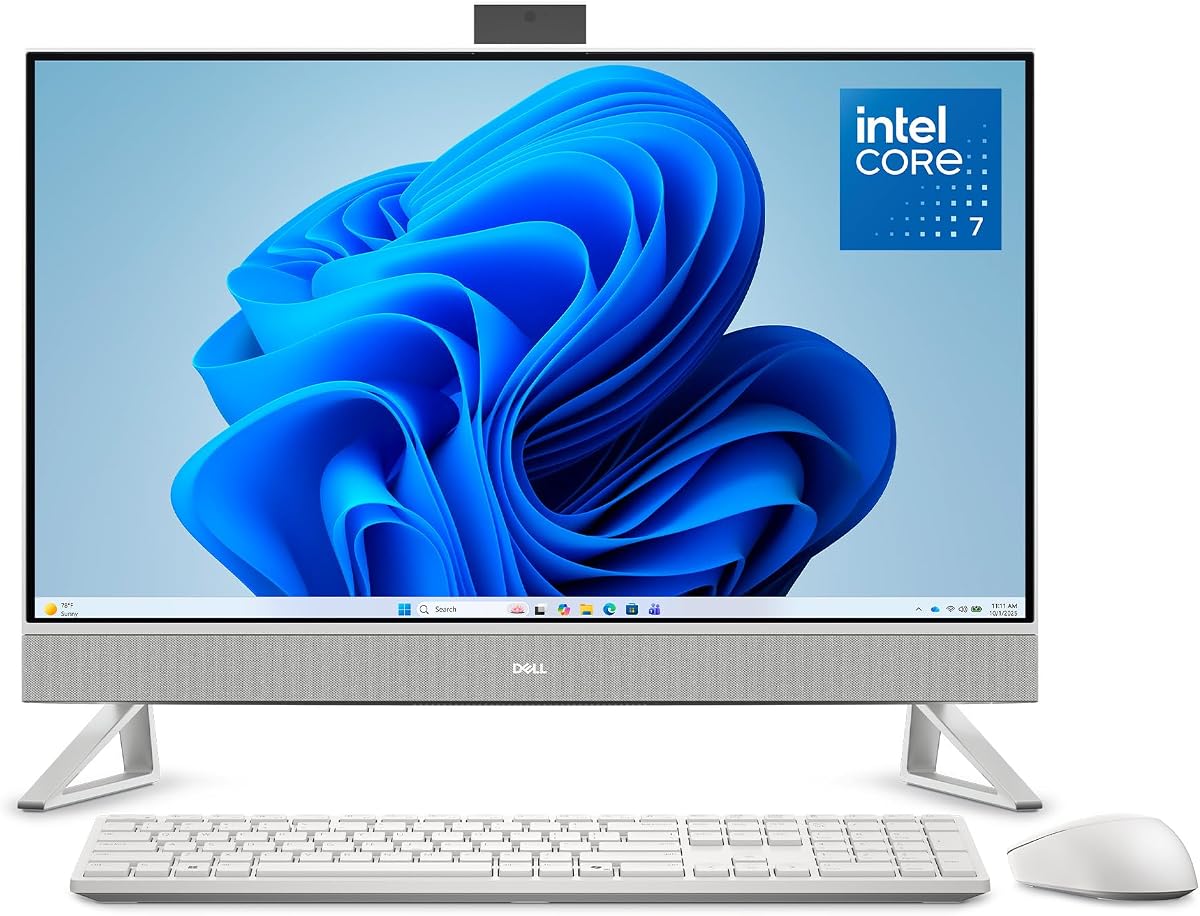
Dell 24 All-in-One Desktop Computer Touchscreen
5.0Editor score
Intel Ultra 7 355 Processor
32GB DDR5-5600MT/s RAM
Wi-Fi 7 and BT 6 Connectivity
All in one desktop PCs with touchscreens combine powerful computing hardware with interactive displays for a streamlined workstation. These devices integrate the monitor and computer into a single unit, saving desk space while offering intuitive touch input for modern workflows.
We evaluated ten leading models based on performance, display quality, build design, and user feedback. Our analysis focuses on processors, memory, storage speeds, and touchscreen responsiveness to ensure each recommendation meets professional and home office standards effectively.
Each pick highlights key strengths and ideal use cases for different budgets and tasks. Keep in mind that availability and specific configurations may vary over time, so checking current listings before purchasing ensures you get the exact model you need today.
5.0Editor score

4.7Editor score

As an Amazon Associate we earn from qualifying purchases.
The following table provides a side-by-side comparison of all ten selected models to help you quickly identify key specifications like processor type, memory capacity, storage size, and display size.




The Dell 23.8" All-in-One Desktop offers a balanced mix of performance and visual quality for general home and office use. With a 4.5 rating from users, it stands out for its clear display and reliable build quality suitable for daily productivity tasks.
We may earn a commission when you buy through this link, at no additional cost to you.
Its FHD IPS display delivers vivid colors with 99% sRGB coverage, making it ideal for media consumption and light creative work. The ComfortView Plus technology reduces blue light emissions to protect eyes during long sessions, while Dolby Atmos speakers provide immersive audio without external hardware.
While it lacks a touchscreen interface which limits interactive usage, the system remains responsive for standard computing needs. The included onsite service and migration tools add significant value by ensuring support and easy data transfer when setting up the new machine.
This model is best suited for users seeking a clean, space-saving setup without the complexity of touch inputs. It excels in home offices or living rooms where visual comfort and audio quality are priorities alongside everyday computing reliability.
The IPS panel ensures wide viewing angles and consistent color accuracy whether you are working directly in front or from the side. Combined with narrow bezels, it creates an immersive experience that draws your focus to content without distractions from frame edges.
Dolby Atmos spatial sound transforms the unit into a multimedia hub capable of handling video calls and entertainment well. The onsite service warranty means professional support is available at your location if hardware issues arise, reducing downtime effectively.
We may earn a commission when you buy through this link, at no additional cost to you.
The HP 27" All in One Desktop Computer is a powerhouse for AI-driven workflows thanks to its dedicated Copilot key and AMD Ryzen AI processor. Rated 4.7 by users, it combines responsive hardware with smart software tools that streamline complex tasks and multitasking.
We may earn a commission when you buy through this link, at no additional cost to you.
Its 27-inch FHD touchscreen offers an ergonomic interface that adapts to touch input for intuitive navigation. The anti-glare panel and DC dimming technology reduce eye strain during long work hours, while the high bandwidth DDR5 RAM ensures smooth performance across multiple applications.
Though designed primarily for productivity, the system handles graphics-heavy tasks reasonably well with integrated Radeon graphics. However, it is not optimized for high-end gaming which limits its appeal to hardcore gamers seeking dedicated GPU performance in an all-in-one form factor.
This device is ideal for professionals and content creators who benefit from AI assistance and large interactive displays. The inclusion of security features like Windows Hello facial recognition adds a layer of convenience and protection for sensitive business data.
The dedicated Copilot key provides immediate access to intelligent assistance tools that can summarize content, manage schedules, or automate repetitive tasks. This integration significantly boosts efficiency for users who rely heavily on digital organization and quick information retrieval.
An adjustable stand allows tilting from negative five to twenty degrees so you can find the perfect viewing angle. The wide viewing angles ensure colors remain consistent across the screen which is essential for collaborative work or presentations.
We may earn a commission when you buy through this link, at no additional cost to you.
The Dell All-in-One 24" FHD Touchscreen Desktop delivers top-tier performance in a compact form factor perfect for smaller desks. With a perfect 5.0 rating, users praise its responsive touch interface and robust processing capabilities that handle business applications effortlessly.
We may earn a commission when you buy through this link, at no additional cost to you.
Powered by a ten-core Intel Core 7 processor, this system ensures smooth multitasking across various productivity tools. The Windows 11 Pro operating system provides advanced security and management features suitable for business environments while the touchscreen adds intuitive interaction for presentations.
While the storage capacity is limited to 512GB which might require cloud reliance for extensive files, the speed of the SSD ensures rapid boot times. The pop-up privacy camera is a standout feature that guarantees privacy when not in use without needing manual shutters.
This model is an excellent choice for professionals who need reliable performance and professional features in a small footprint. It balances power and size effectively making it a premium option for office setups where space efficiency is critical.
Windows 11 Pro includes BitLocker encryption and advanced management tools that protect corporate data from unauthorized access. Combined with the privacy camera design, it offers a secure environment for handling sensitive documents and confidential video conferencing.
The ten-core architecture allows for efficient distribution of tasks across cores ensuring that background processes do not slow down active work. This makes it capable of handling virtual machines or multiple browser tabs without noticeable lag during operation.
We may earn a commission when you buy through this link, at no additional cost to you.
The ASUS VM670 27" All-in-One Desktop is a robust choice for demanding professional workloads requiring substantial memory and storage. It holds a 5.0 rating among users who value its ability to handle complex multitasking and creative applications without bottlenecks.
We may earn a commission when you buy through this link, at no additional cost to you.
With 32GB of DDR5 RAM and a 1TB NVMe SSD, this system provides ample resources for running multiple virtual machines or editing large video files. The dedicated 50-TOPS NPU enhances AI tasks making it highly efficient for modern software that utilizes machine learning.
The versatility of HDMI in and out ports allows the unit to function as a monitor for external devices or to connect additional screens. This flexibility extends its utility beyond standard computing enabling users to integrate it into multi-monitor setups seamlessly.
Ideal for power users and businesses, this model justifies its price with enterprise-grade features and high-performance components. It is well suited for workstations where reliability and speed are paramount requirements for daily operations.
The onboard NPU accelerates AI-enhanced tools allowing for faster processing of generative tasks and intelligent assistants. This hardware acceleration ensures that AI features do not tax the main CPU keeping overall system performance smooth and responsive.
The anti-glare coating on the IPS display reduces reflections making it easier to view content in bright office environments. With extensive port options you can connect various peripherals directly without needing excessive hubs or adapters on your desk.
We may earn a commission when you buy through this link, at no additional cost to you.
The Dell 24 All-in-One Desktop Computer Touchscreen introduces cutting-edge connectivity and performance features suitable for forward-thinking environments. With a 5.0 rating, it impresses with its Intel Ultra 7 processor and advanced wireless standards that future-proof the investment.
We may earn a commission when you buy through this link, at no additional cost to you.
Its support for Wi-Fi 7 and Bluetooth 6 ensures extremely low latency and high throughput for data transfers and peripherals. The addition of pen support transforms the touchscreen into a versatile input tool for digital note-taking and creative sketching without extra hardware.
While these advanced features are beneficial the compatibility with older peripherals may vary as standards evolve. The system is designed for speed so users should ensure their network router supports these new protocols to fully utilize the potential speeds offered.
This model is highly recommended for users who want the latest technology in an all-in-one form factor. It excels in modern offices where wireless connectivity and precise input methods are valued alongside raw processing power.
Wi-Fi 7 offers significantly higher bandwidth and reduced congestion which is crucial for busy networks with many connected devices. This ensures consistent performance for video conferencing and cloud backups without the interruptions common in older wireless standards.
Pen support allows for natural handwriting and drawing directly on the screen enhancing collaboration during meetings or lessons. This feature adds a layer of interaction that standard touch does not provide making it ideal for creative or educational applications.
We may earn a commission when you buy through this link, at no additional cost to you.
The HP 27 inch All-in-One Desktop PC offers a solid balance of features for general use and home office tasks. Rated 4.4 by users, it provides a large touchscreen experience with enough power to handle daily multitasking and media consumption efficiently.
We may earn a commission when you buy through this link, at no additional cost to you.
Its 27-inch FHD touchscreen combined with LPDDR5 memory ensures smooth operation for web browsing and light productivity work. The Windows 11 Pro OS adds professional capabilities like better security and remote desktop support which are valuable for small business users.
Although the memory is onboard and not user-upgradeable it provides sufficient capacity for most tasks. The camera is standard quality which works for basic calls but might not meet high expectations for frequent professional broadcasting or recording.
This device is a good middle-ground option for those wanting a reliable system with a generous display size. It suits users who prioritize screen real estate and software features over extreme hardware customization or top-tier specs.
Windows 11 Pro provides access to features like BitLocker and Remote Desktop that are often reserved for business environments. These tools make it easier to manage data security and access the machine remotely for maintenance or troubleshooting.
The large 27-inch screen allows for comfortable multitasking with two windows open side by side. This is particularly useful for tasks like coding data entry or research where comparing information across screens is a daily requirement.
We may earn a commission when you buy through this link, at no additional cost to you.
The Dell 27 All-in-One Desktop provides a large workspace and strong memory configuration for multitasking heavy users. With a 4.3 rating, it stands out for its generous RAM and large display which are crucial for complex productivity workflows.
We may earn a commission when you buy through this link, at no additional cost to you.
The 32GB of RAM ensures that multiple applications run smoothly without slowing down the system. Combined with the 27-inch FHD IPS display, it offers ample visual real estate for managing spreadsheets or project dashboards effectively.
While it lacks a touchscreen limiting interactive use cases the robust performance and visual quality compensate for this omission. The stand includes space to house a keyboard which keeps the desk tidy and provides a clean professional look.
This model is best for users who need high capacity memory and a large screen but do not require touch input. It is ideal for workstations where data volume and screen space are the primary considerations over input methods.
Having 32GB of RAM allows for running virtual machines or heavy software like CAD without performance degradation. This headroom means the computer remains responsive even when many background applications are active during a work session.
The innovative stand design incorporates a keyboard storage area which significantly reduces desk clutter. This attention to physical layout makes the device look organized and professional in office environments where neatness is valued.
We may earn a commission when you buy through this link, at no additional cost to you.
The HP 24 Touchscreen All-in-One Desktop is designed for light work and educational needs at a budget-friendly price. It has a 4.3 rating among users who need a simple reliable device for basic tasks and learning environments.
We may earn a commission when you buy through this link, at no additional cost to you.
Equipped with a reliable Intel processor and 16GB of DDR4 RAM, it handles everyday applications like web browsing and office suites well. The 1TB SSD ensures that files load quickly and there is plenty of room for storing educational materials.
While the processor is entry-level and not suitable for intensive processing it is sufficient for students and light home use. The touchscreen adds convenience for navigating menus which can be helpful for non-technical users or children.
This model is perfect for households or schools seeking a cost-effective all-in-one solution without compromising on storage. It balances functionality and price to deliver a straightforward experience for general purpose computing.
The 1TB PCIe SSD provides fast boot times and responsive file access ensuring that you do not wait long to start using the machine. This speed is noticeable in daily use making the system feel more responsive than models with traditional hard drives.
WiFi 6 support ensures stable and fast internet connections which is essential for online classes and video conferencing. It handles multiple connected devices on a network better than older standards making it reliable for modern homes.
We may earn a commission when you buy through this link, at no additional cost to you.
The ASUS 27" FHD Touchscreen All-in-One PC is a top-tier machine for creative professionals and power users. With a 5.0 rating, it delivers exceptional performance through its AI-optimized processor and large DDR5 memory which are crucial for modern workflows.
We may earn a commission when you buy through this link, at no additional cost to you.
The IPS anti-glare display ensures accurate colors and comfortable viewing which is essential for design work. The dedicated 50 TOPS NPU accelerates AI tools making it highly efficient for tasks that require intelligent processing or content generation.
Although it does not include a built-in webcam the robust specs and connectivity options make it a versatile hub. Users can connect external peripherals as needed while relying on the powerful internal hardware for heavy rendering and data tasks.
This model is ideal for creatives who need high fidelity and speed in a compact all-in-one form. It provides the power of a desktop tower combined with the convenience of a single-unit system for professional environments.
The display covers 100% of the sRGB color spectrum ensuring that digital art and photos appear as intended. This accuracy is vital for graphic designers who need to trust the visuals they see on screen before finalizing projects.
With a dedicated Copilot key users can instantly access AI features that streamline complex workflows. This integration reduces the time spent on repetitive tasks allowing for more focus on creative and strategic work.
We may earn a commission when you buy through this link, at no additional cost to you.
The MSI Touch Screen All-in-One Business Desktop is an accessible option for small businesses needing a reliable workstation. While it lacks user ratings due to its new status, its specs suggest strong utility for standard office applications.
We may earn a commission when you buy through this link, at no additional cost to you.
It comes with a fast Intel Core 7 processor and ample storage space to handle daily business tasks and files efficiently. The inclusion of wireless keyboard and mouse ensures a clean desk setup which helps maintain a professional workspace.
While the base RAM is limited to 8GB the ability to connect dual external monitors allows for extended workflows. This expandability is particularly useful for professionals who need to view multiple documents or applications simultaneously.
This model serves as a cost-effective entry point for those needing a touchscreen business desktop. It balances performance and connectivity to provide a functional solution for light to moderate workloads without high upfront costs.
Support for dual external monitors means you can extend your workspace beyond the built-in screen. This is a significant advantage for users who manage complex spreadsheets or need to reference multiple data sources constantly.
With 1.2TB of storage you can store a large library of documents and media locally without immediate need for cloud solutions. This helps in maintaining quick access to files and reducing dependency on internet connectivity.
We may earn a commission when you buy through this link, at no additional cost to you.
Selecting the right all in one desktop PC with touchscreen requires balancing performance features and budget to match your specific needs.
The processor is the brain of your computer and determines how well it handles multitasking and demanding applications. Look for models with Intel Core i5 or i7 or AMD Ryzen 5 or 7 processors for reliable speed in home and business tasks.
Prioritize processors with enough cores to handle your workflow without bottlenecks ensuring smooth operation over time.
Since you will interact with the screen frequently resolution and color accuracy are vital for eye comfort and visual tasks. Opt for Full HD or higher IPS panels with anti-glare coatings to reduce reflections and strain during long sessions.
Check for touch responsiveness and refresh rates to ensure input feels smooth and natural during daily use.
RAM dictates how many programs you can run simultaneously without slowing down the system. For general use 16GB is a standard recommendation that allows for comfortable multitasking across browsers and office apps.
Choose 32GB or more if you work with large files or run virtual machines to maintain optimal speed.
Solid state drives significantly reduce boot times and file access speeds compared to traditional hard drives. Ensure your system uses a PCIe NVMe SSD for the best performance in opening applications and saving work.
Consider total storage size based on how much local data you need to keep accessible without cloud reliance.
The OS provides the interface and tools you use daily so choose based on your familiarity and security needs. Windows 11 Home is great for consumers while Pro offers additional business features like remote desktop and encryption.
Verify that the system supports the latest updates to ensure ongoing security and compatibility with software.
Ports determine what devices you can connect such as external monitors cameras or storage drives. Look for USB-C and USB-A ports as well as HDMI inputs to support versatile workflows.
Modern wireless standards like Wi-Fi 6 or 7 ensure fast and stable network connections for cloud access.
Aesthetics and footprint matter in an all-in-one since it serves as both computer and monitor. Select a design that fits your workspace and offers adjustability for ergonomic viewing angles.
Ensure the stand is sturdy enough to support the display without wobbling during use for stability.
A solid warranty provides peace of mind against hardware failures which can disrupt work. Look for manufacturers that offer onsite service or extended support options to minimize downtime.
Check if the warranty covers accidental damage or includes technical support for setup and troubleshooting.
When setting up your device place it on a stable surface away from direct sunlight to prevent screen glare and overheating. Connect all necessary peripherals using the available ports and ensure your internet connection is stable before installing updates.
To maintain the touchscreen use a soft microfiber cloth and approved screen cleaners to remove fingerprints without scratching the glass. Avoid applying excessive pressure on the screen and keep liquids away from the unit to prevent liquid damage to internal components.
Regularly update your operating system and drivers to ensure security patches are applied for optimal performance. Clean the vents and dust ports periodically to prevent overheating and extend the lifespan of your all-in-one desktop system.
Most all-in-one PCs are designed for productivity rather than high-end gaming. While some models handle casual or light gaming well they typically lack dedicated graphics cards required for modern AAA titles. Check if the model has upgraded GPU options before buying for gaming use.
Many all-in-one units have soldered RAM limiting upgrade options so check specs before purchasing. Some models allow SSD replacement but not RAM. Consider buying with sufficient capacity upfront if future upgrades are restricted by the manufacturer.
Most modern all-in-one desktops include built-in webcams for video conferencing. Many feature privacy shutters or pop-up cameras for security. Check the camera resolution and microphone quality to ensure they meet your call needs.
All-in-one units save space by combining the computer and monitor into one footprint. They eliminate tower clutter and reduce cable management needs making them ideal for small desks. This streamlining can improve workspace organization significantly.
Touchscreens on desktops are calibrated for touch input but may lack the precision of a tablet. They are great for navigation and note-taking but require care to avoid accidental inputs. Look for models with palm rejection features for better accuracy.
All-in-one PCs generally last between three to five years depending on usage intensity and build quality. Regular updates and proper cleaning can extend this. Hardware may become outdated sooner for demanding applications than for basic tasks.
We reviewed ten top models highlighting options like the HP 27 All in One Desktop and Dell 24 All-in-One for various needs. These selections offer a mix of AI features and performance and budget-friendly choices.
Prioritize performance and memory if you run heavy apps but consider display size and connectivity for daily workflow efficiency. The right choice depends on balancing technical specs with ergonomic features for your space.
Always verify the latest specifications and availability before purchasing as models update frequently. Check current listings to ensure you get the exact configuration that meets your requirements and expectations.