
Thrustmaster T-Flight Hotas X USB Flight Sim Stick & Throttle
4.4Editor score
Detachable throttle design
12 programmable buttons
Adjustable resistance dial
Discover the top airplane controllers for PC flight simulators in October 2026. This guide compares ten best options for immersion, precision, and value.
Flight simulation enthusiasts crave realism, and the right controller transforms your setup from a game into a cockpit experience. Choosing the best airplane controllers for PC requires balancing tactile feedback, build quality, and software compatibility to ensure every maneuver feels authentic.
We evaluated ten top-rated models based on user feedback, expert reviews, and technical specifications. Our comparison focuses on durability, ergonomic design, programmability, and how well each device integrates with popular simulators like Microsoft Flight Simulator and X Plane.
Each pick below highlights unique strengths for different pilot preferences, from compact setups to full yoke systems. Prices and availability fluctuate, so check current listings before purchasing to secure the best deal for your flight simulation journey.
4.4Editor score

4.0Editor score

4.4Editor score
This side-by-side comparison helps you evaluate key features across ten leading flight sim controllers. Review specs like axis count, button layout, and compatibility to find the perfect match for your cockpit setup.





The Logitech G X56 stands out as a top choice for serious sim pilots seeking precision and versatility. With over 189 programmable controls, it offers unmatched flexibility for managing complex aircraft systems during long flights.
We may earn a commission when you buy through this link, at no additional cost to you.
Its adjustable spring system allows users to tune stick force to their preference, while RGB lighting helps organize functions visually. The mini analog sticks provide extra control surface options ideal for advanced maneuvers in combat or cargo sims.
While the price reflects its premium features, some users find the setup overwhelming initially. However, the software customization compensates for this by letting you map every button to your exact workflow needs.
This controller is best suited for enthusiasts who demand professional-grade inputs. If you prioritize realism and control depth over simplicity, the X56 delivers a robust and reliable flight experience.
Software allows deep profile management for different aircraft types.
Controls are designed to stay under fingers for easy VR navigation.
We may earn a commission when you buy through this link, at no additional cost to you.
Pilots seeking a commercial airliner experience will appreciate the realistic feedback from this yoke system. It mimics the resistance and weight of real-world controls, helping build accurate muscle memory for flight training.
We may earn a commission when you buy through this link, at no additional cost to you.
The stainless steel shaft ensures smooth operation without jitter, while the included quadrant adds essential throttle management. Desk clamps keep everything stable during intense maneuvers or turbulence simulation.
Installation demands space and patience, but the result is a cockpit-like setup that elevates immersion. Users often note the shift from joystick to yoke makes civil aviation sims feel more authentic.
This system is ideal for those focusing on airliners or multi-crew scenarios. If space permits and you want a true captain's chair experience, this yoke setup is a solid investment.
Designed to replicate real yoke resistance and range of motion.
Separate quadrant provides distinct control for engine management.
We may earn a commission when you buy through this link, at no additional cost to you.
Entry-level pilots often start with the Thrustmaster T-Flight Hotas X due to its balance of cost and features. It provides essential controls without breaking the bank, making it perfect for casual flying or learning basics.
We may earn a commission when you buy through this link, at no additional cost to you.
The detachable throttle allows flexible setups, whether you want a compact desk unit or a separated configuration. Ergonomic grips reduce fatigue during longer sessions, and pre-configured presets help you fly immediately.
While it lacks the metal parts of higher-end models, it delivers reliable performance for the price. Users appreciate the resistance dial for fine-tuning stick tension to match their sensitivity preferences.
This controller is recommended for beginners or those with limited desk space. If you want a straightforward, effective tool to explore flight sims without complexity, this Hotas offers excellent value.
Detaching throttle lets you tailor cockpit layout to your space.
Plug and play functionality minimizes setup time for quick sessions.
We may earn a commission when you buy through this link, at no additional cost to you.
The X52 Pro remains popular among legacy users for its unique LCD display and tactile feel. It offers a compact single-piece design that simplifies cockpit organization while keeping critical info in view.
We may earn a commission when you buy through this link, at no additional cost to you.
Progressive throttle with detents helps manage engine states like idle and afterburner accurately. The non-contact axis technology reduces wear over time, ensuring consistent performance across thousands of flight hours.
Some users find the software interface dated compared to newer tools, but core functionality remains solid. The adjustable handle positions accommodate various hand sizes for better ergonomics.
This system suits pilots who prefer a classic HOTAS layout with visual feedback. If you value quick access to flight data without looking away, the X52 Pro still holds its own.
Shows programmed commands and flight plan timing instantly.
Handle positions let you customize grip for comfort.
We may earn a commission when you buy through this link, at no additional cost to you.
Budget pilots looking for basic functionality will find the PXN 2113PRO offers a simple, reliable experience. It focuses on core controls without extra bells and whistles, making it easy to set up.
We may earn a commission when you buy through this link, at no additional cost to you.
Vibration adds a layer of feedback during takeoff or turbulence, enhancing immersion slightly. The suction cups keep the stick stable on smooth surfaces, preventing slippage during intense maneuvers.
While it lacks advanced customization, it supports major flight sims out of the box. Users note it works well for casual play where deep programming isn't necessary.
This joystick is best for those on a tight budget or testing the waters. If you want something that just works without complex driver installs, the PXN 2113PRO fits the bill.
Adds tactile feedback to simulate flight events.
Suction cups ensure secure placement on smooth desks.
We may earn a commission when you buy through this link, at no additional cost to you.
The X52 Flight Control delivers robust performance for pilots needing extensive controls. Its 282 programmable commands allow deep customization for complex sims without switching keyboards.
We may earn a commission when you buy through this link, at no additional cost to you.
Magnetic sensors ensure long-term accuracy without physical contact wear. The LCD helps check active modes, while the 3D twist offers realistic rudder control without separate pedals.
Many users praise its durability and build quality, though the initial setup can be dense. Profiles allow easy switching between different aircraft types.
This model suits intermediate to advanced pilots seeking reliability. If you want a complete package with high button counts, the X52 Flight Control is a strong contender.
Magnetic technology ensures consistent precision over time.
Profiles let you switch modes for different aircraft easily.
We may earn a commission when you buy through this link, at no additional cost to you.
For commercial aviation fans, the Boeing Edition delivers an unmatched replica experience. Licensed design ensures controls match real-world layouts, creating a convincing bridge between home and cockpit.
We may earn a commission when you buy through this link, at no additional cost to you.
The pendulum mechanism replicates airliner movement, making turns and banking feel natural. A metal structure adds weight and stability, reducing shake during turbulence.
While it requires space and assembly, the immersion gained is unmatched. Users note it elevates Microsoft Flight Simulator visuals and gameplay significantly.
This bundle is perfect for those committed to realism. If you want to fly like a real captain, the Boeing Edition is a worthy investment.
Licensed design matches Boeing 787 cockpit controls.
Replicates realistic motion for smoother control feel.
We may earn a commission when you buy through this link, at no additional cost to you.
A320 pilots appreciate the authentic sidestick design of this controller. Licensed by Airbus, it brings true commercial aviation ergonomics to your desk without needing separate throttle units.
We may earn a commission when you buy through this link, at no additional cost to you.
Magnetic sensors eliminate drift over time, maintaining perfect calibration for critical maneuvers. The throttle and rudder are integrated, simplifying setup for compact cockpits.
Users find the braille style identification useful for quick adjustments during flight. The setup is quick, and compatibility with major sims is excellent.
This is ideal for Airbus enthusiasts seeking simplicity. If you prefer sidesticks and want a clean setup, the TCA Sidestick delivers reliable performance.
Magnetic sensors prevent wear and maintain calibration.
Combines throttle and rudder for a compact package.
We may earn a commission when you buy through this link, at no additional cost to you.
The VelocityOne Flightstick modernizes flight controls with cross-platform utility. It works on PC and Xbox, offering flexibility for multi-device gaming setups without extra adapters.
We may earn a commission when you buy through this link, at no additional cost to you.
An OLED display shows flight info while you fly, and the touchpad adds cursor control for menus. The RGB lighting enhances visual customization for your setup.
While new to the market, it offers a fresh take on HOTAS with unique features. Users appreciate the modern aesthetic and intuitive layout.
This suits gamers who want versatility and style. If you play across devices, the VelocityOne provides a unified and sleek flight experience.
Supports both PC and Xbox Series X.
Allows cursor navigation without removing hands.
We may earn a commission when you buy through this link, at no additional cost to you.
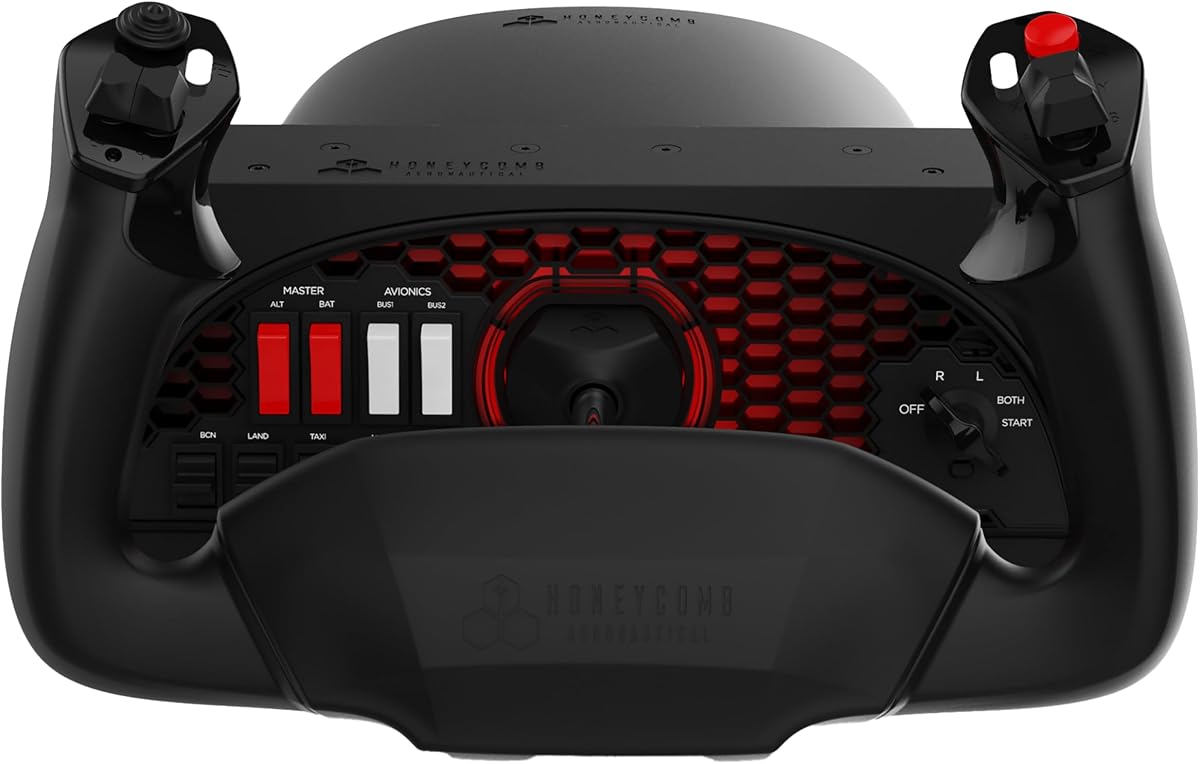
The Honeycomb Alpha Yoke is beloved for offering premium realism at an accessible price. It includes a dedicated switch panel, making it a complete cockpit unit straight out of the box.
We may earn a commission when you buy through this link, at no additional cost to you.
The steel shaft and ball bearings ensure smooth, responsive movement without jitter. LED backlighting helps during night flights, and dual mounting options adapt to different desk types.
Pilots praise its durability and reliability over thousands of hours. The simple design means fewer points of failure compared to complex systems.
This is an ideal choice for those building a full cockpit. If you want a professional yoke without the high cost, Honeycomb Alpha is a top pick.
Built with steel and ball bearings for longevity.
Red LEDs ensure switches stay visible in dark cabins.
We may earn a commission when you buy through this link, at no additional cost to you.
Selecting the right controller involves weighing several technical and ergonomic factors. Consider how often you fly, what aircraft types you prefer, and your available space.
Yokes mimic airliners for civil aviation, while joysticks suit military fighters. Choose based on your flight sim focus.
Yoke for planes, joystick for jets.
Materials like metal shafts and bearings ensure smooth movement and longevity. Avoid plastic that wears quickly with heavy use.
Metal parts provide better durability.
More buttons allow deeper control mapping for complex systems. Ensure enough inputs for your typical flight tasks.
Aim for 10+ buttons minimum.
Check support for your sim software. Custom drivers can enhance customization for Microsoft Flight Simulator or X-Plane.
Drivers are essential for customization.
Comfortable grips and wrist rests reduce fatigue. Test handle sizes and button placement for long sessions.
Comfort prevents wrist strain.
Higher cost usually brings better materials and more features. Balance budget with needed functionalities.
Invest in quality for longevity.
Clamps or suction bases ensure stability during flight. Consider desk space before buying larger setups.
Stability prevents accidental inputs.
Built-in twist or rudder pedals help for precise turns. Determine if you need separate pedals or built-in axes.
Twist handles work for basics.
Connect the controller to a USB port and install necessary drivers. Calibrate it within Windows control panel for accurate movement.
Map buttons to your flight sim settings for efficient access. Save profiles for different aircraft to switch quickly.
Clean sensors and buttons regularly with soft cloths to prevent dust buildup. Store in a dry place to avoid electronic damage.
Most major controllers support popular simulators like Microsoft Flight Simulator, X-Plane, and Prepar3D. However, check specific software compatibility before purchasing.
It depends on your goals. Joysticks suit fighter jets and combat, while yokes fit airliners. Match the type to your simulation focus.
For basic flight, 10 to 20 buttons suffice. Complex simulations with many systems benefit from 30+ buttons for full control.
Rudder pedals improve realism but are optional. Many controllers include twist handles that handle rudder adequately for casual use.
Some modern models support both PC and Xbox. Verify product specs, as many controllers are PC only.
Most plug and play via USB. Driver installation may take a few minutes, but most devices work immediately after connection.
The Logitech G X56 leads for customization, while the Thrustmaster Boeing Edition offers unmatched realism. Budget options like the T-Flight Hotas X remain accessible.
Prioritize build quality and ergonomics to ensure comfort over long sessions. Matching controller type to your aircraft preference ensures the best experience.
Prices fluctuate frequently, so verify listings before buying. This guide helps you select a controller that grows with your flight simulation ambitions.