
Air Mouse Remote MX3 Pro
3.8Editor score
Plug and play setup
Mini keyboard on back
IR learning for 5 keys
This guide compares the top air mouse for Android TV box devices to help you choose the best wireless remote with voice and keyboard features.
Navigating smart TV interfaces can be frustrating with standard remotes that lack precision. An air mouse for Android TV box solves this by offering intuitive cursor control and enhanced navigation through motion sensors.
We evaluated ten leading models based on connectivity, battery life, build quality, and additional features like voice search and mini keyboards. Our testing highlights performance across various Android environments.
Each pick includes detailed specifications, pros, cons, and usage notes to guide your decision. Prices and availability change frequently so verify current details before purchasing your new remote.
3.8Editor score

4.5Editor score
4.3Editor score
The following table provides a side-by-side overview of key specifications and features for all ten reviewed air mouse models to simplify your selection process.


The BOXPUT BPR2S Plus stands out as the top choice for most users seeking a versatile air mouse for Android TV box devices. With a 4.5 rating, it combines robust motion tracking with seamless voice integration to deliver a premium streaming experience.
We may earn a commission when you buy through this link, at no additional cost to you.
Its 6-axis gyroscope ensures smooth cursor movement, while dual wireless modes offer compatibility with a wide range of Android boxes and TVs. The IR learning feature allows control of your TV power and volume alongside your box.
While it lacks support for Fire Stick or Roku devices, this limitation is expected for dedicated Android remotes. Users must ensure their device supports the required BT or 2.4G protocols for voice functionality.
If you prioritize accuracy and smart search features, this remote delivers exceptional value. It is ideal for smart home setups where universal control and quick navigation are essential.
The 6-axis gyroscope provides intuitive pointing without needing physical movement on a flat surface.
IR learning lets one remote handle multiple devices reducing clutter on your coffee table.
We may earn a commission when you buy through this link, at no additional cost to you.
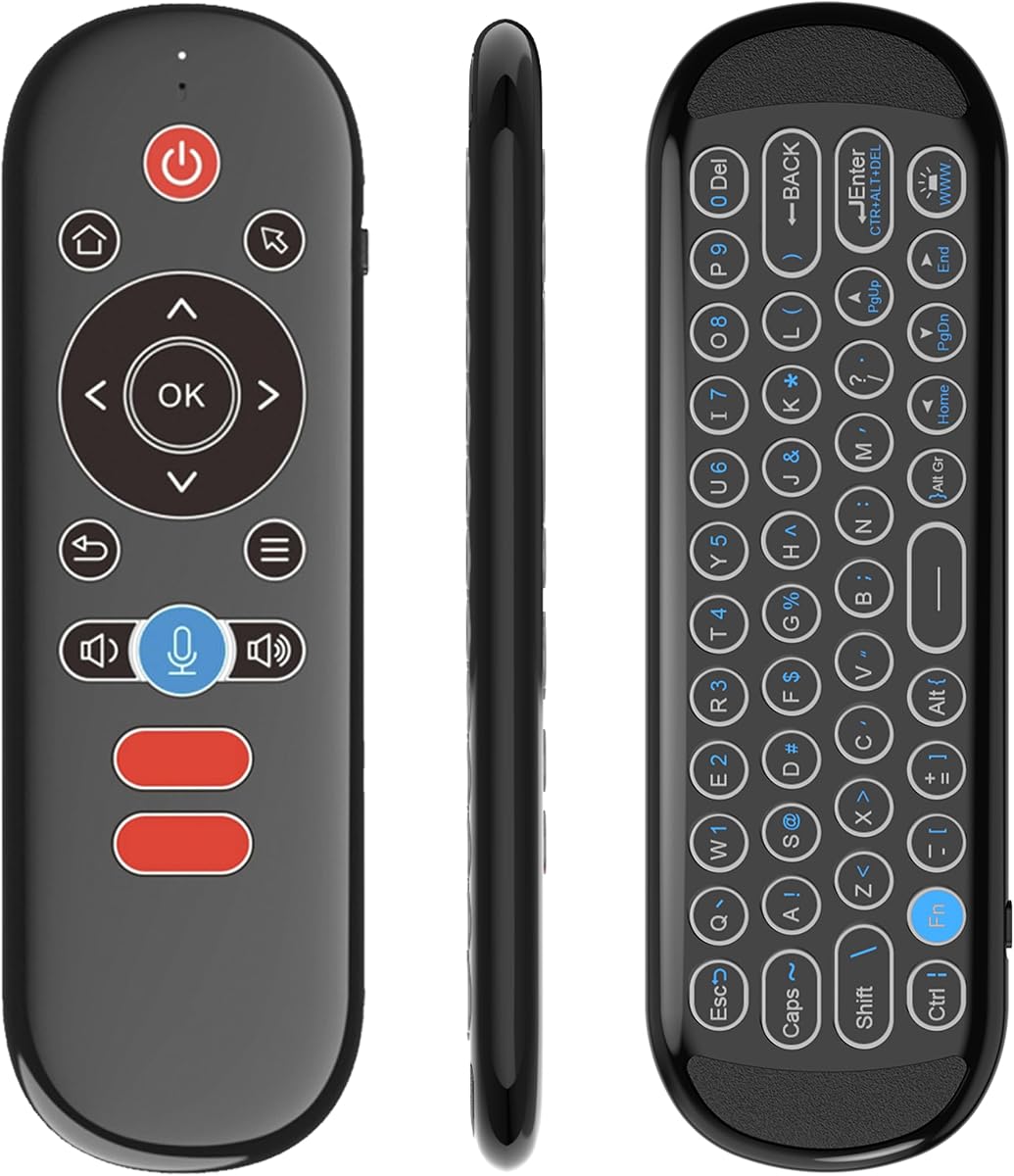
For budget-conscious shoppers, the Air Mouse Remote MX3 Pro offers essential features without breaking the bank. It delivers fundamental air mouse functionality combined with a mini keyboard for typing tasks.
We may earn a commission when you buy through this link, at no additional cost to you.
The 2.4G wireless connection ensures stable performance within a typical living room range. Motion sensors allow basic cursor navigation while IR learning covers standard TV controls.
While it may lack the refined ergonomics of premium models, it remains a practical tool for casual users. The keyboard on the back makes entering search terms significantly easier.
This model suits users who need a functional upgrade over standard remotes without investing heavily. It is a solid entry point for those new to air mouse technology.
Just plug in the USB receiver and start using it immediately with no drivers needed.
The small form factor fits easily in pockets and fits comfortably during extended use.
We may earn a commission when you buy through this link, at no additional cost to you.
This dual-mode air mouse brings premium features to the table with its rechargeable design and vibrant backlighting. It is engineered for users who want superior typing comfort and reliable wireless performance.
We may earn a commission when you buy through this link, at no additional cost to you.
The 7-color backlight ensures keys are visible in dim environments making it ideal for movie nights. Dual connectivity options provide flexibility across different devices including PCs and Android TVs.
While it may weigh slightly more than standard models, the ergonomic shape compensates for added comfort. The rechargeable aspect reduces long-term battery waste and adds convenience.
It is the best choice for those willing to pay extra for a polished experience. The combination of light features and motion tracking makes it a standout contender.
Adjustable lighting helps reduce eye strain during late-night browsing sessions.
Rechargeable battery eliminates frequent replacements and lowers long-term costs.
We may earn a commission when you buy through this link, at no additional cost to you.
The BOXPUT BPR1S Plus offers advanced firmware options that allow switching between PC and TV modes. This versatility makes it useful for hybrid setups involving both computers and Android TVs.
We may earn a commission when you buy through this link, at no additional cost to you.
Voice search functions perform well on supported devices offering quick access to content without manual typing. Its full IR learning ensures you can consolidate control into one device.
Users should note that switching firmware modes requires specific button sequences which may confuse beginners. However, once set up correctly, the performance is highly reliable.
If you need a remote that can adapt to multiple environments, this model is worth considering. It bridges the gap between standard media control and PC navigation effectively.
Switching between PC and TV modes expands the utility beyond just entertainment.
Built-in assistant simplifies searching for titles across your favorite streaming apps.
We may earn a commission when you buy through this link, at no additional cost to you.
EASYTONE delivers a straightforward solution for users needing basic air mouse functionality across multiple platforms. Its cross-platform compatibility is a key strength for those with diverse devices.
We may earn a commission when you buy through this link, at no additional cost to you.
The 2.4GHz connection ensures minimal lag during typical navigation tasks. Voice input is functional but may require specific app support to activate search features.
While it lacks advanced customization options, it covers the essentials well. The build is durable enough for daily household use without feeling cheap.
Ideal for users prioritizing simplicity over advanced features, this remote gets the job done. It is a reliable fallback for multi-device households.
Supports Android Windows and Mac making it flexible for home office and media use.
Plug the receiver in and start navigating instantly without configuration steps.
We may earn a commission when you buy through this link, at no additional cost to you.
The iPazzPort Mini brings style to utility with its RGB backlight that adds a touch of flair to your setup. It is particularly useful for typing in dark environments where visibility is key.
We may earn a commission when you buy through this link, at no additional cost to you.
Its compact design makes it easy to carry around the house or on trips. The 6-Axis gyroscope ensures smooth navigation despite its small footprint.
Users may find the keys slightly cramped if they have larger fingers. Additionally pairing it via Bluetooth requires specific steps compared to RF.
Despite minor ergonomic drawbacks, it remains a favorite for its aesthetic appeal. The rechargeable feature adds to its modern practicality for tech enthusiasts.
Lighting is visible enough to see keys without hurting your eyes at night.
Small enough to slip into a bag for mobile presentation or gaming use.
We may earn a commission when you buy through this link, at no additional cost to you.
A classic in the market, the Rii MX3 continues to perform well with its trusted 2.4G wireless technology. It is known for its durability and straightforward functionality without unnecessary fluff.
We may earn a commission when you buy through this link, at no additional cost to you.
Motion sensor accuracy is reliable for standard navigation and gaming. IR learning works well for basic TV controls ensuring you rarely need the original remote.
Its design may feel dated compared to newer models with backlights or dual modes. Users relying on batteries may find them needing replacement after extended use.
It remains a solid choice for those who value dependability over novelty. A good option for second rooms or guest setups where simplicity is key.
Consistent connectivity means fewer dropouts during critical moments like gaming.
Can learn from most remotes ensuring seamless integration into your existing setup.
We may earn a commission when you buy through this link, at no additional cost to you.
This model combines a standard MX3 design with a useful LED backlight for low-light typing. It balances affordability with enhanced usability features that make text entry more convenient.
We may earn a commission when you buy through this link, at no additional cost to you.
Its broad OS support makes it versatile for home theater PCs and Raspberry Pi projects. Motion tracking is adequate for most navigation needs within a typical room.
The backlight adds convenience but may drain batteries faster if left on constantly. Users should manage power settings to avoid frequent battery changes.
A practical choice for those who type frequently and need visibility. It bridges the gap between basic and premium features effectively.
Lighting makes entering search terms easier in dark living rooms without extra lamps.
Works well with hobbyist projects like Raspberry Pi setups for full control.
We may earn a commission when you buy through this link, at no additional cost to you.
The G20S PRO BT offers a unique single-sided design that prioritizes simplicity and ergonomic comfort. It is built with durable materials to withstand daily use without wear on buttons.
We may earn a commission when you buy through this link, at no additional cost to you.
Bluetooth mode requires disconnecting the USB receiver first, which adds a step to the setup. Once paired, it offers smooth motion control for Android devices specifically.
While it lacks universal compatibility, it excels within its targeted Android ecosystem. The design ensures buttons remain distinguishable and functional over time.
This remote suits users looking for a minimalist approach to smart home control. It is a solid choice for dedicated Android setups where extra features are not needed.
Button placement is optimized for quick access to essential functions.
Fewer buttons mean less confusion for casual users and elderly individuals.
We may earn a commission when you buy through this link, at no additional cost to you.
Rock&Rown provides a dependable option for users seeking essential air mouse features at a reasonable cost. It covers the basics of motion control and keyboard input without unnecessary complexity.
We may earn a commission when you buy through this link, at no additional cost to you.
Motion control is responsive enough for navigating menus and games. The IR learning feature helps unify control over your TV and box.
While build quality is standard, it holds up well for regular use. Users looking for advanced customization will find it lacking in those areas.
Ideal for straightforward setups where functionality is key. It serves as a reliable spare or primary remote for budget-conscious buyers.
Focuses on core features to keep costs low without sacrificing utility.
Offers a balance of features that suits everyday streaming needs effectively.
We may earn a commission when you buy through this link, at no additional cost to you.
Selecting the right air mouse depends on your specific needs regarding connectivity, extra features, and device compatibility. This guide outlines key factors to help you make an informed decision.
Air mice typically use either Bluetooth or 2.4GHz RF. 2.4GHz models often come with a USB receiver and offer plug-and-play convenience without pairing steps. Bluetooth models require pairing but may save a USB port on your device.
Look for 6-axis gyroscope and accelerometer systems which ensure smooth and precise cursor movement. Basic models may struggle with tracking speed or stability in large rooms. Testing responsiveness is key if possible.
Many models feature a mini keyboard on the back to facilitate typing searches and passwords. Consider if you need full QWERTY layout or just essential characters. Some models also offer backlit keys for dark rooms.
Universal remotes with IR learning allow you to control your TV power and volume alongside the Android box. This reduces the need for multiple remotes. Ensure the IR codes match your specific TV brand for best results.
Voice search features can significantly speed up content discovery on supported devices. Check if the remote supports specific voice assistants or requires specific Android TV versions. Voice works best in quiet environments.
Most remotes work with Android TV boxes but may lack support for Roku or Fire Stick. Verify that your specific device is listed in the compatibility charts before purchasing. Some models are Android specific.
Remotes may use replaceable batteries or built-in rechargeable batteries. Rechargeable models reduce waste and offer long-term savings but require charging. Battery models are convenient for extended usage without downtime.
Ergonomics and material durability determine how comfortable the remote is for extended use. Look for textured grips and robust button mechanisms that prevent wear. A well-designed remote reduces hand fatigue during long viewing sessions.
To start using your air mouse, insert the USB receiver into your Android TV box port if it uses RF. For Bluetooth models, go to your device settings and add the remote by pressing the pairing buttons.
Hold the remote in one hand and gently tilt or move it to navigate the cursor. Press the OK button to select options. For typing, flip the remote to access the keyboard and enter text easily.
Keep the remote clean by wiping it with a dry cloth. Avoid exposure to moisture or extreme temperatures. If the motion sensor stops responding, replace or recharge the batteries as needed.
Most models support Windows and macOS but some are optimized for Android. Always check the product details for cross platform support. Universal remotes offer the best compatibility across ecosystems.
Setup is generally simple with plug and play models requiring no software installation. Bluetooth pairing may take more steps but many guides are included. Consider models with clear buttons for easier navigation.
Voice search often works only within supported apps like YouTube or Netflix. Ensure your device has the necessary voice assistant enabled for best results. Compatibility varies by remote brand and firmware.
Rechargeable models can last weeks on a single charge depending on usage. Battery powered remotes may need changes every few weeks. Power saving features help extend battery life between charges.
Many remotes allow you to adjust sensitivity in settings or firmware. Calibrating the device by keeping it still can also help. Using the device closer to the receiver improves tracking accuracy.
Some models include LED or RGB backlighting for visibility in dark rooms. Check product specs to confirm if this feature is available. Backlighting can consume more battery so consider usage patterns.
Our top picks include the BOXPUT BPR2S Plus for its balance of features and performance alongside the Air Mouse Remote MX3 Pro for budget buyers. The Dual Mode Air Mouse offers premium convenience for those needing backlighting.
Prioritize compatibility with your device ecosystem and check if voice or keyboard features are necessary. Consider connectivity preferences and whether rechargeable power suits your lifestyle better than replaceable batteries.
Remember that prices and stock fluctuate so verify current details before finalizing your purchase. Choosing the right air mouse will transform your streaming experience significantly.