
Redragon BM4195 AI Wireless Optical Computer Office Mouse
3.9Editor score
AI voice typing and translation
Triple mode connectivity support
Type-C fast charging included
Discover the top AI Smart Wireless Mouse options for productivity. This guide compares voice typing, translation, and smart features across ten leading models.
AI Smart Wireless Mouse devices are reshaping how we interact with computers daily. These innovative tools combine traditional pointing with voice commands and AI assistance. They aim to boost efficiency for professionals, students, and creators seeking seamless workflow integration.
We evaluated ten leading models based on voice accuracy, connectivity options, and battery life. Our analysis focuses on real-world performance in office, creative, and travel scenarios. Each product brings unique strengths to the growing smart mouse category.
Each pick highlights key specifications, pros, cons, and ideal use cases for clarity. Note that prices fluctuate frequently, so check current listings before buying. We aim to guide you toward the right fit for your specific needs and budget.
3.9Editor score

4.1Editor score

5.0Editor score
This side-by-side comparison highlights the core specifications and capabilities of all ten models. We focus on connectivity, battery capacity, voice features, and design elements to help you decide quickly.


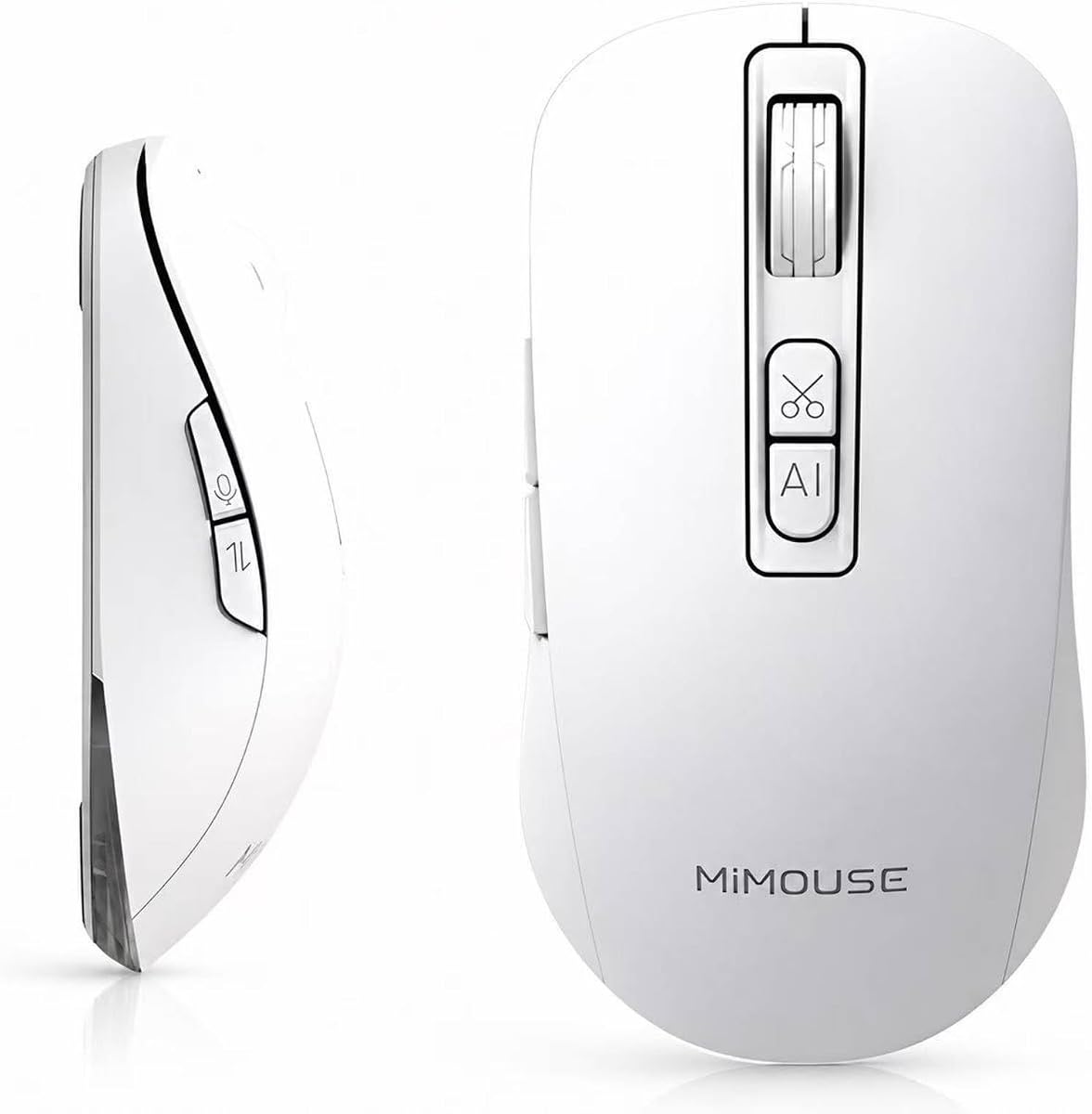


This model stands out with powerful voice typing and ChatGPT integration. Its 4.1 rating reflects strong performance in office and creative workflows. The ergonomic design ensures comfort during long sessions.
We may earn a commission when you buy through this link, at no additional cost to you.
Key strengths include 98% recognition accuracy and 400 words per minute speed. It supports 200+ languages for real-time translation. The 600mAh battery lasts days on a single charge with Type-C fast charging.
Trade-offs involve needing the GAMINJA APP for full AI access. Voice commands may require proximity in noisy rooms. These are acceptable given the privacy and functionality benefits.
Buyers seeking speed and multilingual support will find it ideal. Professionals, students, and writers benefit most. We recommend it as a top pick for modern productivity needs.
All data stays on your device without cloud storage. This ensures maximum security for sensitive work and private records.
From PPT creation to code generation, the built-in AI handles diverse tasks. It replaces multiple apps with one unified mouse interface.
We may earn a commission when you buy through this link, at no additional cost to you.
The Redragon BM4195 offers entry-level AI voice typing at a low cost. It delivers solid wireless performance for daily office tasks. Its 3.9 rating suggests good value for beginners.
We may earn a commission when you buy through this link, at no additional cost to you.
It supports 2.4G and dual Bluetooth for instant switching. The 500mAh battery ensures all-day use. DPI adjusts to five levels for precision work.
Downsides include needing software for AI features and basic build. Voice accuracy is decent but not top-tier. These fit the budget category well.
Ideal for casual users needing hands-free dictation. Students and office staff looking to save money will appreciate it. A practical first step into AI mice.
Provides essential AI typing without high expense. Great for testing the technology before investing in premium models.
Toggle between desktop, laptop, and tablet effortlessly. The mode switch button makes transitions smooth.
We may earn a commission when you buy through this link, at no additional cost to you.
Cheerdots2 brings a unique detachable magnetic design for presentations and work. It earns a 5.0 rating for innovation and versatility. The built-in AI assistant captures meeting notes accurately.
We may earn a commission when you buy through this link, at no additional cost to you.
It doubles as a touchpad for cursor glide during slides. The laser pointer and recording features enhance meetings. Battery lasts up to 20 days on a single charge.
Trade-offs include a higher price and complex mode switching. The base adds bulk when docked. These suit professionals valuing portability and flair.
Executives and presenters will find unmatched utility here. It replaces clickers and recorders. We recommend it for those needing a standout tool.
Walk freely while controlling slides with gestures. No need to stand near the screen or use extra remotes.
Weighs only 70 grams for easy carrying. Pairs instantly with Mac, Windows, and tablets for on-the-go work.
We may earn a commission when you buy through this link, at no additional cost to you.
This model focuses on ergonomic comfort and silent clicks for shared spaces. It supports extensive AI tools like article polishing and code generation. The 600mAh battery reduces charging frequency.
We may earn a commission when you buy through this link, at no additional cost to you.
The shape reduces strain during long work sessions. Silent clicks prevent distractions in libraries or offices. Local processing keeps your data secure on device.
Issues include needing the app for pairing and limited aesthetics. The grey finish is practical but plain. These are minor compared to functionality.
Comfort seekers and remote workers will enjoy the design. We suggest it for those prioritizing health and speed. A solid daily driver for productivity.
Ergonomic curves fit the palm naturally. Prevents fatigue during extended typing or navigating tasks.
Clicks measure under 25dB for quiet use. Ideal for offices, libraries, or home studies without disturbance.
We may earn a commission when you buy through this link, at no additional cost to you.
The LTC OM021 combines BT 5.0 and 2.4G for broad compatibility. Its quiet click design suits quiet offices. The ergonomic form reduces hand fatigue during daily tasks.
We may earn a commission when you buy through this link, at no additional cost to you.
It supports up to 300 words per minute voice typing. Five DPI levels allow tailored precision. Type-C charging keeps power available quickly.
Limitations include needing software hold to access features. Voice accuracy is good but not elite. These fit standard office expectations well.
Users needing reliable dual connectivity benefit most. It works well across Mac and PC. A dependable choice for mixed environments.
Switch between Bluetooth and USB seamlessly. Ensures connection stability across different systems.
Silent clicks maintain focus in shared spaces. Great for collaborative offices or home setups.
We may earn a commission when you buy through this link, at no additional cost to you.
This M750 edition emphasizes reliability and ecosystem integration. It lacks native voice features but supports AI via software. The 4.5 rating reflects Logitech's trusted quality.
We may earn a commission when you buy through this link, at no additional cost to you.
Battery lasts up to 24 months with USB receiver. It offers both Bluetooth and Bolt for flexibility. Ergo shape fits the palm securely.
Downsides include manual software for AI tasks and AA usage. Users needing hardware dictation may prefer others. These fit standard productivity workflows.
Ideal for Logitech ecosystem users seeking endurance. We recommend it for office workers prioritizing longevity. A safe and solid investment.
Runs up to 24 months on one charge. Minimizes downtime and maintenance for busy professionals.
Works with Logi Options+ for custom commands. Extends functionality through existing trusted tools.
We may earn a commission when you buy through this link, at no additional cost to you.
This RGB model adds visual flair to smart voice tools. It supports local AI processing for privacy. The 500mAh battery sustains typical daily usage.
We may earn a commission when you buy through this link, at no additional cost to you.
Voice typing reaches 400 words per minute. The silent design prevents noise in public spaces. Dual Bluetooth modes allow multi-device workflows.
Lack of public rating data reduces confidence. The white case needs frequent cleaning. These trade-offs suit style-focused users.
Creators and streamers may appreciate the RGB look. We suggest it for those who value customization. A fun functional option for tech lovers.
Adds personal style to your desk setup. Matches aesthetic preferences while providing smart function.
All voice and text data remains local. Protects privacy without cloud exposure risks.
We may earn a commission when you buy through this link, at no additional cost to you.
This device targets meeting efficiency with audio and text tools. It links to a unified M-AI platform for tasks like drafting. The 30-day battery supports travelers.
We may earn a commission when you buy through this link, at no additional cost to you.
Transcription and summarization work well for lectures. OCR extracts text from images easily. Dual Bluetooth and USB ensure flexible links.
Trade-offs include setup complexity and limited user feedback. Privacy features are strong but local. These suit corporate environments well.
Professionals in meetings benefit most from its tools. We recommend it for teams needing structured notes. A focused productivity aid.
Captures and summarizes discussions automatically. Saves time on post-meeting documentation.
Access multiple models like ChatGPT and Gemini. Centralizes workflows in one interface.
We may earn a commission when you buy through this link, at no additional cost to you.
This mouse emphasizes remote work flexibility with triple connectivity. It supports voice transcription and summarization for notes. The ergonomic shape ensures comfort.
We may earn a commission when you buy through this link, at no additional cost to you.
Five DPI levels adapt to different screens. Translation removes language barriers. Seamless switching between devices aids multitasking.
Trade-offs include missing public reviews. Setup steps might delay first use. These are typical for smart tech.
Remote professionals find strong support here. We recommend it for travelers and flexible teams. A practical remote work aid.
Works with Windows, macOS, and iPad. Fits most setups without compatibility issues.
Instantly toggle between connected devices. Keeps workflow continuous without interruption.
We may earn a commission when you buy through this link, at no additional cost to you.
This basic model focuses on core voice-to-text functions. It offers simple text summarization. The silent clicks reduce distraction. The 1.0 rating suggests possible issues.
We may earn a commission when you buy through this link, at no additional cost to you.
Translation covers 200+ languages for global users. Charging is convenient with a built-in battery. It suits light typing needs.
Trade-offs include low user satisfaction. Advanced features are absent. These make it a cautious choice.
Budget buyers seeking simple dictation might try it. We suggest checking reviews first. A minimal option for basic tasks.
Focuses on speaking to type quickly. Keeps design and cost low for entry users.
Built-in battery reduces cable needs. Simple maintenance for everyday use.
We may earn a commission when you buy through this link, at no additional cost to you.
Choosing the right device involves evaluating voice capabilities, battery, and comfort. These factors help match the tool to your daily workflow needs.
Accuracy directly impacts efficiency in dictating notes or emails. Look for models claiming 95%+ recognition rates and speeds near 300-400 words per minute. This ensures fewer corrections and smoother flow.
Prioritize high accuracy ratings in reviews to avoid frustration.
Most models support Bluetooth 5.0 and 2.4G USB receivers. Choose devices offering dual or triple modes if you switch between phones, tablets, or desktops. This ensures seamless workflow transitions.
Opt for multi-mode support to maximize device flexibility.
Battery capacity ranges from 500mAh to 600mAh, affecting usage time. Rechargeable models with Type-C charging offer convenience. Check for sleep modes that extend standby to days or weeks.
Select longer-lasting batteries for travel or heavy daily use.
Some brands process voice data locally on device without cloud storage. This protects sensitive work and personal records. Review specs to confirm local AI processing if security is a priority.
Choose local processing models to safeguard private information.
Shapes vary from flat to contoured grips. Look for silent clicks under 25dB to reduce noise. A comfortable shape prevents strain during long writing or navigation sessions.
Prioritize ergonomic designs and silent operation for health.
Advanced AI features often need dedicated companion software. Some mice auto-download when holding the scroll wheel. Ensure your system meets requirements for full functionality like translation or summarization.
Verify software compatibility before buying to avoid limitations.
Multilingual users need broad translation and dictation support. Check for models covering over 100 languages including Chinese, Spanish, and French. This aids international collaboration and study.
Select broad language support for global communication needs.
Prices vary significantly from budget to premium tiers. Define your needs like recording or translation to justify cost. Compare features like battery life and build quality against price tags.
Balance feature set with budget to ensure value.
Start by connecting via Bluetooth or USB receiver. Install the companion app as instructed by the manufacturer. Hold the scroll or designated key to activate pairing mode.
Practice voice commands using the dedicated button. Speak clearly into the mic for best accuracy. Adjust DPI and key settings via the software for your preferences.
Keep the sensor clean with a soft dry cloth. Avoid dropping the device to maintain internal components. Charge regularly and store in a dry place when not in use.
Many models use local AI processing, so basic typing works offline. However, advanced translation or summarization may need a connection. Check product specs to confirm offline capabilities.
Typically, battery life ranges from one week to twenty days depending on usage. Models with 500mAh to 600mAh capacity often support daily office use for several days.
Most listed models support macOS 10.15 or higher. Ensure the software app is available for your system. Compatibility with Bluetooth and USB makes them versatile for Mac users.
Yes, many models feature silent click technology under 25dB. This prevents noise during calls or in shared workspaces. It is a common feature in the ergonomic lineup.
Top models support over 200 languages including Chinese and Spanish. This includes both dictation and translation functions. Check specific lists to ensure your target language is included.
Setup usually involves plugging in a receiver and installing an app. Many devices auto-pair after holding a button. Step-by-step guides in manuals help new users get started.
Most offer triple-mode switching like Bluetooth and USB. Some buttons toggle connections instantly without re-pairing. This is ideal for using with laptop, tablet, and desktop together.
Many sellers offer standard warranties ranging from one to three years. Check listing details for support policies. Customer service can help with software or pairing issues.
We highlighted top picks like the Cheerdots2 for presentations and the Redragon for budget value. Each model serves different needs from privacy to multilingual support.
Prioritize accuracy and battery life if you plan daily heavy use. For meetings, look for recording features. Consider privacy if handling sensitive documents often.
Prices may change, so verify current listings before buying. This guide aims to save time by narrowing options based on key specs. Pick the one that matches your workflow goals.