
Ai Pen Chat Gpt Pen
5.0Editor score
HD touchscreen interface
Offline translation support
Built-in GPT integration
AI scan pens with Chatgpt integration represent a new frontier in digital learning tools. These devices combine optical character recognition with advanced language models to provide instant answers, translations, and study aids. They are designed to streamline reading and note-taking for users who want faster access to information.
We evaluated ten leading models based on their AI capabilities, translation accuracy, and ease of use. Our comparison focuses on how well each pen handles text-to-speech, offline functionality, and integration with AI chat features. We also considered battery life, screen quality, and support for multiple languages.
Each pick highlights specific strengths such as budget-friendly options, premium features, or specialized tools for dyslexia. Readers will find detailed breakdowns of pros and cons to help them choose the right device. Please note that product availability and pricing may change over time.
5.0Editor score

3.3Editor score

4.0Editor score
As an Amazon Associate we earn from qualifying purchases.
The following table provides a side-by-side comparison of all ten products reviewed in this guide. It highlights key specifications and unique features to help you identify the best fit for your specific needs.




The Scanmarker AI Pen with Built-in Screen stands out as a leading option for users seeking instant digital access to printed text. It received a rating of 3.3 from users who value its ability to display scanned words directly on the device. Its standout quality lies in the seamless integration of OCR with a visible screen interface.
We may earn a commission when you buy through this link, at no additional cost to you.
Key strengths include the ability to slide over text and see words appear almost immediately. This feature reduces the frustration of manual typing and speeds up study sessions significantly. The text-to-speech function provides an auditory layer that helps with comprehension and reduces reading fatigue during long sessions.
One trade-off is the reliance on screen visibility in bright environments which might require adjustments. Additionally the user ratings suggest there is room for improvement in software stability. These are acceptable given the convenience of having a self-contained scanning tool without needing a phone.
This pen is ideal for students and professionals who need quick reference during meetings or travel. It helps organize notes by storing scans and exporting them for editing. We recommend it for anyone prioritizing speed and immediate visual feedback over other advanced features.
The built-in screen allows users to see scanned text immediately without switching devices. This creates a faster workflow for capturing quotes or definitions during study.
Hearing text read aloud helps auditory learners retain information better. It also supports users with reading difficulties by providing clear pronunciation guides.
We may earn a commission when you buy through this link, at no additional cost to you.
The NEWYES AI Pen is designed specifically to assist readers with dyslexia while offering robust translation tools. It holds a rating of 3.9 from users who appreciate the customizable settings. Its standout quality is the combination of AI homework checking with text-to-speech adjustments tailored for learning.
We may earn a commission when you buy through this link, at no additional cost to you.
This pen allows users to adjust word reading speed and pause time to match their processing needs. The 16GB storage ensures ample space for saving scanned documents and notes without constant cloud dependency. It also features a built-in camera for photo translation which expands its utility beyond printed text.
While the feature set is comprehensive it may require some time to master all the options. The screen size is compact which might limit readability for some users. However these trade-offs are balanced by the deep customization options for those with specific learning needs.
We recommend this pen for students and adults who need extra support in reading and language learning. It is also suitable for travelers needing multi-language translation capabilities. Its focus on accessibility makes it a unique choice in this category.
Adjustable reading speeds and pause times help users process text at their own pace. The special font design further reduces stress when reading dense material.
With 16GB of storage and Bluetooth connectivity you can easily export notes to various formats. This ensures your study materials are accessible across all your devices.
We may earn a commission when you buy through this link, at no additional cost to you.
The XNote Smart Pen & Notebook Starter Set offers a unique blend of traditional writing and digital AI capabilities. It is rated 4.0 by users who value the tactile experience of paper. Its standout quality is the ability to sync handwritten notes to an app where AI organizes and summarizes them.
We may earn a commission when you buy through this link, at no additional cost to you.
The pen features a 17-hour battery life ensuring it lasts through long study or work sessions. AI-powered organization allows for keyword searches and automatic tagging of your notes. When used with the companion app it can transcribe meeting audio and combine it with your handwritten notes.
The system does rely on a companion app for full functionality which requires setup time. The pen itself does not have a microphone so audio recording happens on the paired device. These limitations are acceptable given the high quality of the digital synchronization process.
We recommend this set for creatives and professionals who prefer writing by hand but need digital searchability. It is also perfect for students who want to keep physical notes without losing the benefits of digital backup. The starter bundle provides everything needed to begin immediately.
Users can enjoy the comfort of real paper while their strokes are captured digitally. This removes the friction often felt when switching entirely to tablets.
The system summarizes lectures and tags notes automatically to save time. This makes retrieving specific information later much faster and easier.
We may earn a commission when you buy through this link, at no additional cost to you.
The Translator Pen & Reading Pen is a highly rated device designed for dyslexia and language learners. It holds a perfect 5.0 rating from users who rely on its offline capabilities. Its standout quality is the support for 142 online languages and 10 offline languages without internet.
We may earn a commission when you buy through this link, at no additional cost to you.
The pen features a 5MP HD camera that allows for high-definition photo text recognition. This is useful for translating menus or signs that are not flat text. It also supports one-click sync to mobile phones for easy editing of extracted documents.
Users may find some features require an internet connection for full translation accuracy. The variety of tools can also be overwhelming at first. However the offline support ensures you can use it effectively in areas with poor connectivity.
We recommend this pen for travelers and business professionals who work across languages. The voice recording feature is also a great addition for meetings. It offers a strong balance of translation power and assistive reading tools.
This feature ensures you can translate text even without an internet connection. It is essential for international travel where data might be limited.
The camera allows you to scan text from non-standard sources like photos. This adds significant flexibility compared to standard scanning pens.
We may earn a commission when you buy through this link, at no additional cost to you.
The Ai Pen Chat Gpt Pen offers a cost-effective way to access AI answers and translations. It is rated 5.0 by users who value its built-in GPT features. Its standout quality is the ability to provide instant answers for math and history directly on the pen.
We may earn a commission when you buy through this link, at no additional cost to you.
The device includes a 3.69-inch HD touchscreen which provides clear visual feedback for translations. It supports offline translation for over 150 languages making it versatile for various regions. The file storage capability allows you to organize notes for easy access later.
It is a compact device which means it lacks some advanced physical features like paper sync. Users should ensure they have the app setup before traveling. These limitations are minor given the price point and the utility of the AI features.
We recommend this pen for students looking for an affordable study tool with AI capabilities. It is also useful for travelers needing quick translations without internet. The built-in GPT makes it unique for on-the-go knowledge checks.
Get instant answers for history or math questions directly on the screen. This helps verify facts without needing to open a laptop.
The clear screen ensures text is easy to read in various lighting conditions. This improves usability during outdoor study or travel.
We may earn a commission when you buy through this link, at no additional cost to you.
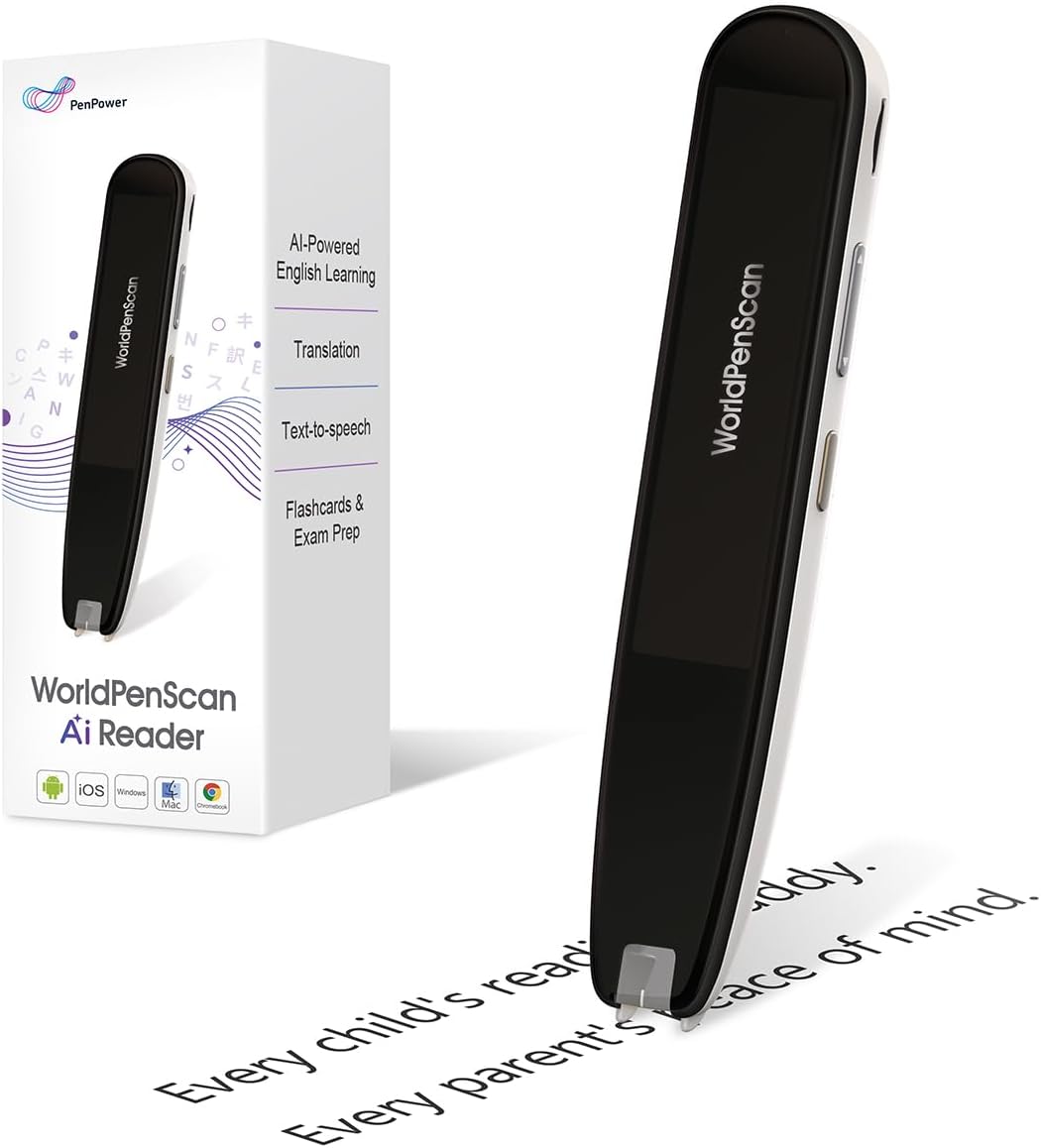
The WorldPenScan AI Reader is designed specifically to help children build reading confidence. It holds a rating of 4.2 from parents who appreciate its educational value. Its standout quality is the AI Reading Companion which provides age-appropriate explanations for difficult words.
We may earn a commission when you buy through this link, at no additional cost to you.
The pen allows kids to scan words or sentences and get quick simplified answers. This reduces frustration and encourages independent reading without constant adult help. The built-in dictionary and text-to-speech features provide continuous support for vocabulary development.
It is optimized for younger users which might limit its utility for advanced adult studies. The features are tailored to build comprehension rather than just translation. However this focus makes it highly effective for its intended audience.
We recommend this pen for parents helping children with reading comprehension and fluency. It is also great for ESL learners who need extra support with new languages. The interactive features keep children engaged with their books.
Scan text to get fun facts and insights beyond the page. This reinforces comprehension and keeps reading enjoyable for children.
Simplify complex ideas with taps that tailor content to the child's level. This helps them understand difficult vocabulary without confusion.
We may earn a commission when you buy through this link, at no additional cost to you.
The Pen Gpt Ai Pen focuses on integrating ChatGPT directly into a portable scanning tool. It has no public rating yet but offers features like instant AI answers for math and history. Its standout quality is the ability to interact with knowledge via an intuitive interface.
We may earn a commission when you buy through this link, at no additional cost to you.
Users can scan text to view translations on a vibrant 3.5-inch HD touchscreen. The device supports offline translation for over 50 languages which is useful for travel. WiFi sync ensures that recorded lectures and notes are available wirelessly on your devices.
The lack of user ratings means there is limited feedback on long-term reliability. The interface may require learning to maximize the ChatGPT features. However the potential for productivity is high for those familiar with AI tools.
We recommend this pen for professionals who need to brainstorm ideas or refine essays on the go. It is also useful for students needing quick verification of facts. The ChatGPT integration sets it apart from standard dictionary pens.
Ask questions or brainstorm ideas directly through the pen interface. This turns the device into a smart assistant for writing tasks.
Record lectures and sync files wirelessly for complete review. This ensures your notes are backed up and easy to edit.
We may earn a commission when you buy through this link, at no additional cost to you.
The Smart Pen Notebook Set introduces unique AI voice transcription and creation tools. It has no public rating yet but stands out for transforming verbal expressions into visuals. Its standout quality is the ability to generate images from voice commands in seconds.
We may earn a commission when you buy through this link, at no additional cost to you.
The pen supports handwriting recognition that converts notes into editable Word documents instantly. This is paired with voice transcription to capture meeting content efficiently. The notebook allows for reusable writing with erasable refills for repeated use.
The concept of generating visuals from voice may not suit all workflows immediately. The system relies on the app to process these commands effectively. However for creative teams this offers a streamlined way to capture ideas quickly.
We recommend this set for creatives and teams that rely on verbal brainstorming. It is also useful for meeting notes where quick transcription is valuable. The wireless charging adds convenience to the daily usage experience.
Input verbal expressions to generate visuals in about 40 seconds. This allows for rapid prototyping of ideas without software.
Write notes while the app converts them into editable files instantly. This saves time on manual transcription and data entry.
We may earn a commission when you buy through this link, at no additional cost to you.
The Scanmarker Pal is a versatile tool for language learners and those with dyslexia. It holds a rating of 4.0 from users who appreciate its clear text-to-speech. Its standout quality is the ability to translate text in over 100 languages with offline support for major languages.
We may earn a commission when you buy through this link, at no additional cost to you.
Users can scan text and have it read aloud with highlighted words on the screen. This provides immediate feedback on pronunciation and comprehension. The device is lightweight and portable making it easy to carry during study or travel.
It is a more traditional reader compared to those with full AI chat interfaces. The screen display is functional but basic compared to high-end models. However this simplicity ensures it works reliably for core reading tasks.
We recommend this pen for students focusing on language acquisition or reading support. It is also useful for travelers needing quick translations on the go. The Bluetooth headphone support enhances the immersive audio experience.
Scan and translate text in over 100 languages instantly. Offline support ensures access even when data is unavailable.
Text is read aloud with highlighted words to improve comprehension. This helps auditory learners grasp meaning faster.
We may earn a commission when you buy through this link, at no additional cost to you.
The Translation Pen 142 Language offers a wide range of translation and media capabilities. It has a rating of 3.6 from users who utilize its extensive language support. Its standout quality is the inclusion of music and video players alongside translation tools.
We may earn a commission when you buy through this link, at no additional cost to you.
The pen supports photo translation and offline scanning for text extraction. It allows syncing documents with your phone for easy editing and storage. The device is compact and suitable for travel, study, and business meetings.
The variety of features like music players may add unnecessary weight to the device. Some users may prefer a more focused approach to reading tools. However the utility of offline scanning compensates for these additions in many scenarios.
We recommend this pen for travelers who want an all-in-one device for language and media. It is also useful for professionals needing quick document translation. The offline capabilities ensure you remain productive without internet access.
Access music and video players alongside translation tools. This turns the pen into a versatile entertainment device for breaks.
Aim the camera at text to get automatic translations instantly. This is useful for menus or signs without physical scanning.
We may earn a commission when you buy through this link, at no additional cost to you.
Selecting the right AI scan pen requires understanding your primary needs. This guide breaks down the most critical factors to consider.
The most important factor is how deeply the device integrates with AI models like Chatgpt. Some pens offer simple chat features while others provide homework checking or lecture summaries. Look for tools that match your study habits.
Choose a model that offers specific AI features relevant to your daily tasks.
If you need translation for travel or global business check the supported language list. Many devices offer online translation for hundreds of languages but offline options are limited. Ensure the offline count matches your needs.
Verify both online and offline language counts before purchasing.
A clear screen is essential for viewing scanned text and translations. Larger screens make reading easier but add bulk to the device. Consider if you need high definition or just basic visibility.
Prioritize HD touchscreens for better readability during extended use.
Battery capacity determines how long you can work without charging. Devices range from a few hours to over 15 hours per charge. This is vital for all-day studying or business travel.
Look for at least 10 hours of battery life for heavy use.
Built-in storage ensures you can save notes without relying on cloud accounts immediately. Bluetooth or WiFi sync allows easy transfer to other devices. Check if the pen exports to formats like PDF or DOCX.
Confirm storage capacity and export compatibility to match your workflow.
Some pens are designed specifically for dyslexia or reading difficulties. Features like adjustable reading speeds and text-to-speech are key for these users. Ensure the device supports your specific learning needs.
Check for customizable settings like font or speed adjustments.
A built-in camera enables photo translation for non-flat text. This is useful for menus or labels that cannot be scanned directly. Higher megapixel counts improve recognition accuracy.
Look for at least 5MP cameras for clear photo recognition.
Most smart pens rely on a companion app for full functionality. The quality of this app dictates how easy it is to manage your notes. Read reviews of the app separately from the device hardware.
Ensure the app is user-friendly and regularly updated for best performance.
To start using your AI scan pen turn it on and pair it with the companion app via Bluetooth or WiFi. Ensure you have the latest firmware installed for best AI performance. Log in to your account to sync your data automatically.
When scanning text hold the pen parallel to the page and slide it smoothly over the words. Avoid pressing too hard as this may damage the scanning sensor. The device will display the text instantly for review.
Store the pen in a cool dry place when not in use to protect the battery and screen. Charge it regularly using the provided cable to maintain battery health. Clean the scanning window with a soft cloth to keep it free of dust.
Many devices offer offline capabilities for limited languages and text extraction. However full AI chat features usually require an internet connection. Check the offline language count to ensure you can use it in remote areas.
Traditional scan pens are designed for printed text on paper. Some newer models like the XNote set allow handwritten input synced to an app. Always check the product specifications to confirm compatibility with handwriting.
Basic translation tools offer good accuracy for general text but struggle with complex grammar. AI models help refine these results but human verification is recommended for professional use. Always review the output before publishing.
Most pens allow you to export text via Bluetooth to a paired phone or computer. You can usually save files in PDF or DOCX formats. Check the app settings to configure your preferred export method.
Yes several models are specifically designed for kids with features like age-appropriate explanations. They can help with reading comprehension and language learning. However always supervise young children to ensure they use the device safely.
Battery life ranges from a few hours to over 15 hours per charge. This depends on how much you use the screen and audio features. Most devices come with USB charging cables for easy recharging.
You can typically switch between languages in the settings menu. Some tools allow automatic language detection if you are scanning different scripts. Check if your model supports dynamic language switching.
The device uses built-in speakers or Bluetooth headphones to read scanned text aloud. You can usually adjust the speed and voice accent in the settings. This is a vital feature for auditory learners and accessibility.
This guide highlights ten distinct options ranging from budget-friendly devices to premium bundles. The Scanmarker AI Pen offers immediate visual feedback while the Ai Pen Chat Gpt Pen provides an affordable entry point. Selecting the right tool depends on your specific reading and translation needs.
Prioritize battery life and language support if you travel frequently. For students accessibility features like text-to-speech are equally important. Consider how much screen real estate you need for viewing translations comfortably.
Always check current prices and availability on the product pages before buying. Technology evolves quickly so reading recent reviews is recommended. We hope this guide helps you find the perfect AI pen for your workflow.