
HP Smart Tank 5003
4.1Editor score
Up to 3 years of ink included
Mess-free refillable ink tank
Cost-effective high-volume printing
This guide compares the top 10 AI printers for home and office use, evaluating speed, connectivity, and smart features to help you choose the right model.
AI printers are transforming how we produce documents by integrating smart features that optimize formatting and enhance connectivity. These devices offer convenience through automated settings and seamless wireless connections for modern workspaces.
We evaluated ten top models based on performance, reliability, and AI capabilities. Our comparison covers a range of options from compact home units to robust office machines designed for diverse printing needs.
Each pick highlights key strengths and ideal use cases for different users. Keep in mind that pricing and availability can change frequently, so check current details before making your final purchase decision.
4.1Editor score

3.9Editor score

4.2Editor score
The following table provides a side-by-side comparison of all ten featured AI printers. Review these specifications to understand which model best fits your specific home or office requirements.




The HP OfficeJet Pro 8125 stands out as a reliable choice for home offices needing professional quality. It features AI capabilities that optimize print formatting for web pages and emails.
We may earn a commission when you buy through this link, at no additional cost to you.
Its dual-band Wi-Fi ensures stable connections while the HP app allows seamless control. The device includes a 2.7-inch touchscreen for easy navigation of print settings.
While it restricts non-HP cartridges, the included Instant Ink trial offers significant savings. Users benefit from reliable wireless printing and sustainable design elements.
This printer is ideal for small teams or individuals needing consistent professional output. Its smart features reduce waste and improve document presentation effectively.
HP AI removes unwanted content to ensure precise prints without awkward layouts or wasted paper.
Made with over 45% recycled plastic content to support environmentally conscious printing practices.
We may earn a commission when you buy through this link, at no additional cost to you.
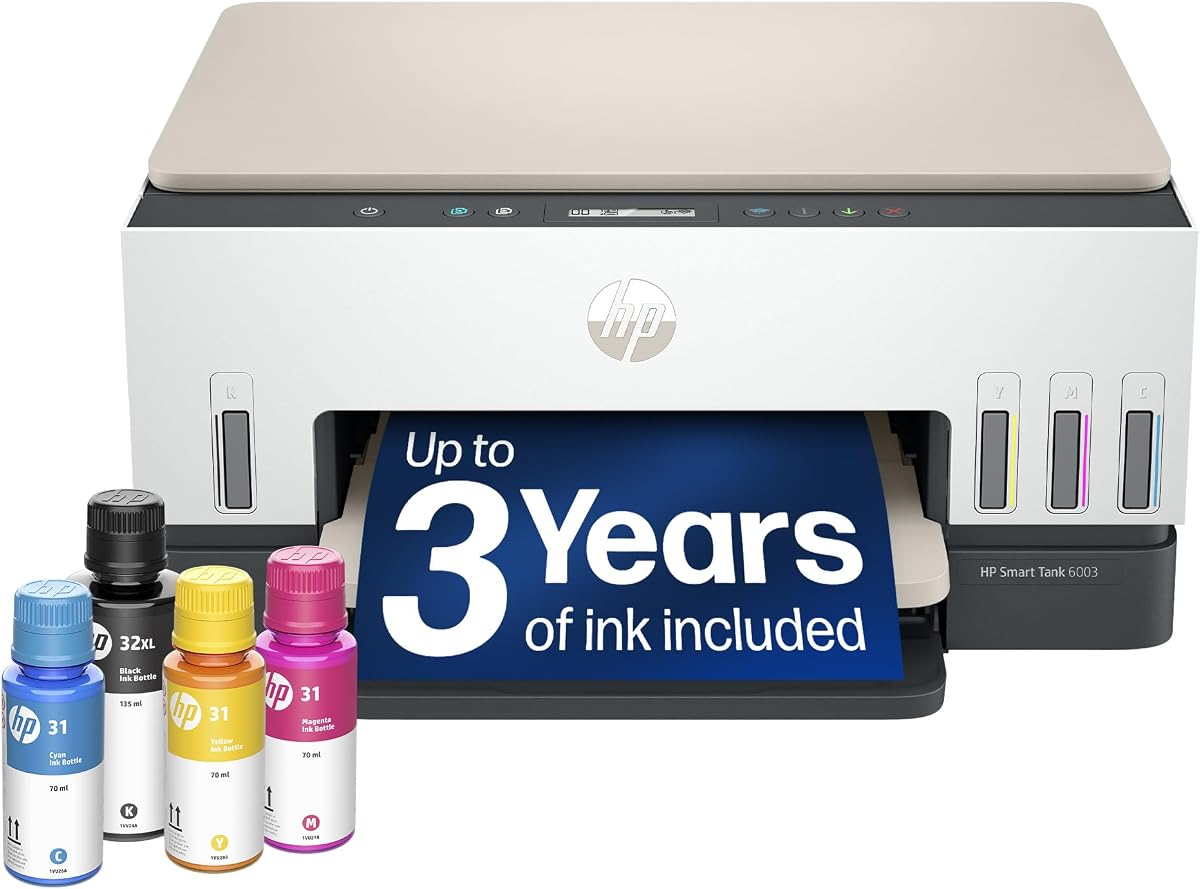
The HP Smart Tank 5003 offers exceptional value for users requiring high-volume printing without high costs. It includes up to three years of ink right out of the box.
We may earn a commission when you buy through this link, at no additional cost to you.
The mess-free refill system makes maintenance simple while the cartridge-free design reduces waste. This model ensures reliable performance for everyday home printing tasks.
While it lacks some advanced features like faxing, the savings on ink are substantial. It is perfect for families or small businesses needing consistent output.
Invest in this model for long-term affordability and ease of use. The included ink supply provides a hassle-free start to your printing needs.
Refillable tanks eliminate frequent cartridge purchases saving money on every page printed.
No complicated maintenance tasks required allowing you to focus on getting your work done.
We may earn a commission when you buy through this link, at no additional cost to you.
The Liene PixCut S1 combines high-resolution printing with precise cutting for an all-in-one creative solution. It uses thermal dye-sublimation to produce stunning 300 DPI sticker output.
We may earn a commission when you buy through this link, at no additional cost to you.
Its AI image extraction feature automatically recognizes subjects while the cutting system follows edges with pinpoint accuracy. This makes creating custom stickers fast and easy.
Users appreciate the lack of subscription fees for accessing thousands of free assets. The durable waterproof stickers are perfect for gifts or personal customization.
Ideal for crafters and DIY enthusiasts needing professional results. This device brings imagination to life effortlessly with intuitive app controls.
Upload a photo and watch AI transform it into anime characters or fantasy illustrations instantly.
Four-layer lamination ensures stickers remain vibrant and intact over time even with heavy use.
We may earn a commission when you buy through this link, at no additional cost to you.
The HP Envy 6155 is designed for home users wanting vibrant color documents and borderless photos. It uses P3 technology to ensure true-to-screen output.
We may earn a commission when you buy through this link, at no additional cost to you.
With AI formatting tools it optimizes web pages and emails to reduce waste. The 2.4-inch touchscreen provides an intuitive interface for daily tasks.
While it is not the fastest for color, the quality is high for personal use. Sustainable materials and wireless connectivity add value to the package.
Consider this for families needing reliable home printing. The included Instant Ink trial helps manage costs during your first months of use.
HP P3 technology ensures printed photos match exactly what you see on your device screen.
Constructed with at least 60% recycled plastic content to reduce environmental impact.
We may earn a commission when you buy through this link, at no additional cost to you.
The Bambu Lab P2S Combo delivers professional-grade 3D printing with multi-color capabilities. Its high-speed precision ensures sharp results while AI failure detection maintains quality.
We may earn a commission when you buy through this link, at no additional cost to you.
The AMS 2 Pro enables seamless multi-material printing with built-in drying at up to 65°C. This keeps filaments ready for flawless prints without manual intervention.
Users benefit from a streamlined workflow across design tools. The adaptive airflow system adjusts for different materials to ensure consistent quality.
This is ideal for makers needing advanced 3D capabilities. Its speed and reliability make it a strong choice for complex projects.
Print up to 600 mm/s while maintaining exceptional accuracy for smooth and sharp layers.
AMS 2 Pro supports multi-color printing with integrated filament drying for perfect results.
We may earn a commission when you buy through this link, at no additional cost to you.
The HP OfficeJet Pro 9135 is built for busy offices needing speed and reliability. It offers 25 ppm black printing and single-pass duplex scanning for efficiency.
We may earn a commission when you buy through this link, at no additional cost to you.
Its 4.3-inch touchscreen makes navigation easy while dual-band Wi-Fi ensures stable connectivity. Wolf Pro Security bolsters network protection against cyber threats.
Users appreciate the high capacity input trays which reduce refills during busy periods. The included Instant Ink trial helps manage early operational costs.
Select this for medium offices needing robust document handling. Its AI formatting tools ensure professional presentation for all business documents.
Single-pass duplex scanning allows two-sided document processing without flipping pages manually.
HP Wolf Pro Security helps protect your office network from external cyber threats effectively.
We may earn a commission when you buy through this link, at no additional cost to you.
The HP Smart Tank 7603 is ideal for home offices needing large print volumes without high ink costs. It includes up to 3 years of ink for up to 8000 pages.
We may earn a commission when you buy through this link, at no additional cost to you.
The mess-free refill system makes maintenance easy while the magic touch control panel simplifies operation. Fax and scan features add versatility for office tasks.
It offers borderless printing and wireless capabilities for flexible use. The reliable design ensures you can count on it for daily printing needs.
This model is perfect for small teams requiring cost-effective solutions. Its high capacity reduces interruptions during critical work hours.
Included ink supply provides up to 8000 color pages reducing long-term operational expenses.
Magic touch control panel provides intuitive navigation for all common printing and scanning tasks.
We may earn a commission when you buy through this link, at no additional cost to you.
The HP OfficeJet Pro 8139 is perfect for home offices needing extended support and fax capabilities. It features a one-year trial of Instant Ink to help manage initial costs.
We may earn a commission when you buy through this link, at no additional cost to you.
With AI formatting tools it optimizes web pages and emails to prevent wasted paper. The 225-sheet input tray supports moderate volume needs effectively.
Wolf Essential Security bolsters your network while dual-band Wi-Fi resolves connection issues automatically. Sustainable design elements align with green business goals.
Choose this for reliable home office performance and savings. The long ink trial makes it a smart start for new setups.
One-year Instant Ink trial offers up to 50% savings on ink delivery directly to your door.
HP Wolf Essential Security helps keep your home network protected from external cyber threats.
We may earn a commission when you buy through this link, at no additional cost to you.
The HP Smart Tank 7603 offers reliable high-volume printing for home offices needing consistent output. It includes up to 3 years of ink with up to 8000 color pages.
We may earn a commission when you buy through this link, at no additional cost to you.
The mess-free refill system makes maintenance easy while fax and scan capabilities cover standard office tasks. Borderless printing allows for creative document designs.
It supports wireless and mobile printing for flexible use. The durable design ensures you can rely on it for daily needs.
Select this for long-term affordability in home setups. Its included ink supply provides significant value from the start.
Reliable design ensures easy daily printing needs without frequent interruptions or maintenance.
Cartridge-free refillable design eliminates reliance on proprietary cartridges for better value.
We may earn a commission when you buy through this link, at no additional cost to you.
The HP Smart Tank 6003 is perfect for small homes needing affordable high-volume printing. It includes up to 3 years of ink with up to 8000 color pages.
We may earn a commission when you buy through this link, at no additional cost to you.
The cartridge-free refill system is mess-free and easy to manage. Borderless printing and wireless capabilities make it versatile for personal photos and documents.
It supports mobile printing for seamless use from smartphones. The reliable design ensures everyday performance without complex maintenance needs.
Ideal for individuals needing straightforward low-cost printing. Its high page yield reduces frequent interruptions during daily tasks.
Seamlessly print from your smartphone with reliable wireless mobile capabilities.
Included ink supply provides enough material for up to 8000 color pages out of the box.
We may earn a commission when you buy through this link, at no additional cost to you.
Choosing the right AI printer depends on your specific printing needs and office size. Review these factors to find a model that balances performance with smart features.
Print speed measures how many pages a printer can produce per minute. Look for models offering at least 20 ppm for black and 10 ppm for color if you handle high-volume tasks.
Prioritize faster speeds if you frequently print reports or documents to maintain workflow efficiency.
AI features help optimize print formatting by removing unwanted content from web pages and emails. This reduces wasted paper and ensures professional-looking layouts automatically.
Choose models with clear AI integration for smarter document handling and resource conservation.
Ink cost often exceeds the printer price itself. Consider printers with high-capacity ink tanks or Instant Ink subscriptions to lower long-term expenses.
Refillable ink tanks offer the best value for frequent users needing consistent output.
Modern printers should offer reliable dual-band Wi-Fi and mobile printing apps. These features allow seamless connection without cables or complex setups.
Ensure the model supports your preferred devices for remote access and easy sharing.
Paper handling includes input tray capacity and auto document feeders. Large trays and ADFs reduce manual effort during bulk printing tasks.
Select models with adequate tray sizes to minimize interruptions during busy work periods.
Security features like HP Wolf Protect your network from cyber threats. These tools add essential safeguards for business environments handling sensitive data.
Prioritize models with integrated security to protect your network effectively.
Sustainable design considers materials used in manufacturing. Look for printers made with recycled plastic content to support eco-friendly practices.
Choosing green devices helps reduce environmental impact while maintaining performance.
Maintenance needs vary by model. Cartridge-free systems simplify refilling while complex models might require regular cleaning cycles.
Opt for straightforward maintenance features to save time and reduce user effort.
Start by connecting your printer to your Wi-Fi network using the HP app or touchscreen interface to ensure stable connectivity and remote access for printing tasks.
Use the built-in AI formatting tools to optimize web pages and emails for printing. This feature removes unnecessary content to save paper and improve document quality.
Regularly update firmware to maintain security and performance. For ink tank models, ensure you use genuine HP bottles to avoid refill issues and ensure consistent print quality.
An AI printer uses artificial intelligence to optimize document formatting and automate settings. It can detect and remove unwanted content from web pages or emails to ensure clean layouts and reduce waste.
AI printers scan documents and remove unnecessary headers footers or ads before printing. This optimization ensures only relevant content is produced reducing overall paper consumption significantly.
Yes most modern AI printers include security features like network protection and threat detection. These tools help keep your data safe from external cyber threats and unauthorized access.
Instant Ink is a subscription service that delivers ink directly to you before it runs out. It tracks your usage and charges a monthly fee based on pages printed offering potential savings.
Most HP printers restrict use to original HP chips to maintain performance and warranties. Using non-HP cartridges may block functionality or lead to firmware warnings.
Yes most of these models support mobile printing via the HP app or native device features. This allows you to print from smartphones and tablets wirelessly without complex setups.
The HP OfficeJet Pro 8125, HP Smart Tank 5003, and Liene PixCut S1 lead our list for their distinct strengths in formatting, cost savings, and creative tools.
Prioritize ink costs and connectivity when selecting a model to ensure long-term satisfaction. Choose based on your specific needs whether for photos, home office, or professional printing.
Always verify current prices and availability before purchasing. Technology and pricing evolve quickly so checking the latest details ensures you get the best deal today.