
Acer Aspire 14 AI Copilot+ PC
4.3Editor score
Intel Core Ultra 7 Processor
Up to 47 Tops NPU Speed
Long Lasting All Day Battery Life
The landscape of personal computing is shifting rapidly toward artificial intelligence integration. Modern devices now include dedicated neural processing units to handle complex workloads efficiently without relying on the cloud.
We evaluated ten leading laptops designed with these specialized AI chips to determine which offer the most value. Our analysis focuses on performance metrics battery life and real-world usability for professionals and creators.
Each pick highlights unique strengths ranging from portability to raw processing power. Please note that availability and specifications can change frequently so always verify details before making your final decision today.
4.3Editor score

5.0Editor score

5.0Editor score
As an Amazon Associate we earn from qualifying purchases.
This side-by-side comparison highlights the key specifications of the top ten AI laptops featuring dedicated neural processing units for enhanced local computing capabilities.


The ASUS Vivobook S16 stands out as a top contender in the AI laptop market with its impressive hardware configuration. It features a dedicated neural processing unit capable of delivering up to 50 TOPS of performance for efficient local AI tasks.
We may earn a commission when you buy through this link, at no additional cost to you.
Its standout quality lies in the combination of powerful AMD Ryzen AI 9 465 processor and a stunning 16 inch OLED display. This setup ensures that both productivity workflows and creative projects benefit from high speed processing and vibrant visuals.
While the device offers excellent performance potential users should note the limited port selection compared to some larger workstations. Additionally the premium build quality and advanced features contribute to a higher price point than basic models.
This laptop is ideal for professionals who need a reliable machine for content creation and AI driven productivity without sacrificing portability. Its balanced specifications make it a highly recommended choice for those seeking top tier features.
The integrated NPU enables faster on device AI tasks like image generation and real time translation without cloud dependency.
The OLED panel provides deep blacks and vivid colors making it perfect for media consumption and detailed design work.
We may earn a commission when you buy through this link, at no additional cost to you.
The Acer Aspire 14 AI offers an accessible entry point into the world of AI enhanced computing with its Intel Core Ultra 7 processor. It delivers up to 47 TOPS of NPU performance making it suitable for everyday AI applications.
We may earn a commission when you buy through this link, at no additional cost to you.
Key strengths include its impressive battery life which can last up to 22 hours under specific conditions. The laptop is also lightweight and durable making it easy to carry around for work or study sessions throughout the day.
Potential drawbacks include the smaller 14 inch screen which might feel limiting for multitasking compared to larger models. The display brightness is also average so outdoor visibility could be compromised in very bright environments.
This device is perfect for students or budget conscious professionals who need reliable AI capabilities without breaking the bank. It provides a strong foundation for productivity tasks and basic creative work with efficient power usage.
The Intel Core Ultra processor balances performance and efficiency to ensure long battery life during typical workloads.
Built in AcerSense tools help streamline settings and optimize video presence for better communication experiences.
We may earn a commission when you buy through this link, at no additional cost to you.
The ASUS Zenbook A16 represents the pinnacle of AI laptop technology with its Snapdragon X2 Elite Extreme processor delivering up to 80 TOPS of NPU performance. This makes it exceptionally capable for demanding local AI workloads.
We may earn a commission when you buy through this link, at no additional cost to you.
Its standout quality is the combination of a stunning 3K OLED touchscreen and massive 48GB of high speed RAM. This configuration ensures smooth multitasking and vibrant visuals for creative professionals who need top tier hardware.
The main trade-off is the high cost which might be prohibitive for many users. Additionally while the build is premium the device is not as lightweight as ultra portable models making it less ideal for frequent travel.
This laptop is best suited for power users who require maximum performance and display fidelity for professional tasks. It is an excellent investment for those who prioritize cutting edge AI capabilities and premium features above all else.
The 80 TOPS NPU ensures that complex generative AI tasks run smoothly without lag or cloud reliance.
The 3K OLED panel offers incredible detail and color accuracy ideal for design and media creation work.
We may earn a commission when you buy through this link, at no additional cost to you.
The Acer Aspire 16 AI offers a spacious 16 inch display with a 120Hz refresh rate for smooth visual performance. It features a Snapdragon X processor with 45 TOPS of NPU power ensuring efficient local AI task handling.
We may earn a commission when you buy through this link, at no additional cost to you.
Its strengths include the fast refresh rate which improves fluidity for scrolling and motion. The inclusion of Wi-Fi 7 also ensures future-proof connectivity speeds for network heavy environments.
However the 512GB SSD might fill up quickly for users dealing with large media files. Battery life is also average compared to some competitors which might limit unplugged usage time.
This laptop is suitable for users who want a larger screen and modern connectivity without paying premium prices. It balances performance and portability well for general productivity and light creative work.
Wi-Fi 7 support ensures ultra-fast internet speeds and low latency for data transfers.
The 120Hz display reduces motion blur making interactions feel more responsive and fluid.
We may earn a commission when you buy through this link, at no additional cost to you.
The NIMO 16 AI Laptop is a powerhouse designed for heavy local AI tasks like running large language models. It features an impressive 128GB of LPDDR5X memory which eliminates bottlenecks for complex applications.
We may earn a commission when you buy through this link, at no additional cost to you.
Its key strength is the unique hardware configuration including OCuLink for eGPU expansion and 128GB unified memory. This makes it ideal for developers and content creators who need extreme multitasking capabilities.
The main drawbacks are the high price and limited availability in some markets. The specialized nature might not appeal to casual users who do not need such extreme specs.
This device is perfect for professionals working with 8K video or large local AI datasets. It offers a rare combination of raw power and expandability that is hard to find in standard laptops.
128GB RAM allows running multiple heavy applications simultaneously without slowdowns.
OCuLink support allows adding external graphics cards for even more performance.
We may earn a commission when you buy through this link, at no additional cost to you.
The NIMO 17.3 AI Laptop provides a large workspace with its 17.3 inch display which is excellent for multitasking. It uses the AMD Ryzen AI 9 HX 370 processor to deliver strong AI performance.
We may earn a commission when you buy through this link, at no additional cost to you.
Key strengths include the integrated Radeon 890M graphics which support high framerate tasks and 144Hz refresh rate. The expandable memory and storage options also provide flexibility for growth.
Its larger size makes it heavier and less portable than 14 or 16 inch models. This is more of a stationary workstation style machine than a daily commuter device.
It suits users who prioritize screen real estate and performance over portability. It is a good choice for home offices or creative studios where the device stays mostly in one place.
The 17.3 inch screen provides ample room for side-by-side windows and detailed editing.
USB4.0 ensures fast data transfer for external drives and docking stations.
We may earn a commission when you buy through this link, at no additional cost to you.
The HP Omnibook 16 strikes a balance between performance and value with 32GB of RAM and 2TB storage. Its AMD Ryzen AI 7 processor offers reliable local AI processing with 50 TOPS NPU power.
We may earn a commission when you buy through this link, at no additional cost to you.
Key strengths are the generous storage and memory which support multitasking without slowdowns. The touchscreen adds flexibility for navigation and input methods in a 16 inch form factor.
Battery life is moderate so extended unplugged use might require a power adapter. The build is standard for its class but does not feel as premium as higher end models.
This laptop is ideal for general professionals and power users who need storage and memory. It provides a solid platform for everyday work and light creative tasks with efficient AI integration.
With 2TB storage users can store large media files locally without cloud reliance.
The touchscreen supports intuitive gestures making navigation faster and more engaging.
We may earn a commission when you buy through this link, at no additional cost to you.
The Dell 16 Plus is designed with business needs in mind offering a reliable platform with Intel Core Ultra 9 power. It delivers up to 48 TOPS of NPU performance for secure on-device AI features.
We may earn a commission when you buy through this link, at no additional cost to you.
Its strengths include robust build quality and enterprise security features that appeal to professional environments. Wi-Fi 7 support ensures fast connectivity for data intensive corporate networks.
The main trade-off is the premium pricing which might be high for casual users. The display is standard and not as vibrant as OLED panels found on some competitor models.
This device is best for corporate users who need secure and reliable hardware. It supports professional workflows well with efficient AI acceleration and stable connectivity.
Built-in security features help protect sensitive data during AI processing tasks.
Wi-Fi 7 enables rapid file transfers and stable connections in busy offices.
We may earn a commission when you buy through this link, at no additional cost to you.
The HP 16 AI Laptop focuses on productivity with efficient hardware and strong security features. It includes a dedicated NPU for AI acceleration alongside standard professional productivity tools.
We may earn a commission when you buy through this link, at no additional cost to you.
Its strengths include robust privacy features like physical camera shutters and microphone mute keys. These appeal to users concerned about data privacy during remote work sessions.
However the device is moderately heavy and has a limited selection of ports compared to docking solutions. This might require additional adapters for expanded connectivity setups.
It is well suited for professionals who prioritize privacy and stable performance. It offers a reliable experience for business tasks without excessive overhead or complexity.
Physical camera and microphone shutters give users direct control over their privacy.
Multiple ports support various peripherals though docks may be needed for full setups.
We may earn a commission when you buy through this link, at no additional cost to you.
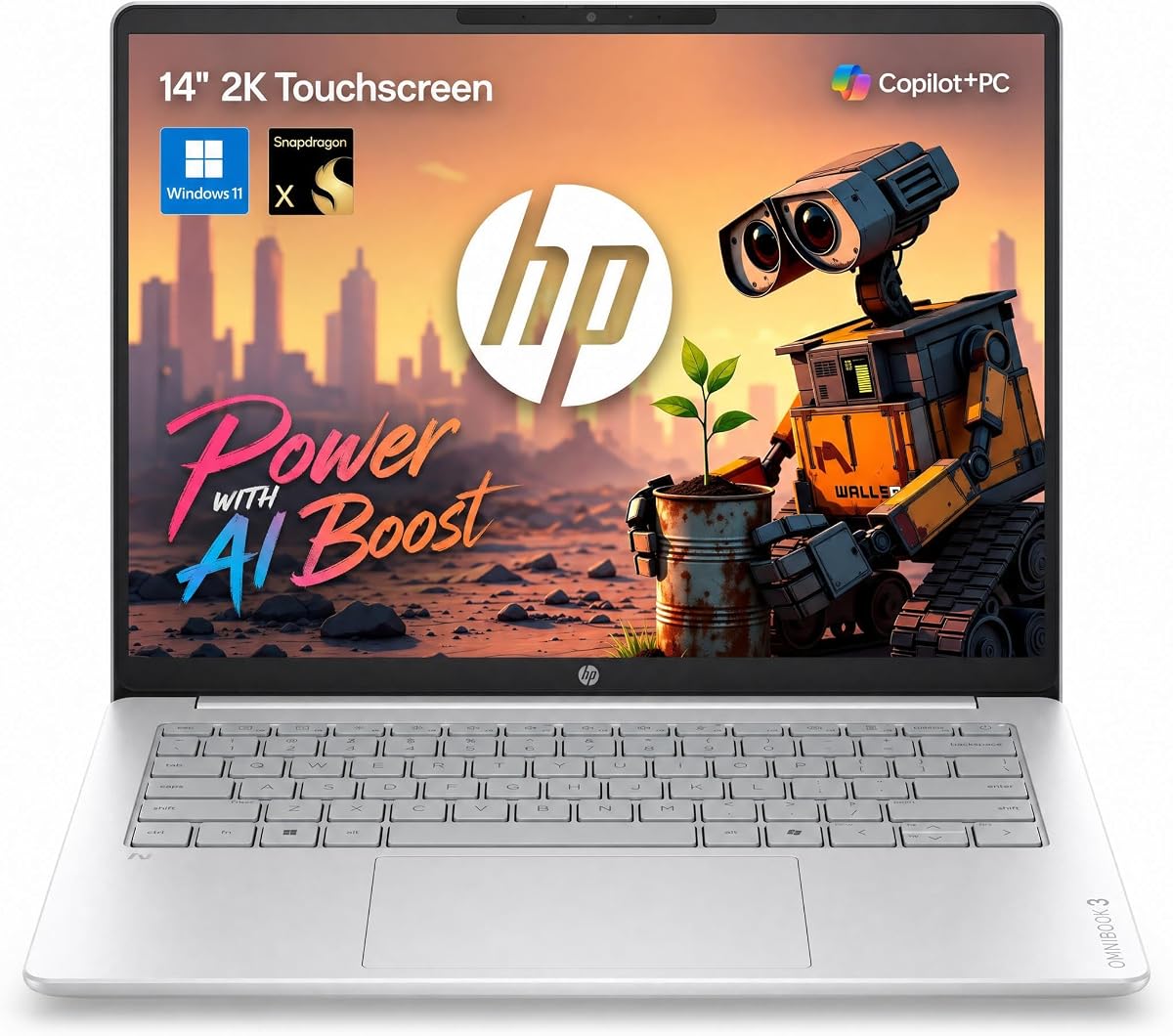
The HP OmniBook 3 14 is designed for mobility with a lightweight chassis and efficient Snapdragon processor. It provides 45 TOPS of NPU performance sufficient for common AI productivity tasks.
We may earn a commission when you buy through this link, at no additional cost to you.
Key strengths are its excellent battery life and fast charging capability which support on the go work. The 2K touchscreen offers sharp visuals in a compact form factor.
However it offers less raw power than models with more cores which might limit heavy rendering tasks. The port selection is also minimal which could require dongles for multiple peripherals.
This laptop is ideal for mobile users who value portability and battery life. It serves well as a companion device for general productivity and light creative work on the move.
Lightweight design and long battery life make it easy to take anywhere.
The 2K touchscreen provides clear and vibrant visuals for content viewing.
We may earn a commission when you buy through this link, at no additional cost to you.
Selecting the right AI laptop requires understanding how the NPU and other hardware components interact to meet your specific needs.
The Neural Processing Unit or NPU is designed to handle AI workloads efficiently. When comparing models look for higher TOPS ratings which indicate better local processing speed for tasks like image generation or real time translation.
A higher TOPS rating ensures smoother AI experiences without relying on cloud services.
AI applications often require significant memory to store models and data efficiently. Aim for at least 16GB of RAM but consider 32GB or more if you plan to run multiple heavy applications simultaneously.
More RAM allows for smoother multitasking and better handling of large datasets.
The CPU and GPU work alongside the NPU to balance system performance. Choose a processor that matches your workflow needs whether that is Intel Core Ultra or AMD Ryzen AI for best integration.
Matching processor architecture ensures balanced performance across all computing tasks.
High resolution and color accurate screens are vital for visual tasks and clarity. Look for OLED or high brightness IPS panels to ensure comfortable viewing in various lighting conditions.
A good display reduces eye strain and improves accuracy for creative work.
AI tasks can be power intensive so efficient battery management is key. Select a model with a capacity that supports your typical work duration away from a power outlet.
Longer battery life increases productivity during travel or remote work.
Ensure the laptop has enough connectivity options for your peripherals. USB4 or Thunderbolt ports allow for fast data transfer and external display connections.
Adequate ports reduce the need for additional dongles and docks.
Check for compatibility with the latest AI tools and operating system features. Windows 11 Home and Pro provide built in AI features that work well with supported hardware.
Updated software ensures you get the most out of your AI hardware.
Keep your system updated to ensure optimal AI feature performance. Manufacturers release updates that refine NPU efficiency and introduce new tools.
Clean the screen and chassis gently to maintain longevity. Use a soft cloth to avoid scratching the display and ports.
Avoid exposing the device to extreme heat or cold to protect internal components. Proper ventilation during heavy use also helps maintain performance.
An NPU is a specialized processor core designed to handle artificial intelligence tasks efficiently. It offloads AI workloads from the CPU to improve speed and reduce power consumption.
While some models have decent integrated graphics they are primarily optimized for productivity. Gaming performance varies but they are not replacements for dedicated gaming rigs.
No many features run locally on the device thanks to the NPU. This reduces or eliminates the need for subscription based cloud services for basic tasks.
Look for models explicitly marketed as Copilot+ PCs or with dedicated NPU specs in their product details. The specs will list the TOPS rating of the NPU.
Most modern AI laptops have soldered memory so upgrades are not possible. Storage can sometimes be upgraded if there is an accessible slot.
Yes most dedicated AI features require Windows 11 Home or Pro for full integration and support of new tools.
The ASUS Vivobook S16 and Zenbook A16 lead in performance and display quality making them ideal for power users.
The Acer Aspire 14 and HP OmniBook 3 offer excellent entry points for those seeking efficiency and portability.
Remember that technology evolves quickly so always check current specifications and availability before making your purchase.