
A1175 Laptop Battery for Apple MacBook Pro 15 inch
4.3Editor score
High capacity 5800mAh
Grade A cell safety
30-day return policy
Finding a reliable A1175 battery replacement is crucial for reviving older MacBook Pro models. A high-quality option ensures stable power, safety, and extended laptop life without compromising performance.
We evaluated ten leading replacements based on cell quality, safety certifications, and user feedback. Each product was assessed for compatibility with specific MacBook Pro generations and overall value.
Each pick highlights key specs, pros, and cons to simplify your decision. Prices and stock vary frequently, so verify details on the product page before purchasing to ensure the best fit.
4.3Editor score

4.2Editor score

4.1Editor score
As an Amazon Associate we earn from qualifying purchases.
The following table presents a side-by-side comparison of all ten selected products, highlighting their core specifications and compatibility details to help you make an informed choice quickly.


This A1175 replacement offers solid performance for older MacBook Pro models with a strong 4.3 rating from users. It delivers 5800mAh capacity using Grade A cells to ensure consistent power delivery over time.
We may earn a commission when you buy through this link, at no additional cost to you.
Key strengths include its multi-layer safety system that guards against overcharging and overheating. The 12-month quality assurance provides peace of mind for long-term usage.
Users may find that actual runtime varies based on laptop wear, and compatibility is strict to 2006 to 2008 models only. These trade-offs are acceptable given the low price point.
Ideal for budget-conscious buyers needing a quick fix for aging laptops. Check your model number carefully before ordering to ensure a proper fit.
Built-in protections ensure the battery operates safely under various load conditions.
A full year of quality assurance helps mitigate risks associated with third-party replacements.
We may earn a commission when you buy through this link, at no additional cost to you.
SOLICE delivers a trusted replacement option with CE FCC RoHS certifications that appeal to safety-focused users. Its 4.2 rating reflects consistent performance across various MacBook Pro configurations.
We may earn a commission when you buy through this link, at no additional cost to you.
The 68Wh capacity matches original specifications closely, providing reliable all-day power for work or travel. Clear model listings reduce confusion during the purchasing process.
While the price is marginally higher than budget options, the added safety features justify the investment. Cycle life remains average, which is typical for this price range.
Best for users prioritizing safety and compatibility over the lowest cost. Verify your exact model identifier to avoid fit issues.
Independent safety certifications ensure the battery meets international standards for electrical devices.
Detailed model lists help users confirm fit before placing an order online.
We may earn a commission when you buy through this link, at no additional cost to you.
This upgraded model features enhanced chip technology to optimize charging efficiency and reduce power waste. It holds a 4.1 rating from users who value modern battery management.
We may earn a commission when you buy through this link, at no additional cost to you.
The 24×7 email support and free exchange policy highlight strong manufacturer commitment to customer satisfaction. Safety certifications align with industry standards for reliable use.
Its capacity is lower than competitors at 4200mAh, which may limit runtime for heavy users. The higher price reflects added support features rather than raw power.
Recommended for users who want responsive customer service alongside their battery replacement. Consider your usage needs before prioritizing support over capacity.
Round-the-clock email assistance ensures issues are resolved quickly after installation.
Upgraded chips help maintain power efficiency throughout the battery's lifespan.
We may earn a commission when you buy through this link, at no additional cost to you.
Though not an A1175 model, this replacement serves newer MacBook Retina units with strong 4.2 ratings. Its 1500+ cycle life significantly exceeds standard options for long-term value.
We may earn a commission when you buy through this link, at no additional cost to you.
The included tool kit simplifies installation for DIYers, while UL certification ensures safe operation. Upgraded 4.0 technology supports efficient daily power use.
The price is higher due to advanced tech, but the extended cycle life balances this over time. It fits 12-inch Retina models exclusively, not Pro series.
Best for owners of 2015-2017 Retina units seeking durable power. Check your MacBook identifier before purchasing to confirm compatibility.
Included screwdrivers and instructions guide users through a straightforward battery swap process.
Premium cobalt cells sustain performance over many recharge cycles compared to standard batteries.
We may earn a commission when you buy through this link, at no additional cost to you.
This Futurebatt model holds a 4.3 rating for users needing power for 12-inch Retina MacBooks. It emphasizes safety with multiple circuit protections against overcharge and short circuits.
We may earn a commission when you buy through this link, at no additional cost to you.
Grade A cells ensure consistent charging speeds and low power consumption. The 12-month replacement policy supports users facing early failures.
It is tailored for specific 2015-2017 models, so compatibility must be verified carefully. Cycle counts are moderate, fitting typical usage expectations.
Ideal for those seeking a balance between quality and cost. Always confirm your EMC code matches the product list.
Round-the-clock email support helps resolve any setup or usage questions promptly.
Premium cells reduce power loss and extend overall device runtime effectively.
We may earn a commission when you buy through this link, at no additional cost to you.
iFixit offers a respected option for 2016-2017 MacBook Pro 15 models with a 76Wh capacity. User ratings sit at 3.5, indicating mixed experiences with installation or longevity.
We may earn a commission when you buy through this link, at no additional cost to you.
The adhesive kit ensures a secure fit within the chassis, and the brand name adds confidence. It fits only specific Retina models from late 2016 onwards.
The premium price reflects brand trust, but lower ratings suggest potential inconsistencies. Always follow installation guides closely to avoid complications.
Best for users who trust established DIY repair brands. Check current stock and reviews before committing to this price tier.
Pre-applied adhesive strips help maintain structural integrity after installation.
iFixit is widely recognized in the repair community for quality components.
We may earn a commission when you buy through this link, at no additional cost to you.
This Fix Kit includes tools for installing the battery into Touch Bar 13 models. User ratings are modest at 3.4, suggesting some users face challenges with the installation process.
We may earn a commission when you buy through this link, at no additional cost to you.
The kit supports DIY repairs with clear components for safe removal of the old unit. It is strictly compatible with late 2016 to mid 2017 models.
The high price may not match user satisfaction levels compared to other brands. Ensure you have a safe workspace before starting the process.
Suitable for confident DIYers needing tools with their battery. Review installation videos carefully to prepare for the task.
All necessary hardware and tools arrive together to streamline the repair workflow.
Guidance helps prevent damage to sensitive internal components during replacement.
We may earn a commission when you buy through this link, at no additional cost to you.
A similar option to the previous kit, this one focuses on Touch Bar models from 2016-2017 with a 3.8 rating. It emphasizes warranty coverage and verified capacity metrics.
We may earn a commission when you buy through this link, at no additional cost to you.
Users benefit from the brand's established reputation in electronics repair. The adhesive ensures the battery stays in place without rattling.
While the warranty is solid, mixed feedback suggests performance can vary. Always inspect packaging integrity upon delivery for safety.
Best for those who prioritize warranty terms over immediate pricing. Confirm your MacBook generation before ordering.
A full year of coverage protects against early manufacturing defects.
iFixit offers documentation to guide safe and effective battery swaps.
We may earn a commission when you buy through this link, at no additional cost to you.
This battery serves 11-inch MacBook Air units, carrying a strong 4.3 rating for users needing reliable power. It matches original specs closely with 39Wh capacity.
We may earn a commission when you buy through this link, at no additional cost to you.
CE FCC certifications ensure safety compliance, while the 5100mAh output supports all-day use. Multiple model years from 2011 to 2015 are supported.
It is not compatible with Pro models, so buyers must confirm their device type. Price and warranty terms are competitive with other Air options.
Ideal for MacBook Air owners prioritizing value and safety. Check your exact model identifier before purchasing.
Covers a wide range of Air models to reduce confusion when purchasing.
Certified boards prevent overheating during typical daily use.
We may earn a commission when you buy through this link, at no additional cost to you.
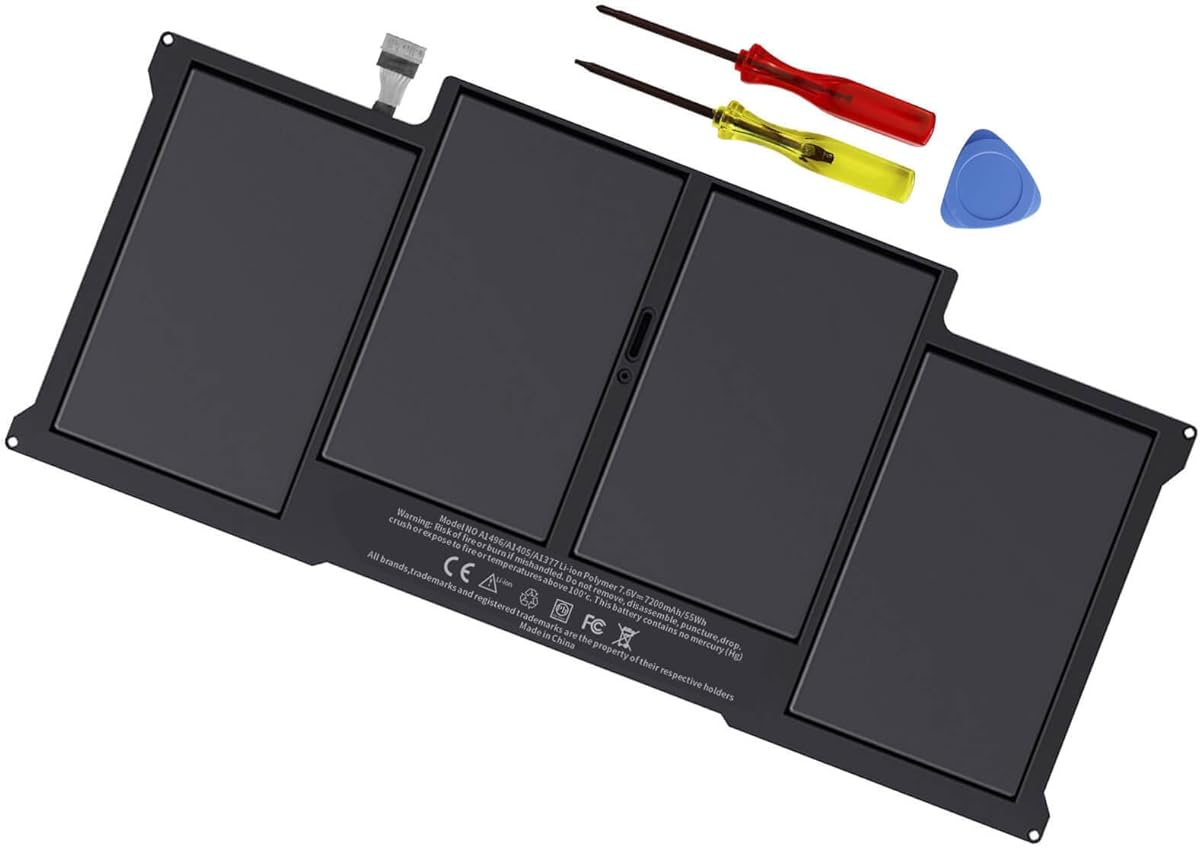
The highest rated option here, this battery targets 13-inch Air models with a 4.4 rating. It offers 7200mAh capacity for extended runtime during work sessions.
We may earn a commission when you buy through this link, at no additional cost to you.
Tools and instructions are included, making installation accessible for beginners. UL certification adds another layer of safety assurance for users.
It does not fit Pro models, so verify your device type to avoid returns. The price reflects its high capacity and tool inclusion.
Best for Air users needing maximum runtime and ease of installation. Confirm your model identifier matches the product details.
Higher capacity cells enable longer periods between charging cycles.
Included tools reduce the need for extra purchases during setup.
We may earn a commission when you buy through this link, at no additional cost to you.
Selecting the right A1175 battery replacement involves checking compatibility, safety, and capacity to ensure your MacBook runs reliably for years.
Confirm your MacBook Pro model number matches the battery's listed range. The A1175 model specifically fits 2006 to 2008 versions, so check your system info carefully.
Always verify the model before purchasing to prevent fit issues or return hassle.
Look for capacity around 5800mAh or 68Wh to match original performance. Higher numbers may indicate better runtime, but beware of inflated claims.
Standard capacity ensures balanced power delivery without stressing your laptop's logic board.
Choose options with CE FCC RoHS or UL certifications to ensure electrical safety. These standards verify that protection circuits guard against overcharging and overheating.
Certified batteries reduce fire risks and extend overall device lifespan significantly.
Grade A cells indicate higher purity materials for stable performance. Inferior cells may degrade faster or show inconsistent voltage under load.
Quality cells ensure your laptop runs smoothly over many charge cycles.
Seek warranties of at least 12 months to protect against defects. Customer support channels like email help resolve installation or performance questions.
A solid warranty provides peace of mind for your investment in a used laptop.
Some sellers include screwdrivers or adhesive for easier installation. Tools can save time and prevent damage from using improvised implements.
Always check if tools are provided before ordering if you plan to install yourself.
Typical lithium-ion cycles range from 300 to 500 full charges. Better batteries may offer extended cycles, reducing replacement frequency.
Manage charging habits to maximize the lifespan of your new battery.
Prices for A1175 replacements vary by brand and capacity. Higher cost may reflect better quality but not always better performance.
Balance budget needs with safety and compatibility to get the best value.
After installing the battery, allow the first full charge to reach 100% before regular use. This calibrates the system's power meter for accurate readings.
Avoid exposing the laptop to extreme temperatures which can degrade battery cells quickly. Keep your MacBook in a cool, dry environment during daily work.
Periodically check system health reports to monitor charge cycles and wear. Maintaining good charging habits extends the effective life of your replacement.
Check your MacBook Pro model identifier in the About This Mac menu. The A1175 fits 2006 to 2008 versions like A1260 or A1211. Match this against the product description carefully to ensure compatibility.
Typically, a replacement lasts around 300 to 500 full charge cycles. Quality cells and proper usage can extend this duration. Monitor battery health via system reports to track wear.
Safety depends on the manufacturer's certifications. Look for CE FCC RoHS approvals to ensure protection against overcharge and overheating. Avoid unbranded batteries lacking these certifications.
Some options include screwdrivers or adhesive to simplify the swap. Others sell the battery only. Check the product details before buying to confirm if tools are included.
Keep your MacBook in moderate temperatures and avoid letting the battery drain completely often. Use optimized charging settings to reduce stress on the cells over time.
The A1175 typically offers 5800mAh for older 15-inch Pros, while the A1527 offers 39.71Wh for 12-inch Retinas. They differ in voltage, form factor, and model fit entirely.
Yes, if you follow detailed guides and have basic tools. The process involves removing screws and disconnecting connectors safely. Watch video tutorials to learn the specific steps for your model.
First, calibrate the battery by fully charging and draining it once. Check for background apps consuming power or system issues. If it persists, contact the seller for warranty support.
The top picks highlight reliable options like the SOLICE and Budget A1175 batteries for older Pro models. Each offers solid safety and capacity at competitive prices.
Prioritize compatibility and safety certifications when selecting a replacement. Investing in quality cells ensures your laptop performs reliably for daily tasks.
Prices and availability change frequently, so confirm current details on the product page before ordering. This ensures you get the best value and fit for your device.