
CENMATE Aluminum 8 Bay Hard Drive RAID Enclosure
3.8Editor score
Supports up to 160TB total capacity
Multiple RAID modes for data protection
USB A/C 3.0 connectivity included
Finding the right storage solution is crucial for modern workflows. Eight bay hardware RAID enclosures offer massive capacity and redundancy. They protect data while providing high-speed access for professionals.
This guide evaluates ten top-rated models based on performance and build quality. We examined connectivity options, cooling systems, and compatibility. Each unit was assessed for real-world usability and value.
Each pick highlights specific strengths and ideal use cases for buyers. Prices fluctuate often so verify current listings before purchasing. Our analysis helps you choose the perfect enclosure for your needs.
3.8Editor score

5.0Editor score

3.7Editor score
As an Amazon Associate we earn from qualifying purchases.
The following table provides a side-by-side comparison of all ten reviewed enclosures. It highlights key specifications and features to help you quickly identify the model that fits your specific storage requirements.

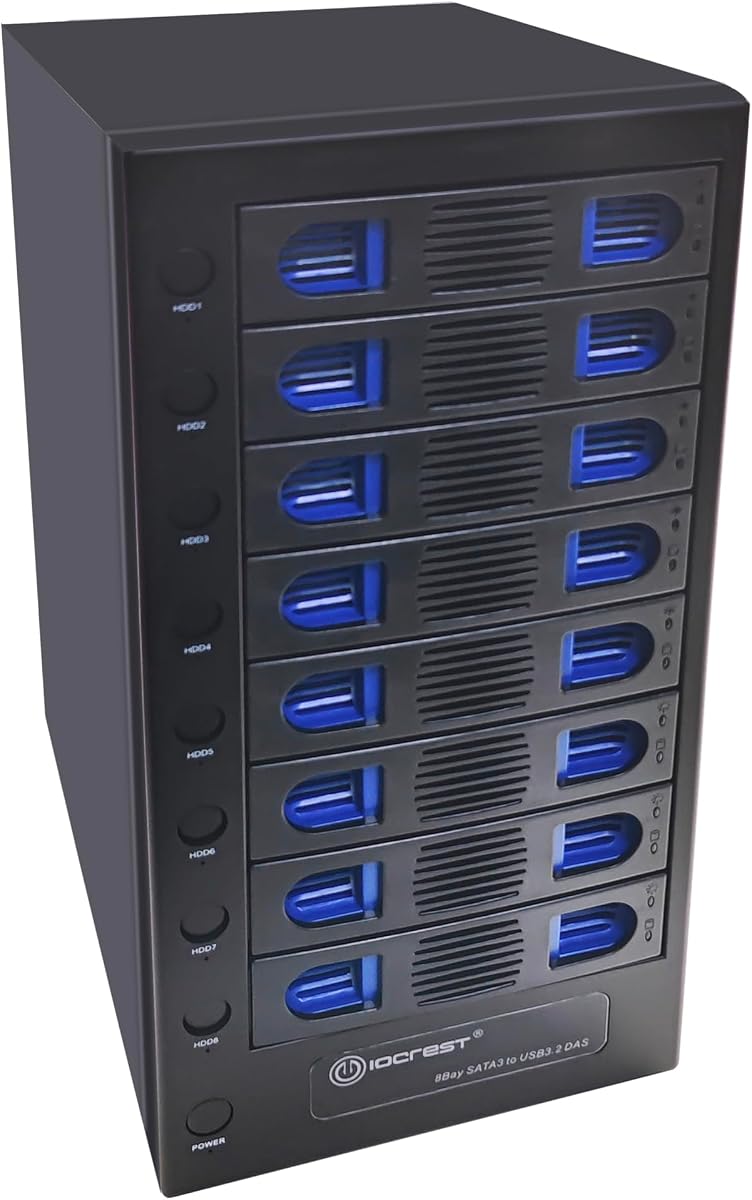


This CENMATE enclosure offers an entry point for users needing massive storage without enterprise costs. With a rating of 3.8 stars it provides reliable connectivity for personal and light professional use. Its aluminum build ensures durability while supporting up to 160TB of capacity across eight bays.
We may earn a commission when you buy through this link, at no additional cost to you.
The standout feature is the versatility of its eight RAID modes including RAID 0 and 5. This allows users to balance speed and redundancy based on their needs. The unit supports both 2.5 and 3.5 inch drives and includes cooling fans to maintain safe operating temperatures during heavy loads.
Users should note that setting up RAID requires careful attention to the manual as data formatting occurs during the process. Fan noise levels around 50 decibels might be noticeable in quiet environments. However these trade-offs are acceptable for the level of functionality provided at this price.
Ideal for home users or small studios needing affordable expansion this unit fits well on a desktop. The plug-and-play compatibility with Windows and Mac makes it accessible. For those seeking high capacity storage without breaking the budget this is a strong candidate.
The eight distinct RAID modes allow for flexible data management strategies tailored to specific workflow needs.
Dual internal fans prevent overheating ensuring long-term stability for drives running continuously.
We may earn a commission when you buy through this link, at no additional cost to you.
The SanDisk Professional G-RAID Shuttle stands out as a top choice for professionals requiring high performance and portability. With a perfect 5.0 rating it delivers exceptional reliability for mission-critical workflows. Its colossal capacity supports demanding video editing and data archiving tasks efficiently.
We may earn a commission when you buy through this link, at no additional cost to you.
Speed is the primary advantage here with Thunderbolt 3 enabling read speeds up to 1900MB/s. The inclusion of removable enterprise-class Ultrastar hard drives ensures data integrity and simplifies replacement. Users can also power their MacBooks through the built-in USB-C Power Delivery feature.
While the price is high it reflects the quality of hardware included. The requirement for a Thunderbolt port may limit compatibility with older systems but future-proofs the investment. For creatives needing massive throughput this unit justifies the expense.
Best suited for video editors and 3D artists this array integrates seamlessly into high-end workflows. The ability to daisy-chain devices expands options further. If you need speed and capacity in a single portable unit this is the optimal solution.
Thunderbolt 3 technology ensures rapid file access essential for working with 8K and VR content.
Pre-installed Ultrastar drives offer superior durability and reliability for critical data storage.
We may earn a commission when you buy through this link, at no additional cost to you.
This enclosure is designed for simplicity offering direct attached storage without the complexity of RAID configurations. With a rating of 4.3 stars it is appreciated for its ease of use and hot-swap capabilities. Users can add drives without powering down the system.
We may earn a commission when you buy through this link, at no additional cost to you.
The aluminum chassis and dual fans keep the internal components cool during operation. Support for up to 160TB total capacity makes it scalable for growing data needs. The daisy chain feature allows expansion to three devices creating a robust storage ecosystem.
While it lacks advanced RAID modes it provides a straightforward way to expand storage. The fan noise can be audible but is manageable for most office settings. It is a practical choice for users prioritizing accessibility over redundancy.
Ideal for photo editors and media creators needing quick access to multiple volumes this DAS unit works well. The plug-and-play nature reduces setup time significantly. If you need flexible expansion without configuring arrays this model is highly recommended.
Replace drives on the fly without system interruption saving valuable time during work sessions.
Expand capacity easily by daisy-chaining additional units to reach massive storage totals.
We may earn a commission when you buy through this link, at no additional cost to you.
The OWC ThunderBay 8 is a robust enclosure designed for high-performance external storage needs. It supports both 2.5 and 3.5 inch drives allowing flexibility in drive selection. Users benefit from dual Thunderbolt 3 ports which enable chaining multiple devices together efficiently.
We may earn a commission when you buy through this link, at no additional cost to you.
Its universal drive bays accept various drive types simplifying upgrades and replacements. The thumb screw release trays make swapping drives quick and tool-free. Compatibility with both Mac and Windows ensures broad accessibility for diverse work environments.
While the price is higher than basic models the Thunderbolt interface justifies it for speed-focused workflows. The requirement for a Thunderbolt port may necessitate adapters for older computers. For those needing high throughput this unit delivers consistent performance.
Best for users with high-speed workflows this enclosure integrates well into professional setups. The ability to chain up to six units offers incredible scalability. If you need reliable Thunderbolt storage this model is a solid investment.
Dual ports allow for daisy-chaining and faster data transfer rates for intensive tasks.
Supports both Mac and Windows systems without requiring additional driver installations.
We may earn a commission when you buy through this link, at no additional cost to you.
This model upgrades connectivity to USB 3.2 Gen 2 offering faster data transfer than standard USB 3.0. With a rating of 4.1 stars it provides a balance of speed and affordability. The enclosure supports both SSD and HDD drives for flexible configuration options.
We may earn a commission when you buy through this link, at no additional cost to you.
The hot-swappable design allows users to add drives without shutting down the system. Dual fans ensure proper cooling which is vital for maintaining drive longevity during prolonged usage. The aluminum chassis provides durability and helps dissipate heat effectively.
Users should be aware of fan noise levels which might disturb quiet environments. While it lacks advanced RAID modes it is excellent for simple storage expansion needs. The price point makes it accessible for small businesses or home users.
Ideal for those needing USB-based expansion this unit delivers reliable performance. The Type-C interface supports various computer ports including Thunderbolt. If you need high-speed USB storage without complex RAID features this is a great choice.
10Gbps transfer speeds reduce wait times when moving large media files around.
Swap drives without powering down to maintain workflow continuity and efficiency.
We may earn a commission when you buy through this link, at no additional cost to you.
This enclosure focuses on usability and versatility supporting drives up to 22TB each. The smart fan function adjusts speed based on thermal readings ensuring quiet operation when idle. It is ideal for users needing simple expansion without complicated setup procedures.
We may earn a commission when you buy through this link, at no additional cost to you.
Independent power switches for each drive allow precise control over which drives are active. This helps save energy and reduces heat generation. Compatibility with major operating systems makes it a convenient option for diverse setups.
While it lacks RAID features the simplicity is a benefit for casual users. The USB-C interface provides fast transfer speeds suitable for most tasks. Build quality with steel housing ensures durability and longevity.
Best for small businesses needing reliable external storage this unit is practical. The ability to manage drives independently adds convenience. If you need straightforward expansion without RAID complexity this model serves well.
Built-in thermal sensors regulate fan speed to keep noise low during light use.
Control power for each drive individually to optimize energy usage and heat.
We may earn a commission when you buy through this link, at no additional cost to you.
The OWC ThunderBay Flex 8 is a powerhouse combining storage and connectivity. It features eight bays supporting SATA and NVMe drives for incredible speed. With a PCIe slot users can add capture cards or network interfaces easily.
We may earn a commission when you buy through this link, at no additional cost to you.
Front-facing USB-C and SD card readers simplify workflows for content creators. The dock allows access to peripherals without reaching behind the computer. SoftRAID software provides advanced management for those needing specific array configurations.
Price is significant but the value lies in its multi-functionality. It is a docking station first and storage second. Users needing a single device for expansion and storage will find it convenient.
Best for creative professionals needing a centralized hub this enclosure delivers. The PCIe slot opens many possibilities for hardware expansion. If you need more than just storage this unit is a comprehensive solution.
The internal PCIe slot allows adding specialized hardware like capture cards or NICs.
Front USB and card readers streamline workflow by bringing connections to the front.
We may earn a commission when you buy through this link, at no additional cost to you.
Designed for seamless integration with QNAP NAS systems this unit simplifies storage expansion. It supports JBOD configurations allowing drives to be used as individual volumes easily. The desktop tower design fits well under a desk or in a server rack.
We may earn a commission when you buy through this link, at no additional cost to you.
USB 3.2 Gen 2 connectivity ensures rapid data access for backups and archives. The included utility helps monitor drive health and manage configurations without complex software. It is a straightforward solution for expanding existing QNAP setups.
While compatible with Windows and Mac its full potential is unlocked with QNAP devices. The lack of internal RAID means you rely on host software or JBOD. For QNAP users this is a natural and convenient expansion step.
Best for those already in the QNAP ecosystem this enclosure offers reliable expansion. The plug-and-play nature reduces setup friction significantly. If you need to extend your NAS storage this model is the logical choice.
JBOD mode lets you treat each drive independently for simple storage expansion.
Works seamlessly with QNAP NAS for streamlined management and performance.
We may earn a commission when you buy through this link, at no additional cost to you.
This unit is a chassis designed for DIY NAS builds rather than a finished enclosure. It supports Mini-ITX and Micro-ATX motherboards providing flexibility for custom configurations. Hot swap drive bays make maintenance easy without powering down.
We may earn a commission when you buy through this link, at no additional cost to you.
Dual independent air channels separate cooling for drives and motherboard components. This prevents thermal throttling and keeps noise levels low. The steel chassis ensures durability and protection against physical shocks.
Building your own server requires technical knowledge and time. The kit does not include a motherboard or CPU which adds to the total cost. However it is rewarding for users wanting full control over their hardware.
Best for tinkerers and advanced users this case allows unique setups. You can choose components that fit specific needs. If you want a custom NAS system with 8 bays this is the foundation.
Choose your own motherboard and CPU for a system tailored to your needs.
Dual air channels manage heat efficiently to keep all components cool.
We may earn a commission when you buy through this link, at no additional cost to you.
This enclosure is designed for internal installation into a desktop or workstation case. It holds eight 2.5 inch drives within a 5.25 inch external bay. The full metal build ensures strength and protects drives from physical damage.
We may earn a commission when you buy through this link, at no additional cost to you.
Locking trays secure drives in place which is vital for mobile workstations. Support for both SATA and SAS drives offers flexibility. It is ideal for users needing massive internal storage in a professional workstation.
Since it is internal it requires an open 5.25 bay in the computer case. This makes it unsuitable for laptops or compact systems. The locking mechanism adds security and prevents drive vibration issues.
Best for workstations needing high-density internal storage this cage is effective. It transforms external drive bays into massive storage solutions. If you need internal expansion for a desktop this model is excellent.
Locking trays prevent drives from moving and protect them from vibration damage.
Mounts inside your PC case to keep storage hidden and secure.
We may earn a commission when you buy through this link, at no additional cost to you.
Selecting the right 8 bay hardware RAID enclosure requires understanding your specific storage needs. Here are key factors to consider before making a purchase.
Check what ports your computer has such as USB 3.0 USB 3.2 Gen 2 or Thunderbolt. Thunderbolt offers the highest speeds but costs more and requires specific ports.
Ensure the enclosure supports the interface your system can handle to avoid bottlenecks.
Decide if you need RAID for data redundancy or just Direct Attached Storage for capacity. RAID protects data from drive failure while DAS offers raw space.
Choose based on whether you prioritize speed safety or maximum raw storage space.
Consider the maximum drive capacity each bay supports like 20TB or 22TB per drive. Eight bays mean total capacity depends heavily on the individual drive size.
Confirm the enclosure supports the drive sizes you plan to use before buying.
Look for models with smart fans or thermal sensors to manage noise. Continuous operation generates heat which can affect drive longevity.
Check decibel ratings to ensure the fan noise fits your environment.
Aluminum or steel chassises provide better heat dissipation and protection. Quality materials protect your drives from physical damage and heat.
Opt for durable construction to ensure the device lasts over time.
Hot swap features allow drive changes without powering down which saves time. Tool-free designs make installation and maintenance much easier.
Look for these convenience features if you access drives frequently.
Ensure the enclosure works with your OS like Windows Mac or Linux. Some models require drivers or specific formatting for certain systems.
Check compatibility lists to avoid driver issues after purchase.
Compare prices against features like Thunderbolt support or included drives. Higher cost may be worth it for performance or durability.
Determine your budget to find the best balance between cost and capabilities.
Install drives carefully ensuring each is seated firmly in the bays. For RAID setups follow the manual to select the correct mode before initializing.
Keep the enclosure in a well-ventilated space to prevent overheating. Regularly clean the intake fans to maintain airflow.
Back up your data regularly even if using RAID. RAID protects against hardware failure but not accidental deletion or software corruption.
Yes most models support both SSD and HDD drives. Ensure the SSD size is compatible like 2.5 or 3.5 inch depending on the enclosure specifications.
Most units are plug-and-play and do not require drivers. However check the product details for your specific OS compatibility.
Setup varies by model but generally involves switching a toggle or software setting. Always back up data before initializing RAID as it formats the drives.
Power consumption depends on the number of drives and activity. Most units use an external power adapter designed for the 8-bay configuration.
Some models support daisy chaining via Thunderbolt or USB. Check the specs to see if multiple units can be connected together.
In RAID setups data is protected based on the mode used. In DAS setups you lose that drive's data so regular backups are recommended.
Most are compatible but you may need to format drives to APFS or ExFAT for Mac use. Check compatibility details in the product specs.
We reviewed ten top 8 bay hardware RAID enclosures ranging from budget-friendly to high-end models. Each offers unique benefits depending on your performance and storage needs.
Prioritize connectivity and build quality when selecting a unit to ensure long-term reliability. Consider whether RAID redundancy or raw capacity is more important.
Remember to check current listings for the latest offers. Your ideal enclosure is among these options ready to expand your digital world.