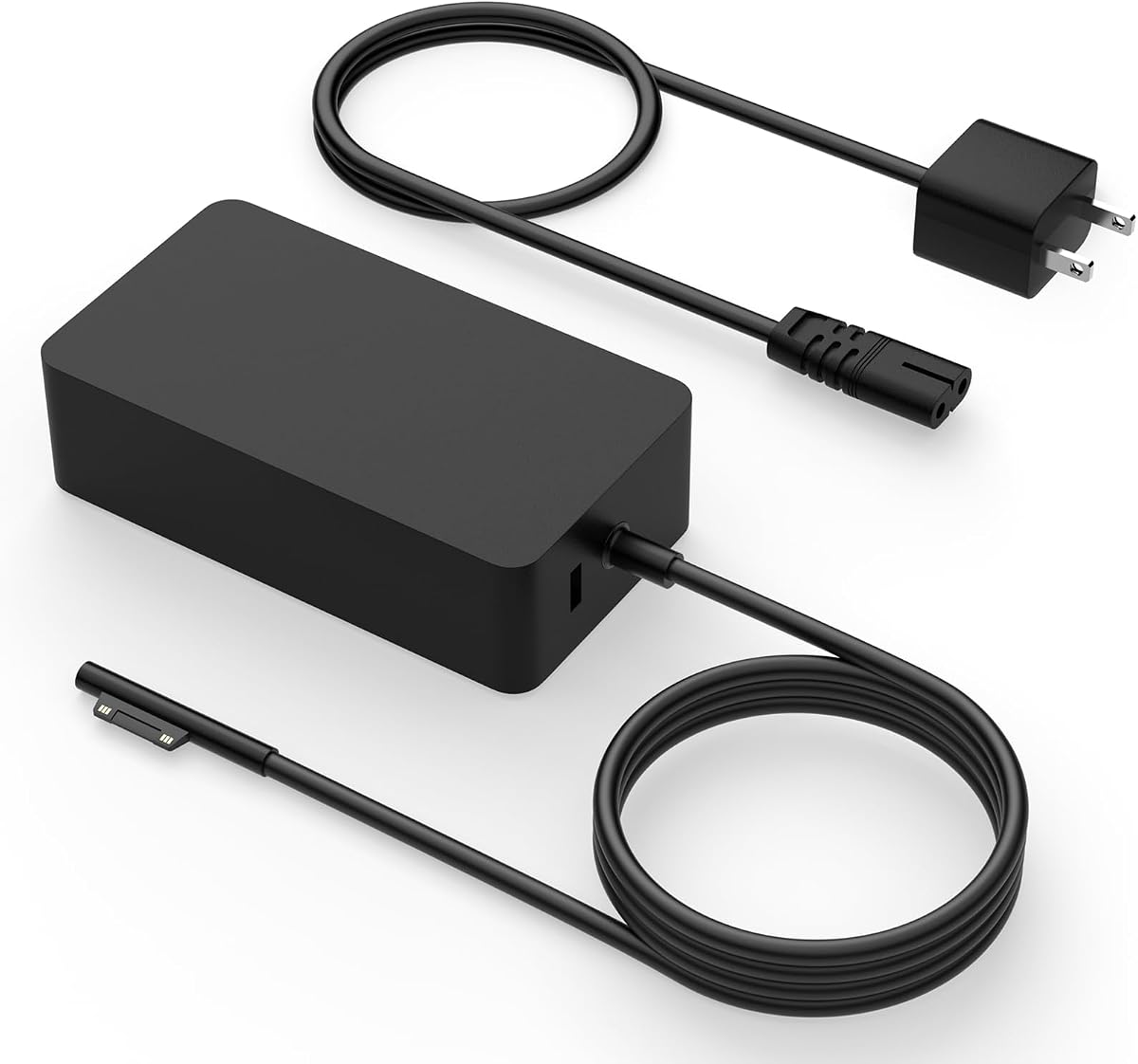
Replacement for Surface Pro Charger 65w
4.6Editor score
Built-in USB port for charging
Multi-wattage output support
Compact and lightweight design
This comprehensive guide compares the top 65W Microsoft Surface Pro Charger Replacement options available in October 2026 for performance and safety.
Finding a reliable power source for your device is crucial for productivity and connectivity in today's fast-paced digital environment. The right charger ensures your laptop stays operational during long work sessions or travel days without interruptions or unexpected shutdowns.
We evaluated ten top-rated replacement chargers based on compatibility, build quality, safety features, and customer feedback to help you make an informed decision. Each product was analyzed for its ability to deliver consistent power across various Surface models and its durability under regular daily use conditions.
Every review highlights specific strengths and potential trade-offs so you can choose the model that best fits your usage patterns and budget requirements. Please note that product availability and pricing may vary over time, so verify current details before making your final purchase decision.
4.6Editor score

4.5Editor score

4.6Editor score
The following table provides a side-by-side overview of key specifications and features for each of the ten chargers reviewed in this guide to help you quickly identify the best fit for your needs.


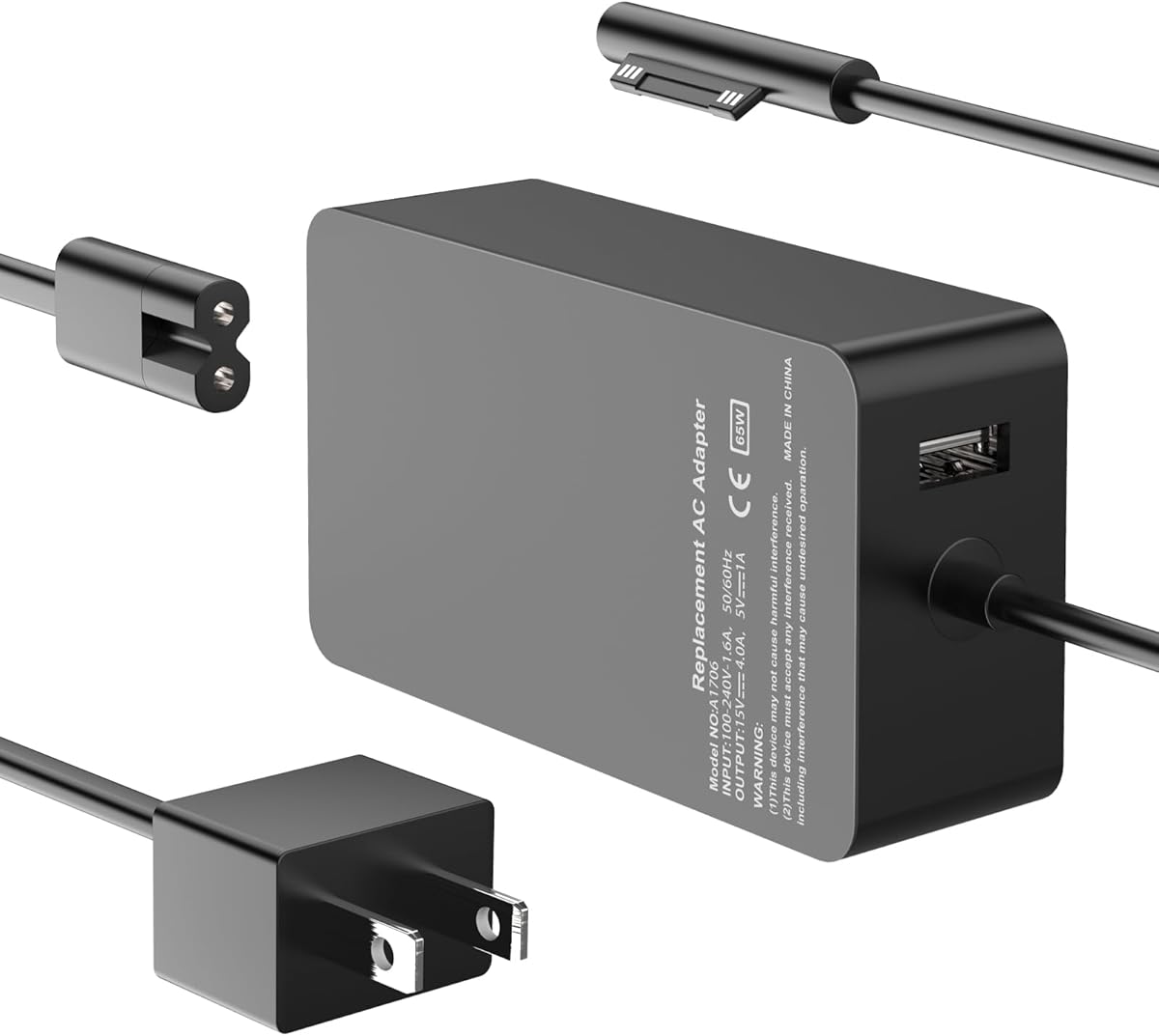


This charger stands out as a top choice due to its exceptional versatility and user-friendly design elements that enhance daily usability. It offers a robust 65W output capable of powering a wide array of Surface devices efficiently while maintaining safety standards.
We may earn a commission when you buy through this link, at no additional cost to you.
The inclusion of a 10FT cable provides significant freedom to work from various locations without needing to be near a power outlet. Additionally, the LED indicator ensures you can quickly check charging status without interrupting your workflow or opening the laptop lid.
While it performs excellently in most scenarios, the longer cable might be slightly cumbersome for users who prioritize extreme portability in small bags. However, the trade-off is well worth it for those who value convenience and reach during home or office use.
If you need a reliable all-in-one solution that balances power, safety, and convenience, this model is highly recommended for most Surface Pro users seeking dependable daily charging.
The 10FT cable allows users to charge comfortably from a distance, making it ideal for desks, beds, or travel setups where outlets are scarce.
The cool-blue LED light provides immediate visual confirmation of active charging, reducing uncertainty about power delivery during critical tasks.
We may earn a commission when you buy through this link, at no additional cost to you.
For budget-conscious shoppers who still need reliable performance, this charger delivers impressive value without compromising on essential power delivery features. It supports multiple wattage levels to accommodate different Surface models efficiently.
We may earn a commission when you buy through this link, at no additional cost to you.
A standout feature is the built-in USB port which allows you to charge a smartphone simultaneously while powering your laptop. This dual-functionality reduces cable clutter and ensures all devices stay powered during meetings or travel.
The charger lacks some premium features like an LED indicator or extra-long cable which may limit convenience for some users. However, the core charging performance remains solid and is backed by a generous exchange policy for peace of mind.
Choose this option if you want a cost-effective solution with added utility like USB charging and trust the support team to handle any potential issues quickly.
The integrated USB port enables simultaneous charging of your phone and laptop, making it a practical choice for commuters and professionals.
Engineered with professional testing and heat dissipation, it ensures efficient power transfer while protecting devices from overheating risks.
We may earn a commission when you buy through this link, at no additional cost to you.
This charger combines premium build quality with robust safety features to provide a stable and secure charging experience for demanding users. Its design focuses on protecting your device through multiple layers of technical safeguards.
We may earn a commission when you buy through this link, at no additional cost to you.
It includes a dedicated USB port for auxiliary device charging and supports multiple power outputs to fit various device needs. The internal protection systems against over-voltage and short circuits ensure long-term reliability for both charger and laptop.
While it offers great protection and performance, it does not include extra perks like a super long cable or unique visual indicators found in other models. These trade-offs are acceptable given the focus on safety and consistent power delivery.
If safety and reliability are your top priorities, this model offers a premium-level peace of mind for your valuable Surface devices without unnecessary extras.
Multiple built-in safeguards protect against common electrical issues ensuring safe and stable charging across diverse usage environments.
The additional USB port allows you to power other devices simultaneously keeping your workspace organized and functional.
We may earn a commission when you buy through this link, at no additional cost to you.
This charger offers high efficiency and a wide range of wattage outputs to suit different device power requirements effectively. It is built to deliver fast charging times while maintaining a compact and portable form factor.
We may earn a commission when you buy through this link, at no additional cost to you.
The added USB port enhances convenience by allowing you to charge phones or other accessories alongside your laptop. This multi-device capability makes it a practical choice for users who manage multiple gadgets daily.
While it performs well in terms of speed and safety, it lacks visual indicators like an LED light to show charging status. Users must rely on device software or physical checks to confirm power delivery.
Ideal for those seeking a balanced mix of speed and utility this charger delivers reliable performance for daily Surface Pro use without complex features.
Supports 65W 44W and 36W outputs ensuring compatibility with older and newer Surface models requiring different power levels.
A secondary USB port enables charging of phones or headphones reducing the need for extra wall adapters.
We may earn a commission when you buy through this link, at no additional cost to you.
This model focuses on portability and safety with a design that ensures safe operation and ease of transport. The high-sensitive magnetic plug allows for quick and hassle-free connection without the need to align ports carefully.
We may earn a commission when you buy through this link, at no additional cost to you.
It includes thermal protection and overload cut-off features that prevent overheating and extend battery life. The 8.8ft cord provides decent reach while maintaining a compact profile suitable for travel bags or desks.
While the magnetic connector is convenient, some users may prefer a fixed connector for added physical durability in heavy industrial environments. For general office or home use however, this is a reliable and safe option.
Choose this charger if you value a balanced combination of safety features portability and ease of connection for your Surface laptop.
The high-sensitive magnetic connector ensures a secure connection with minimal effort reducing wear on the laptop charging port.
Built-in thermal cut-off prevents overheating ensuring safe operation even during extended charging sessions or full power use.
We may earn a commission when you buy through this link, at no additional cost to you.
This charger offers extensive peace of mind with an 18-month warranty and a long cable for flexible positioning. It is designed to perform reliably across a broad range of Surface Pro models with consistent power output.
We may earn a commission when you buy through this link, at no additional cost to you.
The LED indicator provides clear visual feedback while the comprehensive safety features protect against overheating and short circuits. Customers also benefit from friendly service and a promise of quality support during the warranty period.
While it is priced higher than some competitors the added warranty and cable length justify the cost for users seeking long-term reliability. The weight may be a minor inconvenience for frequent travelers though.
If you prioritize warranty coverage and a long cable for home or office setups this model is a dependable choice for daily use.
The 18-month warranty offers strong assurance against defects ensuring you are covered for over a year of regular use.
A clear LED light indicates charging status making it easy to confirm power without opening the device.
We may earn a commission when you buy through this link, at no additional cost to you.
This charger is a straightforward option focusing on key Surface models with a reliable 65W output. It avoids unnecessary extras to deliver a clean and functional charging solution for specific device users.
We may earn a commission when you buy through this link, at no additional cost to you.
The 8.8ft cord offers sufficient reach for most desk setups while the compact design makes it easy to store in a bag. It performs consistently without overheating issues and matches well with supported Pro models.
It lacks additional ports like USB which may be a downside if you need to charge multiple devices simultaneously. However for users who only need laptop charging this simplicity is beneficial.
Opt for this if you want a simple no-fuss charger tailored to your specific Surface model without extra features or complications.
Designed specifically for listed Surface models it ensures perfect compatibility without risking errors from generic adapters.
Avoids extra features to keep the unit compact and cost-effective for users needing pure charging power.
We may earn a commission when you buy through this link, at no additional cost to you.
This upgraded version brings a mix of safety and versatility to the charging experience for various Surface models. It includes a 10ft cord and USB port to handle multiple devices while protecting against electrical risks.
We may earn a commission when you buy through this link, at no additional cost to you.
The overload cut-off and automatic thermal protection ensure the charger remains safe even during extended high-power sessions. This makes it a reliable choice for users who frequently charge laptops alongside phones or tablets.
The build feels robust but may be heavier than modern slimmer alternatives which could affect portability for commuters. Still the extra power and safety features often outweigh this minor inconvenience for home users.
Select this model if you need a robust and versatile charger that can handle multiple devices safely without extra cost.
Automatic thermal and overload cut-off mechanisms safeguard your devices from electrical surges and overheating effectively.
Supports 65W 44W and 36W outputs making it compatible with a wide range of older and newer Surface devices.
We may earn a commission when you buy through this link, at no additional cost to you.
This charger emphasizes safety with multi-safeguard protections while maintaining high-speed charging for modern Surface models. It is designed to protect your device battery while delivering reliable power for daily tasks.
We may earn a commission when you buy through this link, at no additional cost to you.
The top-rated performance ensures efficient charging that minimizes downtime and keeps your device ready for work. Customer service is responsive which adds to the overall confidence in the product for potential buyers.
While the design is fairly standard without unique visual indicators the core performance and safety systems are robust. This makes it a solid choice for those who prioritize reliability over extra convenience features.
If you seek a safe and efficient charger with a strong reputation this model is an excellent candidate for your next purchase.
Built-in multi safeguards protect against overcharging and short circuits ensuring your device battery remains healthy over time.
Top-rated status reflects consistent satisfaction among users proving its reliability for regular professional and personal use.
We may earn a commission when you buy through this link, at no additional cost to you.
This charger is built for durability and speed with a focus on maintaining efficiency and reliability across a wide range of devices. The thick copper wire and magnetic connector ensure long-term durability and stable connections.
We may earn a commission when you buy through this link, at no additional cost to you.
It delivers fast charging capabilities that can reach 50 percent battery in just half an hour making it ideal for quick top-ups. The temperature monitoring system adds an extra layer of safety during high-load usage.
While the price is moderate the extra durability and convenience features like the 10FT cable justify the cost for many users. The magnetic connector ensures a secure fit without the risk of accidental disconnections.
Choose this if you want a durable fast charger with a long cable and safety features to handle demanding daily power needs.
Charges up to 50 percent in 30 minutes ensuring you get back to work quickly without long waits for power.
Thicker copper wire and magnetic connector provide a sturdy connection resistant to frequent bending and wear over time.
We may earn a commission when you buy through this link, at no additional cost to you.
Selecting the right charger involves checking compatibility, safety, power output, and build quality to ensure reliable performance for your device.
Ensure the charger matches your device's model and required wattage to avoid performance issues or charging errors. Most Surface Pro models support 65W but older devices may require 44W or 36W.
Always verify compatibility lists in product descriptions before purchasing to confirm the charger fits your specific laptop or tablet.
Look for built-in safeguards against overheating, short circuits, and overcharging to protect your device battery from potential damage. These features extend lifespan and reduce fire risks during prolonged use.
A charger with multi-safeguard systems ensures consistent safe operation across different power conditions.
Longer cables offer flexibility to use your device away from power outlets without unplugging or moving your laptop. Typical lengths range from 6 to 10 feet depending on the model.
Choose a cable length that suits your workspace setup to avoid strain or inconvenience.
Robust materials and connectors contribute to durability and resistance to physical wear from daily use. Magnetic connectors can also prevent accidental damage to the charging port.
Invest in a unit with solid construction to ensure longevity and reliable performance over time.
Some chargers include USB ports for charging phones or tablets simultaneously which adds convenience for multi-device users. LED indicators provide visual confirmation of charging status without opening the device.
Decide which extra features matter most to your workflow before making a final choice.
A longer warranty period and responsive customer service indicate manufacturer confidence and provide protection against defects. This is important if issues arise after purchase.
Check the terms of the warranty and return policy to ensure you are covered adequately.
Compare prices against the features offered to find a model that delivers good value for your specific needs and budget. Higher cost does not always mean better performance but often reflects durability.
Balance cost with essential features to find the best fit without overspending on unused capabilities.
Reading customer reviews helps identify common strengths or issues not listed in official product descriptions. Look for consistent feedback on reliability and charging speed.
Prioritize models with high average ratings and positive long-term usage reports to ensure satisfaction.
Always plug the power cord into a secure outlet before connecting the magnetic connector to your device to ensure a stable power supply. This prevents intermittent connections that can damage the charging port or battery.
Store the charger in a cool dry place away from direct sunlight or heat sources to maintain internal component integrity. Avoid wrapping the cable too tightly around the charger which can strain internal wires over time.
Regularly inspect the cable and connectors for signs of wear or fraying before each use to prevent safety hazards or power loss. Replace the unit if you notice any physical damage or inconsistent charging behavior during operation.
Yes most modern chargers adjust output automatically to match device requirements safely. However always check product descriptions for compatibility with your specific model to avoid errors.
Using third-party chargers generally does not void device warranties but safety features and certifications ensure reliable performance. Stick to reputable brands with proper safety testing for best results.
A 10FT cable provides extra reach for working from beds, sofas, or desks far from outlets. This flexibility reduces the need to move devices or rely on extension cords.
An LED light shows charging status visually so you can confirm power without opening the laptop. This is useful when the device is in sleep mode or you are away from it.
Look for chargers with overheating and short circuit protection to prevent battery damage or fires. These features are critical for long-term reliability and device safety.
A good warranty typically covers at least one year of defects and includes responsive customer support. Longer periods and exchange options offer better peace of mind for buyers.
Yes, a USB port lets you charge phones or tablets while the laptop charges reducing desk clutter. It is a convenient feature for managing multiple devices simultaneously.
Check your device model number and compare it against the charger's compatibility list on the product page. Also confirm power requirements like wattage to avoid mismatched specs.
Choosing the right charger depends on your priorities for speed, safety, and convenience. The top picks offer strong balances of these features for most users.
Focus on safety features and compatibility first as these ensure your device remains protected and functional. Additional perks like long cables or USB ports can then tailor the choice to your workflow.
Remember to verify current availability and pricing before purchase as details may vary over time. This ensures you get the most up-to-date and reliable solution for your needs.