
xTool F2 Ultra 60W MOPA & 40W Diode Dual Laser Engraver
4.2Editor score
Dual MOPA and diode laser system
Over 100 vibrant color on metal
Industrial grade productivity speed
Choosing the right 60W laser engraver means balancing power with safety and ease of use. Professional tools now offer enclosed chambers and smart cameras to simplify complex projects.
We evaluated each machine based on cutting depth, engraving speed, and built-in safety certifications. Real-world performance data helps separate marketing claims from actual workshop capabilities.
Each pick below shows key specs and user feedback to guide your decision. Prices and availability change frequently so verify details before placing your order today.
4.2Editor score

4.8Editor score

3.5Editor score
As an Amazon Associate we earn from qualifying purchases.
The following table offers a side-by-side view of the leading 60W laser engraver models available this month.




The Creality Falcon2 Pro 60W Laser Engraver & Cutter stands out as a top choice for serious makers needing commercial grade performance. It boasts a fully enclosed Class 1 safety design which is rare at this power level and ensures user protection during operation.
We may earn a commission when you buy through this link, at no additional cost to you.
Its adjustable 60W output allows for precise control across different materials while the 1.6W secondary laser assists with fine detailing. The HD camera streamlines batch jobs by providing live preview and automatic alignment reducing setup time significantly.
While the price is higher than hobby units the safety and speed justify the investment. The enclosed structure manages smoke effectively and the LightBurn compatibility ensures you get professional software support for complex designs.
This machine is ideal for workshops and growing businesses needing reliable throughput. If safety and versatility are your top priorities this model offers the best balance of power and user protection available today.
The Class 1 enclosure minimizes laser exposure risk and contains smoke allowing safe operation without protective eyewear during normal use.
Using two lasers allows for simultaneous heavy cutting and fine engraving tasks increasing workflow efficiency and reducing project time.
We may earn a commission when you buy through this link, at no additional cost to you.
The Creality Falcon2 Pro Desktop Diode offers a powerful entry point for those needing 60W output without the premium price tag. It delivers impressive engraving speeds and includes a built-in camera to help with positioning tasks.
We may earn a commission when you buy through this link, at no additional cost to you.
Its intelligent focus feature reduces manual adjustments and the Class 1 enclosure adds a layer of safety often missing from open laser systems. The quick installation process gets you working faster compared to larger industrial units.
Users may find the software settings require attention to maximize performance but the included features provide strong value. The batch processing capabilities make it a good fit for small studios aiming to scale production efficiently.
If you need speed and safety on a budget this model is a compelling option. Just ensure you are comfortable with the calibration steps to get the most out of the machine.
Engraving speeds over 500mm/s allow for rapid batch production which is essential for meeting tight project deadlines.
Most assembly is pre done allowing setup in roughly ten minutes so you can focus on creating rather than building.
We may earn a commission when you buy through this link, at no additional cost to you.
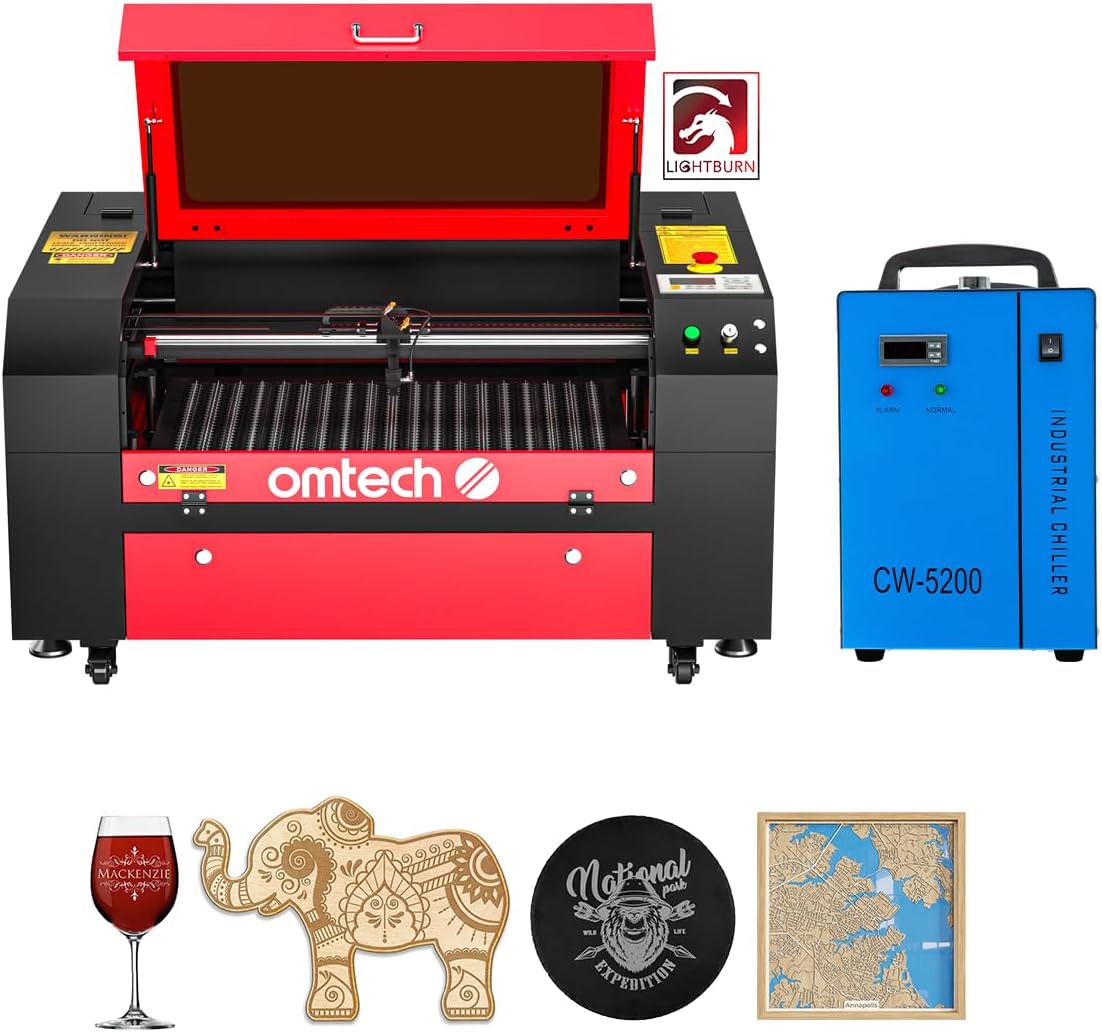
The OMTech Maker 60W CO2 Laser Engraver is a commercial bundle designed for reliability and ease of use. It comes with a water chiller and LightBurn software ensuring consistent performance right out of the box.
We may earn a commission when you buy through this link, at no additional cost to you.
The large 20×28 inch work area accommodates bigger projects easily while the autofocus feature simplifies setup for different material thicknesses. This reduces guesswork and improves precision across multiple runs.
While the machine requires more space and careful handling it delivers professional results for non metal materials. The safety window and air assist keep the workspace clean and protect optics from dust buildup.
For businesses needing a robust CO2 solution this package offers significant value. The included accessories and software make it a solid choice for those ready to commit to CO2 laser engraving.
Adjustable workbeds allow for quick height changes so you can switch between materials without tools or manual recalibration.
Getting a chiller and software included saves money and ensures you have all the necessary components for immediate use.
We may earn a commission when you buy through this link, at no additional cost to you.
The Creality Laser Engraver Falcon2 Pro 60W prioritizes safety with a Class 1 certified enclosure that auto stops if opened. It also bundles a dual laser setup to offer flexibility for various projects.
We may earn a commission when you buy through this link, at no additional cost to you.
The built-in HD camera and free professional software provide tools for accurate alignment and control. This setup is particularly useful for those who want to minimize manual measurement and ensure consistency.
Users should note that while powerful it requires careful setup and attention to safety protocols. The air assist system helps keep the lens clean and improves cut quality over time.
This model is suitable for those needing a safe and capable desktop solution. Its features make it a reliable choice for professional applications where safety compliance is a must.
The auto stop function ensures operation halts if the enclosure is opened protecting users from accidental exposure during use.
Included software like Creality Design Space simplifies the workflow and reduces the barrier to entry for new users.
We may earn a commission when you buy through this link, at no additional cost to you.
The xTool F2 Ultra brings together a 60W MOPA fiber laser and a 40W diode laser in one powerful system. This allows for vibrant color engraving on metal which is rare in this class.
We may earn a commission when you buy through this link, at no additional cost to you.
AI powered cameras provide high precision positioning and material detection to simplify the workflow. The speed and accuracy make it a strong contender for high volume or specialized industrial applications.
While the price is significant the dual laser capabilities offer unmatched versatility. The ability to switch between deep engraving and color marking in one machine is a major benefit for professionals.
If you need advanced features like color metal engraving this unit is top tier. It is best suited for businesses that require high performance and are willing to invest in premium tools.
The MOPA laser allows for over 100 vibrant colors on metal which expands design possibilities significantly.
AI assisted detection and positioning reduce setup time and improve accuracy for repeatable results.
We may earn a commission when you buy through this link, at no additional cost to you.
The Monport 60W Fiber Laser Engraver is built for precision marking with a long life source rated for 100000 hours. It excels at high speed etching on metals using a customized galvanometer system.
We may earn a commission when you buy through this link, at no additional cost to you.
Its small footprint makes it suitable for smaller setups while the LightBurn compatibility ensures flexibility in design. The high accuracy of 0.01mm ensures professional results on intricate designs.
While the work area is limited it is optimized for the precision needed in metal marking. The included software and accessories make it ready for use with minimal additional investment.
This unit is ideal for jewelers or industrial markers needing a dedicated fiber solution. The lifespan and speed make it a cost effective choice over time for regular metal work.
Galvanometer systems allow for extremely fast marking speeds which is vital for high volume metal production tasks.
A long rated lifespan ensures reliability over years of operation reducing the need for frequent replacements.
We may earn a commission when you buy through this link, at no additional cost to you.
The VEVOR 60W CO2 Laser Engraver provides a large 24×16 inch workbed ideal for cutting bigger sheets of acrylic or wood. The four way pass through design allows for long materials without stopping the machine.
We may earn a commission when you buy through this link, at no additional cost to you.
Manual focusing via the control panel gives direct control over the beam placement while the air assist helps keep edges clean. This setup is practical for shops handling varied projects.
While it lacks modern autofocus the reliability and simplicity are strengths. The compatibility with common design software makes it easy to integrate into existing workflows.
This model is best for users needing a large working area at a reasonable price. It is a solid choice for cutting and engraving non metals in a workshop setting.
Pass through doors allow for long materials like pipes or boards to be processed without size constraints.
An included air assist helps prevent burning and keeps the lens clean for better cut quality.
We may earn a commission when you buy through this link, at no additional cost to you.
The OMTech 60W CO2 Laser Engraver adds motorized workbeds to a classic commercial design. This Autolift feature simplifies focusing and makes it easier to handle different material heights quickly.
We may earn a commission when you buy through this link, at no additional cost to you.
The 28×20 inch work area is generous and paired with the chiller and software bundle it offers a complete solution. The four way pass through adds flexibility for large items.
While the cost is higher the motorized features justify the investment for frequent users. The included accessories save time and ensure consistent performance from the start.
This unit is ideal for businesses that need reliable large format cutting. The combination of size and automation makes it a strong choice for professional environments.
Motorized beds adjust at the touch of a button which saves time and improves consistency during repeated setup.
A chiller is essential for CO2 tubes and having it included ensures stable operation in high temperature settings.
We may earn a commission when you buy through this link, at no additional cost to you.
The Aliencell X1 Lite 60W Laser Engraver offers a massive 26×21 inch work area with a Class 1 enclosed safety design. The intelligent auto focus ensures accurate depth without manual adjustments.
We may earn a commission when you buy through this link, at no additional cost to you.
With support for LightBurn and a built-in AI assistant the workflow is streamlined for both beginners and pros. The preview feature helps reduce waste by showing exact depth before cutting.
While it is an investment the precision and safety features are top tier. The SGS certification and flame sensors add peace of mind for users in shared spaces.
This model is best for those needing a safe large format engraver. Its features make it a reliable choice for detailed work that demands accuracy and safety.
The Class 1 enclosure and flame sensors provide a secure environment that minimizes risk during operation.
Seeing depth and contrast before cutting saves material and reduces trial and error for high value projects.
We may earn a commission when you buy through this link, at no additional cost to you.
The Cloudray 60W JPT MOPA Fiber Laser Engraver is a portable industrial solution for metal marking. It includes two lenses and a manual lift column for flexibility in focus depth.
We may earn a commission when you buy through this link, at no additional cost to you.
The 0.5mm engraving capability allows for detailed 2.5D engraving which is perfect for jewelry or small parts. The JPT source ensures consistent power and high marking quality.
While the working area is smaller it is optimized for precision tasks. The Class 2 rating requires goggles but this is standard for open fiber systems in controlled environments.
This machine is best for those needing reliable deep engraving on small parts. Its portability and power make it a strong choice for specialized industrial applications.
Included lenses allow for different focal areas to suit various task sizes.
Deep engraving on stainless steel is achievable with consistent quality for professional results.
We may earn a commission when you buy through this link, at no additional cost to you.
Selecting the right 60W laser engraver requires understanding power type safety and workspace needs.
60W models come in diode CO2 and fiber types. Diodes excel on wood and acrylic CO2 is for larger sheets and fiber is best for metals.
Choose the type that matches your primary materials to ensure efficiency and longevity.
Look for Class 1 or Class 2 ratings. Class 1 enclosures contain the beam and smoke making them safer for home or shared use.
Ensure the machine meets safety standards like SGS or UL to protect users during operation.
Work areas range from small desktop spots to large commercial beds. Consider the maximum material size you plan to cut regularly.
A larger bed increases flexibility but requires more floor space and a dedicated table for support.
Support for LightBurn is a standard for professional control. Some machines include free software which can save initial costs.
Ensure the software supports your design workflow and offers the necessary tools for alignment and preview.
Manual focus knobs are common but motorized autolift systems save time. Accurate focus is critical for clean edges and deep engraving.
Auto focus or smart camera systems can reduce setup time and improve precision across batches.
Air assist helps clear debris and prevents burn marks. For CO2 units a water chiller is vital to protect the laser tube.
Check if these features are included or require separate purchase to budget accurately.
Built-in cameras allow for material preview and batch positioning. This reduces manual measurement and ensures designs stay within bounds.
Look for models with AI features that suggest settings for specific materials automatically.
Official support and warranty terms vary by brand. A responsive team helps resolve issues quickly and minimizes downtime.
Prioritize manufacturers that offer clear documentation and accessible customer service channels.
Begin by setting up the machine in a well ventilated area. Connect the power and ensure the exhaust is clear to prevent heat buildup.
Always perform a focus test on scrap material before running a full project. Check that the lens and mirrors are clean to maintain beam quality.
Clean the bed and tray after each use to remove debris. Follow the manual for software updates and inspect safety sensors regularly to ensure safe operation.
A 60W laser engraver typically cuts non metals like wood acrylic leather paper and some coated metals. Fiber versions are needed for bare metals like steel and brass.
Class 1 units are safer because the enclosure blocks the beam entirely. Class 2 requires safety glasses during operation but is acceptable in controlled environments.
Not all models require it but it is standard for control. Many machines include free software so check compatibility before buying if you rely on LightBurn.
Clean the lens every few hours of use or whenever cuts become weak. Use a soft cloth and lens cleaner to avoid scratching the coating.
Yes if it is enclosed and has air extraction. Ensure smoke exhaust reaches a window or uses a filter to maintain air quality.
CO2 tubes last around 1000 to 3000 hours while fiber sources can last up to 100000 hours. Diodes fall between these depending on use.
Yes cameras allow for material preview and alignment. This reduces setup time for multiple items and improves consistency in large runs.
Only for CO2 lasers. Diode and fiber systems usually have internal cooling fans. A chiller protects the tube from overheating during long runs.
The Creality Falcon2 Pro leads as a versatile choice for safety and performance. It balances power with a Class 1 enclosure for secure operation.
For metal specialists the xTool F2 Ultra offers unmatched color engraving and MOPA technology. It stands out for advanced industrial applications.
Prices and stock change often so verify current specs and warranty details before purchasing. Choose the model that fits your workspace and safety requirements.