
Redragon K617 Wired 60% Compact Hot-Swap RGB Gaming
4.6Editor score
60 percent compact layout
RGB lighting modes included
Durable switch lifespan
Software customization support
Explore our expert guide comparing the top 5 pin hot swappable keyboard models for gamers and typists seeking customizable mechanical switches.
Finding the right input device is crucial for productivity and gaming performance. A 5 pin hot swappable keyboard offers flexibility to change switches without soldering, allowing users to tailor tactile feedback to their specific needs and preferences.
We evaluated ten distinct models based on build quality, switch compatibility, and customization options. Our analysis covers wired and wireless options across various layouts, ensuring you find a board that fits your desk setup and usage patterns effectively.
Each selection highlights unique features like RGB lighting, polling rates, and keycap materials. Note that pricing fluctuates frequently due to market demand and seasonal promotions, so verify current costs before making your final purchase decision today.
4.6Editor score

4.5Editor score
4.4Editor score
This side-by-side comparison highlights key specifications across all ten selected keyboards to help you identify the best match for your specific typing and gaming requirements.


The Keychron V6 8K stands out as a top-tier option for enthusiasts seeking high performance and customization. With a rating of 4.5 stars, this full-size mechanical keyboard delivers exceptional speed and reliability. Its standout feature is the 8000 Hz polling rate, ensuring minimal input lag for competitive gaming and rapid typing tasks.
We may earn a commission when you buy through this link, at no additional cost to you.
This keyboard supports hot-swappable sockets that accept most 3-pin and 5-pin MX-style switches, giving you the freedom to tailor your typing experience without soldering. The OSA profile PBT keycaps provide durability and resistance to shine over time. Additionally, the inclusion of QMK and Keychron Launcher allows for deep customization of macros and key functions across the entire layout including the numpad.
While the build quality is premium with sound-absorbing foam, the price reflects these advanced features. Some users might prefer a wireless option, but the stable Type-C connection ensures consistent performance. The RGB lighting offers over 22 effects and zone customization to match your setup aesthetics.
If you need a versatile keyboard for both Mac and Windows environments with professional-grade responsiveness, the Keychron V6 8K is an excellent investment. It balances premium materials with open-source firmware support, making it ideal for power users who demand precision and flexibility in their daily workflow.
The 8000 Hz polling rate via Type-C connection reduces input lag significantly compared to standard 1000 Hz boards. This ensures your commands register instantly during fast-paced competitive matches.
Open-source QMK firmware allows you to remap keys and create complex macros easily. The Keychron Launcher web app simplifies the process of configuring layouts without needing command-line tools.
We may earn a commission when you buy through this link, at no additional cost to you.
The Redragon K617 offers an accessible entry point into mechanical keyboards with hot-swap capabilities. Rated 4.6 stars by users, this 60% compact board balances performance and affordability effectively. It features upgraded sockets compatible with nearly any 3-pin or 5-pin switch, allowing for smooth upgrades without soldering tools.
We may earn a commission when you buy through this link, at no additional cost to you.
Designed for gaming and productivity, the 60% layout frees up desk space for wider mouse movements. The RGB lighting includes up to 20 preset modes with adjustable brightness to suit any mood. Its switches are rated for 50 million keypresses ensuring longevity even under heavy daily usage scenarios.
While the software is less advanced than high-end options, the onboard controls provide sufficient customization for most users. The white and grey colorway offers a unique aesthetic compared to typical all-black gaming keyboards. However, it lacks wireless options which might limit flexibility for some setups.
This keyboard is ideal for budget-conscious gamers or typists who want the freedom to swap switches later. If you need a reliable compact board that supports standard MX-style switches at a low cost, the Redragon K617 delivers excellent value without compromising on essential features.
You can customize your keyboard feel by swapping switches without expensive tools. The budget-friendly price makes it a low-risk option for experimenting with different tactile profiles.
The compact 60% design removes the numpad to maximize mouse room. This layout is perfect for FPS gamers who need wide desk space to lower sensitivity and improve aim.
We may earn a commission when you buy through this link, at no additional cost to you.
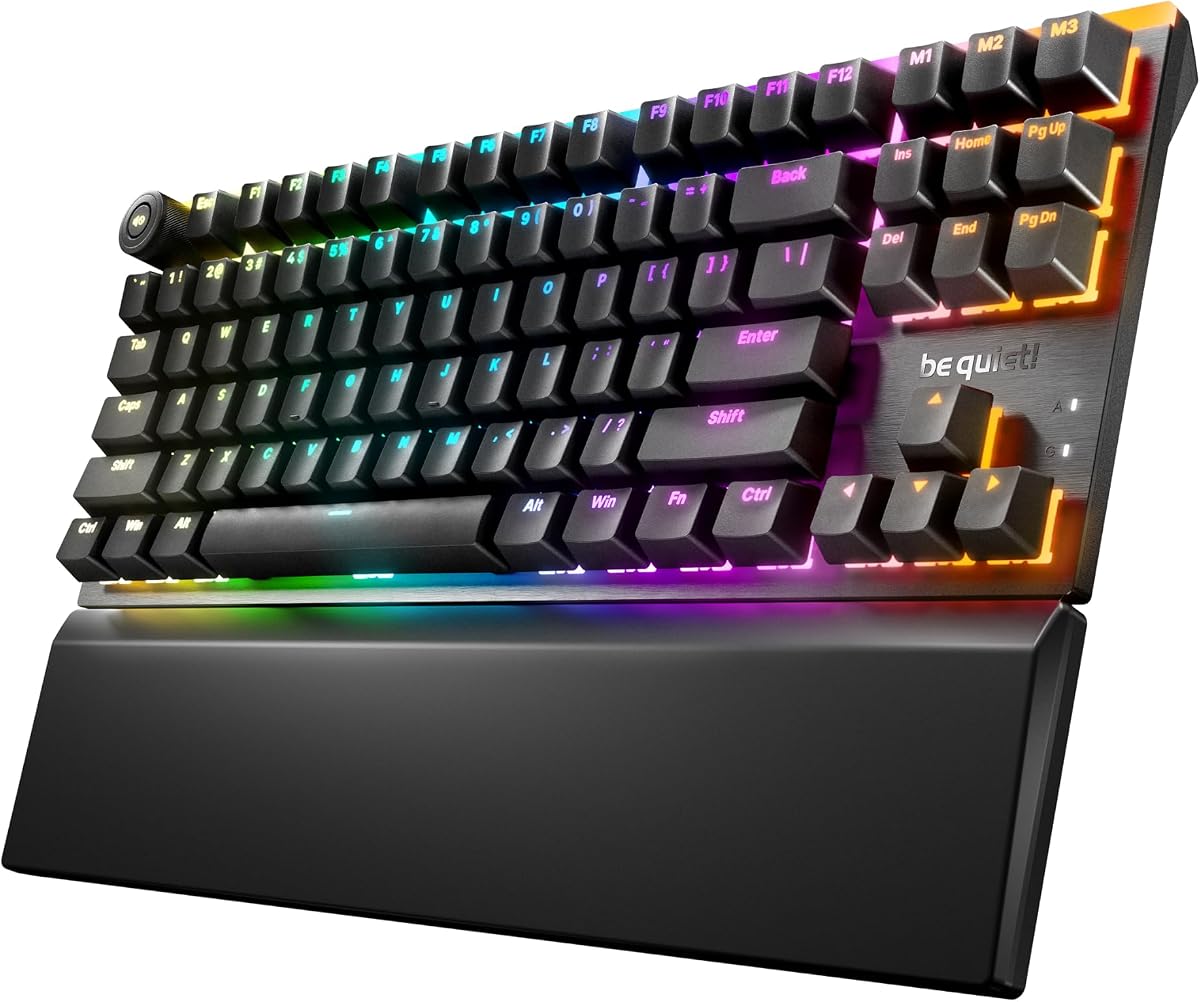
The be quiet! Light Mount TKL prioritizes silence and premium build quality for professionals and gamers. With a 4.4 star rating, it features hot-swappable 5-pin MX-style switches that allow for customization without soldering. The silent pre-lubricated switches ensure smooth and ultra-quiet keystrokes suitable for shared workspaces.
We may earn a commission when you buy through this link, at no additional cost to you.
Its build quality stands out with a brushed aluminum top plate and three layers of noise-reduction foam. These elements minimize typing noise and resonance creating a refined acoustic experience. The Quick Tap SOCD technology enhances competitive gaming by prioritizing the latest key input for faster directional changes in FPS titles.
While the price is higher than average, the materials justify the cost for those seeking durability. The programmable media wheel and magnetic palm rest add convenience. However, it lacks the extensive RGB customization found in cheaper models focusing more on functionality and build integrity.
If you need a high-end silent keyboard for office use or late-night gaming, this is a strong choice. It combines solid construction with hot-swap flexibility making it a premium solution for users who value acoustic comfort and reliable performance over flashy lighting effects.
Three integrated noise-reduction layers minimize unwanted resonance and typing noise. This ensures a quiet mechanical experience even during intense typing sessions or shared office environments.
The brushed aluminum top plate adds durability and a high-end aesthetic. Durable double-shot PBT keycaps ensure legends remain visible and the keys stay crisp over time.
We may earn a commission when you buy through this link, at no additional cost to you.
The TECWARE Phantom+ Elite combines wireless freedom with hot-swap versatility making it a strong competitor. Rated 4.4 stars it supports Bluetooth 5.0 2.4GHz wireless and USB-C wired modes. This flexibility allows seamless switching between up to three paired devices instantly for efficient multi-device workflows.
We may earn a commission when you buy through this link, at no additional cost to you.
Its hot-swap sockets accept virtually all MX-style 5-pin switches enabling deep customization without soldering. The keyboard features premium double-shot PBT keycaps for lasting durability and resistance to shine. With a 2500mAh battery it delivers up to 250 hours of wireless use reducing frequent charging needs.
Per-key RGB lighting with 16.8 million colors enhances visual customization for any setup aesthetic. While wireless performance is strong some users might find the tactile switches less smooth out of the box compared to pre-lubed options. The build remains robust with sound dampening foam improving acoustic quality.
This keyboard suits users needing both productivity and gaming features across multiple devices. If you value wireless connectivity alongside hot-swap customization this model provides a reliable balance. It is an excellent choice for professionals or gamers who want to customize switches while maintaining a clutter-free wireless desk.
Switch between Bluetooth and 2.4GHz instantly for different tasks. Use 2.4GHz for gaming to ensure low latency and Bluetooth for productivity to save battery power on the go.
A 2500mAh rechargeable battery powers long sessions without interruption. This capacity supports up to 250 hours of continuous use ensuring you remain productive throughout the workday or gaming marathon.
We may earn a commission when you buy through this link, at no additional cost to you.
The RK ROYAL KLUDGE RK61 is a compact powerhouse for those wanting deep programming capabilities. Rated 4.6 stars it features QMK and VIA support allowing extensive key remapping and macro creation. Its 60% layout concentrates essential functions into a minimal frame ideal for saving desk space.
We may earn a commission when you buy through this link, at no additional cost to you.
The hot-swappable PCB supports both 3-pin and 5-pin switches enabling easy customization without soldering. Pre-lubed red switches provide a smooth linear experience suitable for fast-paced gaming or typing. The detachable Type-C cable ensures stable connection and convenience for transport or replacement.
RGB backlighting with 18 modes adds visual flair and customization options. While the compact layout lacks dedicated arrow keys it uses function layers for access. Build quality is solid but the lack of wireless connectivity limits portability for mobile users.
If you value software customization and compact design this keyboard delivers strong performance. It appeals to enthusiasts who want to program complex macros and swap switches freely. For gamers needing extra mouse room or professionals seeking a clean desk the RK61 is a practical and affordable choice.
Open-source QMK and VIA software allow deep customization of keys and macros. You can remap keys and create complex functions to match your workflow efficiently.
The 61-key layout saves significant desk space while maintaining essential functionality. This design is preferred by FPS gamers needing room for wide mouse movements.
We may earn a commission when you buy through this link, at no additional cost to you.
The Keychron C1 TKL offers a streamlined approach to hot-swap keyboards without RGB complexity. Rated 4.7 stars it features a tenkeyless layout compatible with both Mac and Windows. The hot-swap sockets allow you to customize your typing experience without soldering making it accessible for beginners.
We may earn a commission when you buy through this link, at no additional cost to you.
It includes a detachable USB Type-C cable for a stable wired connection. The white backlight shines through double-shot ABS keycaps providing clear visibility. Two levels of adjustable feet ensure comfortable typing ergonomics for various desk setups.
While it lacks RGB and premium PBT keycaps it excels in reliability and layout compatibility. The included extra keycaps for both operating systems add versatility. However, some users might find ABS keycaps less durable than PBT over time.
This keyboard is ideal for Mac users wanting a simple hot-swap solution. It balances price and functionality well for office or light gaming use. If you prefer a clean minimalist look and need Mac/Windows switching capability the Keychron C1 is a solid option.
Designed specifically to support both macOS and Windows layouts. Includes dedicated multimedia keys and extra caps for seamless transition between operating systems without software tweaks.
The inclined bottom frame with two levels of adjustable feet improves comfort. This design allows you to customize the typing angle to reduce wrist strain during long sessions.
We may earn a commission when you buy through this link, at no additional cost to you.
The X82 Wired Gaming keyboard stands out with a unique volume knob in a compact 60% frame. Rated 4.6 stars it features a high-grade CNC aluminum knob for precise control over media and volume levels. This addition enhances typing efficiency without needing software shortcuts.
We may earn a commission when you buy through this link, at no additional cost to you.
It supports hot-swap 3-pin and 5-pin switches allowing users to replace switches without soldering. The two-color injection molding keycaps make characters transparent and luminous for clear visibility in the dark. With over 20 RGB backlight modes it offers customization for gaming setups.
Full anti-ghosting ensures all keys register simultaneously during intense gaming. While the build quality is decent the linear red switches offer a smooth and quiet experience suitable for open offices. However, it lacks the advanced macro programming found in other models.
If you want a compact board with a functional media control knob this is a good pick. It balances aesthetics and utility well for gamers and users. It suits those needing a small desk footprint and tactile media control without sacrificing hot-swap customization.
The built-in CNC aluminum knob offers tactile volume control. This improves efficiency and enjoyment by allowing quick adjustments without switching applications or using keyboard shortcuts.
Translucent characters on injection-molded keycaps remain visible in low light. This ensures you can see keys clearly during night gaming or typing without needing excessive ambient lighting.
We may earn a commission when you buy through this link, at no additional cost to you.
The FANTECH Maxfit61 is a classic 60% keyboard designed for customization and compact setups. Rated 4.6 stars it supports universal hot-swappable switches including 5-pin and 3-pin options. This flexibility lets you replace switches from any brand to meet specific typing needs without soldering.
We may earn a commission when you buy through this link, at no additional cost to you.
Its pre-lubed stabilizers ensure smooth movement on larger keys like Enter and Shift. The RGB backlight offers 18 modes with adjustable brightness for personal aesthetics. This layout provides all power of a full board in a smaller footprint ideal for gamers.
While the blue clicky switches included are loud for some environments the ability to swap them helps. The accessory kit includes a switch puller and keycap puller for convenience. However, software features are basic compared to more advanced boards.
This is a great choice for beginners wanting to enter the custom keyboard hobby. It balances cost and features effectively. If you want a small, customizable board with smooth stabilizers out of the box the Maxfit61 is a solid option to consider.
You can replace switches freely without soldering to tailor your experience. The universal support allows you to experiment with different feel and feedback options easily.
Pre-lubed stabilizers reduce rattle on larger keys. This ensures smooth and consistent strokes on the Enter Shift and Space keys for a premium feel.
We may earn a commission when you buy through this link, at no additional cost to you.
The aikeec Black OSU offers a compact 5-key keypad ideal for macro programming or gaming shortcuts. Rated 4.4 stars it features a plug-and-play HID interface requiring no drivers for basic use. Each button can be set to a unique function allowing independent actions without interference.
We may earn a commission when you buy through this link, at no additional cost to you.
Its upgrade Cherry shaft and RGB LED enhance gaming experience and aesthetics. The software allows autonomous programming of macros for streamlined workflows or gaming commands. While it is not a full keyboard it complements main setups effectively for specialized tasks.
Setup on Mac requires initial configuration on Windows which may be a hurdle. The transport risk of loose switches is noted but easily resolved by reseating them. Overall it provides a focused tool for users needing quick access to complex commands.
This accessory suits gamers needing extra buttons or professionals needing macro shortcuts. It balances functionality and size well. If you need a small programmable device to save keystrokes this keypad is a practical addition to your existing setup.
Each button can be assigned a unique function or macro. This allows for rapid execution of complex commands improving efficiency in gaming and specialized workflows.
The 5-key layout saves desk space while retaining essential functions. It is easy to move and fits well on crowded desks or mobile gaming stations.
We may earn a commission when you buy through this link, at no additional cost to you.
The Keyboard Versatile Hotswap is a specialized product offering 5-pin switches to upgrade existing keyboards. These switches are compatible with most mechanical boards allowing easy customization without soldering. They feature high-quality PA66 and POM materials for enhanced durability and consistent performance.
We may earn a commission when you buy through this link, at no additional cost to you.
Meticulously lubed for quieter operation these switches provide smooth tactile or linear feedback. This makes them ideal for environments where noise is a concern. The versatility allows enthusiasts to tailor keyboard feel without buying a whole new board.
While it is not a full keyboard it serves a specific purpose for builders. Users should ensure their board supports 5-pin hot-swap sockets. The build quality suggests reliability for long-term use in custom builds.
If you are upgrading an existing board and want smoother quieter switches this set helps. It offers a budget-friendly path to improve typing feel. For hobbyists looking to refine their current gear without replacing the entire keyboard this component is a practical tool.
These switches are lubricated to reduce noise and improve smoothness. This is perfect for environments where quiet typing is essential such as late-night gaming or shared offices.
Constructed from high-quality PA66 and POM materials for longevity. These materials ensure the switches maintain consistent performance over time and resist wear.
We may earn a commission when you buy through this link, at no additional cost to you.
Selecting the right keyboard requires evaluating several technical factors to ensure it matches your usage patterns and preferences effectively.
Hot-swap sockets determine which switches you can use. Ensure the keyboard supports both 3-pin and 5-pin if you plan to use various third-party switches. This flexibility allows you to customize without soldering later.
Look for universal MX-style compatibility to avoid being locked into a single brand. This ensures you can experiment with different switches as your needs change.
Decide between full-size TKL or compact layouts based on desk space. A 60% board saves space for mouse movement while TKL retains a numpad for productivity. Consider how much room you need for peripherals.
Compact layouts like 60% remove dedicated arrow keys requiring function layers for access. Ensure you are comfortable with these layers before buying to avoid frustration.
Materials like aluminum plates and PBT keycaps enhance durability and feel. PBT resists shine and provides better texture than ABS plastic over time. Aluminum adds weight and stability reducing typing vibration.
Check for features like screw-in stabilizers for reduced rattle on larger keys. These details contribute to a more premium typing experience and long-term satisfaction.
Wired keyboards offer zero latency ideal for gaming. Wireless options provide flexibility but depend on battery life and charging cycles. Determine if mobility or performance priority for your setup.
Check battery capacity for wireless models to ensure it meets usage needs. A 2500mAh battery is sufficient for long days without frequent recharges.
Software support enables remapping keys and creating macros. QMK or VIA open-source firmware provides deep customization for enthusiasts. Proprietary software often limits flexibility but remains user-friendly for basic users.
Ensure the software is compatible with your operating system. Cross-platform support is essential if you switch between Mac and Windows regularly.
RGB lighting adds visual flair and customization options for setups. Per-key RGB allows unique patterns while zones offer simpler modes. Some keyboards offer only white backlighting for a cleaner look.
Consider your preference for static versus dynamic lighting effects. Adjustable brightness ensures visibility in different lighting conditions without being distracting.
Internal foam layers and switch dampening reduce typing noise significantly. Quiet keyboards are essential for office environments or shared living spaces. Look for models specifically marketed as silent or low-noise.
Thick keycaps and stabilizers also contribute to sound reduction. Testing audio samples online can help gauge the acoustic profile before purchasing.
Budget keyboards offer basic hot-swap features while premium ones add build quality. Determine your spending limit to balance cost with desired features. Often, mid-range options provide the best value for enthusiasts.
Check for included accessories like keycap or switch pullers which save extra costs. Bundled kits enhance value and simplify the customization process immediately.
To swap switches safely unplug the keyboard and use a switch puller to lift old switches gently. Align the new switch pins with the socket and press down firmly until it clicks into place. This prevents damage to the PCB during changes.
Clean your keyboard regularly with compressed air to remove dust and debris from switches. Wipe keycaps with a damp cloth to remove oils and grime. Proper maintenance extends the life of the PCB and switches significantly.
Store the keyboard in a dry environment away from direct sunlight to prevent material degradation. If using wireless models charge the battery periodically even if not in use to maintain health. These practices ensure longevity and consistent performance.
Yes, most hot-swap boards support both types. 3-pin switches lack the two bottom stabilizing legs but fit into 5-pin sockets. You may need to remove the legs from 5-pin switches to fit 3-pin boards but not vice versa.
No, hot-swap keyboards eliminate the need for soldering. You can swap switches using a puller tool by simply popping old ones out and pressing new ones in. This makes customization accessible even for beginners without soldering skills.
Generally no you should unplug the keyboard before swapping switches. Swapping while connected could damage the PCB or cause electrical issues. Always disconnect power before making hardware changes for safety.
Linear switches are preferred for gaming due to smooth actuation without tactile bumps. This reduces resistance and fatigue during rapid key presses. However, personal preference plays a major role in selecting the best switch.
Remove keycaps and use compressed air to blow out dust. If sticky use is small brush or compressed air to clear debris. Do not use water directly on the PCB to avoid short circuits or corrosion.
Most quality mechanical switches are rated for 50 million keypresses or more. This ensures they last for years even with heavy daily use. Regular maintenance and proper handling can extend this lifespan significantly.
The top picks include the Keychron V6 8K for performance TECWARE Phantom+ Elite for versatility and Redragon K617 for budget value. Each offers unique strengths depending on your specific needs and budget constraints for daily use.
Prioritize features like compatibility layout and connectivity that align with your workflow. Wireless options offer freedom while wired models ensure reliability and speed during competitive activities.
Always check current pricing and availability before purchasing as deals change frequently. Verify the switch compatibility with your preferred custom options to ensure a smooth customization experience.