
22MP Film & Slide Scanner with 5 LCD LCD
4.3Editor score
Affordable price point
Five inch LCD screen
Multiple film format support
Discover the best 35mm slide scanner options for digitizing old film. This guide compares top models with screens, specs, and ease of use.
Digitizing old film memories requires a reliable 35mm slide scanner that balances quality with ease of use. Modern devices offer large screens and standalone operation, letting you convert negatives without a computer. Choosing the right model ensures your cherished photos remain vibrant for years to come.
We evaluated ten top-rated scanners based on resolution, display quality, and format compatibility. Each product was reviewed for its ability to handle various film types like 135, 110, and 126. Our goal is to help you find a device that fits your specific archiving needs.
Each pick below highlights key strengths, pros, and cons to guide your decision. Prices and availability change frequently, so verify current details before purchasing. Whether you need a budget-friendly option or a premium touch screen model, this list covers the best available now.
4.3Editor score

4.3Editor score

5.0Editor score
This side-by-side comparison highlights the key specifications and features of each top-rated 35mm slide scanner. From resolution and screen size to format support and included accessories, these details help you differentiate between similar models quickly.


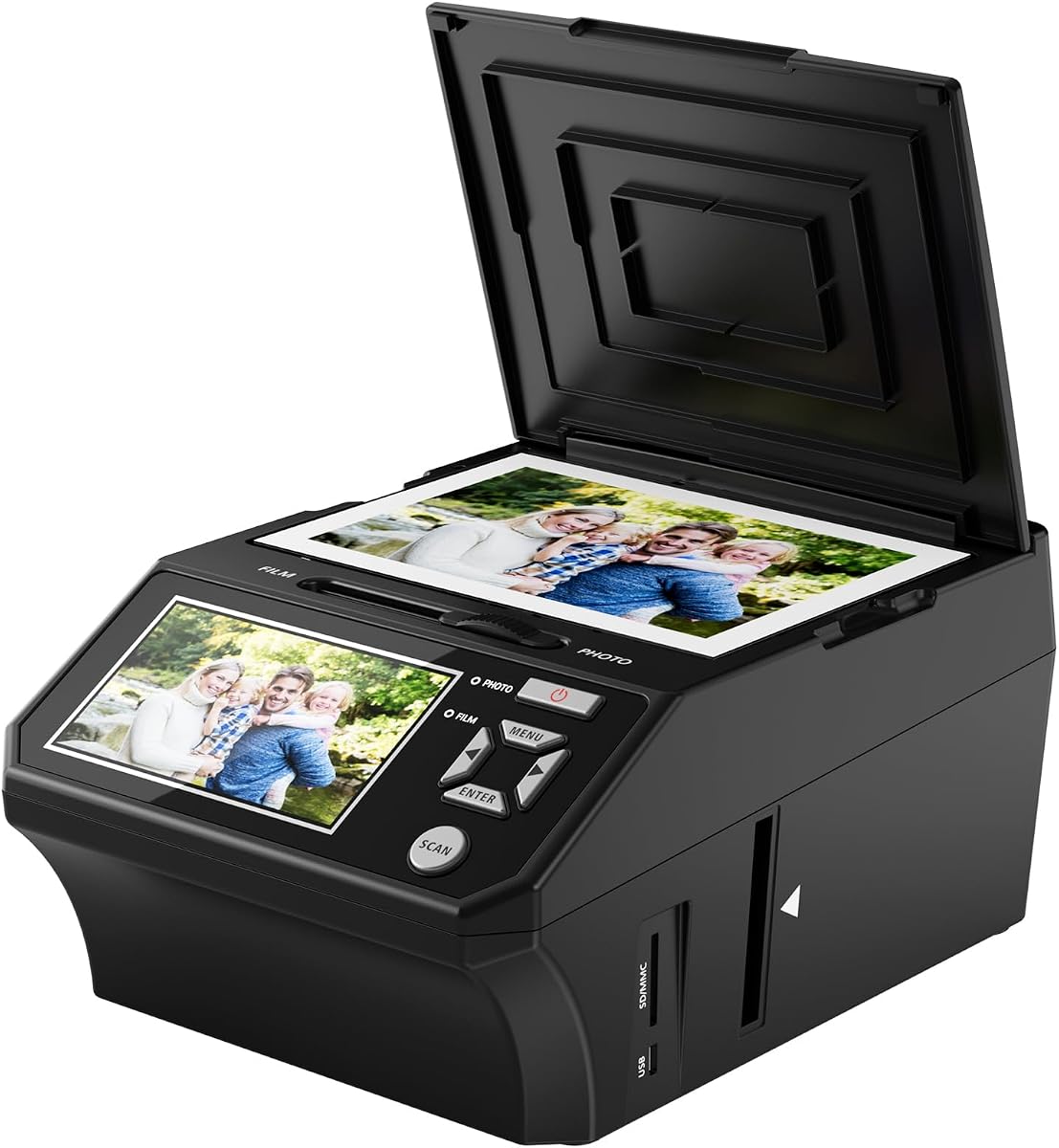




The KODAK Slide N Scan stands out as a reliable 35mm slide scanner for home archivists. With a 22MP digital output and a large 5-inch LCD screen, it allows instant previewing without needing a computer. Its 4.3 rating reflects consistent performance across various film types.
We may earn a commission when you buy through this link, at no additional cost to you.
This device excels in convenience, offering quick-feeding tray technology for continuous loading. You can adjust brightness and color with a single touch, making it user-friendly for all ages. The included adapters handle 135, 110, and 126mm formats, covering most standard collections.
However, the SD card is not included, which is a minor inconvenience for immediate use. Some users note the software interface can be slower on older computers when transferring files. These trade-offs are acceptable given the device's standalone capabilities and high-resolution output.
If you need a versatile scanner that works independently of a PC, this is a top choice. It is perfect for families looking to digitize memories quickly without technical hurdles. The glossy design also blends well in home offices or living rooms.
The 5-inch LCD allows you to view and edit photos immediately after scanning.
Adapters for 135, 110, and 126mm ensure compatibility with diverse collections.
We may earn a commission when you buy through this link, at no additional cost to you.
The Magnasonic All-in-One scanner is designed for those with mixed film formats. It offers 24MP resolution and supports Super 8 film alongside standard slides. Its 4.3 rating highlights its durability and ability to produce high-quality digital files.
We may earn a commission when you buy through this link, at no additional cost to you.
A standout feature is the ability to view scans directly on a TV using HDMI. This makes family viewing sessions enjoyable without transferring files to a computer. The fast-loading trays help streamline the process, scanning images in under five seconds.
On the downside, the HDMI cable is not included, requiring an extra purchase. The unit is also heavier than some competitors, which might matter for portability. These issues are minor compared to its broad format support and clear display.
Choose this model if you have vintage film reels to digitize. It provides a comprehensive solution for archiving diverse media types. The standalone workflow ensures you can focus on scanning rather than software setup.
Unique support for Super 8 film adds value for vintage collectors.
View scanned photos on a large screen for easy family sharing.
We may earn a commission when you buy through this link, at no additional cost to you.
The KODAK Slide N Scan Max improves on the original with a streamlined tray. This design allows efficient digitization without constant repositioning. With 22MP interpolation, it captures detailed images up to 4208×3120 resolution.
We may earn a commission when you buy through this link, at no additional cost to you.
It saves directly to SD cards, removing the need for a PC during workflow. The one-touch editing simplifies resizing and converting, making it accessible for non-tech users. Its 4.2 rating suggests solid performance for home archiving tasks.
The price is higher than basic models, but the continuous feed feature may save time. The SD card omission is standard but inconvenient. These factors are worth considering if you have large batches of slides.
Ideal for users with extensive collections, this scanner offers efficiency. It balances quality with ease of use for daily scanning. Ensure you have a compatible SD card ready before starting.
The smooth-moving tray reduces interruptions during scanning sessions.
22MP interpolation ensures crisp details for large digital prints.
We may earn a commission when you buy through this link, at no additional cost to you.
This all-in-one digital photo converter offers a 3-year warranty, providing peace of mind. It handles 35mm slides, negatives, and even printed photos like 3R and 4R. The 4.4 rating reflects user satisfaction with its performance and reliability.
We may earn a commission when you buy through this link, at no additional cost to you.
The 5-inch HD screen ensures vibrant previews, making editing intuitive. It includes an 8GB SD card, so you can start scanning right out of the box. The one-touch buttons simplify the process, reducing learning time.
While the brand is less recognized, the support seems solid given the warranty. The interface is functional but may lack advanced features compared to premium models. It remains a practical choice for casual users.
Best for families wanting a robust device without complexity. The ability to scan printed photos adds versatility. Prioritize this if long-term support is a priority for your project.
Digitize both film and printed photos with one device.
Start scanning immediately without extra accessory purchases.
We may earn a commission when you buy through this link, at no additional cost to you.
This model offers excellent value for those on a budget. It supports 35mm, 110, and 126mm formats plus Super 8 film. With 22MP resolution and a 5-inch LCD, it delivers quality scans without breaking the bank.
We may earn a commission when you buy through this link, at no additional cost to you.
It includes USB and HDMI cables, plus power adapter, ensuring you can view on a TV. The built-in 128MB memory allows basic storage before transferring to an SD card. Its 4.3 rating confirms reliable performance for the price.
The build is simpler than premium units, and SD cards are not included. However, for occasional use, these trade-offs are minimal. It provides a clear path from film to digital files easily.
Perfect for beginners or those scanning a small collection. The HDMI output adds a nice touch for family viewing. Consider this if cost is a primary factor in your decision.
Connect directly to a TV for easy sharing of scanned memories.
Lightweight design makes it easy to store or move around.
We may earn a commission when you buy through this link, at no additional cost to you.
The HP FilmScan offers a premium experience with a 7-inch touch screen. It transforms negatives into vivid digital memories using a 13MP sensor. Its 4.0 rating indicates good quality with slight room for improvement.
We may earn a commission when you buy through this link, at no additional cost to you.
The quick-feed loading tray simplifies processing mixed collections. You can crop and adjust scans directly on the display without extra software. This workflow is efficient for those who want professional-quality results effortlessly.
While the resolution is lower than some competitors, the touch interface compensates with usability. The price is higher, but the build quality feels more durable. It suits those valuing design and interface over raw megapixels.
Ideal for professionals or enthusiasts seeking a polished device. The touch screen reduces buttons, making navigation smoother. If you prefer modern interaction, this model stands out in the market.
Navigate menus easily with a responsive touch screen.
CMOS sensor preserves fine details for high-quality archives.
We may earn a commission when you buy through this link, at no additional cost to you.
This HP model combines touch screen usability with modern USB-C power. It supports 135, 126, and 110 formats using a quick-load tray. The 4.3 rating reflects satisfaction with its versatile use across different film types.
We may earn a commission when you buy through this link, at no additional cost to you.
USB-C versatility allows efficient power from PCs or adapters, simplifying setup. The 22MP interpolation enhances clarity beyond the base 13MP sensor. It saves to SD cards directly, ensuring offline archiving is possible.
While it lacks some advanced features of higher-end models, the power convenience is key. The resolution limits may not suit large print needs but are fine for digital sharing. This makes it a practical hybrid for modern users.
Choose this if you prefer USB-C charging and a touch interface. It balances traditional scanning with modern connectivity. Ensure you have the right adapters if not using a PC for power.
USB-C support aligns with current device standards for easier use.
22MP interpolation boosts detail for better digital results.
We may earn a commission when you buy through this link, at no additional cost to you.
The KODAK SCANZA is ideal for those with space constraints. It handles 35mm, 8mm, and Super 8 with a 22MP interpolated output. Its 4.2 rating shows reliable quality for various film formats.
We may earn a commission when you buy through this link, at no additional cost to you.
The 3.5-inch LCD is bright and adjustable, allowing easy viewing. It includes an HDMI cable and cleaning brush, aiding setup and maintenance. The adapters ensure flexibility for different film types and sizes.
The screen is smaller than other models, which may affect preview comfort. SD cards are not included, adding minor costs. However, its compact size is a major plus for storage.
Best for users with limited desk space or specific film formats. It balances size with functional capability. Consider this if portability and storage matter most to you.
Small footprint fits easily on any desk or table.
Handles 8mm and Super 8 for older collections.
We may earn a commission when you buy through this link, at no additional cost to you.
This portable scanner focuses on 35mm negatives and slides for simplicity. It features a 2.4-inch screen for instant preview. Its 3.9 rating suggests basic functionality works but lacks advanced features.
We may earn a commission when you buy through this link, at no additional cost to you.
Fast-load adapters ensure stability during scanning, preventing blur. It requires no software, saving directly to SD cards. The small size makes it easy to carry for traveling or storage.
Limited to 35mm, it won't handle other formats. The small screen may be hard to use for detailed edits. However, for dedicated 35mm conversion, it performs adequately.
Ideal for those needing a lightweight option for specific film. It is great for quick conversions without computer setup. Prioritize if 35mm is your only format of interest.
Small design fits in a bag for scanning on the go.
No drivers needed for straightforward operation.
We may earn a commission when you buy through this link, at no additional cost to you.
The ClearScan T7 boasts a perfect 5.0 rating for user satisfaction. It offers a 7-inch touch screen and 24MP output for clarity. This model excels in reducing confusion for beginners and families.
We may earn a commission when you buy through this link, at no additional cost to you.
It includes a 16GB SD card, ready for immediate use. The touch interface helps avoid button errors, making it comfortable for all ages. It handles various formats including Super 8 for comprehensive needs.
Being a newer brand, long-term support is unproven compared to legacy brands. The price is higher but aligns with the included accessories and interface. These factors are minor given the high user feedback.
Best for those wanting a plug-and-play solution with modern design. It is perfect for families with mixed film collections. Prioritize this if interface and ease of use are top priorities.
Touch interface simplifies scanning for first-time users.
Includes 16GB SD card for instant scanning setup.
We may earn a commission when you buy through this link, at no additional cost to you.
Selecting a 35mm slide scanner depends on your film formats, desired resolution, and ease of use. This guide covers key factors to consider.
Resolution determines how detailed your digital files will be. Higher megapixel counts allow for better zooming and large prints. Look for at least 20MP interpolated output for standard archival needs.
Prioritize scanners with high native sensors to ensure sharp details.
A large LCD screen helps you preview and edit without a computer. Touch screens add convenience but may cost more. Non-touch screens are often more affordable and functional.
Choose a screen at least 5 inches for comfortable viewing.
Ensure the scanner supports all your film types like 135, 110, and Super 8. Some models only handle 35mm which limits versatility. Check included adapters for compatibility.
Select models that match your collection diversity.
USB allows file transfer to PC while HDMI enables direct TV viewing. Modern scanners may use USB-C for better compatibility. Verify cables are included in the bundle.
Choose based on how you want to view images.
Most modern scanners work without a computer. This simplifies the workflow and reduces dependency on software. Look for direct SD card saving capabilities.
Prioritize standalone features for simpler setups.
Built-in editing tools allow brightness and color adjustment. This reduces post-processing time on a computer. One-touch functions can save significant time.
Check for basic editing capabilities in the device.
Established brands often offer better support and reliability. Warranty terms vary significantly so check coverage details. Longer warranties provide peace of mind.
Consider brand reputation and warranty length.
Prices vary widely based on features. Determine your budget and prioritize must-have specs. Sometimes mid-range models offer the best balance.
Balance features with your specific needs.
Start by assembling the device and inserting a memory card if required. Connect power and turn on the scanner to access the main menu. Ensure the device is stable on a flat surface.
Insert film using the correct adapter for your format. Clean the film gently before scanning to avoid dust marks. Use the preview function to check alignment.
After scanning, save files to the card and transfer to a computer. Keep the lens clean with a soft brush. Store in a cool dry place to maintain longevity.
Most modern scanners operate standalone, allowing you to scan directly to an SD card without a PC. This makes them ideal for quick digitization at home.
They typically support 35mm, 110, and 126mm formats. Some models also handle Super 8 and 8mm films depending on adapters.
Scanning a single image usually takes between 5 to 10 seconds. Batch modes can reduce overall time significantly for large collections.
No, standalone models do not require drivers. However, USB file transfer to a PC generally works with standard OS drivers.
Yes, many models include built-in tools to adjust brightness and color. These simplify the workflow before transferring files.
Some models include an SD card but most do not. Always check the product description for included accessories.
Choosing a 35mm slide scanner depends on your format needs and ease of use. The KODAK Slide N Scan and ClearScan T7 offer excellent options for most users.
Prioritize screen size and format support when making your decision. A larger screen enhances the viewing experience significantly.
Check current prices and availability before purchasing as they change frequently. Verify what accessories are included to ensure you have everything ready.