
SANSUI 24.5 Inch
4.5Editor score
300Hz Overclocked Rate
Fast IPS Panel
Low Price Point
Competitive Valorant players demand high performance from their hardware. A 240Hz monitor provides ultra smooth motion and reduced input lag for faster reactions.
We evaluated ten top models based on refresh rate accuracy, response times, color accuracy, and gaming features to find the best options for ranked play.
Each pick highlights key specs and strengths. Prices and availability change frequently so always check current listings before making your final purchase decision.
4.5Editor score
4.5Editor score

4.8Editor score
As an Amazon Associate we earn from qualifying purchases.
The following table compares key specifications across all ten selected monitors to help you quickly identify which model fits your specific gaming setup and budget.




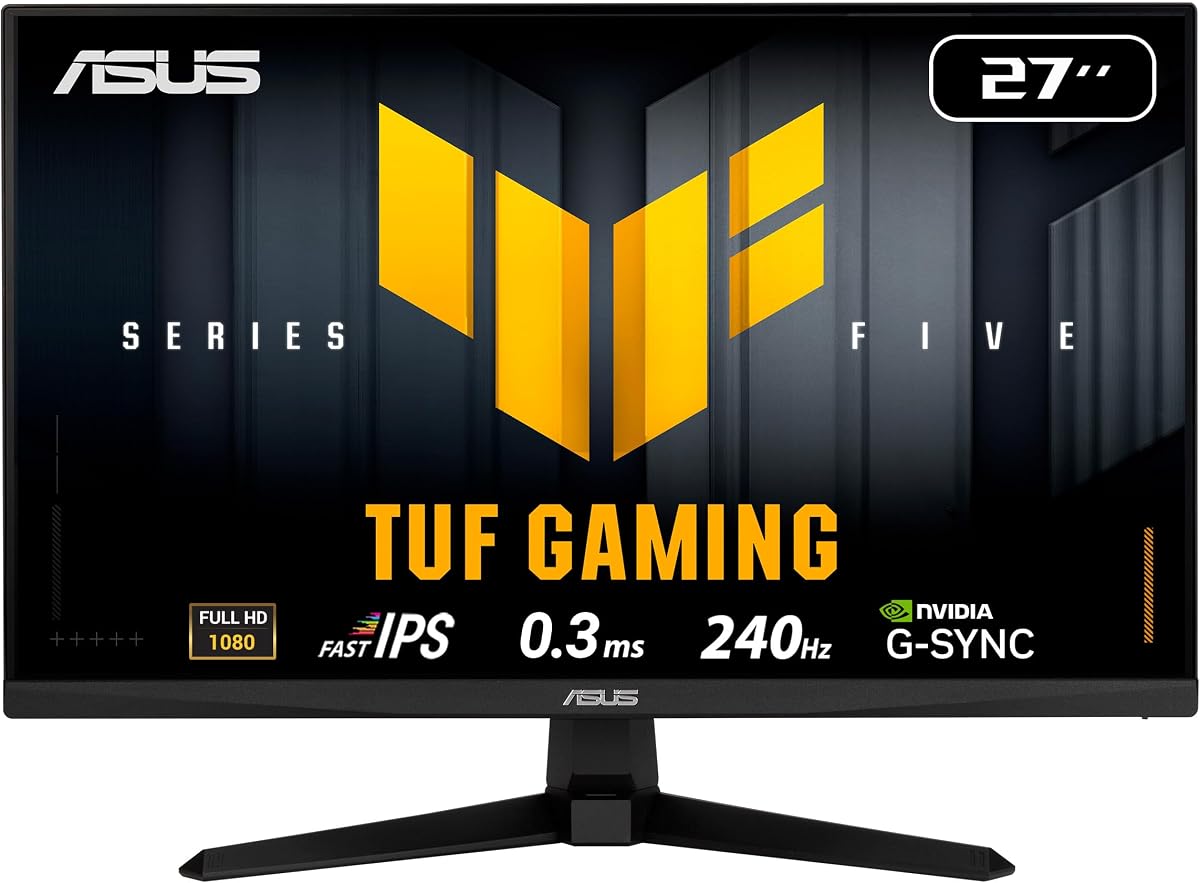
This 27-inch monitor earns our top recommendation with its high rating and premium specifications designed specifically for competitive gaming.
We may earn a commission when you buy through this link, at no additional cost to you.
It delivers 240Hz refresh rates with 0.3ms response times ensuring smooth gameplay and minimal blur during intense Valorant matches.
The Fast IPS panel provides accurate colors and wide viewing angles though it may command a higher price than budget alternatives.
Serious gamers seeking the best performance should choose this model for its consistent frame rates and reliable adaptive sync features.
Fast IPS technology ensures rapid pixel transitions that maintain color accuracy while delivering the speed needed for competitive gaming.
G-Sync and FreeSync Premium compatibility eliminates screen tearing ensuring visual consistency across varying GPU frame rates.
We may earn a commission when you buy through this link, at no additional cost to you.
This model offers a compelling balance of resolution and speed making it ideal for players who want sharper visuals than 1080p.
We may earn a commission when you buy through this link, at no additional cost to you.
With 2560×1440 resolution and overclocked refresh rates it delivers crisp images and smooth motion for competitive shooter games.
The IPS panel ensures great viewing angles but users should ensure their GPU can sustain high frame rates at QHD.
Overall it stands out for its sharpness and responsiveness though the stand options are somewhat basic compared to premium rivals.
A 2560×1440 resolution offers sharper UI text and enemy visibility compared to standard 1080p panels at this speed.
The 260Hz overclocked capability via DisplayPort provides extra fluidity for users pushing frame rates beyond standard limits.
We may earn a commission when you buy through this link, at no additional cost to you.
This SANSUI model punches above its weight offering a massive 300Hz refresh rate at a price point that challenges budget leaders.
We may earn a commission when you buy through this link, at no additional cost to you.
Users can enjoy ultra high frame rates and competitive edge without the cost typically associated with such high speed panels.
While the brand is less established the panel performance and feature set rival much more expensive options on the market.
It is an excellent choice for value hunters who prioritize raw speed and frame rate over premium build materials.
Achieving 300Hz at this price point makes it one of the fastest monitors available for budget-conscious competitive players.
The 120% sRGB coverage ensures vibrant visuals which is rare in this specific price segment of the market.
We may earn a commission when you buy through this link, at no additional cost to you.
The curved design creates a more immersive experience though flat screens are often preferred for precise aim in tactical shooters.
We may earn a commission when you buy through this link, at no additional cost to you.
Its 240Hz speed and high color coverage make it visually appealing for gaming and general use on a small footprint.
The ultra slim base saves desk space but some users may find the curve distracting when playing flat screen games.
Consider this if you want a different aesthetic or play mix genres where immersion matters more than strict pixel alignment.
Curved screens wrap around peripheral vision enhancing immersion for story games though flat is standard for competitive FPS.
The ultra slim base allows under keyboard storage maximizing valuable desk space for mouse movement in competitive setups.
We may earn a commission when you buy through this link, at no additional cost to you.
This 27 inch variant is another top contender offering 0.3ms response times and ASUS ELMB Sync for crystal clear motion.
We may earn a commission when you buy through this link, at no additional cost to you.
ELMB Sync eliminates ghosting while maintaining variable refresh rate which is a significant advantage over other brands features.
Users get a large canvas for games without compromising the speed needed for competitive play in modern tactical shooters.
It is a premium choice for those who want reliable brand support and advanced motion technology in a 1080p form.
ASUS ELMB Sync enables extreme low motion blur while keeping adaptive sync active for tear free fast frame gameplay.
A three year manufacturer warranty provides peace of mind for long term reliability and customer support access.
We may earn a commission when you buy through this link, at no additional cost to you.
This MSI monitor stands out with its high contrast VA panel offering deeper blacks and better HDR performance than IPS.
We may earn a commission when you buy through this link, at no additional cost to you.
AI Vision enhances details in dark areas giving you a tactical edge when checking corners in shadowed game maps.
While VA panels typically have slower response times the specific specs here claim 0.5ms which is competitive for this type.
Choose this if you want superior contrast and HDR features alongside high speed gaming in a 27 inch format.
AI Vision analyzes the screen to reveal details in dark zones ensuring you miss no enemy movements in shadows.
VA panels provide significantly higher contrast ratios than IPS delivering richer blacks and more vibrant colors.
We may earn a commission when you buy through this link, at no additional cost to you.
This model offers overclocked 260Hz refresh rates providing extra smoothness while keeping power usage efficient for long sessions.
We may earn a commission when you buy through this link, at no additional cost to you.
The 0.5ms response time ensures fast pixel transitions and the software suite allows easy adjustment of settings.
While 1080p on 27 inches may look soft to some the speed and low price make it a solid budget contender.
It is best suited for players prioritizing speed and efficiency over sharp pixel density or ergonomic stand adjustments.
Overclocking the panel to 260Hz offers an extra edge in smoothness for those who can sustain high frame rates.
Flicker-Free technology reduces eye strain allowing comfortable gaming during long ranked matches without fatigue.
We may earn a commission when you buy through this link, at no additional cost to you.
This 24 inch curved monitor provides a budget friendly path to high refresh rates while delivering strong color and contrast.
We may earn a commission when you buy through this link, at no additional cost to you.
The 1500R curve wraps around your field of view which may enhance immersion though flat is better for precise aiming.
With 124% sRGB coverage and strong contrast it looks vibrant and clear even in varied lighting conditions.
It is a great choice for secondary setups or players needing a compact curved screen at a very competitive price.
The 1500R curve matches the human eye for natural immersion though flat panels often aid precise aiming in games.
With 3000:1 contrast you get deeper blacks and better shadow detail than typical IPS panels in this price range.
We may earn a commission when you buy through this link, at no additional cost to you.
This 24 inch variant offers a compact form factor with height adjustment and strong motion handling for precise competitive play.
We may earn a commission when you buy through this link, at no additional cost to you.
The combination of ELMB Sync and G-Sync compatibility ensures smooth gameplay with minimal ghosting or tearing issues.
Its stand is more ergonomic than budget options offering tilt and height to reduce neck strain during long sessions.
Choose this model for its mix of performance ergonomics and reliable brand features in a compact 24 inch size.
Adjustable stand height and tilt help optimize your viewing angle reducing neck and eye strain over long play.
ELMB Sync keeps motion crisp while adaptive sync prevents tearing ensuring clear visuals in fast paced fights.
We may earn a commission when you buy through this link, at no additional cost to you.
This 25 inch model offers a sweet spot for pixel density and mouse space while keeping refresh rates high for speed.
We may earn a commission when you buy through this link, at no additional cost to you.
It includes the same Fast IPS panel with 0.3ms response and wide color gamut as the larger 27 inch version.
The lack of height adjustment is a trade off but the performance and warranty make it a strong mid size pick.
It suits players who want slightly more screen real estate than 24 inches without jumping to 27 inch sizes.
A 25 inch FHD screen balances pixel sharpness and screen real estate for efficient aim without pixel stretching.
Vivid 99% sRGB coverage ensures accurate colors and vibrant visuals making game scenes pop on screen.
We may earn a commission when you buy through this link, at no additional cost to you.
Selecting the right monitor requires understanding key specs that impact performance in competitive shooters like Valorant.
A 240Hz refresh rate is standard for competitive play providing smoother motion than 144Hz or 165Hz options.
Prioritize monitors that guarantee true 240Hz performance without significant frame drop or screen tearing.
Response time measures how fast pixels change color affecting motion blur and ghosting during fast movements.
Look for 1ms or lower response time to ensure crisp visuals and precise tracking of moving targets.
IPS panels offer better color and viewing angles while VA panels provide higher contrast and deeper blacks.
Choose IPS for accuracy and speed or VA for contrast depending on your environment and visual preferences.
Adaptive Sync technologies like G-Sync and FreeSync prevent screen tearing by matching the refresh rate to GPU output.
Ensure your monitor supports the sync technology compatible with your graphics card for seamless gameplay.
For competitive gaming 24 to 27 inches at 1080p provides a balance of pixel clarity and performance load.
Larger resolutions like 1440p offer sharper images but may require powerful GPUs to maintain high frame rates.
Adjustable stands with tilt and height features help reduce neck strain during long gaming sessions.
Prioritize models with flexible stands or VESA mount support to customize your viewing angle effectively.
Check for DisplayPort 1.4 or HDMI 2.1 support to ensure you can run the monitor at full 240Hz speed.
Avoid older ports that may limit refresh rates or cause input lag issues in competitive scenarios.
Budget models offer high speed but may lack premium build or ergonomics while premium models include advanced features.
Assess your budget against the features you need most such as high refresh rate or advanced adaptive sync support.
Ensure your graphics card is updated to support 240Hz at your chosen resolution to achieve maximum refresh rates.
Adjust your settings in Windows to verify the refresh rate is set correctly and not limited by cable bandwidth.
Clean the screen regularly with a soft microfiber cloth and avoid harsh chemicals to protect the panel coating.
Yes 240Hz provides smoother motion and reduced input lag which is critical for competitive play. It allows faster reactions to in-game events. Most pro players use 240Hz or higher for maximum performance.
Yes to utilize 240Hz fully your PC must consistently output 240 frames per second. If your PC cannot match the refresh rate you may not see the full benefit. Aim for high FPS in Valorant.
No G-Sync Certified works on specific panels. Many monitors are G-Sync Compatible which supports variable sync without the module. Check compatibility with your specific graphics card model.
For competitive Valorant 1080p is often preferred as it is easier to reach high frame rates. 1440p offers sharper visuals but requires more GPU power for sustained 240Hz.
Use DisplayPort 1.4 or HDMI 2.1 depending on the monitor specs. HDMI 2.0 may not support 240Hz at 1080p or 1440p. Always check the cable included or purchase certified cables.
Gaming monitors typically last five to seven years with proper care. Panel degradation is rare but backlight dimming can occur over time. Warranties often cover defects for three years.
The ten monitors listed above offer a range of features from budget speed to premium color accuracy.
Prioritize refresh rate accuracy and response time over extra features when choosing for competitive Valorant.
Always verify current pricing and availability before buying since deals change frequently online.