
EMEET C960 1080P Webcam
4.4Editor score
1080P video with privacy cover
Built-in 2 omnidirectional mics
Automatic light adjustment and focus
This comprehensive guide compares the top 1080p webcams for streaming and meetings, evaluating video quality, audio performance, and privacy features to help
In today's digital landscape, a high-quality webcam is essential for professional meetings, streaming, and staying connected with loved ones. A good 1080p webcam ensures crisp video, reliable audio, and seamless compatibility with your favorite communication platforms.
We compared ten leading 1080p webcams based on video clarity, audio quality, ease of use, and additional features like privacy covers and autofocus technology. Our analysis focuses on models that deliver consistent performance across various lighting conditions and use cases.
Each pick highlights specific strengths, from budget-friendly options to premium business models with advanced features. Please note that availability and specific model details may change over time, so verify current specifications before making your final purchase decision.
4.4Editor score

4.6Editor score

4.4Editor score
This side-by-side comparison highlights key specifications across all ten selected webcams, allowing you to quickly identify which model best matches your specific needs for resolution, audio, privacy, and connectivity options.



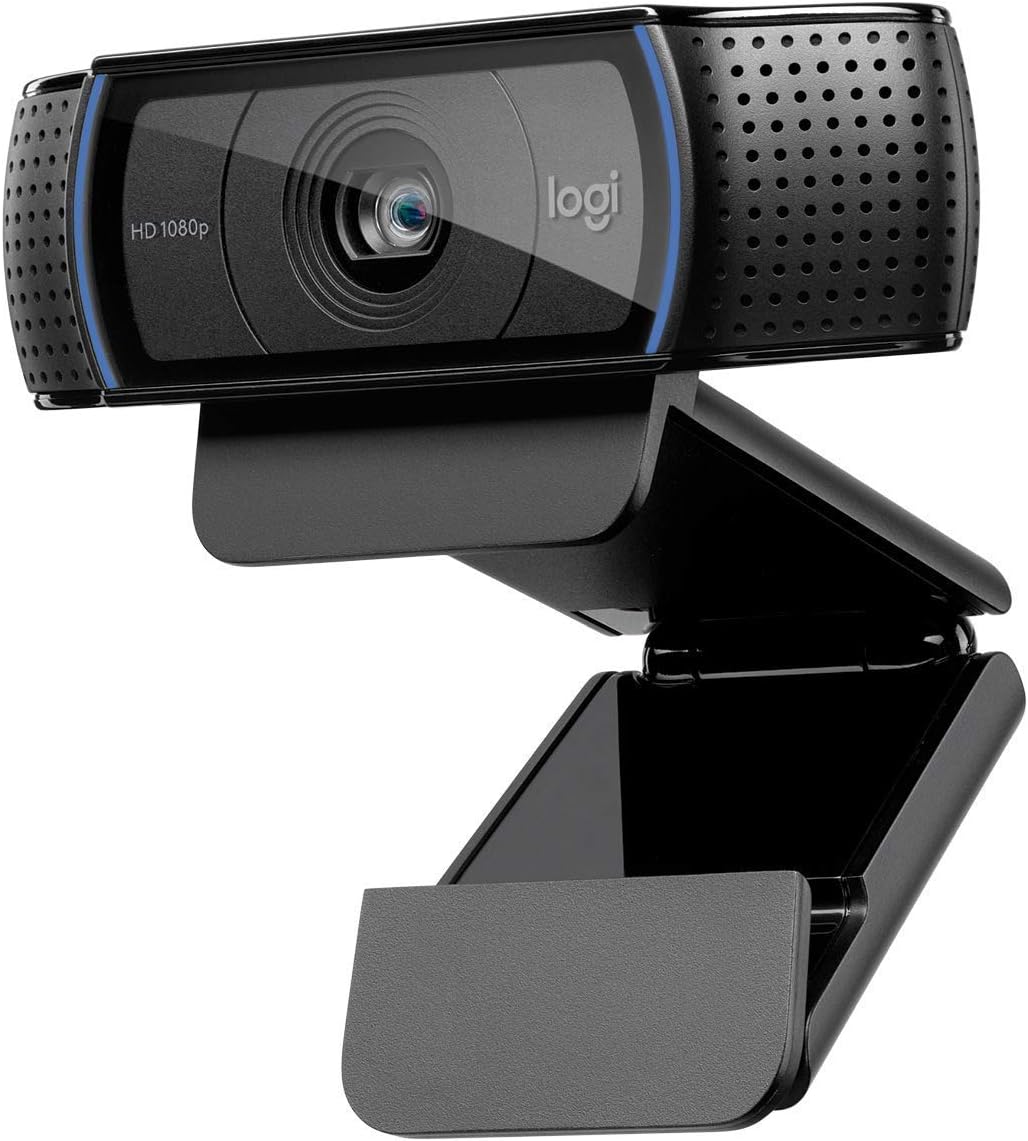


The Logitech C920x HD Pro Webcam stands out as a top contender in the 1080p category, earning a strong 4.6 rating from users who appreciate its consistent performance. It delivers sharp, clear video suitable for professional meetings, streaming, and content creation without requiring complex setup.
We may earn a commission when you buy through this link, at no additional cost to you.
Its HD autofocus and automatic lighting adjustment ensure you look sharp even in suboptimal lighting conditions. The dual microphones capture natural stereo audio, reducing the need for external microphones during calls. Compatibility with Windows 11 and major platforms like Zoom makes it a versatile choice.
While it lacks a built-in privacy shutter, the included XSplit VCam license offers software-based background replacement which is a valuable alternative for many users. The absence of a physical cover is a minor trade-off for the overall value and performance delivered by this model.
Buyers seeking a reliable, high-quality webcam for both work and personal use should consider this model. Its proven track record and feature set make it a solid investment for anyone looking to upgrade their video calling experience.
The HD autofocus ensures your image remains sharp as you move, while automatic lighting adjustment adapts to changing conditions without manual input.
Dual microphones provide natural stereo sound, often eliminating the need for separate audio equipment in home office setups.
We may earn a commission when you buy through this link, at no additional cost to you.
The Logitech Brio 101 Full HD Webcam is an excellent entry-level option for those needing reliable 1080p quality without a premium price tag. It features RightLight 2 technology that boosts brightness and reduces shadows, ensuring you look your best in various lighting environments.
We may earn a commission when you buy through this link, at no additional cost to you.
Privacy is a key focus here, with an integrated slide cover that lets you physically block the lens when not in use. The webcam is made with 77% post-consumer recycled plastic, appealing to eco-conscious consumers. Additionally, the Logi Options+ app allows for easy customization of zoom and framing.
While it operates at 30fps which is standard for 1080p, some streamers might prefer higher frame rates. The fixed focus is generally reliable for static setups but may not suit dynamic movements. Overall, the privacy features and build quality justify its position as a value pick.
This webcam is ideal for remote workers and casual streamers who prioritize privacy and ease of use. Its compatibility with major platforms and plug-and-play simplicity make it a hassle-free choice for immediate deployment.
The integrated slide cover provides a physical barrier to your camera lens, ensuring total privacy when you are off-call.
RightLight 2 automatically adjusts brightness by up to 50%, reducing shadows and enhancing your appearance in any lighting condition.
We may earn a commission when you buy through this link, at no additional cost to you.
The EMEET C960 delivers impressive value as a budget-friendly 1080p webcam, featuring a wide 90-degree field of view that captures more of your room or multiple participants easily. Its automatic privacy cover that removes when in use balances security with convenience effectively.
We may earn a commission when you buy through this link, at no additional cost to you.
Dual omnidirectional microphones capture clear audio from up to a meter away, reducing the need for external hardware. The webcam includes a USB C adapter for broader compatibility with modern laptops and devices. Automatic light adjustment helps maintain image stability in changing environments.
While it lacks Windows Hello support, which is common in budget models, its core video and audio performance remain strong for general use. The fixed focus works well for static positions but might require repositioning if you move around frequently.
This camera is perfect for students and home workers needing a reliable, low-cost solution. Its ease of setup and wide compatibility with Zoom and Teams make it a top recommendation for budget-conscious buyers.
The 90-degree lens captures more participants without frequent adjustments, making it ideal for small group calls or family gatherings.
The cover automatically removes when you start using the webcam, ensuring privacy without requiring manual interaction every time.
We may earn a commission when you buy through this link, at no additional cost to you.
The Logitech C920S HD Pro is a refined version of a classic model, offering full HD 1080p video with the added benefit of a privacy shutter for enhanced security. Users appreciate the glass lens which ensures crisp, vibrantly colored video recording.
We may earn a commission when you buy through this link, at no additional cost to you.
HD autofocus and light correction work seamlessly to keep your image sharp in various environments. The dual microphones capture natural sound on calls, making it a solid all-in-one solution. It is a popular choice for those prioritizing image quality and ease of use.
While it does not include the XSplit VCam license found in other models, the core functionality is robust. The privacy shutter is a significant advantage over similar models that lack physical lens protection.
This webcam is recommended for anyone wanting a balance of performance and privacy without breaking the bank. Its plug-and-play nature ensures it works immediately with most conferencing software.
A snugly fitting cover allows you to put yourself in control of what you show, protecting the lens effectively when not in use.
The glass lens ensures that your recorded videos are crisp and vibrant, preserving quality for future content creation.
We may earn a commission when you buy through this link, at no additional cost to you.
Designed with the business in mind, the Logitech C920e HD offers certification for Zoom and Microsoft Teams, ensuring seamless integration in the workplace. It features two integrated omnidirectional microphones that capture your audio clearly from up to one meter away.
We may earn a commission when you buy through this link, at no additional cost to you.
The attachable privacy screen flips up and down to cover the lens, offering a simple way to confirm if the lens is active. It is TAA compliant and comes with sturdy clip mounts for laptops and external monitors, plus a 1/4 inch thread for tripods.
Sync device management software helps keep connected devices up to date, making it easier for IT teams to manage deployments. While it is pricier than consumer models, the reliability and certification make it worth the investment for offices.
This webcam is ideal for corporate environments requiring reliable, certified hardware. Its durability and integration features make it a superior choice for professional video conferencing needs.
Certified for Zoom and Teams ensures seamless compatibility and integration, reducing technical issues in professional settings.
Sync software allows IT administrators to ensure video collaboration devices are used and up to date across the organization.
We may earn a commission when you buy through this link, at no additional cost to you.
The EMEET S600 stands out with its unmatched 4K streaming quality, featuring a high-definition Sony 1/2.55 sensor that delivers crisp images exceeding typical webcam quality. It offers versatile resolution options, including smooth 1080p at 60fps for fluid motion.
We may earn a commission when you buy through this link, at no additional cost to you.
Advanced PDAF autofocus technology provides faster speed and higher precision compared to common autofocus, ensuring stable performance in various scenes. Customizable FOV lets you focus on yourself or surroundings, while the proprietary audio algorithm filters background noise effectively.
The build is rugged with flexible rotation and tilting, ensuring it stays securely in place. Although 4K depends on software support, the option to use 1080p at 60fps makes it a robust tool for aspiring streamers and content creators seeking top-tier performance.
For those demanding professional-grade quality, this camera is an exceptional choice. Its advanced features justify the higher cost for users focused on content creation and high-fidelity video streaming.
The Sony 1/2.55 sensor delivers crisp, clear images far exceeding typical webcam quality, ensuring you look your best on camera.
PDAF technology offers faster speed and higher precision than common autofocus, keeping your image sharp even in complex scenes.
We may earn a commission when you buy through this link, at no additional cost to you.
The NexiGo N60 produces exceptionally sharp and clear videos at resolutions up to 1920 x 1080 with 30fps, powered by a 1080p FHD two-MP CMOS. The 3.6mm glass lens provides a crisp image at fixed distances optimized between 19.6 inches to 13 feet.
We may earn a commission when you buy through this link, at no additional cost to you.
Its built-in noise-canceling microphone reduces ambient noise, enhancing sound quality for Zoom, Facetime, and other platforms. The privacy cover blocks the lens when the webcam is not in use, providing peace of mind for individuals and large companies alike.
While it lacks autofocus, the fixed focus works reliably for most indoor use. The compatibility list is extensive, covering Mac, Windows, Linux, and Chrome OS. Firmware updates are available via support to address any audio delays.
This camera is ideal for users who prioritize privacy and simplicity. Its robust compatibility and noise-canceling features make it a great choice for remote work and online school.
The built-in microphone reduces ambient noise to enhance sound quality, making you clear and audible in noisy environments.
Works with Windows, Mac, Linux, and Chrome OS without additional drivers, making it a versatile choice for any system.
We may earn a commission when you buy through this link, at no additional cost to you.
The Logitech HD Pro Webcam C920 remains a reliable option with a proven track record of delivering Full HD 1080p video for widescreen video calling and recording. It is designed for both desktop and laptop use, ensuring flexibility in your workspace.
We may earn a commission when you buy through this link, at no additional cost to you.
Its plug-and-play setup means you can start using it immediately without complex configurations. The high rating reflects its consistent performance in providing clear video and audio for general users.
While it is an older model compared to newer offerings, its core functionality remains strong. It lacks advanced features like privacy shutters or advanced light correction, but it covers the basics effectively for straightforward video calling.
This webcam is recommended for those seeking a tried-and-tested camera without extra bells and whistles. It is a solid choice for home offices needing a dependable video solution.
As a classic model, the C920 delivers consistent performance and quality that has been trusted by millions of users globally.
Designed for both desktop and laptop, this camera adapts to various setups, ensuring you always have a clear view.
We may earn a commission when you buy through this link, at no additional cost to you.
The Logitech Brio 105 offers 1080p resolution at a great value, producing clear video so meetings feel natural. It is designed for business, compatible with major operating systems, and certified for Google Meet.
We may earn a commission when you buy through this link, at no additional cost to you.
RightLight 2 light-balancing technology automatically improves image quality in suboptimal conditions. The integrated webcam cover gives employees extra confidence that their privacy is protected, especially when working from home.
Support by Logitech Sync for remote deployment makes it easier to manage devices in a corporate setting. Its plug-and-play nature ensures a quick start to video calls without technical hassle.
Ideal for remote teams and Chromebook users, this model balances affordability with business-grade reliability. It is a strong choice for organizations looking to standardize hardware without compromising on privacy.
Certified for Google Meet and supported by Sync ensures seamless integration and remote management for enterprise deployments.
RightLight 2 automatically balances light in suboptimal conditions, ensuring you look professional regardless of your lighting setup.
We may earn a commission when you buy through this link, at no additional cost to you.
The Logitech Brio 100 (Renewed) offers high definition video quality up to Full HD 1080p Resolution at 30 fps for clear and smooth video streaming. It features a 58-degree diagonal field of view, capturing more of your surroundings during calls.
We may earn a commission when you buy through this link, at no additional cost to you.
Its easy USB connection works seamlessly with popular video conferencing applications. The built-in microphone provides convenient all-in-one audio capture without needing additional equipment.
As a renewed product, it provides a sustainable and budget-friendly option for those looking for quality without the premium price tag. The 4.5 rating indicates strong customer satisfaction with its performance.
This model is perfect for budget-conscious users who want a reliable camera with essential features. It balances cost-effectiveness with the trusted performance of the Brio series.
Opting for a renewed product reduces waste while providing access to high-quality technology at a reduced price point.
The 58-degree field of view captures more of your surroundings, making it easier to include visual aids or guests.
We may earn a commission when you buy through this link, at no additional cost to you.
Choosing the right 1080p webcam involves evaluating several critical factors beyond just resolution. This guide outlines the essential aspects to consider for your specific use case.
While 1080p is the standard, consider if you need higher frame rates like 60fps for smoother motion or if 30fps suffices for static meetings. Ensure the sensor quality supports clear images in varying lighting conditions.
Prioritize models with sensors that handle low light well and support standard 1080p to balance sharpness and performance.
Built-in microphones vary significantly in quality. Look for dual or omnidirectional microphones with noise cancellation to ensure your voice is clear during calls without external equipment.
A decent built-in mic saves money, but check if it supports clear audio capture for your specific room size.
Privacy shutters or physical covers are essential for protecting your visual data when not in use. Ensure the device offers reliable physical blocking mechanisms rather than just software-based security.
Always choose a webcam with a physical privacy shutter for added peace of mind during sensitive conversations.
Verify that the webcam is compatible with your operating system and preferred conferencing apps like Zoom, Teams, or Google Meet. Check for certification or optimized drivers for your specific platform.
Ensure the device supports your OS and conferencing software for a seamless setup experience.
Consider how the webcam attaches to your setup. Look for adjustable clips for laptops or monitors, and check if tripod threads are available for flexible positioning.
Select a model with versatile mounting options to fit your workspace and viewing angle requirements.
The FOV determines how much of your surroundings are visible. A wider FOV is better for group calls, while a narrower one is suitable for solo use.
Choose a FOV that matches your typical usage to maximize the visibility of you and your environment.
Automatic light correction and autofocus technologies ensure you look sharp and well-lit. These features are crucial for environments with changing light conditions or movement.
Opt for cameras with autofocus and light adjustment to maintain professional quality in any setting.
Check the USB type and cable length. USB-C is becoming common, but ensure you have the correct connectors or adapters for your computer.
Ensure you have the necessary cables and ports for a stable connection without dongles or adapters.
Begin by connecting the webcam to a USB port on your computer. Most models are plug-and-play, but ensure you download any necessary drivers or software for advanced features like zoom or filters.
Adjust the webcam's position to ensure your face is centered and well-lit. Avoid having a bright window behind you, which can cause backlighting issues, and use natural light from the front.
Regularly clean the lens with a soft cloth to prevent smudges that affect video quality. Store the webcam in a safe place when not in use and keep the privacy cover closed to protect the lens.
A 1080p webcam provides Full HD resolution, which is sufficient for most video calls and streaming. 4K webcams offer higher detail but require more bandwidth and processing power. For most users, 1080p offers the best balance of quality and compatibility.
Most modern webcams are plug-and-play and work with standard conferencing apps like Zoom and Teams without extra software. However, some models come with optional software for advanced features like background effects or filters.
Low light conditions often reduce image sharpness due to sensor limitations. Look for webcams with autofocus and auto light correction features, which help maintain clarity in dim environments by adjusting brightness dynamically.
Yes, many 1080p webcams are suitable for streaming. Ensure the model supports smooth frame rates like 30fps or 60fps and has good microphone quality. Some models also offer background replacement for professional streams.
Use a soft, lint-free microfiber cloth to gently wipe the lens. Avoid harsh chemicals or rough materials that could scratch the surface. For stubborn smudges, a small amount of lens cleaning solution on the cloth may be used.
While software controls can disable the camera, a physical privacy shutter provides a guaranteed barrier to protect your privacy. It offers peace of mind, especially for home workers or those concerned about unauthorized access.
We have reviewed ten of the best 1080p webcams available, ranging from budget-friendly options to premium models with advanced features. Our top picks include the Logitech C920x for overall reliability and the EMEET S600 for premium streaming quality.
When making your choice, prioritize video quality, audio clarity, and privacy features that align with your specific needs. Whether you are a remote worker, a streamer, or a casual user, these models offer solid performance for everyday use.
Remember that availability and model details can change. Verify current specifications and compatibility before purchasing to ensure the webcam fits your setup perfectly. Always check for the latest updates and deals to get the best value.