
CERRXIAN SCSI HPDB 68 Pin Female
4.7Editor score
Converts HPDB 68pin to IDE 50pin
High-thickness gold-plated layer
Suitable for disks and tapes
This guide compares the top 50 Pin Scsi Adapter models for legacy server and industrial hardware connectivity needs with detailed specs.
Connecting legacy hardware often requires specific adapters to bridge old interfaces with modern or compatible systems. Finding the right 50 Pin Scsi Adapter ensures reliable data transfer and system stability.
We evaluated ten top-rated adapters based on build quality, compatibility, and user feedback to help you make an informed decision for your setup.
Each pick highlights unique strengths and limitations so you can choose the best fit for your needs. Prices change frequently so check current listings before purchasing.
4.7Editor score

5.0Editor score

4.8Editor score
The following table provides a side-by-side comparison of all ten selected adapters to help you quickly identify the best option for your specific hardware requirements.

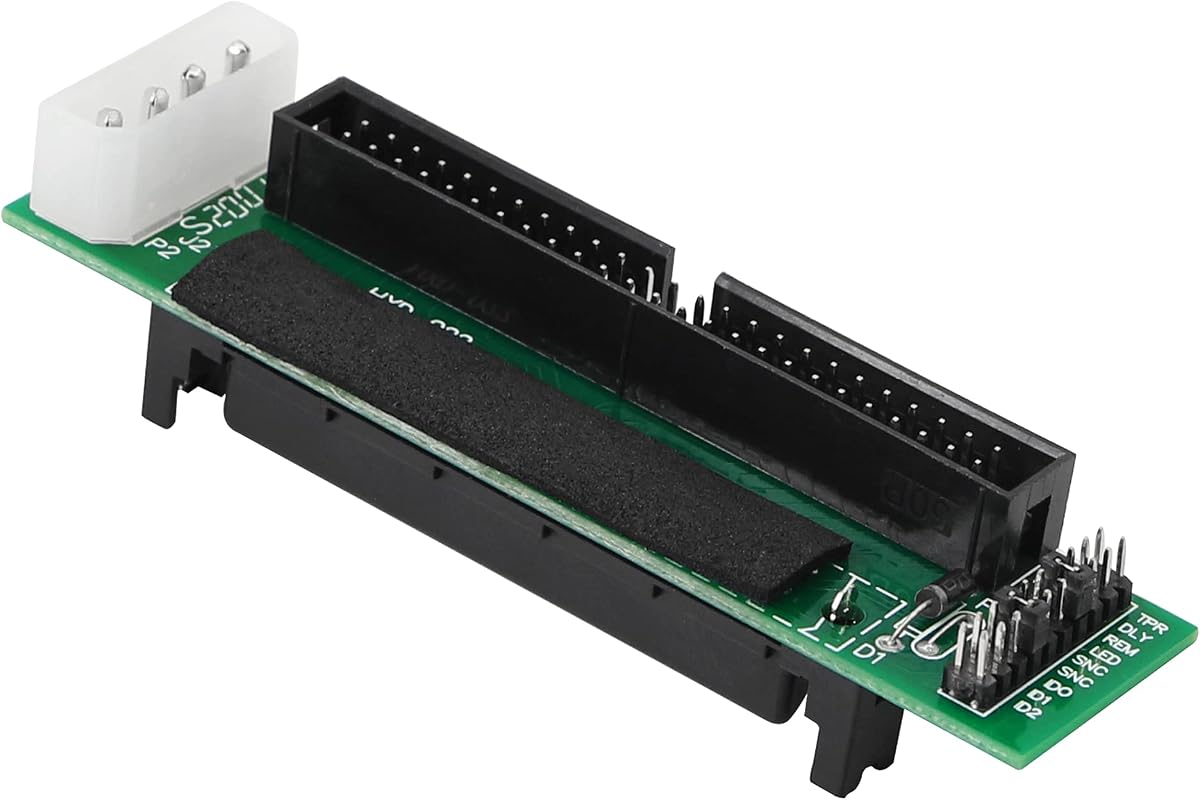


This adapter excels at converting 68-pin HPDB SCSI interfaces to 50-pin IDE for industrial setups. It features a high-thickness gold-plated layer that enhances conductivity and reduces signal loss significantly.
We may earn a commission when you buy through this link, at no additional cost to you.
The build quality ensures a stable and corrosion-resistant connection which is vital for long-term reliability in server environments. It connects a wide array of old SCSI devices including hard disks tape drives CD-ROMs and rewritable optical drives.
It is important to note this adapter is designed specifically for industrial server IDE 50-pin interface motherboards and cannot be used in ordinary computers. This limitation ensures it is only used in compatible high-performance settings.
Choose this adapter if you need a reliable conversion solution for legacy SCSI hard drives or other devices with SCSI interfaces to connect to newer tape drives or industrial systems efficiently.
The gold-plated connector layer ensures superior conductivity and stability for critical operations.
Ideal for connecting hard disks tapes CD-ROMs and printers to server IDE ports.
We may earn a commission when you buy through this link, at no additional cost to you.
This adapter is designed to convert an HPDB 68pin connection into an IDE 50pin connection effectively for hard drives. It features a high-thickness gold-plated layer that makes the IDE connector seat more conductive and stable.
We may earn a commission when you buy through this link, at no additional cost to you.
It is suitable for connecting disks tapes CD-ROMs rewritable optical drives printers and scanners to industrial server IDE 50-pin interface motherboards. The construction ensures a stable connection for long-term use.
Users must remember this adapter is for industrial server IDE 50-pin interfaces and cannot be used in ordinary computers. This ensures compatibility with specific legacy hardware setups.
Opt for this adapter if you need a reliable and affordable solution to connect old SCSI hard drives or devices to newer industrial server IDE systems effectively.
The gold-plated layer enhances conductivity and stability for reliable data transfer.
Connects disks tapes CD-ROMs and scanners to industrial server interfaces.
We may earn a commission when you buy through this link, at no additional cost to you.
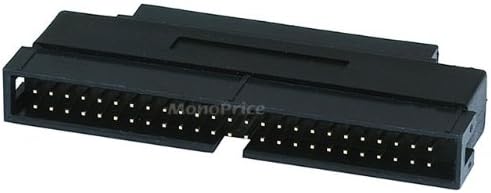
Monoprice offers a reliable internal SCSI adapter that converts 50 Pin to 68 Pin Male to Male configurations for server systems. This product ensures seamless connectivity for legacy SCSI devices.
We may earn a commission when you buy through this link, at no additional cost to you.
The adapter is designed for internal use and provides a stable connection between different SCSI standards. Monoprice is known for consistent quality and reliable product specifications.
Users should note that the item received may not match the photo or specs shown due to manufacturing variations. This is a common caveat with mass-produced adapter components.
Choose this Monoprice adapter if you need a trusted internal solution for converting 50 Pin to 68 Pin connections in your SCSI hardware setup.
Converts 50 Pin to 68 Pin Male to Male configurations reliably.
Monoprice brand known for consistent quality and dependable products.
We may earn a commission when you buy through this link, at no additional cost to you.
Belkin delivers a high-quality internal SCSI adapter with HD-68 (f) to 50 Pin IDC (f) connections for reliable data transfer. It offers premium quality at an outstanding saving value for users.
We may earn a commission when you buy through this link, at no additional cost to you.
The product is praised for excellent quality and 100 percent satisfaction which reflects the brand's commitment to reliability. Belkin adapters are known for consistent performance and durability.
The adapter is designed for internal use ensuring stable connections between SCSI standards in server environments. Users benefit from Belkin's reputation for quality components.
Invest in this Belkin adapter if you require a trusted high-quality internal SCSI solution with excellent product value and reliability.
Offers premium quality at an outstanding saving value for users.
Belkin brand known for excellent product quality and satisfaction.
We may earn a commission when you buy through this link, at no additional cost to you.
This adapter converts the 50-pin interface to the 80-pin interface allowing connection of 50-pin low-speed SCSI devices to 80-pin SCSI interfaces. It is specifically designed for industrial server IDE 50-pin interface motherboards.
We may earn a commission when you buy through this link, at no additional cost to you.
It requires connecting a Molex 4 pin power connector to power the hard drive effectively. It is recommended to be used for direct data transfers or backups in legacy environments.
The adapter supports disks tapes CD-ROMs rewritable optical drives printers and scanners. Users must ensure compatibility with industrial server motherboards as it cannot be used in ordinary computers.
Choose this adapter if you need to connect a 50-pin low-speed SCSI device to an 80-pin SCSI interface for direct data transfers efficiently.
Needs to connect Molex 4 pin power connector to power hard drive.
Recommended for direct data transfers or backups in industrial server.
We may earn a commission when you buy through this link, at no additional cost to you.
The PTC adapter converts a SCA 80 Pin Hard Drive Interface to SCSI I/II/III (UW) HD 50/68 Pin Connector effectively. It is compatible with SCA & SCA-2 80 Pin interfaces for legacy storage.
We may earn a commission when you buy through this link, at no additional cost to you.
Features include jumper setting for 16 SCSI IDs spindle synchronous delay start remote start and a status LED connector. The 80 Pin connector on the adapter is female for compatibility.
This adapter includes a 4 Pin Power Connector and supports various control signals for proper device management. It is a versatile solution for connecting legacy SCSI drives.
Use this PTC adapter if you need to convert SCA 80 Pin drives to standard SCSI interfaces with full control and ID configuration capabilities.
Jumper setting for 16 SCSI IDs for flexible device management.
Supports spindle synchronous and status LED connector pins.
We may earn a commission when you buy through this link, at no additional cost to you.
This adapter connects and extends 50-pin HPCN50 devices effortlessly solving connectivity issues in professional setups. It acts as a compact port extender and gender changer for efficient cabling.
We may earn a commission when you buy through this link, at no additional cost to you.
It features durable construction with gold-plated contacts ensuring superior signal integrity and corrosion resistance. A secure locking mechanism provides vibration-proof reliable connections during critical operations.
Its compact mini design saves space and relieves strain in tight equipment racks ensuring a clean organized setup. Plug-and-Play compatibility achieves instant connectivity without drivers.
Choose this adapter if you need a durable space-saving gender changer for HPCN50 devices in your professional or industrial setup.
Compact mini design acts as a versatile problem-solver for tight racks.
Gold-plated contacts ensure superior signal integrity and corrosion resistance.
We may earn a commission when you buy through this link, at no additional cost to you.
Monoprice provides an internal-type ribbon cable adapter converting IDC 50 female to HPDB 68 female connections for SCSI systems. The IDC 50 connector is a 50-pin 8-bit SCSI header used for internal cables.
We may earn a commission when you buy through this link, at no additional cost to you.
The HPDB 68 connector is a 68-pin 16-bit SCSI-2 connector used for both internal and external connections with parallel 34-pin rows. It resembles older ATA/IDE drive cables but is wider.
Monoprice ensures consistent quality and product specifications for internal and external SCSI connection needs. Users benefit from the established brand reputation for reliable adapters.
Use this Monoprice adapter if you need a reliable solution for connecting IDC 50 and HPDB 68 internal SCSI interfaces effectively.
IDC 50 and HPDB 68 connector details for internal and external use.
Resembles older ATA/IDE drive cable but wider and more pins.
We may earn a commission when you buy through this link, at no additional cost to you.
QVS offers a 50 Pin SCSI terminator that is compatible with hard drives SSDs and tape drives for stable SCSI bus termination. It supports the CEN50M/F standard for reliable connectivity.
We may earn a commission when you buy through this link, at no additional cost to you.
The terminator is passive and features Male-to-Female configuration with a Single end support for proper bus operation. It ensures signal integrity on the SCSI bus for legacy hardware.
This terminator is essential for completing SCSI chains and preventing data corruption on legacy storage buses. Its passive design ensures compatibility with various SCSI devices.
Use this QVS terminator if you need to complete a SCSI bus chain with a standard CEN50M/F compatible passive terminator.
Supports CEN50M/F standard for reliable SCSI bus termination.
Compatible with hard drive SSD and tape drive for stability.
We may earn a commission when you buy through this link, at no additional cost to you.
This adapter converts Internal IDC 50 Male to External HPDB 50 Female for seamless data transfer between SCSI interfaces. The PCB SCSI-2 with IDC50 Male Connector provides a secure and reliable connection.
We may earn a commission when you buy through this link, at no additional cost to you.
The Nickel-Plated HPDB50 Bracket Connector ensures durability and reliable connections in external environments. It supports bidirectional data transfer for flexible SCSI setups.
The adapter is designed for SCSI computer slot integration ensuring proper connectivity and signal transmission. Users benefit from the nickel-plated durability for long-term use.
Use this adapter if you need to convert Internal IDC 50 Male to External HPDB 50 Female for seamless bidirectional SCSI data transfer.
IDC50 Pin Male and HPDB50 Pin Female connectors for seamless transfer.
Nickel-Plated HPDB50 Bracket provides durable reliable connection.
We may earn a commission when you buy through this link, at no additional cost to you.
Choosing the right adapter requires attention to interface types connector compatibility and build quality to ensure reliable legacy hardware functionality.
Ensure the adapter matches your specific SCSI and IDE connector types such as HPDB 68 IDC 50 or SCA 80 to avoid connection issues. Mismatched connectors will prevent device recognition and data transfer entirely.
Always verify the connector gender (Male/Female) and pin count before purchasing to ensure it fits your motherboard and device ports.
Look for adapters with gold-plated contacts and durable housings to ensure signal integrity and corrosion resistance over time. High-quality materials reduce signal loss and prevent connection failures during critical operations.
Avoid cheap plastic connectors which may lead to intermittent connections and unreliable data transfers for legacy hardware.
Check that the adapter supports the specific devices you need to connect such as hard disks tape drives CD-ROMs or printers. Different adapters may have varying compatibility with legacy SCSI device protocols.
Ensure the adapter is compatible with industrial server IDE 50-pin interface motherboards rather than ordinary consumer computers.
Adapters with high-thickness gold-plated connector layers and secure locking mechanisms ensure superior signal integrity and vibration-proof reliability. This is essential for maintaining data integrity during transfers.
Prioritize adapters that minimize signal loss and ensure stable connections for consistent legacy hardware performance.
Some adapters require additional power connectors like Molex 4 pin connectors to power connected hard drives or SCSI devices. Verify power requirements to ensure your system can support the connected devices.
Install the adapter carefully to avoid damaging ports and ensure all locking mechanisms are secure for stable operation.
Choose adapters designed for your specific environment whether industrial server racks indoor setups or external connections. Different environments may require different connector types or durability features.
Ensure the adapter suits your use case whether internal server or external SCSI bus connections.
Opt for reputable brands like Belkin Monoprice or PTC that offer proven reliability and consistent product specifications. Established brands typically provide better build quality and customer support.
Research user reviews and brand reputation to ensure the adapter meets your reliability expectations.
Determine if you need the adapter for direct data transfers backups or general connectivity to legacy devices. Some adapters are better suited for high-performance or specialized SCSI bus tasks.
Select an adapter that aligns with your primary use case to ensure optimal performance and reliability.
Begin by verifying your motherboard and device connector types and genders to ensure compatibility with the adapter you purchased. Check that all pins align correctly before connecting to avoid damage.
Install the adapter securely in the correct motherboard slot or device port and ensure all locking mechanisms are engaged for stable operation. If required connect any necessary power connectors like Molex to power the SCSI devices.
Handle the adapter with care to prevent bending pins or damaging the gold-plated contacts. Keep the connector clean and free from dust to ensure reliable connections over time.
Generally no as most adapters require industrial server IDE 50-pin interface motherboards rather than ordinary consumer PCs. Verify your motherboard specifications before purchasing to ensure compatibility.
IDC 50 is an 8-bit SCSI connector used for internal cables while HPDB 68 is a 16-bit SCSI-2 connector for internal and external use. They differ in pin count width and signal capacity.
Yes many SCSI hard drives require a Molex 4 pin power connector to power the drive properly. Ensure your power supply has this connector before attempting to connect the drive.
Gold-plated contacts provide superior conductivity and corrosion resistance which ensures stable signal integrity and long-term reliability. This is crucial for preventing data loss and connection failures.
Yes certain adapters support connecting printers and scanners that use SCSI interfaces to compatible industrial server IDE motherboards. Check the adapter specifications to confirm compatibility.
Signs include intermittent data transfers device recognition failures and signal errors during boot. Inspect pins for damage and replace the adapter if connections become unstable.
Use the jumper settings on the adapter to assign unique SCSI IDs for each device on the bus. Follow the device manual to configure jumpers properly to avoid ID conflicts.
Yes adapters like the PTC SCA 80 Pin model convert SCA 80 Pin drives to standard SCSI 50 or 68 pin connectors. These are necessary for high-capacity legacy SCSI storage systems.
The Belkin SCSI Internal Adapter CERRXIAN SCSI HPDB 68 Pin Female and Monoprice SCSI (HPDB) 68 Female top our list for reliability performance and value.
Prioritize adapters with gold-plated contacts industrial server compatibility and proper connector types to ensure long-term reliability and data integrity.
Remember to check current listings and verify compatibility before purchasing to ensure the adapter meets your specific legacy hardware needs.