
VIMIN 10G PCI-E Network Card
4.5Editor score
Dual RJ45 ports available
Intel X540-T2 chipset
Standard and slim brackets
Discover the top 10GB Ethernet cards for speed and reliability. We compare features, compatibility, and performance to help you upgrade your network setup
High-speed networking is essential for modern computing tasks. A quality 10GB Ethernet card ensures your desktop can handle demanding workloads efficiently. Look for reliable chipsets and broad compatibility.
We evaluated ten top-rated adapters based on real-world performance data. Our comparison covers various chipsets, port types, and operating system support. This list helps you find the right fit for your needs.
Each pick highlights key strengths and potential trade-offs for buyers. Prices fluctuate frequently so check current listings before purchasing. Our goal is to guide you toward a stable network upgrade.
4.5Editor score

4.2Editor score

4.6Editor score
This side-by-side comparison outlines the core specifications of each adapter. Review these details to understand how each card fits your specific hardware and software environment.




The TP-Link TX401 is a leading choice for users seeking reliable 10GB performance without excessive complexity. It holds a solid rating for users needing direct upgrades to existing desktop infrastructure.
We may earn a commission when you buy through this link, at no additional cost to you.
This card delivers extreme speeds of up to 10 Gbps which is ten times faster than typical Gigabit adapters. It includes a free CAT6A Ethernet Cable rated for up to 10 Gbps to maximize performance.
While it lacks multiple ports, the QoS technology helps prioritize gaming traffic to avoid network congestion. The included low-profile bracket ensures it fits into mini tower computer cases seamlessly.
Buyers needing straightforward high-speed connectivity should consider this adapter. It meets diverse operating system needs including Windows Servers and Linux environments.
With the latest 10GBase-T Technology, the TX401 ensures smooth data transmissions for both internet access and local data transmissions.
It is backwards compatible with multiple data rates including 10 Gbps, 5 Gbps, 2.5 Gbps, 1 Gbps, and 100 Mbps.
We may earn a commission when you buy through this link, at no additional cost to you.
The VIMIN adapter offers a compelling value proposition with dual RJ45 ports for users needing multiple connections. It is designed for high-speed data transmission requirements in servers and high-end devices.
We may earn a commission when you buy through this link, at no additional cost to you.
Utilizing the Intel X540-T2 chipset controller, this Dual Lan 10Gb NIC network card delivers up to 10Gbps of network connection speed. The heat sink maintains optimal temperature levels during heavy usage to ensure stability.
One limitation to note is that 2.5Gbps and 5Gbps speeds are not supported. If your network device is 2.5G or 5G, this card will only operate at a speed of 1Gbps.
This card is ideal for those requiring redundant links without breaking the bank. The standard and slim brackets make it suitable for different heights of servers.
It offers reliable performance and stability ideal for environments needing multiple connection points.
Features a heat sink to maintain optimal temperature levels during heavy usage ensuring device stability.
We may earn a commission when you buy through this link, at no additional cost to you.
The Synology E10G30-T2 adapter is the top choice for NAS users looking for a purpose-built solution. It supports high-performance storage applications with two 10GbE ports for optimal throughput.
We may earn a commission when you buy through this link, at no additional cost to you.
This adapter automatically negotiates between 10 Gbps and 1 Gbps to adapt to your existing network setup. It comes with a five-year warranty which highlights the manufacturer's confidence in its durability.
The primary constraint is that it is purpose-built for use with Synology systems. You must check the compatibility list to ensure your hardware supports this adapter properly.
For Synology owners, this card provides unmatched stability and performance. It ensures your storage system remains a reliable part of your network infrastructure.
Two 10GbE ports support high-performance storage applications ensuring efficient data transfer.
A five-year warranty covers the hardware offering peace of mind for enterprise users.
We may earn a commission when you buy through this link, at no additional cost to you.
The Asus NADACA0140 offers a straightforward upgrade path for desktops needing high throughput. It delivers up to 10X-faster data-transfer speeds for bandwidth-demanding tasks.
We may earn a commission when you buy through this link, at no additional cost to you.
Full compatibility with current network standards including 10/5/2.5/1Gbps and 100Mbps ensures seamless backward compatibility. The built-in QoS technology allows you to prioritize bandwidth for a smooth online experience.
Its integration into Windows and Linux systems is flexible with kernel support for various versions. The RJ45 port easily upgrades your desktop to 10Gbps networking using standard copper network cables.
Buyers looking for a reliable single-port solution will appreciate its performance. It is a solid choice for those who prioritize standard compatibility.
Windows and Linux support ensure flexible integration into various system configurations.
Built-in QoS technology allows you to prioritize bandwidth for a smooth online experience.
We may earn a commission when you buy through this link, at no additional cost to you.
The 10Gtek adapter is equipped with an original Intel X540 controller chip which supports Intelligent Offloads. This makes servers more stable and efficient during heavy data loads.
We may earn a commission when you buy through this link, at no additional cost to you.
Dual copper RJ45 ports let you connect to Category-6A cables for up to 100m. It is compatible with Windows Server 2003/2008/2012 and Linux as well as ESX/ESXi environments.
Note that this card can be used with Windows 11 but it needs to be manually set up. You may need to contact support for an installation guide before using.
For those needing enterprise-grade stability without the premium price, this is a strong candidate. The 3 year free warranty adds further assurance to your purchase.
Intelligent Offloads and original chip support make servers more stable during operation.
Dual copper ports allow connections up to 100m with Category-6A cables.
We may earn a commission when you buy through this link, at no additional cost to you.
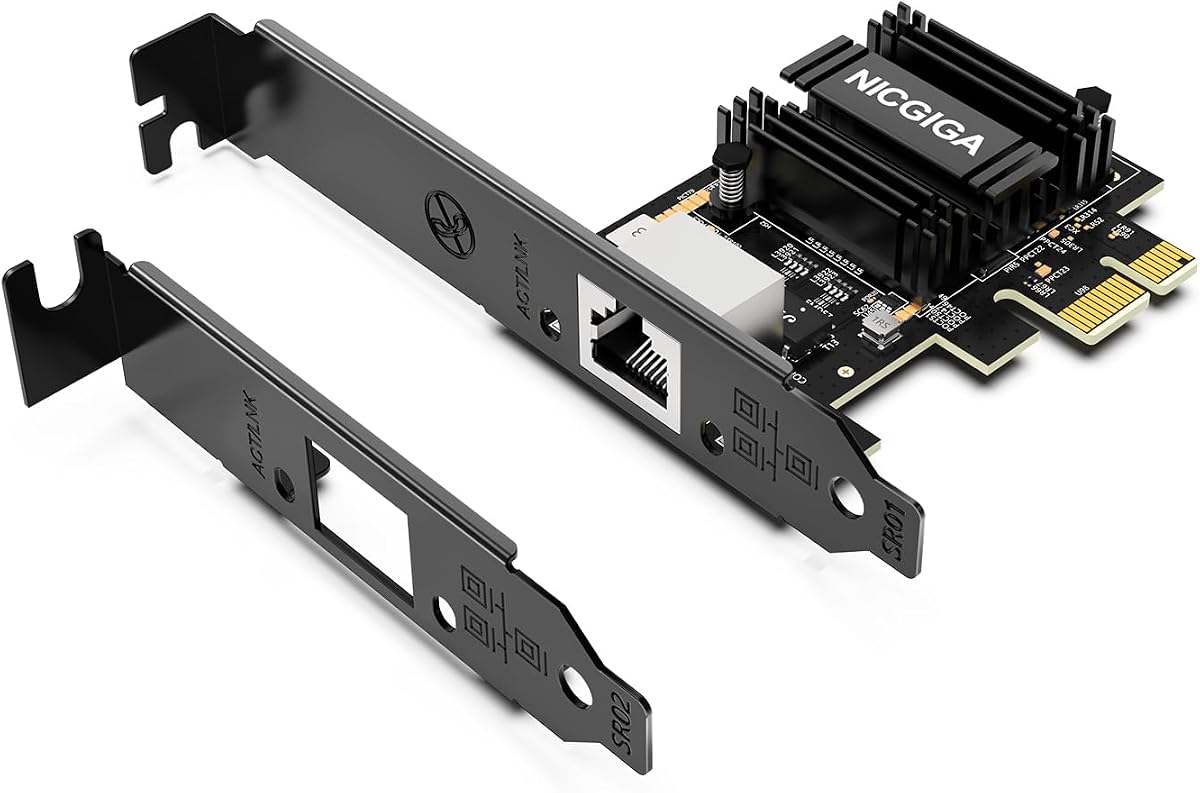
The NICGIGA card adopts the latest Realtek RTL8127 controller to deliver blazing-fast speeds up to 10Gbps. It provides extreme stability for local data transmission and internet access effectively preventing packet loss.
We may earn a commission when you buy through this link, at no additional cost to you.
Features a high-bandwidth PCIe 4.0 x1 interface that easily converts a standard x1 slot into a 10G RJ45 Ethernet port. It universally fits into PCIe x1, x4, x8, and x16 slots without occupying your GPU's lanes.
It is fully compatible with Windows 11 and Windows Server 2019/2022. Native plug-and-play for modern Linux distributions with Kernel 6.x and above makes it versatile for NAS systems.
Mini PCs and ITX builds will find this card ideal for its compact design. It ensures non-stop stability with minimal heat generation compared to older chips.
The PCIe 4.0 x1 interface is ideal for Mini PCs and ITX builds.
Supports Windows 11 and modern Linux distributions with native plug-and-play.
We may earn a commission when you buy through this link, at no additional cost to you.
The VunLink adapter is powered by the latest Realtek RTL8127 chipset to deliver up to 10Gbps Ethernet connectivity. It is built for stable, low-latency, and reliable network performance in workstations.
We may earn a commission when you buy through this link, at no additional cost to you.
It supports 10Gbps, 5Gbps, 2.5Gbps, 1Gbps, and 100Mbps speeds with automatic negotiation. This seamless integration works well with routers, switches, and existing network infrastructure.
The advanced RTL8127 controller is engineered for lower power consumption and reduced heat output. This makes it suitable for continuous operation in home labs and small offices.
For users needing flexibility with various OS and server environments, this adapter is reliable. The dual brackets support flexible installation in both full-height and compact desktop systems.
Powered by Realtek RTL8127 for stable 10Gbps performance.
Lower power consumption and reduced heat output for long-term use.
We may earn a commission when you buy through this link, at no additional cost to you.
The Asus XG-C100F enables blazing fast 10 Gbps speeds capable of 10x the speeds of Gigabit Ethernet. It is compatible with the latest fiber optic technology which carries high speed transmissions over greater distances.
We may earn a commission when you buy through this link, at no additional cost to you.
The SFP+ cage allows for both fiber optic and Direct-Attach copper connections. This flexibility makes it useful for data center environments where distance matters.
A stylish and sophisticated aluminum heatsink keeps the card cool during high performance tasks. This built-in cooling ensures stable operation even under heavy loads.
Users with existing fiber infrastructure will find this card indispensable. It prioritizes important streams or games with built-in QoS technology.
Compatible with latest fiber optic technology for long distance transmission.
Built-in aluminum heatsink keeps the card cool during high performance tasks.
We may earn a commission when you buy through this link, at no additional cost to you.
The TRENDnet TEG-10GECTX features a 10Gbps RJ-45 Ethernet port on PCIe Gen 2/3.0 x4 interface. Its standout feature is NDAA and TAA compliance which is vital for government customers in the U.S. and Canada.
We may earn a commission when you buy through this link, at no additional cost to you.
It supports speeds up to 10Gbps along with 2.5G BASE-T specification for standard Cat5e cables. This allows for flexible integration into existing networks without new cabling.
Reliable tech support from English speaking advisors is available during normal business hours. The product is backed by 3 years of manufacturer protection ensuring long-term quality.
Buyers needing compliance or specific government network approvals should choose this card. It offers stable performance with broad OS compatibility.
NDAA and TAA compliant for government customers in the U.S. and Canada.
Backed by 3 years of manufacturer protection and English speaking support.
We may earn a commission when you buy through this link, at no additional cost to you.
The Cable Matters adapter allows you to upgrade to fast wired networking on devices without PCIe slots. It supports 10G/5G/2.5G/1G/100M auto-negotiation for broad compatibility with various systems.
We may earn a commission when you buy through this link, at no additional cost to you.
Real-world Windows throughput is typically around 7Gbps depending on setup. On Macs, typical real-world throughput is approximately 5Gbps depending on the network equipment and Mac model.
Powered by the Realtek RTL8159 USB 10G controller for efficient power use and minimal heat. A rugged aluminum housing plus integrated thermal silicone helps dissipate heat effectively.
This is the ideal choice for laptop users needing reliable connectivity. It works with USB-C, USB4, and Thunderbolt 3/4/5 devices.
Ideal for travel kits, mobile workstations, and tight dock setups.
Realtek RTL8159 controller addresses heat concerns common with 10GbE adapters.
We may earn a commission when you buy through this link, at no additional cost to you.
Selecting the right 10GB Ethernet card requires understanding your specific hardware and network needs.
Check your motherboard to ensure it has a compatible PCIe slot. Most cards work with PCIe x1, x4, x8, or x16 slots, but bandwidth may be limited if using a smaller slot.
Always verify your slot type before purchasing to avoid installation issues.
Confirm that the card supports your specific operating system version. Many cards support Windows 10/11 and Linux but may require specific drivers for older versions.
Check the manufacturer documentation for detailed compatibility lists.
Decide between RJ45 copper ports or SFP+ fiber options. RJ45 cards are easier to set up with standard Ethernet cables, while SFP+ offers better range for fiber optic networks.
Choose the connector type that matches your existing infrastructure.
Ensure your network equipment supports 10Gbps speeds. Even if the card supports 10G, your router or switch may limit you to lower speeds.
Verify your entire network chain supports the desired speed for optimal results.
Use Cat6A or higher cables for 10Gbps connections to minimize signal loss. Lower quality cables may not sustain 10G speeds over long distances.
Always use the recommended cable rating for your adapter.
Look for manufacturers offering at least a one-year warranty. Some premium brands provide extended warranties for extra peace of mind.
Check customer support availability to resolve potential driver issues quickly.
High-speed adapters can generate significant heat during continuous use. Cards with built-in heatsinks ensure stable operation without thermal throttling.
Ensure adequate airflow in your case for long-term reliability.
Prices vary significantly based on brand and features. Balance your budget with the necessary features to avoid paying for unused capabilities.
Compare similar models to find the best value for your specific needs.
Power down your computer before installing the card to avoid damage. Open the case and insert the card into the appropriate PCIe slot.
Secure the card with the case screws and close the chassis. Connect a compatible Ethernet cable to the card port.
Power on your computer and install necessary drivers if required. Verify the connection status in your network settings to ensure it is active.
Yes, to achieve full 10Gbps speeds you should use Cat6A or higher cables. Standard Cat5e cables might support 2.5G or 5G speeds but will limit 10G performance.
Most standard routers do not support 10Gbps speeds. You will need a switch or router that supports 10Gbps to utilize the card fully.
It depends on your internet plan. If your ISP provides less than 1Gbps, you may not see an immediate improvement but local transfers will be faster.
Many modern Linux kernels include drivers for popular chipsets but older systems may require manual driver installation. Check compatibility with your specific Linux version.
Yes, PCIe is backward compatible. However, the card will operate at PCIe 3.0 speeds which might slightly limit total bandwidth in high-load scenarios.
The card will automatically negotiate down to the router's speed. You will still have connectivity but you will not achieve 10Gbps throughput.
This guide reviewed ten top-rated 10GB Ethernet cards suitable for various needs. The TP-Link TX401 offers a balanced solution while the Synology adapter is ideal for NAS users.
Prioritize compatibility and cable quality when selecting your adapter. Ensure your entire network infrastructure supports 10G speeds to maximize your investment.
Prices and availability change frequently so verify current details before purchase. Check the linked Amazon pages for up-to-date stock and pricing.