
Logitech G203 Wired Gaming Mouse
4.6Editor score
8000 DPI optical sensor
Mechanical primary buttons tensioned
Six button customizable design
This guide compares the top analog gaming mice for precision, speed, and ergonomics helping you find the perfect wired mouse for competitive and casual play.
Analog gaming mice offer the precision and speed required for competitive play. These devices track movement accurately allowing players to execute rapid movements without lag or smoothing issues that can hinder performance during intense gaming sessions.
We evaluated ten top models based on sensor accuracy build quality ergonomics and customization options. Each product was analyzed for its ability to deliver consistent performance across different games and user preferences ensuring a reliable choice for any setup.
Every pick includes key specifications pros and cons to help you decide quickly. Note that product availability and pricing can change over time so always check the current details before making your final purchase decision today.
4.6Editor score

4.6Editor score
4.5Editor score
The following table provides a side-by-side comparison of all ten models reviewed in this guide highlighting their core specifications and unique features to assist your selection process.



The Logitech G502 Hero stands out as a top choice for gamers seeking precision and versatility. With a high rating it delivers exceptional tracking performance suitable for both competitive and casual play.
We may earn a commission when you buy through this link, at no additional cost to you.
Its HERO sensor tracks up to 25600 DPI ensuring accurate movements without acceleration. The 11 programmable buttons allow deep customization while the dual mode scroll wheel provides tactile or free-spin scrolling.
While some may find it slightly heavy the adjustable weights let you personalize balance. The mechanical switches offer crisp feedback but the cable lacks a quick release mechanism for transport.
This mouse is ideal for players needing reliable control and extensive macro options. It offers a balanced mix of performance and durability that justifies its position as a leading pick.
The HERO sensor ensures zero smoothing or acceleration for accurate aiming across any surface.
Assign complex macros to any of the 11 buttons to streamline your gameplay experience.
We may earn a commission when you buy through this link, at no additional cost to you.
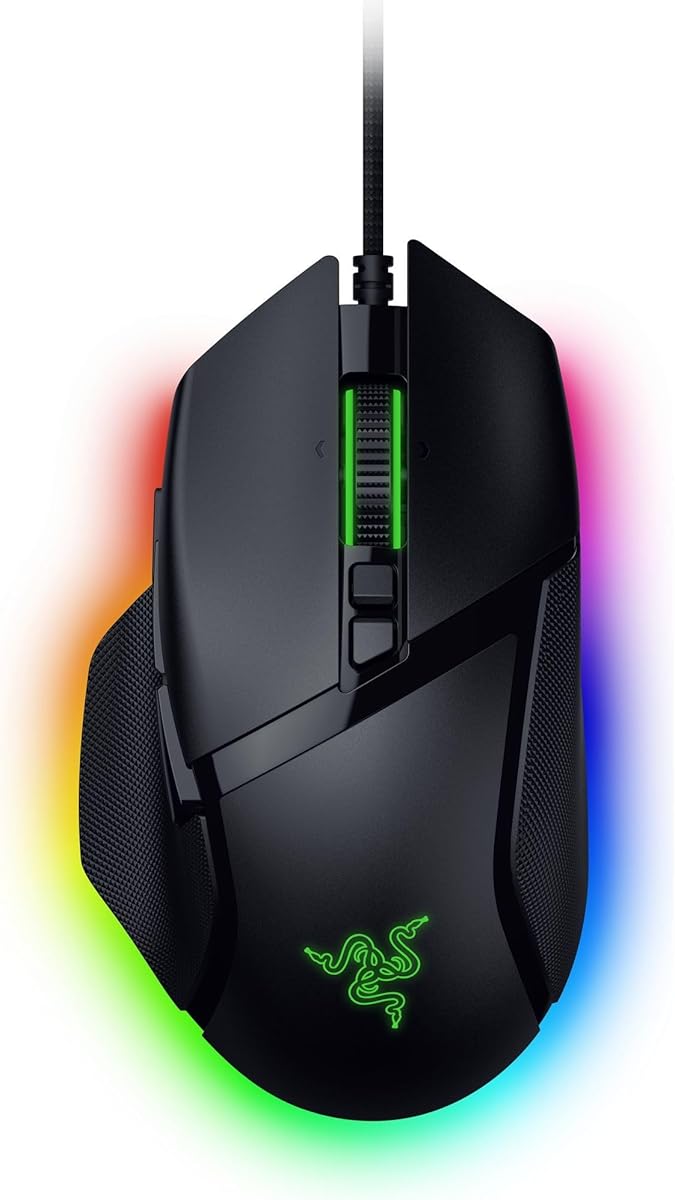
The Razer Basilisk V3 combines ergonomic comfort with advanced features for a superior experience. It ranks high for its build quality and extensive lighting options that integrate well with other devices.
We may earn a commission when you buy through this link, at no additional cost to you.
Its multi function trigger adds versatility for actions like ping or push to talk. The HyperScroll wheel transitions between tactile and free spin modes seamlessly enhancing usability across games and apps.
Optical switches ensure rapid actuation without accidental clicks though setup via software is necessary. The ergonomic shape supports prolonged sessions making it comfortable for various hand sizes.
This model is perfect for gamers who value customization and aesthetics. Its balance of speed comfort and durability makes it a top contender in the premium category.
The HyperScroll wheel offers tactile feedback for precision or free spin for quick content navigation.
Chroma lighting reacts dynamically with over 150 supported games for an immersive setup.
We may earn a commission when you buy through this link, at no additional cost to you.
The Logitech G203 is an excellent entry level option for gamers needing reliability on a budget. It delivers solid performance with a high rating proving it offers value despite its lower cost.
We may earn a commission when you buy through this link, at no additional cost to you.
Its 8000 DPI sensor provides precise tracking for most play styles. The six buttons are customizable via G HUB allowing users to map commands easily for streamlined gameplay.
Mechanical buttons offer satisfying clicks and durability while RGB lighting adds flair. The lack of advanced sensors or high DPI is acceptable for casual or budget focused users.
This mouse is ideal for students or beginners seeking quality without overspending. It proves that great gaming performance does not always require a high price tag.
The sensor offers zero filtering ensuring smooth and accurate tracking during gameplay.
Built with metal springs for tension it withstands heavy use over time.
We may earn a commission when you buy through this link, at no additional cost to you.
The Logitech G403 Hero offers a comfortable shape and reliable tracking for various games. Its ergonomic design supports long sessions while the lightweight build aids in quick movements.
We may earn a commission when you buy through this link, at no additional cost to you.
A removable weight allows tuning to personal preference and six buttons simplify tasks. The sensor tracks at 16000 DPI with zero acceleration ensuring consistent aim.
RGB lighting syncs across G accessories enhancing the visual setup. However fewer buttons might limit heavy macro users and the sensor is slightly less advanced than top tier models.
This mouse suits those prioritizing comfort and simplicity. It is a strong choice for gamers who value ergonomics over extensive customization options.
The contoured shape and rubber grips ensure a secure and comfortable hold.
On-board memory saves profiles so settings work on any PC without software.
We may earn a commission when you buy through this link, at no additional cost to you.
The Logitech G MX518 revives a classic design with modern precision. Its high rating reflects consistent performance making it a favorite for those who prefer traditional ergonomics.
We may earn a commission when you buy through this link, at no additional cost to you.
The HERO 25K sensor ensures pinpoint accuracy while eight programmable buttons offer flexibility. On-board memory allows profile storage for instant setup on any system.
A dedicated DPI cycle button simplifies sensitivity changes during play. While it lacks modern RGB flair it excels in core gaming metrics and reliability.
This model is ideal for fans of the original design seeking updated tech. It remains a robust option for competitive play without unnecessary features.
The sensor captures 17000 frames per second for ultra accurate movement.
On-board memory eliminates software needs when switching between computers.
We may earn a commission when you buy through this link, at no additional cost to you.
The Corsair Scimitar RGB Elite is built for gamers needing extensive control. Its 17 programmable buttons and key slider system make it uniquely adaptable for MMO and MOBA titles.
We may earn a commission when you buy through this link, at no additional cost to you.
The 12 side buttons can be repositioned via the slider to match grip styles. The high DPI sensor ensures smooth tracking while Omron switches guarantee durability.
The contoured shape and finger rest provide comfort during long raids. However its bulkiness may suit larger hands better and mastering the buttons takes time.
This mouse is perfect for MMO enthusiasts prioritizing macro capability. It delivers specialized functionality that general gaming mice cannot match.
The key slider lets you slide the side buttons to your natural resting position.
Execute complex macros with ease thanks to the large button cluster.
We may earn a commission when you buy through this link, at no additional cost to you.
The Razer Basilisk V3 35K features cutting edge optical technology. With a top sensor rating it delivers precision on glass and other surfaces that typically challenge gaming mice.
We may earn a commission when you buy through this link, at no additional cost to you.
The Focus Pro 35K sensor allows 1 DPI steps for exact tuning. Speedflex cable reduces drag while the HyperScroll wheel offers intuitive tactile or free spin modes.
Optical switches provide rapid actuation and durability. While the cost is high the advanced features justify it for competitive players seeking every edge.
This mouse suits serious gamers needing top tier accuracy. It combines innovative hardware with ergonomic design for peak performance.
Intelligent functions allow tracking on glass and glossy surfaces.
Speedflex cable minimizes drag for smoother swipes.
We may earn a commission when you buy through this link, at no additional cost to you.
The Corsair NIGHTSWORD offers unmatched control over weight and balance. Its smart tuning system detects the center of gravity ensuring a perfect fit for any grip.
We may earn a commission when you buy through this link, at no additional cost to you.
Twelve0 configurations allow precise adjustments via included weights. The contoured shape and rubber grips enhance comfort while the sensor delivers reliable tracking.
Ten buttons offer ample customization though the mouse leans heavy without adjustments. This weight system is its standout feature for those seeking tailored feel.
This model is ideal for gamers prioritizing ergonomics and balance. It bridges performance and comfort through innovative engineering.
Software detects weight shifts in real time for optimal stability.
Rubber grips inspired by pro sports gear ensure a secure hold.
We may earn a commission when you buy through this link, at no additional cost to you.
The Corsair M65 RGB Ultra targets FPS players with advanced speed and precision. Its 8000Hz polling rate ensures ultra-low latency for responsive gameplay.
We may earn a commission when you buy through this link, at no additional cost to you.
The 26000 DPI sensor tracks movement accurately and the aluminum frame ensures durability. Optical switches provide instant response while the adjustable weight aids aim.
This mouse delivers high performance though its shape may not suit all genres. The speed and frame make it a solid choice for competitive shooters.
This model suits gamers focused on speed and build quality. It balances lightweight performance with rugged design effectively.
8000Hz polling ensures clicks and movement are registered faster than standard mice.
The aluminum frame resists wear and adds to the overall quality.
We may earn a commission when you buy through this link, at no additional cost to you.
The Razer Basilisk V3 Customizable offers a strong balance of ergonomics and features. Its high rating reflects solid performance and wide appeal among diverse gamers.
We may earn a commission when you buy through this link, at no additional cost to you.
The Focus Plus 26K sensor provides precision while Chroma RGB adds visual flair. The multi-function trigger and scroll wheel enhance usability for various tasks.
Optical switches ensure durability and speed though some may find the software setup complex. It fits general gaming needs with excellent adaptability.
This model is great for those seeking versatile performance. It remains a reliable all-rounder for daily use.
Assign macros for games or productivity to streamline your workflow.
Switches rated for 70 million clicks ensure long-term reliability.
We may earn a commission when you buy through this link, at no additional cost to you.
Selecting the right mouse depends on your gaming style and hand size.
Look for optical sensors with high DPI and zero smoothing for precise tracking. Brands like Logitech and Razer offer top tier sensors that perform across surfaces.
Prioritize sensors rated 16000 DPI or higher for competitive play.
Choose a shape that fits your hand size and grip style. Right-handed mice often feature thumb rests for comfort.
Comfort prevents fatigue during long sessions so test shapes if possible.
More buttons allow deeper customization for macros. FPS players need fewer while MMO players prefer many.
Ensure buttons are easily reachable without stretching fingers.
Durability comes from quality switches and materials. Optical switches avoid double-click issues over time.
Check for ratings like 50 million clicks to ensure longevity.
Software lets you remap buttons and adjust lighting. Ensure it is user-friendly and supports your OS.
Cloud profiles save settings when switching PCs.
Adjustable weights help match your preference. Heavier mice offer stability while lighter ones aid speed.
Consider adjustable weight systems for tailored balance.
RGB lighting adds flair and syncs with games. Not essential but enhances immersion.
Check lighting zones if visual customization matters.
Higher polling rates reduce latency. 1000Hz is standard but 8000Hz offers faster response.
Prioritize high polling for competitive gaming.
Install the manufacturer software to map buttons and calibrate the sensor. This ensures all features function as intended.
Clean the mouse regularly with a dry cloth to prevent dust buildup on the sensor and feet.
Store in a cool dry place to avoid cable strain and wear.
Wired analog mice ensure zero interference and battery issues which benefits competitive play. Wireless tech has improved but wired remains more reliable for esports.
Use a cotton swab dipped in isopropyl alcohol to gently clean the sensor area. Avoid liquid entering internal parts.
Lower DPI between 400 and 1600 is common for FPS to allow precise aiming. Adjust to your personal preference.
Most models support both Windows and macOS but software features may vary. Check compatibility lists on the product page.
Optical switches use light for actuation preventing double clicks. They last longer and actuate faster than traditional mechanical switches.
Many models include removable weights. Insert or remove them via the bottom compartment to change the balance.
These ten options cover diverse needs from budget to premium. Each delivers solid performance tailored to different play styles.
Prioritize ergonomics and sensor accuracy to match your gaming habits.
Always verify current availability and prices before purchasing today.