
MATX Case B2Pro
5.0Editor score
Full aluminum construction
Compact 17.8L capacity
Mesh side panels
This guide compares the top aluminum PC cases for builders seeking durability airflow airflow, and premium aesthetics in compact or full tower designs.
Selecting the right enclosure is crucial for protecting your investment and ensuring optimal thermal performance. Aluminum cases offer superior durability and heat dissipation compared to standard steel alternatives. They provide a sleek aesthetic that complements high-end components while maintaining structural integrity under stress.
We evaluated ten leading aluminum PC cases based on build quality, airflow efficiency, and hardware compatibility. Our analysis focuses on how each chassis supports modern motherboards and cooling solutions. This list covers diverse form factors from mini ITX to full tower E ATX configurations for any build scenario.
Each pick highlights specific strengths such as modular layouts, premium materials, or portability features. Note that availability and pricing may fluctuate over time. Review the detailed breakdowns below to find the chassis that aligns with your specific performance needs and design preferences.
5.0Editor score
4.4Editor score

4.6Editor score
The following table provides a side-by-side overview of key specifications for all ten aluminum cases reviewed. Compare their supported motherboard sizes, cooling options, and physical dimensions to narrow down your selection effectively.




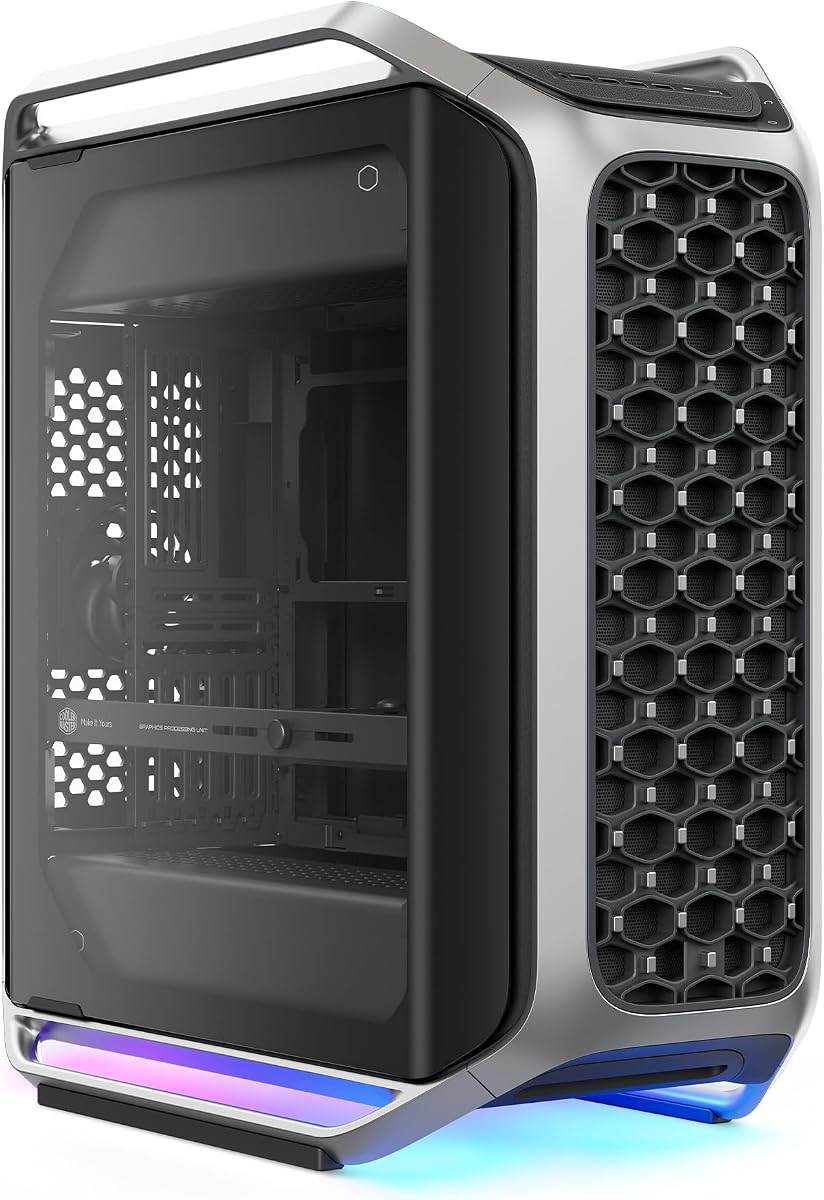
The Cooler Master Cosmos Alpha stands out as a flagship enclosure for enthusiasts seeking to showcase high-end builds. It combines a curved aluminum frame with full tempered glass panels to preserve the iconic COSMOS look while integrating modern features like ARGB underglow. This case supports extreme hardware compatibility including E-ATX motherboards and GPUs up to 400mm making it suitable for large scale workstation or gaming builds.
We may earn a commission when you buy through this link, at no additional cost to you.
Its FreeForm 2.0 rotatable layout allows internal components to rotate left or right enabling custom orientations for optimized airflow and visual presentation. The modular sliding motherboard tray facilitates easy switching between air and liquid cooling layouts. You can adjust GPU distance to improve airflow or highlight your graphics card. The next-gen front I/O includes four USB-A 5Gbps ports and two USB-C 20Gbps ports for ultra-fast data transfer.
While the case offers exceptional build quality and design innovation the large footprint requires significant desk space. The price reflects the premium materials and advanced features but may be prohibitive for budget builds. Cable management is aided by removable dust filters and generous rear clearance.
This case is ideal for users who prioritize aesthetics and airflow in large scale builds. If you want a true showcase chassis that supports cutting-edge hardware and unique layouts the Cosmos Alpha is a top recommendation.
The curved aluminum frame provides durability while enhancing the visual appeal of the case significantly.
Rotatable internal components allow for custom airflow optimization and flexible build orientations.
We may earn a commission when you buy through this link, at no additional cost to you.
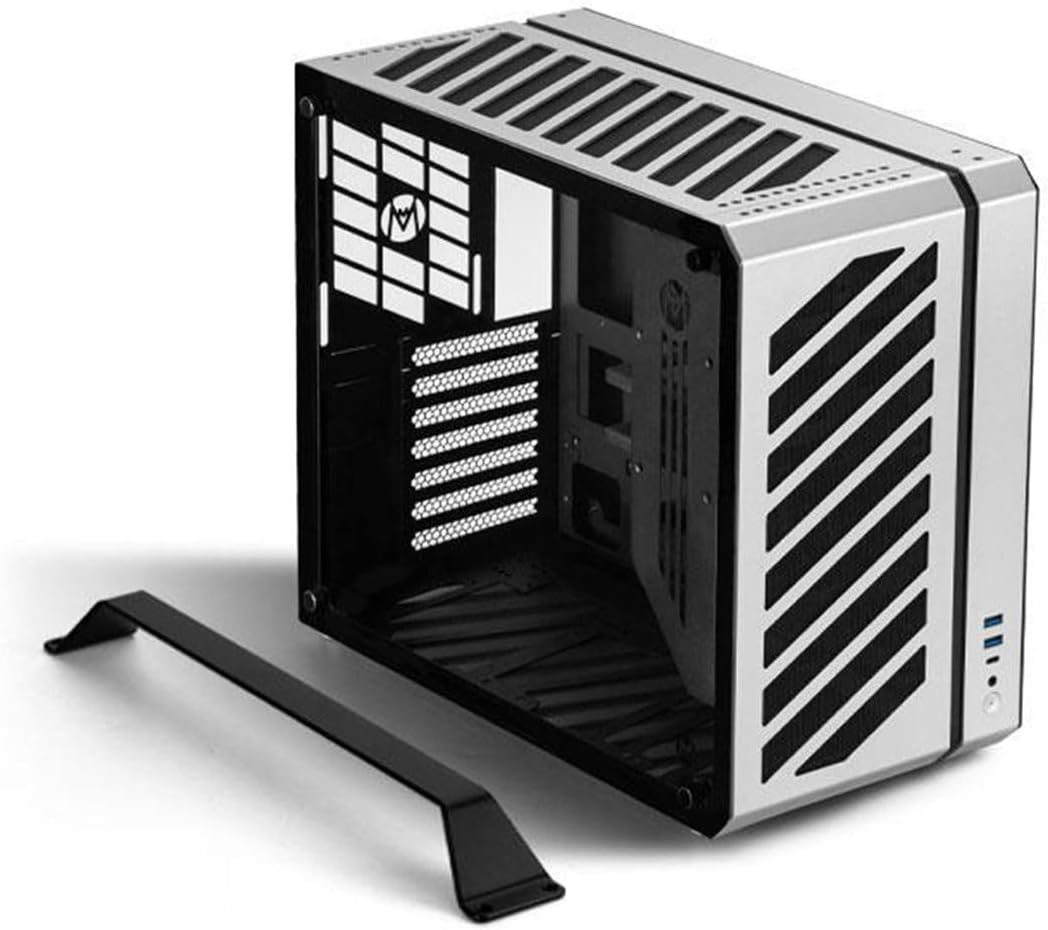
The MATX Case B2Pro delivers exceptional value with its full aluminum construction and compact footprint. Measuring 14.61 by 6.61 by 11.26 inches it fits easily on desktops without sacrificing build quality. The silver anodized surface treatment enhances durability while the frame thickness of 3.0mm ensures rigidity. It supports MatX and ITX motherboards along with SFX power supplies for a truly compact system.
We may earn a commission when you buy through this link, at no additional cost to you.
Unique exterior design features include mesh side panels that provide perfect heat dissipation for the chassis. The exquisite foot stand and handle design make it convenient to move on the desktop. It accommodates a three-slot GPU up to 340mm long and supports tower CPU coolers up to 135mm high. Water cooling support includes integrated 240mm or 120mm radiators for efficient thermal management.
The limited GPU clearance might restrict high-end graphics cards but is sufficient for most compact builds. The compact size means airflow relies heavily on the mesh panels and fan configuration. It offers a premium feel at an accessible price point compared to larger aluminum cases.
This case is perfect for small form factor builds using MatX or ITX boards. If you need a portable aluminum chassis with excellent heat dissipation features the B2Pro is a top budget choice.
Full aluminum thickness ensures the case remains rigid and resistant to bending during transport.
Integrated handles and stands make moving the case around your workspace simple and safe.
We may earn a commission when you buy through this link, at no additional cost to you.
The Fractal Design Define 7 XL is renowned for its silent full tower design that supports E-ATX motherboards. The brushed aluminum encases a refined front door design with reversible dual-handed hinges and magnetic latching for a premium touch. It offers an expansive internal layout easily accommodating large motherboards and up to eighteen HDDs alongside five SSD mounts in the default storage layout.
We may earn a commission when you buy through this link, at no additional cost to you.
You can convert to an open layout to get more room for custom water loops with large reservoirs and radiators up to 480mm. Versatile new multi-brackets convert any unused fan position to an HDD, SSD, or pump mount for flexible configurations. The case prioritizes acoustic performance making it ideal for workstations requiring quiet operation under load.
The solid front door limits airflow compared to mesh designs so careful fan planning is required. Its size and weight make it difficult to move once installed. The storage layout may be overkill for users who do not need massive drive capacity.
This case is best for professional workstations or media centers needing silent operation and massive storage. If you prioritize noise reduction and expandability over pure airflow the Define 7 XL is an outstanding choice.
Noise-dampening materials and solid panels ensure whisper-quiet operation even under heavy workloads.
Supports up to eighteen HDDs allowing for extensive local data storage capabilities.
We may earn a commission when you buy through this link, at no additional cost to you.
This open air frame computer case is made of aerospace magnesium aluminum alloy with an actual thickness of 8mm providing robust support for testing setups. The surface is treated with metal to reduce corrosion and improve service life. It supports standard MatX motherboards and allows installation of four hard drives including solid-state or mechanical types for extensive storage options.
We may earn a commission when you buy through this link, at no additional cost to you.
The design supports standard ATX power supplies suitable for long-term high-intensity disassembly tasks. Integrated water-cooled installation is supported with drainage for 120, 140, 240, 280, and 360mm water-cooled systems. Metal support rods add stability while anti-slip pads on the bottom bracket keep the bench secure during use.
Users must assemble the product upon shipment according to instructions as it is not a finished unit. The lack of side panels means dust and debris can accumulate more easily compared to enclosed cases. It is designed primarily for testing rather than daily aesthetic display.
This case is ideal for builders who need an open environment for rapid component swapping and water cooling setups. If you want a durable aluminum test bench for high-intensity use this option delivers excellent support.
8mm aerospace magnesium aluminum provides extreme rigidity for heavy components.
Supports radiators up to 360mm for advanced thermal solutions.
We may earn a commission when you buy through this link, at no additional cost to you.
The Mechanic Master C34 offers an ultra-compact ATX design that saves space without sacrificing performance. It supports standard ATX motherboards full-size ATX power supplies and graphics cards up to 335mm in length. A built-in carry handle enhances portability making it easy to transport your powerful desktop PC to LAN events or rearrange your space with ease.
We may earn a commission when you buy through this link, at no additional cost to you.
Flexible cooling support accommodates high-performance builds with support for a 240mm liquid cooling radiator. When using air cooling it fits CPU coolers up to 162mm tall and allows for a larger ATX power supply. The internal layout is designed to simplify installation with cable management optimized for SFX or SFX-L power supplies.
Attention to detail and build quality is evident in the metal front I/O panel which includes modern ports like USB 3.0 and USB Type-C. The compact design might limit GPU choices for users with very large graphics cards. SFX power supplies are recommended for the cleanest cable management experience.
This case is perfect for portable workstations or LAN party setups requiring an ATX form factor. If you need a compact chassis with a handle and premium port options this model is a strong contender.
Integrated handle allows for easy movement between workstations and events.
USB-C front port ensures compatibility with modern peripherals.
We may earn a commission when you buy through this link, at no additional cost to you.
The Cooler Master MasterFrame 500 features a FreeForm 2.0 aluminum exo-structure that enables flexible configurations and supports various installation scenarios. It is compatible with Mini-ITX to E-ATX motherboards accommodating a wide range of system builds. Interchangeable panels and open-frame layout offer flexibility for personalized builds and modding.
We may earn a commission when you buy through this link, at no additional cost to you.
Pre-installed dual 200mm fans are equipped as front intake fans for powerful airflow and effective out-of-box cooling. Extensive cooling support accommodates up to seven fans and 360mm radiators to deliver strong and reliable thermal performance. The open frame design provides unrestricted access to components for easy cable management.
The open-frame layout may expose components to dust and debris so it is best suited for clean environments. Users may need to swap panels to achieve specific looks or protections. It prioritizes airflow and flexibility over traditional enclosure aesthetics.
This case is ideal for users who want maximum airflow and modding potential. If you prioritize cooling performance and flexible layouts the MasterFrame 500 is a versatile option.
Aluminum exo-structure enables flexible configurations for custom layouts.
Pre-installed 200mm fans ensure strong cooling out of the box.
We may earn a commission when you buy through this link, at no additional cost to you.
The Mechanic Master C34Pro supports ATX and E-ATX motherboards with modular flexibility and PCIe slot adjustments. It fits 360mm radiators 165mm tower coolers 420mm GPUs and 220mm ATX PSUs for flagship components. The multi-zone fan mounts with dust filters and optimized airflow ensure stable cooling under heavy loads.
We may earn a commission when you buy through this link, at no additional cost to you.
Built with a 2mm aluminum shell plus 1mm steel frame it offers robust durability for portable use. It measures 429 by 205 by 349mm with a 30.6L capacity and features a portable carry handle for convenient transportation. Versatile PSU mounting options include front bottom and side configurations to accommodate various build layouts.
The 18mm cable management space may be tight for complex builds requiring extensive routing. The weight might be significant due to the thick aluminum construction. It balances compactness with high-performance component support.
This case is best for portable gaming rigs that require E-ATX support and robust cooling. If you need a high-performance chassis that moves easily the C34Pro meets demanding needs.
2mm aluminum shell provides durability for transport and daily use.
Multiple PSU positions allow for customized airflow and layout.
We may earn a commission when you buy through this link, at no additional cost to you.
The Lian Li V100 comes with four pre-installed PWM-controlled 120mm ARGB fans ensuring adaptable airflow and vibrant lighting. It supports ATX Micro-ATX Mini-ITX and back-connect ATX motherboards for cleaner routing and flexible builds. Each side panel features a tool-less mounting mechanism for easy and fast access to internal components streamlining your build process.
We may earn a commission when you buy through this link, at no additional cost to you.
It fits high-end hardware with support for GPUs up to 420mm CPU coolers up to 178mm and a top radiator up to 360mm. The integrated 26-LED ARGB strip offers full spectrum color control and synchronization with motherboard software. Fan bearing hydraulic technology ensures smooth operation with noise levels ranging from 26.5 to 30.8 dBA.
The standard steel body lacks the premium aluminum feel of other options but offers excellent value. The focus is on modern aesthetics and ease of use rather than structural materials. Back-connect support is a modern feature for cleaner cable management.
This case is ideal for budget builders seeking modern features and RGB aesthetics. If you prioritize ease of assembly and clean cabling the V100 offers strong support.
Side panels use tool-less mechanisms for fast access to internals.
Integrated ARGB strip and fans offer vibrant lighting options.
We may earn a commission when you buy through this link, at no additional cost to you.
The O11D EVO allows you to remove the front support pillar without affecting structural integrity for a completely uninterrupted view inside the chassis. It provides ample room for latest gaming hardware with 455.7mm clearance and seven expansion slots. Two 1.5mm L-shaped RGB strips sit at the top and bottom of the tempered glass panels for beautiful lighting options.
We may earn a commission when you buy through this link, at no additional cost to you.
Builders appreciate the adjustable internal layout with two height options for motherboard installation offering different performance and aesthetic setups. It comes with Velcro straps and dual-layered clips to tidy up large and small cables together into an easily managed bundle. The PSU mounting bracket protrudes 15mm out from the case providing additional space for cable management.
The design prioritizes aesthetics which may require more time to manage cables effectively. The tempered glass adds weight to the case structure. It is a standard for windowed cases with its high visibility.
This case is best for builders who want to showcase their components with glass panels. If you prioritize visuals and modern layout options the O11D EVO delivers.
Removing front pillars allows for a fully open view of components.
Multiple motherboard height options provide flexible fan and cooler placement.
We may earn a commission when you buy through this link, at no additional cost to you.
This case is only 4.3L capacity with dimensions of 7.3 by 4.1 by 8.8 inches making it ultra compact. It includes a PCIe 3.0 riser cable which is 18.5cm long to support GPU graphics cards. The body is made of 2.0mm aluminum alloy providing good heatsink performance and a beautiful appearance.
We may earn a commission when you buy through this link, at no additional cost to you.
It supports standard ITX motherboards FLEX-Small 1U power supplies and graphics cards up to 17 by 10 by 4cm. Hard disk support is limited to 2×2.5inch SSDs with thickness less than 9mm. CPU coolers must be less than 36mm tall which restricts cooling options significantly for high-end CPUs.
The packaging includes the case riser and screws only. You must ensure your CPU cooler and GPU fit within the strict dimensions before purchasing. It is an affordable entry point into the tiny PC enthusiast market.
This case is ideal for ultra compact builds with low power components. If you need the smallest possible chassis for a simple gaming PC this model offers a practical solution.
4.3L capacity allows for a truly portable PC setup.
Comes with a PCIe riser to enable GPU installation in tight space.
We may earn a commission when you buy through this link, at no additional cost to you.
Selecting the right aluminum PC case requires understanding several critical factors that affect performance aesthetics and compatibility.
Aluminum alloy is the standard for premium cases. Look for thicker gauges like 3mm or 8mm which provide better rigidity and heat dissipation compared to thinner 1.5mm or 2mm alternatives. Heavier aluminum cases often indicate better build quality.
Choose a case with sufficient aluminum thickness for your use case to ensure durability and structural integrity.
Aluminum cases come in various sizes from mini ITX SFF to full tower E-ATX. Ensure the dimensions fit your desk and that the case supports your motherboard size. Larger cases offer better airflow but consume more space.
Verify that the chassis supports your specific motherboard size and fits your available workspace before purchasing.
Confirm that the case supports your motherboard form factor whether it is Mini-ITX Micro-ATX ATX or E-ATX. Some cases like the B2Pro only support MatX and ITX boards so check this carefully. Compatibility with back-connect boards is also becoming a valuable feature.
Always match the case specifications with your motherboard dimensions to avoid fitment issues.
Aluminum conducts heat well but you still need airflow. Look for support for radiators up to 360mm or larger and multiple fan mounts. Open frame designs like the MasterFrame 500 offer the best airflow while closed solid cases focus on acoustics.
Prioritize cases with flexible cooling options that match your thermal needs whether air or liquid.
If you plan to move your PC often look for built-in handles and compact designs like the Mechanic Master C34. Portable cases often use stronger materials to withstand travel stress. This feature is vital for LAN party enthusiasts.
Choose a case with a handle if you anticipate moving your system regularly to prevent damage.
Aluminum cases often feature brushed or anodized finishes that look premium. Some models like the Cosmos Alpha include curved frames or ARGB lighting for a unique look. Decide if you prefer glass panels or solid metal sides for your aesthetic goals.
Select a finish and design style that matches your personal setup preferences.
Many compact aluminum cases support SFX power supplies to save space while full towers support standard ATX units. Check if the case requires a specific PSU form factor to avoid compatibility issues with your power supply.
Ensure the PSU form factor supported by the case matches your existing or planned power supply.
Some cases offer tool-less mounting mechanisms for side panels making upgrades easier. Assembly requirements vary with open bench cases needing more manual setup. Consider how much effort you want to spend during the build process.
Look for tool-less features if you value easy access for maintenance and upgrades.
Always assemble the case on a clean flat surface to prevent dust from entering during the build process. Follow the instructions provided especially for open bench cases that require manual assembly before installation.
Regularly clean the aluminum surfaces with a soft dry cloth to maintain the finish and prevent dust buildup. Ensure air vents are clear of debris to maintain optimal cooling performance for your components.
If transporting the case always secure internal components with screws to prevent movement damage. Use the built-in handles if available and avoid dropping the chassis to protect the aluminum structure.
Aluminum cases offer superior durability and heat dissipation compared to standard steel cases. They provide a premium feel and look that enhances the aesthetic of your build significantly. The higher price is justified by better long-term structural integrity and performance.
Yes aluminum conducts heat better than steel which helps dissipate warmth from components more efficiently. However airflow design plays a larger role in cooling performance. Combined with proper ventilation aluminum cases offer excellent thermal properties.
Not all aluminum cases support E-ATX motherboards. Larger full tower models like the Define 7 XL support it while compact cases like the B2Pro do not. Always check the specific motherboard compatibility before purchasing.
Most aluminum cases are anodized or treated to resist corrosion and oxidation. Proper care with dry cleaning ensures the surface remains intact for many years. High-quality cases usually offer excellent resistance to environmental factors.
Open frame cases like the MasterFrame 500 offer unrestricted airflow and easy access to components. They are ideal for testing and maximizing cooling potential. However they lack protection from dust and accidental contact.
Yes many compact aluminum cases such as the B2Pro and C34 support SFX power supplies. This allows for smaller internal volumes while maintaining high performance capabilities. Always verify PSU compatibility during selection.
Use a soft microfiber cloth to gently wipe the surface without harsh chemicals. Avoid abrasive cleaners that might scratch the finish. Regular dusting keeps the case looking new and maintains performance.
Yes aluminum cases often support large radiators and custom water cooling setups. The thermal conductivity of aluminum helps dissipate heat effectively. Cases like the Cosmos Alpha and O11D EVO are excellent examples.
The top picks for aluminum PC cases include the Cooler Master Cosmos Alpha for premium features the B2Pro for value and the Define 7 XL for silent workstations. Each option balances durability thermal performance and design uniquely.
Prioritize the factors that matter most to you such as portability cooling potential or aesthetics. Understanding your specific build requirements will help you select the right chassis effectively.
Always check current availability and pricing before purchasing as stock levels and offers change frequently. Ensure the final selection meets all compatibility requirements for your components.