
ASUS ProArt PA248QV
4.6Editor score
WUXGA resolution panel
100 percent sRGB coverage
Calman Verified accuracy
This guide compares the top 10 ASUS Proart Monitor models for color accuracy, connectivity, and professional workflows in October 2026.
Choosing the right display is critical for creative professionals who demand precision. The ASUS Proart Monitor lineup offers exceptional color accuracy and robust features tailored for designers, editors, and photographers.
We evaluated ten models based on resolution, color gamut coverage, connectivity options, and ergonomic design. Each selection balances performance with usability to meet diverse professional needs in modern workspaces.
This list highlights key strengths and potential trade-offs for every model. Note that pricing and availability change frequently, so verify current details before making your final purchasing decision.
4.6Editor score

4.2Editor score

The following comparison table outlines the core specifications of each model to help you quickly identify the right fit for your workspace requirements.




The ASUS ProArt PA279CRV stands out as a top choice for professionals needing high resolution and color fidelity. It earns an Editor's Choice badge for its balanced mix of features and performance.
We may earn a commission when you buy through this link, at no additional cost to you.
This monitor delivers 99 percent DCI-P3 and Adobe RGB coverage, ensuring vibrant and accurate visuals. Its USB-C port supports 96W Power Delivery, simplifying cable management for laptop users.
While it comes at a higher price, the included Adobe subscription and 5-year warranty offset the cost. The daisy-chain capability also makes it versatile for multi-monitor setups.
If you need a reliable 4K display for creative work, this model is an excellent investment. It handles photo editing and design tasks with exceptional precision and comfort.
Factory calibration ensures Delta E less than 2 accuracy, so colors match your intent right out of the box.
USB-C with 96W power lets you charge your Mac or PC while connecting video with a single cable.
We may earn a commission when you buy through this link, at no additional cost to you.
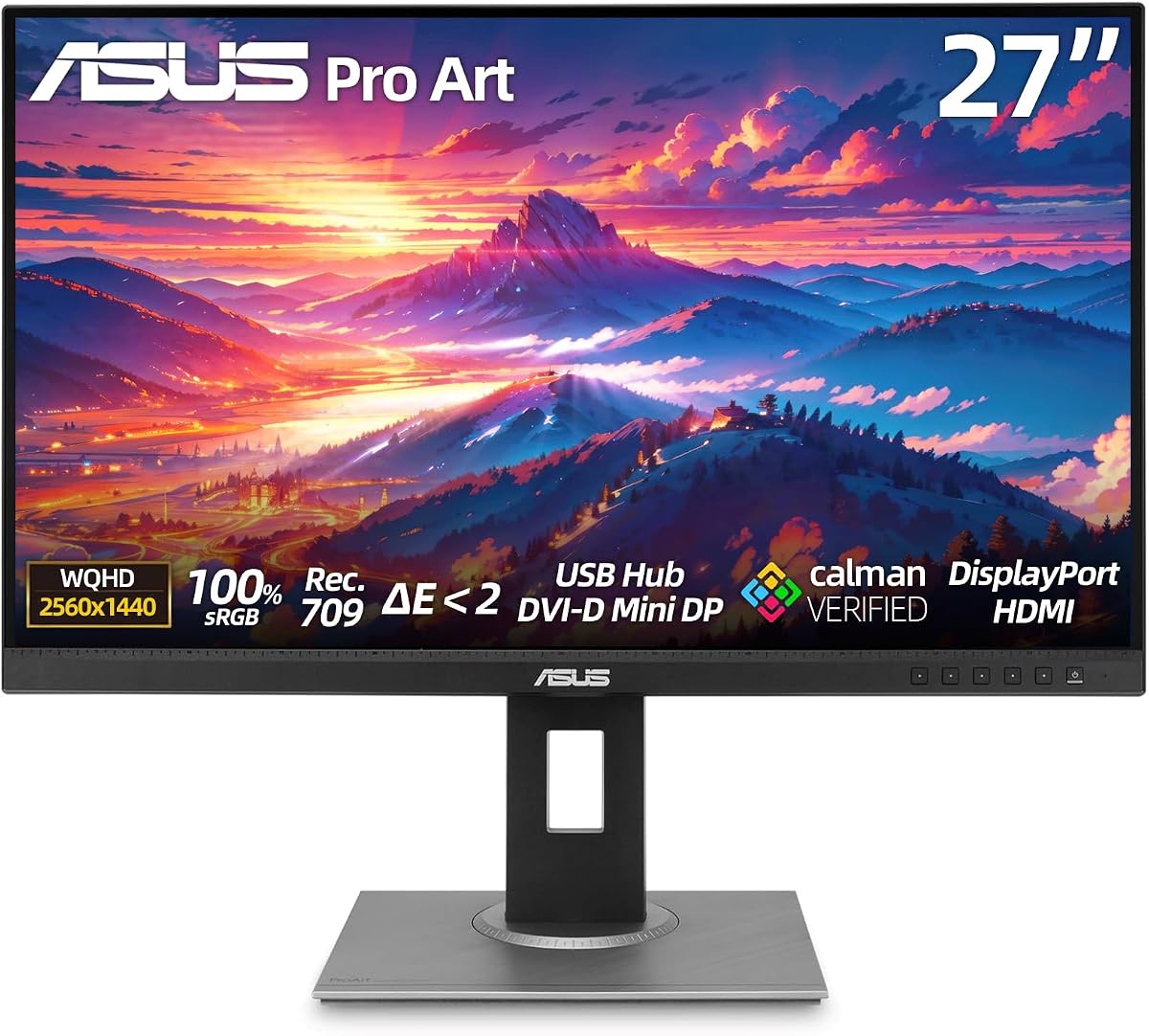
The ASUS ProArt PA248QV is an ideal entry point for professionals seeking quality without breaking the bank. It offers solid performance for everyday design tasks.
We may earn a commission when you buy through this link, at no additional cost to you.
With 100 percent sRGB coverage and Delta E less than 2, it delivers reliable color fidelity. The anti-glare screen reduces eye strain during long editing sessions.
Some users may find the WUXGA resolution limiting for detailed work, but it suffices for most web and print projects. The ergonomic stand adds significant value at this price.
If budget is a priority, this model provides excellent value. It is perfect for freelancers or small studios needing accurate visuals without high-end costs.
Despite its lower price, it maintains professional standards with Calman Verified color accuracy.
Tilt, pivot, and height adjustments ensure you can work comfortably without physical strain.
We may earn a commission when you buy through this link, at no additional cost to you.
The ASUS ProArt PA32USD represents the pinnacle of OLED technology for professional use. It targets creators who need the best contrast and speed available.
We may earn a commission when you buy through this link, at no additional cost to you.
Its QD-OLED panel delivers true black levels and 100 percent sRGB coverage. The 240Hz refresh rate and 0.1ms response time make it suitable for high-end video and motion graphics.
The price is steep, and the advanced features may be overkill for some. However, for broadcast and cinema work, the performance is unmatched in the market.
If you demand top-tier visual fidelity and speed, this monitor is worth the investment. It sets a new standard for professional displays in demanding workflows.
OLED technology ensures every pixel produces its own light for perfect blacks and vibrant colors.
High refresh rates eliminate motion blur, essential for fluid video editing and animation work.
We may earn a commission when you buy through this link, at no additional cost to you.
The ASUS ProArt PA32QCV offers an impressive 6K resolution for users who need maximum pixel density. It is designed with Apple ecosystems in mind.
We may earn a commission when you buy through this link, at no additional cost to you.
Its MacBook color preset mode ensures seamless workflows for Mac users. The dual Thunderbolt 4 ports support up to 96W Power Delivery and daisy-chaining.
The price is higher than other models, and some Windows users might find features less relevant. Still, for video editors needing high resolution, it is a strong contender.
If you prioritize resolution and Mac integration, this is an excellent choice. It provides future-proof connectivity and stunning visual clarity for detailed work.
Color preset modes match MacBook displays, making switching between devices effortless.
Thunderbolt 4 ensures fast data transfer and high power delivery for modern laptops.
We may earn a commission when you buy through this link, at no additional cost to you.
The ASUS ProArt PA278CV is a solid workhorse for general professional tasks. It balances resolution and affordability well for daily use.
We may earn a commission when you buy through this link, at no additional cost to you.
Its 1440p resolution offers ample workspace, and USB-C with 65W Power Delivery simplifies desk setups. The DisplayPort daisy-chaining supports multi-monitor configurations.
It lacks the broader color gamuts of higher-end models, but meets video editing standards. The 5-year warranty adds peace of mind for long-term use.
If you need a dependable monitor for mixed tasks, this model fits. It handles coding and writing comfortably with accurate enough colors for most clients.
USB-C connects video and power, reducing cable clutter on your workspace.
A five-year warranty ensures your investment is protected against unexpected issues.
We may earn a commission when you buy through this link, at no additional cost to you.
The ASUS ProArt PA279CGV impresses with a perfect 5.0 rating, highlighting its reliability and accuracy. It focuses heavily on color fidelity and eye comfort.
We may earn a commission when you buy through this link, at no additional cost to you.
Its Calman Verified status ensures precise colors, making it great for print work. The Eye Care technology reduces flicker and blue light for extended sessions.
While it lacks some advanced features like daisy-chaining, it delivers on core needs. The connectivity options cover most common ports for desktop and laptop connections.
If you want a highly rated monitor for steady color work, pick this one. It offers comfort and accuracy without complicating your daily workflow.
Flicker-free and low blue light tech help prevent strain during long creative sessions.
Factory calibration ensures consistent hues across every project you complete.
We may earn a commission when you buy through this link, at no additional cost to you.
The ASUS PA329CRV-P stands out for government buyers needing TAA compliance. It offers a large 4K screen with solid color performance for public sector projects.
We may earn a commission when you buy through this link, at no additional cost to you.
Its 4K resolution and HDR400 support provide rich visuals for presentations. The stand allows full ergonomic adjustment, ensuring comfort during long meetings or work.
It lacks Thunderbolt but includes dual DisplayPorts for versatile setups. For general business and professional use, it balances performance and regulatory requirements well.
If compliance is a key factor, this monitor delivers. It handles standard professional tasks with ease while meeting specific procurement standards.
TAA compliance ensures it qualifies for procurement under trade agreements.
A 32-inch 4K screen provides ample space for detailed spreadsheets or designs.
We may earn a commission when you buy through this link, at no additional cost to you.
The ASUS ProArt PA32UCR-K brings mini-LED brightness to the table, making HDR content pop. It is geared towards video professionals needing high brightness.
We may earn a commission when you buy through this link, at no additional cost to you.
It includes an X-rite i1 Calibrator for precise tuning. The HDR support covers multiple formats, offering flexibility for different content types.
Some users report minor software calibration challenges, but the hardware is top-notch. For high-contrast video editing, it performs admirably despite its quirks.
If you work with HDR projects and need brightness, this is a strong option. The included tools help achieve professional results with careful setup.
Mini-LED backlighting delivers stunning highlights and deep blacks for video work.
The bundled calibrator saves money and simplifies color profiling for your setup.
We may earn a commission when you buy through this link, at no additional cost to you.
The ASUS ProArt PA278CGV is unique with its 144Hz refresh rate, catering to users who want smooth motion alongside professional features. It is a rare find for pro workflows.
We may earn a commission when you buy through this link, at no additional cost to you.
It supports FreeSync Premium and offers USB-C with 90W Power Delivery. This makes it versatile for both work and lighter gaming needs.
Color accuracy is solid with Calman Verified status, though some reviews vary. The high refresh rate ensures smooth scrolling and video playback.
If you need a fast display for mixed use, this model excels. It bridges the gap between professional editing and responsive user experiences.
A 144Hz refresh rate makes transitions fluid for video editing and casual gaming.
90W USB-C ensures your laptop stays charged even under heavy loads.
We may earn a commission when you buy through this link, at no additional cost to you.
The ASUS ProArt PA32UCG-K offers extreme brightness with 1600 nits peak, ideal for HDR grading in bright rooms. It is a powerhouse for specific professional needs.
We may earn a commission when you buy through this link, at no additional cost to you.
With mini-LED zones and local dimming, it controls light precisely. The included calibrator helps maintain its impressive color fidelity and performance.
Its cost is high and the setup can be complex. However, for HDR professionals needing unmatched brightness, few rivals exist in the market.
If brightness is your top priority, this model is unmatched. It handles demanding HDR workflows with authority, though it requires careful configuration.
1600 nits peak brightness ensures visibility even in well-lit environments.
Quantum-dot tech provides smooth gradients and accurate hues for critical work.
We may earn a commission when you buy through this link, at no additional cost to you.
Selecting the right monitor involves understanding your specific workflow needs and technical requirements. This section breaks down the key factors to consider before making a purchase.
Resolution determines the clarity and detail you see on screen. For creative work, 4K or higher is often preferred to view fine details without zooming in.
A larger screen helps with multitasking but requires more desk space. Choose a size that fits your room while maintaining comfortable viewing distances.
Look for models with Delta E less than 2 and high coverage of sRGB, Adobe RGB, or DCI-P3. This ensures colors match your prints or digital outputs accurately.
Factory calibration saves time and ensures consistency from day one. Verify Calman Verified status for reliable professional standards.
Modern setups need USB-C with Power Delivery to simplify your desk. HDMI and DisplayPort provide options for multiple devices and high-resolution output.
Daisy-chaining allows you to connect multiple monitors through one cable. Check if your computer supports these features for maximum flexibility.
Most professional monitors have 60Hz, but higher refresh rates like 144Hz reduce motion blur. This is useful for video editing or motion graphics work.
Higher refresh rates also make daily tasks like scrolling smoother. Balance this with resolution and panel quality to find the right fit.
HDR support enhances contrast and brightness for video content. Look for DisplayHDR ratings like 400 or True Black for meaningful improvements.
Ensure your content creation software supports HDR workflows to take advantage of the features. Not all projects require HDR, but it adds value.
An adjustable stand with tilt, swivel, and height options prevents physical strain. Pivot is essential if you work with vertical code or documents.
VESA mounting compatibility allows you to use third-party arms. Prioritize stands that offer flexibility for long working hours.
IPS panels offer wide viewing angles and good color consistency. OLED panels provide perfect blacks but may cost more and require careful handling.
Mini-LED is a great balance, offering high brightness and local dimming. Choose the technology that fits your budget and specific visual needs.
Many ASUS ProArt monitors come with extended warranties up to five years. Check registration requirements to ensure you get the full coverage period.
Good customer support is vital if technical issues arise. Read reviews about service responsiveness and parts availability before buying.
Start by calibrating your display using built-in tools or an external sensor. Ensure your color settings match the preset mode you need for your specific workflow.
Clean the screen gently with a microfiber cloth to avoid scratches. Do not use harsh chemicals or direct sprays that might damage the panel coating.
Position the monitor at eye level to reduce neck strain. Adjust the height and tilt so the top of the screen is at or slightly below eye level.
Yes, many models like the PA279CRV and PA32QCV are optimized for Mac with USB-C and color presets. They support macOS scaling and provide accurate color reproduction right out of the box.
Delta E measures color accuracy, with values below 2 generally considered indistinguishable to the human eye. Lower numbers indicate better fidelity, which is critical for professional work.
Many models offer HDR400 or True Black certification. However, true HDR editing may require higher-end panels with local dimming and higher brightness levels.
Yes, but they focus on accuracy over high refresh rates. Some models like the PA278CGV include 144Hz, making them suitable for both work and casual gaming.
Some high-end models include X-rite calibration tools. Others offer built-in hardware calibration, but you may need external software for the best results.
Most models come with a three-year standard warranty extendable to five years with registration. Check the product page for specific terms and conditions.
The ASUS ProArt lineup offers something for every creative professional, from budget-friendly options to top-tier OLED models. Each monitor balances performance, reliability, and usability effectively.
Prioritize color accuracy, connectivity, and ergonomics based on your daily tasks. The best monitor is one that supports your workflow without creating distractions or physical strain.
Remember to check current pricing and availability before buying. Prices fluctuate and specific models may offer seasonal discounts or bundle deals that add extra value.